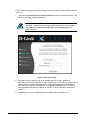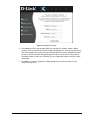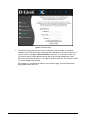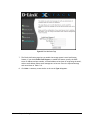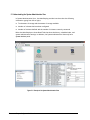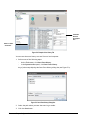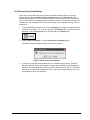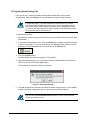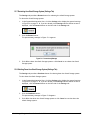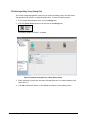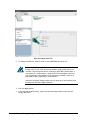
1
D-Link xStack Storage iSCSI SAN Arrays Managed SAN Solutions DSN-1100, DSN-2100, DSN-3200 & DSN-3400 Storage Management Center Software User’s Guide Version 1.0 © 2008 D-Link Networks, Inc. All Rights Reserved D-Link Systems, Inc. makes no warranty of any kind with regard to this material, including, but not limited to, the implied warranties of merchantability and fitness for a particular purpose. D-Link Systems, Inc. shall not be liable for errors contained herein or for incidental or consequential damages in connection with the furnishing, performance, or use of this material. This document contains proprietary information, which is protected by copyright. No part of this document may be photocopied, reproduced, or translated into another language without the prior written consent of D-Link Systems, Inc. The information is provided “as is” without warranty of any kind and is subject to change without notice. The only warranties for D-Link products and services are set forth in the express warranty statements accompanying such products and services. Nothing herein should be construed as constituting an additional warranty. D-Link shall not be liable for technical or editorial errors or omissions contained herein. Copyright © 2008 D-Link Systems, Inc.™ Trademarks Adobe® and Acrobat® are trademarks of Adobe Systems, Incorporated. Java™ is a U.S. trademark of Sun Microsystems, Incorporated. Microsoft Windows is a U.S. registered trademark of Microsoft Corporation. Oracle® is a registered U.S. trademark of Oracle Corporation, Redwood City, California. UNIX® is a registered trademark of The Open Group. All other brand or product names are or may be trademarks or service marks, and are used to identify products or services, of their respective owners. D-Link Systems, Inc. 17595 Mount Herrmann Street Fountain Valley, CA 92708 ii Preface Safety Information There is a danger of a new battery exploding if it is incorrectly installed. Replace the battery pack only with the same or equivalent type recommended by the manufacturer. Do not dispose of the battery along with household waste. Contact your local waste disposal agency for the address of the nearest battery deposit site. This product also uses a lithium coin cell battery. The lithium coin cell battery is a long-life battery, and it is very possible that you will never need to replace it. However, should you need to replace it, consult your service documentation. Do not dispose of the battery along with household waste. Contact your local waste disposal agency for the address of the nearest battery deposit site. Following are the safety agency certifications that the xStack Storage enclosure has met: CSA 60950-1 UL 60950-1 IEC 60950-1 EN 60950-1 Compliance Information FCC Class A CE Class A C-Tick Class A VCCI Class A Notice of Export Controls Export of technical data contained in this document may require an export license from the United States government. Please contact D-Link Systems, Inc. for any export compliance questions. xStack Storage Management Center Software User’s Guide iii Document Revision Level iv Revision Date Version 1.0 November 17, 2008 Preface Notes Preface This document is intended to assist users with configuring and managing storage on xStack storage® systems from D-Link Systems . Audience This document is intended for storage managers and administrators responsible for using the xStack Storage Management Center to configure and manage the xStack Storage array from D-Link Systems Inc. This document assumes that the user is computer literate, familiar with storage array products, and has a basic understanding of storage products and concepts. Typographic Conventions Notes Notes provide information that deserves special attention. They are preceded by: Cautions Cautions contain information which, if not followed, can cause damage to the xStack Storage array and possible loss of data. They are preceded by: Warnings Warnings contain information which, if not followed, can cause damage to the xStack Storage array and to the person installing it. They are preceded by: xStack Storage Management Center Software User’s Guide v Contact Information You can find software updates and user documentation on the D-Link website. D-Link provides free technical support for customers within the United States and within Canada for the duration of the warranty period on this product. U.S. and Canadian customers can contact D-Link Technical Support through our website, or by phone. Tech Support for customers within the United States: D-Link Technical Support over the Telephone Please see our support site for current number: http://support.dlink.com Monday to Friday 8:00am – 5:00pm PST/PDT D-Link Technical Support over the Internet: http://support.dlink.com Tech Support for customers within Canada: D-Link Technical Support over the Telephone Please see our support site for current number: http://support.dlink.ca Monday to Friday 7:30am to 9:00pm EST/EDT D-Link Technical Support over the Internet: vi http://support.dlink.ca Preface Contents Chapter 1 Introduction.......................................................................................................................................1 1.1 Key Features.......................................................................................... 1.2 Compatibility and Minimum System Requirements ............................................ 1.3 Understanding the Basics........................................................................... 1.3.1 Understanding the User Interface....................................................... 1.3.2 Menu Bar and Toolbar ..................................................................... 1.3.2.1 Shortcut Menu................................................................... 1.3.3 View Panel................................................................................... 1.3.4 Main Display................................................................................. 1.3.5 Action Panels ............................................................................... 1.3.6 Detail Tabs .................................................................................. 1.3.7 Status Bar.................................................................................... 1.4 Getting Help.......................................................................................... 1.5 READ THIS SECTION - If You Read Nothing Else In This Guide ............................... 1 2 2 3 3 4 5 6 6 7 7 8 8 Chapter 2 Getting Started .................................................................................................................................9 2.1 Logging In ............................................................................................ 10 2.1.1 Using the Start-up Wizard ............................................................... 10 2.1.2 Logging in from the Home Page ........................................................ 15 2.2 Customizing the Date and Time.................................................................. 18 2.3 Setting Up Accounts................................................................................ 19 2.3.1 Changing the Default Admin Login Password......................................... 19 2.3.2 Adding Admin Accounts .................................................................. 22 2.3.3 Adding User Accounts .................................................................... 22 2.3.4 Modifying Accounts ....................................................................... 24 2.3.5 Deleting User Accounts................................................................... 24 2.4 Logging Out .......................................................................................... 25 2.5 Exiting the xStack Storage Management Center .............................................. 25 2.6 Powering Off the xStack Storage Array ......................................................... 26 Chapter 3 Managing Volumes ........................................................................................................................27 3.1 Understanding the Volume View................................................................. 28 3.2 Creating Volumes ................................................................................... 29 3.2.1 Letting the Wizard Choose the Best Volume Organization......................... 31 3.2.2 Making Your Own Volume Selection Choices ......................................... 36 3.3 Performing Volume Actions ....................................................................... 41 3.3.1 Granting or Revoking iSCSI Access to Volumes....................................... 41 3.3.2 Scanning a Volume ........................................................................ 43 3.3.3 Destroying a Volume...................................................................... 45 3.3.4 Growing a Volume......................................................................... 46 3.3.5 Reconfiguring a Volume.................................................................. 47 3.4 Using the Detail Tabs .............................................................................. 50 3.4.1 Changing Volume Names and Viewing Volume Information (Volume Properties Tab) ....................................................................................... 50 3.4.2 Viewing Extents on a Volume (Extents Tab).......................................... 51 3.4.3 Viewing Reconfiguration Information (Reconfigure Tab) .......................... 53 3.4.4 Enabling or Disabling CHAP Security (Security Tab) ................................ 54 xStack Storage Management Center Software User’s Guide vii 3.4.4.1 Enabling CHAP Security .......................................................54 3.4.4.2 Changing the CHAP Secret ...................................................55 3.4.4.3 Disabling CHAP Security ......................................................56 3.4.5 Viewing or Changing Advanced Settings (Advanced Settings Tab) ................56 3.5 Removing iSCSI Initiators ..........................................................................59 Chapter 4 Managing Physical Storage ......................................................................................................... 61 4.1 Understanding the Physical Storage View ......................................................62 4.2 Performing Drive Actions ..........................................................................63 4.2.1 Downing a Drive............................................................................63 4.2.2 Reserving Spare Drives....................................................................64 4.3 Using the Detail Tabs...............................................................................65 4.3.1 Viewing Drive Properties (Properties Tab) ............................................65 4.3.2 Viewing SMART Data and Attributes (SMART Data and SMART Attributes Tabs)66 4.3.3 Viewing Extents on a Drive (Extents Tab).............................................67 Chapter 5 System Administration ................................................................................................................. 69 5.1 Understanding the System Administration View...............................................70 5.2 Using the Detail Tabs...............................................................................71 5.2.1 Viewing Historical Information (History Tab).........................................71 5.2.2 Viewing Scheduled Activities (Schedule Tab) ........................................73 5.2.3 Saving the Current Configuration (Settings Tab).....................................74 5.2.4 Restoring a Configuration (Settings Tab)..............................................76 5.2.5 Restoring Factory Default Settings .....................................................77 5.2.6 Upgrading Software (Settings Tab) .....................................................78 5.2.7 Restarting the xStack Storage System (Settings Tab) ...............................79 5.2.8 Shutting Down the xStack Storage System (Settings Tab) ..........................79 5.2.9 Selecting a Battery Policy (Settings Tab) .............................................80 5.2.10 Setting User Accounts (Settings Tab) .................................................81 5.2.11 Viewing or Changing Advanced Settings (Settings Tab) ...........................81 Chapter 6 Managing Management and Ethernet Ports and Portals .........................................................85 6.1 Understanding the Network Settings View .....................................................86 6.2 Working with Management Ports .................................................................87 6.2.1 Viewing or Changing Management Port Settings .....................................87 6.2.2 Pinging from a Management Port .......................................................88 6.3 Viewing Ethernet Port Settings or Changing the MTU Setting...............................89 6.4 Working with Network Portals ....................................................................91 6.4.1 Creating Network Portals ................................................................91 6.4.2 Deleting a Network Portal ...............................................................92 6.4.3 Pinging from a Network Portal ..........................................................93 6.5 Grouping and Ungrouping Ports ..................................................................94 6.5.1 Grouping Ports .............................................................................95 6.5.2 Ungrouping Ports ..........................................................................97 6.5.3 Removing Ports from a LAG..............................................................98 6.6 Working with VLANs ................................................................................98 6.6.1 VLAN-Enabling a Port .....................................................................99 6.6.2 Removing a Port from a VLAN ...........................................................99 6.6.3 VLAN-Enabling a Group ................................................................. 100 6.6.4 Removing a Group from a VLAN....................................................... 100 viii Contents Chapter 7 Performing System Actions....................................................................................................... 101 7.1 Adding an xStack Storage ........................................................................101 7.2 Removing an xStack Storage.....................................................................102 Chapter 8 Best Practices.............................................................................................................................. 103 8.1 Saving Configuration Settings ...................................................................104 8.2 Resetting Display Preferences...................................................................104 8.3 Working with Firewalls ...........................................................................104 Appendix A Menu Summary ........................................................................................................................ 107 A.1 File Menu ..............................................................................................107 A.2 View Menu............................................................................................107 A.3 Tools Menu ...........................................................................................108 A.4 Volumes Menu ......................................................................................108 A.5 Storage Menu ........................................................................................108 A.6 Network Menu (Management Port Selected)..........................................109 A.7 Network Menu (Ethernet Port Selected).................................................109 A.8 Network Menu (Group Ethernet Port Selected) ......................................109 A.9 Network Menu (Group Selected) ...........................................................109 A.10 Help Menu...........................................................................................109 Appendix B Factory Default Settings ......................................................................................................... 111 Appendix C Recording Your Configuration Settings.............................................................................. 115 C.1 C.2 C.3 C.4 C.5 C.6 C.7 C.8 C.9 C.10 Recording Volumes..............................................................................115 Recording iSCSI Initiator Access ..............................................................117 Recording Groups................................................................................118 Recording Network Portals ....................................................................120 Recording Scheduled Tasks ....................................................................121 Admin Login Password ..........................................................................122 Configuration Files ..............................................................................123 Management Port Settings .....................................................................124 Data Port Settings ...............................................................................125 Email Settings....................................................................................126 xStack Storage Management Center Software User’s Guide ix Chapter 1 Introduction The right management software can help you enhance the performance and functionality of your storage investment. The xStack Storage Management Center from D-Link Inc has been designed and optimized from the ground up to deliver the command and control foundation you need to efficiently manage your xStack Storage infrastructure. The xStack Storage Management Center is an intuitive Java-based graphical application that provides anytime, anywhere access and control to your xStack Storage arrays. By providing increased visibility with unified views of your storage environment along with powerful feature-rich offerings and point-and-click simplicity, the xStack Storage Management Center empowers you to maximize your investment in xStack Storage arrays while enjoying lower total cost of ownership. This User’s Guide describes how to use the xStack Storage Management Center to configure, provision, and manage the storage on xStack Storage arrays. It includes an overview of the xStack Storage Management Center, a description of its user interface, and step-by-step instructions for performing configuration and management activities. 1.1 Key Features The following list summarizes a few key features of the xStack Storage Management Center: Feature-rich embedded IP-based Management Center lets you install, configure, and maintain your online network storage with unparalleled ease and flexibility Easy wizard-based installation slashes configuration time allows you to focus your valuable resources on supporting users instead of maintaining equipment Remote configuration and monitoring of xStack Storage arrays For the latest information about hardware and software supported by your D-Link DSN iSCSI SAN Array, please consult the Interoperability Matrix found on the D-Link Systems Inc Web site: http://support.dlink.com xStack Storage Management Center Software User’s Guide 1 1.2 Compatibility and Minimum System Requirements Running the xStack Storage Management Center requires a host computer system connected to the management port of an xStack Storage array. The host system must have an installed: Network-interface card (NIC) configured for the same Internet Protocol (IP) subnetwork (192.168.1.x) as the xStack Storage management port. Web browser. Version of the latest Java Runtime Environment (JRE). If the latest version of JRE is not installed, you will be able to download it if the host system has Internet access. The minimum version of JRE is v1.6.0.0. In addition: The xStack Storage arrays must be powered-up and the Ready Light on the front panel of all arrays must be ON (green). If your management host has a firewall, see section 8.3 for best practices on using your xStack Storage solutions in a firewall environment. 1.3 Understanding the Basics The xStack Storage Management Center is a graphical Web-based interface used to perform centralized storage configuration, management, administrative, and network activities for one or more xStack Storage systems (see Figure 1-1). These activities are performed in their own screens (or “views”). The xStack Storage Management Center supports the following four views: Volume View – lets you view, configure, and manage volumes. Physical Storage View – lets you view and manage xStack Storage hard disks. System Administration View – lets you perform system administrator activities such as setting up user accounts, upgrading software, and selecting an xStack Storage battery policy. Network Settings View – lets you view and configure the settings for the management and iSCSI data ports. For your convenience, there are a number of ways to move from one view to another: Click commands on the pull-down View menu. Click icons in the View panel. Click buttons in the toolbar. The information shown in the views is a point-in-time snapshot. To update the information shown, either click Refresh All on the View menu or press the F5 key. 2 Chapter 1 Introduction 1.3.1 Understanding the User Interface Figure 1-1 shows the different areas of the xStack main window. The following sections describe these areas. For a summary of the commands and menus on the menu bar, refer to Appendix A. Menu Bar and Toolbar Main Display View Panel Detail Tabs Action Panel Status Bar Figure 1-1. xStack Storage Main Window 1.3.2 Menu Bar and Toolbar The menu bar appears at the top of the xStack Storage Management Center main window (see Figure 1-2). The menu bar contains commands for performing activities relative to the current view. In the Volume View shown Figure 1-1, for example, the Volumes menu provides commands for managing volumes. Menus and commands change when you switch views. If you switch from Volume View to Physical Storage View, for example, the Volume menu changes to Storage and all the volume-related commands in the Volume menu change to commands relevant to managing the physical storage on the xStack Storage. The toolbar appears below the menu bar and provides buttons for frequently performed activities in the current view. If you place the pointer over a button in the toolbar, a tooltip identifies the button’s function. Figure 1-3, for example, shows the tooltip that appears when the pointer is moved over the Volume View button on the toolbar. The buttons displayed on the toolbar change depending on the current view. For users who prefer the toolbar to be hidden, uncheck Show Toolbar on the View menu. Figure 1-2 shows an example of how the menu bar and toolbar appear in the Volume View. xStack Storage Management Center Software User’s Guide 3 Menu bar Toolbar Figure 1-2. Example of Menu Bar and Toolbar Volume View Button Figure 1-3. Example of a Tooltip 1.3.2.1 Shortcut Menu The previous section explained how the menus, commands, and toolbar can be used to perform activities. As an added convenience, some tasks can also be performed by pressing the right mouse button and clicking an option from a shortcut menu that appears. In Volume View, for example, selecting a volume in the Main Display and pressing the right mouse button displays the shortcut menu in Figure 1-4. You can then select an option from the shortcut menu to perform the desired task. Figure 1-4. Example of Shortcut Menu for Volume View Main Display 4 Chapter 1 Introduction 1.3.3 View Panel The View panel appears below the toolbar. The View panel shows the IP address of each xStack Storage system that has been added to the Management Center (an xStack Storage system must be added to the console in order to be managed by it). In Figure 1-5, for example, two xStack Storage systems have been added to the Management Center, one with an IP address of 192.168.0.34 and another with the IP address 192.168.0.32. While you can add many xStack Storage systems to the Management Center, the console lets you access one xStack Storage system at a time. To identify the xStack Storage system that is currently being managed, the IP address of the currently managed system appears in a box along with color-coded icons that indicates its operating status. In the View panel in Figure 1-5, the xStack Storage system corresponding to IP address 192.168.0.34 is being managed. The checkmark and OK next to this IP address, and the green color coding of the IP address itself, indicate that this xStack Storage system is operating normally. When the IP address of the currently managed xStack Storage system is highlighted, the Volume View is displayed. Below the IP address of the currently managed xStack Storage system are links you can click to display the other console views for that array. In Figure 1-5, for example, clicking Physical Storage displays the Physical Storage View of the xStack Storage system corresponding to IP address 192.168.0.34. If you add an xStack Storage system to the Management Center (described in section 7.1), you can log in to that system by clicking its IP address in the View pane. In Figure 1-5, for example, clicking the IP address 192.168.0.32 will display the login page for the xStack Storage system associated with that IP address. Figure 1-5. View panel xStack Storage Management Center Software User’s Guide 5 1.3.4 Main Display The Main Display appears to the right of the View panel. The Main Display shows information relevant for the current view. For example, when the Volume View is displayed (as shown in Figure 1-6), the Main Display provides radio buttons for sorting the information shown by volume name or iSCSI initiator, along with the volumes and iSCSI initiators associated with the xStack Storage system being managed. Figure 1-6. Main Display in Volume View 1.3.5 Action Panels Below the View panel are action panels. Most views show two action panels. The top panel contains actions relevant to the current view and any item selected in the Main Display. The top panel acquires its name from the current view. In Volume View, for example, the top panel becomes the Volume Actions panel and contains actions associated with volumes. If you switch to Physical Storage View, the tops panel changes to the Drive Actions panel and displays actions related to drives. If there are no actions available for the current view, such as in System Administrator View, the top panel disappears. There are times when the top panel and the Detail Tabs below the Main Display work together. In Volume View, for example, clicking Show Advanced Extents in the Volume Actions panel (see Figure 1-7) displays advanced extent information in the Extents tab. The System Actions panel appears below the top panel. The System Actions panel always contains the same five actions and is displayed for all views. Figure 1-7. Example of Volume Actions and System Action Panels 6 Chapter 1 Introduction 1.3.6 Detail Tabs Detail Tabs appear below the Main Display. When you display a view, activities and information associated with the view appear in these tabs in the Detail Tabs area. These tabs will change when you switch views. In the Volume View, for example, the tabs in Figure 1-8 appear, allowing you to view and perform volume-related activities. Figure 1-8. Example of Detail Tabs in Volume View 1.3.7 Status Bar The status bar appears at the bottom of the main window. If an action (such as an alert or event) requires your attention, it appears as a clickable link on the left side of the status bar. On the right side of the status bar is an activity indicator that moves from side to side to indicate when activity is being performed; otherwise, the activity indicator sits dormant. For users who prefer the status bar to be hidden, uncheck Show Status Bar on the View menu. Clickable Event Link Activity Indicator Figure 1-9. Status Bar xStack Storage Management Center Software User’s Guide 7 1.4 Getting Help The xStack Storage Management Center provides a comprehensive online help system that is available by clicking the Help button on the toolbar (see Figure 1-10). The help system is optimized for fast access and contains information about every component in the xStack Storage Management Center. When you click the help button, a question mark gets appended to the pointer. You can then click an area on the main window to display a help topic for that area. Help is also available for xStack Storage wizards by pressing the F1 key. Figure 1-10. Help Button 1.5 READ THIS SECTION - If You Read Nothing Else In This Guide Table 1-1 identifies the tasks that can be performed using the xStack Storage Management Center. These tasks are organized into three groups: Required tasks that all users must perform Recommended tasks that D-Link recommends that you perform Optional tasks that are suggested but not required to use the xStack Storage system Table 1-1. xStack Storage Management Center User Tasks Task See Section Required Tasks 1. Log in to the xStack Storage Management Center for the first time. 2.1 2. Complete the Start-up Wizard (first-time login only). 2.1.1 3. Change the default admin login password. 2.3.1 4. Set up users. (if users other than the administrator will be accessing the xStack Storage Management Center) 2.3.3 5. Create one or more volumes. 3.2 6. Grant access to all initiators. 3.3.1 Recommended Tasks 1. Save the configuration file. 5.2.3 2. Grant individual iSCSI initiators access to volumes. 3.3.1 3. Check drive status periodically. 4.1 4. Check the drives’ SMART status (SATA drives only). 4.3.2 5. Set up one or more spare drives. 4.2.2 6. Change the hostname to simplify for identification and troubleshooting. 6.2 Optional Tasks 1. Make sure the Battery Policy setting is correct for your application. All of the other activities described in this document are optional. 8 Chapter 1 Introduction 5.2.9 Chapter 2 Getting Started This chapter describes how to get started using the xStack Storage Management Center. The topics covered in this chapter are: Section 2.1, Logging In (page 10) Section 2.2, Customizing the Date and Time (page 18) Section 2.3, Setting Up Accounts (page 19) Section 2.4, Logging Out (page 25) Section 2.5, Exiting the xStack Storage Management Center (page 25) Section 2.6, Powering Off the xStack Storage Array (page 26) Before proceeding, be sure all the minimum system requirements in section 1.2 have been met. xStack Storage Management Center Software User’s Guide 9 2.1 Logging In After confirming that the minimum system requirements in section 1.2 have been met, use the following procedure to log in to the xStack Storage Management Center. 1. Start a Web browser on the PC connected to the xStack Storage management port. 2. In the browser’s address bar, type the following default IP address and press the Enter key: 192.168.1.1 One of the following actions occurs: – For your initial login, the start-up wizard appears and you should proceed to section 2.1.1. – For all subsequent logins, the home page appears and you should proceed to section 2.1.2. 2.1.1 Using the Start-up Wizard The xStack Storage Management Center provides administrators with a straightforward, easyto-use start-up wizard for the initial configuration and setup of their storage environment. The start-up wizard incorporates a series of intuitive point-and-click pages that start automatically at initial login, guiding administrators through the first-time setup. The start-up wizard greets administrators with the Welcome page in Figure 2-1. Figure 2-1. Welcome Page 10 Chapter 2 Getting Started From the Welcome page, perform the following steps to set up the xStack Storage system for initial use. 1. Click the I Accept the End User License Agreement button on the Welcome screen. The Admin Account page in Figure 2-2 appears. You must accept the End User License Agreement to proceed with the startup wizard. To download the End User License Agreement to your computer, click Click here to download the End User License Agreement on the Welcome screen. Figure 2-2. Admin Account Page 2. The Admin Account page lets you set up an administrator account. (Additional administrative accounts can be set up after completing the initial start-up wizard.) If you want to change the default password, type a case-sensitive password in the Password field and then retype the same password in the Re-type Password field. For security, each typed password character appears as a bullet (). Record the admin password in Table C-6. 3. Click Next to continue. The Management Port page appears (see Figure 2-3). xStack Storage Management Center Software User’s Guide 11 Figure 2-3. Management Port Page 4. The Management Port page provides fields for entering an IP address, subnet, default gateway, and host name of the xStack Storage management port. The settings you specify must be compatible with your local network and accessible to client computers that may be used to access the xStack Storage Management Center. By default, the host name is the model number of the array. If desired, you can change this name to one that is more meaningful. 5. Click Next to continue. The Data Port page appears once for each data port on your system (see Figure 2-4). 12 Chapter 2 Getting Started Figure 2-4. Data Ports Page 6. The Data Ports page lets you specify the IP addresses, network masks, and gateway addresses for each iSCSI data port. Specifying these addresses at this time is optional. To skip this screen, click Skip to Email Notification. However, if you skip this screen, you will need to specify these addresses through the xStack Storage Management Center before you can use the data ports. If you specify these settings now, record them in Table C-9 and click Next when finished. After skipping or completing the fields on the Data Ports page, the Email Notification page appears (see Figure 2-5). xStack Storage Management Center Software User’s Guide 13 Figure 2-5. Email Notification Page 7. The Email Notification page lets you enable the storage system’s email notification feature. If you check Enable Email Support to enable this feature, specify the SMTP server IP address and port number, an email address to be shown as originating the email, and an email address where email messages are to be sent. Enter the required settings and record them in Table C-10. 8. Click Next. A summary screen similar to the one in Figure 2-6 appears. 14 Chapter 2 Getting Started Figure 2-6. Summary Screen 9. With the Summary page displayed, review the settings you selected. If you need to change a setting, click Previous until you arrive at the appropriate page, then make the desired changes and click Next until you reach the Summary page. If you are satisfied with the settings on the Summary page, click Finish to commit the settings. After you click Finish, the storage system restarts, your settings take effect, and the login screen in Figure 2-7 on page 16 appears. Should you need to change the settings in the future, refer to the appropriate section in this document for instructions. This completes the start-up wizard. After the storage system restarts, the home page appears (see section 2.1.2). 2.1.2 Logging in from the Home Page The xStack Storage Management Center home page has the following three links (see Figure 2-7): Click here to run the xStack Storage Management Center now – displays a log in screen similar to the one in Figure 2-8. If you are having problems starting the xStack Storage Management Center Click here – lets you install Java (including Java Web Start) and try to log in again. Click here to install the xStack Storage Advanced Features for Windows – lets you install the xStack Storage command-line interface (CLI) and Microsoft Virtual Disk Services (VDS). xStack Storage Management Center Software User’s Guide 15 Figure 2-7. xStack Storage Management Center Home Page Figure 2-8. Example of the xStack Storage Management Center Login Screen The xStack Storage Management Center requires the latest version of Java Runtime Environment (JRE). If the latest version of JRE is not installed on the management PC, xStack will let you download it if the PC has Internet access. The minimum version of JRE is v1.6.0.0. 3. In the View panel, click the xStack Storage system you want to log in to if it is not already selected. 16 Chapter 2 Getting Started 4. Enter your username and case-sensitive password in the appropriate text boxes. The first time you log in, use the following default username and case-sensitive password: Default username: admin Default password: admin If you create another account with admin and add/edit user privileges and then delete the default admin account, write the new username and password on a piece of paper. Otherwise, if you lose this information, you will need to contact D-Link Systems Inc technical support. 5. To log in to the selected xStack Storage array without having to enter your user name and password each time, check Remember me and log in automatically. A browser cookie will be placed on the management PC that will let the xStack Storage Management Center know who you are the next time you log in and log you in automatically. (If you use a different PC, you will need to log in again.) If other people use the management PC, you may not want to check Remember me and log in automatically. If you do, the other people will automatically be logged in to the xStack Storage resources. In this case, you may prefer simply to enter a username and password for each login. 6. Perform one of the following steps: Click the Log In button below the Password field. Click Log In in the System Actions panel. In the View panel, right-click the IP address of the xStack Storage system you want to log in to and click Log In from the shortcut menu. A connection message appears as you log in to the xStack Storage system, then the Volume View is displayed. xStack Storage Management Center Software User’s Guide 17 2.2 Customizing the Date and Time The xStack Storage system maintains the current timezone, date and time. You may need to change these settings the first time you configure the xStack Storage system, if time changes occur in your area, or if you transport the xStack Storage system to another location. If you change these settings, restart the xStack Storage system for the new settings to take effect. To customize the date and time, perform the following procedure from any view. 1. On the Tools menu, click Customize Time Display. The Customize Time Display dialog box appears (see Figure 2-9). Figure 2-9. Customize Time Display Dialog Box 2. Select the appropriate time option. If you select Other, use the drop-down list to select the appropriate time zone. 3. By default, time settings will be applied to all xStack Storage arrays being managed. To apply the settings to just the current system, check the Only change setting for checkbox. 4. Click OK. 5. Restart the xStack Storage system for the new settings to take effect. The system date and time is reflected in the Remote System Time advanced setting of the System Administration View (see Table 5-2 on page 83). 18 Chapter 2 Getting Started 2.3 Setting Up Accounts The xStack Storage Management Center comes with a single administrative account called admin. The admin has permission to modify passwords and create, modify, and delete accounts. Additional admin accounts can be set up if desired. You can also set up user accounts. Users can access the xStack Storage Management Center and modify passwords only. Users cannot create, modify, and delete accounts (these tasks are reserved for admins only). 2.3.1 Changing the Default Admin Login Password The xStack Storage Management Center comes with a single user account called admin whose default login password is admin. To prevent unauthorized users from accessing the console as admin, it is strongly recommended that you change the default login password. Write the new login password on a piece of paper and keep the paper in a safe place. If you lose the login password, you may have to contact D-Link Technical Support. To change the default admin login password: 1. In the View panel, click System Administration. 2. Click the Settings tab. The Settings tab appears in the Detail Tabs area (see Figure 2-10). xStack Storage Management Center Software User’s Guide 19 Figure 2-10. Settings Tab 3. Click the User Accounts button on the left side of the Settings tab: The Settings tab displays your user account settings (an example is shown in Figure 2-11). 20 Chapter 2 Getting Started Figure 2-11. Example of User Account Information in the Settings Tab (Admin is Shown) 4. If admin is not selected in the left pane, click admin. 5. In the New Password field, enter a case-sensitive password for the admin account. The Confirm New Password field becomes available. 6. In the Confirm New Password field, retype the same case-sensitive password that you typed in the previous step. For security, each typed password character appears as a bullet (●). 7. Click the Modify button. The login password for admin is changed. After changing the default admin login password, you must specify the new password when logging in to this xStack Storage system as admin. 8. Record the new admin password in Table C-6. xStack Storage Management Center Software User’s Guide 21 2.3.2 Adding Admin Accounts An admin account consists of a unique user name and password, and a selection to grant permission for managing accounts. To add admin accounts: 1. Click System Administration in the View panel. 2. Click the Settings tab. The Settings tab appears in the Detail Tabs area (see Figure 2-10 on page 20). 3. Click the User Accounts button on the left side of the Settings tab: The Settings tab displays your user account settings (an example is shown in Figure 2-11 on page 21). 4. In the User Name field, replace the name shown with the name of the admin whose account you are creating. 5. Confirm that Allow Modify Users is checked. (If it is not checked, check it.) 6. In the New Password field, enter the case-sensitive password that this admin must specify to log in to the xStack Storage Management Center. The Confirm New Password field becomes available. 7. In the Confirm New Password field, re-enter the same case-sensitive login password that you typed in the previous step. For security, each typed password character appears as a bullet (●). For future reference, write the user names and corresponding passwords on a piece of paper and keep the paper in a safe place. 8. Click the Add button. The admin account is added to the list at the left side of the tab. 9. To add more admin accounts, repeat steps 4 through 8. 2.3.3 Adding User Accounts A user account consists of a unique user name and password. Individuals with user accounts can modify passwords only. To add user accounts: 1. In Volume View, click System Administration in the View panel. 2. Click the Settings tab. The Settings tab appears in the Detail Tabs area (see Figure 2-10 on page 20). 3. Click the User Accounts button on the left side of the Settings tab: 22 Chapter 2 Getting Started The Settings tab displays your user account settings (an example is shown in Figure 2-11 on page 21). 4. In the User Name field, replace the name shown with the name of the user whose account you are creating. 5. Uncheck Allow Modify Users to deny permission to create and delete accounts. 6. In the New Password field, enter the case-sensitive password that this user must specify to log in to the xStack Storage Management Center. The Confirm New Password field becomes available. 7. In the Confirm New Password field, re-enter the same case-sensitive login password that you typed in the previous step. Figure 2-12 shows an example of how the Settings tab looks when adding a user account named User. For security, each typed password character appears as a bullet (●). For future reference, write the user names and corresponding passwords on a piece of paper and keep the paper in a safe place. Figure 2-12. Example of Adding a User Account Named User 8. Click the Add button. The user account is added to the list at the left side of the tab. 9. To add more user accounts, repeat steps 4 through 8. xStack Storage Management Center Software User’s Guide 23 2.3.4 Modifying Accounts There may be times when the administrator needs to edit an account. For example, you may want to change a user’s login password or promote the user to admin so the user can create, modify, and delete user accounts. 1. In the View panel, click System Administration. 2. Click the Settings tab. The Settings tab appears in the Detail Tabs area ((see Figure 2-10 on page 20). 3. Click the User Accounts button on the left side of the Settings tab: The Settings tab displays your user account settings (an example is shown in Figure 2-11 on page 21). 4. In the left column, click the user account you want to modify. 5. To change the user’s ability to modify user accounts, either check or uncheck Allow Modify Users to allow or deny permission. 6. To change the login password for this user account, enter a new case-sensitive password in the New Password field, retype the same password in the Confirm New Password field, and type the user’s current password in the Old Password field. 7. Click the Modify button. The user account is modified. 8. To modify more users, repeat steps 4 through 7. 2.3.5 Deleting User Accounts If you no longer need a user account, use the following procedure to delete it. No warning message appears prior to deleting a user account. Therefore, be sure you do not want to keep the account before deleting it. The admin account cannot be deleted unless at least one additional account is created with admin and permission to modify user accounts; thereafter, the admin account can be deleted. However, if you lose the password for the new account, you may have to contact D-Link Systems Inc technical support. 1. In the View panel, click System Administration. 2. Click the Settings tab. The Settings tab appears in the Detail Tabs area (see Figure 2-10 on page 20). 24 Chapter 2 Getting Started 3. Click the User Accounts button on the left side of the Settings tab: The Settings tab displays your user account settings (an example is shown in Figure 2-11 on page 21). 4. In the left column, click the user account you want to delete. 5. Click the Remove button. The user account is deleted from the left column. 6. To delete more user accounts, repeat steps 4 and 5. 2.4 Logging Out When you finish working with the current xStack Storage system, you can log out using any of the following methods: Click Log Out on the File menu. Click Log Out in the System Actions panel. Right-click the IP address of the xStack Storage in the View panel and click Log Out from the shortcut menu. Performing any of these steps displays the login screen and keeps the xStack Storage Management Center running. You can then log in to the same or another array in the View panel by starting with step 3 in section 2.1 on page 10, or perform any of the actions in the System Actions panel. 2.5 Exiting the xStack Storage Management Center To end your current management session, use the following procedure to exit from the xStack Storage Management Center. If you want to power off the xStack Storage system, use the procedure in section 2.6 after performing the following procedure. No warning message appears prior to exiting the xStack Storage Management Center. Therefore, be sure you want to exit before clicking Exit on the File menu 1. On the File menu, click Exit. The xStack Storage Management Center closes. xStack Storage Management Center Software User’s Guide 25 2.6 Powering Off the xStack Storage Array If you no longer want to use the xStack Storage system, use the following procedure to power it off. The following steps are required for shutting down the xStack Storage system. Failing to use this procedure to shut down the array will result in battery power degradation if a UPS is not used. If the battery charge exhausts, you will lose data. 1. Log off from all initiators. 2. In the View panel, click System Administration. 4. Click the Settings tab. The Settings tab appears in the Detail Tabs area (see Figure 2-13). Figure 2-13. Settings Tab 3. On the right side of the tab, click Shutdown. 4. Wait for the Ready LED on the array front panel to go off. Then manually power off your xStack Storage system and any expansion arrays according to the instructions in the hardware reference guide. 26 Chapter 2 Getting Started Chapter 3 Managing Volumes This chapter describes how to manage volumes on an xStack Storage system. A volume is a set of storage blocks organized and presented for use by a customer’s server (an iSCSI initiator node). The iSCSI initiator node sees the volume as a contiguous series of numbered blocks, called Virtual Logical Block Numbers (VLBNs), in the same way that it would see the storage space on a single disk drive. The xStack Storage system builds a volume from extents. A volume typically consists of extents from several drives. Volumes are managed in the Volume View. Volume View is the initial view that appears when you log in to the xStack Storage Management Center. If you are in a different console view, you can display the Volume View by performing any of the following steps: Clicking Volume on the View menu. Clicking an xStack Storage IP address in the View panel. Clicking the Volume View button on the toolbar: The topics covered in this chapter are: Section 3.1, Understanding the Volume View (page 28) Section 3.2, Creating Volumes (page 29) Section 3.3, Performing Volume Actions (page 41) Section 3.4, Using the Detail Tabs (page 50) Section 3.5, Removing iSCSI Initiators (page 59) xStack Storage Management Center Software User’s Guide 27 3.1 Understanding the Volume View In the Volume View, the Main Display shows information about the volumes on the xStack Storage array. The information shown can be sorted by volume name or by iSCSI initiator using the two radio buttons in the Main Display. By default, the Sort by Volume button is selected (see Figure 3-1). When this button is selected, the Main Display provides a volume-centric view of the volumes on the xStack Storage and any unused iSCSI initiators. If you click the Sort by Initiator radio button, information in the Main Display is resorted to an iSCSI initiator-centric view, with iSCSI initiators displayed above the volumes associated with them (see Figure 3-2). If you click a volume in the Main Display: An icon to the left of the Detail Tabs shows the composition of the volume you selected (for example, parity, JBOD, etc.). The Volume Actions panel lets you grant or revoke iSCSI access to the volume; scan, destroy, grow, or reconfigure the volume; and view advanced extent information. See section 3.3. The Detail Tabs let you rename and view volume information, view extent information, enable Challenge Handshake Authentication Protocol (CHAP), set a CHAP password, grant or revoke iSCSI initiator access to the volume, and view or define advanced settings. See section 3.4. Volumes (Shaded Volume is Selected) Unused iSCSI Initiator Information About the Selected Volume Appears Here Figure 3-1. Example of the Volume View Sorted by Volume 28 Chapter 3 Managing Volumes iSCSI Initiator Volume Associated with the iSCSI Initiator Information About the Selected Volume Appears Here Figure 3-2. Example of the Volume View Sorted by Initiator 3.2 Creating Volumes Adding volumes defines what volumes are accessible through the xStack Storage target. The xStack Storage Management Center provides a Create Volume Wizard that makes volume creation as easy as answering a few questions. Options are provided that allow you to customize and fine-tune the volume or have the Wizard fine-tune the volume for you. As you create volumes, record the information in Table C-1. Drives that have volumes cannot be reserved for use as spares. If you intend to use a drive as a spare, perform the procedure in section 4.2.2 before creating volumes on the drive. 1. In the Volume View, perform one of the following steps: – In the System Actions panel, click Volume Creation Wizard. – On the Tools menu, click Volume Creation Wizard. – On the toolbar, click the Volume Creation Wizard button: Any step launches the Create Volume Wizard (see Figure 3-3). xStack Storage Management Center Software User’s Guide 29 Figure 3-3. Create Volume Wizard Welcome Screen 2. To skip the Welcome page in the future, check Don’t show this dialog when staring this wizard. 3. Click Next. The Volume Name screen appears (see Figure 3-4). Figure 3-4. Volume Name Screen 4. In the Volume Name field, enter a name for the volume. Volume names can contain from 1 to 30 alphanumeric upper- and lower-case characters. Spaces and special characters, such as parentheses, dashes, and question marks, are permitted. 30 Chapter 3 Managing Volumes The target name and durable name shown in the volume Properties tab in Volume View incorporate the Volume name and are guaranteed to be worldwide unique (see section 3.4.1). 5. Perform one of the following steps: – To have the Wizard help you choose the best volume organization, click Help me choose the best volume organization, click Next, and go to section 3.2.1, below. This method is the fastest way to create a volume and is recommended for basic users. – To make your own volume selections, click Let me make my own choices (Advanced), click Next, and go to section 3.2.2 on page 36. This method is for advanced users who want to customize or fine-tune the volume. 3.2.1 Letting the Wizard Choose the Best Volume Organization If you selected Help me choose the best volume organization and clicked Next, the Volume Use screen appears (see Figure 3-5). This screen lets you choose from one of several predefined volume plans or walks you through options that let you customize the volume. To walk through the choices, select Walk me through the choices, click Next, and proceed to step 1 below. To select a predefined plan for this volume, select the appropriate plan and click Next to display the Volume Size screen in Figure 3-9 on page 33. Then skip to step 5 in this section. Figure 3-5. Volume Use Screen 1. If you selected Walk me through the choices and clicked Next, the Data Protection screen appears (see Figure 3-6). xStack Storage Management Center Software User’s Guide 31 Figure 3-6. Data Protection Screen 2. With the Data Protection screen displayed, select whether you want to protect the volume against data loss or maximize volume capacity on the drive. Click Next. If you selected Very Important, the Storage Efficiency screen appears (see Figure 3-7) and you should proceed to the next step. If you selected Less Important, the Number of Drives screen appears (see Figure 3-8) and you should skip to step 4. Figure 3-7. Storage Efficiency Screen 3. Select the option that best describes the protection you desire against data loss if a drive should fail. Click Next. If you select Complete Copy, the Number of Drives screen appears (see Figure 3-8) and you should proceed to the next step. Otherwise, the Volume Size screen appears (see Figure 3-9) and you should skip to step 5. 32 Chapter 3 Managing Volumes Figure 3-8. Number of Drives Screen 4. Select whether you want to distribute the same amount of storage over many drives to improve performance or to use the fewest drives possible. Click Next. The Volume Size screen appears (see Figure 3-9). Figure 3-9. Volume Size Screen 5. In the Volume Size screen, use the Capacity field and drop-down list to specify the size to be allocated for this volume. Do not exceed the maximum volume size shown in this screen. Click Next. The Grant Access screen appears (see Figure 3-10). xStack Storage Management Center Software User’s Guide 33 Figure 3-10. Grant Access Screen The resulting volume capacity may be slightly smaller than the size specified, depending on the type of volume and the number of drives used. 6. By default, all iSCSI initiators will have access to the volume you create. If you prefer, you can grant access to one or more iSCSI initiators listed in the screen, grant access to an initiator not in the list, or not grant access to an initiator at this time. If you decide to select multiple iSCSI initiators from the list, you can use the following shortcuts: – For adjacent iSCSI initiators, click the first one, then hold down the Shift key and click the last one. The first and last initiators, and all the initiators between them, get selected. – For non-adjacent initiators, click the first one, then hold down the Ctrl key and click each subsequent initiator. – To deselect an initiator, hold down the Ctrl key and click an initiator that is selected. 7. Click Next. The Ready to Create Volume screen appears (see Figure 3-11). If you decide not to grant access to an initiator now, you can do so at a later time (see section 3.3.1). 34 Chapter 3 Managing Volumes Figure 3-11. Ready to Create Volume Screen 8. If you are satisfied with your selections, click Finish to create the volume. Otherwise, click the Back button to return to the screen where you need to change a selection. Then click Next until you return to this screen and click Finish to create the volume. If the volume is created, a message similar to the one in Figure 3-12 appears. Figure 3-12. Successfully Created Volume Message 9. Click Close to close the Wizard and return to the Volume View. xStack Storage Management Center Software User’s Guide 35 3.2.2 Making Your Own Volume Selection Choices If you selected Let me make my own choices (Advanced) in the Volume Name screen on page 30 and clicked Next, the Volume Composition screen appears (see Figure 3-13). Use the following procedure to complete the volume creation process and record your settings in Table C-1. Figure 3-13. Volume Composition Screen 2. In the Volume Composition screen, select a composition type. The choices are: – Stripe/Mirror – creates two RAID 0 stripes, with a RAID 1 mirror created over them for replicating and sharing data among drives. Stripe/mirror volumes support an even number of drives from 4 to 32, and provide improved performance and data redundancy. – Parity – provides redundancy that helps detect data integrity defects and increases data resiliency with respect to individual drive failure. Parity volumes support 3 to 17 drives, although the effective storage capacity of the volume will be reduced by one drive, which is reserved for parity data. – Mirror – creates an exact copy of a set of data on two or more drives for data redundancy. Mirror volumes support 2 to 16 drives. – Stripe – splits data evenly across two or more drives for improved performance; however, there is no parity information for redundancy. Striped volumes support 2 to 16 drives, plus one extra drive for parity. – JBOD - uses two or more physical drives to create one logical drive, with no data redundancy. JBOD volumes support a minimum of 1 drive and can span across additional drives if the capacity required exceeds that which a single drive can provide. 3. Click Next. If you selected Stripe/Mirror, Parity, or Stripe, a Stripe Width screen similar to the one in Figure 3-14 appears and you should proceed to the next step. Otherwise, the Number of Drives screen appears (see Figure 3-15) and you should skip to step 5. 36 Chapter 3 Managing Volumes Figure 3-14. Stripe Width Screen 4. The Stripe Width screen shows the volume composition selection you made in the Volume Composition screen. Use the Number of Members in Stripe box to specify the number of the members that will be in the stripe. Click Next. The Number of Drives screen appears (see Figure 3-15). Figure 3-15. Number of Drives Screen 5. By default, the Wizard will select the disks for your volume. If you prefer, click Let Me Select the Disks and select one or more disks you want to be part of the volume. If you decide to select multiple disks from the list, you can use the following shortcuts: xStack Storage Management Center Software User’s Guide 37 – For adjacent disks, click the first one, then hold down the Shift key and click the last one. The first and last disks, and all the disks between them, get selected. – For non-adjacent disks, click the first one, then hold down the Ctrl key and click each subsequent disk. – To deselect a disk, hold down the Ctrl key and click a disk that is selected. 6. Click Next. If you selected Stripe/Mirror, Parity, or Stripe, a Stripe Depth screen similar to the one in Figure 3-16 appears and you should proceed to the next step. Otherwise, the Volume Size screen appears (see Figure 3-17) and you should skip to step 8. Figure 3-16. Stripe Depth Screen 7. By default, the Wizard will select the stripe depth (chunk size) for volumes configured as stripe/mirror, parity, or stripe. If you prefer, use the Stripe Depth drop-down list to select from one of the commonly used chunk sizes. Click Next. The Volume Size screen appears (see Figure 3-17). 38 Chapter 3 Managing Volumes Figure 3-17. Volume Size Screen 8. In the Volume Size screen, use the Capacity field and drop-down list to select the size to be allocated for this volume. Do not exceed the maximum volume size shown in the screen. Click Next. The Grant Access screen appears (see Figure 3-18). Figure 3-18. Grant Access Screen The resulting volume capacity may be slightly smaller than the size specified, depending on the type of volume and the number of drives used. xStack Storage Management Center Software User’s Guide 39 8. By default, all iSCSI initiators will have access to the volume you create. If you prefer, you can grant access to one or more iSCSI initiators listed in the screen, grant access to an initiator not in the list, or not grant access to an initiator at this time. If you decide to select multiple iSCSI initiators from the list, you can use the following shortcuts: – For adjacent iSCSI initiators, click the first one, then hold down the Shift key and click the last one. The first and last initiators, and all the initiators between them, get selected. – For non-adjacent initiators, click the first one, then hold down the Ctrl key and click each subsequent initiator. – To deselect an initiator, hold down the Ctrl key and click an initiator that is selected. 9. Click Next. The Ready to Create Volume screen appears (see Figure 3-19). If you decide not to grant access to an initiator now, you can do so at a later time (see section 3.3). Figure 3-19. Ready to Create Volume Screen 10. If you are satisfied with your selections click Finish to create the volume. Otherwise, click the Back button to return to the screen where you need to change a selection. Then click Next until you return to this screen and click Finish to create the volume. If the volume is created, a message similar to the one in Figure 3-20 appears. 40 Chapter 3 Managing Volumes Figure 3-20. Successfully Created Volume Message 11. Click Close to close the Wizard and return to the Volume View. 3.3 Performing Volume Actions After you create volumes, you can use the Volume Actions panel to perform the following activities: Grant or revoke volume access to iSCSI initiators. See section 3.3.1. Scan a volume. See section 3.3.2. Destroy a volume. See section 3.3.3. Grow a volume. See section 3.3.4. Reconfigure a volume. See section 3.3.5. Show advanced extents in the Extents tab. See section 3.4.2. 3.3.1 Granting or Revoking iSCSI Access to Volumes During the volume creation process, you can grant or revoke volume access to iSCSI initiators. To change this setting, use the following procedure and record your settings in Table C-2. 1. In the Volume View, click a volume in the Main Display. 2. Perform one of the following steps: – On the Volumes menu, click Grant/Revoke Access. – Click Grant/Revoke Access in the Volume Actions panel. xStack Storage Management Center Software User’s Guide 41 – Press the right mouse button and click Grant/Revoke Access from the shortcut menu. – Click the Initiator Access tab. Any of these steps displays the Initiator Access tab (see Figure 3-21). Figure 3-21. Initiator Access Tab 3. If the top option is checked, all iSCSI initiators can access the selected volume. To change this selection, uncheck this option and select one of the following: 42 – Grant access to Initiator. Enter the name of an initiator that will have access to this volume. To enable CHAP, check Require CHAP Logon Authentication, enter a CHAP secret (12 to 16 characters) in the CHAP Secret field, and reenter the same CHAP secret in the Confirm CHAP Secret field (or you can enable CHAP later – see section 3.4.4). Click Apply. – Grant access to an iSCSI Initiator in this list. Select the iSCSI initiators to which you want to grant access to this volume and click Apply. Chapter 3 Managing Volumes – Revoke Access for an iSCSI Initiator in this list. Select the iSCSI initiators to which you want to deny access this volume and click Apply. 4. Record your settings in Table C-2. If you revoke access, the iSCSI initiator moves below Unused Initiators if Sort by Volume is selected in the Volume View. You can then use the procedure in section 3.5 to remove unused iSCSI initiators if desired. 3.3.2 Scanning a Volume After you create a volume, you can scan it for errors. This task reads every block in the volume to ensure that parity and media are correct. If parity errors are found, this task corrects the errors. To scan a volume: 1. In the Volume View, click a volume in the Main Display. 2. Perform one of the following steps: – On the Volumes menu, click Scan Volume. – Click Scan Volume in the Volume Actions panel. – Press the right mouse button and click Scan Volume from the shortcut menu. Any of these steps displays the Scan Volume dialog box (see Figure 3-22). xStack Storage Management Center Software User’s Guide 43 Figure 3-22. Scan Volume Dialog Box 3. To scan the selected volume now, be sure Scan Volume now is selected. Skip to step 5. 4. To scan the selected volume at a later time, click Scan Volume later. Then: – Under Scan Frequency, specify how often the scan is to be performed. – Click the icon next to the right of the Date and time drop-down list and select a date and time from the pop-up calendar (see Figure 3-23). 5. Click OK. 6. Record the scheduled task in Table C-5. If you schedule the scan, you can use the Schedule tab in the System Administration View to view, suspend, or delete this scheduled action (see section 5.2.2). 44 Chapter 3 Managing Volumes Figure 3-23, Pop-up Calendar 3.3.3 Destroying a Volume If you no longer need a volume, you can remove or “destroy” it. Destroying a volume does not “sanitize” data on the drive(s). To destroy a volume: 1. In the Volume View, click a volume in the Main Display. 2. Perform one of the following steps: – On the Volumes menu, click Destroy Volume. – Click Destroy Volume in the Volume Actions panel. – Press the right mouse button and click Destroy Volume from the shortcut menu. Any of these steps display the message in Figure 3-24. xStack Storage Management Center Software User’s Guide 45 Figure 3-24. Warning Message when Destroying a Volume 3. Click OK to destroy the selected volume or Cancel to keep the volume. 3.3.4 Growing a Volume There may be times when you want to increase the capacity of a volume. In this case, you can “grow” the volume. To grow a volume: 1. In the Volume View, click a volume in the Main Display. 2. Perform one of the following steps: – On the Volumes menu, click Grow Volume. – Click Grow Volume in the Volume Actions panel. – Press the right mouse button and click Grow Volume from the shortcut menu. Any of these steps displays the Grow Volume dialog box (seeFigure 3-25).This dialog box shows the current size of the volume and the maximum size that you can grow it. Figure 3-25. Grow Volume Dialog Box 3. Using the New Volume Size controls, increase the size of the volume as required. Do not exceed the Maximum size shown. 4. Click OK. 5. Record the new size in Table C-1. 46 Chapter 3 Managing Volumes After the volume is grown, the size of the file system that resides on the volume may also need to be increased. For more information, refer to your host operating system documentation (for example, Windows Disk Management). 3.3.5 Reconfiguring a Volume After you create a volume, you can reconfigure its composition, stripe width and depth (if appropriate), number of drives, volume size, and access to iSCSI initiators. When you reconfigure a volume, a Reconfigure tab between the Extents and Security tabs in the Detail Tabs lets you view information about the volume being reconfigured (see section 3.4.3). The volume keeps its original composition until it is reconfigured. After it is reconfigured, the Reconfigure tab is removed from the Detail Tabs and the volume icon in the Volume View changes, if necessary, to indicate the volume’s new composition. To reconfigure a volume: 1. In the Volume View, click a volume in the Main Display. 2. Perform one of the following steps: – On the Volumes menu, click Reconfigure Volume. – Click Reconfigure Volume Access in the Volume Actions panel. – Press the right mouse button and click Reconfigure Volume from the shortcut menu. Any of these steps displays the Volume Composition screen of the Create Volume Wizard (see Figure 3-26). xStack Storage Management Center Software User’s Guide 47 Figure 3-26. Volume Composition Page 3. See section 3.2.2 on page 36 to complete this procedure and record your settings in Table C-1. Note that when you click Next on the Ready to Reconfigure screen, the reconfiguration process starts and the Started Reconfiguring Volume screen appears, with the name of the volume being reconfigured (see Figure 3-27). Click Close to remove this screen. During the volume reconfiguration, the Main Display in the Volume View can be used to view the progress of the reconfiguration. In Figure 3-28, for example, the Main Display shows that the reconfiguration of the HR Documents volume is 3% complete. In addition, the activity indicator in the status bar moves from side to side. At the end of the reconfiguration, the Starting Reconfiguring screen appears, the reconfigured parameters appear in the Reconfigure tab in Volume View, and the activity indicator stops moving. 48 Chapter 3 Managing Volumes Figure 3-27. Started Reconfiguring Volume Screen Figure 3-28. Example of the HR Documents Volume Being Reconfigured If you reconfigure a volume, you can use the Schedule tab in the System Administration View to view, suspend, or delete this action (see section 5.2.2). xStack Storage Management Center Software User’s Guide 49 3.4 Using the Detail Tabs Volume View provides the following Detail Tabs: The first tab inherits its name from the volume selected in the Main Display. You can use this tab to change the name of the selected volume or view information about it. See section 3.4.1. The Extents tab displays basic or advanced information about the extents associated with a volume. See section 3.4.2. The Reconfigure tab appears when a volume is being reconfigured. See section 3.4.3. The Security tab lets you enable or disable CHAP security or change the CHAP secret for a volume. See section 3.4.4. The Initiator Access tab lets you grant or revoke iSCSI access to a volume. See section 3.3.1. The Advanced Settings tab lets you view or change advanced settings for a volume. See section 3.4.5. 3.4.1 Changing Volume Names and Viewing Volume Information (Volume Properties Tab) When a volume is selected in the Main Display, the volume name is inherited by the first tab in the Detail Tabs. In Figure 3-29, for example, the volume named Example0 is selected in the Main Display and appears on the first tab. This tab provides a Name field for changing the name of the selected volume, along with the following read-only information about the selected volume: The volume’s target and durable names. The volume’s type (e.g., parity), size, status, chunk size, and health. The iSCSI initiator(s) associated with the selected volume. To change the name of the selected volume: 1. In the first tab of the Detail Tabs, click in the Name field. 2. Delete the current name shown and enter the new name for the selected volume. 3. Click the Apply button. The new name appears in the Main Display and at the top of the first tab. 50 Chapter 3 Managing Volumes Information about this selected volume… …is displayed in this tab Figure 3-29. Information About a Selected Volume Shown in the First Tab 3.4.2 Viewing Extents on a Volume (Extents Tab) An extent (also known as a “physical extent”) is a contiguous set of logical blocks (LBs) on a drive. A volume typically consists of extents from several drives. When a volume is selected in the Main Display, you can use the Extents tab to view information about the extents on the selected volume. Initially, the Extents tab shows basic extent information, as shown in Figure 3-30. This read-only screen provides drive links below the first Description column that, when clicked, display the selected drive in the Extents tab of the Physical Storage View (see section 3.4.2). xStack Storage Management Center Software User’s Guide 51 Figure 3-30. Example of Extents Tab (Basic Information) You can use one of the following methods to display advanced extent information in the Extents tab for the selected volume: On the Volumes menu, check Show Advanced Extents. Check Show Advanced Extents in the Volume Actions panel. Press the right mouse button and click Extent Table View (Advanced) from the shortcut menu. Press the F9 key. Figure 3-31 shows an example of the advanced extent information displayed in the Extent tab. 52 Chapter 3 Managing Volumes Figure 3-31. Example of Advanced Extent Information in the Extents Tab 3.4.3 Viewing Reconfiguration Information (Reconfigure Tab) If the volume selected in the Main Display is being reconfigured (see section 3.3.5), a Reconfigure tab appears between the Extents and Security tabs. This read-only screen shows the description and status of the drive being reconfigured. Clicking a drive link in the first Description column displays the Physical Storage View of the drive you selected. When the reconfiguration process completes, this tab disappears automatically. xStack Storage Management Center Software User’s Guide 53 Figure 3-32. Example of the Reconfigure Tab 3.4.4 Enabling or Disabling CHAP Security (Security Tab) When you create a volume, you can enable CHAP. If you want to change this setting, you can use the Security tab to enable or disable CHAP, or change the CHAP secret. Record your settings in Table C-1. 3.4.4.1 Enabling CHAP Security To enable CHAP security: 1. In the Volume View, click a volume in the Main Display. 2. Click the Security tab. The options in Figure 3-33 appear. 54 Chapter 3 Managing Volumes Figure 3-33. Security Tab 3. Check Require CHAP Logon Authentication. 4. In the CHAP Secret field, enter the case-sensitive password that will be used by the target to authenticate an initiator. Then re-enter the same password in the Confirm CHAP Secret field. The CHAP secret must be from 12 to 16 characters long. For security, each typed character appears as a bullet (●). 5. Click Apply. 3.4.4.2 Changing the CHAP Secret To change the CHAP secret: 1. In the Volume View, click the volume in the Main Display whose CHAP secret you want to change. 2. Click the Security tab. The options in Figure 3-33 appear. 3. Delete the entry in the CHAP Secret field and enter a new case-sensitive password that will be used by the target to authenticate an initiator. Then repeat this step in the Confirm CHAP Secret field. The CHAP secret must be from 12 to 16 characters long. For security, each typed character appears as a bullet (●). 4. Click Apply. 5. Record your settings in Table C-1. xStack Storage Management Center Software User’s Guide 55 3.4.4.3 Disabling CHAP Security To disable CHAP security: 1. In the Volume View, click the volume in the Main Display whose CHAP security you want to disable. 2. Click the Security tab. The options in Figure 3-33 appear. 3. Uncheck Require CHAP Logon Authentication. 4. Click Apply. 5. Record your settings in Table C-1. 3.4.5 Viewing or Changing Advanced Settings (Advanced Settings Tab) When a volume is selected in the Main Display, the Advanced Settings tab lets you view or change advanced settings for that volume. Figure 3-34 shows the advanced settings tab and Table 3-1 describes the settings. These settings are for expert users who understand networking concepts and terminology. To change a setting: 1. In the Volume View, click a volume in the Main Display. 2. Click the Advanced Settings tab. The advanced settings are displayed (see Figure 3-34). 3. In the Value column, perform one of the following steps: – If the value is selected from a drop-down list, click in the field and select the desired value. – If the value is entered in the field, double-click in the field and enter the desired value. 4. Click Apply. 56 Chapter 3 Managing Volumes Figure 3-34. Advanced Volume Settings Table 3-1. Advanced Volume Settings Advanced Setting Description Maximum Burst Length Maximum length, in bytes, of the SCSI data payload in a sequence of input (DataIn) PDUs or solicited output (Data-Out) PDUs. Default is 262,144 bytes. First Burst Length Maximum amount, in bytes, of unsolicited data that an initiator can send to a target during the execution of a single SCSI command. This amount includes the immediate data, if any, and the sequence of unsolicited Data-Out PDUs, if any, that follow the command. Default is 8192 bytes. Default Time To Wait Maximum time to wait, in seconds, for a login PDU to be received from the target in response to a login request sent by the initiator before failing the connection attempt. Default is 2 seconds. Default Time To Retain Length of wait time, in seconds, negotiated between the initiator and the target before trying an explicit/implicit logout or an active task reassignment after an unexpected connection termination or a connection reset. Range is 0 - 3600 seconds. Default is 20 seconds. Maximum R2T Outstanding Maximum number of outstanding ready-to-send (R2T) requests that are allowed for each task within this session. Default is 8. Maximum Connections Maximum number of connections that will be allowed within this session. Default is 8. xStack Storage Management Center Software User’s Guide 57 Advanced Setting Description Error Recovery Level The level of error recovery that the initiator and the target negotiated. Higher numbers represent more elaborate recovery schemes. Choices are: 0 = session recovery class (default) 1 = digest failure recovery 2 = connection recovery class For more information, refer to the iSCSI specification. Initial R2T Indicates whether the initiator must wait for a R2T request before sending data to the target. Choices are: Immediate Data Data PDU In Order Data Sequence In Order Enabled =- the initiator must wait for a R2T request before sending data to the target. (default) Disabled - the initiator can send unsolicited data within limits that the value of First Burst Length specifies. Indicates whether the initiator and target have agreed to allow the transmission of immediate data in the session. (Immediate data is data that the initiator piggybacks onto an iSCSI command PDU.) Choices are: Enabled = the initiator and target have agreed to allow the transmission of immediate data in this session. (default) Disabled = the initiator and target have not agreed to allow the transmission of immediate data in this session. Indicates whether the data PDUs within a sequence of data PDUs must be located at continuously increasing addresses. Choices are: Enabled = the data PDUs within a sequence of data PDUs must be located at continuously increasing addresses, with no gaps or overlay between PDUs. (default) Disabled = the data PDUs within each sequence can be in any order. Indicates whether sequences of data PDUs must be transmitted by using continuously increasing offsets, except during error recovery. Choices are: Enabled = sequences of data PDUs must be transmitted by using continuously increasing offsets, except during error recovery. (default) Disabled = sequences of data PDUs can be transmitted in any order. This value indicates the ordering of the sequences themselves, not the ordering of the data PDUs within each sequence. The Data PDU In Order setting indicates the ordering of the data PDUs within each sequence. Primary Header Digest Method Secondary Header Digest Method Primary Data Digest Method Secondary Data Digest Method 58 Chapter 3 Managing Volumes Primary header digest used by the volume. Choices are: No Digest (default) CRC32C Secondary header digest used by the volume. Choices are: No Digest CRC32C (default) Primary data digest used by the volume. Choices are: No Digest (default) CRC32C Secondary data digest used by the volume. Choices are: No Digest CRC32C (default) Advanced Setting Description Maximum Data Segment Length Received The longest data segment, in bytes, that the volume can receive. Choices are: Primary Authentication Method Secondary Authentication Method Is Read Only? 8192 16384 32768 (default) Primary authentication method used by the volume. Choices are: CHAP None (default) Secondary authentication method used by the volume. Choices are: CHAP (default) None Choices are: Do not set as Read Only (default) Set as Read Only 3.5 Removing iSCSI Initiators To remove an iSCSI initiator: 1. In the Volume View, click an iSCSI initiator. Clicking the Sort by Initiator button displays iSCSI initiators without iSCSI sessions below initiators with active sessions in the Main View. 2. Perform one of the following steps to remove the selected iSCSI initiator: – On the Initiators menu, click Remove Initiator. – In the Initiator Actions panel, click Remove Initiator. – Press the right mouse button, then from the shortcut menu, click Remove Initiator. Do not remove an iSCSI initiator when there is disk input/output (I/O) activity occurring between the initiator and the array. xStack Storage Management Center Software User’s Guide 59 THIS PAGE LEFT INTENTIONALLY BLANK 60 Chapter 3 Managing Volumes Chapter 4 Managing Physical Storage This chapter describes how to manage the physical storage on an xStack Storage system. Physical storage is managed in the Physical Storage View. If you are in a different console view, you can display the Physical Storage View by performing any of the following steps: Clicking Physical Storage on the View menu. Clicking Physical Storage in the View panel. Clicking the Storage View button on the toolbar: The topics covered in this chapter are: Section 4.1, Understanding the Physical Storage View (page 62) Section 4.2, Performing Drive Actions (page 63) Section 4.3, Using the Detail Tabs (page 65) xStack Storage Management Center Software User’s Guide 61 4.1 Understanding the Physical Storage View In the Physical Storage View, the Main Display shows the following information about each of the xStack Storage drives: The drive number The total capacity The percentage of capacity used The status If you click a drive in the Main Display: The Drive Actions panel lists the actions you can perform on the selected drive. See section 4.2. The Detail Tabs let you view the properties and extents associated with the drive, as well as SMART data and SMART attributes for SATA drives. See section 4.3. Drives Appear Here (Shaded Drive is Selected) Information About the Selected Drive Appears Here Figure 4-1. Example of the Physical Storage View 62 Chapter 4 Managing Physical Storage 4.2 Performing Drive Actions When you select a drive in the Main Display, you can use the Drive Actions panel to perform the following activities: Down a drive. See section 4.2.1. Reserve spare drives. See section 4.2.2. Show advanced extents in the Extents tab. See section 4.3.3. 4.2.1 Downing a Drive The xStack Storage Management Center provides a Down Drive feature that lets you remove a drive from the system in an orderly way. Using this feature, you can, for example, replace a smaller drive with a larger drive. The Down Drive operation requires all space used on the selected drive to be relocated onto different drives. The Down Drive feature handles this requirement by performing a reconfigure task on every volume that uses space on the drive. This operation is conducted for any type of volume, including redundant and non-redundant organizations. To down a drive: 1. In the Physical Storage View, select a drive in the Main Display. 2. Perform one of the following steps: – On the Storage menu, click Down Drive. – Click Down Drive in the Drive Actions panel. – Press the right mouse button and click Down Drive on the shortcut menu. Any of these steps displays the message inFigure 4-2. Figure 4-2. Down Drive Started Message 3. Click OK in the box to remove the message. If you down a drive, you can use the Schedule tab in the System Administration View to view, suspend, or delete this action (see section 5.2.2). xStack Storage Management Center Software User’s Guide 63 4.2.2 Reserving Spare Drives A spare is a drive that is present in the system but normally unused until you need additional capacity or another drive fails. At that time, the drive is substituted for the failed drive. Prior to initially using your system, you must reserve spare drives. After a drive has been allocated to a volume, it can no longer be reserved as spare. To reserve spare drives: 1. In the Physical Storage View, select a drive in the Main Display. A drive can be reserved as a spare so long as no volumes have been created on the drive. If you select a drive that has volumes, the Reserve Drive as Spare option in step 2 will not be available. 2. Perform one of the following steps: – On the Storage menu, click Reserve Drive as Spare. – Click Reserve Drive as Spare in the Drive Actions panel. – Press the right mouse button and click Reserve Drive as Spare on the shortcut menu. A check mark appears next to Reserve Drive as Spare on the Storage menu, in the Drive Actions panel, and on the shortcut menu to show that the selected drive is designated as a spare. 3. To remove the selected drive as a spare, perform any of the steps in step 2 to remove the check mark. 64 Chapter 4 Managing Physical Storage 4.3 Using the Detail Tabs Physical Storage View provides the following Detail Tabs: The Properties tab shows a drive’s properties. See section 4.3.1. The SMART Data tab shows SMART overview, self-test, and offline data collection information for a SATA drive. See section 4.3.2. This tab does not appear when a SAS drive is selected in the Main Display. The SMART Attributes tab shows SMART attributes for a SATA drive (this information is defined differently by each drive vendor). See section 4.3.2. This tab does not appear when a SAS drive is selected in the Main Display. The Extents tab displays basic or advanced information about the extents associated with the a drive. See section 4.3.3. 4.3.1 Viewing Drive Properties (Properties Tab) When a drive is selected in the Main Display, you can use the Properties tab to view characteristics about the drive. Figure 4-3. Example of Properties Tab xStack Storage Management Center Software User’s Guide 65 4.3.2 Viewing SMART Data and Attributes (SMART Data and SMART Attributes Tabs) Self-Monitoring, Analysis, and Reporting Technology (SMART) is a monitoring system for SATA drives to detect and report on various indicators of reliability, with the hope of anticipating failures. SMART is not supported on SAS drives. With SMART, a SATA disk's integrated controller works with various sensors to monitor various aspects of the drive's performance, determines from this information if the drive is behaving normally or not, and makes available status information to software that probes the drive and look at it. The xStack Storage collects the SMART information and displays it on the following read-only tabs: Smart Data. Shows SMART overview, self-test, and offline data collection information for a SATA drive (see Figure 4-4). Smart Attributes. Shows SMART attributes that are defined differently by each vendor (see Figure 4-5). SMART is supported on SATA drives only, not on SAS drives. Figure 4-4. Example of SMART Data Tab 66 Chapter 4 Managing Physical Storage Figure 4-5. Example of SMART Attributes Tab 4.3.3 Viewing Extents on a Drive (Extents Tab) An extent is a contiguous set of logical blocks (LBs) on a drive. An extent is also called a physical extent. When a drive is selected in the Main Display, you can use the Extents tab to view information about the extents on the selected drive. Initially, the Extents tab shows basic extent information, as shown in Figure 4-6. This read-only screen provides volume name links below the first Description column that, when clicked, display the selected volume in the Extents tab of the Volume View (see section 3.4.2). Figure 4-6. Example of Extents Tab (Basic Information) xStack Storage Management Center Software User’s Guide 67 You can use one of the following methods to display advanced extent information in the Extents tab for the selected volume: On the Storage menu, check Show Advanced Extents. Check Show Advanced Extents in the Drive Actions panel. Press the right mouse button and click Extent Table View (Advanced) from the shortcut menu. Press the F9 key. Figure 4-7 shows an example of the advanced extent information displayed in the Extent tab. Figure 4-7. Example of Advanced Extent Information in the Extents Tab 68 Chapter 4 Managing Physical Storage Chapter 5 System Administration This chapter describes how to perform system administration activities. System administration tasks are performed from the System Administration View. If you are in a different console view, you can display the System Administration View by performing any of the following steps: Clicking System Administration on the View menu. Clicking System Administration in the View panel. Clicking the System View button on the toolbar: The topics covered in this chapter are: Section 5.1, Understanding the System Administration View (page 70) Section 5.2, Using the Detail Tabs (page 71) xStack Storage Management Center Software User’s Guide 69 5.1 Understanding the System Administration View In System Administration View , the Main Display provides icons that show the following information (going from left to right): Total amount of storage and the amount of storage available Number of volumes that have been configured Number of initiators defined and the number of initiators currently connected Below the Main Display are three Detail Tabs that show the history, scheduled tasks, and system administration settings. In addition, the System Administration View only has a System Actions panel. Figure 5-1. Example of the System Administration View 70 Chapter 5 System Administration 5.2 Using the Detail Tabs System Administration View provides the following Detail Tabs: The History tab shows historical information. See section 5.2.1. The Schedule tab shows tasks that have been scheduled. See section 5.2.2. The Settings tab lets you: – Save the current xStack Storage configuration. See section 5.2.3. – Restore a previously saved configuration file. See section 5.2.4. – Restore factory default settings. See section 5.2.5 – Upgrade software. See section 5.2.6. – Restart the xStack Storage. See section 5.2.7. – Shut down the xStack Storage. See section 5.2.8. – Specify a battery policy for the xStack Storage. See section 5.2.9. – Set up user accounts. See sections 5.2.10 and 2.3. – View and change advanced settings. See section 5.2.10. 5.2.1 Viewing Historical Information (History Tab) The History tab in the System Administration View provides an historical list of informational, warning, and error items (see Figure 5-2). Each row in the tab corresponds to an item. The items are date- and time-stamped, with the most recent item appearing at the top of the list. The time zone configured for the array appears in parentheses on the tab label; in Figure 5-2, for example, the array is configured for Pacific Daylight Time (PDT). The icon in the left column indicates the severity of the item. When you select an item, detailed information about the item appears on the right side of the tab. xStack Storage Management Center Software User’s Guide 71 Information About the Item Appears Here When You Select an Item Here… Figure 5-2. Example of the History Tab You can save the event history as a text file on a local computer. 1. Perform one of the following steps: – On the Tools menu, click Save Event History. – In the System Actions panel, click Save Event History. Any of these steps displays the Save Event History dialog box (see Figure 5-3). Figure 5-3. Save Event History Dialog Box 2. Select the path where you want the event log to reside. 3. Click the Save button. 72 Chapter 5 System Administration 4. When the message in Figure 5-4 tells you that the event history file has been saved successfully, click OK to remove the message. Figure 5-4. Event History File Save Message 5.2.2 Viewing Scheduled Activities (Schedule Tab) The Schedule tab in the System Administration View lets you view, suspend, or delete activities that you have scheduled. Each row in the tab corresponds to an activity that has been scheduled. Examples of activities that can be scheduled include volume scanning, volume reconfiguration, and downing of a drive. The tab provides Suspend, Cancel, and Delete buttons for suspending, canceling, or deleting scheduled activities. To suspend a scheduled activity, click the activity and click the Suspend button. The Suspend button toggles to Resume for this activity. To resume a suspended activity, click the activity again and click the Resume button. To delete a scheduled activity, click the scheduled activity and click the Delete button. To cancel a scheduled activity that is being performed or is suspended, click the activity and click the Cancel button. If the task is set to recur, this procedure only cancels the current operation. To cancel all future occurrences of the activity, use the Delete button to delete the scheduled task. xStack Storage Management Center Software User’s Guide 73 Figure 5-5. Example of the Schedule Tab 5.2.3 Saving the Current Configuration (Settings Tab) Best practices dictate that you save the xStack Storage system configuration after you configure the array for the first time and, thereafter, each time you change the configuration. You can then use the procedure in section 5.2.4 to restore the configuration if necessary, without having to re-enter the settings from scratch. Saving the current configuration also allows you to propagate the configuration to other xStack Storage systems that will use the same settings. When you save the current configuration, the following settings are saved in a configuration file: Management port IP address All targets All the initiators that have access to the targets, including their access rights and CHAP secrets All volumes and access parameters User account information Battery policy To save the current configuration: 1. In the System Administration View, click the Settings tab to display the general settings in Figure 5-6. Or if you are already in the Settings tab but another screen is displayed, click the General button on the left side of the Settings tab: 74 Chapter 5 System Administration Figure 5-6. Settings Tab (General Settings Shown) 2. Under xStack Configuration, click the Save button. The Open dialog box appears (see Figure 5-7). Figure 5-7. Open Dialog Box 3. Using the Open dialog box, go to the location where you want to store the configuration file. 4. In the File Name field, enter a name for the configuration file. The extension .gcf is appended to the end of the file name automatically. xStack Storage Management Center Software User’s Guide 75 When naming the configuration file, assign a name that will make it easy to differentiate this file from other configuration files. For example, you can use the current date and time or a particular configuration as part of the file name. 5. Click the Open button. The configuration file is saved. We recommend you write the name and location of the configuration file in case you need to use it to restore your xStack Storage’s configuration. 6. Record the information in Table C-7. 5.2.4 Restoring a Configuration (Settings Tab) If you used the procedure in section 5.2.3 to save the xStack Storage configuration, you can use the following procedure to restore the configuration. 1. In the System Administration View, click the Settings tab to display the general settings in Figure 5-6 on page 75. Or if you are already in the Settings tab but another screen is displayed, click the General button on the left side of the Settings tab: 2. Under xStack Configuration, click the Restore button. The Open dialog box appears (see Figure 5-7 on page 75). 3. Using the Open dialog box, go to the location where you stored the configuration file. If you recorded the name and location of the configuration file in Table C-7, refer to this table for reference 4. Click the file and click the Open button. The precautionary message in Figure 5-8 appears. Figure 5-8.Precautionary Message 5. Click OK to restore the configuration and reboot the xStack Storage system, or click Cancel to keep the current configuration and not reboot the xStack Storage system. 76 Chapter 5 System Administration 5.2.5 Restoring Factory Default Settings There may be times when you want to return the xStack Storage system to its factory default settings. Using the Restore Factory Defaults button in the Settings tab of the System Administration view, you can return the xStack Storage system to the settings that were in effect when it was shipped from the factory. However, any volumes you set up will remain intact. For a complete list of the xStack Storage’s factory default settings, refer to Appendix B. 1. In the System Administration View, click the Settings tab to display the general settings in Figure 5-6 on page 75. Or if you are already in the Settings tab but another screen is displayed, click the General button on the left side of the Settings tab: 2. Under xStack Configuration, click the Restore Factory Defaults button. The Restore Factory Defaults message in Figure 5-9 appears. Figure 5-9. Restore Factory Defaults Message 3. If you want to return the management port to its default factory setting, click Yes. Doing so, however, means you will have to change the IP address of your Management Center to the same subnet as the xStack Storage’s default port 192.168.1.1. Otherwise, click No to not restore the management port to the factory default setting. Or you can click Cancel to cancel the operation. xStack Storage Management Center Software User’s Guide 77 5.2.6 Upgrading Software (Settings Tab) From time to time, software upgrades will be made available that contain feature improvements. Using the Settings tab, you can update the xStack Storage software. To upgrade software, you must download the software file to a location where the xStack Storage system can access it. If your environment uses a port-based firewall, either disable the firewall prior to upgrading software or create a rule that will allow the xStack Storage to go outside the firewall. For more information, see section 8.3. To upgrade the software: 1. Download the xStack Storage software file and note the location where the file has been downloaded. 2. In the System Administration View, click the Settings tab to display the general settings in Figure 5-6 on page 75. Or if you are already in the Settings tab but another screen is displayed, click the General button on the left side of the Settings tab: 3. Click the Upgrade button. The Open dialog box appears (see Figure 5-7 on page75). 4. Using the Open dialog box, go to the location where you downloaded the software file. Then click the file and click the Open button. The precautionary message in Figure 5-10 appears. Figure 5-10. Precautionary Message 5. Click OK to upgrade the software and reboot the xStack Storage system, or click Cancel to keep the current configuration and not reboot the xStack Storage system. You can click the Use Alternate Version button to revert to the previous version of software (if any). 78 Chapter 5 System Administration 5.2.7 Restarting the xStack Storage System (Settings Tab) The Settings tab provides a Restart button for rebooting the xStack Storage system. To reboot the xStack Storage system: 1. In the System Administration View, click the Settings tab to display the general settings in Figure 5-6 on page 75. Or if you are already in the Settings tab but another screen is displayed, click the General button on the left side of the Settings tab: 2. Click the Restart button. The precautionary message in Figure 5-11 appears. Figure 5-11. Precautionary Message 3. Click OK to reboot the xStack Storage system or click Cancel to not reboot the xStack Storage system. 5.2.8 Shutting Down the xStack Storage System (Settings Tab) The Settings tab provides a Shutdown button for shutting down the xStack Storage system. To shut down the xStack Storage system: 1. In the System Administration View, click the Settings tab to display the general settings in Figure 5-6 on page 75. Or if you are already in the Settings tab but another screen is displayed, click the General button on the left side of the Settings tab: 2. Click the Shutdown button. The precautionary message In Figure 5-10 appears 3. Click OK to shut down the xStack Storage system or click Cancel to not shut down the xStack Storage system. xStack Storage Management Center Software User’s Guide 79 5.2.9 Selecting a Battery Policy (Settings Tab) The xStack Storage Management Center lets you select the battery policy that the xStack Storage system will follow if its onboard battery fails. To select the battery policy: 1. In the System Administration View, click the Settings tab. 2. Click the System Policy button on the left side of the Settings tab: The battery options in Figure 5-12 appear. Figure 5-12. Settings Tab (System Policy - Battery Options Shown) 3. Select the battery option that the xStack Storage should use if its onboard battery fails (see Table 5-1). 4. Click OK to enable the option or click Cancel to keep the current battery policy. 80 Chapter 5 System Administration It is recommended that you accept the default setting Stop buffering I/O in cache, which allows host I/O to continue, although with lower performance. Table 5-1. Summary of Battery Options Option Description Ignore Battery Status Select this option only if you have a uninterruptible power supply (UPS) Stop buffering Safest mode that prevents loss of data if a power failure occurs Prevent reads or writes All I/O stops if the battery fails 5.2.10 Setting User Accounts (Settings Tab) Using the User Accounts button in the Settings tab, you can change the default admin login password and set up admin and user accounts. Before you start configuring the xStack Storage, we recommend that you use the Accounts button to: Enhance the security of the xStack Storage Management Center by changing the default login password for the admin user. Set up the other admins and/or users who will be using the xStack Storage Management Center to manage the xStack Storage. Thereafter, you can use the User Accounts button in the Settings tab to edit user accounts in case you need to change a user’s login password or delete user accounts for users who will no longer be managing the xStack Storage system. For more information about adding, modifying, and deleting user accounts, see section 2.3. 5.2.11 Viewing or Changing Advanced Settings (Settings Tab) The System Administration View provides an Advanced Settings tab that lets you view or change advanced network administration settings. Figure 5-13 shows the advanced settings tab and Table 5-2 describes the settings. These settings are for expert users who understand networking concepts and terminology. To change an advanced setting: 1. In the System Administration View, click the Settings tab. 2. Click the Advanced button on the left side of the Settings tab: xStack Storage Management Center Software User’s Guide 81 The advanced settings in Figure 5-13appear. 3. In the Value column, perform one of the following steps: – If the value is selected from a drop-down list, click in the field and select the desired value. – If the value is entered in the field, double-click in the field and enter the desired value. 4. Click Apply. Figure 5-13. Settings Tab (Advanced Settings Shown) 82 Chapter 5 System Administration Table 5-2. Advanced System Settings Advanced Setting Description Remote System Time Date and time of the xStack Storage, adjusted for its local time zone. iSCSI Port Number Specifies the TCP port number used for the iSCSI communication. The default value for the iSCSI protocol is 3260 and should not be changed. TCP/IP – Time to Live Specifies the Time To Live value set in the header of outgoing IP packets. This value determines the maximum number of seconds an IP packet can live in the network without reaching its destination. This limits the number of hops an IP packet can pass through before being discarded. Default is 64 seconds. TCP/IP – Maximum IP Segmentation Specifies the largest amount of data, in bytes, that TCP is willing to send in a single segment. For best performance, this value should be set small enough to avoid IP fragmentation, which can lead to excessive retransmissions if there is packet loss. Default is 8960 bytes. TCP/IP – Window Scale For efficient use of high bandwidth networks, a larger TCP window size can be used. This option increases the maximum window size from 65,535 bytes to 1 Gigabyte. Scaling up to larger window sizes is a part of what is necessary for TCP Tuning. This option is used only during the TCP 3-way handshake. The window scale value represents the number of bits to left-shift the 16-bit window size field. The window scale value can be set from 0 (no shift) to 14. Default is 0. TCP/IP – Timestamp Causes the receiving computer to send a time-stamp reply back to the originating computer. Systems can use time-stamp requests and replies to measure the transmission speed of datagrams on a network.. Choices are: TCP/IP – PMTU TCP/IP – Reset Upper Layer Counter Enabled = TCP/IP timestamp is enabled. Disabled = TCP/IP timestamp is disabled. (default) Determines whether the xStack Storage automatically adapts its packet size. Choices are: Enabled = xStack Storage automatically adapt its packet size. (default) Disabled = xStack Storage keeps its default packet size (576 bytes), even if it receives an ICMP request to change its packet size. This can render some remote systems unreachable, because if intermediate systems on the path to the remote system cannot support the default packet size, the xStack Storage ignores their requests to make the packets smaller. Determines whether the TCP/IP upper layer counters can be reset. Resetting the counters simplifies the ability to look at the counters for an accurate percentage of packets sent or received. Choices are: Email Notification Enabled Enabled = upper layer counters can be reset. Disabled = upper layer counters cannot be reset. (default) Indicates whether the xStack Storage will send an alert notifications by email when an event occurs. Choices are: Enabled = xStack Storage will send an email alert. If you select this setting, the following four fields must also be completed. Disabled = xStack Storage will not send an email alert. (default) Email To Address Enter the email address where notifications are to be sent. This can be an individual email address or a distribution list. Email From Address Enter an IP address, email address, or other meaningful entry that identifies the xStack Storage as the source of the email. xStack Storage Management Center Software User’s Guide 83 84 Advanced Setting Description Email Server IP Address Enter the IP address of the mail server through which email notifications from the xStack Storage will be routed. Default is 0.0.0.0. Email Server Port Enter the SMTP port on which the mail server will be listening for email alerts from the xStack Storage. Default is 25. iSNS Enabled Indicates whether iSNS is enabled. Choices are Enabled = iSNS is enabled and will register clients automatically. Disabled = iSNS is not enabled. (default) iSNS Server IP Address Enter the IP address of the iSNS server. Default is 0.0.0.0. iSNS Server Subnet Mask Enter the subnet mask of the iSNS server. Default is 255.255.255.0. iSNS Server Port Enter the port of the iSNS server. Default is 0. Chapter 5 System Administration Chapter 6 Managing Management and Ethernet Ports and Portals This chapter describes how to manage the xStack Storage management and Ethernet ports and portals. Ports and portals are managed in the Network Settings View. If you are in a different console view, you can display the Network Settings View by performing any of the following steps: Clicking Network Settings on the View menu. Clicking Network Settings in the View panel. Clicking the Network View button on the toolbar: When you switch to the Network Settings View, the Network Settings icon at the top of the Main Display may show a progress percentage as the management and Ethernet ports are displayed in the Main Display. The topics covered in this chapter are: Section 6.1, Understanding the Network Settings View (page 86) Section 6.2, Working with Management Ports (page 87) Section 6.3, Viewing Ethernet Port Settings or Changing the MTU Setting (page 89) Section 6.4, Working with Network Portals (page 91) Section 6.5, Grouping and Ungrouping Ports (page 94) Section 6.6, Working with VLANs (page 98) xStack Storage Management Center Software User’s Guide 85 6.1 Understanding the Network Settings View In the Network Settings View, the Main Display shows the IP address and connection status of the xStack Storage management port, Ethernet ports, and Link Aggregate Groups (LAGs). If you click a management port in the Main Display, the Management Port tab lets you view or change the network settings for the selected port and the Network Actions panel allows you to ping from that management port. If you click an Ethernet (iSCSI) port in the Main Display, the Port tab shows the settings for the selected port and lets you change the MTU size. The Network Actions panel allows you to create a portal on the selected port, replace the port with a VLAN-enabled port, and group ports. If you click a LAG, the Link Aggregation Group (LAG) tab shows information about the LAG and lets you change the LAG’s MTU setting. If you click an IP address below an Ethernet port in the Main Display, the Portal tab shows the status of the selected portal. The Network Actions panel allows you to ping from or delete the portal. If You Select This Management Port… Information About the Port Appears Here Figure 6-1. Example of the Network Settings View 86 Chapter 6 Managing Management and Ethernet Ports and Portals 6.2 Working with Management Ports The xStack Storage system contains a management port that provides access to the xStack Storage Management Center. In the Network Settings View, the management port associated with the xStack Storage system appears below Network Settings in the Main Display. The following sections describe how to view or change the settings of the management port and how to ping from the management port to check its connection. 6.2.1 Viewing or Changing Management Port Settings You configure the xStack Storage’s management port settings using the initial Startup Wizard. Thereafter, you can use the following procedure to view or change the xStack Storage’s management port settings. If you change these settings, you must: Restart the xStack Storage system for the new settings to take effect. In addition: Configure the NIC in the management PC to use the first 3 octets of the new IP address (in the example in Figure 6-2, the first three octets are 192.168.0). Enter the new IP address in your Web browser to access the xStack Storage Management Center. While not required, changing the hostname to one that is intuitive is recommended for identification and troubleshooting purposes. To view or change management port settings: 1. In the Network Settings View, click the management port in the Main Display. The Management Port tab shows the settings for the selected management port (see Figure 6-2). xStack Storage Management Center Software User’s Guide 87 Figure 6-2. Management Port Tab 2. To change a setting, click in the appropriate field and change the value shown. 3. When you finish changing all the settings in the tab, click the Apply button. 4. If you changed any settings, restart the xStack Storage system to have the new settings take effect. 6.2.2 Pinging from a Management Port If you encounter or suspect a problem with the management port, you can originate an outgoing ping from the management port to the management host. To ping from the management port: 1. In the Network Settings View, click the management port in the Main Display. 2. Perform one of the following steps: – On the Network menu, click Ping from Management Port. – In the Network Actions panel, click Ping from Management Port. – Press the right mouse button and click , click Ping from Management Port from the shortcut menu. Any of these steps displays the Ping from Management Port dialog box (see Figure 6-3). 88 Chapter 6 Managing Management and Ethernet Ports and Portals Figure 6-3. Ping from Management Port Dialog Box 3. In the Ping to field, type the IP address of the destination device you want to ping. 4. Click OK. The results of the ping appear in the Ping Results field. 5. If the ping is successful, click the Close button. If the ping fails, verify that the Management Center's IP address is not active elsewhere on the network. 6.3 Viewing Ethernet Port Settings or Changing the MTU Setting You can view the settings of the xStack Storage's Ethernet (iSCSI) ports and change the port’s maximum transmission unit (MTU) setting. If you change the MTU setting, you must restart the xStack Storage for the new setting to take effect. To view Ethernet port settings and/or change the MTU setting: 1. In the Network Settings View, click an Ethernet port in the Main Display. The Port tab shows the settings for the selected Ethernet port (see Figure 6-4). xStack Storage Management Center Software User’s Guide 89 Figure 6-4. Example of Port Tab 2. To change the MTU size, select a value from the MTU Size drop-down list. The standard MTU size (and default value) is 1500. However, you can select a larger value if your iSCSI network can handle a larger frame size to see whether it improves performance. Selecting a higher MTU value (known in the industry as “jumbo frames”) requires all network equipment involved, such as switches, to be capable of and configured to handle an MTU of at least 4088 or 9000, depending on your selection. Note that the xStack Storage system can only have up to four Ethernet ports connected to the SAN if 9000 is selected. 3. Click the Apply button. 4. If you changed the MTU setting, restart the xStack Storage system to have the new setting take effect. 90 Chapter 6 Managing Management and Ethernet Ports and Portals 6.4 Working with Network Portals The iSCSI standard uses the concept of a network entity that represents a device or gateway attached to an IP network. In general, this network entity (either target or initiator) must contain one or more network portals that provide the physical connection to the IP network. An iSCSI node within a network entity can use any of the network portals to access the IP network. The iSCSI node is identified by its IP address within a network entity. It is possible to specify more than one network portal to a physical data port, but the IP addresses must be on different subnets. 6.4.1 Creating Network Portals The following procedure describes how to create network portals. When you create a network portal, you specify the IP address for each xStack Storage data port that will be communicating with your iSCSI initiator. Therefore, you must know which IP address(es) will be assigned to which the xStack Storage data port(s) before performing this procedure. As you create network portals, record your settings in Table C-4. Your iSCSI initiator must be aware of the IP address(es) you specify in this procedure so it can communicate with the target xStack Storage system. When you create a network portal, you have the option of VLAN-enabling the ports. If you VLAN enable ports, the ports are deleted and then replaced by VLAN ports. As a result, any IP addresses associated with the ports are removed when they become VLAN enabled. The converse is true as well: when VLAN-enabled ports are replaced by ports that are not VLAN enabled. 2. In the Network Settings View, click an Ethernet port in the Main Display. 3. Perform one of the following steps: – On the Network menu, click Create Portal. – In the System Actions panel, click Create Portal. – Press the right mouse button and click Create Portal from the shortcut menu. Any of these steps displays the Create Portal dialog box (see Figure 6-5). If the selected Ethernet port is not part of a VLAN, the VLAN ID field is not present in the Create Portal dialog box. xStack Storage Management Center Software User’s Guide 91 Figure 6-5. Create Portal Tab 4. In the IP Address field, enter the IP address for the network portal. The IP address must be a unique address that is different than the management port and reside on the same subnet as the iSCSI initiator. 5. In the Subnet Mask field, enter a subnet mask for the network portal. 6. In the Gateway field, enter the default gateway, if appropriate. 7. If the selected Ethernet port is part of a VLAN, use the VLAN id field to specify the ID of the VLAN to which this portal will belong. 8. Click the OK button. The network portal appears below the selected Ethernet port in the Main Display. 6.4.2 Deleting a Network Portal If you no longer need a network portal, use the following procedure to delete it. 1. In the Network Settings View, click an IP address in the Main Display for the network portal you want to delete. 2. Perform one of the following steps: – On the Network menu, click Delete Portal. – In the System Actions panel, click Delete Portal. – Press the right mouse button and click Delete Portal from the shortcut menu. Any of these steps displays the message in Figure 6-6. Figure 6-6. Precautionary Message when Deleting a Portal 92 Chapter 6 Managing Management and Ethernet Ports and Portals 3. Click OK to delete the portal or click Cancel to keep it. 6.4.3 Pinging from a Network Portal If you encounter or suspect a problem with a network portal, you can originate an outgoing ping from the network portal to a destination device. To ping from the network portal: 1. In the Network Settings View, click a network portal in the Main Display. 2. Perform one of the following steps: – On the Network menu, click Ping from Portal. – In the Network Actions panel, click Ping from Portal. – Press the right mouse button and click Ping from Portal from the shortcut menu. Any of these steps displays the Ping from Portal dialog box (see Figure 6-7). Figure 6-7. Ping from Portal Dialog Box 3. In the Ping to field, type the IP address of the destination device you want to ping. 4. Click OK. The results of the ping appear in the Ping Results field. 5. If the ping is successful, click the Close button. If the ping fails, verify that the network portal's IP address is not active elsewhere on the network. xStack Storage Management Center Software User’s Guide 93 6.5 Grouping and Ungrouping Ports The xStack Storage Management Center allows you to group individual physical Ethernet ports into a single logical port called a link aggregate group (or “LAG”). Link aggregation is a way to combine (or “aggregate”) multiple data ports in parallel to act as a single logical connection with increased bandwidth, and the xStack Storage system can do this, too, using static link aggregation. The xStack Storage system does not support the LACP protocol. Rather, the xStack Storage system supports static link aggregation groups (LAGs) that must be configured at the xStack Storage system and at the switch or host. Combining two or more data ports increases the overall bandwidth capability between the xStack Storage and your SAN, and creates resilient and redundant links. These capabilities are suited for demanding applications that run in high-performance environments, such as servers in enterprises, Web servers, and intranet servers gain from the high-bandwidth capabilities of link aggregation. Figure 6-8 shows an example of a LAG created between the xStack Storage and a Gigabit Ethernet switch. In this example, multiple workgroups join to form one high-speed aggregated link. In this figure, the xStack Storage system is connected to a Gigabit Ethernet switch using eight 1000 Mbps links (two are not seen in this view). If one link fails between the xStack Storage and switch, the other links in the LAG take over the traffic and the connection is maintained. This configuration reduces the number of ports available for connection to external devices. Aggregation thus implies a trade-off between port usage and additional bandwidth for a given device pair. When a LAG is clicked in the Main Display, the Link Aggregate Group (LAG) tab shows the settings of the selected LAG. All settings in this tab are read-only, except for MTU Size, which you can change to suit your requirements. If the selected LAG is not VLAN-enabled, the network action Replace Group with VLAN enabled Group lets you VLAN-enable the group. 94 Chapter 6 Managing Management and Ethernet Ports and Portals Figure 6-8. Example of a Group 6.5.1 Grouping Ports The following procedure describes how to group ports. When you group ports, you have the option of creating a VLAN-enabled group. To group ports: 1. In the Network Settings View, click an Ethernet port in the Main Display. 2. Perform one of the following steps: – On the Network menu, click Group Ports. – Click Group Ports in the Network Actions panel. – Press the right mouse button and click Group Ports from the shortcut menu. Any of these steps Displays the Group Ports dialog box (see Figure 6-9). xStack Storage Management Center Software User’s Guide 95 Figure 6-9. Group Ports Dialog Box 3. To create a VLAN-enabled group from the grouped ports, check Create VLAN enabled Group. 4. By default, the MTU size is 1500. To enlarge this size, select 4088 or 9000 from the MTU Size drop-down list. While the standard MTU size (and default value) is 1500, you can select a larger value if your iSCSI network can handle a larger frame size to see whether it improves performance. Note, however, that selecting a higher MTU value (known in the industry as “jumbo frames”) requires all network equipment involved, such as switches, to be capable of and configured to handle an MTU of at least 4088 or 9000, depending on your selection. 5. Under Select Ports to Group, click each Ethernet port you want to make a member of this group. – To select adjacent ports, click the top one you want to select, then hold down the Shift key and click the bottom one you want to select. The ports you clicked and all the ports between them are selected. – To select nonadjacent ports, click the top one you want to select, then hold down the Ctrl key and click each additional port you want to select. – If you decide not to include a port you selected, hold down the Ctrl key and click the port to deselect it. 6. Click OK. 7. Record your settings in Table C-3. If you click an IP address that is part of the VLAN-enabled group, the icon to the left of the Detail Tabs uses a V to indicate that the selected IP address belongs to a VLAN-enabled group (see Figure 6-10). 96 Chapter 6 Managing Management and Ethernet Ports and Portals This “V” Indicates That the IP Address Selected in the Main Display is VLAN Enabled Figure 6-10. Example of an IP Address that Belongs to a VLAN-Enabled Group 6.5.2 Ungrouping Ports If you want to ungroup the ports in a LAG: 1. In the Network Settings View of the Main Display, click a LAG. 2. Perform one of the following steps: – On the Network menu, click Ungroup Ports. – In the Network Actions panel, click Ungroup Ports. – Press the right mouse button and click Ungroup Ports from the shortcut menu. Any of these steps ungroups the ports in the selected group. 3. Record your settings in Table C-3. xStack Storage Management Center Software User’s Guide 97 6.5.3 Removing Ports from a LAG If you no longer need ports in a LAG, you can remove the ports from the LAG. 1. In the Network Settings View of the Main Display, click an Ethernet port that belongs to a LAG. 2. Perform one of the following steps to remove the port from the group: – On the Network menu, click Remove Port from Group. – In the Network Actions panel, click Remove Port from Group. – Press the right mouse button and click Remove Port from Group from the shortcut menu. 3. Record your settings in Table C-3. 6.6 Working with VLANs iSCSI performance can be improved through careful logical and physical separation. For example, iSCSI SAN traffic should never be mixed with ordinary Ethernet user traffic. This not only impairs SAN performance, but also creates a potential security risk since storage data is accessible on the user LAN. Instead, iSCSI SAN traffic should be isolated from the everyday user traffic. The most common method of separation is creating a virtual LAN (VLAN). A VLAN limits iSCSI traffic to the virtual LAN and keeps out regular traffic. Using the xStack Storage Management Center, you can VLAN-enable ports and LAGs. To differentiate between ports and LAGs that are and are not VLAN-enabled, the port or LAG icon to the left of the Detail Tabs displays a V when a VLAN-enabled port or LAG is clicked in the Main Display (see Figure 6-11). 98 Chapter 6 Managing Management and Ethernet Ports and Portals This “V” Indicates That the Port Selected in the Main Display is VLAN Enabled Figure 6-11. Example of a VLAN-Enabled Port When you VLAN-enable a port or LAG, the portal information associated with the port or LAG is deleted prior to the port or LAG joining the VLAN. As a result, any IP address associated with the port or LAG is removed. The same scenario occurs if a VLAN-enabled port or LAG is removed from the VLAN. 6.6.1 VLAN-Enabling a Port To VLAN-enable a port: 1. In the Network Settings View, click an Ethernet port in the Main Display. 2. Perform one of the following steps: – On the Network menu, click Replace Port with VLAN enabled Port. – Click Replace Port with VLAN enabled Port in the Network Actions panel. – Press the right mouse button and click Replace Port with VLAN enabled Port from the shortcut menu. 6.6.2 Removing a Port from a VLAN If you no longer want a port to participate in a VLAN: 1. In the Network Settings View, click a VLAN-enabled Ethernet port in the Main Display. 2. Perform one of the following steps: – On the Network menu, click Replace VLAN enabled Port with standard Port. – Click Replace VLAN enabled Port with standard Port in the Network Actions panel. – Press the right mouse button and click Replace VLAN enabled Port with standard Port from the shortcut menu. xStack Storage Management Center Software User’s Guide 99 6.6.3 VLAN-Enabling a Group There are two ways to VLAN enable a group: When you create the group - check Create VLAN enabled Group in the Group Ports dialog box (see section 6.5.1). After you create a group – using the Replace Group with VLAN enabled Group option (described below). To VLAN-enable a group using the Replace Group with VLAN enabled Group option: 1. In the Network Settings View, click a group in the Main Display. 2. Perform one of the following steps: – On the Network menu, click Replace Group with VLAN enabled Group. – Click Replace Group with VLAN enabled Group in the Network Actions panel. – Press the right mouse button and click Replace Group with VLAN enabled Group from the shortcut menu. 6.6.4 Removing a Group from a VLAN If you no longer want a group to participate in a VLAN: 1. In the Network Settings View, click a VLAN-enabled group in the Main Display. 2. Perform one of the following steps: 100 – On the Network menu, click Replace VLAN enabled Group with standard Group. – Click Replace VLAN enabled Group with standard Group in the Network Actions panel. – Press the right mouse button and click Replace VLAN enabled Group with standard Group from the shortcut menu. Chapter 6 Managing Management and Ethernet Ports and Portals Chapter 7 Performing System Actions The System Actions panel is displayed in all views and always contains the following actions: Volume Creation Wizard – launches the wizard for creating volumes. See section 3.2. Add xStack Storage – adds an xStack Storage system to be managed by the xStack Storage Management Center. See section 7.1. Remove xStack Storage – removes an xStack Storage system from being managed by the xStack Storage Management Center. See section 7.2. Log Out – lets you log out of the current xStack Storage Management Center session. See section 2.4. 7.1 Adding an xStack Storage The Add xStack Storage action in the System Actions panel lets you add an xStack Storage system to be managed by the xStack Storage Management Center. To perform this task, you must know the IP address or host name of the xStack Storage to be managed. To add an xStack Storage system: 1. Perform one of the following steps: – In the System Actions panel click Add xStack Storage. – On the File menu, click Add xStack Storage. – Press Ctrl + A. The Add xStack Storage screen appears (see Figure 7-1). xStack Storage Management Center Software User’s Guide 101 Figure 7-1. Add xStack Storage Screen 2. In the IP Address or Hostname field, enter either the IP address or the host name of the xStack Storage you want to manage. 3. Click Add. The IP address or host name is selected in the View panel and a Log In screen for that xStack Storage appears, with the cursor in the Username field (see Figure 2-8 on page 16). 4. With the IP address or host name for the newly added xStack Storage system selected in the View panel, start with step 4 in section 2.1 to log in to the xStack Storage system. 7.2 Removing an xStack Storage If you no longer need to manage an xStack Storage system, use Remove xStack Storage in the System Actions panel to remove the xStack Storage system from the View panel. A warning message does not appear before you remove an xStack Storage system. Therefore, be sure to select the appropriate xStack Storage system when performing this procedure. To remove an xStack Storage system: 1. In the View panel, click the xStack Storage system you want to remove. 2. In the System Actions panel click Remove xStack Storage. The xStack Storage system you selected is removed from the View panel. 102 Chapter 7 Performing System Actions Chapter 8 Best Practices This chapter provides suggestions and guidelines for optimizing your management experience with the xStack Storage Management Center. The topics covered in this chapter are: Section 8.1, Saving Configuration Settings (page 104) Section 8.2, Resetting Display Preferences (page 104) Section 8.3, Working with Firewalls (page 104) xStack Storage Management Center Software User’s Guide 103 8.1 Saving Configuration Settings After you define the settings for your xStack Storage, it is strongly recommended that you use the xStack Storage Management Center to save the settings in a configuration file and store the file in a safe location. Thereafter, you should save your configuration every time you change it to ensure you have a copy of your latest xStack Storage configuration. You can then use the configuration file to restore the xStack Storage system to the latest configuration in case: You change the configuration and decide to roll-back to a previous configuration. You want to use particular configuration settings after upgrading the xStack Storage system software. The xStack Storage system gets swapped out. The xStack Storage system settings get corrupt. You want to replicate the settings on other xStack Storage systems. Backing up and restoring an xStack Storage system configuration is as simple as clicking a button in the Settings tab of the Volume View. For more information, see sections 5.2.3 and 5.2.4. 8.2 Resetting Display Preferences Like any window, the xStack Storage Management Center window can be moved and resized to suit user preferences. If the window’s default preferences have been changed, you can reset them to their default settings by clicking Reset Display Preferences on the View menu. 8.3 Working with Firewalls A firewall's main purpose is to block incoming unsolicited connection attempts to your network. If the xStack Storage is used within an environment that uses a firewall, there will be times when the xStack Storage’s outbound connections will need to traverse the firewall. The xStack Storage’s incoming indication ports are ephemeral, with the system randomly selecting the first available open port that is not being used by another TCP application. To permit outbound connections from the xStack Storage, you must either disable the firewall or create or revise a source-based firewall rule (not a port-based rule) so that items coming from the xStack Storage system are allowed to traverse the firewall. A firewall can also interfere when upgrading the xStack Storage software. Software upgrades on the xStack Storage are FTP connections, where the host computer acts as a server and the software acts as the client. In these roles, the host listens for an xStack Storage’s software upgrade request on an FTP socket and then makes an incoming connection to the xStack Storage system. The firewall must permit this incoming socket for the upgrade to succeed. 104 Chapter 8 Best Practices Table 8-1 lists the ports used by the xStack Storage. We suggest you create or revise your source-based firewall rules/policies to accommodate outbound connections to the xStack Storage system via these ports. Table 8-1. xStack Storage Ports Port Description 23 Telnet 80 http (Web Server) 443 https (Web Server) 5988 CIM 5989 CIM HTTPS For outgoing traffic from the xStack Storage system management port, there are no fixed port numbers (ports are ephemeral), so all ports should be open for traffic from the xStack Storage management port. The xStack Storage system’s iSCSI data ports only use port 3260 (standard iSCSI port). xStack Storage Management Center Software User’s Guide 105 THIS PAGE LEFT INTENTIONALLY BLANK 106 Chapter 8 Best Practices Appendix A Menu Summary This appendix summarizes the menus in the xStack Storage Management Center menus and the commands they contain. For more information about a command, refer to the section number. A.1 File Menu Add xStack Storage – adds xStack Storage arrays to be managed by the xStack Storage Management Center (see section 7.1). Remove xStack Storage – removes an xStack Storage from being managed by the xStack Storage Management Center (see section 7.2). Log Out – logs out of the current xStack Storage Management Center session (see section 2.4). Exit – closes the xStack Storage Management Center and exits the session (see section 2.5). A.2 View Menu Volumes – displays the Volume View (see section 3.1). Physical Storage – displays the Physical Storage View (see section 1.1). System Administration – displays the System Administration View (see section 5.1). Network Settings – displays the Network Settings View (see section 6.1). Show Toolbar – displays or hides the toolbar (see section 1.3.2). Show Status Bar – displays or hides the status bar (see section 1.3.7). Reset Display Preferences – returns the xStack Storage Management Center window to its display preferences (see section 8.2). Refresh All – updates the information displayed in the main window (see section 1.3). xStack Storage Management Center Software User’s Guide 107 A.3 Tools Menu Volume Creation Wizard – runs the wizard for creating volumes (see section 3.2.1). Customize Time Display – customizes the time display for the timezone in which the xStack Storage is located (see section 2.2). Save Event History – saves the event history to a text file on a local computer (section 5.2.1). A.4 Volumes Menu Grant/Revoke Access – grants or denies iSCSI access to a volume (see section 3.3.1). Scan Volume – scans a volume now or at a scheduled date/time (see section 3.3.2). Destroy Volume – destroys a volume (see section 3.3.3). Grow Volume – grows a volume (see section 3.3.4. Reconfigure Volume – reconfigures a volume configuration (see section 3.3.5). Show Advanced Extents – displays advanced extent information in the Extents tab (see section 3.4.2). A.5 Storage Menu Down Drive – takes a drive out of service (see section 4.2.1). Reserve Spare Drives – reserves a number of drives as spares (see section 4.2.2). Show Advanced Extents – displays advanced extent information in the Extents tab (see section 4.3.3). 108 Appendix A Menu Summary A.6 Network Menu (Management Port Selected) Ping from Management Port – issues an outbound ping from the xStack Storage management port to a target (see section 6.2.2). A.7 Network Menu (Ethernet Port Selected) Create Portal – creates a portal (see section 6.4.1). Replace Port with VLAN enabled Port – removes a port from an Ethernet group (see section 6.6.1). If the port is VLAN-enabled, this option changes to Replace VLAN enabled Port with standard Port (see section 6.6.2). Group Ports - groups individual ports (see section 6.5.1). A.8 Network Menu (Group Ethernet Port Selected) Create Portal –creates portals (see section 6.4.1). Remove Port from Group – removes a port from a LAG (see section 6.5.3). A.9 Network Menu (Group Selected) Replace Group with VLAN enabled Group – replaces a group with a VLAN-enabled group (see section 6.6.3). If the group is VLAN-enabled, this option changes to Replace VLAN enabled Group with standard Group (see section 6.6.4). Ungroup Ports – ungroups ports in a group and returns them to being individual ports (see section 6.5.2). Add Ports to Group – adds ports to a group (see section 6.5.1). A.10 Help Menu Help Contents – shows the online help table of content. About – shows the version of the xStack Storage Management Center. xStack Storage Management Center Software User’s Guide 109 THIS PAGE LEFT INTENTIONALLY BLANK 110 Appendix A Menu Summary Appendix B Factory Default Settings This appendix lists the xStack Storage factory-default settings. Table B-1. Battery Policy Default Setting Parameter Default Value If the battery fails, the xStack Storage should Stop buffering I/O in cache Table B-2. Date and Time Default Setting Parameter Default Value Timezone UTC Table B-3. Modify System TCPIP Default Settings Parameter Default Value Max. Segment Size 8960 Window Scale 0 Time To Live (TTL) 64 PMTU Enabled True Table B-4. Set Cache Mode Default Setting Parameter Default Value Write Back Enabled Table B-5. Set Default Task Priority Setting Parameter Default Value Default Priority 5 Table B-6. Set Spare Count Default Setting Parameter Default Value Number of Spare Counts 0 Table B-7. Modify iSCSI Port Default Setting Parameter Default Value New SCSI Port 3260 xStack Storage Management Center Software User’s Guide 111 Table B-8. Email Notification Support Default Setting Parameter Default Value Enable Email Notification Support Disabled SMTP Server 0.0.0.0 SMTP Port 25 Table B-9. Advanced Settings (Volume View) 112 Parameter Default Value Maximum Burst Length 262,144 bytes First Burst Length 8192 bytes Default Time To Wait 2 seconds Default Time To Retain 20 seconds Maximum R2T Outstanding 8 Maximum Connections 8 Error Recovery Level 0 = session recovery class Initial R2T Enabled Immediate Data Enabled Data PDU In Order Enabled Data Sequence In Order Enabled Primary Header Digest Method No Digest Secondary Header Digest Method CRC32C Primary Data Digest Method No Digest Secondary Data Digest Method CRC32C Maximum Data Segment Length Received 32768 Primary Authentication Method None Secondary Authentication Method CHAP Is Read Only? Do not set as Read Only Appendix B Factory Default Settings Table B-10. Advanced Settings (System Administration View) Advanced Setting Description Remote System Time Date and time of the xStack Storage, adjusted for its local time zone. iSCSI Port Number 3260 TCP/IP – Time to Live 64 seconds TCP/IP – Maximum IP Segmentation 8960 bytes TCP/IP – Window Scale 0 TCP/IP – Timestamp Disabled TCP/IP – PMTU Enabled TCP/IP – Reset Upper Layer Counter Disabled Email Notification Enabled Disabled Email Server IP Address 0.0.0.0 Email Server Port 25 iSNS Enabled Disabled iSNS Server IP Address 0.0.0.0 iSNS Server Subnet Mask 255.255.255.0 iSNS Server Port 0 xStack Storage Management Center Software User’s Guide 113 THIS PAGE LEFT INTENTIONALLY BLANK 114 Appendix B Factory Default Settings Appendix C Recording Your Configuration Settings This appendix contains tables you can use to record the configuration settings. C.1 Recording Volumes Use Table C-1 to record information about the volumes you create. Table C-1. Volumes Created Using the xStack Storage Storage Array Volume Name Volume Size Volume Composition (Parity, Mirror, etc.) Stripe Width (Number of Stripes in Set) Number of Drives Stripe Depth CHAP Security No Yes Secret: ________________________ No Yes Secret: ________________________ No Yes Secret: ________________________ No Yes Secret: ________________________ No Yes Secret: ________________________ No Yes Secret: ________________________ No Yes Secret: ________________________ No Yes Secret: ________________________ No Yes Secret: ________________________ No Yes Secret: ________________________ No Yes Secret: ________________________ xStack Storage Management Center Software User’s Guide 115 Volume Name Volume Size Volume Composition (Parity, Mirror, etc.) Stripe Width (Number of Stripes in Set) Number of Drives Stripe Depth CHAP Security No Yes Secret: ________________________ No Yes Secret: ________________________ No Yes Secret: ________________________ No Yes Secret: ________________________ No Yes Secret: ________________________ No Yes Secret: ________________________ No Yes Secret: ________________________ No Yes Secret: ________________________ No Yes Secret: ________________________ No Yes Secret: ________________________ No Yes Secret: ________________________ No Yes Secret: ________________________ No Yes Secret: ________________________ No Yes Secret: ________________________ 116 Appendix C Recording Your Configuration Settings C.2 Recording iSCSI Initiator Access Use Table C-2 to record information about the iSCSI initiators that will be accessing volumes. Table C-2. iSCSI Initiators Created Using the xStack Storage Storage Array Initiator Name Volume Name Initiator Access Granted to All Initiators Granted to Initiator: ________________________________ CHAP Secret_______________________________________________ Revoked for Initiator: ________________________________ Granted to All Initiators Granted to Initiator: ________________________________ CHAP Secret_______________________________________________ Revoked for Initiator: ________________________________ Granted to All Initiators Granted to Initiator: ________________________________ CHAP Secret_______________________________________________ Revoked for Initiator: ________________________________ Granted to All Initiators Granted to Initiator: ________________________________ CHAP Secret_______________________________________________ Revoked for Initiator: ________________________________ Granted to All Initiators Granted to Initiator: ________________________________ CHAP Secret_______________________________________________ Revoked for Initiator: ________________________________ Granted to All Initiators Granted to Initiator: ________________________________ CHAP Secret_______________________________________________ Revoked for Initiator: ________________________________ Granted to All Initiators Granted to Initiator: ________________________________ CHAP Secret_______________________________________________ Revoked for Initiator: ________________________________ Granted to All Initiators Granted to Initiator: ________________________________ CHAP Secret_______________________________________________ Revoked for Initiator: ________________________________ Granted to All Initiators Granted to Initiator: ________________________________ CHAP Secret_______________________________________________ Revoked for Initiator: ________________________________ Granted to All Initiators Granted to Initiator: ________________________________ CHAP Secret_______________________________________________ Revoked for Initiator: ________________________________ Granted to All Initiators Granted to Initiator: ________________________________ CHAP Secret_______________________________________________ Revoked for Initiator: ________________________________ Granted to All Initiators xStack Storage Management Center Software User’s Guide 117 Initiator Name Volume Name Initiator Access Granted to Initiator: ________________________________ CHAP Secret_______________________________________________ Revoked for Initiator: ________________________________ Granted to All Initiators Granted to Initiator: ________________________________ CHAP Secret_______________________________________________ Revoked for Initiator: ________________________________ Granted to All Initiators Granted to Initiator: ________________________________ CHAP Secret_______________________________________________ Revoked for Initiator: ________________________________ Granted to All Initiators Granted to Initiator: ________________________________ CHAP Secret_______________________________________________ Revoked for Initiator: ________________________________ Granted to All Initiators Granted to Initiator: ________________________________ CHAP Secret_______________________________________________ Revoked for Initiator: ________________________________ Granted to All Initiators Granted to Initiator: ________________________________ CHAP Secret_______________________________________________ Revoked for Initiator: ________________________________ Granted to All Initiators Granted to Initiator: ________________________________ CHAP Secret_______________________________________________ Revoked for Initiator: ________________________________ Granted to All Initiators Granted to Initiator: ________________________________ CHAP Secret_______________________________________________ Revoked for Initiator: ________________________________ Granted to All Initiators Granted to Initiator: ________________________________ CHAP Secret_______________________________________________ Revoked for Initiator: ________________________________ Granted to All Initiators Granted to Initiator: ________________________________ CHAP Secret_______________________________________________ Revoked for Initiator: ________________________________ Granted to All Initiators Granted to Initiator: ________________________________ CHAP Secret_______________________________________________ Revoked for Initiator: ________________________________ Granted to All Initiators Granted to Initiator: ________________________________ CHAP Secret_______________________________________________ Revoked for Initiator: ________________________________ C.3 Recording Groups Use Table C-3 to record information about the port groups you create. 118 Appendix C Recording Your Configuration Settings Table C-3. Groups Created Using the xStack Storage Storage Array Physical Ethernet Ports Grouped xStack Storage Management Center Software User’s Guide VLAN Enabled (Yes/No) MTU Size 119 C.4 Recording Network Portals Use Table C-4 to record information about the network portals you create. Table C-4. Network Portals Created Using the xStack Storage Storage Array IP Address 120 Appendix C Subnet Mask Gateway Recording Your Configuration Settings VLAN ID (for VLANs) C.5 Recording Scheduled Tasks Use Table C-5 to record information about the scheduled tasks you create. Table C-5. Scheduled Tasks Created Using the xStack Storage Storage Array Operation Name Object Operation xStack Storage Management Center Software User’s Guide Task Frequency (Daily, Weekly, Monthly, Once) Start Date Start Time 121 C.6 Admin Login Password If you change the default admin login password, record it in Table C-6. Table C-6. Admin Login Password xStack Storage Admin Login Password 122 Appendix C Recording Your Configuration Settings C.7 Configuration Files If you save a configuration to a configuration file, record it in Table C-7. Table C-7. Configuration Files Configuration File Name File Location xStack Storage Management Center Software User’s Guide Description 123 C.8 Management Port Settings Record your management port settings in Table C-8. Table C-8. Management Port Settings IP Address 124 Appendix C Subnet Default Gateway Recording Your Configuration Settings Host Name C.9 Data Port Settings Record your data port settings in Table C-9. Table C-9. Data Port Settings IP Address Subnet xStack Storage Management Center Software User’s Guide Default Gateway Host Name 125 C.10 Email Settings Record your email settings in Table C-10. Table C-10. Email Setting Enable Email Support SMTP Server IP Address Port Number 126 Appendix C Recording Your Configuration Settings From To