1
Step 3:
Unlock Scanner
A. Remove the yellow “Step 3” sticker
from your scanner.
B. With the scanner power off, tilt the
back left corner of the scanner to see
the locking switch at the bottom.
C. Push the locking switch to the position
as indicated in the graphic, with the
icon on the lock showing as
“Unlocked”.
Unlocked
Locked
NOTE: To lock the scanner (for shipping and other reasons), tilt the scanner and look for the locking
switch on the left corner at the back, then push the locking switch to the "Locked" position. DO
NOT turn the scanner upside down when attempting to lock the unit.
Step 4:
Connect Scanner
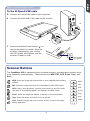
To the power adapter
A. Remove the yellow “Step 4” sticker from your scanner.
B. Connect the power adapter to the back of the scanner.
C. Plug the power adapter into a power source.
C
B
2