1
Using the LightLid 35 IV
NOTE: If your scanner configuration does not contain the LightLid 35 IV and you do not have
intention to use this device, please ignore this section.
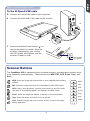
Connecting the LightLid 35 IV
1. Remove the scanner lid.
2. Ensure that the scanner is powered off;
then plug the connector of the LightLid
into the scanner’s 9-pin accessory port.
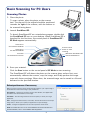
To load film
B. To load slides:
A. To load filmstrips:
Turn the LightLid 35 IV over. Load the
slide inside the lower slot of the LightLid,
with the slide facing up.
Turn the LightLid 35 IV over. Load the
filmstrip inside the upper slot of the
LightLid, with the film’s shiny base
facing up.
Do not block
calibration window
Do not block
calibration window
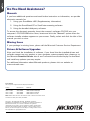
To place the LightLid 35 IV
O
CR
PD
F
PO
WE
R
SC
AN
W
CO
PY
EB
E-M
AI
L
OC
R
PD
F
W
EB
Place the LightLid 35 IV with the loaded film vertically on the scan bed. The LightLid
should be flush against the top ruler of the bed, with the slot running down the center.
IV
4
Align the top of the LightLid with
the recessed area, as label “Place
LightLid 35 IV Here”.