1
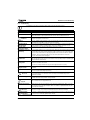
Maintenance and troubleshooting 6.3.3 Troubleshooting Visit www.worcester-bosch.co.uk/wave-FAQ for a full list of frequently asked questions. Error Remedy No Wi-Fi connection The Wi-Fi signal from the Wi-Fi router is possibly not strong enough. Fit a Wi-Fi repeater. Wi-Fi network not found Hide function of the Wi-Fi-router is possibly switched on or broadcast function (transmitting the SSID) is switched off. Temporarily switch the hide-function off or broadcast-function on. This display remains on Wi-Fi network is possibly protected with “WEP64” protocol. This protocol is not supported. Change the safety protocol of the router. IP address There is no IP-address allocated by the router yet. This can take some time. It may be necessary to manually allocate an IP-address in the router ( router manual). New router or Wi-Fi network installed Remove the thermostat from the wall plate, wait 10 seconds and then click the thermostat back onto the wall plate. All Wi-Fi networks found are shown on the display ( Section 3.6.3). Time ring on the thermostat not shown Connection to the server is broken. Wait until the connection is restored. Serial number and access code missing The serial number and the access code are both on the label on the front of these instructions and also on the label on the back of the thermostat. If an app. is used to log in, the serial number and the access code can be shown in the app. by going via the “Info” menu to the submenu “product information”. If the serial number and the access code cannot be found, then contact the Worcester, Bosch Group technical support. App cannot connect too the thermostat Is the thermostat connected to the Internet ( 3.6.3)? Are the serial number and the access code input correctly? Please note, these are case-sensitive. There is possibly a delay in establishing the connection. Wait for a few minutes. Touch screen locked, timer A horizontal swipe across the display makes the touch screen inactive. The touch-screen is the counting down locked for 15 seconds to be cleaned. The touch screen may be locked in the app, check the app and unlock if necessary. Temperature displayed is too high or too low In the app, the temperature shown can be calibrated ( refer to www.worcester-bosch.co.uk/ wave/FAQ). Touchscreen will not come If there is detection for longer than 5 minutes, the screen goes off automatically. After this, the on screen can only be activated again by touching. Symbol visible on There is no connection to the Internet server, wait until the connection to the Internet server is the screen restored automatically. Once started, the boiler can only be controlled manually, no time programme is available. Password with $ signs stays on No full app. functionality. The Wave uses the standard Wi-Fi protocol, so it is not possible to use a $-sign in the Wi-Fi router password. Remove the $ sign from the router password. Symbol disappears when the temperature is changed via the display or when the next switching point is reached in the time programme mode. Straight out of the box, the latest software version may not be installed on the Wave, as a result functionality may not yet be supported by the Wave. The software is updated automatically, this can possibly take a few days. Symbol visible on Indication of one of the following messages: repeated ignition attempts, Worcester boiler gives the screen maintenance message. This relates to an information signal. The boiler runs normally. No software updates received in the Wave Table 5 The software is updated automatically and a continuous Internet connection is required for this. If the router is not on continually, updates may be missed. Troubleshooting list Worcester Wave– 6 720 810 446 (2014/09) 13