1
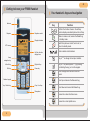
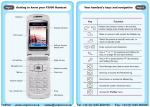
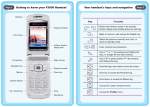
Getting to know your F1000 Handset
Antenna
Earpiece
II.
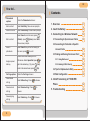
Your handset's keys and navigation
Key
Earphone socket
Make or receive a call; access the Dialed Log
in standby mode.
Display indicators
Switch the phone on and off, end a call, or
return to standby mode.
LCD screen
Soft key function
display area
4-way
navigation key
Left soft key
Talk key
Function
Perform the function shown in the soft key
function display area directly above the soft key.
_
Enter numbers and characters.
Key in "*" or change the text input method.
Right soft key
Power key
Key in "#" or pause symbol "P" (by pressing
and holding the key), or lock the keypad.
Scroll through menu lists and move the
cursor.
Number keypad
* key / Switch key
Scroll up and access the Received Log.
# key / Lock key
Scroll down and access the Missed Log.
Microphone
Access the custom functions menu.
Access the current profile menu.
I.