1
Printed on 100% recycled paper.
Printed in Japan
402520600
02.03-.4A(C05)
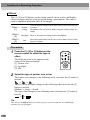
About The Manuals and Notations Used
Types of Manual
The documentation for your EPSON projector is divided into the following three
manuals. The manuals cover the following topics.
• User’s Guide (this manual)
This Users Guide contains information on installing the projector, basic operation,
using the projector menus, troubleshooting and maintenance.
• Safety Instructions/World-Wide Warranty Terms
This manual contains information on using the projector safely, and also includes
World-Wide Warranty Terms and a Troubleshooting check sheet.
Be sure to read this manual thoroughly before using the projector.
• Quick Reference Guide
Contains an overview of the most commonly-used projector functions for easy
reference. You should keep this Quick Reference Guide near the projector at all times
and refer to it before starting presentations and while using the projector in order to
check details of operation.
Notations used in this Users Guide
General information
Caution :
Indicates procedures which may result in damage or injury if sufficient
care is not taken.
Tip :
Indicates additional information and points which may be useful to know
regarding a topic.
Indicates that an explanation of the underlined word or words in front of
this symbol appears in the Glossary of Terms.
Refer to the Glossary in the Appendix. (P.101)
Procedure
Indicates operating methods and the order of operations.
The procedure indicated should be carried out in the order of the numbers.
Meaning of "unit" and "projector"
When "unit" or "projector" appears in the text of this Users Guide, they may refer to
items which are accessories or optional equipment in addition to the main projector unit
itself.
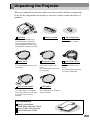
Unpacking the Projector
When you unpack the projector, make sure that you have all these components.
If any of the components are missing or incorrect, please contact the place of
purchase.
Projector
Remote control
(with lens cover attached by a
cord) At the time of purchase,
there is packing attached to the
rear adjustable foot. Remove this
packing before using the projector.
(for the remote control)
Power cord
(3 m (9.8 ft.))
For connecting the projector to a
wall outlet
Computer cable
(mini D-SUB 15-pin /
mini D-Sub 15-pin 1.8 m
(6 ft.))
For connecting the projector
to a computer
PS/2 mouse cable
(1.8 m (6 ft.))
For connecting to a computer
with a PS/2 mouse port in order
to use the wireless mouse
function
2 AA manganese
batteries
Audio/Video (A/V)
cable
(red/white/yellow 1.8 m
(6 ft.))
For connecting the projector
to a video component
USB cable
(1.8 m (6 ft.))
For connecting to a computer
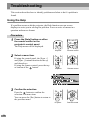
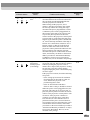
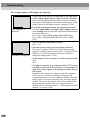
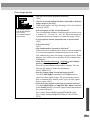
with a USB port
Documentation
Safety Instructions/
World-Wide Warranty Terms
User’s Guide (this manual)
Quick Reference Guide
1
Features of the Projector
Horizontal and vertical keystone correction function
Keystone distortion in the projected image can be easily corrected,
not only vertically but horizontally also.
This allows even images which have been captured from a sideways
angle to be projected correctly. (P. 44)
Color mode function
The optimum images can be projected simply by selecting the image
quality from the following six pre-recorded settings according to the
projection environment being used. (P. 63, 66)
sRGB
Normal Meeting
Presentation Theater Amusement
Easy to Operate
The accessory remote control can be used for operations such as pausing projection
(See "Freeze" on page 54) and zooming in on important areas of an image
(See "E-Zoom" on page 56). In addition, the remote control can be used to move the
pointer around on the computer screen during projection, to carry out operations
such as moving to the next page to be projected.
(See "Using the Remote Control to Operate the
Mouse Pointer" on page 25.)
If using the wireless mouse function with a USB
connection you can use the remote control to
display the next page or previous page when giving
a presentation using PowerPoint documents.
Compact and lightweight
The projector has a compact body with
a footprint the size of an A4 page
(348 (W) x 104 (H) x 274 (D) mm) and is
light in weight (approximately 4.2kg (9.3 lbs)).
2
Brilliant, Attractive Images
Despite its compact size, the projector can display
images at high resolutions with a high degree of
luminance, providing beautifully clear images
even in bright environments.
80
proje
ctor
70
60
50
40
F
30
D
20
C
10
B
0
Jan
A
Feb
Mar
Jun
Jul
Presentation Support Functions
Effect options such as indicating important points using a pointer,
positioning stamps and drawing lines can be used to provide
effective support for presentations. (P. 58)
Picture-in-Picture Function
Computer images and VCR images can be played back and projected
simultaneously on a single screen. A sub-screen appearing on the
main computer screen can show moving images from a VCR,
thereby increasing the power of your presentation. (P. 60)
3
Contents
Unpacking the Projector .......................................................................... 1
Features of the Projector......................................................................... 2
Before Using the Projector
Part Names and Functions...................................................................... 8
Front/Top......................................................................................................................8
Control panel................................................................................................................9
Rear ............................................................................................................................10
Base ............................................................................................................................11
Remote control...........................................................................................................12
Before Using the Remote Control ......................................................... 13
Inserting the Batteries ................................................................................................13
Battery Replacement Period and Cautions.................................................................13
Using the Remote Control and Remote Operating Range .........................................14
Notes on Handling the Remote Control .....................................................................15
Installation ............................................................................................. 16
Setting Up the Projector.............................................................................................16
Screen Size and Projection Distance..........................................................................18
Connecting to a Computer .................................................................... 19
Eligible Computers.....................................................................................................19
Projecting Images from the Computer .......................................................................20
Playing Sound from the Computer.............................................................................24
Using the Remote Control to Operate the Mouse Pointer..........................................25
Connecting to an External Monitor............................................................................28
Connecting to a Video Source .............................................................. 29
Projecting Composite Video Images..........................................................................29
Projecting S-Video Images.........................................................................................30
Projecting Component Video Images.........................................................................31
Projecting RGB Video Images ...................................................................................32
Connecting to an External Speaker ...................................................... 34
Basic Operations
Turning On the Projector ....................................................................... 36
Connecting the Power Cord .......................................................................................36
Turning On the Power and Projecting Images ...........................................................37
Turning Off the Projector ....................................................................... 39
4
Adjusting the Image Size ...........................................................................................41
Adjusting the Image Angle ........................................................................................42
Correcting Keystone Distortion .................................................................................44
Adjusting the Image Quality .................................................................. 46
Focusing the Screen Image ........................................................................................46
Adjusting Computer Images ......................................................................................46
Adjusting the Volume ............................................................................ 49
Advanced Operations
Before Using the Projector
Adjusting the Screen Image .................................................................. 41
List of Functions ........................................................................................................52
Function Details .........................................................................................................52
Using the Projector Menu Functions ..................................................... 62
List of Functions ........................................................................................................62
Using the Menus ........................................................................................................75
Appendices
Basic Operations
Functions for Enhancing Projection ...................................................... 52
Using the Help ...........................................................................................................78
When Having Some Trouble......................................................................................80
When the Indicators Provide No Help .......................................................................83
Maintenance.......................................................................................... 91
Cleaning .....................................................................................................................91
Replacing Consumables.............................................................................................93
Saving a User's Logo ............................................................................ 98
Optional Accessories .......................................................................... 100
Advanced Operations
Troubleshooting ..................................................................................... 78
Glossary.............................................................................................. 101
Command List..........................................................................................................103
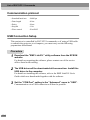
Communication protocol .........................................................................................104
USB Connection Setup ............................................................................................104
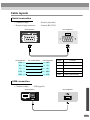
Cable layouts............................................................................................................105
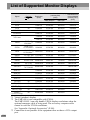
List of Supported Monitor Displays ..................................................... 106
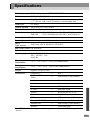
Specifications ...................................................................................... 107
Appendices
List of ESC/VP21 Commands ............................................................. 103
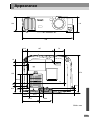
Appearance......................................................................................... 109
Index ................................................................................................... 110
5
Before Using the Projector
This chapter describes the procedures for setting up the projector
before use.
Part Names and Functions .................................................8
Before Using the Remote Control ....................................13
•
•
•
•
Inserting the Batteries ......................................................................... 13
Battery Replacement Period and Cautions ....................................... 13
Using the Remote Control and Remote Operating Range ............... 14
Notes on Handling the Remote Control............................................. 15
Installation .........................................................................16
• Setting Up the Projector...................................................................... 16
• Screen Size and Projection Distance .................................................. 18
Connecting to a Computer ...............................................19
• Eligible Computers .............................................................................. 19
• Projecting Images from the Computer .............................................. 20
•
•
•
•
If the monitor port is a mini D-Sub 15-pin connector ...................................... 20
If the monitor port is a digital RGB connector ................................................. 21
If the monitor port is a 5BNC connector .......................................................... 22
If the monitor port is a 13w3 connector............................................................ 23
• Playing Sound from the Computer .................................................... 24
• Using the Remote Control to Operate the Mouse Pointer ............... 25
• Connecting to an External Monitor ................................................... 28
Connecting to a Video Source .........................................29
•
•
•
•
Projecting Composite Video Images .................................................. 29
Projecting S-Video Images .................................................................. 30
Projecting Component Video Images................................................. 31
Projecting RGB Video Images ............................................................ 32
Connecting to an External Speaker .................................34
7
Part Names and Functions
Front/Top
• Zoom ring (P.41)
•
Adjusts the image size.
• Focus ring (P.46)
Adjusts the image focus.
•
• Lamp cover (P.94)
Open this cover when replacing
the lamp unit inside the projector.
• Lamp cover opening switch (P.94)
Slide this switch to unlock the lamp
cover when removing it.
• Security lock (
•
Temperature indicator
(P.80)
Indicates abnormalities in the
internal projector temperature.
Lamp indicator (P.80)
Indicates a problem with the
projection lamp or that the lamp
needs to be replaced.
Operation indicator (P.80)
Flashes or lights to indicate the
operating status of the projector.
• Control panel (P.9)
)
(P.102)
• Air exhaust
vent
• Remote control receiver (P.14)
Receives signals from the remote
control.
• Handle
Hold this handle when
lifting and transporting
the projector.
• Front adjustable foot (P.42)
Extend and retract to adjust the
projection angle.
• Lens cover
Attach when not using the projector to
prevent the lens from becoming dirty or
damaged.
8
• Foot adjust button (P.42)
Press this button while lifting up
the projector in order to make
fine adjustments to the
adjustable foot or to retract it.
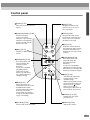
Control panel
• [Power] (P.37)
• [Help] (P.78)
Turns the projector power on
and off.
Displays the online help
menu to assist you if you
have a problem.
• [Video] (P.38)
• [Computer/YCbCr] (P.38)
Switches the input
source between the
Computer 1 port and the
Computer 2/Component
Video port each time the
button is pressed.
• [Menu] (P.75)
Displays or hides the
menus.
Switches the input source
between the Video port and
the S-Video port each time
the button is pressed.
Power
Help
Computer/YCbCr
Video
Source
Menu
Esc
• [V-Keystone] (P.44)
Press this button if the
projected image has
vertical keystone
distortion.
If you press and hold
the [Shift] button
while pressing this
button, you can adjust
the synchronization of
computer images.
• [Shift] (P.47)
This button does not
function by itself. Press and
hold this button while
pressing either [Keystone]
button to activate the
function that is printed in
orange on the control panel
(Sync or Tracking).
• [A/V Mute] (P.52)
Turns off the audio and video.
Auto
Tracking +
Keystone
Shift
Sync-
Resize
A/V Mute
Stops the current function.
Pressing [Esc] while viewing
a menu or the online help
displays the previous screen
or menu.
• [H-Keystone] (P.44)
Sync+
Tracking -
• [Esc] (P.75)
Press this button if the
projected image has
horizontal keystone
distortion.
If you press and hold the
[Shift] button while pressing
this button, you can adjust the
tracking of computer images.
Volume
• [Auto] (P.46)
Automatically adjusts the
computer image to the
optimum image.
When a setting menu or help
screen is displayed, this key
functions as an
button.
When a menu item is
selected, press this button to
proceed to the next screen.
• [Resize] (P.41, 55)
Changes the size of the
projection area.
• [Volume] (P.49)
Adjusts the volume.
9
Part Names and Functions
Rear
• Audio Out port (P.34)
Outputs the audio signal being input to
the projector.
* If a stereo mini jack is connected here,
the sound stops coming out from the
projector's built-in speaker.
• Monitor Out port (P.28)
Outputs the projected analog video signal
from a computer to an external monitor.
This is not available for digital video signals
being input to the Computer 1 port or signals
from other video sources.
• Control (RS-232C) port (P.105)
Connects the projector to a computer
using an RS-232C cable.
• Mouse port (P.25)
Connects the projector to a computer
via the accessory PS/2 mouse cable
when using the remote control as a
wireless mouse.
• USB port (P.24, 26, 105)
Connects the projector to a
computer or USB equipment via
the accessory USB cable.
• Computer 2/Component Video port
(P.20)
Inputs analog video signals from a
computer and component video signals
from other video sources.
• Computer 1 port (P.21)
Inputs digital/analog RGB video
signals from a computer.
• Remote control receiver
(P.14)
Receives signals from
the remote control.
• Speaker
• Power inlet
(P.36)
Connects the
power cord.
• Audio 1 port (P.24)
• Rear adjustable foot (P.42)
Extend and retract to adjust the
horizontal projection angle. At the time
of purchase, there is packing attached to
the rear adjustable foot. Remove this
packing before using the projector.
• Remote port (P.100)
Connects an optional
remote control receiver to
the projector.
10
• S-Video port (P.30)
Inputs an S-Video signal to
the projector from other
video sources.
Inputs audio signals.
Connects using a stereo mini jack.
• Audio 2 port (P.24)
Inputs audio signals. Use the
accessory A/V cable for this
connection.
• Video port (P.29)
Inputs composite video signals to the
projector from other video sources.
Use the accessory A/V cable for this
connection.
Base
• Front adjustable foot
• Air filter (air inlet) (P.92, 97)
Prevents dust and other foreign particles
from being drawn into the projector. When
replacing the lamp, replace the air filter also.
• Suspension bracket fixing points (4 points)
• Rear adjustable foot
(P.16)
Install the optional ceiling mount here when
suspending the projector from the ceiling.
11
Part Names and Functions
Remote control
• Remote control transmitter (P.14)
Outputs infrared remote control signals.
• Indicator
• [Power] (P.37)
Lights when a remote control
signal is being output.
Turns the projector power on
and off.
• [↑]/[↓] (P.26)
When the projector is
connected to a computer using
the accessory USB cable, these
keys function in the same way
as the [↑]/[↓] keys on the USB
keyboard.
• [Freeze] (P.54)
Keeps the current computer or
video image on the screen.
• [A/V Mute] (P.52)
Turns off the audio and video.
• R/C switch (P.14)
• [E-Zoom] (P.56)
Enlarges or reduces the size of
the image without changing the
size of the projection area.
•
Freeze
A/V Mute
E-Zoom
• Effect buttons (P.58)
Special effects functions are
assigned to these buttons as
follows.
[1]: Pointer/stamp
[2]: Spotlight
[3]: Bar
Esc
Menu
• [Left] (P.27)
Acts as a mouse left-click
when using the remote
control as a wireless mouse.
Help
Comp1
Comp2/YCbCr
Source
Video
S-Video
Resize
Auto
P in P
• [Menu] (P.75)
Stops the current function.
Displays the previous screen or
menu while viewing a menu or
the online help. Acts as a
mouse right-click when using
the remote control as a
wireless mouse.
• [Help] (P.78)
• [Source] (P.38)
Automatically adjusts the
computer image to the
optimum image.
• [P in P] (P.60)
Activates the Picture in Picture
(P in P) function.
• [Preset] (P.63)
Selects one of the computer
image resolutions that have
been preset.
12
• [Right]/[Esc] (P.27, 76)
Displays the online help menu.
• [Auto] (P.46)
Adjusts the volume.
(P.27, 75)
Press the edge of the
button
to move the mouse pointer in
the direction of the edge
pressed. When a menu is
displayed, the
button
accepts the menu selection and
displays the next screen or
menu.
Preset
Volume
Displays or hides the menus.
• [Volume] (P.49)
Turns the remote control power
on and off.
Power
[Comp1]: Switches to the
images input from the
Computer 1 port.
[Comp2/YCbCr]: Switches to
the images input from the
Computer 2/Component Video
port.
[S-Video]: Switches to the
images input from the S-Video
port.
[Video]: Switches to the
images input from the Video
port.
• [Resize] (P.41, 55)
Changes the size of the
projection area.
Before Using the Remote Control
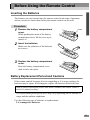
Inserting the Batteries
The batteries are not inserted into the remote control at the time of purchase,
and so you need to insert them before the remote control can be used.
Procedure
1
Remove the battery compartment
cover.
While pushing the catch of the battery
compartment cover, lift the cover up to
remove it.
2
Insert the batteries.
Make sure the polarities of the batteries
are correct.
3
Replace the battery compartment
cover.
Press the battery compartment cover
until it clicks into place.
Catch
Battery Replacement Period and Cautions
If the remote control becomes slow in responding or if it stops working, the
batteries may be spent. If this happens, replace the batteries with fresh ones.
Guide to battery replacement period: After about 6 months if the remote control is
used for 30 minutes each day
* The replacement period given above may vary depending on the amount of
usage and the ambient conditions.
Use the following type of batteries as replacements.
2 AA manganese batteries
13
Before Using the Remote Control
Using the Remote Control and Remote Operating Range
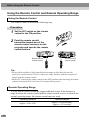
Using the Remote Control
The remote control is used in the following way.
Procedure
1
Set the R/C switch on the remote
control to the ON position.
2
Point the remote control
transmitter toward one of the
remote control receivers on the
projector and operate the remote
control buttons.
Remote control
receiver (front)
Power
Power
A/V Mute
A/V Mute
Freeze
E-Zoom
E-Zoom
Esc
Esc
Menu
Help
Comp1
Comp2/YCbCr
Menu
Help
Comp1
Comp2/YCbCr
Source
Source
Video
Remote control
receiver (back)
Freeze
S-Video
Video
S-Video
Auto
Resize
Auto
Resize
P in P
Preset
P in P
Preset
Volume
Volume
Tip :
• Do not allow sunlight or light from fluorescent lamps to shine directly onto the
projector's remote control receivers, otherwise it may interfere with the reception of
signals from the remote control.
• Set the R/C switch on the remote control to the OFF position when not using the remote
control. Leaving the R/C switch on will consume battery power.
Remote Operating Range
Use the remote control within the ranges indicated below. If the distance or
angle between the remote control and the remote control receiver is outside the
normal operating range, the remote control may not work.
14
Operating distance
Operating angle
Approx. 10 m (30 ft.)
Approx. ±30° horizontally
Approx. ±15° vertically
Approx. ±30° horizontally
Remote control
receiver
Approx. 30°
Approx. 30°
Approx.
10 m (30 ft.)
Approx. 30°
Approx. 30°
Power
A/V Mute
Power
Freeze
A/V Mute
E-Zoom
Freeze
E-Zoom
Remote control transmitter
Esc
Menu
Help
Comp1
Comp2/YCbCr
Esc
Menu
Help
Comp1
Source
Video
Comp2/YCbCr
Source
S-Video
Video
S-Video
Auto
Resize
Auto
Resize
P in P
Preset
P in P
Preset
Volume
Volume
Approx. ±15° vertically
Approx. 15°
Approx. 15°
Approx. 15°
Approx. 15°
When suspended from
the ceiling
Approx. 15°
Approx. 15°
Tip :
If you would like to use the remote control from a distance outside the normal operating
range, use the optional remote control receiver.
See “Appendix: Optional Accessories” (P.100)
Notes on Handling the Remote Control
Make sure that you observe the following at all times to avoid malfunctions or
damage to the remote control.
• Do not drop the remote control or subject it to strong shocks.
• Do not allow the remote control to become wet. If it does become wet,
wipe it immediately with a dry cloth.
• Remove the batteries if you will not be using the remote control for a long
period of time. The batteries may leak if they are left inside the remote
control.
• Some functions can only be carried out using the remote control. Keep the
remote control near the projector at all times so that you do not lose the
remote control.
15
Installation
Setting Up the Projector
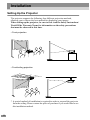
The projector supports the following four different projection methods,
allowing you to choose the best method for displaying your images.
When setting up the projector, be sure to first read the Safety Instructions/
World-Wide Warranty Terms for information on the safety precautions
that must be observed at this time.
• Front projection
• Front/ceiling projection
* A special method of installation is required in order to suspend the projector
from the ceiling. Please contact the place of purchase if you would like to use
this installation method.
16
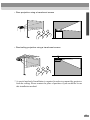
• Rear projection using a translucent screen
• Rear/ceiling projection using a translucent screen
* A special method of installation is required in order to suspend the projector
from the ceiling. Please contact the place of purchase if you would like to use
this installation method.
17
Installation
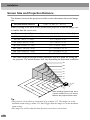
Screen Size and Projection Distance
The distance between the projector and the screen determines the actual image
size.
Recommended distance
0.9m – 12.4m (3.0 – 40.7 ft.)
While referring to the table below, position the projector so that the image size
is smaller than the screen size.
Screen size (cm (ft.))
Approximate projection distance* (m (ft.))
30” (61 × 46 (2.0 × 1.5))
0.9 – 1.1 (3.0 – 3.6)
40” (81 × 61 (2.7 × 2.0))
1.2 – 1.6 (3.9 – 5.2)
60” (120 × 90 (3.9 × 3.0))
1.8 – 2.4 (5.9 – 7.9)
80” (160 × 120 (5.3 × 3.9))
2.5 – 3.2 (8.2 – 10.5)
100” (200 × 150 (6.6 × 4.9))
3.1 – 4.1 (10.2 – 13.5)
200” (410 × 300 (13.5 × 9.8))
6.1 – 8.3 (20.0 – 27.2)
300” (610 × 460 (20.0 × 15.1))
9.2 – 12.4 (30.2 – 40.7)
* The value for the projection distance should be used as a guide for setting up
the projector. The actual distance will vary depending on projection conditions.
300"
m)
(c
460
410
200"
300
100"
150
200
160
80"
120
120
60"
90
40"
81
61
61
46
30"
9
0.
1.
1
2
1.
6
1.
8
1.
4
2.
5
2.
1
4.
2
9.
1
6.
2
1
3.
3.
(7.9 20cm
inch *
es)
(7. 20cm
9i *
nc
he
s)
610
3
8.
.4
12
)
(m
* When installing against a wall, leave
a space of about 20 cm (7.9 inches)
between the projector and the wall.
Tip :
• The projector’s lens allows a zoom ratio of up to about 1.35. The image size at the
maximum zoom setting is about 1.35 times bigger than the image size at the minimum
zoom setting.
• The image size will be reduced when keystone correction is carried out.
18
Connecting to a Computer
Caution :
When connecting the projector to a computer, be sure to check the following.
• Turn off the power for both the projector and the computer before connecting them. If
the power for either device is on at the time of connection, damage may result.
• Check the shapes of the cable connectors and the device ports before making the
connections. If you try to force a connector to fit a device port with a different shape or
number of terminals, damage to the connector or port may result.
Eligible Computers
The projector cannot be connected to some types of computer, or projection of
images may not be possible even if actual connection is possible. Make sure
that the computer you intend to use satisfies the conditions given below.
• Condition 1: The computer must have a video signal output port.
Check that the computer has a port such as an RGB port, monitor port or CRT
port which can output image signals.
If the computer has a built-in monitor, or if using a laptop computer, it may
not be possible to connect the computer to the projector, or alternatively you
may need to purchase a separate external output port. Refer to the
documentation for your computer under a heading such as "Connecting an
external monitor" or similar for further details.
• Condition 2: The display resolution and frequency of the computer must be
listed in the "List of Supported Monitor Displays".
See “Appendix: List of Supported Monitor Displays”(P.106)
Some computers may have functions for changing the output resolution. For
details, refer to the section of the documentation provided with your computer
and change the setting to within a range given in the list of supported
resolutions.
19
Connecting to a Computer
Projecting Images from the Computer
The shape and specifications of the computer’s monitor port will determine
which projector port and what type of cable should be used. Check the
following to see which type of port your computer has.
If the monitor port is a mini D-Sub 15-pin port
Use the accessory computer cable to connect the Computer 2/Component Video
port at the rear of the projector to the monitor port of the computer.
If you are connecting two computers with analog RGB output to the projector,
use the optional DVI analog cable to connect the monitors of the two computers
to the Computer 1 port at the rear of the projector.
See “Appendix: Optional Accessories” (P.100)
When connecting to the Computer 2/Component Video port
To monitor port
Computer cable
(accessory)
To Computer2/
Component Video port
Tip :
• After making the connections, change the Comp2/YCbCr Input setting in the Setting
menu to Analog-RGB. (P.69)
• Do not bind the power cord and the computer cable together, otherwise image
interference or errors in operation may result.
• You may need to purchase a separate adapter to connect the computer to the projector,
depending on the shape of the computer's monitor port. Refer to the documentation for
the computer for details.
• A commercially-available adapter is required in order to connect the projector to a
Macintosh computer.
• If the computer and projector are too far away from each other for the accessory cable
to reach, or if you would like to project computer images at UXGA resolution, use the
optional computer cable. See “Appendix: Optional Accessories” (P.100)
20
If the monitor port is a digital RGB connector
If the computer has a standard DVI or DFP -compliant digital video card or
video output port, use an optional digital video cable or DVI analog cable to
connect the monitor port of the computer to the Computer 1 port at the rear of
the projector. The type of connection cable used will vary depending on the
specifications for the computer's monitor port.
See “Appendix: Optional Accessories” (P.100)
To digital RGB
output port
Digital video cable or DVI analog cable
(optional)
To Computer 1 port
Tip :
• You may need to change the computer settings when switching the computer output to
digital RGB. Refer to the documentation for the computer for details.
• If you are connecting a computer with a mini D-Sub 15-pin output port to the projector
at the same time, connect the computer with the mini D-Sub 15-pin output port to the
Computer 2/Component Video port of the projector.
• After making the connections, change the Comp1 Input setting in the Setting menu to
Digital-RGB. (P.69)
21
Connecting to a Computer
If the monitor port is a 5BNC
port
Use the optional computer cable to connect the Computer 2/Component Video
port at the rear of the projector to the monitor port of the computer.
See “Appendix: Optional Accessories” (P.100)
To monitor port
Computer cable
(optional)
To Computer 2/
Component Video port
Tip :
• After making the connections, change the Comp2/YCbCr Input setting in the Setting
menu to Analog-RGB. (P.69)
• Do not bind the power cord and the computer cable together, otherwise image
interference or errors in operation may result.
22
If the monitor port is a 13w3 port
Some workstation-type computers have a 13w3 monitor port.
Use a commercially-available 13w3 ⇔ D-Sub 15-pin adapter cable to connect
the Computer 2/Component Video port at the rear of the projector to the
monitor port of the computer.
To monitor port
13w3 cable (commercially-available)
To Computer 2/
Component Video port
Tip :
• After making the connections, change the Comp2/YCbCr Input setting in the Setting
menu to Analog-RGB. (P.69)
• Do not bind the power cord and the computer cable together, otherwise image
interference or errors in operation may result.
• Some workstations may require a special cable. Consult the workstation manufacturer
for further details.
23
Connecting to a Computer
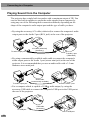
Playing Sound from the Computer
The projector has a single built-in speaker with a maximum output of 5W. You
can use this built-in speaker to output the audio signals from a computer by
using any one of the following three connection methods, depending on the
shape of the computer's audio output port and the type of cable you have.
• By using the accessory A/V cable (white/red) to connect the computer's audio
output ports to the Audio 2 port (RCA jack) at the rear of the projector
A/V cable (white/red)
(accessory)
To audio output port
To Audio 2 port
(White/Red)
• By using a commercially-available audio cable to connect the computer's
audio output ports to the Audio 1 port (stereo mini jack) at the rear of the
projector. It is recommended that you use an audio cable with a 3.5 mm
diameter stereo mini jack.
Audio cable
(commercially-available)
To audio output port
To Audio 1 port
• For a computer which is capable of USB audio output, by using the
accessory USB cable to connect the computer's USB port to the USB port at
the rear of the projector.
USB cable
(accessory)
To USB port
To USB port
24
Tip :
• After making the connections, change the Audio Input setting in the Audio menu to
either Audio1, Audio2 or USB, depending on which input port you are using. (P.67)
• You can also connect external speakers to the projector in order to reproduce the audio
signals. (P.34)
• The USB cable can only be connected to computers with a standard USB interface. If
using a computer which is running Windows, the computer must have had a full
version of Windows 98/2000/Me installed. If the computer is running a version of
Windows 98/2000/Me that has been upgraded from an earlier version of Windows,
correct operation cannot be guaranteed. If using a Macintosh computer, the computer
must be running OS9.0 – 9.1. It may not be possible to use the USB audio function
under some versions of both the Windows and Macintosh operating systems.
• If using a USB cable to output sound from the computer, you may need to change the
computer settings. For details, refer to the section of the documentation provided with
your computer.
Using the Remote Control to Operate the Mouse Pointer
You can use the remote control as a wireless mouse to control the mouse pointer
on the computer screen. To do this, you must use a mouse cable to connect the
mouse port of the computer to the mouse port or the USB port at the rear of
the projector.
Computer
Windows
Macintosh
(OS8.6 – 9.1)
Mouse used
Applicable cable
PS/2 mouse
PS/2 mouse cable (supplied)
USB mouse
USB cable (supplied)
USB mouse
USB cable (supplied)
Example of PS/2 mouse connection
Turn off the power for both the projector and the computer before connecting
them. If the power for either device is on at the time of connection, errors in
operation or damage may result.
To PS/2 mouse port
PS/2 mouse cable (accessory)
To Mouse port
25
Connecting to a Computer
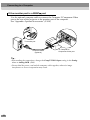
Example of USB mouse connection
To USB mouse port
USB cable
(accessory)
To USB port
* If you make a USB connection, you can use the [↑] and [↓] buttons on the
remote control. These buttons can be used to scroll back and forth through
pages when projecting a PowerPoint presentation.
Tip :
• The USB cable can only be connected to computers with a standard USB interface. If
using a computer which is running Windows, the computer must have had a full
version of Windows 98/2000/Me installed. If the computer is running a version of
Windows 98/2000/Me that has been upgraded from an earlier version of Windows,
correct operation cannot be guaranteed.
If using a Macintosh computer, the computer must be running OS8.6 – 9.1.
It may not be possible to use the mouse function under some versions of both the
Windows and Macintosh operating systems.
• Some computer settings may have to be changed in order for the mouse function to be
used. Consult the Users Guide for the computer for further details.
• A PS/2 mouse and a USB mouse cannot be used simultaneously.
26
Once the connection has been made, the mouse pointer can be operated as
follows.
Moving the mouse
pointer
Press the edge of the
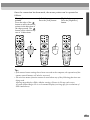
button to move the mouse
pointer in the direction of
the edge pressed. The
button can be tilted in any
one of 16 directions.
Left click
Press the [Left] button.
Power
Power
Freeze
A/V Mute
Freeze
A/V Mute
E-Zoom
Esc
Esc
Menu
Help
Comp1
Comp2/YCbCr
Menu
Help
Comp1
Comp2/YCbCr
Esc
Menu
S-Video
Video
Help
Comp1
Source
Source
Video
Power
Freeze
A/V Mute
E-Zoom
E-Zoom
Right click
Press the [Right/Esc]
button.
Comp2/YCbCr
Source
S-Video
Video
S-Video
Auto
Resize
Auto
Resize
Auto
Resize
P in P
Preset
P in P
Preset
P in P
Preset
Volume
Volume
Volume
Tip :
• If the mouse button settings have been reversed at the computer, the operation of the
remote control buttons will also be reversed.
• The wireless mouse function cannot be used when any of the following functions are
being used.
•During menu display •Effect •Before setting a Picture in Picture sub-screen
•E-zoom •When image size is set to normal display (resizing off) (for resolutions of
SXGA and above)
27
Connecting to a Computer
Connecting to an External Monitor
Images can be viewed on an external computer monitor at the same time they
are being projected by the projector. Use the cable provided with the computer
monitor to connect the monitor to the Monitor Out port at the rear of the
projector.
Monitor port
Cable provided with monitor
To Monitor Out port
Tip :
• Digital RGB signals that are being input to the Computer 1 port cannot be output to an
external monitor.
• Video images cannot be output to an external monitor.
28
Connecting to a Video Source
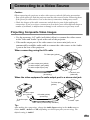
Caution :
When connecting the projector to other video sources, take the following precautions.
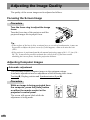
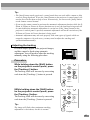
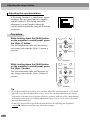
• Turn off the power for both the projector and the video source before connecting them.
If the power for either device is on at the time of connection, damage may result.
• Check the shapes of the cable connectors and the device ports before making the
connections. If you try to force a connector to fit a device port with a different shape or
number of terminals, a malfunction or damage to the connector or port may result.
Projecting Composite Video Images
• Use the accessory A/V cable (red/white/yellow) to connect the video source
to the Video and Audio 2 ports at the rear of the projector.
• If the audio output port of the video source is a stereo mini jack, use a
commercially-available audio cable to connect the video source to the Audio
1 port at the rear of the projector.
When connecting using the A/V cable
To Video port (yellow)
To video output port (yellow)
To audio output L port (white)
To audio output R port (red)
A/V cable
(accessory)
To Audio 2 port
(white/red)
When the video equipment's audio output port is a stereo mini jack
To Video port
(yellow)
To video output
port (yellow)
To audio output
port
A/V cable (yellow)
(accessory)
Audio cable (commercially-available)
To Audio 1 port
Tip :
After making the connections, change the Audio Input setting in the Audio menu to
either Audio1, Audio2 or USB, depending on which input port you are using. The
default setting is Audio2.
29
Connecting to a Video Source
Projecting S-Video Images
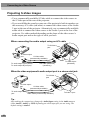
• Use a commercially-available S-Video cable to connect the video source to
the S-Video port at the rear of the projector.
• If you would like the sound to come out of the projector's built-in speaker, use
the accessory A/V cable (red/white) to connect the video source to the Audio
2 port at the rear of the projector. Alternatively, use a commercially-available
audio cable to connect the video source to the Audio 1 port at the rear of the
projector. Use either method depending on the shape of the video source’s
audio output port and on the type of cable you have.
When connecting the audio output using an A/V cable
To S-Video
port
To video output
S-Video cable
port
(commercially-available)
To audio output L port (white)
To audio output R port (red)
A/V cable (white/red)
(accessory)
To Audio 2 port
(white/red)
When the video equipment's audio output port is a stereo mini jack
To S-Video
port
To video output
port
S-Video cable
(commercially-available)
To audio output
port
Audio cable (commercially-available)
To Audio 1 port
Tip :
After making the connections, change the Audio Input setting in the Audio menu to
either Audio1, Audio2 or USB, depending on which input port you are using. The
default setting is Audio2.
30
Projecting Component Video Images
• Use the optional component video cable to connect the video source to the
Computer 2/Component Video port at the rear of the projector.
See “Appendix: Optional Accessories” (P.100)
• If you would like the sound to come out of the projector's built-in speaker, use
the accessory A/V cable (red/white) to connect the video source to the Audio
2 port at the rear of the projector. Alternatively, use a commercially-available
audio cable to connect the video source to the Audio 1 port at the rear of the
projector. Use either method depending on the shape of the video source’s
audio output port and on the type of cable you have.
When connecting the audio output using an A/V cable
To Computer 2/Component
Video port
To video output
port
Component video
cable (optional)
To audio output L port (white)
To audio output R port (red)
A/V cable (white/red)
(accessory)
To Audio 2 port
(white/red)
When the video equipment's audio output port is a stereo mini jack
To Computer 2/Component
Video port
To video output
Component video
port
cable (optional)
To audio output
Audio cable (commercially-available)
port
To Audio 1 port
Tip :
• After making the connections, change the Comp2/YCbCr Input in the Setting menu to
either "YCbCr " or "YPbPr " to match the signals from these devices. (P.69)
For HDTV (750P or 1125i), "YPbPr" will be selected regardless of the above setting.
• After making the connections, change the Audio Input setting in the Audio menu to
either Audio1, Audio2 or USB, depending on which input port you are using.
31
Connecting to a Video Source
Projecting RGB Video Images
RGB video is used when RGB signals that have copy protection added are input
and projected.
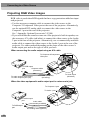
• Use the accessory computer cable to connect the video source to the
Computer 2/Component Video port at the rear of the projector. Alternatively,
use the optional DVI analog cable to connect the video source to the
Computer 1 port at the rear of the projector.
See “ Appendix: Optional Accessories” (P.100)
• If you would like the sound to come out of the projector's built-in speaker, use
the accessory A/V cable (red/white) to connect the video source to the Audio
2 port at the rear of the projector. Alternatively, use a commercially-available
audio cable to connect the video source to the Audio 1 port at the rear of the
projector. Use either method depending on the shape of the video source’s
audio output port and on the type of cable you have.
When connecting the audio output using an A/V cable
To Computer 2/Component
Video port
To RGB output
port
Computer cable
(accessory)
To audio output L port (white)
To audio output R port (red)
A/V cable (white/red)
(accessory)
To Audio 2 port
(white/red)
When the video equipment's audio output port is a stereo mini jack
To Computer 1 port
To Audio 1 port
To audio output
port
Audio cable
(commercially-available)
To RGB output
port
32
DVI analog cable (optional)
Tip :
• RGB video is only compatible with sync-on-green signals. This can be checked by
looking at SYNC Mode in the About menu.
• After making the connections, change the Comp1 Input or Comp2 /YCbCr Input
setting in the Setting menu to RGB Video.
For separate sync (separate H-SYNC and V-SYNC) signals, set to Analog-RGB.
(P.69) This can be checked by looking at SYNC Mode in the About menu.
• After making the connections, change the Audio Input setting in the Audio menu to
either Audio1, Audio2 or USB, depending on which input port you are using. The
default setting is Audio2.
33
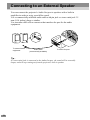
Connecting to an External Speaker
You can connect the projector's Audio Out port to speakers with a built-in
amplifier in order to enjoy even fuller sound.
Use a commercially-available audio cable with pin jack ⇔ stereo mini jack 3.5
mm (0.14 inches) plugs or similar.
Use an audio cable with a connector that matches the port for the audio
equipment.
To external audio
equipment
Audio cable
(commercially-available)
To Audio Out port
Tip :
If a stereo mini jack is connected to the Audio Out port, the sound will be externally
output, and will stop coming out from the projector's built-in speaker.
34
Basic Operations
This chapter describes basic operations such as turning projection
on and off and adjusting the projected images.
Turning On the Projector ..................................................36
• Connecting the Power Cord................................................................ 36
• Turning On the Power and Projecting Images.................................. 37
Turning Off the Projector ..................................................39
Adjusting the Screen Image .............................................41
• Adjusting the Image Size..................................................................... 41
• Adjusting the Image Angle.................................................................. 42
• Correcting Keystone Distortion.......................................................... 44
Adjusting the Image Quality .............................................46
• Focusing the Screen Image.................................................................. 46
• Adjusting Computer Images............................................................... 46
• Automatic adjustment ....................................................................................... 46
• Adjusting the tracking....................................................................................... 47
• Adjusting the synchronization .......................................................................... 48
Adjusting the Volume........................................................49
35
Turning On the Projector
Turn on the power to start projecting images.
Be sure to read the separate Safety Instructions/World-Wide Warranty
Terms and check the points that must be noted before using the projector
to project images.
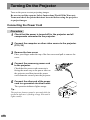
Connecting the Power Cord
Procedure
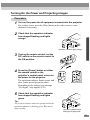
1
Check that the power is turned off for the projector and all
components connected to the projector.
2
Connect the computer or other video source to the projector.
(P.19, 29)
3
Remove the lens cover.
Place your finger under the top of the lens cover and pull to remove the
cover.
4
Connect the accessory power cord
to the projector.
Check that the power cord connector is
facing the same way as the power inlet on
the projector, and then insert the power
cord connector securely into the projector.
5
Power inlet
Connect the other end of the power
cord to a grounded electrical outlet.
The operation indicator lights orange.
Tip :
The projector buttons cannot be operated while the
operation indicator is flashing orange. Wait until it
lights steadily.
36
Lit orange
Turning On the Power and Projecting Images
Procedure
1
Turn on the power for all equipment connected to the projector.
For a video source, press the [Play] button at the video source to start
playback if necessary.
2
Check that the operation indicator
has stopped flashing and lights
orange.
Operation indicator lights orange
3
If using the remote control, set the
R/C switch on the remote control to
the ON position.
4
Press the [Power] button on either
the remote control or the
projector's control panel to turn on
the power for the projector.
The operation indicator flashes green, and
after a short period projection starts.
Depending on the settings, the message
"No-Signal." may appear. (P.70)
5
Power
Power
Help
A/V Mute
Computer/YCbCr
Freeze
Video
E-Zoom
Source
Menu
Esc
Sync+
Tracking -
A to
Tracking +
Projector
Remote control
Check that the operation indicator
has stopped flashing and lights
green.
Tip :
The projector buttons cannot be operated while the
operation indicator is flashing green. Wait until it
lights steadily.
Operation indicator stops
flashing and lights green
37
Turning On the Projector
6
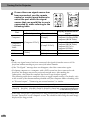
If more than one signal source has
been connected, use the remote
control or control panel buttons to
select the port which the signal
source that you would like to use is
connected to, while referring to the
following table.
Help
Computer/YCbCr
Video
Computer1
Comp1
Comp2/YCbCr
Esc
Video
S-Video
Auto
Resize
P in P
Preset
Sync+
Tracking -
Auto
Tracking +
Projector
[Computer/YCbCr]
[Comp2/YCbCr]
[Video]
Help
Source
Menu
[Comp1]
Computer2/
Component
Video
Menu
Source
Button to press
Control panel
Remote control
Port
S-Video
Video
Power
[S-Video]
[Video]
Remote control
Display at bottom-left of
screen
Computer1(Digital-RGB)
Computer1(Analog-RGB)
Computer1(RGB-Video)
Computer2(Analog-RGB)
Computer2(RGB-Video)
Computer2(YCbCr)
Computer2(YPbPr)
S-Video
Video
Tip :
• If only one signal source has been connected, the signals from that source will be
projected without needing to press one of the above buttons.
• If the "No-Signal." message does not disappear, check the connections again.
• If a laptop computer or a computer with a LCD screen has been connected to the
projector, the images may not be projected straight away. After making the
connections, check that the computer has been set up to output signals.
The following table shows examples of how to toggle output settings. For details, refer
to the section of the documentation provided with your computer under a heading such
as "External output", "Connecting an external monitor" or similar.
NEC
Panasonic
[Fn]+[F3]
[Fn]+[F3]
Toshiba
IBM
Sony
Fujitsu
Macintosh
After startup, change the
[Fn]+[F5] [Fn]+[F7] [Fn]+[F7] [Fn]+[F10] Control Panel adjustments
so that Mirroring is active.
• If the same still picture is projected for a long period of time, the projected image may
become "burned in" on the computer screen. You should avoid leaving the same image
displayed for long periods.
38
Turning Off the Projector
Follow the procedure below to turn off the power of the projector.
Procedure
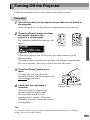
1
Turn off the power for the signal sources that are connected to
the projector.
Check that the power for all connected components has been tuned off.
2
Press the [Power] button on either
the remote control or the
projector's control panel.
The following confirmation message will
appear.
Power
Power
Help
A/V Mute
Computer/YCbCr
Freeze
Video
E-Zoom
Source
Menu
Esc
Sync+
Tracking -
A to
Tracking +
Projector
Remote control
If you do not want to turn off the power, press any button except the
[Power] button.
If you do not press any button, the message will disappear automatically
after seven seconds. (The power will not turn off at this time.)
3
Press the [Power] button once
more.
The lamp unit will turn off and the
operation indicator will flash orange as the
cool-down period starts.
4
Check that the cool-down is
complete.
When cool-down is complete, the
operation indicator lights orange.
The cool-down period lasts for
approximately 2 minutes. (This varies
depending on factors such as the ambient
air temperature.)
Operation indicator stops flashing
and lights orange
Tip :
The projector buttons cannot be operated while the operation indicator is flashing
orange. Wait until it lights steadily.
39
Turning Off the Projector
5
Unplug the power cord from the electrical outlet.
Caution :
Do not disconnect the power cord from the outlet while the operation indicator is still
flashing orange. If you disconnect the power cord while the indicator is still flashing, it
may result in errors in projector operation and reduce the lamp unit operating life.
6
Set the R/C switch on the remote
control to the OFF position.
Tip :
If you leave the R/C switch at the ON position, the
remote control will continue to consume battery
power.
Move the R/C switch to the OFF position when not
using the remote control.
7
Retract the front adjustable foot if it
is extended.
Gently push down on the projector while
pressing the foot adjust button.
Foot adjust button
8
Attach the lens cover.
Attach the lens cover to the lens when not
using the projector, in order to stop the
lens from getting dusty or dirty.
Lens cover
40
Adjusting the Screen Image
You can adjust the screen image in order to obtain the best possible picture.
Adjusting the Image Size
The size of the projected image is basically determined by the distance from the
projector to the screen. (P.18)
The following procedures explain how to adjust the screen image once the
projector itself has been set up.
Tip :
The E-Zoom function lets you enlarge parts of the image. (P.56)
Procedure
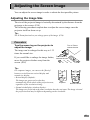
Turn the zoom ring on the projector to
adjust the image.
The image can be enlarged in this way to 1.35
times the normal size.
If you would like to enlarge the image further,
move the projector further away from the
screen. (P.18)
Turn to Tele to
reduce the size
Turn to Wide to
increase the size
Tip :
For computer images, you can use the [Resize]
button to switch between resized display and
normal size display.
• Resized display (default):
The images are processed so that they
automatically fill the whole of the projection area,
Projector
Remote control
regardless of the resolution setting.
• Normal sized display (window display):
The images are projected at the same resolution that they are input. The image size and
the projection area may be different depending on the resolution.
Source
Keystone
Shift
Sync-
Video
S-Video
Auto
Resize
P in P
Preset
Resize
A/V Mute
Volume
Volume
41
Adjusting the Screen Image
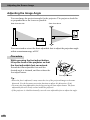
Adjusting the Image Angle
You can change the projection angle for the projector. The projector should be
as perpendicular to the screen as possible.
Seen from the side
Seen from above
You can extend or retract the front adjustable foot to adjust the projection angle
within a maximum range of 12°.
Procedure
While pressing the foot adjust button,
lift up the front of the projector so that
the front adjustable foot can extend.
Extend the front adjustable foot until the
desired angle is obtained, and then release the
foot adjust button.
Foot adjust button
Tip :
• When the foot is adjusted, it may cause the size of the projected images to become
distorted. Use the keystone correction function to adjust this distortion. (P.44)
• To retract the front adjustable foot, keep pressing the foot adjust button. The front
adjustable foot will slowly retract inside the projector.
• If the projector is tilted horizontally, turn the rear adjustable foot to adjust the angle.
42
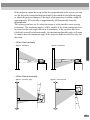
If the projector cannot be set up so that it is perpendicular to the screen, you can
use the keystone correction function which is described on the following page
to adjust the projected images if the angle of the projector is within a range of
approximately 30° vertically or approximately 10° horizontally from the
perpendicular.
The values given here are for when the image is at the smallest zoom setting
(telephoto). The maximum angles will be smaller if the zoom setting has been
increased in the wide angle direction. Furthermore, if the projector has been
tilted both vertically and horizontally, the maximum adjustable angle will again
be smaller than the maximum angle if the projector had been tilted in only one
direction.
• When tilted vertically
Approx. 30° above
Approx. 30° below
30°
30°
• When tilted horizontally
Approx. 10° to the right
Approx. 10° to the left
10°
10°
43
Adjusting the Screen Image
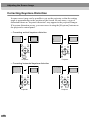
Correcting Keystone Distortion
In some cases it may not be possible to set up the projector so that the setting
angle is perpendicular to the position of the screen. In such cases, a type of
distortion known as "keystone distortion" may appear in the projected images.
If keystone distortion occurs, you can correct it using the [Keystone] buttons on
the projector's control panel.
• Correcting vertical keystone distortion
Menu
Esc
Menu
Esc
Sync+
Sync+
Tracking -
Auto
Tracking +
Tracking -
Auto
Tracking +
Keystone
Shift
Sync-
Keystone
Shift
Sync-
Projector
Projector
• Correcting horizontal keystone distortion
Menu
Esc
Menu
Tracking -
Auto
Shift
Tracking +
Tracking -
Keystone
Shift
Sync-
Projector
44
Esc
Sync+
Sync+
Auto
Tracking +
Keystone
Sync-
Projector
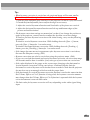
Tip :
• When keystone correction is carried out, the projected image will become smaller.
• Procedure to follow if using both horizontal and vertical keystone correction:
1. With the front adjustable foot retracted, set the projector so that it is fully horizontal.
2. Extend the front adjustable foot to adjust the angle as necessary.
3. Adjust the vertical keystone distortion until both sides of the picture are vertical.
4. Adjust the horizontal keystone distortion until the top and bottom edges of the
picture are both horizontal.
• The keystone correction settings are memorized, so that if you change the position or
angle of the projector, you may need to readjust the keystone correction settings.
To return a previous keystone correction to the initial setting, carry out the following
operations.
To initalize vertical keystone correction: While holding down the [Sync +] button,
press the [Sync -] button for 1 second or more.
To initalize horizontal keystone correction: While holding down the [Tracking +]
button, press the [Tracking -] button for 1 second or more.
• If the images become uneven in appearance after keystone correction is carried out,
decrease the Sharpness setting. (P.63)
• Keystone correction can also be carried out using the projector menu. (P.69)
• If you carry out both horizontal and vertical keystone correction, the correction range
will become smaller than it would be if only one type of correction was carried out.
• If the value displayed in the gauge on the screen stops changing when horizontal or
vertical keystone correction is being carried out, it indicates that the limit for
horizontal or vertical keystone correction has been exceeded. Check that the projector
has not been set up at an angle which exceeds the proper limit.
• If the horizontal (or vertical) keystone correction function is used at the same time that
the E-Zoom, Effects or P in P function is being used, the keystone correction amount
may change when the E-Zoom, Effects or P in P function is operated while the keystone
correction amount is near the limit value.
• The limit value for keystone correction will vary depending on the video signal being
input.
45
Adjusting the Image Quality
The quality of the screen images can be adjusted as follows.
Focusing the Screen Image
Procedure
Turn the focus ring to adjust the image
focus.
Turn the focus ring of the projector until the
projected images are in proper focus.
Tip :
• If the surface of the lens is dirty or misted over as a result of condensation, it may not
be possible to adjust the focus correctly. If this happens, clean or de-mist the lens.
(P.91)
• If the projector is positioned outside the normal projecting range of 0.9 – 12.4 m (3.0 –
40.7 ft.), it may not be possible to obtain the correct focus. If you have trouble
obtaining the correct focus, check the projection distance.
Adjusting Computer Images
Automatic adjustment
This procedure adjusts computer images to the optimum settings.
Automatic adjustment involves adjustment of the following three items:
Tracking , Display position and Synchronization (Sync) .
Procedure
While an image is being projected from
the computer, press the [Auto] button
on either the remote control or the
projector's control panel.
The screen will appear black while the
adjustment is being made.
46
Menu
Tracking -
Source
Esc
Video
Sync+
Auto
S-Video
Auto
Resize
P in P
Preset
Tracking +
Volume
Keystone
Shift
Sync-
Resize
Projector
Remote control
Tip :
• The [Auto] button on the projector's control panel does not work while a menu or help
screen is being displayed. To use the [Auto] button on the projector's control panel, you
need to first exit the menu or help screen. Alternatively, you can use the [Auto] button
on the remote control instead.
• If you use the remote control to activate the automatic adjustment function while the EZoom, A/V Mute or Picture in Picture functions are in use, the functions being used will
be canceled before automatic adjustment is carried out. If the [Auto] button on the
projector’s control panel is pressed, automatic adjustment will not be carried out if the
E-Zoom or Picture in Picture function is being used.
• Automatic adjustment may not work properly with some types of signals which are
output by computers. In such cases, you may need to adjust the tracking and
synchronization manually.
Adjusting the tracking
If vertical stripes appear in the projected images,
and this cannot be fixed using automatic
adjustment. You will need to adjust the tracking
manually using the following procedure.
Procedure
While holding down the [Shift] button
on the projector's control panel, press
the [Tracking +] button.
The tracking value will increase by one setting
each time the [Tracking +] button is pressed.
Sync+
Tracking -
Auto
Tracking +
Keystone
Shift
Sync-
Resi e
Projector
[While holding down the [Shift] button
on the projector's control panel, press
the [Tracking -] button.
The tracking value will decrease by one setting
each time the [Tracking -] button is pressed.
Sync+
Tracking -
Auto
Keystone
Shift
Tip :
The image will flash when continuous tracking
adjustment is carried out, but this is normal.
Tracking +
Sync-
R
i
Projector
47
Adjusting the Image Quality
Adjusting the synchronization
If flickering, fuzziness or interference appear
in images that are input from the computer,
and this cannot be fixed using automatic
adjustment, you will need to adjust the
synchronization manually using the following
projection.
Procedure
While holding down the [Shift] button
on the projector's control panel, press
the [Sync +] button.
The synchronization value will increase by
one setting each time the [Sync +] button is
pressed.
Sync+
Tracking -
Auto
Tracking +
Keystone
Shift
Sync-
R
i
Projector
While holding down the [Shift] button
on the projector's control panel, press
the [Sync -] button.
The synchronization value will decrease by
one setting each time the [Sync -] button is
pressed.
Sync+
Tracking -
Auto
Tracking +
Keystone
Shift
Sync-
R
i
Projector
Tip :
• If you do not adjust the tracking first and then adjust the synchronization, it will not be
possible to get the best adjustment results. Incorrect tracking adjustment may not be
noticeable with some types of picture. However, pictures with lots of lines and shading
will tend to show incorrect tracking adjustments more clearly, so be sure to check the
tracking adjustment first.
• It may also be possible to fix flickering and fuzziness by adjusting the brightness,
contrast , sharpness and keystone correction settings.
48
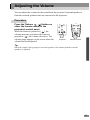
Adjusting the Volume
You can adjust the volume for the sound from the projector's internal speaker or
from the external speakers that are connected to the projector.
Procedure
Press the [Volume
,
] button on
either the remote control or the
projector's control panel.
When the button is pressed to [ ], the
volume increases, and when the button is
pressed to [ ], the volume decreases. The
volume gauge appears on the screen when the
volume has been adjusted.
Source
Keystone
Shift
Sync-
Video
S-Video
Auto
Resize
P in P
Preset
Resize
A/V Mute
Volume
Volume
Projector
Remote control
Tip :
When the sound is being output to external speakers, the volume from the external
speakers is adjusted.
49
Advanced Operations
This chapter describes functions for enhancing the projection of
images, and how to use the setting menus.
Functions for Enhancing Projection................................52
• List of Functions................................................................................... 52
• Function Details ................................................................................... 52
•
•
•
•
•
•
•
A/V Mute .......................................................................................................... 52
Freeze................................................................................................................ 54
Wide-screen Projection ..................................................................................... 55
E-Zoom ............................................................................................................. 56
Effects ............................................................................................................... 58
Canceling effects............................................................................................... 59
Picture in Picture (P in P).................................................................................. 60
Using the Projector Menu Functions...............................62
• List of Functions................................................................................... 62
•
•
•
•
•
•
•
•
Video menu ....................................................................................................... 62
Audio menu....................................................................................................... 67
Effect menu ....................................................................................................... 68
Setting menu ..................................................................................................... 69
User's Logo menu ............................................................................................. 71
Advanced menu................................................................................................. 72
About menu....................................................................................................... 73
Reset All menu.................................................................................................. 74
• Using the Menus................................................................................... 75
51
Functions for Enhancing Projection
This section describes the various useful functions that can be used to enhance
projection.
List of Functions
The following functions are available for enhancing projection.
Function
Description
Reference
page
A/V Mute
Momentarily pauses both the image and the
sound.
P.52
Freeze
Pauses only the projected image.
P.54
Wide-screen Projection
When projecting video images, changes the
aspect ratio from 4:3 to 16:9 to view the
images in wide screen format.
P.55
E-Zoom
Enlarge a part of the image.
P.56
Effect 1
Lets you use a pointer to indicate areas of an
image, or stamps the pointer icon on a
specified part of the image.
P.58
Effect 2
Spotlights a specified part of the image.
P.58
Effect 3
Draws a colored bar over the image.
P.58
P in P
Displays a sub-screen containing a video
image over part of a computer or component
video image.
P.60
Function Details
Detailed descriptions of the above functions are given below.
A/V Mute
This function momentarily pauses the image and sound.
For example, it can be used when you do not want to show viewers details of
operations such as selecting different files while computer images are being
projected.
However, if you use this function when projecting moving images, the images
and sound will still continue to be played back by the source, and you cannot
return to the point where the mute function was activated.
52
Procedure
Press the [A/V Mute] button on either
the remote control or the projector's
control panel.
The image and sound will then be paused.
Press the [A/V Mute] button on either the
remote control or the projector's control panel
to continue normal projection.
Power
Keystone
Shift
Sync-
A/V Mute
Freeze
Resize
E-Zoom
A/V Mute
Volume
Projector
Remote control
You can use the [A/V Mute] function in the [Setting] menu to set the screen
appearance when the images and sound have been paused to any one of the
following three settings. (P.69)
Black
Blue
User's logo
Default setting
Tip :
The default user's logo is the EPSON logo. You can change the user's logo by recording
and setting your own logo. (P.98)
53
Functions for Enhancing Projection
Freeze
This function pauses only the projected images. The sound keeps playing
without pausing.
Furthermore, for moving pictures, the playback signal continues to be input
even while the picture is paused, so playback will not resume from the point
from where it was paused.
Procedure
Press the [Freeze] button on the
remote control.
The images will then be paused.
To continue projecting the images, either press
the [Freeze] button again or press the [Esc]
button.
Power
A/V Mute
Freeze
E-Zoom
Remote control
Tip :
• Pressing the [Freeze] button also clears menu displays, effects functions and help
messages.
• If you press the [Freeze] button while using the E-Zoom function or after a P in P subscreen has been set, all of the screen displays will be paused.
54
Wide-screen Projection
This function changes the aspect ratio of video images from 4:3 to 16:9 when
video images are being projected. Images which have been recorded in digital
video or onto DVDs can be viewed in 16:9 wide-screen format. In the case of
HDTV , the central part of the image can be displayed in the whole of the
screen.
Procedure
Press the [Resize] button on either the
remote control or the projector's control
panel. The image size will change each
time the button is pressed.
Resize
A/V Mute
Auto
Resize
P in P
Preset
Volume
Volume
Projector
Remote control
For SDTV
4:3 display
16:9 display
16:9 display
4:3 display
For HDTV
Changing the display position for 16:9 display
While holding down the [Shift] button on the projector’s control panel, press
the [Resize] button. The display position changes as follows each time the
[Resize] button is pressed.
Center
Top
Bottom
55
Functions for Enhancing Projection
E-Zoom
This function lets you enlarge and reduce a part of projected images such as
graphs and tables.
Procedure
1
Press the [E-Zoom] button on the
remote control.
A cursor (cross) indicating the center
point for the area to be enlarged will
appear on the screen.
Power
A/V Mute
Freeze
E-Zoom
Remote control
2
Move the cross to the area of the
image that is to be enlarged or
reduced.
Tilt the
button on the remote control
to move the cross.
3
When the [E-Zoom] button is pressed to ( ), the image is
enlarged with the cross as its center. When it is pressed to (
the enlarged picture is then reduced.
The enlargement ratio will appear at the bottom-left of the screen.
You can scroll around the image by tilting the
button.
cross
),
Shows enlargement ratio
To cancel the zoom, press the [Esc] button.
56
Tip :
• The selected area can be enlarged to between 1 – 4 times, in 25 steps of x 0.125.
• If a sub-screen has been set using the P in P function, the enlargement function is
applied to both the main screen and the sub-screen.
• Effect functions cannot be carried out while the E-Zoom function is being used.
Furthermore, keystone correction, tracking adjustment and sync adjustment cannot be
carried out using the projector’s control panel buttons.
• If the E-Zoom function is used while the keystone correction amount is near the limit
value, the keystone correction amount may change.
57
Functions for Enhancing Projection
Effects
The [1], [2] and [3] buttons on the remote control can be used to add display
effects to images that are being projected during a presentation. This can be
used to emphasize particular parts of the images.
Effect 1
[1]
Pointer/
stamp
An icon appears on the screen and it can be moved around like
a pointer.
In addition, the icon can be made to appear on the image as a
stamp.
Effect 2
[2]
Spotlight
Parts of the projected image can be spotlighted.
Effect 3
[3]
Bar
Bars (horizontal and vertical lines) can be drawn on top of the
projected image.
Procedure
1
2
Press the [1], [2] or [3] button on the
remote control to select the type of
effect.
The following icon or bar appears at the
center of the projected image.
[1]: Pointer icon
[2]: Spotlight
[3]: Bar
Power
A/V Mute
Freeze
E-Zoom
Remote control
Select the type of pointer icon or bar.
The pointer icon changes in the following order each time the [1] button is
pressed.
→
→
The size of the spotlight changes in the following order each time the [2]
button is pressed.
Medium → Large → Small
The type of bar changes in the following order each time the [3] button is
pressed.
→ →
Tip :
You can use the Effect menu to set the type of icon or bar and the size and display
sequence for the spotlight.
58
3
Tilt the
button on the remote control up, down or to the left
or right to move the item displayed around the screen.
Effect 1: The pointer icon moves.
Effect 2: The spotlight moves.
Effect 3: Horizontal bars are moved vertically, and vertical bars are moved
horizontally.
4
For effect 1, move the icon to the place where you would like it
to be stamped, and then press the
button.
Tip :
• Only one type of effect can be displayed at any one time. If you press a different effect
button while using an effect function, the current effect will be canceled and the effect
function for the new button pressed will start.
• The normal wireless mouse function of the remote control cannot be used while an
effect function is in use.
• If the effect function is used while the keystone correction amount is near the limit
value, the keystone correction amount may change.
Canceling effects
Press a button other than the [1], [2], [3],
or [Left] buttons. The effect
function will be canceled and the items which were drawn on the screen will
disappear.
59
Functions for Enhancing Projection
Picture in Picture (P in P)
This function lets you simultaneously display computer or component video
images on the main screen and video images (Video or S-Video) in a subscreen. The video images in the sub-screen can be selected using the P in P
command in the Setting menu. (P.70)
Tip :
• The P in P function cannot be used if the refresh rate for the computer images is set to
interlaced.
• The P in P function cannot be used when TV (525i) component video images are being
projected.
Procedure
60
1
Connect all components, set the
type of sub-screen using the
Setting menu, and then press the [P
in P] button on the remote control.
The sub-screen will appear at the top-right
of the screen, and the operation guide will
appear at the bottom-left of the screen.
2
Tilt the
button on the remote
control to change the position of
the sub-screen.
3
Press the [E-Zoom] button on the remote control to change the
size of the sub-screen.
The size of the sub-screen can be changed to one of five different sizes.
The following values are the ratios for the vertical and horizontal lengths of
the sub-screens to those of the main screen when the lengths of the main
screen sides are 1.
Size 1
Approx. 1/3.2
Size 2
Approx. 1/2.8
Size 3
Approx. 1/2.5
Size 4
Approx. 1/2.3
Size 5
Approx. 1/2.1
When the [P in P] button is pressed, the initial sub-screen appears in size 2.
4
Press the
button on the remote control to accept the display
position and size for the sub-screen.
If you press the [P in P] button once more, the sub-screen will disappear.
Tip :
• If you change the position of the sub-screen, the sub-screen will appear in the last
position which was set next time the P in P function is used.
• The E-Zoom function can be used at the same time that the P in P function is being used.
• If the audio input connector for the main screen and the sub-screen have already been
set using the Audio Input command in the Audio menu, you can use the Effect buttons
to switch between the sound for the two screens.
Effect [1] button: Main screen audio
Effect [2] button: Sub-screen audio
• If the P in P function is used while the keystone correction amount is near the limit
value, the keystone correction amount may change.
61
Using the Projector Menu Functions
The setting menus can be used to carry out a variety of settings and
adjustments.
The menus have a hierarchical structure, with a main menu that is divided into
sub-menus, which are further divided into other sub-menus.
Refer to “Using the Menus” (P.75) for details on using the menus.
Main menu
Sub-menu
List of Functions
Video menu
• The functions in the Video menu cannot be adjusted while no video signal is
being input.
• The functions which appear in the Video menu will change depending on the
type of input source being used for the video signal. Functions which are not
available in the Video menu for a particular input source cannot be adjusted.
Analog-RGB
62
Digital-RGB
Computer (Analog-RGB, Digital-RGB)
Main menu
Video
Sub-menu
Default
setting
Function
Position
(Analog-RGB only)
Moves the image display position vertically and
horizontally.
• Press the
button and make the adjustment using the
display position adjustment screen which appears.
Depends
on
connection
Tracking
(Analog-RGB only)
Adjusts computer images when vertical stripes appear in
the images.
Depends
on
connection
Sync.
(Analog-RGB only)
Adjusts computer images when flickering, fuzziness or
interference appear in the images.
• Flickering and fuzziness may also appear when the
brightness, contrast , sharpness or keystone settings
are adjusted.
• You can obtain the best results if you adjust the
tracking first and then adjust the synchronization.
0
Brightness
Adjusts the image brightness.
Median
value (0)
Contrast
Adjusts the difference between light and shade in the
images.
• If Auto is selected, automatic gain adjustment is
carried out at periodical intervals.
Auto
Sharpness
Adjusts the image sharpness.
Median
value (0)
Color Mode
Corrects the vividness of the image color. The settings
can be saved separately for each type of source
(computer or video source). You can select from six
different quality settings depending on the surroundings.
: Images conform to the sRGB standard.*
• sRGB
• Normal : For presentation in bright rooms where
brightness is emphasized.
• Meeting : Images are modulated using their original
tints, with no color enhancement.
• Presentation: For presentations in dark rooms.
• Theater : Movie images are optimized using natural
tints.
• Amusement: Produced modulated images with natural
tints. Ideal for games.
Normal
Resolution
(Analog-RGB only)
Select Auto or Manual.
• If Auto is selected, automatic setup is carried out.
• If Manual is selected, you can select the image
resolution for adjustment from a list.
Auto
Preset
(Analog-RGB only)
Saves the current input resolution to the preset list.
-
63
Using the Projector Menu Functions
Main menu
Video
Sub-menu
Reset
Default
setting
Function
Resets all adjustment values for the Video menu
functions to their default settings.
• Press the
button to display the confirmation screen,
and select Yes.
• Select Reset All to return all menu settings to their
default settings. (P.74)
-
* If set to sRGB, the color temperature for the Color Adjustment command in the Advanced menu will
be set to 6500K.
64
RGB-Video
Component (YCbCr, YPbPr)
S-Video,Video
Video (RGB-Video, YCbCr, YPbPr, S-Video, Video)
Main menu
Video
Sub-menu
Function
Default
setting
Position
Moves the image display position vertically and
horizontally.
• Press the
button and make the adjustment using the
display position adjustment screen which appears.
Depends
on
connection
Brightness
Adjusts the image brightness.
Median
value (0)
Contrast
Adjusts the difference between light and shade in the
images.
Median
value (0)
Color
(Not available for RGB-Video)
Adjusts the color intensity for the images.
Median
value (0)
Tint
(Not available for RGB-Video)
Adjust the image tint.
Adjustment is only possible for NTSC signals.
Median
value (0)
Sharpness
Adjusts the image sharpness.
Median
value (0)
65
Using the Projector Menu Functions
Main menu
Video
Sub-menu
Default
setting
Function
Color Mode
Corrects the vividness of the image color. The settings
can be saved separately for each type of source
(computer or video source). You can select from six
different quality settings depending on the
surroundings.
: Images conform to the sRGB standard.*
• sRGB
• Normal : For presentation in bright rooms where
brightness is emphasized.
• Meeting : Images are modulated using their original
tints, with no color enhancement.
• Presentation: For presentations in dark rooms.
• Theater : Movie images are optimized using natural
tints. The black & white extension
function operates to emphasize the
gradation differences (color densities)
when projecting images in dark or light
environments, in order to make the images
easier to see.
• Amusement: Produced modulated images with natural
tints. Ideal for games.
Theater
Video Signal
Sets the video signal format.
• Press the
button, and choose the setting from the
video signal format selection sub-menu which
appears.
• When set to Auto, the video signal format is set
automatically, but if projecting signals in PAL (60 Hz)
format, the setting needs to be made manually.
Auto
Noise
Reduction
Turns the Noise Reduction function on and off.
When set to ON, noise is reduced.
Ignored when a menu or help screen is being displayed,
even when set to ON. The setting becomes effective
from the point where the menu or help screen is closed.
ON
Reset
Resets all adjustment values for the Video menu
functions to their default settings.
• Press the
button to display the confirmation
screen, and select Yes.
• Select Reset All to return all menu settings to their
default settings. (P.74)
-
* If set to sRGB, the color temperature for the Color Adjustment command in the Advanced menu will
be set to 6500K.
66
Audio menu
Main menu
Audio
Function
Default
setting
Audio Input
Sets the audio input port from Audio 1, Audio 2 or USB
to match the current video source.
Depends on
connection
Volume
Adjusts the volume.
15
Treble
Adjusts the treble setting.
Median
value (0)
Bass
Adjusts the bass setting.
Median
value (0)
Reset
Resets all adjustment values for the Audio menu
functions to their default settings.
• Press the
button to display the confirmation
screen, and select Yes.
• Select Reset All to return all menu settings to their
default settings. (P.74)
-
Sub-menu
67
Using the Projector Menu Functions
Effect menu
Main menu
Effect
68
Sub-menu
Function
Pointer/Stamp
Sets the three types of pointer icon which appear when
the [1] button on the remote control is pressed from the
eight available types, and sets the display ratio.
• Press the
button, and choose the setting from the
Pointer/Stamp sub-menu which appears.
• The pointer and stamp function can be used by
pressing the [1] button on the remote control. (P.58)
Spotlight
Sets the size of the spotlight which appears when the [2]
button on the remote control is pressed.
• Press the
button, and choose the setting from the
Spotlight sub-menu which appears.
This selects the sequence of sizes for the spotlight
which appear each time the [2] button is pressed.
• The spotlight function can be used by pressing the [2]
button on the remote control. (P.58)
Bar
Sets the color, direction and thickness of the bar which
appears when the [3] button on the remote control is
pressed.
• Press the
button, and choose the setting from the
Bar sub-menu which appears.
• The bar function can be used by pressing the [3]
button on the remote control. (P.58)
Default
setting
→
→
Size:
Medium →
Large →
Small
→
→
Pointer Speed
Selects the pointer speed.
L: Slow, M: Medium, H: Fast
M
Reset
Resets all adjustment values for the Effect menu
functions to their default settings.
• Press the
button to display the confirmation
screen, and select Yes.
• Select Reset All to return all menu settings to their
default settings. (P.74)
-
Setting menu
Main menu
Setting
Sub-menu
Function
Default
setting
V-Keystone
Corrects vertical keystone distortion in images.
• When keystone correction is carried out, the
projected image will become smaller.
• If using both horizontal and vertical keystone
correction, first make the vertical correction and
then make the horizontal correction in that order.
• The keystone correction settings are memorized, so
that if you change the position or angle of the
projector, you may need to readjust the keystone
correction settings.
• If the images become uneven in appearance after
keystone correction is carried out, decrease the
Sharpness setting.
• If you carry out both horizontal and vertical
keystone correction, the correction range will
become smaller than it would be if only one type of
correction was carried out.
Median
value (0)
H-Keystone
Corrects horizontal keystone distortion in images.
• When keystone correction is carried out, the image
becomes smaller.
• If using both horizontal and vertical keystone
correction, first make the vertical correction and
then make the horizontal correction in that order.
• The keystone correction settings are memorized, so
that if you change the position or angle of the
projector, you may need to readjust the keystone
correction settings.
• If the images become uneven in appearance after
keystone correction is carried out, decrease the
Sharpness setting.
• If you carry out both horizontal and vertical
keystone correction, the correction range will
become smaller than it would be if only one type of
correction was carried out.
Median
value (0)
69
Using the Projector Menu Functions
Main menu
Setting
70
Sub-menu
Default
setting
Function
P in P
Sets the input source for the sub-screen of the Picture
in Picture function to either Composite Video or
S-Video.
• The Picture in Picture function can be used by
pressing the [P in P] button. (P.60)
Composite
No-Signal
Msg.
Sets the message status and background color at times
such as when no video signal is being input.
• To change the user's logo, you need to record and set
your own logo. (P.98)
Blue
Prompt
Sets whether the source prompt for the input image is
displayed on the screen or not.
ON
A/V Mute
Sets the screen status when the [A/V Mute] button is
pressed.
• To change the user's logo, you need to record and set
your own logo.
Black
Comp1 Input
Sets the video signal for Computer 1 input.
Digital-RGB/
Analog-RGB
Comp2/
YCbCr Input
Sets the video signal for Computer 2 input.
Analog-RGB
Sleep Mode
Sets the energy saving operation when no video signal
is being input.
• When set to ON, projection stops automatically and
the projector changes to sleep mode if no operations
are carried out for 30 minutes while the "No-Signal."
message is being displayed. (The operation indicator
lights orange.)
• Projection starts again when the [Power] button is
pressed.
ON
Reset
Returns the adjustment values for the Setting menu to
their default settings.
• Press the
button to display the confirmation
screen, and select Yes.
• Select Reset All to return all menu settings to their
default settings.
-
User's Logo menu
Main menu
User's Logo
Sub-menu
Execute
Function
Records a user's logo. (P.98)
• Press the
button and follow the procedure
appearing on the screen.
Default
setting
EPSON
logo
71
Using the Projector Menu Functions
Advanced menu
Main menu
Advanced
72
Sub-menu
Default
setting
Function
Language
Sets the language for message displays.
• Press the
button and select the language from
the selection menu that appears.
English
Startup Screen
Sets whether the startup screen is displayed or not.
• To change the user's logo, you need to record and
set your own logo.
ON
Color Adjustment
Adjusts the color temperature and intensity of
each RGB color in the image.
Color Temp.: Sets the color temperature.
• Press the
button and set the color
temperature in the Color Adjustment sub-menu.
RGB: Sets the color intensity for each RGB (red/
green/blue) color in the image.
• Press the
button, select R (red), G (green) or B
(blue) in the Color Adjustment sub-menu, and
make the required setting for each color.
• You can adjust the colors while viewing the results
on the screen.
(This item cannot be selected if sRGB has been
selected as the Color Mode setting in the Video
menu.)
Color Temp :
Depends on
connection
Rear Proj.
Use when projecting images from behind a
translucent screen.
When set to ON, the projected images are
horizontally reversed.
OFF
Ceiling
Use when installing the projector to a ceiling.
When set to ON, the projected images are
horizontally and vertically reversed.
OFF
COM Port
Sets the communication ports for switching between
RS-232C connections and USB connections.
RS-232C
Reset
Resets all adjustment values for the Advanced
menu functions to their default settings.
• Press the
button to display the
confirmation screen, and select Yes.
• Select Reset All to return all menu settings to
their default settings.
-
About menu
• The About menu shows the setting details for the current video source.
• The Lamp setting appears as 0H for 0 – 10 hours, after that, it appears in
units of 1 hour.
Computer
Computer (Digital-RGB, Analog-RGB, RGB-Video, YCbCr, YPbPr)
Main menu
About
Sub-menu
Default
setting
Function
Lamp
Displays the cumulative lamp operating time.
• When the lamp warning period is reached, the
display characters appear in red.
0H
Reset Lamp
Timer
Initializes the lamp operating time. When this
command is selected, the cumulative lamp operating
time is reset to the initial default value.
-
Video Source
Displays the input source which is currently being
projected.
Input Signal
Displays the input signal settings.
Frequency
Displays the horizontal scanning frequency.
SYNC Polarity
Displays the synchronization polarity.
-
SYNC Mode
Displays the synchronization attributes.
-
Resolution
Displays the input resolution.
-
Refresh Rate
Displays the refresh rate.
-
73
Using the Projector Menu Functions
Video
Video (S-Video, Video)
Main menu
About
Sub-menu
Default
setting
Function
Lamp
Displays the cumulative lamp operating time.
• When the lamp warning period is reached, the
display characters appear in red.
0H
Reset Lamp
Timer
Initializes the lamp operating time. When this
command is selected, the cumulative lamp operating
time is reset to the initial default value.
-
Video Source
Displays the input source which is currently being
projected.
Video Signal
Displays the video signal format.
Auto
Reset All menu
Main menu
Reset All
74
Sub-menu
Execute
Default
setting
Function
Resets all items in all setting menus to their default
settings.
• Press the
button to display the
confirmation screen, and select Yes.
• Select Reset in an individual menu to reset only
the settings for the items in each sub-menu.
• The User's Logo, Lamp and Language settings
will not return to their default settings.
-
Using the Menus
The menus can be operated using either the remote control or the projector's
control panel.
Procedure
1
Press the [Menu] button on either
the remote control or the
projector's control panel.
The Main menu will be displayed.
Computer/YCbCr
Video
Menu
Auto
Comp1
Tracking +
Select a menu item.
If using the control panel, press the
[Sync +] or [Sync -] button.
If using the remote control, press the top
or bottom of the
button.
3
Confirm the selection.
Press the
button to confirm the
selection of a menu item.
The selected sub-menu will then be
displayed.
4
Select a sub-menu item.
If using the control panel, press the
[Sync +] or [Sync -] button.
If using the remote control, press the top
or bottom of the
button.
Comp2/YCbCr
Source
Video
Projector
2
Help
Esc
Sync+
Tracking -
Esc
Menu
Source
S-Video
Remote control
The items appearing in the Video menu
and the About menu will vary depending
on the type of input source being
projected.
75
Using the Projector Menu Functions
5
Select a setting value.
If using the control panel, press the
[Tracking -] or [Tracking +] button.
If using the remote control, press the left
or right edge of the
button.
Tip :
• Sub-menu items which cause another sub-menu to be displayed when they are selected
have
(Enter) after them. If you select such menu items and press the
button,
you can then change the settings in the next sub-menu which appears.
• Refer to "List of Functions" for details on the functions of each menu item. (P.62)
76
6
Select other menu items in the same way.
Repeat steps 2 to 5 to change the setting for other menu items. To return to
a previous menu, press the [Esc] button.
7
Close the menu.
Press the [Menu] button.
Appendices
This chapter provides information on troubleshooting and maintenance procedures
to ensure the best level of performance for the projector for a long time.
Troubleshooting.................................................................78
• Using the Help ...................................................................................... 78
• When Having Some Trouble ............................................................... 80
• When the Indicators Provide No Help .............................................. 83
Maintenance.......................................................................91
• Cleaning ................................................................................................ 91
• Cleaning the Projector Case.............................................................................. 91
• Cleaning the Lens ............................................................................................. 91
• Cleaning the Air Filter ...................................................................................... 92
• Replacing Consumables ...................................................................... 93
•
•
•
•
Lamp Replacement Period................................................................................ 93
Replacing the Lamp .......................................................................................... 94
Resetting the Lamp Operating Time ................................................................. 96
Replacing the Air Filter .................................................................................... 97
Saving a User's Logo ........................................................98
Optional Accessories......................................................100
Glossary ...........................................................................101
List of ESC/VP21 Commands .........................................103
•
•
•
•
Command List.................................................................................... 103
Communication protocol................................................................... 104
USB Connection Setup ...................................................................... 104
Cable layouts ...................................................................................... 105
• Serial connection............................................................................................. 105
• USB connection .............................................................................................. 105
List of Supported Monitor Displays...............................106
Specifications ..................................................................107
Appearance ......................................................................109
Index .................................................................................110
77
Troubleshooting
This section describes how to identify problems and what to do if a problem is
found.
Using the Help
If a problem occurs with the projector, the Help function uses on-screen
displays to assist you in solving the problem. It uses a series of menus in a
question and answer format.
Procedure
1
Press the [Help] button on either
the remote control or the
projector's control panel.
The Help menu will be displayed.
Esc
Power
Help
Computer/YCbCr
Video
3
Select a menu item.
If using the control panel, the [Sync +]
and [Sync -] buttons function as the up
and down keys.
If using the remote control, press the top
or bottom of the
button.
Confirm the selection.
Press the
button to confirm the
selection of a menu item.
You can press the [Esc] button to return to
the previous menu.
Menu
Comp1
Comp2/YCbCr
Esc
Video
S-Video
Remote control
Sync+
Tracking -
Auto
Tracking +
Keystone
Shift
Sync-
R
Esc
i
Projector
Menu
Remote control
Esc
Sync+
Tracking -
Auto
Tracking +
Keystone
Shift
Sync-
Projector
78
Help
Source
Projector
2
Menu
Esc
Remote control
4
Repeat the operations in steps 2
and 3 to proceed through the menu
to more detailed items.
You can exit the Help menu at any time by
pressing the [Help] button.
Tip :
If the Help function does not provide a solution to the problem, refer to "When Having
Some Trouble" (P.80) or "When the Indicators Provide No Help" (P.83).
79
Troubleshooting
When Having Some Trouble
If you are having a problem with the projector, first check the projector's
indicators.
The projector is provided with the following three indicators. These indicators
alert you to problems with projector operation.
Operation indicator
Lamp indicator
Temperature indicator
The following tables show what the indicators mean and how to remedy
problems that they indicate.
: lit
Indicator status
red
red
red
red
80
red
red
red
Projector
status
: flashing
Problem and remedy
Internal problem
Stop using the projector, disconnect the
power cord from the electrical outlet, and
contact your dealer or the nearest address
provided at “International Warranty
Conditions” in Safety Instructions/WorldWide Warranty Terms included in the
package.
Fan problem/
Sensor
problem
Stop using the projector, disconnect the
power cord from the electrical outlet, and
contact your dealer or the nearest address
provided at “International Warranty
Conditions” in Safety Instructions/WorldWide Warranty Terms included in the
package.
Lamp problem
Replace the lamp with a new one.
When replacing the lamp, check that the lamp
and the lamp cover are securely installed. If
the lamp or lamp cover is not securely
installed, the projector power will not turn on.
: off
Reference
page
P.94
Indicator status
red
red
red
red
Projector
status
Problem and remedy
Lamp operating
error
This can happen when the power cord was
disconnected from the electrical outlet before
the cool-down period had finished the last
time the projector was turned off.
When turning off the projector, wait 2
minutes. After about 2 minutes, the cooling
fan will stop. When the cooling fan stops,
disconnect the power plug and then re-insert
it. When the power cord is plugged back in,
the projector will return to its previous state,
so press the [Power] button on either the
remote control or the projector's control panel
to turn it back on. If the lamp operating error
happens again when the power is turned back
on, remove the lamp and check if the lamp is
broken. If it is not broken, reinstall it. If it is
broken, replace it. Then press the [Power]
button on either the remote control or the
projector's control panel.If the indicators still
show a problem, stop using the projector,
disconnect the power cord from the electrical
outlet, and contact your dealer or the nearest
address provided at “International Warranty
Conditions” in Safety Instructions/WorldWide Warranty Terms included in the package.
High
temperature
inside projector
(overheating)
The lamp will turn off automatically and
projection will stop. Wait for about 5 minutes
without operating the projector. After 5
minutes have elapsed, the projector’s cooling
fan will stop. Once the cooling fan has
stopped, unplug the power cord and then plug
it back in again.
If the projector overheats, check the following
two points.
Reference
page
P.18
P.92
• Is the setting-up location well ventilated?
Check that the air inlet and air outlet are
clear, and that the projector is not
positioned against a wall.
• Is the air filter blocked with dust?
If the air filter is dirty, it should be cleaned.
When the power cord is plugged back in, the
projector will return to its previous state, so
press the [Power] button on either the remote
control or the projector's control panel to turn
it back on. If the projector continues to
overheat even after the above points have
been checked, or if the indicators show a
problem when the power is turned back on,
stop using the projector, disconnect the power
cord from the electrical outlet, and contact
your dealer or the nearest address provided at
“International Warranty Conditions” in Safety
Instructions/World-Wide Warranty Terms
included in the package.
81
Troubleshooting
Indicator status
red
orange
Projector
status
High-speed
cooling in
progress
Problem and remedy
(This is not an abnormality, but if the
temperature rises too high again, projection
will stop automatically.)
Reference
page
P.18
P.92
• Set the projector up in a place which is
well-ventilated, and so that the air inlet and
exhaust vents are clear.
• Clean the air filter.
orange
Lamp will soon
need to be
replaced.
Have a new replacement lamp ready.
The lamp service life can become shorter than
normal as a result of the usage conditions,
and so the lamp should be replaced as soon as
possible.
P.94
* The appearance of the operation indicator
at this time will vary depending on the status of the projector.
Standby
condition
(No abnormality)
Projection starts when the [Power] button is
pressed.
P.37
green
Warm-up in
progress
(No abnormality)
Wait for a short while. The indicator will stop
flashing and light with a green color.
P.37
green
Projecting in
progress
(No abnormality)
P.37
orange
Cool-down in
progress
(No abnormality)
P.39
orange
• Wait for a short while.
The cool-down (lamp cooling operation)
period lasts for about 2 minutes. The actual
time will vary depending on the external air
temperature.
• The [Power] button will not operate during
the cool-down period. When cool-down is
complete, the indicator will stop flashing
and light orange. You can then use the
[Power] button.
Tip :
• If the projector is not operating properly even though the indicators are all showing
normal, refer to "When the Indicators Provide No Help" on the following page.
• If an indicator is showing a status which does not appear in the previous tables,
contact your dealer or the nearest address provided at “International Warranty
Conditions” in Safety Instructions/World-Wide Warranty Terms included in the
package.
82
When the Indicators Provide No Help
If any of the following problems occur and the indicators do not offer a
solution, refer to the pages given for each problem.
• No images appear
• Poor image quality
• Only part of the image is
displayed
(Large/small)
• Images appear dark
(P.83, 84)
(P.85, 86)
(P.87)
(P.87)
• The image colors are not
right
• No sound can be heard
• The remote control does not
work
• The power does not turn off
(P.88)
(P.89)
(P.90)
(P.90)
No images appear (Nothing at all appears)
• Is the lens cover still attached?
(P.36)
No images appear
• Was the power turned off and then straight back on
again?
After the power is turned off (during cool-down), the
[Power] button will not work. Wait until cool-down has
finished. You can then use the [Power] button. (P.39)
• Is sleep mode active?
When sleep mode has been set to ON, the lamp turns off
automatically if no operations are carried out for 30
minutes while no video signal is being input. The operation
indicator lights orange at this time.
Setting - Sleep Mode (P.70)
• Have you pressed the [Power] button?
(P.37)
• Has the image brightness been adjusted correctly?
Video - Brightness (P.63)
• Is A/V Mute mode active?
(P.52)
• Is the projected image completely black?
Some input images, such as screen savers, may be
completely black.
• Is a video signal being input?
If No-Signal Msg. in the Setting menu has been set to
OFF, no messages will be displayed. Set it to Black or
Blue for messages to be displayed. If a message is
displayed, refer to the item indicated. (P.70)
• Try resetting all of the current settings.
Reset All - Execute (P.74)
83
Troubleshooting
No images appear (Messages do appear)
• Check the mode which corresponds to the frequency
of the image signals being output from the computer.
Refer to the documentation provided with your computer
for details on changing the resolution and frequency of the
image signals being output from the computer. (P.106)
"Not Supported" is
displayed.
• Does the input signal match the connected source?
Use the Comp1 Input or Comp2/YCbCr Input command
in the Setting menu to select the signal format that matches
the connected source.
For Comp1: Digital-RGB,Analog-RGB,RGB-Video
For Comp2: Analog-RGB,RGB-Video,YCbCr,YPbPr
(P.70)
• Are the cables connected correctly?
(P.19 – 33)
• Has the correct video input port been selected?
Press the [Computer/YCbCr] or [Video] button on the
projector's control panel or the [Comp1], [Comp2/YCbCr],
[Video] or [S-Video] button on the remote control to
change the image source. (P.38)
"No-Signal." is displayed.
• Is the power for the computer or video source turned
on?
(P.37)
• If a laptop computer or a computer with a LCD screen
has been connected to the projector, it is necessary to
output the video signals to the projector rather than to
the screen.
Normally video signals are output to only the computer's
LCD screen, so you need to change the output to an
external destination. For some computer models, when the
image signals are output externally, they no longer appear
on the LCD screen. For details, refer to the section of the
documentation provided with your computer under a
heading such as "External output", "Connecting an external
monitor" or similar. (P.38)
84
Poor image quality
• Has the focus been adjusted correctly?
(P.46)
• Has the front adjustable foot been adjusted so that the
image angle is too big?
If the image angle is too big, the image will be out of focus
vertically. (P.42)
• The image is fuzzy
• Part of the image is
out of focus
• The whole image is
out of focus
• Is the projector at the correct distance?
The recommended distance from the projector to the screen
is within 0.9 – 12.4 m (3.0 – 40.7 ft.). Set up the projector
so that the projection distance is within this range. (P.18)
• Is the projector beam perpendicular to the screen?
(P.42)
• Is the lens dirty?
(P.91)
• Has condensation formed on the lens?
If the projector is suddenly taken from a cold environment
to a warm environment, condensation may form on the
lens, and this may cause the images to appear fuzzy. If this
happens, turn off the power and wait for the condensation
to disappear.
• Have the synchronization , tracking and display
position been adjusted correctly?
Press the [Auto] button to adjust these settings. You can
also use the menus to make the adjustment.
(P.46), Video (P.63)
• Are the image signal format settings correct?
Use the Video Signal command in the Video menu to
select the video signal format. The projector may not be
able to automatically identify some types of video signal
that are input. (P.66)
• Does the input signal match the connected source?
Use the Comp1 Input or Comp2/YCbCr Input command
in the Setting menu to select the signal format that matches
the connected source.
For Comp1: Digital-RGB,Analog-RGB,RGB-Video
For Comp2: Analog-RGB,RGB-Video,YCbCr,YPbPr
(P.70)
85
Troubleshooting
• Are the cables connected correctly?
(P.19 – P.33)
• Image is distorted
• Image contains
interference
• Has the correct resolution been selected?
Set the computer so that the signals that are output are
compatible with this projector. Refer to the documentation
provided with your computer for details on changing the
settings. (P.106)
• Have the synchronization , tracking and display
position been adjusted correctly?
Press the [Auto] button to adjust these settings. You can
also use the menus to make the adjustment. (P.46, 63)
• Is an extension cable being used?
If an extension cable is used, electrical interference may
increase. Use the accessory cables provided, or connect a
signal amplifier and see if this helps.
• Are the image signal format settings correct?
Use the Video Signal command in the Video menu to
select the video signal format. The projector may not be
able to automatically identify some types of video signal
that are input. (P.66)
• Does the input signal match the connected source?
Use the Comp1 Input or Comp2/YCbCr Input command
in the Setting menu to select the signal format that matches
the connected source.
For Comp1: Digital-RGB,Analog-RGB,RGB-Video
For Comp2: Analog-RGB,RGB-Video,YCbCr,YPbPr
(P.70)
86
Only part of the image is displayed (Large/small)
• The [Resize] setting may not be selected correctly.
Press the [Resize] button. (P.41, 55)
• Has the Position setting been adjusted correctly?
Use the Position command in the Video menu to adjust.
(P.63)
Only part of the image is
displayed
Small
• Has the correct resolution been selected?
Set the computer so that the signals that are output are
compatible with this projector. Refer to the documentation
provided with your computer for details on changing the
settings. (P.106)
• Change the resolution for the laptop computer or
computer with a LCD screen.
Change the resolution so that the image is displayed in the
whole of the projection area, or set the video signal to
external output only. (P.38)
• Has the computer been set for dual display?
If dual display has been activated in the Display Properties
of the computer's Control Panel, the projector will only
project about half of the image on the computer screen. To
display the whole of the image on the computer screen,
turn off the dual display setting. Refer to the video driver
manual for the computer's monitor for further details.
Images appear dark
• Is the lamp due for replacement?
If the lamp indicator is flashing orange, it means that the
lamp will soon be due for replacement. When the lamp is
nearly due for replacement, the image will become darker,
and so the lamp should be replaced with a new one. (P.93)
• Has the image brightness been adjusted correctly?
Video - Brightness (P.63)
• Has the image contrast
Video - Contrast (P.63)
been adjusted correctly?
87
Troubleshooting
The image colors are not right
• Has the image brightness been adjusted correctly?
Video - Brightness (P.63)
• Are the cables connected correctly?
(P.19 – P.33)
• Has the image contrast
Video - Contrast (P.63)
been adjusted correctly?
• Has the color been adjusted correctly?
Video - Color Mode (P.63)
• Have the color intensity and tint been adjusted
correctly?
(The colors may not exactly match the colors in the image
on the computer screen or LCD screen, but this is normal
and is not the sign of a problem.)
Video - Color (P.65)
Video - Tint (P.65)
• Is the lamp due for replacement?
If the lamp indicator is flashing orange, it means that the
lamp will soon be due for replacement. When the lamp is
nearly due for replacement, the image will become darker,
and so the lamp should be replaced with a new one. (P.93)
• Does the input signal match the connected source?
Use the Comp1 Input or Comp2/YCbCr Input command
in the Setting menu to select the signal format that matches
the connected source.
If the signal format is set to "YCbCr" or "YPbPr" when a
computer is connected, the projected images will appear
purplish.
If the signal format is set to "Analog-RGB" when a
component video source is connected, the projected images
will appear greenish.
(P.70)
88
No sound can be heard
• Is the audio source connected correctly?
(P.24)
• Has the correct audio input port been selected?
Use the Audio Input command in the Audio menu to set
the port for audio signal input. (P.67)
• Is sound being output from the audio source?
Check the volume for the audio source.
• Has the volume been adjusted to the minimum
setting?
(P.49)
• Has the A/V Mute function been turned on?
The projector may be in A/V Mute mode. Press the [A/V
Mute] button on the projector’s control panel or the remote
control to cancel the A/V Mute sub-menu command. (P.52)
• Is sound being output to external speakers?
If a stereo mini jack is connected to the Audio Out port, no
sound will be output from the projector's built-in speaker.
(P.34)
• Have the correct USB audio settings for this projector
been made at the computer?
If using a USB cable to output sound from the computer,
you need to select USB audio for the projector in the audio
properties for the computer.
89
Troubleshooting
The remote control does not work
• Is the R/C switch on the remote control set to the ON
position?
(P.14)
Power
Freeze
A/V Mute
E-Zoom
Esc
Menu
Help
Comp1
Comp2/YCbCr
Source
Video
• Is the remote control being pointed in the right
direction?
The operating angle for the remote control is
approximately ±30° horizontally and approximately ±15°
vertically.
S-Video
Resize
Auto
P in P
Preset
Volume
• Is the remote control too far from the projector?
The operating distance for the remote control is
approximately 10 m (30 ft.). (P.14)
• Is the remote control being pointed at the projector
when a remote control receiver has been connected?
• Is direct sunlight or strong light from fluorescent
lamps shining onto the remote control receiver?
• Are there batteries in the remote control?
(P.13)
• Are the batteries dead?
• Have the batteries been inserted correctly?
(P.13)
• If the mouse function does not work after connecting
a PS/2 mouse, you will need to restart the computer.
The power does not turn off (after the [Power] button is pressed)
• The operation indicator remains orange.
This projector is designed so that the operation indicator
remains lit even when after the power has been turned off.
The operation indicator will switch off when the power
cord is disconnected from the electrical outlet.
• Cooling fan does not stop.
After the [Power] button on either the remote control or the
projector's control panel is pressed to turn off the power,
the cool-down period starts.
After this, the operation indicator changes to a steady
orange, and you can then disconnect the power cord from
the electrical outlet.
* The cool-down period lasts for about 2 minutes. The actual
time will vary depending on the external air temperature.
90
Maintenance
This section describes maintenance tasks such as cleaning the projector and
replacing consumable parts.
Cleaning
You should clean the projector if it becomes dirty or if the quality of projected
images starts to deteriorate.
Be sure to read the separate Safety Instructions/World-Wide Warranty
Terms for details on safe handling of the projector during cleaning.
Cleaning the Projector Case
Clean the projector case by wiping it gently with a soft cloth.
If the projector is particularly dirty, moisten the cloth with water containing a
small amount of neutral detergent, and then firmly wring the cloth dry before
using it to wipe the projector case. Then wipe the case again with a soft, dry
cloth.
Caution :
Do not use volatile substances such as wax, alcohol or thinner to clean the projector
case. These can cause the case to warp and make the coating finish peel off.
Cleaning the Lens
Use a commercially-available air blower, or use a lens cleaning paper to gently
wipe the lens.
Caution :
Do not rub the lens with harsh materials or subject the lens to shocks, as it can easily
become damaged.
91
Maintenance
Cleaning the Air Filter
If the air filter becomes clogged with dust, it can cause overheating and damage
the projector.
Stand up the projector in order to prevent dust getting inside the projector, and
then use a vacuum cleaner to clean away the dust from the air filter.
Tip :
• If the air filter is difficult to clean or if it is broken, it should be replaced. Contact your
dealer for a spare air filter.
• Replacement lamps are provided with a spare air filter. The air filter should also be
replaced when the lamp is replaced.
92
Replacing Consumables
This section describes how to replace the lamp and the air filter.
Lamp Replacement Period
It is time to replace the lamp when:
• The message "Lamp Replace" appears on the screen for 30 seconds
when projection starts.
A message will be displayed.
• The lamp indicator flashes orange or lights red.
Lamp indicator flashes orange or lights red
• The projected image gets darker or starts to deteriorate.
Tip :
• In order to maintain the brightness and quality of the projected images, replace the
lamp as soon as possible after the warning message appears.
• The replacement warning message is set to appear after 1400 hours of lamp use in order
to maintain the brightness and quality of the projected images. If you continue to use the
lamp after this period, the possibility of the lamp breaking becomes greater. When the
lamp replacement message appears, replace the lamp with a new one as soon as
possible, even if it is still working.
• The warning message appears after 1400 hours of use, but the actual life of each
individual lamp will vary depending on the characteristics of the lamp and on the way
it has been used. Some lamps may stop operating before 1400 hours of use, so you
should always have a spare lamp ready in case.
• When the lamp replacement warning message appears, the user’s logo will not appear
even if the start-up screen setting is ON.
• Contact your dealer for a spare lamp.
93
Maintenance
Replacing the Lamp
Caution :
If the lamp stops working and needs to be replaced, there is the danger that the lamp
may break when handled.
If replacing the lamp of a projector which has been installed to the ceiling, you should
always assume that the lamp is broken and handle it with extreme care during removal.
Furthermore, you should stand to the side of the projector, not underneath it.
Procedure
94
1
Turn off the projector power, wait
for the cool-down period to end,
and then disconnect the power
cord.
The cool-down period lasts for about 2
minutes. The actual time will vary
depending on the external air temperature.
2
Wait until the lamp has cooled
down, and then remove the lamp
cover.
It takes approximately 30 minutes for the
lamp to cool down by itself.
Use the screwdriver that is provided with
the replacement lamp to slide the lamp
cover opening switch so that the lamp
cover lifts up. Hold the raised section of
the lamp cover and then slide it forward to
remove it from the projector.
3
Loosen the two lamp fixing screws.
Use the screwdriver that is supplied with
the replacement lamp to loosen the two
lamp fixing screws that are securing the
lamp to the projector.
4
Take out the lamp.
Hold the lamp by the two recesses on the
side to lift it up and out from the projector.
5
Install the new lamp.
Hold the lamp so that it faces the correct
way to fit into the projector, and then
insert the lamp until it clicks into place
and tighten the two fixing screws.
6
Install the lamp cover.
Insert the two cover tabs into the projector,
and then press the other side of the lamp
cover until it clicks into place.
Tip :
• Install the lamp securely. If the lamp cover is removed, the lamp turns off automatically
as a safety precaution. Moreover, the lamp will not turn on if the lamp or the lamp
cover is not installed correctly.
• Replacement lamps are provided with a spare air filter. The air filter should also be
replaced when the lamp is replaced.
• Dispose of used lamps properly in accordance with your local regulations.
95
Maintenance
Resetting the Lamp Operating Time
The projector has a built-in counter which keeps track of the lamp operating
time. When the cumulative operating time reaches a certain point, it causes the
replacement warning message to be displayed. Therefore, the counter needs to
be reset after the lamp has been replaced with a new one. You can do this using
the projector menu.
Procedure
1
Press the [Menu] button on either
the remote control or the
projector's control panel.
The Main menu will be displayed.
Computer/YCbCr
Video
Menu
Help
Esc
Comp1
Sync+
Tracking -
Esc
Menu
Source
Auto
Tracking +
Video
Projector
2
Select Reset Lamp Timer from the
About menu and then press the
button.
3
Select Yes and then press the
button.
The lamp operating time will then be
reset.
Comp2/YCbCr
Source
S-Video
Remote control
Tip :
Do not reset the lamp operating time except after the lamp has been replaced, otherwise
the lamp replacement period will not be indicated correctly.
96
Replacing the Air Filter
Procedure
1
Turn off the projector power, wait
for the cool-down period to end,
and then disconnect the power
cord.
The cool-down period lasts for about 2
minutes. The actual time will vary
depending on the external air temperature.
2
Put your finger into the recess in
the air filter hook, and lift up the air
filter to remove it.
In order to prevent any dust on the air
filter from getting into the projector, be
sure to stand up the projector so that the
handle is at the top.
3
Install the new air filter.
First insert the tabs, and then press down
on the opposite side until it clicks into
place.
Tip :
Dispose of used air filters properly in accordance
with your local regulations.
97
Saving a User's Logo
You can record the image that is currently being projected as a user's logo.
Procedure
1
Project the image that you would like to use as a user's logo,
and then press the [Menu] button on the projector’s control
panel or the remote control.
2
Select the User's Logo menu, and
then press the
button.
Tip :
If keystone correction has been carried out, it will
be canceled when the User's Logo menu is selected.
3
Select Yes in the sub-menu, and
then press the
button.
4
The image to be recorded and a
selection marquee box will be
displayed. Move the marquee box to
select the part of the image to use.
Tilt the
button on the remote control
to select the part of the image to use as the
user’s logo, and then press the
button.
Tip :
If the video signal being input is a YCbCr or YPbPr signal, the selection marquee box
can only be moved around the middle of the image.
98
5
Select Yes at the confirmation
screen, and then press the
button.
6
Select the zoom rate in the Zoom
rate setting screen, and then press
the
button.
7
Select Yes at the confirmation
screen, and then press the
button.
The image will then be saved. Once the
image has been saved, the message
"Saving the user's logo is completed." will
be displayed.
Tip :
• Saving the user's logo may take a few moments (about 40 seconds). Do not use the
projector or any other sources which are connected to the projector while the user's
logo is being saved, otherwise it may result in errors in projector operation.
• User's logos can be saved at up to 400 x 300 dots in size.
• If the image resolution is not XGA, or if a video image is being projected, the display
size will be changed.
• Once a user's logo has been saved, the logo setting cannot be returned to the factory
default.
99
Optional Accessories
The following optional accessories are available for purchase if required. This
list of optional accessories is current as of April 2002. Details of accessories are
subject to change without notice.
Hard travel case
ELPKS26
Soft carrying case
ELPKS27
Use this case if you need to carry the projector by
hand.
Digital video cable
ELPKC21
(3 m (9.8 ft.) - for DVI-D/DFP 20-pin)
DFP cable for connecting the projector to a
computer with a digital RGB output interface.
Spare lamp
ELPLP15
Use as a replacement for spent lamps.
DVI analog cable
ELPKC25
(3 m (9.8 ft.) - for DVI-I/mini D-Sub 15-pin)
Use to connect the projector to connect two
computers with analog RGB output to the
projector.
Portable screen (50 inch)
ELPSC06
A compact screen which can be carried easily.
60 inch screen
ELPSC07
80 inch screen
ELPSC08
Computer cable
ELPKC02
(1.8 m (6 ft.) - for mini D-Sub 15-pin/mini DSub 15-pin)
Use to connect the projector to a computer when
you would like to use UXGA display resolution.
Computer cable
ELPKC09
(3 m (9.8 ft.) - for mini D-Sub 15-pin/mini DSub 15-pin)
Computer cable
ELPKC10
(20 m (65.6 ft.) - for mini D-Sub 15-pin/mini
D-Sub 15-pin)
Use this extension cable if the accessory
computer cable is too short.
Computer cable
ELPKC11
(1.8 m (6 ft.) - for mini D-Sub 15-pin/5BNC)
Use to connect the projector to a workstation.
Digital video cable
ELPKC20
(3 m (9.8 ft.) - DVI-D male-male)
DVI cable for connecting the projector to a
computer with a digital RGB output interface.
Component video cable
ELPKC19
(3 m (9.8 ft.) - for mini D-Sub 15-pin/RCA x 3)
Use to connect a component video source.
Remote control receiver
ELPST04
Use to control the projector with the remote
control from a distance.
Ceiling mount *
ELPMB07
Use when installing the projector to a ceiling.
Ceiling plate *
ELPFC03
Pipe 370 (370 mm (14.57 inches)/silver)*
ELPFP04
Pipe 570 (570 mm (22.4 inches)/silver)*
ELPFP05
Pipe 770 (770 mm (30.3 inches)/silver)*
ELPFP06
Use when installing the projector to a high ceiling
or a ceiling with veneer panels.
Image presentation camera
ELPDC02
ELPDC03
ELPDC04
Use when projecting books, OHP films and
slides.
* A special method of installation is required in order to suspend the projector from the ceiling. Please
contact the place of purchase if you would like to use this installation method.
100
Glossary
Following is an explanation of some of the terms used in this guide which may
be unfamiliar or which were not explained in the manual itself. Further
information can be obtained by referring to other commercially-available
publications.
5BNC
A port used to input analog video signals.
A/V Mute
The momentary canceling of audio and video output. This projector has an [A/V
Mute] button which you can press to momentarily stop the projection of pictures and
sound. The picture and sound can be restored by pressing the [A/V Mute] button on
the projector’s control panel or the remote control once more.
Aspect ratio
The ratio between an image's length and its height. HDTV images have an aspect ratio
of 16:9 and appear elongated. The aspect ratio for standard images is 4:3.
Color
difference
signal
(component)
A type of video signal output by video equipment which actually consists of three
separate signals: a red + luminance signal (R-Y), a luminance signal (Y) and a blue +
luminance signal (B-Y). Each signal is transmitted along a separate cable. Color
difference signals generally result in a better image than composite signals (in which
the red, green and blue signals and the luminance signal are all transmitted along a
single cable).
Color
temperature
The temperature of an object which is emitting light. If the color temperature is high,
the colors tend to take on a bluish tinge. If the color temperature is lower, the colors
tend to take on a reddish tinge.
Component
video
Video signals which have the video brightness signals and color signals separated, in
order to provide better image quality.
In high-definition TV (HDTV), it refers to images which consist of three independent
signals: Y (luminance signal), and Pb and Pr (color difference signals).
Composite
video
Video signals which have the video brightness signals and color signals mixed
together. The type of signals commonly used by household video equipment (NTSC
format).
The signals consist of the carrier signal Y (luminance signal) and the chroma (color)
signal which are contained in the color bar signal.
Contrast
The relative brightness of the light and dark areas of an image can be increased or
decreased in order to make text and graphics stand out more clearly, or to make them
appear softer. Adjusting this particular property of an image is called "contrast
adjustment".
Cool-down
The cooling process for the projector's lamp unit continues even after the [Power]
button has been pressed to turn off the lamp. After the lamp turns off, the cooling fan
continues operating, but all button operations are disabled. The length of time that this
is happening is called the "cool-down period". The cool-down period lasts for about 2
minutes. The actual time will vary depending on the external air temperature.
DFP
Abbreviation for Digital Flat Panel. Refers to a standard method for digital
transmission of video signals.
DVI
Abbreviation for Digital Visual Interface. Refers to a standard method for digital
transmission of video signals.
DVI is a standard which has also been applied to digital household electronic
equipment other than computers. It allows images to be transmitted at higher
resolutions than for DFP, and also includes a digital signal encoding function.
Freeze
The momentary pausing of image playback only. When the [Freeze] button on the
projector is pressed, the image playback only can be paused. When the [Freeze] button
is pressed again, playback resumes.
HDTV
An abbreviation for High-Definition Television. It refers to high-definition systems
which satisfy the following conditions.
• Vertical resolution of 720P or 1080i or greater
(P = progressive scanning, i = interlaced scanning)
• Screen aspect ratio of 16:9
• Dolby Digital audio reception and playback (or output)
101
Glossary
102
Interlaced
scanning
A method of image scanning whereby the signal bandwidth used is approximately half
that required for sequential scanning when images with the same still picture
resolution are broadcast.
Refresh Rate
The light-emitting element of a display maintains the same luminosity and color for an
extremely short time. Because of this, the image must be scanned many times per
second in order to refresh the light emitting element. The number of refresh operations
per second is called the "refresh rate", and is expressed in hertz (Hz).
Remote
port
Connects an optional remote control receiver.
S-Video
images
A video signal which has the luminance component and color component separated in
order to provide better image quality.
It refers to images which consist of two independent signals: Y (luminance signal),
and C (color signal).
SDTV
An abbreviation for Standard Definition Television. It refers to standard television
systems which do not satisfy the conditions for High-Definition Television.
Security lock
A device consisting of a protector case with a hole in it that a commercially-available
theft-prevention cable can be passed through in order to secure the device to a table or
pillar. This projector is compatible with the Microsaver Security System manufactured
by Kensington.
Source prompt
The screen display showing the type of signal being input.
sRGB
An international standard for color intervals that was formulated so that colors which
are reproduced by video equipment can be handled easily by computer operating
systems (OS) and the Internet.
SVGA
A type of video signal with a resolution of 800 (horizontal) x 600 (vertical) dots which
is used by IBM PC/AT-compatible computers (DOS/V computers).
SXGA
A type of video signal with a resolution of 1,280 (horizontal) x 1,024 (vertical) dots
which is used by IBM PC/AT-compatible computers (DOS/V computers).
Synchronization
(Sync.)
The signals output from computers have a specific frequency. If the projector
frequency does not match this frequency, the resulting images will not be of a good
quality. The process of matching the phases of these signals (the relative position of
the crests and troughs in the signal) is called "synchronization". If the signals are not
synchronized, problems such as flickering, blurriness and horizontal interference can
occur.
Tracking
The signals output from computers have a specific frequency. If the projector
frequency does not match this frequency, the resulting images will not be of a good
quality. The process of matching the frequency of these signals (the number of crests
in the signal) is called “tracking”. If tracking is not carried out correctly, wide vertical
stripes will appear in the projected images.
USB
An abbreviation for Universal Serial Bus. USB is an interface for connecting personal
computers to peripheral devices which only support relatively low data transmission
speeds.
UXGA
A type of video signal with a resolution of 1,600 (horizontal) x 1,200 (vertical) dots
which is used by IBM PC/AT-compatible computers (DOS/V computers).
VGA
A type of video signal with a resolution of 640 (horizontal) x 480 (vertical) dots which
is used by IBM PC/AT-compatible computers (DOS/V computers).
XGA
A type of video signal with a resolution of 1,024 (horizontal) x 768 (vertical) dots
which is used by IBM PC/AT-compatible computers (DOS/V computers).
YCbCr
The carrier signal which is contained in the color bar signal used in modern TV
transmissions (NTSC format). The name comes from the Y (luminance) signal and the
CbCr (chroma [color]) signals.
YPbPr
The carrier signal which is contained in the color bar signal used in high-definition TV
(HDTV) transmissions. The name comes from the Y (luminance) signal and the PbPr
(color difference) signals.
List of ESC/VP21 Commands
Command List
When a power ON command is sent to the projector, the power for the projector
turns on. When the projector is in a command ready state, it returns the '3Ah' (:)
code. Furthermore, when command processing is complete, the projector also
returns a ":" code.
The ":" code status can be used to determine whether the projector is ready or
busy. If command processing terminates with an error, an error message is
output and then the ":" code is sent.
Item
Power ON/OFF
Signal selection
A/V Mute ON/OFF
Command
ON
PWR ON
OFF
PWR OFF
Computer1 (Analog-RGB)
SOURCE 11
Computer1 (Digital-RGB)
SOURCE 12
Computer1 (RGB-Video)
SOURCE 13
Computer2/Component Video (Analog-RGB)
SOURCE 21
Computer2/Component Video (RGB-Video)
SOURCE 22
Computer2/Component Video (YCbCr)
SOURCE 23
Computer2/Component Video (YPbPr)
SOURCE 24
Video
SOURCE 41
S-Video
SOURCE 42
ON
MUTE ON
OFF
MUTE OFF
Black
MSEL 00
A/V Mute selection Blue
User's Logo
MSEL 01
MSEL 02
103
List of ESC/VP21 Commands
Communication protocol
• Standard baud rate
• Data length
• Parity
• Stop bit
• Flow control
: 9600 bps
: 8 bits
: None
: 1 bit
: Xon/Xoff
USB Connection Setup
This projector is controlled by ESC/VP21 commands, so if using a USB cable
to connect the projector to a computer, you must carry out the following
preparations beforehand.
Procedure
104
1
Download the "EMP Link21L" utility software from the EPSON
website.
For details on acquiring the software, please contact one of the service
offices listed in the catalog.
2
The USB driver will be downloaded at the same time. Install this
USB driver to the computer.
For details on installing the software, refer to the EMP Link21L User's
Guide which was downloaded together with the software.
3
Set the "COM Port" setting in the "Advanced" menu to "USB".
Communication via a USB connection will then be possible.
Cable layouts
Serial connection
• Connector shape
• Projector input connector
: D-sub 9 pin (male)
: Control (RS-232C)
<At projector>
<At projector>
(PC serial cable)
GND 5
<At computer>
<At computer>
5 GND
RD
2
3
TD
TD
3
2
RD
Signal
GND
TD
RD
Function
Signal wire ground
Transmit data
Receive data
DTR 4
6 DSR
DSR
Data set ready
DSR 6
4 DTR
DTR
Data terminal ready
USB connection
• Connector shape
: USB (type B)
<At projector>
<At computer>
105
List of Supported Monitor Displays
Signal
Refresh
rate (Hz)
Resolution
(dots)
Resolutions for resized display Resolutions for
(resizing ON)
normal display
(dots)
(resizing OFF)
(dots)
EMP-820/811
EMP-600
PC98
640x400
1024x640
800x500
640x400
EGA
640x350
1024x560
800x438
640x350
640x480
1024x768
800x600
640x480
VGACGA
VGA
60
640x400
1024x640
800x500
640x400
VGAEGA
640x350
1024x560
800x438
640x350
720x400
1024x568
800x444
720x400
720x350
1024x498
800x388
720x350
VESA
72/75/85/
120,iMac*3
640x480
1024x768
800x600
640x480
SVGA
56/60/72/75/
85/120,iMac*3
800x600
1024x768
800x600
800x600
XGA
43i/60/70/75/
1024x768
85/120,iMac*3
1024x768
800x600
1024x768
SXGA
70/75/85/100 1152x864
1024x768
800x600
1152x864*1
1280x960
1024x768
800x600
1280x960*1
43i/60/75/85 1280x1024
960x768
750x600
1280x1024*1
1400x1050
1024x768
800x600
1400x1050*1
48i/60/65/ 1600x1200
70/75/80/85
1024x768
-
1600x1200*1
VGA text
SXGA
SXGA
SXGA+
UXGA*2
60/75/85
60/75/85
MAC13"
640x480
1024x768
800x600
640x480
MAC16"
832x624
1024x768
800x600
832x624
MAC19"
1024x768
1024x768
800x600
1024x768
MAC21"
1152x870
1016x768
794x600
1152x870*1
640x480
1024x768
800x600
640x480
TV(525i)
60
TV(625i)
50
720x540
1024x768
800x600
720x540
SDTV(525p)
60
640x480
1024x768
800x600
640x480
HDTV(750p)
60
1280x720
1024x576
800x450
HDTV
(1125i, 1125p)
60
1920x1080
1024x576
800x450
*1 Virtual (window) display
*2 The EMP-600 is not compatible with UXGA.
The EMP-820/811 can only handle UXGA display resolutions when the
optional computer cable is being used. The accessory computer cable
cannot be used for UXGA resolutions.
See “Appendix: Optional Accessories” (P.100)
*3 Connection is not possible if the equipment does not have a VGA output
port.
106
Specifications
Product name
Multimedia projector EMP-820/811/600
Model
EMP-810UG/800UG/600
Dimensions
348 (W) x 104 (H) x 274 (D) mm
(13.7 (W) x 4.1 (H) x 10.8 (D) inches) (not including feet)
Panel size
0.9 inches
Display method
Polysilicon TFT active matrix
Drive method
Full-line 12-phase block sequential writing
Resolution
EMP-820/811 : XGA 786,432 pixels (1024 (W) x 768 (H) dots) x 3
EMP-600
: SVGA 480,000 pixels (800 (W) x 600 (H) dots) x 3
Focus adjustment Manual
Zoom adjustment Manual (approx. 1:1.35)
Lamp
(light source)
UHE lamp, 200 W, Model No.: ELPLP15
Max. audio output 5W monaural
Speaker
1
Power supply
100 – 120 VAC, 3.1A
200 – 240 VAC, 1.5A
50/60 Hz
Operating
temperature
+5°C – +35°C (41°F – 95°F) (No condensation)
Storage
temperature
-10°C – +60°C (14°F – 140°F) (No condensation)
Weight
Approx. 4.2 kg (9.3 lbs)
Connectors
Computer 1:
1
Computer 2/Component
1
Video:
DVI-I
Mini D-Sub 15-pin (female)
Audio 1:
1
Stereo mini jack
Audio Out:
1
Stereo mini jack
Video:
1
RCA pin jack
S-Video:
1
Mini DIN 4-pin
Audio 2:
1
RCA pin jack x 2 (L, R)
Mouse:
1
DIN jack 9-pin
USB:
2
USB connectors (A/B series)
Control (RS-232C):
1
D-Sub 9-pin (male)
Monitor Out:
1
Mini D-Sub 15-pin (female)
Remote:
1
Stereo mini jack
* The USB connector is not guaranteed to operate correctly with all USB-compatible
devices.
107
Safety
USA
UL1950 3rd Edition
Canada
CSA C22.2 No.950 -95 (cUL)
European Community
The Low Voltage Directive (73/23/EEC)
IEC60950 2nd Edition, +Amd.1, +Amd.2, +Amd.3, +Amd.4
EMC
USA
FCC 47CFR Part15B Class B (DoC)
Canada
ICES-003 Class B
European Community
The EMC Directive (89/336/EEC)
EN55022, 1998 Class B
EN55024, 1998
IEC61000-4-2, IEC61000-4-3, IEC61000-4-4, IEC61000-4-5,
IEC61000-4-6, IEC61000-4-8, IEC61000-4-11,
IEC61000-3-2, IEC61000-3-3
Australia/New Zealand
AS/NZS 3548:1995, A1:1997, A2:1997 Class B
CISPR Pub.22:1993, A1:1995, A2:1996, Class B
108
Appearance
104
114
348
33.4
187
73
R3.8
18
M4x10
274
136
103.2
23
12.8
44.3
33.7
16.7
97.2
46.8
116.5
90.8
Units: mm
109
Index
Buttons
General Terms
(Enter) button. . . . . . . . . . . . . . . . . . 12
13w3 cable. . . . . . . . . . . . . . . . . . . . . . . 23
[↑], [↓] buttons. . . . . . . . . . . . . . . . . 12, 26
13w3 connector . . . . . . . . . . . . . . . . . . . 23
[1]/[2]/[3] (Effect) buttons . . . . . . . . 12, 58
5BNC connector . . . . . . . . . . . . . . . . . . 22
[Auto] button . . . . . . . . . . . . . . . . 9, 12, 46
[A/V Mute] button . . . . . . . . . . . . 9, 12, 53
A
[Comp1] button . . . . . . . . . . . . . . . . 12, 38
A/V cable. . . . . . . . . . 1, 24, 29, 30, 31, 32
[Comp2/YCbCr] button . . . . . . . . . . 12, 38
A/V mute function. . . . . . . . . . 52, 70, 101
[Computer/YCbCr] button . . . . . . . . . 9, 38
About menu . . . . . . . . . . . . . . . . . . . . . . 73
[Esc] button . . . . . . . . . . . . . . . . . . . . 9, 12
Advanced menu . . . . . . . . . . . . . . . . . . . 72
[E-Zoom] button . . . . . . . . . . . . 12, 56, 60
Air filter . . . . . . . . . . . . . . . . . . . . . . . . . 11
[Freeze] button. . . . . . . . . . . . . . . . . 12, 54
Air filter cleaning . . . . . . . . . . . . . . . . . 92
[Help] button . . . . . . . . . . . . . . . . 9, 12, 78
Air filter replacement . . . . . . . . . . . . . . 97
[Keystone] button. . . . . . . . . . . . . . . . 9, 44
Air inlet . . . . . . . . . . . . . . . . . . . . . . . . . 11
[Left] button. . . . . . . . . . . . . . . . . . . 12, 27
Analog-RGB . . . . . . . . . . . . . . . 38, 62, 73
[Menu] button . . . . . . . . . . . . . . . 9, 12, 75
Aspect ratio . . . . . . . . . . . . . . . . . . 55, 101
[P in P] button . . . . . . . . . . . . . . . . . 12, 60
Audio input . . . . . . . . . . . . . . . . . . . . . . 67
[Power] button . . . . . . . . . . . . . . . 9, 12, 37
Audio menu . . . . . . . . . . . . . . . . . . . . . . 67
[Preset] button . . . . . . . . . . . . . . . . . . . . 12
Audio Out connector . . . . . . . . 10, 34, 107
[Resize] button. . . . . . . . . . . . 9, 12, 41, 55
Audio1 connector . . . . . . . . . . 10, 24, 107
[Right]/[Esc] button . . . . . . . . . . . . . 12, 27
Audio2 connector . . . . . . . . . . 10, 24, 107
[Shift] button . . . . . . . . . . . . . 9, 47, 48, 55
Automatic adjustment . . . . . . . . . . . . . . 46
[S-Video] button . . . . . . . . . . . . . . . 12, 38
[Source] button . . . . . . . . . . . . . . . . . . . 12
B
[Sync] button . . . . . . . . . . . . . 9, 48, 75, 78
Bar . . . . . . . . . . . . . . . . . . . . . . . . . . 58, 68
[Tracking] button . . . . . . . . . . . . . 9, 47, 76
Bass . . . . . . . . . . . . . . . . . . . . . . . . . . . . 67
[Video] button . . . . . . . . . . . . . . . . . . 9, 38
Battery compartment cover . . . . . . . . . . 13
[Volume] button . . . . . . . . . . . . . . 9, 12, 49
Brightness . . . . . . . . . . . . . . . . . . . . 63, 65
C
Ceiling . . . . . . . . . . . . . . . . . . . . 16, 17, 72
Check sheet . . . . . . . . . . . . . . . . . .Separate
Cleaning. . . . . . . . . . . . . . . . . . . . . . . . . 91
Color . . . . . . . . . . . . . . . . . . . . . . . . . . . 65
Color adjustment . . . . . . . . . . . . . . . . . . 75
110
Color mode. . . . . . . . . . . . . . . . . . . . 63, 66
Focus ring. . . . . . . . . . . . . . . . . . . . . . 8, 46
Color temperature. . . . . . . . . . . . . . 73, 102
Foot adjust button. . . . . . . . . . . . . . . . . . . 8
COM port . . . . . . . . . . . . . . . . . . . . . . . . 72
Foot adjustment . . . . . . . . . . . . . . . . . . . 42
Comp1 input. . . . . . . . . . . . . . . . . . . . . . 70
Freeze function . . . . . . . . . . . . . . . . . . . 54
Comp2/YCbCr input . . . . . . . . . . . . . . . 70
Frequency. . . . . . . . . . . . . . . . . . . . . . . . 73
Component video . . . . . . . . . . . . . . 31, 101
Front adjustable foot . . . . . . . . . . 8, 11, 42
Composite video. . . . . . . . . . . . . . . 29, 101
Computer connections . . . . . . . . . . . . . . 19
G
Computer1 connector
. . . . . . . . . . . . . . . . . 10, 20, 21, 38, 107
Glossary . . . . . . . . . . . . . . . . . . . . . . . . 101
Computer2/Component Video connector
. . . . . . . . . . . . . . . . . . . . . . . 10, 38, 107
H
Handle . . . . . . . . . . . . . . . . . . . . . . . . . . . 8
Connectors . . . . . . . . . . . . . . . . . . . 38, 107
HDTV . . . . . . . . . . . . . . . . . . . . . . 55, 101
Contrast . . . . . . . . . . . . . . . . . . 63, 65, 101
Help function . . . . . . . . . . . . . . . . . . . . . 78
Control (RS-232C) connector . . . . 10, 107
Horizontal keystone . . . . . . . . . . . . . 44, 69
Control panel . . . . . . . . . . . . . . . . . . . . . . 9
Cool-down . . . . . . . . . . . . . . . . 39, 83, 101
Cross. . . . . . . . . . . . . . . . . . . . . . . . . . . . 56
D
I
Image adjustment . . . . . . . . . . . . . . . . . . 46
Image size . . . . . . . . . . . . . . . . . . . . . . . 41
Indicators . . . . . . . . . . . . . . . . . . . 8, 12, 83
DFP . . . . . . . . . . . . . . . . . . . . . . . . 21, 101
Input signal . . . . . . . . . . . . . . . . . . . . . . 73
Digital video cable . . . . . . . . . . . . . . . . 100
Inserting batteries. . . . . . . . . . . . . . . . . . 13
Digital-RGB . . . . . . . . . . . . . . . . 38, 63, 73
Installation . . . . . . . . . . . . . . . . . . . . . . . 16
DVI. . . . . . . . . . . . . . . . . . . . . . . . . 21, 101
DVI analog cable . . . . . . . . . . . . . . . 20, 32
E
E-Zoom function . . . . . . . . . . . . . . . . . . 56
K
Keystone correction . . . . . . . . . . . . . . . . 44
L
Effect menu . . . . . . . . . . . . . . . . . . . . . . 68
Lamp . . . . . . . . . . . . . . . . . . . . . . . . 73, 74
Effects. . . . . . . . . . . . . . . . . . . . . . . . . . . 58
Lamp cover . . . . . . . . . . . . . . . . . . . . 8, 94
Eligible computers . . . . . . . . . . . . . . . . . 19
Lamp cover opening switch . . . . . . . . 8, 94
Exhaust vent . . . . . . . . . . . . . . . . . . . . . . . 8
Lamp indicator . . . . . . . . . . . . . . . . . . 8, 80
External monitor. . . . . . . . . . . . . . . . . . . 28
Lamp replacement . . . . . . . . . . . . . . . . . 93
External speakers . . . . . . . . . . . . . . . 34, 49
Lamp replacement period . . . . . . . . . . . 93
F
Lamp resetting . . . . . . . . . . . . . . 73, 74, 96
Language . . . . . . . . . . . . . . . . . . . . . . . . 72
Focus . . . . . . . . . . . . . . . . . . . . . . . . . . . 46
111
Index
Lens cleaning . . . . . . . . . . . . . . . . . . . . . 92
Projection angle. . . . . . . . . . . . . . . . . . . 42
Lens cover . . . . . . . . . . . . . . . . . . . . . . . . 8
Projection distance . . . . . . . . . . . . . . . . 18
List of Functions . . . . . . . . . . . . . . . 52, 62
Prompt . . . . . . . . . . . . . . . . . . . . . . . . . . 70
PS/2 mouse . . . . . . . . . . . . . . . . . . . . . . 25
M
PS/2 mouse cable. . . . . . . . . . . . . . . . 1, 25
Main menu . . . . . . . . . . . . . . . . . . . . . . . 62
Menu functions . . . . . . . . . . . . . . . . . . . 62
R
Menu operations . . . . . . . . . . . . . . . . . . 75
R/C switch . . . . . . . . . . . . . . . . . . . . 12, 14
Menus . . . . . . . . . . . . . . . . . . . . . . . . . . 62
Rear adjustable foot. . . . . . . . . . . . . 10, 11
Mini D-Sub 15-pin connector . . . . . . . . 20
Rear Proj.. . . . . . . . . . . . . . . . . . . . . . . . 72
Monitor out connector . . . . . . . 10, 28, 107
Refresh Rate . . . . . . . . . . . . . . . . . 73, 102
Mouse connection . . . . . . . . . . . . . . . . . 25
Remote connector . . . . . . . . . 10, 102, 107
Mouse connector . . . . . . . . . . . 10, 25, 107
Remote control . . . . . . . . . . 12, 13, 14, 25
Mouse pointer . . . . . . . . . . . . . . . . . . . . 25
Remote control transmitter . . . . . . . 12, 14
Remote operating distance . . . . . . . . . . 14
N
Remote operating range. . . . . . . . . . . . . 14
No-Signal . . . . . . . . . . . . . . . . . . . . . . . . 70
Remote control receiver. . . . . . . . 8, 10, 14
Noise reduction . . . . . . . . . . . . . . . . . . . 66
Reset All menu . . . . . . . . . . . . . . . . . . . 74
Resized display . . . . . . . . . . . . . . . 41, 106
O
Resolution . . . . . . . . . . . . . . . . 63, 73, 106
Operating temperature . . . . . . . . . . . . . 107
RGB settings . . . . . . . . . . . . . . . . . . . . . 72
Operation indicator . . . . . . . . . . . . . . 8, 80
RGB video . . . . . . . . . . . . . . 32, 38, 65, 73
Optional accessories . . . . . . . . . . . . . . 100
Overheating . . . . . . . . . . . . . . . . . . . . . . 81
S
S-Video . . . . . . . . . . . . . . . 30, 65, 74, 102
112
P
S-Video connector . . . . . . . 10, 30, 38, 107
P in P function . . . . . . . . . . . . . . . . . 60, 70
Safety Instructions. . . . . . . . . . . . .Separate
Part Names and Functions . . . . . . . . . . . . 8
Screen size . . . . . . . . . . . . . . . . . . . . . . . 18
Picture in Picture . . . . . . . . . . . . . . . 60, 70
SDTV. . . . . . . . . . . . . . . . . . . . . . . . . . . 55
Pointer . . . . . . . . . . . . . . . . . . . . . . . 59, 68
Security lock . . . . . . . . . . . . . . . . . . 8, 102
Pointer Speed . . . . . . . . . . . . . . . . . . . . . 68
Setting menu . . . . . . . . . . . . . . . . . . . . . 69
Position . . . . . . . . . . . . . . . . . . . 55, 63, 65
Sharpness. . . . . . . . . . . . . . . . . . . . . 63, 65
Power cord . . . . . . . . . . . . . . . . . . . . . 1, 36
Sleep mode . . . . . . . . . . . . . . . . . . . . . . 70
Power inlet . . . . . . . . . . . . . . . . . . . . 10, 36
Speaker . . . . . . . . . . . . . . . . . . . 10, 24, 35
Preset . . . . . . . . . . . . . . . . . . . . . . . . . . . 63
Specifications . . . . . . . . . . . . . . . . . . . 107
Projection. . . . . . . . . . . . . . . . . . . . . 16, 37
Spotlight . . . . . . . . . . . . . . . . . . . . . 58, 68
sRGB . . . . . . . . . . . . . . . . . . . . . . . . 63, 66
Stamp . . . . . . . . . . . . . . . . . . . . . . . . 58, 68
Startup screen . . . . . . . . . . . . . . . . . . . . . 72
Storage temperature . . . . . . . . . . . . . . . 107
Sub-menu . . . . . . . . . . . . . . . . . . . . . . . . 62
Supported displays . . . . . . . . . . . . . . . . 106
Suspension bracket fixing point . . . . . . . 11
SYNC Mode. . . . . . . . . . . . . . . . . . . . . . 73
W
Warranty. . . . . . . . . . . . . . . . . . . . Separate
When Having Some Trouble . . . . . . . . . 80
Wide-screen . . . . . . . . . . . . . . . . . . . . . . 55
Window display . . . . . . . . . . . . . . . . . . . 41
Wireless mouse . . . . . . . . . . . . . . . . 25, 26
Workstation . . . . . . . . . . . . . . . . . . 23, 100
World-wide Warranty Terms . . . . Separate
SYNC Polarity . . . . . . . . . . . . . . . . . . . . 73
Sync, . . . . . . . . . . . . . . . . . . . . 48, 63, 102
Y
Synchronization . . . . . . . . . . . . 48, 63, 102
YCbCr . . . . . . . . . . . . . . . . 38, 65, 73, 102
T
Temperature indicator . . . . . . . . . . . . 8, 80
Tint . . . . . . . . . . . . . . . . . . . . . . . . . . . . . 65
YPbPr. . . . . . . . . . . . . . . . . 38, 65, 73, 102
Z
Zoom ring . . . . . . . . . . . . . . . . . . . . . 8, 41
Tracking . . . . . . . . . . . . . . . . . . 47, 63, 102
Treble . . . . . . . . . . . . . . . . . . . . . . . . . . . 67
Troubleshooting . . . . . . . . . . . . . . . . . . . 78
Turning off . . . . . . . . . . . . . . . . . . . . . . . 39
U
USB cable. . . . . . . . . . . . . . . . . . . 1, 24, 25
USB connector . . . . . . . . . . 10, 24, 25, 107
USB mouse. . . . . . . . . . . . . . . . . . . . . . . 25
User's Logo menu. . . . . . . . . . . . . . . . . . 71
User's Logo saving . . . . . . . . . . . . . . . . . 98
V
Vertical keystone . . . . . . . . . . . . . . . 44, 69
Video . . . . . . . . . . . . . . . . . . . . . . . . 65, 75
Video connector . . . . . . . . . 10, 29, 38, 107
Video menu . . . . . . . . . . . . . . . . . . . . . . 62
Video Signal . . . . . . . . . . . . . . . . . . . 66, 74
Video Source . . . . . . . . . . . . . . . . . . 73, 74
Video source connection . . . . . . . . . . . . 29
Volume . . . . . . . . . . . . . . . . . . . . . . . 49, 67
113
DECLARATION of CONFORMITY
According to 47CFR, Part 2 and 15
Class B Personal Computers and Peripherals; and/or
CPU Boards and Power Supplies used with Class B
Personal Computers
We
Located at
Tel
:EPSON AMERICA, INC.
:3840 Kilroy Airport Way
MS: 3-13
Long Beach, CA 90806
:562-290-5254
Declare under sole responsibility that the product identified herein,
complies with 47CFR Part 2 and 15 of the FCC rules as a Class B
digital device. Each product marketed, is identical to the
representative unit tested and found to be compliant with the
standards. Records maintained continue to reflect the equipment
being produced can be expected to be within the variation accepted,
due to quantity production and testing on a statistical basis as
required by 47CFR 2.909. Operation is subject to the following two
conditions : (1) this device may not cause harmful interference, and
(2) this device must accept any interference received, including
interference that may cause undesired operation.
Trade Name
:EPSON
Type of Product
:Projector
Model
:EMP-810UG / ELP-810UG
EMP-800UG / ELP-800UG
EMP-600 / ELP-600
EMP-820 / ELP-820
EMP-811 / ELP-811
FCC Compliance Statement
For United States Users
This equipment has been tested and found to comply with the limits
for a Class B digital device, pursuant to Part 15 of the FCC Rules.
These limits are designed to provide reasonable protection against
harmful interference in a residential installation. This equipment
generates, uses, and can radiate radio frequency energy and, if not
installed and used in accordance with the instructions, may cause
harmful interference to radio or television reception. However, there is
no guarantee that interference will not occur in a particular
installation. If this equipment does cause interference to radio and
television reception, which can be determined by turning the
equipment off and on, the user is encouraged to try to correct the
interference by one or more of the following measures.
• Reorient or relocate the receiving antenna.
• Increase the separation between the equipment and receiver.
• Connect the equipment into an outlet on a circuit different from that
to which the receiver is connected.
• Consult the dealer or an experienced radio/TV technician for help.
WARNING
The connection of a non-shielded equipment interface cable to this
equipment will invalidate the FCC Certification or Declaration of this
device and may cause interference levels which exceed the limits
established by the FCC for this equipment. It is the responsibility of
the user to obtain and use a shielded equipment interface cable with
this device. If this equipment has more than one interface connector,
do not leave cables connected to unused interfaces. Changes or
modifications not expressly approved by the manufacturer could void
the user’s authority to operate the equipment.
All rights reserved. No part of this publication may be reproduced, stored in a
retrieval system, or transmitted in any form or by any means, electronic,
mechanical, photocopying, recording, or otherwise, without the prior written
permission of SEIKO EPSON CORPORATION. No patent liability is assumed
with respect to the use of the information contained herein. Neither is any liability
assumed for damages resulting from the use of the information contained herein.
Neither SEIKO EPSON CORPORATION nor its affiliates shall be liable to the
purchaser of this product or third parties for damages, losses, costs, or expenses
incurred by purchaser or third parties as a result of: accident, misuse, or abuse of
this product or unauthorized modifications, repairs, or alterations to this product, or
(excluding the U.S.) failure to strictly comply with SEIKO EPSON
CORPORATION’s operating and maintenance instructions.
SEIKO EPSON CORPORATION shall not be liable against any damages or
problems arising from the use of any options or any consumable products other
than those designated as Original EPSON Products or EPSON Approved Products
by SEIKO EPSON CORPORATION.
EPSON is a registered trademark and PowerLite is a trademark of SEIKO EPSON
CORPORATION.
General Notice: The following trademarks and registered trademarks are the
property of their respective owners and are used in this publication for
identification purposes only.
•
•
•
•
EPSON/Seiko Epson Corp.
Macintosh, PowerBook/Apple Computer Inc.
IBM/International Business Machine Corp.
Windows/Microsoft Corp.
Other product names used herein are also for identification purposes only and may
be trademarks of their respective owners. EPSON disclaims any and all rights in
those marks.
Copyright
2002 by SEIKO EPSON CORPORATION
Printed on 100% recycled paper.
Printed in Japan
402520600
02.03-.4A(C05)