1
LED digital colour TV
C32100DVB
USER GUIDE
Introduction
Thank you for purchasing this TV which has been designed and manufactured to
give you many years of trouble free service.
You may already be familiar with using a similar product but please take time to read
these instructions which have been written to ensure you get the very best from your
purchase.
HDMI
HDMI (High Definition Multimedia Interface) is the next generation of digital interface.
Unlike conventional connections, it transmits uncompressed digital and audio signals
using a single cable. This TV supports high-definition video input via the HDMI
socket on the back of the TV.
Safety is important
To ensure your safety and the safety of others, please read the safety precautions
BEFORE you operate this product.
Contents
You will find the following
•
•
•
•
•
TV
User Guide
Quick Start Guide
Remote Control
2 x AA Batteries
NOTE: If any of the items listed are damaged or missing please contact our
technical helpline on 0871 288 7345
Contents
1-3
SAFETY INFORMATION
4-5
6-9
10
10-15
16
17
17
18-25
26-28
29-31
32
Unit and Accessories
Remote Control
Aerial connection
Connecting external devices
Common Interface slot
Auto installation setup
Source menu
Menu settings
Multimedia Operation
Recording Operation
EPG menu
33
34
35
TROUBLE SHOOTING GUIDE
TECHNICAL SPECIFICATIONS
Wall mounting options
SAFETY INFORMATION
IMPORTANT SAFETY INSTRUCTIONS - READ CAREFULLY BEFORE USE.
Take note of the following safety information which appears on the back of the TV.
CAUTION TO PREVENT ELECTRICAL SHOCK, DO NOT REMOVE ANY
COVER SCREWS, NO USER SERVICEABLE PARTS INSIDE, REFER
SERVICING TO QUALIFIED SERVICE PERSONNEL.
This symbol indicates that there are important operating maintenance instructions in
the literature accompanying this unit.
This symbol indicates that dangerous voltage constituting a risk of electric shock is
present within this unit.
Keep these instructions
•
•
•
•
•
•
•
Do not use this TV near water.
Clean only with a slightly damp cloth.
Do not block any ventilation openings.
Install in accordance with the supplied Quick Start Guide and this User Guide.
Protect the power chord from being walked on or pinched, particularly at plugs, and the
point where it exits from the TV.
Do not allow the power chord to overhang the edge of a table.
Unplug this TV during lightening storms or when unused for long periods of time.
WARNING! TO REDUCE THE RISK OF FIRE OR ELECTRICAL SHOCK, DO NOT
EXPOSE THIS TV TO RAIN OR MOISTURE. THE TV MUST NOT BE EXPOSED
TO DRIPPING AND SPLASHING AND NO OBJECTS FILLED WITH LIQUIDS
SHOULD BE PLACED ON THE TV.
NOTE: No naked flames such as candles should be placed on the TV.
1
IMPORTANT SAFETY INFORMATION(Continued)
This unit has been produced according to all current safety regulations. The following safety
tips should safeguard users against careless use and the dangers connected with such use. x Although this appliance has been carefully manufactured and rigorously checked
prior leaving the factory, as with all electrical appliances it is possible for problems to
develop. If you notice smoke, an excessive build up of heat or any other unexpected
phenomena, you should disconnect the plug from the mains power socket
immediately.
x Ensure that the unit is sufficiently ventilated! Never place next to or underneath
curtains!
x The mains plug or appliance coupler is used as the disconnect device, the disconnect
device shall remain readily operarble.
x This set should only be connected to a mains power supply which matches that
stated on the label on the rear of the TV – do not attempt to connect it to any other
type of supply.
x The socket – outlet must be installed near the equipment and easily accessible.
x To prevent overload, don’t share the same mains supply socket with too many other
items of equipment.
x Apparatus with Class 1 construction shall be connected to a mains socket outlet with
a protective earthing connection.
x Keep away from rodents. Rodents enjoy biting into electric flexes.
x Always hold the plug when pulling out the plug from the mains supply socket. Do not
pull on the flex, the flex can become overloaded and cause a short circuit.
x Set up the unit so that no one is able to trip over the flex.
x Do not place heavy items on the flex, which may damage it.
x Take note that the flex cannot be reached and pulled by young children, avoiding
injury.
x Do not set up the unit near to heat sources. The casing and the flex could be
damaged by the impact of heat.
x The screen is made of plastic and can break if damage is done to it. Be careful when
collecting sharp edged plastic splinters to avoid injury.
x Avoid placing the unit on any surfaces that may be subject to vibrations or shocks.
x To protect the unit during a thunderstorm unplug the AC power cable and disconnect
the aerial. Caution: Do not touch the aerial (RF) connector.
x When you leave your home for long periods of time, unplug the AC power cable for
safety reasons.
x The unit becomes warm when in operation. Do not place any covers or blankets on
the unit in order to prevent overheating. The ventilation holes are not to be blocked.
Do not set up near radiators. Do not place in direct sunshine. When placing on a
shelf leave 5 cm (2”) free space around the whole unit.
x Do not allow water or moisture to enter the TV. Do NOT use in wet or moist areas
such as Bathrooms, steamy kitchens or near swimming pools.
x Do not use this unit when moisture condensation may occur
x Any repairs must be carried out by qualified personnel only.
x Do not open this unit. A non – expert attempting to repair the unit could be dangerous
and potentially cause a fire hazard.
2
IMPORTANT SAFETY INFORMATION (continued)
x
x
x
x
x
Liquids spilt into the unit can cause serious damage. Switch the set OFF and
disconnect the mains power supply, then consult a qualified service person before
attempting to use the unit again.
Do NOT remove the safety covers. There are no useable or serviceable parts inside.
You may invalidate the warranty. Qualified personnel must only service this
apperatus.
Do NOT tap or shake the screen, you may damage the internal circuits. Take good
care of the remote control, do not drop.
Never place hot objects or open flame sources on or close to the TV.
High temperatures can melt plastic and lead to fires.
x To clean the TV use a soft dry cloth. Do NOT use solvents or petrol based fluids. For
stubborn stains, you may use a damp cloth with dilute detergent.
Headphone Warning
Loud music can damage your hearing irreversibly, therefore do not set the volume to a high
level when listening through headphones, particularly for lengthy listening periods.
Where to install
Locate the television away from direct sunlight and strong lights, soft indirect lighting is
recommended for comfortable viewing. Use curtains or blinds to prevent direct sunlight
falling on the screen. Place the TV on a sturdy platform of which the surface should be flat
and steady. This will prevent it from falling over.
Make sure the television is located in a position where it cannot be pushed or hit by objects,
as pressure will break or damage the screen, and so that small objects cannot be inserted
into the ventilation slots or openings in the cabinet.
LED Screen
The LED display panels are manufactured using an extremely high level of precision
technology, however sometimes some parts of the screen may be missing picture elements
or have luminous spots. This is not a sign of malfunction.
3
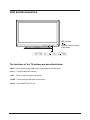
Unit and Accessories
LED Indicator
Remote Control Window
(keep clear)
The functions of the TV buttons are described below.
Menu :Touch to display the OSD menu, press again to exit the menu.
Vol +/- : Touch to adjust the volume.
CH+/- : Touch to skip through the channels.
TV/AV : Touch to display the input source menu.
Power : Turn ON/OFF the TV set.
4
Unit and Accessories (continued)
U
TV set
Remote Control
Converter cable
for AV IN
Remote Guide
Remote Guide
Converter cable
for YPBPR video
QUICK START
GUIDE
Quick Start Guide
5
Batteries
Converter cable
for MINI SCART
Warranty Card
USER GUIDE
Warranty Card
User Guide
Remote control
Functions of remote control buttons
Dependant on the model of theTV some keys will have no function
iViewer
Only used on TVs with Internet Player*.
In this mode the remote does not control
the TV.
to control the TV again.
Press
If you have set the remote to work a
Satellite receiver, the remote controls only
the Satellite receiver and not the TV when
you press
Press
to control the TV again.
Used on TVs with DVD* or PVR
Used on TVs with PVR or Internet Player*
HOLD
TEXT
Used on TVs with PVR or Internet Player*
*Dependant on Model
6
Remote control (continued)
Dependant on the Model of the TV some keys will have no function
Menu
TV Settings
Picture
Sound
Extras
Option *
Language
DVD setup *
Restore Setting
*Dependant on Model
Source Menu
ATV (Analogue)
DTV ( Freeview )
SD1 (red card)*
SD2 (green card)*
AV
Scart 1
Scart 2 *
S-Video*
HDMI 1
HDMI 2
HDMI 3
HDMI 4
YPbPr
DVD*
VGA
USB
Help
This displays a page that gives telephone
numbers for service.
Press to enter, press again to exit.
iViewer
Quick Start
Searches all ATV and DTV channels by a
single key (can take up to 10 Mins).
Lock
Info-Taste
In DTV mode shows Now / Next.
2nd Press
Extended programme Info.
Whilst Recording*
Shows details of the recording and space
available on the card.
Back
Exit from any Menu
Guide(DTV)
Press to enter, press again to exit.
DVD Eject *
Stop
For DVD*, iPlayer*, PVR, SD1*and SD2*.
Fast forward - DVD*&SD1*, SD2*, PVR
Reverse - DVD* &SD1*, SD2*, PVR
DVD Disc Menu *
Picture Mode
Displays picture and aspect function
Sound - changes the sound
Pause/Play
DVD*, iPlayer*, SD1* und SD2*
PVR and Time shift
Next - DVD *, iPlayer*, PVR
Display the Playback list on SD1*
(red card)
Display the Recorded list
Previous- DVD *, iPlayer*, PVR
Soft Keys
The action they perform is shown on the
menu and changes for each menu .
Display the Playback list on SD2*
(green card)
Subtitles
DVD and DTV mode only.
Teletext / MHEG5
(You can not record this)
HOLD
TEXT
A
Displays the red recording list.
(The programmes you have booked to be
recorded).
Displays the timer schedule list.
B*
Displays the green recording list.
(The programmes you have booked to be
recorded).
7
Remote control (continued)
Dependant on the model of TV some keys will have no function
*Dependant on Model
iViewer
HOLD
TEXT
DVD
8
S
Remote control (continued)
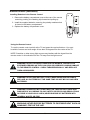
Installing Batteries in the Remote Control
1. Remove the battery compartment cover at the rear of the remote
control by pushing the retaining clip forward and pulling up.
2. Install the supplied batteries, ensuring the polarity matches what
is shown in the battery compartment.
3. Replace the battery compartment cover.
Using the Remote Control
To use the remote control point it at the TV and press the required buttons. You must
be within 6 meters and at an angle of less than 30 degrees from the center of the TV.
NOTE: Sunshine or other strong light sources may interfere with the signal from the
remote control. In this situation turn the TV away from the light source.
WARNING! DO NOT LEAVE BATTERIES IN THE REMOTE CONTROL FOR
EXTENDED PERIODS AS THEY CAN LEAK OR CORRODE CAUSING DAMAGE
TO THE REMOTE CONTROL. CHECK THEM PERIODICALLY AND REPLACE
THEM AS REQUIRED.
WARNING! DO NOT MIX BATTERY TYPES. WHEN INSERTING BATTERIES,
REPLACE ALL BATTERIES AT THE SAME TIME. DO NOT MIX OLD AND NEW
BATTERIES.
WARNING! EXHAUSTED BATTERIES MUST BE TREATED WITH CARE AND
DISPOSED OF ACCORDING TO ANY SAFETY OR RECYCLING REGULATIONS
IN FORCE IN YOUR LOCAL AREA, NEVER DISPOSE OF BATTERIES INTO
GENERAL WASTE, OR FIRE.
WARNING! NEVER EXPOSE BATTERIES TO EXCESSIVE HEAT SUCH AS
SUNSHINE, FIRE OR THE LIKE.
9
Aerial connection
USER GUIDE
WARNING! ENSURE THE TV AND ALL ANCILLARY EQUIPMENT IS
UNPLUGGED FROM THE MAINS BEFORE MAKING ANY CONNECTIONS!
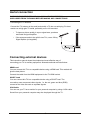
Connecting the TV Antenna
Connect the TV antenna to the aerial socket with a 75 ohm co-axial plug. For best
results use a high gain TV aerial, preferably roof or loft mounted.
•
To improve picture quality in a poor signal area, purchase
and install a signal amplifier.
•
If the antenna needs to be split for two TVs, use a 2-Way
Signal Splitter (not supplied).
audio in
PC
Coax
Headphone out
HDMI4
SCART
YPbPr
AV IN
Connecting external devices
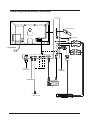
This instruction manual shows the simplest and most effective way of
connecting your TV to ancillary equipment. Alternate methods are listed below.
HDMI Lead
You can connect this TV to a compatible device using a HDMI lead. This method will
give the best picture.
Connect the cable from the HDMI equipment to the TV HDMI socket.
SCART Lead
You can connect this TV to a compatible device using a SCART lead. The
connection uses component video signals, i.e. the red, green and blue (RGB)
content of the video are sent on separate signals.
VGA Cable
You can use your TV as a monitor for your personal computer by using a VGA cable.
Sound from your personal computer may also be played through the TV.
10
RF
Common Interface
Connecting external devices (continued)
AV IN
TV Signal
SCART
YPbPr
Headphone out
RF
Common Interface
Common Interface
Audio out
L
USB
HDMI1
HDMI2
HDMI3
R
Output to
Audio amplifier
VGA
audio in
PC
Coax
HDMI4
AC POWER IN
Output to
Audio amplifier
USB device
Satellite Box
or Blue Ray DVD
11
Connecting external devices (continued)
CONNECTIONS
Name
AC POWER IN
RCA audio output
USB
HDMI1/2/3/4
VGA
PC-IN
Function Description
Connect to power supply
Output to audio amplifier
Connect to USB device for multimedia
Connect to the HDMI socket of your DVD or Satellite Box
Connect to the PC VGA output to display PC graphics
PC audio input
Coax out
mini SCART
mini YPbPr
Output to Audio amplifier
Connect to the scart input / output of external devices
Connect to the YPbPr output on external devices
mini AV(Video)
Connect to the video output of external devices
Audio signal input for AV(Shared with YPbPr)
mini AV(audio)
Headphone
Connect Headphone
RF
Connect to TV-Aerial
CI
CI slot (pay as you view card slot)
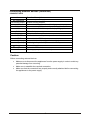
Caution:
Before connecting external devices:
x Makes sure to disconnect the appliances from the power supply in order to avoid any
potential damage from occurring.
x Make sure to establish the required connection.
x Make sure that the connectors are properly and correctly attached before connecting
the appliances to the power supply.
6
12
Connecting external devices (continued)
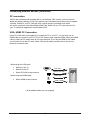
PC connection
As PCs are sometimes still supplied with a ‘conventional’ CRT monitor, you may need to
adjust the display settings of your PCs graphics card, otherwise the pictures may not appear
correctly. Switch on your PC (still with your original monitor connected) no w select
the screen resolution, and select 60Hz refresh rate. Switch off your PC, then connec t it to
your TV while both appliances are still switched off.
VGA, HDMI PC Connection
Use a PC-VGA cable (not supplied) to connect the TV to your PC. You can also use an
HDMI cable to connect to your PC (if your PC Graphic card supports HDMI). When the HDMI
cable is used, the PC audio cable is no longer required. If you use the HDMI to DVI cable,
you will need to use the PC audio cable. Connect all cables carefully and do not bend or
break the connector pins.
When using the VGA cable
x Switch on the TV
x Switch on the PC
x Select PC/VGA as input source
VGA cable HDMI to DVI cable
When using the HDMI cable
Audio cable
x Select HDMI as input source
HDMI to HDMI
( All illustrated cables are not supplied)
13
Connecting external devices (continued)
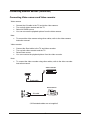
Connecting Video camera and Video recorder
Video camera
x
x
x
x
Connect the AV cable to the TV and to the video camera.
Turn on both video camera and the TV.
Select AV/CVBS source
You can now see the playback picture from the video camera. Note:
x To connect the video camera using other cables, refer to the video camera
instruction manual.
Video recorder
x
x
x
x
Connect the Scart cable to the TV and video recorder.
Turn on both video recorder and the TV.
Select Scart source
You can now see the playback picture from the video recorder.
Note:
x To connect the video recorder using other cables, refer to the video recorder
instruction manual.
Video recorder
Scart cable
Video camera
AV cable
All illustrated cables are not supplied
14
Connecting external devices (continued)
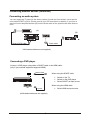
Connecting an audio system
You can supply the TV sound to the stereo system (A) with the Scart socket. Use a special
scart cable SCART to RCA. (Please consult your hi-fi instructions for details). If you have a
surround sound amplifier/decoder (B) Use the Scart cable or the special scart cable Scart to
RCA.
(A)
Scart to RCA cable
(B)
Scart cable
All illustrated cables are not supplied)
Connecting a DVD player
Connect a DVD player using either a SCART cable or the HDMI cable.
(only if your external equipment supports HDMI).
HDMI to HDMI
When using the SCART cable
x Switch on the TV
x Switch on the DVD player
x Select SCART as input source
When using the HDMI cable
SCART
x Select HDMI as input source
(All illustrated cables are not supplied)
15
USER GUIDE
Common Interface Slot
USING YOUR COMMON INTERFACE SLOT
Common Interface
The Common Interface (CI) slot is designed to accept the Conditional Access
Module (CAM) and Smart Card in order to view the pay TV programmes and
additional services. Contact your Pay Per View TV service provider to get more
information about the modules and subscriptions.
NOTE: Conditional Access Module and Smart Cards are sold separately.
WARNING! SWITCH OFF YOUR TV BEFORE ANY MODULE IS INSERTED INTO THE
COMMON INTERFACE SLOT, THEN ADD THE SMART CARD TO THE
CAM.
1. Turn on the TV and ensure ‘DTV’ Source is selected.
2. If the CAM is detected the TV will display the following message on the
screen. "Common Interface Module inserted" wait for a few moments
until the card is activated.
3. Select the relevant digital Pay Per View channel.
4. Detailed information on the Smart Card in use is displayed
5. Press the Ok button to access the card menu. Refer to the Module
Instruction Manual for setting details.
6. When the module is removed, the following message will appear on the
screen. "Common Interface module removed".
16
Auto installation setup
Power On / Off the TV
To turn on the TV
Touch the power button on the TV or press the
indicator will light green.
To turn off the TV
Touch the power button on the TV or press the
indicator will light red.
button on the remote control, the standby
button on the remote control, the standby
When you initially turn on the TV you will see the first time installation menu as below:
Ensure that the aerial is plugged in to the TV,
Make sure your Remote is in TV mode (by
pressing TV button), switch on the TV by
pressing
. You will see the first time
installation menu.
Press the
button on the remote control to
start the tuning procedure. This process will
find all available ATV and DTV channels and
store them.
By pressing the Quick Start button the first
time installation can be recalled at any time.
Source Menu You can select the input source menu by pressing the Source button on the remote control or
the TV / AV button on the TV.
DTV
Source
ATV
SCART
YPBPR
PC
HDMI1
HDMI2
HDMI3
HDMI4
OK
AV
USB
17
BasLc Use
Menu Settings
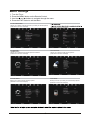
1. Turn the TV on.
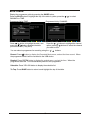
2. Press the MENU button on the Remote Control.
3. Use the
and
buttons to navigate through the menu.
4. Press the EXIT button to exit the Menu.
TV SETTINGS MENU
Allows you to search channels and set up a variety of channel options.
(Select DTV source for example)
(Select DTV source for example)
EXTRAS MENU:
Allows you to setup a variety of time options.
(Select DTV source for example)
Allows you to customize the sound options and effects.
(Select DTV source for example)
OPTIONS MENU:
LOCK MENU:
Allows you to setup a variety of setup options.
(Select DTV source for example)
Allows you to set up a variety of lock and setup options.
(Select DTV source for example)
18
Application
Menu Settings (continued)
1. TV SETTINGS menu
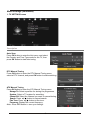
Description
Auto Scan
Press OK button to enter the hint menu, and select
the Country and Tune Type mode for the TV, then
press OK button to start auto tuning.
DTV Manual Tuning
Press OK button to enter the DTV Manual Tuning menu,
select a DTV channel, and press OK button to start searching.
ATV Manual Tuning
Press OK button to enter the ATV Manual Tuning menu.
Storage To: Select a position for storing the programme.
System: Select a TV system for searching.
Current CH: Select the channel you want to manual tuning.
Search: Press
/ button to manual search.
Fine Tune: Press
/ button to fine-tune.
Frequency: Display the current frequency.
Note: Press RED button to save your settings
19
Menu Settings (continued)
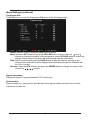
Programme Edit
Press OK button to enter the Programme Edit menu as the following picture.
Delete: Select a channel and press RED button to delete.
Move: Select an ATV channel, and press YELLOW button, then you can use and buttons to change the position of the programme, press YELLOW again to confirm the
change. Press menu to exit and it will automatically save the current set.
Skip: Select a channel and press the BLUE button to label the channel, as long as the
channel has a skip label it will be skipped when searching through the channels with
the CH+/- buttons.
Rename: Select an ATV channel and press the GREEN button to change the name of the
channel by buttons
Signal Information
Display the digital TV-signal information (DTV mode only).
CI Information
Please contact your “pay perview” provider who can supply a viewing card and cam unit with
instructions for their use.
20
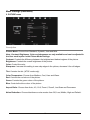
Menu Settings (continued)
2. PICTURE menu
Description
Picture Mode: Choose from Standard, Dynamic, User and Mild.
Note: Contrast, Brightness, Color and sharpness are only available and can be adjusted in
the User mode option in the Picture Mode Settings.
Contrast: Controls the difference between the brightest and darkest regions of the picture.
Brightness: Controls the overall brightness of the picture.
Color: Control the color.
Sharpness: Increase this setting to see crisp edges in the picture; decrease it for soft edges.
Tint: Controls the tint ( NTSC mode only).
Color Temperature: Choose from Medium, Cool, User and Warm.
Red: Controls the red colour of the picture.
Green: Controls the green colour of the picture.
Blue: Controls the blue colour of the picture.
Aspect Ratio: Choose from Auto, 4:3, 16:9, Zoom1, Zoom2, Just Scan and Panorama.
Noise Reduction: Choose interference noise modes form Off, Low, Middle, High and Default.
21
Application
Menu Settings (continued)
3. SOUND menu
Description
Sound Mode: Allows you to select among: Standard, Music, Movie, Sports and User.
Treble(Can be adjusted when the sound mode is User): Controls the relative intensity of
higher pitched sounds.
Bass (Can be adjusted when the sound mode is set to User): Controls the relative intensity of
lower pitched sounds.
Balance: To adjust the balance of the left and right sound track, or turn off the volume of the
left and right sound track.
Auto Volume: Control the volume of the programme automatically when you turn on the function
by selecting “On”.
Surround Sound: Turn on/off the surround sound function by selecting “off”/“surround”.
22
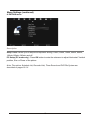
Menu Settings (continued)
4. EXTRAS menu
Description
Sleep Timer: Allows you to setup the sleep timer among: 10min, 20min, 30min, 60min, 90min,
120min,180min, 240min and off.
PC Setup (PC mode only) : Press OK button to enter the submenu to adjust Horizontal / Vertical
position, Size or Phase of the picture.
Note: The options Schedule List, Recorded List, Timer Record and PVR File System are
described on pages 29 -31.
23
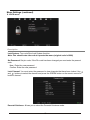
Menu Settings (continued)
5. OPTIONS menu
Description
OSD Language: Allows you to select menu language.
Audio Language (can be selected in DTV mode): Allows you to select audio language.
Subtitle Language (can be selected in DTV mode): Allows you to select subtitle language.
Menu Time Out: Allows you to setup the time of the menu display on the screen among:
5s, 10s, 15s, 20s, 25s, 30s, 35s, 40s.
Country: Displays UK, this can be changed by using the Auto tune function.
Restore Setting: Press OK button to restore factory default.
24
Menu Settings (continued)
6. LOCK menu
Description
Lock System: Turn on/off the Lock System function.
Note: You should enter the code to operate the menu.(original code is 0000)
Set Password: Set pin code. If the Pin code has been changed you must enter the present
code.
New : Enter the new password.
Confirm: Enter the new password.
Lock Channel: You must enter the password to view channels that have been locked. Use
and
buttons to select the channel and press the GREEN button on the remote control to
lock the channel.
Parental Guidance: Allows you to select the Parental Guidance mode.
25
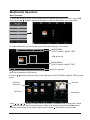
Multimedia Operation
Basic Operation
1). Press the SOURCE button on the remote control to display the input source menu, select USB
source by the /
buttons, and press OK button to enter the Multimedia menu seen below.
DTV
ATV
SCART
YPBPR
PC
HDMI1
HDMI2
HDMI3
HDMI4
AV
USB
Select
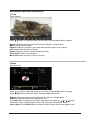
2). Insert USB device, you will find the name of the device display on the screen.
MAINS MENU
PHOTO MUSIC MOVIE TEXT
USB device list
Disk C:
MAINS MENU
PHOTO MUSIC MOVIE TEXT
Hints for operation
Select
Hints and informations of USB device
3). Press
or play.
/
button to select the files on the USB device (PHOTO, MUSIC, MOVIE, TEXT) to view
Preview
Return to
device list
Up Folder
Information
Press /
/
/
buttons to select and the OK button to activate the file or open folder. Press
button to play the files in full screen mode. When in full screen mode press the OK button to
show the option menu on the bottom of the screen or press
stop button to return to files.
26
Multimedia Operation (continued)
1. Photo
Photo viewing
Press
/
button to select the option on the menu, and press OK button to change.
Repeat: Select the repeat mode from Repeat All, Repeat 1, Repeat None.
Music: Play/Pause the music.
Playlist: Display the playlist on the screen and select the photo of your choice.
Info: Display the information of the file.
Rotate: Rotate the photo clockwise/counterclockwise.
Zoom Out/In: Zoom out/in the photo.
Move View: Move the photo in Zoom out mode.
2. Music
Play the music
Screen Saver
Search
Press
Press
/
/
button to select the option on the menu, and press OK button to change.
button to select the music, and press OK button to play.
Repeat: Select the repeat mode from Repeat All, Repeat 1, Repeat None.
Search: Program the music from the time you set.
Press OK button to display the time table, and select the position by / / / button,
set the time by the number buttons, select “OK” and press OK button to search.
Screen Saver: Press BLUE button to enter the Screen Saver mode, press again to exit.
27
Multimedia Operation (continued)
3. Movie
Play the movie
Press
/
button to select the option on the menu, and press OK button to change.
Repeat: Select the repeat mode from Repeat All, Repeat 1, Repeat None.
Set A-B: Select and play the preferable part of the file by setting A and B at the beginning and end.
Press OK button to cancel.
Playlist: Display the playlist on the screen.
Info: Display the information of the movie.
Slow: Play the movies at slow speed, press
button to cancel.
Step: Step quickly through the movie by using this option
Search: Program the movie form the time you set.
Zoom out/in: Zoom out/in the movie screen.
Aspect Ratio: Select the aspect ratio of the screen display.
Move View: Move the photo in Zoom out mode.
4. Text
View the text
Press
/
button to select the option on the menu, and press OK button to change.
Prev/Next page: Turn to previous/next page of the text.
Prev./Next: Turn to previous/next file.
Stop: Stop auto turning pages.
Music: Play/pause the music programme.
Playlist: Display the playlist on the screen.
Info: Display the information of the text.
28
Recording Operation
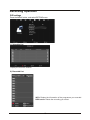
PVR settings
Press the MENU button, and select EXTRAS menu.
1). Schedule List
Display the recorder shedule.
2). Recorded List
INFO: Display the information of the programme you recorded.
RED button: Delete the recording you select.
29
Recording Operation (continued)
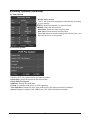
3). Timer Record
Set the timer record
The TV will record the programme automatically according
to your settings.
TITLE: Select the channel you want to record.
MODE: Select the record mode.
Start Time: Select the start recording time.
End Time: Select the end recording time.
Press OK button to save the setting and exit the menu, and
there will be a hint on the screen.
4). PVR File System
Setup the PVR File system before you start recording.
Select Disk: Select the device for the Record files.
Check PVR File System
USB Disc: Display the USB state.
Format: Format the USB device for PVR operating.
Time Shift Size: Display the size of the USB device (The device has been formated).
Speed: Display the speed of the USB device (The device has been formated).
30
Recording Operation (continued)
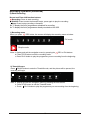
5) Start Recording
Record and Time shift function buttons
Recording: Press to start recording.
PAUSE: Press to enter the timeshift mode, press again to play the recording.
Stop: Press to stop recording or timeshift.
B: To display the list of programmes scheduled for recording.
A: To display the list of programmes already recorded on the USB.
1) Recording menu
When you press
REC button, the screen will display the recording menu as below:
Full mode
Simple mode
Note: a. display and exit the navigation menu by pressing the
REC or Exit buttons.
b. Press STOP button to exit the recording mode.
c. Press PLAY button to play the programme you are recording from the beginning.
2) Timeshift menu
Press PAUSE button to enter the Timeshift mode, and the picture will be paused, the
recording will begin.
Note: a. Display and exit the navigation menu by pressing the Exit buttons.
b. Press STOP button to exit the Timeshift mode.
c. Press
PLAY button to play the programme you are recording from the beginning.
31
EPG menu
Display the programme guide by pressing the GUIDE button.
Press the BLUE button to highlight the top of the table in yellow, press the
CHANNEL or TIME.
Programme list by TIME
/
to select
Programme list by CHANNEL
Press
/ button to highlight the date, now
press the / buttons to select the date
you want to view (7 day EPG)
Press the / buttons to highlight the channel
option, press / buttons to select the channel
you want to view.
You can select a programme for recording using the
/
buttons.
Record: Press R button to display the Recorded Mode menu, and set the timer record. When
the programme starts it will be recorded to the USB device.
Remind: Press GREEN button to display the remind menu, and set the time. When the
programme starts the TV will automatically switch to this programme.
Schedule: Press YELLOW button to display the schedule list.
To Top: Press BLUE button to return to and highlight the top of the table.
32
USER GUIDE
TROUBLE SHOOTING GUIDE
To assist in locating possible faults use the help guide below.
SYMPTOM
TROUBLESHOOTING
No Picture, no sound
Check that the TV is correctly plugged in.
Check that the TV is connected to a suitable power source.
Check the electrical supply is turned on.
Ensure that the TV is powered on.
Check that the cables are fitted securely.
Ensure the aerial and/or external sources are connected.
Press the SOURCE button to change the source.
Turn the TV on or off.
Press the MUTE button and check if Mute mode is set.
Switch to another channel and see if the same problem
occurs.
Press V+ button to see if the problem can be solved.
Check that correct channel is selected
Adjust the antenna.
Check if the same problem exists on other channels.
Ensure the correct picture settings are selected.
No Picture
No Sound
No picture on some
channels
No colour on some
channels (black &
white)
Noisy, Snowy,
Ghosting picture.
Check the antenna is connected correctly.
Check that the antenna Is in good condition.
Try moving the antenna.
If none of the suggestions seem to work, try switching your TV off and then on again. If this
does not work contact our technical helpline 0871 288 7345.
NOTE: The TV must only be repaired by a qualified registered service person. Never
attempt to remove the back cover as the TV has dangerous voltages inside that may cause
fatality or fire.
33
TECHNICAL SPECIFICATIONS
Specifications of the TV that you have just purchased may vary from the information in this
table due to technical innovations.
TV Specifications
TV System
PAL / BG / DK / I
Audio System
BG / DK / I
Screensize
32”(Diagonal)
Resolution
1920 x 1080Pixels(RGB)
Aerial input
75
Audio output power
2 x 6W
Power requirements
100-240V
Power consumption
100W
Standby power consumption
<1W
Weight
9.20 kg
(unbalanced)
50/60Hz
Remotecontrol specifications
Type
Controldistance
ControlanglH
Batteries
Dimensions
Weight
Infrared
5m
30 degrees(Horizontal)
2 x 1.5V,SizeAA
60 x204 x32mm
140g(withoutbatteries)
34
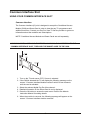
Wall Mounting
1. The stand must first be removed. Place the TV face down.
2. Remove the five screws on the back of the TV to release the stand.
3. Remove and store the stand and screws.
4. Use four machine screws to mount the TV on the bracket.
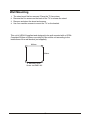
This unit is VESA-Compliant and designed to be wall mounted with a VESACompliant 200mm x 200mm mounting kit. Mount this unit according to the
instructions of the wall bracket (not supplied)
200mm
200mm
4 Mounting holes
Screw size MB5 x25
35