1
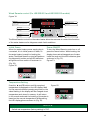
Wired Remote control (For HSE-SBS-015 and HSE-SBS-025 models)
Figure 19
HEATING
SET
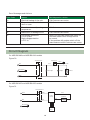
LED Display
Backlight LED indicators
Indicates the different modes of the
Water Heater.
Indicates the water temperature, energy
consumed and Error messages flash in the
event of a failure.
C
2kW
kWh
Thermostat
Increases or decreases the set
temperature.
ENERGY
METER
Power button
Used to switch ON/OFF the
water heater.
Energy Meter
Used to display the total Energy
consumption of the Water Heater.
ON/OFF
The Wired Remote control for the water heater allow the customer to control the functions
of the water heater and to diagnose certain fault conditions.
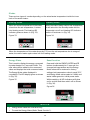
Initial Power
Power ON/OFF
When the water heater power supply plug is
connected, it is in initial power on state, i.e.
the water heater is ready for heating the
water. The Wired Remote control will perform
the diagnosis function and all LED indicators
will glow and then switch off as shown in
(Fig. 20).
Figure 20
To turn the Wired Remote control on or off,
press the Power button. While heating, the
display shows actual temperature of water
inside the tank and the LED indicators glow
as shown in (Fig. 21).
Figure 21
HEATING
C
HEATING
2kW
SET
kWh
SET
ENERGY
METER
C
2kW
kWh
ON/OFF
ENERGY
METER
ON/OFF
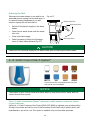
Temperature Setting
Press the S and T buttons until the required
temperature is displayed on the LED display. Wait
for few seconds without pressing any buttons, the
value flashing in the display will be changed as set
temperature and stored in memory. It will return
to its normal mode and the heating of the water is
based on the new set temperature. While setting,
the LED display glows as shown in (Fig. 22).
Figure 22
NOTICE
Default set temperature (factory setting) is 70°C.
13
HEATING
C
2kW
or
ON/OFF
SET
kWh
ENERGY
METER