1
4
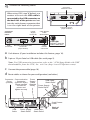
Connect the following cables.
Connector
Interface Panel
When using USB ( step “b” below), use
caution to ensure the USB cable is
connected to the USB connector on
the back left of the printer and not
into the cash drawer connector that
is on the right back of the printer.
Connector Cover
(Open Position)
Power
Supply
Connector
Connector
Interface
Panel
USB
Connector
RS-232C Communication
Connector
(9-pin shown)
Cash Drawer
Cable
Strain Relief
Cash
Drawer
Connector
CAUTION:
DO NOT plug the
USB Cable here.
a Cash drawer (if your installation includes this feature, page 10).
b 9-pin or 25-pin Serial or USB cable (for serial page 9).
Note: For USB connection instructions refer to the “A794 Setup Guide with USB”
downloadable from the TPG, Inc. web site (http://www.TPGprinters.com).
c Connect the power cable (page 10).
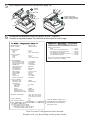
d Route cables as shown for your configuration (see below).
Connector Communication Power
Connector
Supply
Cover
Cable
(Closed) (RS-232C 9-pin)
(Route straight (Straight
out back of
back)
printer and
tighten screws)
USB Cable
Strain Relief
Power Supply
Strain Relief
USB
Cable
Cash Drawer
Cable
USB
Cable
Power Supply
Strain Relief
USB Cable
Strain Relief
Back of
Printer