1
14
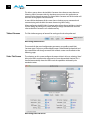
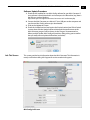
Name—this field allows you to give your Mini-Converter a name. This may be useful
if you have several Mini-Converters attached to a Mac/PC via USB so you can
distinguish one of them easily (especially if they’re the same model). In the
example show previously, the Hi5-3G has been named “HDP2.”
Type—this is the factory set model name of the Mini-Converter (HDP2).
Assembly —this is the factory assembly number.
Serial Number—this is the factory set unique serial number of your HDP2. If you ever
call AJA Support for service, you may be asked for this number.
Specifications
Item
Specification
Inputs
HD, and SD-SDI (auto-selected), SMPTE-259/274/292/
296, BNC connector
Input Formats
525i, 625i,
720p 50/59.94/60,
1080i 50/59.94/60,
1080p 23.98/24/25/29.9/30,
1080psF 23.98/24/25, YCbCr 10-bit
Video Outputs
DVI v1.0 / HDMI v1.3a, 4:2:2 YCbCr, 4:4:4 YCbCr/RGB 24/
30-bit, DVI-D standard male connector
Audio Outputs
2 channel RCA-style analog outputs (-10dBV nominal) as
user-assignable channel pairs, 2 or 8 channel 24-bit
embedded audio (HDMI mode only)
Maximum DVI resolution
1920 x 1200 @ 60Hz
User Controls
USB 2.0 port used with supplied cable and software
application to configure device via PC/Mac
Size
5.8” x 3.1” x 1 (147mm x 79mm x 25mm)
Power
(AJA power supply model DWP or
DWP-U)
+5 to +18v DC regulated, 5 watts