1
2. Functions
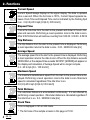
Current Speed
Current Speed always displays in the upper display. The data is updated
once a second. When the font size is 100%, Current Speed appears between Clock Time and Elapsed Time and is indicated by the flashing Spd
icon. 0.0(3.0)-65.9 mph [0.0(4.0)-105.9 km/h]
Elapsed Time
This is the ride time from the start to the present and shown in hours, minutes and seconds. Performing a reset operation returns the data to zero.
After 9.59.59 the timer will continue counting from 0.00.00. 0.00.00 - 9.59.59
Trip Distance
The trip distance from the start to the present time is displayed. Performing
a reset operation returns the data to zero. 0.00 - 99999.99 mile [km]
Average Speed
The average speed from the start to the present time is displayed. Performing
a reset operation returns the data to zero. When the trip distance exceeds
99999.99km or the elapsed time exceeds 99:59'59", [ERROR] will appear on
the display and calculation of Average Speed will no longer compute.
0.0 - 65.9 mph [0.0 - 105.9 km/h]
Maximum Speed
The maximum instantaneous speed from the start to the present time is displayed. Performing a reset operation returns the data to zero. Maximum
speed is calculated regardless if the ride timer is on.
0.0(3.0)-65.9 mph [0.0(4.0)-105.9 km/h]
Total Distance
The odometer distance is accumulated continuously. It is not effected by
performing a reset operation. Odometer distance is calculated regardless if
the ride timer is on. 0.0 - 999999.9 mile [km]
Clock Time
Time is displayed in 12h or 24h mode.
* The font size of the sample screens in this page is 70:30.
4
OS 1.0