1
English
8
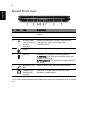
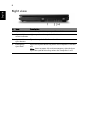
Right view
#
Item
Description
1
Optical drive
Internal optical drive; accepts CDs or DVDs
2
Optical disk
access indicator
Lights up when the optical drive is active.
3
Optical drive
eject button
Ejects the optical disk from the drive.
4
Emergency
eject hole
Ejects the optical drive tray when the computer is turned
off.
Note: Insert a paper clip to the emergency eject hole to
eject the optical drive tray when the computer is off.