1
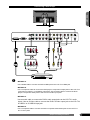
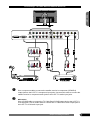
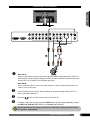
Connecting a DVD Player ENGLISH HDMI VGA VGA-LINE Y1 Pb1 Pr1 L1 R1 DVI-LINE Y2 Pb2 Pr2 L2 R2 ANT. ATSC S-VIDEO1 VIDEO AV1 AV2 S-VIDEO2 ANT. NTSC /Pb /Pr A C B D /Pb /Pr DVD PLAYER METHOD A: Use a HDMI cable to connect the DVD’s HDMI jack to the LCD TV’s HDMI jack. METHOD B: Use a component cable to connect the DVD player’s component output jacks to the LCD TV’s component (Y1Pb1Pr1 or Y2Pb2Pr2) input jacks. Use an audio cable to connect the DVD player’s component audio jacks to the LCD TV’s audio input jacks. METHOD C: Use an audio cable to connect the DVD’s audio output jacks to the LCD TV’s audio inputs. Use an S-Video cable to connect the DVD’s S-video output jack to the LCD TV’s S-VIDEO1 or S-VIDEO2 input jack. METHOD D: Use a composite cable to connect the DVD’s composite video/audio jacks to the LCD TV’s AV1 or AV2 jacks. Chapter 2 Installing the LCD TV 19