1
SECTION 8
Special Applications
Guide
Rubber Stamps
There are two methods used to create a rubber stamp, the single stamp method and the full
sheet method. In the following examples will show you the step by step method of creating both
a single rubber stamp and a full sheet of stamps.
Single Stamp Method
WHITE FILLED TEXT
WHITE FILLED GRAPHIC
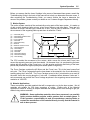
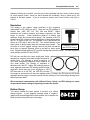
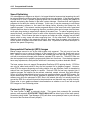
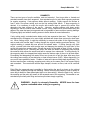
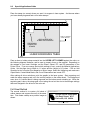
To create the artwork and engrave only one or a
MIRRORED IMAGE
few stamps, set the page size in the graphics
program to something smaller than the full field.
Just as an example, we will use a page size that
is 8.5 x 11 inches (215.9 x 292.1 mm) in the
Landscape mode. In this way we can output to
a paper printer, before engraving, for
BLACK FILLED BOX
RED CUT LINE .001" THICK (MAXIMUM)
proofreading. Make sure that this page size is
set up the same in the printer driver. Create a negative style stamp by drawing a black box
slightly larger than the size of the stamp desired. Type in or add graphics within that area and
color them with a fill of white. If you want the laser to cut out your stamp, draw a red outline box
that is the smallest possible line thickness as your program allows. Make sure that the red
outline is inside the black box by at least .050 inches, otherwise there will be a little
rubber strip of rubber sticking up around the border that will unintentionally appear when
using the stamp.
1
1
2
3
4
5
6
7
8
9
10
11
12
Plainville, KS 99924
100 Easy Street #117
Action Sports Equipment
0
2
3
4
PLACE STAMP IN AN
UNUSED AREA
5
6
7
8
9
PREVIOUSLY
COMPLETED
STAMPS
GRAPHICS SOFTWARE
PAGE LAYOUT
11 INCHES ( 292.1 mm) WIDE
8.5 INCHES ( 215.9 mm) TALL
LANDSCAPE MODE
COMPUTER GRAPHICS SCREEN
13