1
CD663N(øµπÆ)
00.4.17 2:46 PM
∆‰¿Ã¡ˆ12
4. Troubleshooting
4. Troubleshooting
1. Troubleshooting
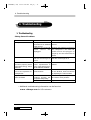
Solving General Problems
Problem
Computer won’t turn on
Blank screen
Monitor doses not
function properly when
used with energy saver
features
Sound does not come
out of the speaker or
headphones
System will not boot
from CD-ROM
Cause
Computer
is
not
connected to an external
power source
Cables to the external
power
source
are
unplugged
Monitor is not turned on
and the monitor light is
not on
Monitor without energy
saver capabilities is
being used with energy
saver features enabled
Software volume control
is turned down
The CD-ROM boot is not
enabled through the
Computer Setup utility
Non-biitable CD in drive
Solution
Connect to an external power
source
Ensure that cables connecting
the computer to the external
power source are pluggen in
properly and the wall outlet is
active
Turn on the monitor and check
that the monitor light is on
Disable monitor energy saver
feature
Double click on the speaker icon
on the tackbar, then set volume
by adjusting the volume slider
Run the Computer Setup utility
and set the drive priorities
Try a bootable CD in the drive
• Additional troubleshooting information can be found at
www. datuspc.com for US customers.
12
Qrium CD663N