1
3.1
OSD (On-Screen Display) menu
3.1.1
How to reconfigure
1.
2.
3.
4.
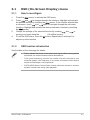
Touch the
sensor to activate the OSD menu.
Touch
and
to navigate through the functions. Highlight and activate
the desired function by touching the
sensor. If the function selected has
a sub-menu, touch
and
again to navigate through the sub-menu
functions. Highlight and activate the desired sub-menu function by touching
the
sensor.
Change the settings of the selected function by touching
moving your finger along the
(Scroll-Bar) sensor.
To exit the OSD menu, touch the
adjust any other function.
3.1.2
and
or
sensor. Repeat step 2 and step 3 to
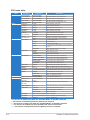
OSD function introduction
See the table on the next page for details.
•
Phase adjusts the phase of the pixel clock signal. With a wrong phase
adjustment, the screen shows horizontal disturbances.
•
Clock (pixel frequency) controls the number of pixels scanned by one
horizontal sweep. If the frequency is not correct, the screen shows vertical
stripes and the image is not proportional.
•
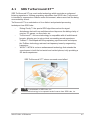
ASCR (ASUS Smart Contrast Ratio) function allows the monitor to enhance
dynamic contrast ratio during video playback.
ASUS PG221 LCD Monitor
3-