1
Introduction
Installation and Setup
Your iScan Pro package contains:
Typical configuration
• iScan Pro Line Doubling Upconverter
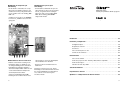
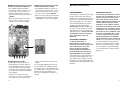
Figure 1 shows a typical configuration for a
home theater system. In this setup, the
iScan Pro is being used to enhance the output from a DVD player, a satellite receiver
and a VCR before the selected signal is sent
to a rear screen projection TV, or another
progressively scanned display device. Your
configuration may be significantly different
from this but the basic functional blocks –
input devices, input cables, iScan Pro, out-
• Universal power supply module
• Power cable (US and International)
• Composite video input cable
• S-Video input cable
• Component video input cable
put cable and display device – will exist in
your system.
One common deviation from this configuration is to use an A/V receiver or another
video switching device to the video signals
from the input devices. In this case, the
input devices shown below will be connected to the inputs of the A/V receiver. The output of the A/V receiver will then be the only
input device to the iScan Pro.
• User Manual
Your iScan Pro package does not contain an
output cable. You will need to purchase an
output cable that works with your display
device. There is more information on these
cables in the Installation section.
Figure 1
3
RGB/YPbPr Output
Y
+ +
2
Pb
Pr
1
DCin
-
+
+
+
video inputs
Set Top Box
Progressively
Scanned TV
or Projector
DVD
VHS
12:00
2
3