1
ReSound AzureTM
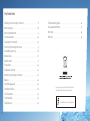
Contents
Your new digital ReSound Azure hearing instruments will enable
you to hear sounds that you may not have heard in years because of
your hearing loss. Practice and a positive attitude are important in
learning to use hearing instruments. While some people adjust quickly
to wearing hearing instruments in their ears and hearing the new
sounds, other people may need more time.
TM
The intent of this user guide is to provide information on the many
aspects of using hearing instruments. Your hearing instruments have
been adjusted to your hearing loss by your hearing care professional.
Familiarising yourself with the functions of your new hearing instruments will help you get optimal benefit.
Page
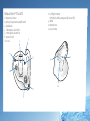
Illustration of the hearing instrument . . . . . . . . . . . . . . . . . . . . . . . . . . . . . 4
Adjusting to a world of new sounds . . . . . . . . . . . . . . . . . . . . . . . . . . . . . . . 6
New sounds . . . . . . . . . . . . . . . . . . . . . . . . . . . . . . . . . . . . . . . . . . . . . . . . . . . . . . . . 6
How to adjust . . . . . . . . . . . . . . . . . . . . . . . . . . . . . . . . . . . . . . . . . . . . . . . . . . . . . . 7
How to use the hearing instrument . . . . . . . . . . . . . . . . . . . . . . . . . . . . . . . 8
On/off function . . . . . . . . . . . . . . . . . . . . . . . . . . . . . . . . . . . . . . . . . . . . . . . . . . . . 8
Inserting the hearing instrument . . . . . . . . . . . . . . . . . . . . . . . . . . . . . . . . . 9
Removing the hearing Instrument . . . . . . . . . . . . . . . . . . . . . . . . . . . . . . . 10
Volume control (optional for all) . . . . . . . . . . . . . . . . . . . . . . . . . . . . . . . . . 11
Programme selector . . . . . . . . . . . . . . . . . . . . . . . . . . . . . . . . . . . . . . . . . . . . . . 12
Telephone use . . . . . . . . . . . . . . . . . . . . . . . . . . . . . . . . . . . . . . . . . . . . . . . . . . . . 14
Low battery warning . . . . . . . . . . . . . . . . . . . . . . . . . . . . . . . . . . . . . . . . . . . . . 16
Changing the battery . . . . . . . . . . . . . . . . . . . . . . . . . . . . . . . . . . . . . . . . . . . . 16
Maintenance . . . . . . . . . . . . . . . . . . . . . . . . . . . . . . . . . . . . . . . . . . . . . . . . . . . . . 17
Daily maintenance . . . . . . . . . . . . . . . . . . . . . . . . . . . . . . . . . . . . . . . . . . . . . . . 17
Cleaning and replacing the sound filters . . . . . . . . . . . . . . . . . . . . . . . . 18
Warnings and precautions . . . . . . . . . . . . . . . . . . . . . . . . . . . . . . . . . . . . . . . 19
Repairs . . . . . . . . . . . . . . . . . . . . . . . . . . . . . . . . . . . . . . . . . . . . . . . . . . . . . . . . . . . 22
Technical data . . . . . . . . . . . . . . . . . . . . . . . . . . . . . . . . . . . . . . . . . . . . . . . . . . . . 23
Troubleshooting . . . . . . . . . . . . . . . . . . . . . . . . . . . . . . . . . . . . . . . . . . . . . . . . . . 24
Key word index . . . . . . . . . . . . . . . . . . . . . . . . . . . . . . . . . . . . . . . . . . . . . . . . . . . 26
ReSound AzureTM is a trademark of ReSound.