1
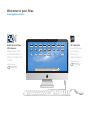
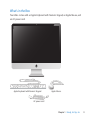
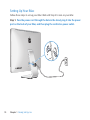
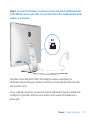
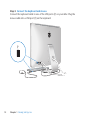
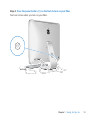
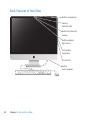
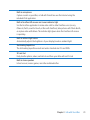
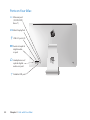
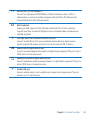
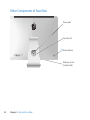
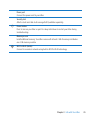
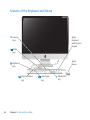
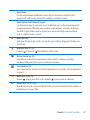
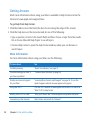
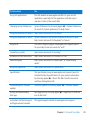
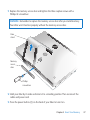
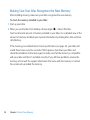
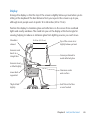
Congratulations, you and your iMac were made for each other. Welcome to your iMac. www.apple.com/imac Built-in FaceTime HD camera Make video calls to the latest iPad, iPhone, iPod touch, or Mac. Help Center facetime SD card slot Import photos and videos from your digital camera. Help Center SD card OS X Lion www.apple.com/macosx Launchpad Instant access to all your apps in one place. Full screen Make apps full screen with a click. Help Center mission control Help Center launchpad Help Center full screen Mail Group your messages by conversations. iPhoto Organize, edit, and share your photos. iMovie Turn home videos into home blockbusters. GarageBand Create greatsounding songs with ease. Help Center mail iPhoto Help photos iMovie Help movie GarageBand Help record Help Center mac app store LO F R O C A EL UP Mac App Store The best way to discover and download Mac apps. M H Mission Control A bird’s-eye view of what’s running on your Mac. E R T I N O, C Contents Chapter 1: Ready, Set Up, Go 9 What’s in the Box 10 Setting Up Your iMac 16 Putting Your iMac to Sleep or Shutting It Down 20 22 24 26 28 Chapter 2: Life with Your iMac Basic Features of Your iMac Ports on Your iMac Other Components of Your iMac Features of the Keyboard and Mouse Getting Answers Chapter 3: Boost Your Memory 33 Installing Memory 38 Making Sure Your iMac Recognizes the New Memory Chapter 4: Problem, Meet Solution 41 An Ounce of Prevention 41 Problems That Prevent You from Using Your iMac 44 Repairing, Restoring, or Reinstalling Mac OS X Software Contents 5 49 Checking for a Hardware Problem 50 Problems with Your Internet Connection 53 Problems with Wireless Communication 53 Keeping Your Software Up to Date 54 Learning More, Service, and Support Chapter 5: Last, but Not Least 58 62 63 64 66 Important Safety Information Important Handling Information Cleaning Your iMac Understanding Ergonomics Apple and the Environment 74 Index Looking for Something? 6 Contents 1 Ready, Set Up, Go www.apple.com/imac Help Center Migration Assistant Your iMac is designed so that you can easily set it up and start using it right away. If you’ve never used an iMac or are new to Mac computers, read this chapter for instructions about getting started. Important: Read all the setup instructions in this chapter and the safety information starting on page 58 before you plug your iMac into a power outlet. If you are an experienced user, you may already know enough to get started. Make sure you look over the information in Chapter 2, “Life with Your iMac,” to find out about the new features of your iMac. Answers to many questions can be found on your iMac in Help Center. For information about Help Center, see “Getting Answers” on page 28. Remove any protective film from the outside of your iMac before you set it up. 8 Chapter 1 Ready, Set Up, Go What’s in the Box Your iMac comes with an Apple Keyboard with Numeric Keypad, an Apple Mouse, and an AC power cord. Apple Keyboard with Numeric Keypad Apple Mouse AC power cord Chapter 1 Ready, Set Up, Go 9 Setting Up Your iMac Follow these steps to set up your iMac. Wait until Step 4 to turn on your iMac. Step 1: Pass the power cord through the hole in the stand, plug it into the power port on the back of your iMac, and then plug the cord into a power outlet. 10 Chapter 1 Ready, Set Up, Go Step 2: To access the Internet or a network, connect one end of an Ethernet cable to the Ethernet port on your iMac. Connect the other end to a cable modem, a DSL modem, or a network. ® Your iMac comes with 802.11n Wi-Fi technology for wireless networking. For information about setting up a wireless connection, choose Help from the menu bar and search for “wi-fi.” To use a dial-up connection, you need an external USB modem. Plug the modem into a USB port on your iMac, and then use a phone cord to connect the modem to a phone jack. Chapter 1 Ready, Set Up, Go 11 Step 3: Connect the keyboard and mouse. Connect the keyboard cable to one of the USB ports (d) on your iMac. Plug the mouse cable into a USB port (d) on the keyboard. d d ® d 12 Chapter 1 Ready, Set Up, Go Step 4: Press the power button (®) on the back to turn on your iMac. You hear a tone when you turn on your iMac. ® d ® d Chapter 1 Ready, Set Up, Go 13 Step 5: Configure your iMac. The first time you turn on your iMac, Setup Assistant starts. Setup Assistant helps you specify your Wi-Fi network, set up a user account, and transfer information from another Mac or PC. You can also transfer information from a Time Machine backup or other disk. If you’re migrating from another Mac, you might have to update software if the other Mac doesn’t have Mac OS X version 10.5.3 or later installed. To migrate from a PC, download Migration Assistant from www.apple.com/migrate-to-mac and install it on the PC you want to migrate from. After you start Setup Assistant on your iMac, you can leave it midprocess without quitting, move to the other computer if you need to update its software, and then return to your iMac to complete the setup. Note: If you don’t use Setup Assistant to transfer information when you first start up your iMac, you can do it later using Migration Assistant. Open Migration Assistant in the Utilities folder in Launchpad. For help using Migration Assistant, open Help Center and search for “Migration Assistant.” To set up your iMac: 1 In Setup Assistant, follow the onscreen instructions until you get to the “Transfer Information to This Mac” screen. 2 Do a basic setup, a setup with migration, or transfer information from a Time Machine backup or other disk: ÂÂ To do a basic setup, select “Don’t transfer now” and click Continue. Follow the remaining prompts to select your wired or wireless network, set up an account, and exit Setup Assistant. 14 Chapter 1 Ready, Set Up, Go ÂÂ To do a setup with migration, select “From another Mac or PC” and click Continue. Follow the onscreen instructions to select the Mac or PC you want to migrate from. Your Mac or PC must be on the same wired or wireless network. Follow the onscreen instructions for migrating. ÂÂ To transfer information from a Time Machine backup or another disk, select “From a Time Machine backup or other disk” and click Continue. Select the backup or the other disk that you want to migrate from. Follow the onscreen instructions. If you don’t intend to keep or use your other computer, it’s best to deauthorize it from playing music, videos, or audiobooks that you’ve purchased from the iTunes Store. Deauthorizing a computer prevents any songs, videos, or audiobooks you’ve purchased from being played by someone else, and frees up another authorization for use. For information about deauthorizing, choose iTunes Help from the Help menu in iTunes. Step 6: Customize your desktop and set your preferences. You can quickly make the desktop look the way you want using System Preferences, your command center for most settings on your iMac. Choose Apple () > System Preferences from the menu bar, or click the System Preferences icon in the Dock. Important: You can set an option to reset your password in Users & Groups preferences, in case you forget your login password. For help with System Preferences, open Help Center and search for “system preferences” or for the specific preference you want help for. Chapter 1 Ready, Set Up, Go 15 Putting Your iMac to Sleep or Shutting It Down When you finish working with your iMac, you can put it to sleep or shut it down. Putting Your iMac to Sleep If you‘ll be away from your iMac for less than a few days, put it to sleep. When your iMac is in sleep, its screen is dark. You can quickly wake your iMac and bypass the startup process. To put your iMac to sleep, do one of the following: ÂÂ Choose Apple () > Sleep from the menu bar. ÂÂ Press the power button (®) on the back of your iMac. ÂÂ Choose Apple () > System Preferences, click Energy Saver, and set a sleep timer. To wake your iMac from sleep, do one of the following: ÂÂ Press any key on the keyboard. ÂÂ Click the mouse. ÂÂ Press the power button (®) on the back of your iMac. When your iMac wakes from sleep, your applications, documents, and computer settings are exactly as you left them. 16 Chapter 1 Ready, Set Up, Go Shutting Down Your iMac If you won’t be using your iMac for more than a few days, shut it down. Choose Apple () > Shut Down. To turn your iMac on again, press the power button (®). NOTICE: Shut down your iMac before moving it. Moving your iMac while the hard disk is spinning can damage the hard disk, causing loss of data or an inability to start up from the hard disk. Chapter 1 Ready, Set Up, Go 17 2 Life with Your iMac www.apple.com/macosx Help Center Mac OS X Basic Features of Your iMac Built-in microphone Camera indicator light Built-in FaceTime HD camera Built-in ambient light sensor Slot-loading SuperDrive SD card slot Built-in stereo speakers 20 Chapter 2 Life with Your iMac Built-in microphone Capture sounds on your iMac, or talk with friends live over the Internet using the included iChat application. Built-in FaceTime HD camera and camera indicator light Use the FaceTime application to make video calls to other FaceTime users (on any iPhone 4, iPad 2, new iPod touch, or Mac with FaceTime), take pictures with Photo Booth, or capture video with iMovie. The indicator light glows when the FaceTime HD camera is operating. Built-in ambient light sensor Automatically adjusts the brightness of your display, based on ambient light. Slot-loading SuperDrive The slot-loading SuperDrive reads and writes standard-size CDs and DVDs. SD card slot Easily transfer photos, videos, and data to and from your iMac with an SD card. Built-in stereo speakers Listen to music, movies, games, and other multimedia files. Chapter 2 Life with Your iMac 21 Ports on Your iMac G Ethernet port (10/100/1000 Base-T) £ Mini DisplayPort d USB 2.0 ports (4) , Audio in/optical digital audio in port f Headphone out/ optical digital audio out port H FireWire 800 port 22 Chapter 2 Life with Your iMac ® G Ethernet port (10/100/1000Base-T) Connect to a high-speed 10/100/1000Base-T Ethernet network, connect a DSL or cable modem, or connect to another computer and transfer files. The Ethernet port automatically detects other Ethernet devices. £ Mini DisplayPort Output port with support for DVI, VGA, and dual-link DVI. The 27-inch model also supports input from an external DisplayPort source. Required cables and adapters are available separately. d Four high-speed USB (Universal Serial Bus) 2.0 ports Connect an iPod, iPhone, iPad, mouse, keyboard, printer, disk drive, digital camera, joystick, external USB modem, and more. You can also connect USB 1.1 devices. , Audio in/optical digital audio in port Connect an external powered microphone or digital audio equipment. This port is also a S/PDIF stereo 3.5 mini-phono jack. f Headphone out/optical digital audio out port Connect headphones, external powered speakers, or digital audio equipment. This port is also a S/PDIF stereo 3.5 mini-phono jack. H FireWire 800 port Connect external devices, such as digital video cameras and storage devices. The port provides up to 7 watts of power. Chapter 2 Life with Your iMac 23 Other Components of Your iMac Power port Security slot ® Power button ® Memory access (underneath) 24 Chapter 2 Life with Your iMac Power port Connect the power cord to your iMac. Security slot Attach a lock and cable to discourage theft (available separately). ® Power button Press to turn on your iMac or put it to sleep. Hold down to restart your iMac during troubleshooting. Memory access Install additional memory. Your iMac comes with at least 2 GB of memory installed as one 2 GB memory module. Z 802.11n Wi-Fi (inside) Connect to a wireless network using built-in 802.11n Wi-Fi technology. Chapter 2 Life with Your iMac 25 Features of the Keyboard and Mouse - Volume Apple Keyboard with Numeric Keypad keys Media keys Apple Mouse Brightness keys Mission Control key 26 Chapter 2 Life with Your iMac Launchpad key C Media Eject key Apple Mouse Use the programmable, multibutton mouse with its innovative scroll ball to click, squeeze, and scroll through documents, webpages, and other content. Apple Keyboard with Numeric Keypad Use the function keys for one-touch access to Mac features. Use the numeric keypad to navigate documents, efficiently enter numbers in spreadsheets, and make calculations. Two USB 2.0 ports make it easy to connect your mouse and a high-speed peripheral such as a digital camera or printer. C Media Eject key Hold down this key to eject a disc. You can also eject a disk by dragging its desktop icon to the Trash. Brightness keys (F1, F2) Increase ( ) or decrease ( ) the brightness of the screen. Mission Control key (F3) Open Mission Control for a comprehensive view of what’s running on your Mac, including Dashboard, all your spaces, and all open windows. Launchpad key (F4) Open Launchpad to instantly see all of the applications on your Mac. Click an application to open it. ’ Media keys (F7, F8, F9) Rewind ( ), play or pause (’), or fast-forward ( - Volume keys (F10, F11, F12) Mute (—), decrease (–), or increase (-) the volume of sound coming from the speakers or headphone port on your iMac. ) a song, movie, or slideshow. Chapter 2 Life with Your iMac 27 Getting Answers Much more information about using your iMac is available in Help Center, and on the Internet at www.apple.com/support/imac. To get help from Help Center: 1 Click the Finder icon in the Dock (the bar of icons along the edge of the screen). 2 Click the Help menu in the menu bar and do one of the following: ÂÂ Type a question or term in the Search field, and then choose a topic from the results list or choose Show All Help Topics to see all topics. ÂÂ Choose Help Center to open the Help Center window, where you can browse or search topics. More Information For more information about using your iMac, see the following: 28 To learn about See Installing memory “Boost Your Memory” on page 31. Troubleshooting your iMac if you have a problem “Problem, Meet Solution” on page 39. Finding service and support for your iMac “Learning More, Service, and Support” on page 54. Or see the Apple Support website at www.apple.com/support. Using Mac OS X The Mac OS X website at www.apple.com/macosx. Or search for “Mac OS X” in Help Center. Moving from a PC to a Mac “Why you’ll love a Mac” at www.apple.com/getamac/whymac. Connecting to the Internet Help Center and search for “Internet.” Chapter 2 Life with Your iMac To learn about See Using iLife applications The iLife website at www.apple.com/ilife. Or open an iLife application, open Help for the application, and then type a question or term in the search field. Changing System Preferences System Preferences by choosing Apple (K) > System Preferences. Or search for “system preferences” in Help Center. Using the FaceTime HD camera Help Center and search for “FaceTime.” Using your keyboard or mouse System Preferences and choose Keyboard or Mouse. Or open Help Center and search for “keyboard” or “mouse.” Using Wi-Fi The AirPort Support page at www.apple.com/support/airport. Or open Help Center and search for “wi-fi.” Connecting a printer Help Center and search for “printing.” FireWire and USB connections Help Center and search for “FireWire” or “USB.” External displays Help Center and search for “display port” or “target display mode.” Using the SuperDrive Help Center and search for “optical drive.” Specifications The Specifications page at www.apple.com/support/specs for standard technical specifications. Or open System Information by choosing Apple (K) > About This Mac from the menu bar and then clicking More Info. Downloading Mac software updates Software Updates by choosing Apple (K) > Software Update. Finding and downloading Mac apps Mac App Store by choosing Apple (K) > App Store. Or click the icon in the Dock. Instructions, technical support, and Apple product manuals The Apple Support website at www.apple.com/support. Chapter 2 Life with Your iMac 29 3 Boost Your Memory www.apple.com/store Help Center RAM Your iMac comes with at least 2 gigabytes (GB) of Double Data Rate 3 (DDR3) Dynamic Random Access memory (DRAM) installed as one 2 GB memory module. You can replace or install additional 2 GB or 4 GB memory modules for up to a maximum of 8 GB. Memory modules must meet the following specifications: ÂÂ Small Outline Dual Inline Memory Module (SO-DIMM) format ÂÂ 1333 MHz, PC3-10600, DDR3 compliant (also referred to as DDR3 1333) ÂÂ Unbuffered and unregistered WARNING: Apple recommends that you have an Apple-certified technician install memory. See “AppleCare Service and Support” on page 55 for information about how to contact Apple for service. If you attempt to install memory and damage your equipment, that damage isn’t covered by the limited warranty on your iMac. 32 Chapter 3 Boost Your Memory Installing Memory Your iMac has four memory slots. One is filled with at least a 2 GB memory module. You can install additional memory in the free slots or replace the memory in the filled slot with 2 GB or 4 GB memory modules, for up to 8 GB of memory. You can purchase additional Apple memory from an Apple Authorized Reseller, an Apple Retail Store, or the Apple Online Store at www.apple.com/store. WARNING: Always shut down your iMac and remove the power cord before installing memory. Do not attempt to install memory while your iMac is plugged in. To install memory: 1 Turn off your iMac by choosing Apple () > Shut Down. 2 Disconnect all cables and the power cord from your iMac. 3 Place a soft, clean towel or cloth on your work surface. Hold the sides of your iMac and lay it down so that the screen rests on the surface and the bottom faces you. Chapter 3 Boost Your Memory 33 4 Raise the stand and use a Phillips #2 screwdriver to loosen the three captive screws on the memory access door. Turn them counterclockwise. Raise stand Memory access door ® Phillips screwdriver 5 Remove the memory access door and set it aside. 34 Chapter 3 Boost Your Memory 6 Untuck the tabs in the memory compartment. 7 To replace memory modules, pull the tab to eject the installed memory module. Remove the memory modules you want to replace. Untuck the tabs ® Pull the tab Chapter 3 Boost Your Memory 35 8 Insert the new memory modules in the slots with the notches facing right, as shown in the illustration. ÂÂ If you install additional memory modules, insert them in the open slots. ÂÂ If you replace the installed memory modules, insert a new memory module in each of the slots farthest from the display. 9 Press each memory module firmly and evenly into its slot. You’ll hear a slight click when the memory module is seated correctly. 10Tuck the tabs into the memory compartment. ® Memory modules 36 Chapter 3 Boost Your Memory Tuck the tab 11 Replace the memory access door and tighten the three captive screws with a Phillips #2 screwdriver. WARNING: Remember to replace the memory access door after you install memory. Your iMac won’t function properly without the memory access door. Raise stand Memory access door ® Phillips screwdriver 12Hold your iMac by its sides and return it to a standing position. Then reconnect the cables and power cord. 13Press the power button (®) on the back of your iMac to turn it on. Chapter 3 Boost Your Memory 37 Making Sure Your iMac Recognizes the New Memory After installing memory, make sure your iMac recognizes the new memory. To check the memory installed in your iMac: 1 Start up your iMac. 2 When you see the Mac OS X desktop, choose Apple () > About This Mac. You’ll see the total amount of memory installed in your iMac. For a detailed view of the amount of memory installed, open System Information by clicking More Info and then click Memory. If the memory you installed doesn’t meet specifications (see page 32), your iMac will sound three tones every five seconds. If this happens, shut down your iMac and check the installation instructions again to make sure that the memory is compatible with your iMac and that it’s installed correctly. If you still have problems, remove the memory and consult the support information that came with the memory or contact the vendor who provided the memory. 38 Chapter 3 Boost Your Memory 4 Problem, Meet Solution www.apple.com/support www.apple.com/macosx Help Center help Occasionally you may have problems while working with your iMac. Read on for troubleshooting tips to try when you have a problem. You can also find more troubleshooting information in Help Center and on the iMac Support website at www.apple.com/support/imac. If you experience a problem working with your iMac, there’s usually a simple and quick solution. If you encounter a problem, try to make a note of what you did before the problem occurred. This can help you narrow down the possible causes of the problem and then find the answers you need. Things to note: ÂÂ The applications you were using when the problem occurred. Problems that occur only with a specific application may indicate that the application isn’t compatible with the version of Mac OS X installed on your iMac. ÂÂ Any software that you recently installed. ÂÂ Any new hardware (such as additional memory or a peripheral) that you connected or installed. WARNING: Do not attempt to open your iMac, except to install memory. If your iMac needs service, see ““Learning More, Service, and Support” on page 54 for information about how to contact Apple or an Apple Authorized Service Provider for service. Your iMac doesn’t have any user-serviceable parts, except the memory. 40 Chapter 4 Problem, Meet Solution An Ounce of Prevention If you have a problem with your computer or software, having kept up-to-date Time Machine backups ensures that your data won’t be lost. If you make regular Time Machine backups, you can restore your software and all your data to exactly the way it was at the time of backup. Even serious issues are of less concern when you safeguard your information with Time Machine. Problems That Prevent You from Using Your iMac If your iMac won’t respond or the pointer won’t move ÂÂ Make sure the mouse and keyboard are connected. Unplug and then plug in the connectors and make sure they are secure. ÂÂ Try to force problem applications to quit. Hold down the Option and Command (x) keys and press the Esc key. If a dialog appears, select the application and click Force Quit. Then restart your iMac to be sure the problem is entirely cleared up. ÂÂ If you’re unable to force the application to quit, hold down the power button (®) on the back of your iMac for five seconds to shut down the computer. ÂÂ Unplug the power cord from your iMac. Then plug the power cord back in and press the power button (®) on your iMac to turn it on. If the problem reoccurs when you use a particular application, check with the application’s manufacturer to see if the application is compatible with your iMac. Chapter 4 Problem, Meet Solution 41 For information about the software that came with your iMac, go to www.apple.com/downloads. If the problem occurs frequently, try repairing your disk, restoring your software from a backup, or reinstalling your system software using the Mac OS X Utilities application (see “Repairing, Restoring, or Reinstalling Mac OS X Software” on page 44). If your iMac freezes during startup or you see a flashing question mark ÂÂ Wait a few seconds. If your iMac doesn’t start up after a delay, press and hold the power button (®) for about 5 seconds, until it shuts down. Then hold down the Option key and press the power button (®) again to start up your iMac. Keep holding down the Option key until your iMac starts up, then click the arrow under the icon of the startup disk you want to use. After your iMac starts up, open System Preferences and click Startup Disk. Select a local Mac OS X System folder. ÂÂ If the problem occurs frequently, you may need to reinstall your system software (see “Repairing, Restoring, or Reinstalling Mac OS X Software” on page 44). If your iMac won’t turn on or start up ÂÂ Make sure the power cord is plugged into your iMac and a functioning power outlet. ÂÂ Restart your computer while holding down the Command (x) and R keys, until the computer restarts. When the Mac OS X Utilities pane appears, select an option to repair your disk, restore your software, or reinstall Mac OS X and Apple applications. For more information, see “Repairing, Restoring, or Reinstalling Mac OS X Software” on page 44. 42 Chapter 4 Problem, Meet Solution ÂÂ Press the power button (®) and immediately hold down the Command (x), Option, P, and R keys until you hear the startup sound a second time. This resets the parameter RAM (PRAM). ÂÂ If you recently installed memory, and your iMac sounds tones every five seconds, make sure that the memory is correctly installed and that it is compatible with your iMac. Check whether removing the memory you installed allows your iMac to start up (see page 38). ÂÂ Unplug the power cord and wait at least 30 seconds. Plug the power cord in again and press the power button (®) to start up your iMac. ÂÂ If you still can’t start up your iMac, see “Learning More, Service, and Support” on page 54 for information about contacting Apple for service. If you have trouble inserting a disc ÂÂ Using a continuous motion, push the disc into the drive until your fingers touch the edge of your iMac. ÂÂ Use only a standard-size disc. If you have trouble ejecting a disc ÂÂ Quit any applications that may be using the disc, and then press the Media Eject key (C) on your keyboard. ÂÂ Open a Finder window and click the eject icon next to the disc icon in the sidebar, or drag the disc icon from the desktop to the Trash. Chapter 4 Problem, Meet Solution 43 ÂÂ Log out from your user account by choosing Apple () > Log Out “User” (your account name appears in the menu), and then press the Media Eject key (C) on your keyboard. ÂÂ Restart your iMac while holding down the mouse button. If you have trouble scrolling with your mouse ÂÂ If you have a mouse with a scroll ball and the scrolling feels rough or the scroll ball isn’t scrolling up, down, or side-to-side, hold the mouse upside-down and roll the ball vigorously while cleaning. ÂÂ For more information, see ““Cleaning Your Mouse” on page 64 If your date and time settings get lost repeatedly ÂÂ You may need to have the internal backup battery replaced. For information about contacting Apple for service, see “Learning More, Service, and Support” on page 54. Repairing, Restoring, or Reinstalling Mac OS X Software If you have a problem with your Mac software or hardware, Mac OS X provides repair and restore utilities that may eliminate problems and can even restore your software to its original factory settings. You can access these utilities from the Mac OS X Utilities application, even if your computer isn’t starting up correctly. 44 Chapter 4 Problem, Meet Solution Use the Mac OS X Utilities application to: ÂÂ Restore your software and data from a Time Machine backup. ÂÂ Reinstall Mac OS X and Apple applications. ÂÂ Restore your computer to its factory settings by erasing its disk and reinstalling Mac OS X and your Apple applications. ÂÂ Repair your computer’s disk using Disk Utility. If your computer detects a problem, it opens the Mac OS X Utilities application automatically. You can also open the application manually by restarting your computer. Chapter 4 Problem, Meet Solution 45 To open the Mac OS X Utilities application: mm Restart your computer while holding down the Command (x) and R keys. Some utilities in the Mac OS X Utilities application require access to the Internet and the Mac App Store. You may need to make sure your computer is connected to the Internet by using your Ethernet or Wi-Fi network. To connect by using a Wi-Fi network: 1 Choose a network from the Wi-Fi status menu in the upper-right corner of the screen. 2 If necessary, type the network password. To join a closed network, choose Join Other Network. Enter the network’s name and password. Repairing a Disk with Disk Utility If you have a problem with your computer, or if you start your computer and see the Mac OS X Utilities pane, you may need to repair your computer’s disk. 1 Select Disk Utility in the Mac OS X Utilities pane and click Continue. 2 Select the disk or partition in the list on the left, and then click the First Aid tab. 3 Click Repair Disk. If Disk Utility can’t repair the disk, back up as much of your information as possible, and then follow the instructions in “Repairing, Restoring, or Reinstalling Mac OS X Software” on page 44. For information about Disk Utility and its options, see Help Center, or open Disk Utility (in the Utilities folder in Launchpad) and choose Help > Disk Utility Help. 46 Chapter 4 Problem, Meet Solution Restoring Information Using a Time Machine Backup You can use the Restore utility to restore everything on your computer to its previous state if you have a Time Machine backup. Use your Time Machine backup to restore information only to the computer that was the source of the backup. If you want to transfer information to a new computer, use Migration Assistant (in the Utilities folder in Launchpad). 1 If your backup is on a Time Capsule, make sure you’re connected to an Ethernet or Wi-Fi network. (To connect to a Wi-Fi network, follow the instructions on page 46.) 2 In the Mac OS X Utilities pane, select Restore From Time Machine Backup and click Continue. 3 Select the disk that contains the Time Machine backup, and then follow the onscreen instructions. Reinstalling Mac OS X and Apple Applications Under some circumstances, you may need to reinstall Mac OS X and Apple applications. You can reinstall while keeping your files and user settings intact. 1 Make sure your iMac is connected to the Internet by using an Ethernet or Wi-Fi network. (To connect to a Wi-Fi network, follow the instructions on page 46.) 2 In the Mac OS X Utilities pane, select Reinstall Mac OS X and click Continue. 3 In the pane where you’re asked to select a disk, select your current Mac OS X disk (in most cases, it’s the only one available). 4 To select or deselect optional software, click Customize. 5 Click Install. Chapter 4 Problem, Meet Solution 47 You can install Mac OS X without erasing the disk, which saves your existing files and settings, or you can erase the disk first, which erases all your data and leaves the computer ready for you to reinstall Mac OS X and Apple applications. After reinstalling Mac OS X, you can re-download the Apple applications that came with your iMac and other apps you purchased from the Mac App Store. You can restore your other data and applications from a Time Machine or other backup. Important: Apple recommends that you back up the data on the disk before restoring software. Apple is not responsible for any lost data. Restoring Your Computer to Its Factory Settings When you restore your computer to its factory settings, everything on your computer (your user accounts, network settings, and all of your files and folders) is deleted. Before you restore, back up any files you want to keep by copying them to another disk. Write down your network settings from Network preferences to make it easier to get connected again after reinstalling Mac OS X. 1 Make sure your iMac is connected to the Internet by using an Ethernet or Wi-Fi network. (To connect to a Wi-Fi network, follow the instructions on page 46.) 2 In the Mac OS X Utilities pane, select Disk Utility and click Continue. 3 Select the disk in the list on the left, and then click the Erase tab. 4 Select Mac OS Extended (Journaled) from the Format pop-up menu, type a name for the disk, and then click Erase. 5 After the disk is erased, choose Disk Utility > Quit Disk Utility. 6 In the Mac OS X Utilities pane, select Reinstall Mac OS X and click Continue. 7 To reinstall Mac OS X and your applications, follow the instructions in the Mac OS X Installer. 48 Chapter 4 Problem, Meet Solution After reinstalling Mac OS X, you can re-download the Apple applications that came with your iMac and other apps you purchased from the Mac App Store. You can restore your other data and applications from a Time Machine or other backup. Checking for a Hardware Problem If you suspect a hardware problem, use the Apple Hardware Test application to help determine if there’s a problem with one of the iMac components. To use Apple Hardware Test: 1 Disconnect all external devices from your iMac, except the keyboard and mouse. If you have an Ethernet cable connected, disconnect it. 2 Restart your iMac while holding down the D key. 3 When the Apple Hardware Test chooser screen appears, select the language you want to use. 4 Press the Return key or click the right arrow button. 5 When the Apple Hardware Test main screen appears (after about 45 seconds), follow the onscreen instructions. 6 If Apple Hardware Test detects a problem, it displays an error code. Make a note of the error code before pursuing support options. If Apple Hardware Test doesn’t detect a hardware failure, the problem may be software-related. Important: If the Apple Hardware Test window doesn’t appear after restarting, hold down the Command (x), Option, and D keys and restart the computer to access the Apple Hardware Test software from the Internet. Your computer must be connected to a network that has access to the Internet. Chapter 4 Problem, Meet Solution 49 Problems with Your Internet Connection The Network Setup Assistant application on your iMac can help walk you through setting up an Internet connection. Open System Preferences and click Network. Click the “Assist me” button to open Network Setup Assistant. If you have trouble with your Internet connection, you can try the steps in this section for your type of connection or you can use Network Diagnostics. To use Network Diagnostics: 1 Choose Apple () > System Preferences. 2 Click Network and then click “Assist me.” 3 Click Diagnostics to open Network Diagnostics. 4 Follow the onscreen instructions. If Network Diagnostics can’t resolve the problem, there may be a problem with the Internet service provider (ISP) you are trying to connect to, with an external device you are using to connect to your ISP, or with the server you are trying to access. You can try the steps in the following sections. Cable Modem, DSL Modem, and LAN Internet Connections Make sure all modem cables are firmly plugged in, including the modem power cord, the cable from the modem to your iMac, and the cable from the modem to the wall jack. Also check the cables and power supplies to any Ethernet hubs or routers. Turn off your DSL or cable modem for a few minutes, and then turn it back on. Some ISPs recommend that you unplug the modem’s power cord. If your modem has a reset button, you can press it either before or after you turn the power off and on. 50 Chapter 4 Problem, Meet Solution Important: Instructions that refer to modems do not apply to LAN users. LAN users might have hubs, switches, routers, or connection pods that cable and DSL modem users do not have. LAN users should contact their network administrator rather than an ISP. PPPoE Connections If you are unable to connect to your ISP using PPPoE (Point to Point Protocol over Ethernet), make sure you entered the correct information in Network preferences. To enter PPPoE settings: 1 Choose Apple () > System Preferences. 2 Click Network. 3 Click Add (+) at the bottom of the network connection services list, and choose PPPoE from the Interface pop-up menu. 4 Choose an interface for the PPPoE service from the Ethernet pop-up menu. Choose Ethernet if you are connecting to a wired network, or Wi-Fi if you are connecting to a wireless network. 5 Click Create. 6 Enter the information you received from your service provider, such as the account name, password, and PPPoE service name (if your service provider requires it). 7 Click Apply to make the settings active. Chapter 4 Problem, Meet Solution 51 Network Connections Make sure the Ethernet cable is plugged into your iMac and into the network. Check the cables and power supplies to your Ethernet hubs and routers. If you have two or more computers sharing an Internet connection, be sure that your network is set up properly. You need to know whether your ISP provides only one IP address or multiple IP addresses, one for each computer. If only one IP address is provided, then you must have a router capable of sharing the connection, also known as network address translation (NAT) or “IP masquerading.” For setup information, check the documentation provided with your router or ask the person who set up your network. An AirPort base station can be used to share one IP address among multiple computers. For information about using an AirPort base station, see Help Center (click Help in the menu bar and search for “airport”) or visit the AirPort website at www.apple.com/support/airport. If you can’t resolve the issue using these steps, contact your ISP or network administrator. 52 Chapter 4 Problem, Meet Solution Problems with Wireless Communication If you have trouble using wireless communication: ÂÂ Make sure the computer or network you are trying to connect to is running and has a wireless access point. ÂÂ Make sure you’ve properly configured the software according to the instructions that came with your base station or access point. ÂÂ Make sure your iMac is within antenna range of the other computer or the network’s access point. Nearby electronic devices or metal structures can interfere with wireless communication and reduce this range. Repositioning or rotating your iMac might improve reception. ÂÂ Check the Wi-Fi status menu (Z) in the menu bar. Up to four bars appear, indicating signal strength. If the signal strength is weak, try changing your location. ÂÂ See Help Center (click Help in the menu bar and search for “wi-fi”). Also see the instructions that came with the wireless device for more information. Keeping Your Software Up to Date When you’re connected to the Internet, Software Update checks periodically to see if updates are available for your computer. You can download and install these free software versions, drivers, and other enhancements from Apple. You can set how frequently your iMac checks for updates in Software Update preferences. To check manually, choose Apple () > Software Update. For more information about Software Update, see Help Center (click Help in the menu bar and search for “Software Update”). Chapter 4 Problem, Meet Solution 53 You can find the latest information about Mac OS X at www.apple.com/macosx. If you have a problem with software from a manufacturer other than Apple, contact the manufacturer. Software manufacturers often provide software updates on their websites. Learning More, Service, and Support Your iMac does not have any user-serviceable parts, except the memory. If you need service, contact Apple or take your iMac to an Apple Authorized Service Provider. You can find more information about your iMac through online resources, Help Center, System Information, or Apple Hardware Test. Online Resources For online service and support information, go to www.apple.com/support. You can search the AppleCare Knowledge Base, check for software updates, or get help on Apple’s discussion forums. Help Center You can often find answers to your questions, as well as instructions and troubleshooting information, in Help Center on your iMac. Choose Help > Help Center. System Information Use System Information to see what hardware and software is on your iMac, the serial number and operating system version, how much memory is installed, and more. To open System Information, choose Apple () > About This Mac from the menu bar and then click More Info. 54 Chapter 4 Problem, Meet Solution AppleCare Service and Support Your iMac comes with 90 days of technical support and one year of hardware repair warranty coverage at an Apple Retail Store or an Apple-authorized repair center, such as an Apple Authorized Service Provider. You can extend your coverage by purchasing the AppleCare Protection Plan. For information, visit www.apple.com/support/products or visit the website address for your country listed below. If you need assistance, AppleCare telephone support representatives can help you with installing and opening applications, and basic troubleshooting. Call the support center number nearest you (the first 90 days are complimentary). Have the purchase date and your iMac serial number ready when you call. Note: Your 90 days of complimentary telephone support begins on the date of purchase and telephone fees may apply. Country Phone Website United States 1-800-275-2273 www.apple.com/support Australia (61) 1-300-321-456 www.apple.com/au/support Canada (English) (French) 1-800-263-3394 www.apple.com/ca/support www.apple.com/ca/fr/support Ireland (353) 1850 946 191 www.apple.com/ie/support New Zealand 00800-7666-7666 www.apple.com/nz/support United Kingdom (44) 0844 209 0611 www.apple.com/uk/support Telephone numbers are subject to change, and local and national telephone rates may apply. A complete list is available on the web: www.apple.com/support/contact/phone_contacts.html Chapter 4 Problem, Meet Solution 55 Locating Your Product Serial Number Use any of these methods to find the serial number of your iMac: ÂÂ Choose Apple () > About This Mac. Click the version number beneath the words “Mac OS X” to cycle through the Mac OS X version number, the build version, and the serial number. ÂÂ Choose Apple () > About This Mac and click More Info. ÂÂ Look on the bottom of the iMac stand. 56 Chapter 4 Problem, Meet Solution 5 Last, but Not Least www.apple.com/environment Help Center ergonomics For your safety and that of your equipment, follow these rules for handling and cleaning your iMac and for working more comfortably. Keep these instructions handy for reference by you and others. NOTICE: Incorrect storage or use of your computer may void the manufacturer’s warranty. Important Safety Information WARNING: Failure to follow these safety instructions could result in fire, electric shock, or other injury or damage. Proper handling Set up your iMac on a stable work surface. Never push objects into the ventilation openings. Water and wet locations Keep your iMac away from sources of liquid, such as drinks, washbasins, bathtubs, shower stalls, and so on. Protect your iMac from dampness or wet weather, such as rain, snow, and fog. Power The only way to disconnect power completely is to unplug the power cord. Make sure you pull the plug, not the cord. Always unplug the power cord before opening your iMac to install memory. 58 Chapter 5 Last, but Not Least Unplug the power cord (by pulling the plug, not the cord) and disconnect the ethernet cable or phone cord if any of the following conditions exist: ÂÂ You want to add memory ÂÂ The power cord or plug becomes frayed or otherwise damaged ÂÂ You spill something into the case ÂÂ Your iMac is exposed to rain or excess moisture ÂÂ Your iMac has been dropped or the case has been damaged ÂÂ You suspect that your iMac needs service or repair ÂÂ You want to clean the case (use only the recommended procedure described on page 63) Important: The only way to turn off power completely is to unplug the power cord. Make sure at least one end of the power cord is within easy reach so that you can unplug your iMac when you need to. WARNING: Your AC cord has a three-wire grounding plug (a plug that has a third, grounding pin). This plug fits only a grounded AC outlet. If you are unable to insert the plug into an outlet because the outlet isn’t grounded, contact a licensed electrician to replace the outlet with a properly grounded outlet. Do not defeat the purpose of the grounding plug. Chapter 5 Last, but Not Least 59 Power specifications: ÂÂ Voltage: 100 to 240 V AC ÂÂ Current: 4 A, maximum ÂÂ Frequency: 50 to 60 Hz Hearing damage Permanent hearing loss may occur if earbuds or headphones are used at high volume. Set the volume to a safe level. You can adapt over time to a higher volume of sound that may sound normal but can be damaging to your hearing. If you experience ringing in your ears or muffled speech, stop listening and have your hearing checked. The louder the volume, the less time is required before your hearing could be affected. Hearing experts suggest that to protect your hearing: ÂÂ Limit the amount of time you use earbuds or headphones at high volume. ÂÂ Avoid turning up the volume to block out noisy surroundings. ÂÂ Turn the volume down if you can’t hear people speaking near you. High-risk activities This computer system is not intended for use in the operation of nuclear facilities, aircraft navigation or communications systems, air traffic control systems, or for any other uses where the failure of the computer system could lead to death, personal injury, or severe environmental damage. 60 Chapter 5 Last, but Not Least Laser Information for Optical Disc Drives WARNING: Making adjustments or performing procedures other than those specified in your equipment’s manual may result in hazardous radiation exposure. The optical disc drive in your iMac contains a laser that is safe in normal use but that may be harmful to your eyes if disassembled. For your safety, have this equipment serviced only by an Apple Authorized Service Provider. Important: Electrical equipment may be hazardous if misused. Operation of this product, or similar products, must always be supervised by an adult. Do not allow children access to the interior of any electrical product and do not permit them to handle any cables. WARNING: Never push objects of any kind into this product through the ventilation openings in the case. Doing so may be dangerous and damage your computer. Do Not Make Repairs Yourself Your iMac has no user-serviceable parts, except the memory (see “Installing Memory” on page 33). Do not attempt to open your iMac. If your iMac needs service, contact an Apple Authorized Service Provider or Apple for service. See “Learning More, Service, and Support” on page 54. If you open your iMac or install items other than memory, you risk damaging your equipment. Such damage isn’t covered by the limited warranty on your iMac. Chapter 5 Last, but Not Least 61 Important Handling Information NOTICE: Failure to follow these handling instructions could result in damage to your iMac or other property. Operating environment Operating your iMac outside these ranges may affect performance: ÂÂ Operating temperature: 50° to 95° F (10° to 35° C) ÂÂ Storage temperature: -4° to 116° F (-20° to 47° C) ÂÂ Relative humidity: 5% to 95% (noncondensing) ÂÂ Maximum operating altitude: 10,000 feet (3048 meters) Do not operate your iMac in areas with significant amounts of airborne dust, or smoke from cigarettes, cigars, ashtrays, stoves, or fireplaces, or near an ultrasonic humidifier using unfiltered tap water. Tiny airborne particles produced by smoking, cooking, burning, or using an ultrasonic humidifier with unfiltered water may, in rare instances, enter the ventilation openings of your iMac and, under certain conditions, result in a slight haze on the inside surface of the glass panel that covers the iMac display. Turning on your iMac Never turn on your iMac unless all of its internal and external parts are in place. Operating the computer when parts are missing may be dangerous and may damage your computer. Carrying your iMac Before you lift or reposition your iMac, shut it down and disconnect all cables and cords connected to it. To lift or move your iMac, hold its sides. 62 Chapter 5 Last, but Not Least Using connectors and ports Never force a connector into a port. When connecting a device, make sure the port is free of debris, that the connector matches the port, and that you have positioned the connector correctly in relation to the port. Using the optical drive The SuperDrive in your iMac supports standard 12 cm (4.7 inch) discs. Irregularly shaped discs or discs smaller than 12 cm (4.7 inches) are not supported. Storing your iMac If you are going to store your iMac for an extended period of time, keep it in a cool location (ideally, 71° F or 22° C). Cleaning Your iMac Follow these guidelines when cleaning the outside of your iMac and its components: ÂÂ Shut down your iMac and disconnect all cables. ÂÂ Use a damp, soft, lint-free cloth to clean the exterior of your iMac. Avoid getting moisture in any openings. Do not spray liquid directly on your iMac. ÂÂ Don’t use aerosol sprays, solvents, or abrasives. Cleaning Your iMac Display Use a clean, soft, lint-free cloth to clean the display. To clean your iMac display, do the following: ÂÂ Shut down your iMac and disconnect all cables. ÂÂ Dampen a clean, soft, lint-free cloth with water only, and then wipe the screen. Do not spray liquid directly on the screen. Chapter 5 Last, but Not Least 63 Cleaning Your Mouse You may need to clean your mouse from time to time to remove dirt and dust that has accumulated in the scroll ball area. Hold the mouse upside-down and roll the scroll ball vigorously with a clean, soft, lint-free cloth, to help dislodge any particles that may interfere with proper scrolling. Understanding Ergonomics Here are some tips for setting up a healthy work environment. Keyboard When you use the keyboard, your shoulders should be relaxed. Your upper arm and forearm should form an approximate right angle, with your wrist and hand in roughly a straight line. Change hand positions often to avoid fatigue. Some computer users might develop discomfort in their hands, wrists, or arms after intensive work without breaks. If you begin to develop chronic pain or discomfort in your hands, wrists, or arms, consult a qualified health specialist. Mouse Position the mouse at the same height as the keyboard and within a comfortable reach. 64 Chapter 5 Last, but Not Least Display Arrange the display so that the top of the screen is slightly below eye level when you’re sitting at the keyboard. The best distance from your eyes to the screen is up to you, although most people seem to prefer 18 to 28 inches (45 to 70 cm). Position the display to minimize glare and reflections on the screen from overhead lights and nearby windows. The stand lets you set the display at the best angle for viewing, helping to reduce or eliminate glare from lighting sources you can’t move. Shoulders relaxed Forearms and hands in a straight line 18–28 in. (45–70 cm) Top of the screen at or slightly below eye level Screen positioned to avoid reflected glare Forearms level or tilted slightly Lower back supported Thighs tilted slightly Clearance under work surface Feet flat on the floor or on a footrest Chapter 5 Last, but Not Least 65 Chair An adjustable chair that provides firm, comfortable support is best. Adjust the height of the chair so your thighs are horizontal and your feet are flat on the floor. The back of the chair should support your lower back (lumbar region). Follow the manufacturer’s instructions for adjusting the backrest to fit your body properly. You might have to raise your chair so that your forearms and hands are at the proper angle to the keyboard. If this makes it impossible to rest your feet flat on the floor, use a footrest with adjustable height and tilt to make up for any gap between the floor and your feet. Or you can lower the desktop to eliminate the need for a footrest. Another option is to use a desk with a keyboard tray that’s lower than the regular work surface. More information about ergonomics is available on the web: www.apple.com/about/ergonomics Apple and the Environment Apple Inc. recognizes its responsibility to minimize the environmental impact of its operations and products. More information is available on the web: www.apple.com/environment 66 Chapter 5 Last, but Not Least Regulatory Compliance Information FCC Compliance Statement This device complies with part 15 of the FCC rules. Operation is subject to the following two conditions: (1) This device may not cause harmful interference, and (2) this device must accept any interference received, including interference that may cause undesired operation. See instructions if interference to radio or television reception is suspected. L‘utilisation de ce dispositif est autorisée seulement aux conditions suivantes: (1) il ne doit pas produire de brouillage et (2) l’utilisateur du dispositif doit étre prêt à accepter tout brouillage radioélectrique reçu, même si ce brouillage est susceptible de compromettre le fonctionnement du dispositif. Radio and Television Interference This computer equipment generates, uses, and can radiate radiofrequency energy. If it is not installed and used properly—that is, in strict accordance with Apple’s instructions—it may cause interference with radio and television reception. This equipment has been tested and found to comply with the limits for a Class B digital device in accordance with the specifications in Part 15 of FCC rules. These specifications are designed to provide reasonable protection against such interference in a residential installation. However, there is no guarantee that interference will not occur in a particular installation. You can determine whether your computer system is causing interference by turning it off. If the interference stops, it was probably caused by the computer or one of the peripheral devices. If your computer system does cause interference to radio or television reception, try to correct the interference by using one or more of the following measures: • Turn the television or radio antenna until the interference stops. • Move the computer to one side or the other of the television or radio. • Move the computer farther away from the television or radio. • Plug the computer into an outlet that is on a different circuit from the television or radio. (That is, make certain the computer and the television or radio are on circuits controlled by different circuit breakers or fuses.) If necessary, consult an Apple Authorized Service Provider or Apple. See the service and support information that came with your Apple product. Or consult an experienced radio/television technician for additional suggestions. Important: Changes or modifications to this product not authorized by Apple Inc. could void the EMC compliance and negate your authority to operate the product. This product has demonstrated EMC compliance under conditions that included the use of compliant peripheral devices and shielded cables between system components. It is important that you use compliant peripheral devices and shielded cables (including Ethernet network cables) between system components to reduce the possibility of causing interference to radios, television sets, and other electronic devices. Responsible party (contact for FCC matters only): Apple Inc. Corporate Compliance 1 Infinite Loop, MS 26-A Cupertino, CA 95014 Wireless Radio Use This device is restricted to indoor use when operating in the 5.15 to 5.25 GHz frequency band. Cet appareil doit être utilisé à l’intérieur. この製品は、周波数帯域 5.18 ~ 5.32 GHz で動作しているときは、 屋内においてのみ使用可能です。 Exposure to Radio Frequency Energy The radiated output power of this device is well below the FCC and EU radio frequency exposure limits. However, this device should be operated with a minimum distance of at least 20 cm between its antennas and a person’s body and the antennas used with this transmitter must not be colocated or operated in conjunction with any other antenna or transmitter subject to the conditions of the FCC Grant. 67 Canadian Compliance Statement This device complies with Industry Canada license-exempt RSS standard(s). Operation is subject to the following two conditions: (1) this device may not cause interference, and (2) this device must accept any interference, including interference that may cause undesired operation of the device. Cet appareil est conforme aux normes CNR exemptes de licence d’Industrie Canada. Le fonctionnement est soumis aux deux conditions suivantes : (1) cet appareil ne doit pas provoquer d’interférences et (2) cet appareil doit accepter toute interférence, y compris celles susceptibles de provoquer un fonctionnement non souhaité de l’appareil. Industry Canada Statement Complies with the Canadian ICES-003 Class B specifications. Cet appareil numérique de la classe B est conforme à la norme NMB-003 du Canada. This device complies with RSS 210 of Industry Canada. Europe—EU Declaration of Conformity Español Por medio de la presente Apple Inc. declara que este iMac cumple con los requisitos esenciales y cualesquiera otras disposiciones aplicables o exigibles de la Directiva 1999/5/CE. Ελληνικά Mε την παρούσα, η Apple Inc. δηλώνει ότι αυτή η συσκευή iMac συμμορφώνεται προς τις βασικές απαιτήσεις και τις λοιπές σχετικές διατάξεις της Οδηγίας 1999/5/ΕΚ. Français Par la présente Apple Inc. déclare que l’appareil iMac est conforme aux exigences essentielles et aux autres dispositions pertinentes de la directive 1999/5/CE. Islenska Apple Inc. lýsir því hér með yfir að þetta tæki iMac fullnægir lágmarkskröfum og öðrum viðeigandi ákvæðum Evróputilskipunar 1999/5/EC. Italiano Con la presente Apple Inc. dichiara che questo dispositivo iMac è conforme ai requisiti essenziali ed alle altre disposizioni pertinenti stabilite dalla direttiva 1999/5/CE. See www.apple.com/euro/compliance. Latviski Ar šo Apple Inc. deklarē, ka iMac ierīce atbilst Direktīvas 1999/5/EK būtiskajām prasībām un citiem ar to saistītajiem noteikumiem. Български Apple Inc. декларира, че това iMac е в съответствие със съществените изисквания и другите приложими правила на Директива 1999/5/ЕС. Lietuvių Šiuo „Apple Inc.“ deklaruoja, kad šis iMac atitinka esminius reikalavimus ir kitas 1999/5/EB Direktyvos nuostatas. Česky Společnost Apple Inc. tímto prohlašuje, že tento iMac je ve shodě se základními požadavky a dalšími příslušnými ustanoveními směrnice 1999/5/ES. Dansk Undertegnede Apple Inc. erklærer herved, at følgende udstyr iMac overholder de væsentlige krav og øvrige relevante krav i direktiv 1999/5/EF. Deutsch Hiermit erklärt Apple Inc., dass sich das iMac in Übereinstimmung mit den grundlegenden Anforderungen und den übrigen einschlägigen Bestimmungen der Richtlinie 1999/5/EG befinden. Eesti Käesolevaga kinnitab Apple Inc., et see iMac vastab direktiivi 1999/5/EÜ põhinõuetele ja nimetatud direktiivist tulenevatele teistele asjakohastele sätetele. 68 English Hereby, Apple Inc. declares that this iMac is in compliance with the essential requirements and other relevant provisions of Directive 1999/5/EC. Magyar Alulírott, Apple Inc. nyilatkozom, hogy a iMac megfelel a vonatkozó alapvetõ követelményeknek és az 1999/5/EC irányelv egyéb elõírásainak. Malti Hawnhekk, Apple Inc., jiddikjara li dan iMac jikkonforma mal-ħtiġijiet essenzjali u ma provvedimenti oħrajn relevanti li hemm fid-Dirrettiva 1999/5/EC. Nederlands Hierbij verklaart Apple Inc. dat het toestel iMac in overeenstemming is met de essentiële eisen en de andere bepalingen van richtlijn 1999/5/EG. Norsk Apple Inc. erklærer herved at dette iMac-apparatet er i samsvar med de grunnleggende kravene og øvrige relevante krav i EU-direktivet 1999/5/EF. Polski Niniejszym Apple Inc. oświadcza, że ten iMac są zgodne z zasadniczymi wymogami oraz pozostałymi stosownymi postanowieniami Dyrektywy 1999/5/EC. Português Apple Inc. declara que este dispositivo iMac está em conformidade com os requisitos essenciais e outras disposições da Directiva 1999/5/CE. Română Prin prezenta, Apple Inc. declară că acest aparat iMac este în conformitate cu cerinţele esenţiale şi cu celelalte prevederi relevante ale Directivei 1999/5/CE. Singapore Wireless Certification Taiwan Wireless Statements Slovensko Apple Inc. izjavlja, da je ta iMac skladne z bistvenimi zahtevami in ostalimi ustreznimi določili direktive 1999/5/ES. Slovensky Apple Inc. týmto vyhlasuje, že toto iMac spĺňa základné požiadavky a všetky príslušné ustanovenia Smernice 1999/5/ES. Suomi Apple Inc. vakuuttaa täten, että tämä iMac tyyppinen laite on direktiivin 1999/5/EY oleellisten vaatimusten ja sitä koskevien direktiivin muiden ehtojen mukainen. Svenska Härmed intygar Apple Inc. att denna iMac står i överensstämmelse med de väsentliga egenskapskrav och övriga relevanta bestämmelser som framgår av direktiv 1999/5/EG. A copy of the EU Declaration of Conformity is available at: www.apple.com/euro/compliance This equipment can be used in the following countries: Taiwan Class B Statement Korea Warning Statements ఝዽූ૬ႜෟა༘ Japan VCCI Class B Statement ෮ቛ၁ધགྷಋ൏ધხຫጃ ጄఙඳ໓໕๗௴ဪဧთ႖ኒጯཅਜ਼ໜၦၰၗ ၦૺૺ௴ၨྦ႖શഏౘ๗༺ຫဧዾ༘࿖ཀఁఋ Bૺૺ(ਜ਼ႜဧ෮ቛཅૺၴႁ) ၦૺૺ௴ਜ਼ႜဧ(B) ႖ၴኒ႕ጁૺૺചച ਜ਼ႜຫဧዻ௴ઇၕඛ႕ၒചዻඑ, ක౷ხ ຫဧዾ༘ၰཀఁఋ. 69 Russia Mouse Class 1 LED Information The Apple Mouse is a Class 1 LED product in accordance with IEC 60825-1 A1 A2. It also complies with the Canadian ICES-003 Class B Specification. External USB Modem Information When connecting your iMac to the phone line using an external USB modem, refer to the telecommunications agency information in the documentation that came with your modem. ENERGY STAR® Compliance As an ENERGY STAR® partner, Apple has determined that standard configurations of this product meet the ENERGY STAR® guidelines for energy efficiency. The ENERGY STAR® program is a partnership with electronic equipment manufacturers to promote energyefficient products. Reducing energy consumption of products saves money and helps conserve valuable resources. This computer is shipped with power management enabled with the computer set to sleep after 10 minutes of user inactivity. To wake your computer, click the mouse or press any key on the keyboard. For more information about ENERGY STAR®, visit: www.energystar.gov 70 Disposal and Recycling Information This symbol indicates that your product must be disposed of properly according to local laws and regulations. When your product reaches its end of life, contact Apple or your local authorities to learn about recycling options. For information about Apple’s recycling program, go to www.apple.com/recycling. European Union: Disposal Information The symbol above means that according to local laws and regulations your product should be disposed of separately from household waste. When this product reaches its end of life, take it to a collection point designated by local authorities. Some collection points accept products for free. The separate collection and recycling of your product at the time of disposal will help conserve natural resources and ensure that it is recycled in a manner that protects human health and the environment. Türkiye EEE yönetmeliğine (Elektrikli ve Elektronik Eşyalarda Bazı Zararlı Maddelerin Kullanımının Sınırlandırılmasına Dair Yönetmelik) uygundur. Brasil: Informações sobre eliminação e reciclagem O símbolo acima indica que este produto e/ou sua bateria não devem ser descartadas no lixo doméstico. Quando decidir descartar este produto e/ou sua bateria, faça-o de acordo com as leis e diretrizes ambientais locais. Para informações sobre o programa de reciclagem da Apple, pontos de coleta e telefone de informações, visite www.apple.com/br/environment. Battery Disposal Information Dispose of batteries according to your local environmental laws and guidelines. Deutschland: Dieses Gerät enthält Batterien. Bitte nicht in den Hausmüll werfen. Entsorgen Sie dieses Gerätes am Ende seines Lebenszyklus entsprechend der maßgeblichen gesetzlichen Regelungen. Nederlands: Gebruikte batterijen kunnen worden ingeleverd bij de chemokar of in een speciale batterijcontainer voor klein chemisch afval (kca) worden gedeponeerd. 71 Looking for Something? Index A ambient light sensor 21 Apple Hardware Test 49 Apple Keyboard with Numeric Keypad 27 Apple Mouse 27 applications Force Quit 41 iLife 29 Mac App Store 48, 49 Mac OS X Utilities 44, 45 Migration Assistant 47 assistants Network Setup Assistant 50 audio in/optical digital audio in port 23 B brightness keys 27 built-in FaceTime HD camera 21 microphone 21 speakers 21 button, power 16 74 Looking for Something? C cable modem 11 camera FaceTime HD 21 carrying your computer 62 chair 66 changing System Preferences 15 the desktop 15 cleaning the display 63 the mouse 64 your iMac 63 computer. See iMac computer disposal 70 connecting a keyboard 12 a mouse 12 an Ethernet cable 11 cable modem 11 dial-up modem 11 DSL modem 11 FireWire devices 23 headphones 23 to a network 11 USB devices 23 controls brightness 27 eject CD or DVD 27 media 27 volume 27 D data transfer FireWire 23 USB 2.0 23 date and time settings 44 desktop, customizing 15 dial-up connection 11 DIMMs. See memory discs ejecting 43 supported types 63 Disk Utility 46 display cleaning 63 ergonomics 65 Dock 28 downloading software 53 DSL modem 11 E ejecting a disc 43 environment 66 ergonomics 64 Ethernet port 11, 23 external USB modem 11, 23, 70 IP F K FaceTime 21 FireWire connections 29 port 23 Force Quit, an application 41 function keys 27 H hand positions 64 headphone port 23 Help Center 8, 15 I iLife applications 29 iMac back view 24 cleaning 63 features 20 front view 20 other components 24 ports 22 putting to sleep 16 setting up 10 shutting down 17 turning on 13 Internet connecting 11 connection problems 50 address sharing 52 masquerading 52 keyboard about 27 connecting 12 ergonomics 64 features 26 keys brightness 27 Launchpad 27 media 27 Media Eject 27 Mission Control 27 volume 27 L Launchpad key 27 M Mac OS X website 28 Mac OS X Utilities application 44, 45 Media Eject Key 27 media keys 27 memory access door 25, 34 how much is installed 38 installing 33 microphone 21 Migration Assistant 47 Mini DisplayPort 23 Mission Control key 27 modem cable 23 DSL 11 external USB 11, 23, 70 mouse cleaning 64 connecting 12 multibutton 27 N network address translation (NAT) 52 connecting to 11 connection problems 52 diagnostics 50 setup assistant 50 wireless 11 Network Setup Assistant 50 O online resources 54 onscreen help 54 operating environment 62 optical digital audio 23 optical drive about 21 safety 61 supported disc sizes 63 Looking for Something? 75 P parameter RAM, resetting 43 ports audio in 23 audio out 23 Ethernet 23 FireWire 800 23 headphone 23 Mini DisplayPort 23 overview 22 power 10, 25 USB 12, 23 video out 23 power button 25 power port 10, 25 power specifications 60 PPPoE connections 51 problems. See troubleshooting Q question mark, flashing 42 R RAM. See memory reinstalling Mac OS X 47 repairing a disk 46 resetting paramater RAM (PRAM) 43 restoring information 47 restoring your computer 48 76 Looking for Something? S safety important information 58 optical drive 61 screen brightness, setting 27 SD card slot 21 SDRAM. See memory security slot 25 serial number 56 service and support 54, 55 setting up your iMac 10 shutting down before installing memory 33 the computer 17 sleep 16 software downloading 48, 49 Software Update 53 S/PDIF stereo 23 speakers 21, 23 specifications in System Information 29 operating environment 62 power 60 storing your iMac 63 SuperDrive about 21 safety 61 supported disc sizes 63 support and service 54, 55 System Information 54 System Preferences customizing the desktop 15 Energy Saver 16 Startup Disk 42 T troubleshooting AppleCare 55 Apple Hardware Test 49 computer freezes during startup 42 computer won’t respond 41 computer won’t turn on 42 date and time settings 44 ejecting a disc 43 flashing question mark 42 force an application to quit 41 Internet connection 50 PPPoE connections 51 resetting PRAM 43 service and support 54 using Mac Help 54 turning on your iMac 13 typing position 64 U updating software 53 USB connections 29 modem, connecting 11, 23, 70 ports 23 V video out port 23 volume keys 27 W waking iMac from sleep 16 Wi-Fi 11 wireless 802.11n Wi-Fi 25 networking 11 problems 53 Looking for Something? 77 KKApple Inc. © 2011 Apple Inc. All rights reserved. Under the copyright laws, this manual may not be copied, in whole or in part, without the written consent of Apple. Every effort has been made to ensure that the information in this manual is accurate. Apple is not responsible for printing or clerical errors. Apple 1 Infinite Loop Cupertino, CA 95014 408-996-1010 www.apple.com The Apple logo is a trademark of Apple Inc., registered in the U.S. and other countries. Use of the “keyboard” Apple logo (OptionShift-K) for commercial purposes without the prior written consent of Apple may constitute trademark infringement and unfair competition in violation of federal and state laws. Apple, the Apple logo, AirPort, FaceTime, Finder, FireWire, GarageBand, iChat, iLife, iMac, iMovie, iPhone, iPhoto, iPod, iPod touch, iTunes, Mac, Mac OS, Photo Booth, SuperDrive, Time Capsule, and Time Machine are trademarks of Apple Inc., registered in the U.S. and other countries. The FireWire logo and iPad are trademarks of Apple Inc. Apple, AppleCare, Apple Store, and iTunes Store are service marks of Apple Inc., registered in the U.S. and other countries. App Store is a service mark of Apple Inc. ENERGY STAR® is a U.S. registered trademark. Other company and product names mentioned herein may be trademarks of their respective companies. Mention of third-party products is for informational purposes only and constitutes neither an endorsement nor a recommendation. Apple assumes no responsibility with regard to the performance or use of these products. Manufactured under license from Dolby Laboratories. “Dolby,” “Pro Logic,” and the double-D symbol are trademarks of Dolby Laboratories. Confidential Unpublished Works, © 1992–1997 Dolby Laboratories, Inc. All rights reserved. Simultaneously published in the United States and Canada.