1
TROUBLE SHOOTING FOR 1001-A SERIES REMOTES
1. Make sure new or good batteries are installed properly in the transmitter and receiver. Make sure that transmitter
is within the 20’ – 25’ range of the receiver.
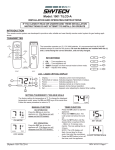
1001-A
Transmitter Battery location
1001T/LCD-A &1001TH-A
Transmitter Battery location
1001-A Series
Receiver Battery location
2. As a test, slide the button switch to the “ON” position of the receiver. (The burner should ignite.)
Does light:
• Move receiver switch back to the “REMOTE” position. Go to Step 3.
Doesn’t light:
• Check to see if the main gas supply is in “ON”,
• Is the Pilot lit?
• Valve knob in “ON” position,
• Check and make sure rocker switch ON FIREPLACE is in “REMOTE” or “OFF” position,
• If burner still doesn’t light go to Step 4.
3. Push the “ON” button on the transmitter, (you should hear a “BEEP” coming from the receiver) and the burner
should ignite.
If the burner doesn’t ignite:
• If no “BEEP” is heard push and hold “LEARN” button for 10 seconds on the face of the
receiver. Release, you should hear 3 “BEEPS”.
• Then press and release the “LEARN” button, you should hear a “BEEP”.
• Then push the “ON” button on the transmitter within 5 seconds; you should hear several
“BEEPS”.
4. If steps 2 and 3 do not work, then please call Skytech Systems, Inc @ 888.672.8929 for tech support.
Rev. 8/2007 Page 1
Back to first page