1
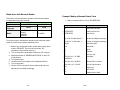
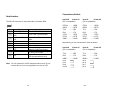
The simplest way to connect to other hosts (not PC compatible) or
terminals is:
Printer
Terminal/Host
Pin 2- RxData ………
TxData
Pin 3- TxData ………
RxData
Pin 5- Ground ………
Ground
In general, as long as the data quantity is not too large and you
use Xon/Xoff as flow control, it will be problem free.
Baud rate:
1200, 2400, 4800, 9600(default), 19200, 38400,
57600,115200 bauds. (Programmable by
command)
Data format: always 8 data bits, 1 start bit and 1 stop bit.
Parity:
always non parity
Handshaking:
XON/XOFF as well as CTS/RTS (hardware
flow control).
Parallel (Centronics)
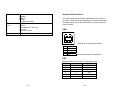
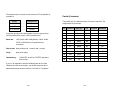
The parallel port is a standard 36-pin Centronics connector. Pin
assignments are as follows:
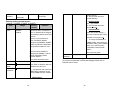
Pin Direction
Definition
Pin
Direction
Definition
Out
SELECT
1
In
/STROBE
13
2
In
Data1
14,15
3
In
Data 2
16
-
Ground
4
In
Data3
17
-
Ground
5
In
Data4
18
6
In
Data5
19~30
-
Ground
7
In
Data6
31
8
In
Data7
32
Out
/Fault
9
In
Data8
33~36
-
NC
10
Out
/ACK
11t
Out
BUSY
12
Out
PE
If you run an application with the bundled printer driver under
Windows and use the serial port, you should check the above
parameters and set the flow control to "Xon/Xoff "or "hardware".
123
124
NC
NC