1
Acer E110
User Guide
1
© 2010 All Rights Reserved
Acer E110 Smartphone User Guide
First issue: 02/2010
Acer E110 Smartphone
Model number: __________________________________
Serial number: ___________________________________
Date of purchase: ________________________________
Place of purchase: ________________________________
2
End User Licence
Agreement
IMPORTANT-READ CAREFULLY: THIS END USER LICENSE AGREEMENT ("AGREEMENT")
IS A LEGAL AGREEMENT BETWEEN YOU (EITHER AN INDIVIDUAL OR A SINGLE ENTITY),
AND ACER INC. INCLUDING ITS SUBSIDIARIES ("ACER") FOR THE SOFTWARE
(WHETHER PROVIDED BY ACER OR BY ACER'S LICENSORS OR SUPPLIERS) THAT
ACCOMPANIES THIS AGREEMENT, INCLUDING ANY ASSOCIATED MEDIA, PRINTED
MATERIALS AND RELATED USER ELECTRONIC DOCUMENTATION WHICH MAY BE
BRANDED "ACER" ("SOFTWARE"). AGREEMENTS RELATING TO ANY OTHER PRODUCT
OR TOPIC ARE NEITHER INTENDED NOR SHOULD THEY BE IMPLIED. BY INSTALLING
THE ACCOMPANYING SOFTWARE OR ANY PORTION THEREOF, YOU AGREE TO BE
BOUND BY THE TERMS AND CONDITIONS OF THIS AGREEMENT. IF YOU DO NOT
AGREE TO ALL OF THE TERMS AND CONDITIONS OF THIS AGREEMENT, DO NOT
CONTINUE THE INSTALLATION PROCESS AND IMMEDIATELY DELETE ALL INSTALLED
FILES, IF ANY, OF THE ACCOMPANYING SOFTWARE FROM YOUR PHONE.
IF YOU DO NOT HAVE A VALIDLY-LICENSED COPY OF THE APPLICABLE SOFTWARE,
YOU ARE NOT AUTHORIZED TO INSTALL, COPY OR OTHERWISE USE THE SOFTWARE,
AND HAVE NO RIGHTS UNDER THIS AGREEMENT.
The Software is protected by U.S. and international copyright laws and conventions as
well as other intellectual property laws and treaties. The Software is licensed, not sold.
GRANT OF LICENSE
Acer grants to you the following non-exclusive and non-transferable rights with
respect to the Software. Under this Agreement, you may:
1. Install and use the Software only on a single designated phone. A separate
license is required for each phone on which the Software will be used;
2. Make one copy of the Software solely for backup or archival purposes;
3. Make one hardcopy of any electronic documents included in the Software,
provided that you receive the documents electronically.
RESTRICTIONS
You may NOT:
1. Use or copy the Software except as provided in this Agreement;
2. Rent or lease the Software to any third party;
3. Modify, adapt, or translate the Software in whole or in part;
4. Reverse engineer, decompile, or disassemble the Software or create derivative
works based upon the Software;
5. Merge the Software with any other program or modify the Software, except for
your personal use; and
6. Sublicense or otherwise make the Software available to third parties, except
that you may, after prior written notification to Acer, transfer the Software as a
whole to a third party so long as you do not retain any copies of the Software
and such third party accepts the terms of this Agreement.
7. Transfer your rights under this Agreement to any third parties.
3
8.
Export the Software in contravention of applicable export laws and regulations,
or (i) sell, export, re-export, transfer, divert, disclose technical data, or dispose
of, any Software to any prohibited person, entity, or destination including,
without limitation, Cuba, Iran, North Korea, Sudan and Syria; or (ii) use any
Software for any use prohibited by the laws or regulations of the United States.
SUPPORT SERVICES
Acer is not obligated to provide technical or other support for the Software.
ACER LIVE UPDATE
Certain of the software contains elements that enable the use of the Acer Live Update
service, which allows for updates for such software to be automatically downloaded
and installed on your phone. By installing the software, you hereby agree and consent
that Acer (or its licensors) may automatically check the version of such software that
you are using on your phone and may provide upgrades to such software that may be
automatically downloaded on to your phone.
OWNERSHIP AND COPYRIGHT
Title, ownership rights and intellectual property rights in and to the Software and all
copies thereof shall remain with Acer or Acer's licensors or suppliers (as applicable).
You do not have or shall not gain any proprietary interest in the Software (including
any modifications or copies made by or for you) or any related intellectual property
rights. Title and related rights in the content accessed through the Software is the
property of the applicable content owner and may be protected by applicable law.
This license gives you no rights to such contents. You hereby agree
1. Not to remove any copyright or other proprietary notices from the Software;
2. To reproduce all such notices on any authorized copies you make; and
3. To use best efforts to prevent any unauthorized copying of the Software.
TRADEMARKS
This Agreement does not grant to you any rights in connection with any trademarks or
service marks of Acer or of Acer's licensors or suppliers.
DISCLAIMER OF WARRANTIES
TO THE MAXIMUM EXTENT PERMITTED BY APPLICABLE LAW, ACER, ITS SUPPLIERS,
AND ITS LICENSORS, PROVIDE THE SOFTWARE "AS IS" AND WITH ALL FAULTS, AND
HEREBY DISCLAIM ALL OTHER WARRANTIES AND CONDITIONS, EITHER EXPRESS,
IMPLIED OR STATUTORY, INCLUDING, BUT NOT LIMITED TO, ANY IMPLIED
WARRANTIES, DUTIES OR CONDITIONS OF MERCHANTABILITY, OF FITNESS FOR A
PARTICULAR PURPOSE, OF ACCURACY OR COMPLETENESS OF RESPONSES, OF
RESULTS, OF WORKMANLIKE EFFORT, OF LACK OF VIRUSES, AND OF LACK OF
NEGLIGENCE, ALL WITH REGARD TO THE SOFTWARE AND THE PROVISION OF OR
FAILURE TO PROVIDE SUPPORT SERVICES. ALSO, THERE IS NO WARRANTY OR
CONDITION OF TITLE, QUIET ENJOYMENT, QUIET POSSESSION, CORRESPONDENCE TO
DESCRIPTION OR NON-INFRINGEMENT WITH REGARD TO THE SOFTWARE.
4
EXCLUSION OF INCIDENTAL, CONSEQUENTIAL AND CERTAIN OTHER DAMAGES
TO THE MAXIMUM EXTENT PERMITTED BY APPLICABLE LAW, IN NO EVENT SHALL
ACER, ACER'S SUPPLIERS, OR ACER'S LICENSORS, BE LIABLE FOR ANY SPECIAL,
INCIDENTAL, INDIRECT, PUNITIVE, OR CONSEQUENTIAL DAMAGES WHATSOEVER
(INCLUDING, BUT NOT LIMITED TO, DAMAGES FOR LOSS OF PROFITS OR
CONFIDENTIAL OR OTHER INFORMATION, FOR BUSINESS INTERRUPTION, FOR
PERSONAL INJURY, FOR LOSS OF PRIVACY, FOR FAILURE TO MEET ANY DUTY
INCLUDING OF GOOD FAITH OR OF REASONABLE CARE, FOR NEGLIGENCE, AND FOR
ANY OTHER PECUNIARY OR OTHER LOSS WHATSOEVER) ARISING OUT OF OR IN ANY
WAY RELATED TO THE USE OF OR INABILITY TO USE THE SOFTWARE, THE PROVISION
OF OR FAILURE TO PROVIDE SUPPORT SERVICES, OR OTHERWISE UNDER OR IN
CONNECTION WITH ANY PROVISION OF THIS AGREEMENT, EVEN IN THE EVENT OF
THE FAULT, TORT (INCLUDING NEGLIGENCE), STRICT LIABILITY, BREACH OF CONTRACT
OR BREACH OF WARRANTY OF ACER OR ITS SUPPLIERS OR LICENSORS, AND EVEN IF
ACER AND ITS SUPPLIERS AND LICENSORS HAVE BEEN ADVISED OF THE POSSIBILITY OF
SUCH DAMAGES.
LIMITATION OF LIABILITY AND REMEDIES
NOTWITHSTANDING ANY DAMAGES THAT YOU MIGHT INCUR FOR ANY REASON
WHATSOEVER (INCLUDING, WITHOUT LIMITATION, ALL DAMAGES REFERENCED
ABOVE AND ALL DIRECT OR GENERAL DAMAGES), THE ENTIRE LIABILITY OF ACER, ITS
SUPPLIERS, AND ITS LICENSORS, UNDER ANY PROVISION OF THIS AGREEMENT, AND
YOUR EXCLUSIVE REMEDY FOR ALL OF THE FOREGOING, SHALL BE LIMITED TO THE
AGGREGATE AMOUNT PAID BY YOU FOR THE SOFTWARE. THE FOREGOING
LIMITATIONS, EXCLUSIONS AND DISCLAIMERS (INCLUDING DISCLAIMER OF
WARRANTIES AND EXCLUSION OF INCIDENTAL, CONSEQUENTIAL AND CERTAIN
OTHER DAMAGES ABOVE) SHALL APPLY TO THE MAXIMUM EXTENT PERMITTED BY
APPLICABLE LAW, EVEN IF ANY REMEDY FAILS ITS ESSENTIAL PURPOSE; PROVIDED,
HOWEVER, THAT BECAUSE SOME JURISDICTIONS DO NOT ALLOW THE EXCLUSION OR
LIMITATION OR LIABILITY FOR CONSEQUENTIAL OR INCIDENTAL DAMAGES, THE
ABOVE LIMITATION MAY NOT APPLY TO YOU.
TERMINATION
Without prejudice to any other rights, Acer may immediately terminate this
Agreement without notice if you fail to comply with any terms and conditions of this
Agreement.
In such event, you must:
1. Cease all use of the Software;
2. Destroy or return to Acer the original and all copies of the Software; and
3. Delete the Software from all phones on which it was resident.
All disclaimers of warranties and limitation of liability set forth in this Agreement shall
survive termination of this Agreement.
GENERAL
This Agreement represents the complete agreement between you and Acer relating to
this license for the Software and supersedes all prior agreements, communications,
proposals and representations between the parties and prevails over any conflicting or
additional terms of any quote, order, acknowledgement or similar communication.
This Agreement may only be modified by a written document signed by both parties.
5
If any provision of this Agreement is held by a court of competent jurisdiction to be
contrary to law that provision will be enforced to the maximum extent permissible
and the remaining provisions of this Agreement will remain in full force and effect.
ADDITIONAL PROVISIONS APPLICABLE TO THIRD PARTY SOFTWARE AND SERVICES
Software provided hereunder by Acer's licensors or suppliers ("Third Party Software")
is made available to you for your personal, non-commercial use only. You may not use
the Third Party Software in any manner that could damage, disable, overburden, or
impair the services provided by Acer's licensors or suppliers hereunder ("Third Party
Services"). Furthermore, you may not use the Third Party Software in any manner that
could interfere with any other party's use and enjoyment of the Third Party Services,
or the services and products of Acer's licensors' or suppliers' third party licensors. Your
use of the Third Party Software and Third Party Services is also subject to additional
terms and conditions and policies which can be accessed through our global website.
Privacy policy
During registration you will be asked to submit some information to Acer. Please refer
to Acer’s privacy policy at http://www.acer.com or your local Acer website.
6
Table of Contents
End User Licence Agreement
Getting to know your smartphone
Features and functions . . . . . . . . . . . . . . . . . . . . . . . . 9
Product registration . . . . . . . . . . . . . . . . . . . . . . . . . . . 9
Chapter 1: Setting Up
Unpacking your smartphone . . . . . . . . . . . . . . . . . .
Getting to know your smartphone . . . . . . . . . . . . . .
Installing or removing the battery . . . . . . . . . . . . . .
Installing a SIM or microSD Card . . . . . . . . . . . . . . .
Turning on for the first time . . . . . . . . . . . . . . . . . . .
Using the touchscreen . . . . . . . . . . . . . . . . . . . . . . . .
The home screen . . . . . . . . . . . . . . . . . . . . . . . . . . . .
11
12
14
16
17
18
19
Chapter 2: Making Calls
Before making a call . . . . . . . . . . . . . . . . . . . . . . . . .
Making a call . . . . . . . . . . . . . . . . . . . . . . . . . . . . . . .
The voice call screen . . . . . . . . . . . . . . . . . . . . . . . . .
Onscreen call options . . . . . . . . . . . . . . . . . . . . . . . .
23
23
25
25
Chapter 3: Messaging
Creating a new message . . . . . . . . . . . . . . . . . . . . . .
Replying to a message . . . . . . . . . . . . . . . . . . . . . . . .
MMS messages . . . . . . . . . . . . . . . . . . . . . . . . . . . . . .
Setting up email . . . . . . . . . . . . . . . . . . . . . . . . . . . . .
29
30
31
33
Chapter 4: Using the Camera
Camera icons and indicators . . . . . . . . . . . . . . . . . . .
Taking a photo . . . . . . . . . . . . . . . . . . . . . . . . . . . . . .
Shooting a video . . . . . . . . . . . . . . . . . . . . . . . . . . . .
Viewing photos and videos . . . . . . . . . . . . . . . . . . . .
35
37
37
38
7
Chapter 5: Advanced Settings
Putting your smartphone in airplane mode . . . . . .
Acer Settings . . . . . . . . . . . . . . . . . . . . . . . . . . . . . . .
Sound and display . . . . . . . . . . . . . . . . . . . . . . . . . . .
Setting the date and time . . . . . . . . . . . . . . . . . . . . .
Setting alarms . . . . . . . . . . . . . . . . . . . . . . . . . . . . . .
Changing location and text options . . . . . . . . . . . . .
Managing your contacts . . . . . . . . . . . . . . . . . . . . . .
Managing your calendar . . . . . . . . . . . . . . . . . . . . . .
Connecting to a PC . . . . . . . . . . . . . . . . . . . . . . . . . .
Social Networking . . . . . . . . . . . . . . . . . . . . . . . . . . .
Multimedia playback . . . . . . . . . . . . . . . . . . . . . . . . .
GPS tracker . . . . . . . . . . . . . . . . . . . . . . . . . . . . . . . . .
FM radio . . . . . . . . . . . . . . . . . . . . . . . . . . . . . . . . . . .
Managing applications . . . . . . . . . . . . . . . . . . . . . . .
Resetting your smartphone . . . . . . . . . . . . . . . . . . . .
39
40
42
43
43
43
44
46
47
49
52
55
56
57
57
Appendix
FAQ and troubleshooting . . . . . . . . . . . . . . . . . . . . .
Other sources of help . . . . . . . . . . . . . . . . . . . . . . . .
Specifications . . . . . . . . . . . . . . . . . . . . . . . . . . . . . . .
Warnings and precautions . . . . . . . . . . . . . . . . . . . .
Emergency calls . . . . . . . . . . . . . . . . . . . . . . . . . . . . .
Disposal and recycling information . . . . . . . . . . . . .
Taking care of your smartphone . . . . . . . . . . . . . . .
Safety regulations . . . . . . . . . . . . . . . . . . . . . . . . . . .
8
59
60
61
62
68
69
70
71
Getting to know your
smartphone
Features and functions
Your new smartphone offers leading, easy-to-access
multimedia and entertainment features. You can:
• Access your email while on the move.
• Connect to the Internet at high speed, via HSDPA (3.6
Mbps).
• Keep in touch with your friends via your Contacts and
social networking applications.
Product registration
When using your product for the first time, it is recommended
that you immediately register it. This will give you access to
some useful benefits, such as:
• Faster service from our trained representatives
• Membership in the Acer community: receive
promotions and participate in customer surveys
• The latest news from Acer
Hurry and register, as other advantages await you!
Features and functions
9
How to register
To register your Acer product, visit our website at
registration.acer.com. Choose your country and follow the
simple instructions.
You can also register directly from your smartphone by
tapping the Registration icon.
After we receive your product registration, you will be sent a
confirmation email with important data that you should keep
in a safe place.
10
Chapter 1: Setting Up
Unpacking your smartphone
Your new smartphone comes packed in a protective box.
Carefully unpack the box and remove the contents. If any of
the following items is missing or damaged, contact your dealer
immediately:
•
•
•
•
•
•
•
Acer E110 Smartphone
Battery
Quick Guide
Companion CD
USB cable
AC adapter
Headset
Unpacking your smartphone
11
Getting to know your smartphone
Views
No. Item
Description
1
microSD Card slot
Expansion slot for microSD Card.
2
Touchscreen
2.8-inch, 240 x 320 pixel resistive
touchscreen to display data, phone content
and enter information.
3
Home button
Return to the home screen.
4
Search button
Open the Google search function.
5
Call button
Activate phone/dial/view recently dialed
numbers or answer a call.
6
Navigation pad
4-way navigation control to move the
cursor.
7
Selection button
Activates selected item.
12
No. Item
Description
8
Microphone
Internal microphone.
9
Power/End button
Press to turn the screen on/off or enter
sleep mode; press and hold for more than
three seconds to turn the smartphone off.
Press to end a call.
10
Menu button
Opens the option menu.
11
Back button
Go back one menu step.
12
LED indicator
Indicates mail, message, missed call and
battery status.
13
Phone speaker
Emits audio from your smartphone; suitable
for holding to your ear.
14
Volume up/down
button
Increase or decrease the phone volume.
15
Micro USB connector
Connects to a USB cable/charger.
16
3.5 mm headphone
jack
Connects to stereo headphones.
17
Camera
A 3-megapixel camera for taking highresolution images.
18
Handsfree speaker
Emits audio from your smartphone; suitable
for handsfree use.
LED indicator
Mail, message, missed call and battery indicator:
LED state
Description
Off
Battery charged; no unread mail or messages.
flashing
Low battery (less than 15%); missed call, unread mail
or message.
On
Phone is charging.
Getting to know your smartphone
13
Installing or removing the battery
Your smartphone uses a replaceable battery to provide power.
It is packed separately from your smartphone and needs to be
inserted and charged before you can use the smartphone.
Installing the battery
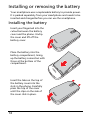
Insert your fingernail into the
cutout between the battery
cover and the phone. Unclip
the cover and lift off the
battery cover.
m
ic
r
o
S
D
Place the battery into the
battery compartment, lining
up the battery connectors with
those at the bottom of the
compartment.
m
ic
r
o
S
D
Insert the tabs on the top of
the battery cover into the
slots in the phone. Carefully
press the top of the cover
until the clips on the side of
the cover click in place.
m
ic
r
o
S
D
14
CAUTION: RISK OF EXPLOSION IF BATTERY IS REPLACED BY AN
INCORRECT TYPE.
DISPOSE OF USED BATTERIES ACCORDING TO THE INSTRUCTIONS.
Charging the battery
For initial use, you need to charge your smartphone for eight
hours. After that you can charge it each day to recharge the
battery to full capacity.
Connect the micro USB connector on your smartphone, then
connect the USB connector to the AC adapter. Plug the AC
adapter into any AC current outlet and charge the device.
It is normal for the phone to heat up when charging or during
long periods of use. All phones are factory tested before
release.
Removing the battery
Open the battery compartment as shown in “Installing the
battery“ on page 14. Lift the battery out of the compartment
by grasping the sides of the battery.
Replace the battery cover as described above.
Installing or removing the battery
15
Installing a SIM or microSD Card
To take full advantage of your smartphone’s telephony
capabilities, you must install a SIM card. The SIM card holder is
located in the battery bay.
Additionally, you may wish to increase your smartphone’s
storage by inserting a microSD Card into the slot provided. The
slot is located on the left side of the phone.
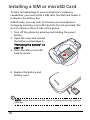
1. Turn off the phone by pressing and holding the power
button.
2. Open the cover and remove
the battery as described in
“Removing the battery“ on
page 15.
3. Insert the SIM or microSD
Card as shown.
m
ic
r
o
S
D
m
ic
r
o
4. Replace the battery and
battery cover.
NOTE: Ensure that the microSD Card is inserted all the way into the
card slot.
16
SIM card lock
Your smartphone may come with a SIM card lock, i.e., you will
only be able to use the SIM card provided by your network
operator.
To cancel the SIM lock, contact your network provider.
Turning on for the first time
To turn on your smartphone for the first time, press and hold
the power button until the system bootup screen appears.
Calibrating the touchscreen
The first time you start the smartphone you will be required to
calibrate the touchscreen. Follow the instructions shown on
the screen and tap on the indicated crosshairs.
To recalibrate the touchscreen, open the applications tab and
tap Settings > Touch Calibration.
Entering your PIN
When you install a SIM card for the first time, you may need to
enter a PIN using the onscreen number pad.
Important: Depending on your settings, you may be required to
enter your PIN each time you switch on the phone function.
If the PIN you enter is incorrect, a warning message appears.
Activating a new SIM card
If you are using your SIM card for the first time, it may require
activation. Contact your network operator for details on how
to do this.
Turning on for the first time
17
Using the touchscreen
Your smartphone uses a touchscreen for selecting items and
entering information. Use your finger to tap the screen.
Tap: Touch the screen once to open items and select options.
Drag: Hold your finger on the screen and drag across the
screen to select text and images.
Tap and hold: Tap and hold an item to see a list of actions
available for that item. On the pop-up menu that appears, tap
the action you want to perform.
Scroll: To scroll up or down the screen, simply drag your finger
up or down the screen in the direction that you want to scroll.
The onscreen keyboard
When you tap a text box to enter text,
the onscreen keyboard will
automatically display.
Text assistance
You can enable various features that
assist you to enter correct text. Tap Menu > Settings > Locale &
Text > TouchPal. From here you can enable or disable the
following basic settings:
Function
Description
Word prediction
Inserts the suggested word whenever you tap space
or a punctuation mark.
Key press sound
Plays sound on key press.
Key press vibration Vibrates on key press.
18
The home screen
After rebooting, your smartphone will
display the home screen. This screen
gives you quick, icon-based access to
many of the frequently-used features of
your smartphone.
The first time you start your smartphone,
you will see some icons on the screen.
At the bottom of the screen is the
Applications tab which lists all the
applications you have installed. Tap the tab to open the
Applications tab. Tap an icon to open the application.
The extended home screen
The home screen extends to either side of the screen, giving
you more room to add icons, widgets or features. To view the
extended home screen slide your finger to the left or right of
the home screen.
The home screen
19
Personalizing the home screen
You may personalize your home screen by adding or removing
icons, shortcuts or widgets, or changing the wallpaper.
Adding or removing icons
You can set icons for installed applications on the home
screen. Tap and hold an icon in the Applications tab to copy it
to the home screen. To remove an icon from the home screen,
tap and hold the icon and drag the icon from the home screen
to the trash tab that appears at the bottom of the screen.
Adding or removing shortcuts or widgets
To add shortcuts or widgets, tap and hold
anywhere on the home screen to open the
Add to Home screen menu. Tap Shortcuts to
open a list of available shortcut types you
can add.
Widgets are handy applications that you can
add to your home screen to display various
information.
20
You can also add folders to your home
screen. There are some pre-defined folders
available or you can add a New folder. This
will be placed on your home screen and
named Folder.
Notification area
At the top of the screen is the Notification area. This contains a
variety of icons to inform you of your phone’s status. To the
left of the Notification area are event icons that indicate a new
event. The icons on the right of the screen indicate
connectivity status. Tap, hold and drag down the Notification
area to view the new events.
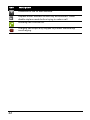
Icon
Description
Indicates the signal strength.
SD Card removed.
Bluetooth enabled.
Vibrate mode enabled.
SIM card not installed/invalid.
Battery status.
Missed call.
New/unread message.
Connected to the 3G data network.
The home screen
21
Icon
Description
Connected to the 2G data network.
Airplane mode: Wireless connectivity disconnected. Please
disable airplane mode before trying to make a call.
Incoming call or active call.
Charging has temporarily stopped to prevent overheating/
overcharging.
22
Chapter 2: Making Calls
This chapter shows you how to make phone calls, and the
various options available to you during your call.
Before making a call
Check that the phone function is on before you make a call.
You can confirm the phone status from the icon on the righthand side of the Notification area.
Icon Description
Connected: You may make a call.
Airplane mode: Wireless connectivity disconnected. Please disable
airplane mode before trying to make a call.
Making a call
1. From the home screen tap Dialer or open
Dialer from the Applications tab to open
the onscreen number pad.
2. Enter the number you wish to dial.
3. Press the Call button to make the call.
4. To end the call, press the End button.
Note: The phone function needs to be enabled before the call can
be connected.
Before making a call
23
Dialing a number from call log
Your call history can be viewed by tapping the Call Log tab. It
displays recent received, dialed, and missed calls.
Tap a number to view the call details. To redial any number in
the call history, select the number and tap Return call. You
may also select Send SMS/MMS or Add to contacts.
Missed calls will be displayed by the call indicator on the top of
your phone and in the Notification area with the icon
.
You can also view missed calls from the Notification area.
1. Open the notification list by tapping and dragging the
Notification area downwards to display the details of the
missed calls.
2. Select the call from the list and tap Return call to return the
missed call.
You can save phone numbers to your Contacts from the Call
Log. Please refer to “Adding a contact“ on page 45 for further
details.
Making a call to one of your contacts
1. Tap the Contacts tab in the dialer or Contacts from the
home screen to view your contacts.
2. Tap a contact. A dialog will open, asking if you want to call
the contact or send the contact a text message.
Dialing an international number
When dialing international numbers, there is no need to enter
the international direct dialing prefix (‘00’ etc.) before the
country code. Simply tap and hold 0+ on the onscreen number
pad until + appears onscreen.
24
Warning: International call rates can vary greatly depending on the
country you are calling and your network provider. We suggest you
check all call rates with your network provider, to avoid excessive
phone bills. If you are using your smartphone abroad, roaming
charges will apply. Consult your network provider for roaming
rates specific to the country you are visiting before you leave.
The voice call screen
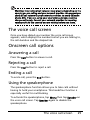
Once you have dialed your number the voice call screen
appears, which displays the number/contact you are talking to,
the call duration and the dialpad tab.
Onscreen call options
Answering a call
Press the Call button to answer a call.
Rejecting a call
Press the End button to reject a call.
Ending a call
To end a call, press the End button.
Using the speakerphone
The speakerphone function allows you to take calls without
having to hold your smartphone. This handsfree function is
especially useful for multitasking.
To activate the speakerphone, tap Menu then tap Speaker on
the voice call screen. Tap Speaker again to disable the
speakerphone.
The voice call screen
25
Muting a call
To mute a call, tap Menu, then tap Mute on the voice call
screen to switch off the microphone. Tap Mute again to switch
the microphone back on.
Saving a dialed or received call number
to contacts
You can save a number you have dialed to your contacts for
future use.
1. Select the number from the Call log tab, and tap Add to
contacts.
2. Tap Create new contact and select how to complete the
action. Please refer to “Adding a contact“ on page 45.
26
Conference calls
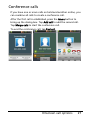
If you have one or more calls on hold and another online, you
can combine all calls to create a conference call.
After the first call is established, press the Menu button to
bring up the dialog box. Tap Add call to add the second call.
Tap Merge calls to start the conference call.
To end the conference call, tap End call.
Onscreen call options
27
28
Chapter 3: Messaging
This chapter shows you how to set up and use the SMS and
MMS functions of your smartphone.
All SMS and MMS messages are accessed via Messaging.
Messaging automatically arranges received and sent messages
into threads.
To access messaging, tap Messaging on the home screen.
Creating a new message
You can use your phone to compose
SMS or MMS messages.
Tap New message to compose a new
message.
Enter the recipient’s phone number or
name in the To field. Suggested
contacts will be displayed in a dropdown list below the text field. To select
a suggested contact, tap the contact’s
name.
Once you have entered the recipient,
enter your message in the text box labeled Type to compose.
You can use the navigation pad to move between fields and to
close the onscreen keyboard.
Note: SMS messages may be up to 160 characters long. If your
message is longer than 160 characters, it will be sent as multiple
linked messages. Most phones will automatically join the linked
messages to present the recipient with a single long message,
however, some older phones do not have this ability.
Creating a new message
29
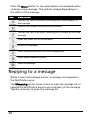
Press the Menu button to see what options are available when
creating a new message. The options change depending on
the status of the message.
Icon
Description
Convert the SMS to an MMS, allowing you to add a subject to
the message.
View all the threads currently on your phone.
Convert the SMS to an MMS, allowing you to attach a file to the
message.
Open the Dialer to call the recipient.
Discard the message.
Insert a smiley/emoticon into your message text.
Show other available options.
Send the message.
Replying to a message
When a new text message arrives, a message icon appears in
the Notification area.
Tap Messaging on the home screen to view the message list or
expand the Notification area to see a summary of the message.
Tap the summary to open the message list.
30
To reply to an SMS or MMS message, open the message from
the message list. Enter your text in the text box labeled Type to
compose. Press the Menu button to see available options.
Icon
Description
Convert the SMS to an MMS, allowing you to add a subject to
the message.
Convert the SMS to an MMS, allowing you to attach a file to the
message.
Open the Dialer to call the recipient.
Delete the thread.
Insert a smiley/emoticon into your message text.
Show other available options.
Send the message.
MMS messages
MMS messages are similar to text messages but also allow you
to attach multimedia files such as pictures, audio or video clips.
Each MMS message can be up to 300 KB in size.
Note: You need to set up an MMS profile before you can send MMS
messages. Normally, your smartphone will set up the profile for you
based on information retrieved from your provider.
Tip: Ask your network provider for the necessary information if you
need to manually set up the MMS profile.
MMS messages
31
Receiving MMS messages
When a new MMS message arrives, a message icon appears at
the top of the screen and a notification message is displayed.
1. Open Messaging to view a summary of the message.
2. Tap Download to download the message content.
Note: Downloads can take a long time, depending on your
connection quality. If you reply or open another application, the
download will be stopped.
Important: You may be charged to download message content,
especially if you are roaming. Please contact your provider if you
have any questions.
3. Tap the message to view the content.
4. Press the Menu button and tap Reply to
reply to the message. The message
window will appear. Simple text replies
will be sent as SMS messages. If you wish
to attach a file, press the Menu button
and tap Attach. You will be presented
with a list of options.
5. When you have finished composing the
message, press the Menu button and tap
Send.
32
Setting up email
Your smartphone enables you to access your
email. Most popular providers can be set up
in two steps. Tap the Applications tab and
then Email to start setting up your email
access.
To manually set up your email, tap Other.
1. Enter your email address and password
for the account and then tap Next.
2. Enter the Account name and Your name
and then tap Done.
Composing an email
1. Tap Email from the home screen or Applications tab.
2. From the inbox, tap Menu and then tap Compose.
3. Enter the recipients email address, subject and message.
You can use the navigation pad to move between fields
and to close the onscreen keyboard.
4. When you are finished composing your message, tap Send.
Setting up email
33
34
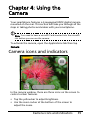
Chapter 4: Using the
Camera
Your smartphone features a 3-megapixel EDOF digital camera
mounted on the rear. This section will take you through all the
steps in taking photos and videos with your smartphone.
Note: You need to have a microSD Card inserted into the microSD
slot before you can use the camera.
To activate the camera, open the Applications tab then tap
Camera.
Camera icons and indicators
In the camera window, there are three icons on the screen to
control certain features.
• Tap the yellow bar to adjust brightness.
• Use the zoom rocker at the bottom of the screen to
adjust the zoom.
Camera icons and indicators
35
• Tap the camera icon to take a picture.
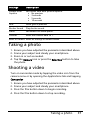
To adjust the settings, press the Menu button and select
Settings. The Settings options are:
Settings
Description
Jpeg Quality
Set the JPG quality:
• Best
• Better
• Good
White Balance/
Lighting
Adjust the white balance:
• Automatic
• Cloudy
• Daylight
• Fluorescent
• Incandescent
• Twilight
Color Effects
Apply an effect to the photo. Effects are:
• None: No effects are applied.
• Negative: Uses negative colors.
• Black/White: Uses black and white colors.
• Sepia: Gives a brown/sepia tint.
• Greenish: Gives a green tint.
• Bluish: Gives a blue tint.
• Reddish: Gives a red tint.
Night Mode
Select between:
• Normal
• Night
Resolution
Set the resolution to:
• 2048 x 1536
• 1600 x 1200
• 1280 x 1024
• 640 x 480
Zoom is only available in 640 x 480.
Anti Banding
Set anti banding to:
• Auto
• 50 Hz
• 60 Hz
36
Settings
Description
Prompt After
Capture
Set review time after picture capture:
• No preview
• 3 seconds
• 5 seconds
• 10 seconds
Grid
Show grid in preview.
Shutter Sound
Play shutter sound.
Prefix
Set default file name prefix.
Counter
Reset the counter back to 1.
Reset to Default Reset all settings to default values.
Taking a photo
1.
2.
3.
4.
Ensure you have adjusted the parameters described above.
Frame your subject and steady your smartphone.
Zoom in or out as needed.
Tap the Camera icon or press the Selection button to take
the photo.
Shooting a video
Turn on camcorder mode by tapping the video icon from the
camera menu or by opening the Applications tab and tapping
Camcorder.
1.
2.
3.
4.
Ensure you have adjusted the parameters described above.
Frame your subject and steady your smartphone.
Press the film button down to begin recording.
Press the film button down to stop recording.
Taking a photo
37
Supported formats
The following file formats are supported:
Type
Formats
Image
JPEG, BMP, PNG, GIF, DRM, WBMP
Video
3GP, MPEG-4
Viewing photos and videos
After you have taken your photo or video, it is automatically
saved.
Once you have taken a photo or video, you can view the it in
Gallery by tapping Gallery in the menu. Alternatively, open the
Applications tab and tap Gallery. From Gallery you can share
the file directly via MMS.
38
Chapter 5: Advanced
Settings
Putting your smartphone in
airplane mode
You can enter airplane mode (also known as flight mode) to
turn off telephone and Bluetooth and use your smartphone as
a handheld device during a flight. Check with your airline to
make sure this is permitted onboard.
Switch your smartphone off during takeoff and landing as it
may interfere with aircraft electronic systems.
Turning airplane mode on or off
1. Tap the Applications tab, then tap
Settings > Wireless controls.
2. Tap Airplane mode to switch it ON
or OFF.
Note: When Airplane mode is active,
the
icon will be displayed in the
Notification area.
Putting your smartphone in airplane mode
39
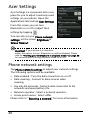
Acer Settings
Acer Settings is a convenient all-in-one
place for you to adjust commonly-used
settings on your phone. Open the
Applications tab and tap Acer Settings.
From this screen you can turn
Bluetooth on or off or adjust their
settings by tapping
.
You can also set your Phone network
settings, set the screen Brightness or
Screen Timeout.
Important: If your phone is in Airplane
mode, the option to turn Bluetooth on will be disabled. Please
refer to “Putting your smartphone in airplane mode“ on page 39
for instructions on turning Airplane mode on or off.
Phone network settings
Tap Phone network settings to adjust your network settings.
The following options will be available:
• Data enabled - Turn the data connection on or off.
• Data roaming - Connect to data services when
roaming.
• Use only 2G networks - Restricts data connection to 2G
networks and saves battery life.
• Network operator - Select a network operator.
• Access point names - Select APNs.
Please refer to “Selecting a network” for more information.
40
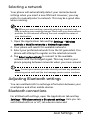
Selecting a network
Your phone will automatically detect your carrier/network
settings when you insert a new SIM card. However, you may
prefer to manually select a network. This may be a good idea
when roaming.
Tip: When you are traveling, manually selecting a network may
help to reduce your roaming charges. Check with your home service
provider for the network offering the most competitive rates at
your destination.
1. Open the Applications tab and tap Settings > Wireless
controls > Mobile networks > Network operators.
2. Your phone will search for available networks.
3. Select your preferred network from the list generated. You
phone will attempt to register on the selected network.
4. Tap Select automatically to connect to the available
network with the strongest signal. This may lead to your
phone jumping between networks when you move around.
Note: Contact your service provider should you have any problems
obtaining voice mail and the text message service center numbers.
Adjusting Bluetooth settings
You can use Bluetooth to exchange information between your
smartphone and other mobile devices.
Bluetooth connections
For all Bluetooth settings, open the Applications tab and tap
Settings > Wireless controls > Bluetooth settings. Here you can
switch Bluetooth on or off, set a device name and
Acer Settings
41
discoverability. Tap Scan for devices to scan for available
devices.
To connect to a device, tap the device in the list of available
devices. You may be asked to enter a PIN on both devices to
establish the connection.
Sound and display
Adjust the volume of your phone using the volume button on
the side of the phone. Alternatively, you can set the Ringer
volume and Media volume by opening the Applications tab
and going to Settings > Sound & display.
Item
Description
Silent mode
Turn off all sounds except for alarms and media.
Ringer volume
Adjust the ringer volume.
Media volume
Set the playback volume for media.
Phone ringtone
Set your phone’s ringtone.
Phone vibrate
Turn on vibration for incoming calls.
Notification
ringtone
Set a ringtone for notifications.
Audible touch
tones
Play tones when using dial pad.
Audible
selection
Play a sound whenever a screen selection is made.
SD card
notifications
Play a sound for SD card notifications.
Animation
Animate when opening or closing windows.
Brightness
Adjust screen brightness.
Screen timeout
Set idle time for screen timeout.
Notification LED Turn on LED notification for calls and messages.
42
Setting the date and time
Set the date and time by opening the Applications tab and
going to Settings > Date & time.
Tip: If you travel frequently or live in an area that uses daylight
saving time, activate Automatic from this menu. This will enable
your smartphone to set the date and time based on information it
receives from the network.
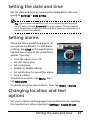
Setting alarms
There are three predefined alarms on
your phone by default. To edit alarm
settings, tap Clock in the Applications
tab and tap on any of the predefined
alarms. You may:
• Turn the alarm on or off.
• Set the alarm time.
• Set a ringtone.
• Enable or disable vibrate.
• Set which days to repeat the alarm.
• Give it a label.
To add a new alarm, tap Menu, then
tap Add alarm.
To delete an alarm, tap an alarm, then tap Menu > Delete.
Changing location and text
options
Set your location and language input preferences by opening
the Applications tab and going to Settings > Locale & text.
Setting the date and time
43
Tap Select Locale to set the language you would like to use the
phone in.
Tap TouchPal to set text input preferences. Under basic
settings you may:
•
•
•
•
•
Turn on word prediction.
Turn on key press sound.
Turn on key press vibration.
Turn on mixed language input.
Select Languages.
Under handwriting you may:
• Set stroke width.
• Set recognize interval.
• Set stroke color.
Managing your contacts
Your smartphone features an address
book that allows you to save contacts
to either the internal memory or onto
your SIM card.
Tap Contacts from the home screen or
the Contacts tab from the Dialer to
view your contacts.
If you don’t have any contacts stored
on your phone, you can import
contacts from your SD card, add a new
contact or import any SIM contacts.
Press the Menu button to open the
menu.
44
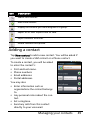
Icon
Description
Search for a contact.
Add a new contact.
Display the contacts you have assigned to a group.
Export to SD card. Import from SD card.
Import contacts from SIM.
Delete contacts from phone.
Adding a contact
Tap New contact to add a new contact. You will be asked if
you want to create a SIM contact or a Phone contact.
To create a contact, you will be asked
to enter the contact’s:
• First and Last name.
• Phone numbers.
• Email addresses.
• Postal addresses.
You may also:
• Enter information such as
organizations the contact belongs
to.
• Any personal notes about the contact.
• Set a ringtone.
• Send any calls from this contact
directly to your voicemail.
Managing your contacts
45
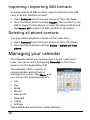
Importing / exporting SIM contacts
You may import all SIM contacts, export contacts to the SIM
card, or delete multiple contacts.
1. Open Contacts from the home screen or from the Dialer.
2. Press the Menu button and tap Import. Tap a contact in the
SIM to import to the phone, or press the Menu button and
tap Import all to import all SIM contacts to the phone.
Deleting all phone contacts
You may delete all phone contacts at the same time.
1. Open Contacts from the home screen or from the Dialer.
2. Press the Menu button and tap Delete > Delete all from
phone.
Managing your calendar
The Calendar allows you to keep track of your events and
tasks. You can access it by tapping Calendar on the home
screen or in the Applications tab.
The Calendar offers a variety of
viewing modes and settings to
manage your events. Tap Menu and
you will see the following options:
• List
• Day
• Week
• Month
• New event
• New task
• Today
• Settings
These additional options are under Settings:
46
•
•
•
•
•
•
•
•
Lunar Calendar
Festival
Hide Declined Events
Hide Completed Tasks
Event/List View Settings
Reminder Settings
Import/Export
Delete Settings
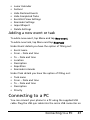
Adding a new event or task
To add a new event, tap Menu and tap New event.
To add a new task, tap Menu and tap New task.
Under Event details you have the option of filling out:
• Event name
• From - Date and time
• To - Date and time
• Location
• Description
• Repetition
• Reminder intervals
Under Task details you have the option of filling out:
•
•
•
•
•
Task name
From - Date and time
To - Date and time
Description
Priority
Connecting to a PC
You can connect your phone to a PC using the supplied USB
cable. Plug the USB sync cable into the micro USB connector on
Connecting to a PC
47
your smartphone. Plug the USB client connector into an
available USB port on your computer.
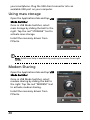
Using mass storage
Open the Applications tab and tap USB
Mode Switcher.
Once in USB Mode Switcher, select
mass storage by sliding the ball to the
right. Tap the red “STORAGE” text to
activate mass storage.
Install the necessary drivers from
PCSuite.
Note: Additional help is available by swiping the screen from right
to left.
Modem Sharing
Open the Applications tab and tap USB
Mode Switcher.
Once in USB Mode Switcher, select
modem sharing by sliding the ball to
the right. Tap the red “MODEM” text
to activate modem sharing.
Install the necessary drivers from
PCSuite.
48
Note: Additional help is available by swiping the screen from right
to left.
Browsing the Internet
In order to browse the Internet with your smartphone, you
must be connected to a data network. Please see “Phone
network settings“ on page 40 for more information.
Tap Browser on the home screen to start browsing. To open a
new website, tap Menu then tap Go to enter a URL.
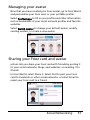
Social Networking
urFooz
urFooz is your portable profile that lives where you live.
• Fooz Creator lets you create a Fooz avatar, which is your
virtual look-a-like.
• Fooz World lets you edit and manage your Fooz
avatar(s), create new avatars and share them on
Facebook, MySpace, blogs and more.
• Share it lets you post your Fooz card to Facebook,
MySpace and other social networks. You can also email it
to your friends.
You can email your Fooz card to friends, or post it to your
social networks and blogs and always be connected.
Launching urFooz
To launch urFooz, tap UrFooz from the Applications tab.
Social Networking
49
Creating your urFooz avatar
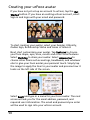
If you have not yet set up an account to urFooz, tap the Get
Started button. If you have an existing urFooz account, select
Sign in and login with your email and password.
To start creating your avatar, select your Gender, Ethnicity,
Zodiac Sign, Relationship Status and Areas of Interest.
Next, start customizing your avatar. Tap Features to choose
your face shape, eyes, nose, mouth and other facial features.
Select Clothing to dress your avatar. Select Accessories to
choose other items such as earrings, headbands, and whatever
else to give your Fooz avatar your personal touch. Simply tap
the image to apply the item to your avatar and preview how it
looks on the left side of the screen.
Select SAVE and type in a name for your Fooz avatar. The next
screen will ask you for the email address, password, and
required user information. The email and password you enter
will be used to sign into your urFooz account.
50
Managing your avatar
Now that you have created your Fooz avatar, go to Fooz World
and personalize your Fooz card, or your portable profile.
Select Profile/Apps to fill in your profile and other information
such as bookmarks of your social network profiles and favorite
websites.
Select Switch Avatar to change your default avatar, modify
existing avatars, or create a new avatar.
Sharing your Fooz card and avatar
urFooz lets you share your Fooz card with friends by posting it
to your social networks, blogs, and websites; or emailing it to
friends.
In Fooz World, select Share it. Select Post to post your Fooz
card to Facebook or other social networks, or select Email to
email your Fooz card to a friend.
Social Networking
51
Note: Fuhu, Spinlets, Spinlet, urFooz, Fooz Avatars, Fooz Creator,
Fooz Card, and Fooz World are trademarks or registered
trademarks of Fuhu, Inc. in the U.S. and/or other countries.
Multimedia playback
Your smartphone comes supplied with a variety of programs
that you can use to enjoy multimedia content.
nemoPlayer
Open nemoPlayer from the Applications tab to play media you
have stored on your phone.
nemoPlayer enables you to listen to music, view video clips and
pictures in the following formats.
Type
Formats
Audio playback MP3, AAC, AMR
Ringtone
MP3, MIDI, iMelody, WAVE
Video
recording
3GP, MPEG-4, H.263
Video playback 3GP, MPEG-4, H.263, H.264, WMV
Spinlets
Spinlets gives you access to your favorite music, movie and
television content. Get your favorite music, photos and videos
from your mobile phone and share your favorite Spinlets on
social networks, websites and more.
Note: Some contents may not be available in some countries.
52
Launching Spinlets
To launch the Spinlets application, tap Spinlets in the
Applications tab.
Browsing Spinlets gallery
You can sort or search your media content by albums or
genres.
Browsing albums
Once Spinlets is opened, you will see a
display of featured albums. Browse this
display by sliding your finger
horizontally (left or right), and select
an album by tapping it.
Browsing genres
To browse the Gallery by genre, tap the
Genres button on the bottom left
corner of the screen. You will see a new
screen with a list of different genres.
Tap on the genre you wish to view.
Sort
To sort through Spinlets by Name, Ratings, or Newest content,
select the Sort button at the bottom of the screen.
Multimedia playback
53
Search
To search the Gallery for a specific name, select the Search
button at the bottom right corner of the screen. Type the
name of an artist in the search box and find potential matches.
Exploring Spinlets widgets
When you select an album, you will see
a Spinlet.
To play the featured song, select the
red Play button.
To play selected songs, select the Music
tab and choose which songs you would
like to play.
To view artist photos, select the Photos
tab.
To visit the artist's social networks and
websites, select the icon located along
the bottom of the screen.
Sharing your Spinlets
You can share your favorite Spinlets in
two ways.
To post the Spinlet you are currently
viewing to your social networks, blogs,
or other websites, tap Share It at the
top right corner of the Spinlet. Select
Post it and tap the icon of the social
network site or blog you want to post
the widget to. Log in to your social
network account or blog page and
follow the steps.
54
Another way you can share Spinlets is through email. Tap
Share It at the top right corner of the Spinlet, select Send it,
and enter your name and your friend’s email address.
Note: Fuhu, Spinlets, Spinlet, urFooz, Fooz Avatars, Fooz Creator,
Fooz Card, and Fooz World are trademarks or registered
trademarks of Fuhu, Inc. in the U.S. and/or other countries.
GPS tracker
The GPS tracker will determine the precise location of the
device at regular intervals.
The tracker provides the following
information:
• GPS time
• Tracking distance
• Moving speed
• Trackers
• POIs
You can begin tracking your location
by tapping . Additionally you can
pause, mark a point of interest ( )
and save your progress by tapping on
the diskette.
Tapping menu provides additional settings:
•
•
•
•
Saved file format
Save to path
Hide
Mode (adjust data gathering intervals)
• Walk - 6-second intervals
• Bicycle - 4-second intervals
GPS tracker
55
• Car - 2-second intervals
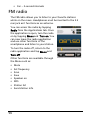
FM radio
The FM radio allows you to listen to your favorite stations
while on the move. Headphones must be inserted to the 3.5
mm jack as it functions as an antenna.
You can access the radio by tapping
Radio from the Applications tab. Once
the application is open, turn the radio
on by tapping Menu and Turn on. You
can now leave the radio application
and use other functions of the
smartphone and listen to your station.
To turn the radio off, return to the
radio application and tap Menu and
Turn off.
Other functions are available through
the Menu such as:
•
•
•
•
•
•
•
•
56
Mute
Set frequency
Scan
Save
Speaker on
RDS
Station list
Send station info
Managing applications
Warning! Make sure you trust the source of any program you
install. If you are not sure of the source, do not install a program.
Installing programs from unknown sources increases your risk of
virus attacks and theft of personal and private data.
You can remove programs installed on your smartphone to
free up extra storage memory. Open the Applications tab and
going to Settings > Applications.
Here you can allow programs from Unknown sources to be
installed and Manage Applications.
Warning! You should only remove programs if you are familiar
with the Android operating system.
Resetting your smartphone
You may have to perform a reset if your smartphone fails to
respond when buttons are pressed or the screen is tapped.
Note: Before performing a reset, ensure that your smartphone is
not locked. Press any key or tap the screen to see if the phone
responds.
Clean boot
Warning! You should only perform a clean boot when all other
options have failed to restore your smartphone to an operational
state.
Managing applications
57
A clean boot will restore your smartphone to the factory
settings.
Warning! This will erase all your personal information, any contacts
stored on your phone and any programs you installed.
1. Open the Applications tab and go to Settings > SD card &
Phone storage > Factory data reset.
2. On the Factory data reset screen, tap Reset Phone and then
tap Erase everything.
58
Appendix
FAQ and troubleshooting
This section lists frequently asked questions that may arise
during the use of your smartphone, and gives easy answers
and solutions to these questions.
Aspect
Question
Answer
Audio
Why is there no
sound coming
from the device?
If the headset is plugged into the
device, the speaker is automatically
shut off. Disconnect the headset.
Check that the device volume
setting is not muted.
Check that the volume control is
not at its lowest setting.
Multimedia files Why can’t I view
my picture files?
You may be trying to view an
image that is not supported. Refer
to “Multimedia” on page 61 for
more information.
Why can’t I view
my video files?
You may be trying to view a video
that is not supported. Refer to
“Multimedia” on page 61 for more
information.
Why can’t I play
my music files?
You may be trying to play a file
that is not supported. Refer to
“Multimedia” on page 61 for more
information.
How do I check
the OS version of
my device?
Tap Menu > Settings > About
phone to check the OS version
(Kernel/build number) and other
hardware and software
information.
System
information
and
performance
FAQ and troubleshooting
59
Aspect
Question
Answer
Power
I couldn’t turn on
the device.
The battery power may be
depleted. Recharge the device.
Refer to “Charging the battery” on
page 15 for more information.
Heat
The phone heats
up when charging
or making long
duration calls.
It is normal for the phone to heat
up when charging. When charging
is complete, it will return to its
normal temperature.
It is also normal for the phone to
heat up during long periods of use,
such as watching a video or a long
phone conversation.
All Acer phones are factory tested
before release.
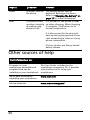
Other sources of help
For information on:
Refer to:
Programs on your
smartphone and additional
programs that can be
installed on your smartphone
This User Guide. Included on the
smartphone companion CD, it provides
online reference for using your
smartphone.
Up-to-date information
regarding your smartphone
www.acer.com/
Service enquiries
www.acer.com/support/
60
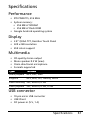
Specifications
Performance
• STE PNX6715, 416 MHz
• System memory:
• 256 MB of SDRAM
• 256 MB of Flash ROM
• Google Android operating system
Display
• 2.8” QVGA TFT, Resistive Touch Panel
• 320 x 240 resolution
• 65K colors support
Multimedia
• CD-quality stereo output
• Mono speaker 0.5 W (max)
• Omni-directional microphone
• Formats supported
Type
Formats
Audio playback
MP3, AAC, AMR
Ringtone
MP3, MIDI, DLS, iMelody, WAVE
Video recording 3GP, MPEG-4, H.263
Video playback
3GP, MPEG-4, H.263, H.264
USB connector
• 10-pin micro USB connector
• USB Client
• DC power-in (5 V, 1 A)
Specifications
61
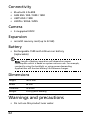
Connectivity
•
•
•
•
Bluetooth 2.0+EDR
GSM 850 / 900 / 1800 / 1900
UMTS 850 / 1900
HSDPA / EDGE / GPRS
Camera
• 3-megapixel EDOF
Expansion
• microSD memory card (up to 32 GB)
Battery
• Rechargeable 1500 mAh Lithium-ion battery
(replaceable)
Note: Length of battery operation will depend on power
consumption which is based on system resource use. For example,
constantly using the backlight or using power-demanding
Applications will shorten battery life between charges.
Dimensions
Height
103.5 mm
Width
54 mm
Thickness
13.4 mm
Weight
<105 g (with battery)
Warnings and precautions
• Do not use this product near water.
62
• Do not place this product on an unstable cart, stand or
table. If the product falls, it could be seriously
damaged.
• Never push objects of any kind into this product
through slots as they may touch dangerous voltage
points or short-out parts that could result in a fire or
electric shock. Never spill liquid of any kind onto or
into the product.
• To avoid damage of internal components and to
prevent battery leakage, do not place the product on a
vibrating surface.
• Never use this product when engaging in sporting
activities, exercising, or in any vibrating environment
which may cause a short circuit or damage, and even a
risk of explosion from the battery pack.
CAUTION when listening to music
To protect your hearing, follow these instructions.
• Increase the volume gradually until you can hear
clearly and comfortably.
• Do not increase the volume level after your ears have
adjusted.
• Do not listen to music at high volumes for extended
periods.
• Do not increase the volume to block out noisy
surroundings.
• Decrease the volume if you can’t hear people speaking
near you.
Battery information
This product uses a Lithium-ion battery. Do not use it in a
humid, wet and/or corrosive environment. Do not put, store or
leave your product in or near a heat source, in a high
Warnings and precautions
63
temperature location, in strong direct sunlight, in a microwave
oven or in a pressurized container, and do not expose it to
temperatures over 60 °C (140 °F). Failure to follow these
guidelines may cause the battery to leak acid, become hot,
explode or ignite and cause injury and/or damage. Do not
pierce, open or disassemble the battery. If the battery leaks
and you come into contact with the leaked fluids, rinse
thoroughly with water and seek medical attention
immediately. For safety reasons, and to prolong the lifetime of
the battery, charging will not occur at low (below 0 °C/32 °F) or
high (over 40 °C/104 °F) temperatures.
The full performance of a new battery is achieved only after
two or three complete charge and discharge cycles. The
battery can be charged and discharged hundreds of times, but
it will eventually wear out. When the talk and standby times
are noticeably shorter than normal, buy a new battery. Use
only Acer approved batteries, and recharge your battery only
with Acer approved chargers designated for this device.
Unplug the charger from the electrical plug and the device
when not in use. Do not leave a fully charged battery
connected to the ac charger, since overcharging may shorten
its lifetime. If left unused, a fully charged battery will lose its
charge over time. If the battery is completely discharged, it
may take a few minutes before the charging indicator appears
on the display or before any calls can be made.
Use the battery only for its intended purpose. Never use any
charger or battery that is damaged.
Do not short-circuit the battery. Accidental short-circuiting can
occur when a metallic object such as a coin, clip, or pen causes
direct connection of the positive (+) and negative (-) terminals
of the battery. (These look like metal strips on the battery.)
This might happen, for example, when you carry a spare
battery in your pocket or purse. Short-circuiting the terminals
may damage the battery or the connecting object.
64
Leaving the battery in hot or cold places, such as in a closed car
in summer or winter conditions, will reduce the capacity and
lifetime of the battery. Always try to keep the battery between
15 °C and 25 °C (59 °F and 77 °F). A device with a hot or cold
battery may not work temporarily, even when the battery is
fully charged. Battery performance is particularly limited in
temperatures well below freezing.
Do not dispose of batteries in a fire as they may explode.
Batteries may also explode if damaged. Dispose of batteries
according to local regulations. Please recycle when possible.
Do not dispose as household waste.
Replacing the battery pack
Your smartphone uses lithium batteries. Replace the battery
with the same type as that which came bundled with your
product. Use of another battery may present a risk of fire or
explosion.
Warning! Batteries may explode if not handled properly. Do not
disassemble or dispose of them in fire. Keep them away from
children. Follow local regulations when disposing of used batteries.
Additional safety information
Your device and its enhancements may contain small parts.
Keep them out of the reach of small children.
Operating environment
Warning! For safety reasons, turn off all wireless or radio
transmitting devices when using your smartphone device under the
following conditions. These devices may include, but are not
limited to: Bluetooth and/or 3G.
Warnings and precautions
65
Remember to follow any special regulations in force in any
area, and always switch off your device when its use is
prohibited or when it may cause interference or danger. Use
the device only in its normal operating positions. Do not cover
the antenna with metal and you should position the device at
the above-stated distance from your body. To successfully
transmit data files or messages, this device requires a good
quality connection to the network. In some cases, transmission
of data files or messages may be delayed until such a
connection is available. Parts of the device are magnetic.
Metallic materials may be attracted to the device, and persons
with hearing aids should not hold the device to the ear with
the hearing aid. Do not place credit cards or other magnetic
storage media near the device, because information stored on
them may be erased.
Medical devices
Operation of any radio transmitting equipment, including
wireless phones, may interfere with the functionality of
inadequately protected medical devices. Consult a physician or
the manufacturer of the medical device to determine if they
are adequately shielded from external RF energy or if you have
any questions. Switch off your device in health care facilities
when any regulations posted in these areas instruct you to do
so. Hospitals or health care facilities may be using equipment
that could be sensitive to external RF transmissions.
Pacemakers. Pacemaker manufacturers recommend that a
minimum separation of 15.3 cm (6") be maintained between
wireless devices and a pacemaker to avoid potential
interference with the pacemaker. These recommendations are
consistent with the independent research by and
recommendations of Wireless Technology Research. Persons
with pacemakers should do the following:
66
• Always keep the device more than 15.3 cm (6") from
the pacemaker.
• Not carry the device near your pacemaker when the
device is switched on. If you suspect interference,
switch off your device, and move it.
Hearing aids. Some digital wireless devices may interfere with
some hearing aids. If interference occurs, consult your service
provider.
Vehicles
RF signals may affect improperly installed or inadequately
shielded electronic systems in motor vehicles such as electronic
fuel injection systems, electronic antiskid (antilock) braking
systems, electronic speed control systems, and air bag systems.
For more information, check with the manufacturer, or its
representative, of your vehicle or any equipment that has been
added. Only qualified personnel should service the device, or
install the device in a vehicle. Faulty installation or service may
be dangerous and may invalidate any warranty that may apply
to the device. Check regularly that all wireless equipment in
your vehicle is mounted and operating properly. Do not store
or carry flammable liquids, gases, or explosive materials in the
same compartment as the device, its parts, or enhancements.
For vehicles equipped with an air bag, remember that air bags
inflate with great force. Do not place objects, including
installed or portable wireless equipment in the area over the
air bag or in the air bag deployment area. If in-vehicle wireless
equipment is improperly installed, and the air bag inflates,
serious injury could result. Using your device while flying in
aircraft is prohibited. Switch off your device before boarding
an aircraft. The use of wireless teledevices in an aircraft may be
dangerous to the operation of the aircraft, disrupt the wireless
telephone network, and may be illegal.
Warnings and precautions
67
Potentially explosive environments
Switch off your device when in any area with a potentially
explosive atmosphere and obey all signs and instructions.
Potentially explosive atmospheres include areas where you
would normally be advised to turn off your vehicle engine.
Sparks in such areas could cause an explosion or fire resulting
in bodily injury or even death. Switch off the device at
refueling points such as near gas pumps at service stations.
Observe restrictions on the use of radio equipment in fuel
depots, storage, and distribution areas; chemical plants; or
where blasting operations are in progress. Areas with a
potentially explosive atmospheres are often, but not always,
clearly marked. They include below deck on boats, chemical
transfer or storage facilities, vehicles using liquefied petroleum
gas (such as propane or butane), and areas where the air
contains chemicals or particles such as grain, dust or metal
powders.
Follow any restrictions. Do not use the device where blasting is
in progress.
Emergency calls
Important: Wireless phones, including this device, operate
using radio signals, wireless networks, landline networks, and
user-programmed functions. Because of this, connections in all
conditions cannot be guaranteed. You should never rely solely
on any wireless device for essential communications like
medical emergencies.
If certain features are in use, you may first need to turn those
features off before you can make an emergency call. Consult
this guide or your service provider for more information.
When making an emergency call, give all the necessary
information as accurately as possible. Your wireless device may
68
be the only means of communication at the scene of an
accident. Do not end the call until given permission to do so.
Disposal and recycling
information
Do not throw this electronic device into the trash when
discarding.
To minimize pollution and ensure utmost protection of the
global environment, please recycle. For more information on
the Waste from Electrical and Electronics Equipment (WEEE)
regulations, visit
www.acer-group.com/public/Sustainability/
sustainability01.htm
Mercury advisory
For projectors or electronic products containing an LCD/CRT
monitor or display:
Lamp(s) inside this product contain mercury and must be
recycled or disposed of according to local, state or federal
laws. For more information, contact the Electronic Industries
Alliance at www.eiae.org. For lamp-specific disposal
information, check www.lamprecycle.org.
Disposal and recycling information
69
Taking care of your smartphone
1. DO take care not to scratch the screen of your smartphone.
Keep the screen clean. When working with your smartphone, use your finger or fingernail. Never use an actual
pen or pencil or other sharp object on the screen surface.
2. DO NOT expose your smartphone to rain or moisture. Do
not let water enter the circuitry through the front panel
buttons or expansion slots. In general, treat your
smartphone as you would a mobile phone or other small
electronic device.
3. DO be careful not to drop your smartphone or subject it to
any strong impact. Do not place your smartphone in your
back pocket.
4. DO NOT expose your smartphone to extreme temperatures.
For example, do not leave your smartphone on the dashboard of a car on a hot day or when temperatures are
below freezing point. Also, keep it away from heaters and
other sources of heat.
5. DO NOT use or store your smartphone in any location that
is dusty, damp or wet.
6. DO use a soft, damp cloth to clean your smartphone. If the
surface of the screen becomes soiled, clean it with a soft
cloth moistened with diluted window-cleaning solution.
7. DO NOT press down on the screen with force, otherwise
you may crack the screen.
70
Safety regulations
LCD pixel statement
The LCD unit is produced with high-precision manufacturing
techniques. Nevertheless, some pixels may occasionally misfire
or appear as black or red dots. This has no effect on the
recorded image and does not constitute a malfunction.
FCC regulations
This mobile phone complies with part 15 of the FCC Rules.
Operation is subject to the following two conditions: (1) This
device may not cause harmful interference, and (2) this device
must accept any interference received, including interference
that may cause undesired operation.
This mobile phone has been tested and found to comply with
the limits for a Class B digital device, pursuant to Part 15 of the
FCC Rules. These limits are designed to provide reasonable
protection against harmful interference in a residential
installation. This equipment generates, uses and can radiated
radio frequency energy and, if not installed and used in
accordance with the instructions, may cause harmful
interference to radio communications. However, there is no
guarantee that interference will not occur in a particular
installation If this equipment does cause harmful interference
to radio or television reception, which can be determined by
turning the equipment off and on, the user is encouraged to
try to correct the interference by one or more of the following
measures:
• Reorient or relocate the receiving antenna.
• Increase the separation between the equipment and
receiver.
• Connect the equipment into an outlet on a circuit
different from that to which the receiver is connected.
Safety regulations
71
• Consult the dealer or an experienced radio/TV
technician for help.
Changes or modifications not expressly approved by the party
responsible for compliance could void the user's authority to
operate the equipment.
The antenna(s) used for this transmitter must not be colocated or operating in conjunction with any other antenna or
transmitter.
RF exposure information (SAR)
This mobile phone meets the government's requirements for
exposure to radio waves.
This phone is designed and manufactured not to exceed the
emission limits for exposure to radio frequency (RF) energy set
by the Federal Communications Commission of the U.S.
Government.
The exposure standard for wireless mobile phones employs a
unit of measurement known as the Specific Absorption Rate,
or SAR. The SAR limit set by the FCC is 1.6W/kg.
Tests for SAR are conducted using standard operating
positions accepted by the FCC with the phone transmitting at
its highest certified power level in all tested frequency bands.
Although the SAR is determined at the highest certified power
level, the actual SAR level of the phone while operating can be
well below the maximum value. This is because the phone is
designed to operate at multiple power levels so as to use only
the poser required to reach the network. In general, the closer
you are to a wireless base station antenna, the lower the
power output.
The highest SAR value for the model phone as reported to the
FCC when tested for use at the ear is 1.09 W/kg and when
worn on the body, as described in this user guide, is
0.662 W/kg.
72
Important: Body-worn measurements differ among phone models,
depending upon available enhancements and FCC requirements.
While there may be differences between the SAR levels of
various phones and at various positions, they all meet the
government requirements.
The FCC has granted an Equipment Authorization for this
model phone with all reported SAR levels evaluated as in
compliance with the FCC RF exposure guidelines. SAR
information on this model phone is on file with the FCC and
can be found under the Display Grant section of
www.fcc.gov/oet/ea/fccid after searching on FCC ID:
HLZDME110.
For body worn operation, this phone has been tested and
meets the FCC RF exposure guidelines for use with accessories
that contain no metal and that position the handset a minimum of 1.5 cm from the body. Use of other accessories may
not ensure compliance with FCC RF exposure guidelines. If you
do not use a body-worn accessory and are not holding the
phone at the ear, position the handset a minimum of 1.5 cm
from your body when the phone is switched on.
Safety regulations
73
Lithium-ion battery warning
ATTENZIONE! Rischio di esplosione della batteria se sostituita in
modo errato. Sostituire la batteria con un una di tipo uguale o
equivalente consigliata dalla fabbrica. Non disperdere le batterie
nell’ambiente.
VORSICHT! Explosionsgefahr bei unsachgemäßen Austausch der
Batterie. Ersatz nur durch denselben oder einem vom Hersteller
empfohlenem ähnlichen Typ. Entsorgung gebrauchter Batterien
nach Angaben des Herstellers.
ADVARSELI! Lithiumbatteri - Eksplosionsfare ved fejlagtig
håndtering. Udskiftning må kun ske med batteri af samme
fabrikat og type. Levér det brugte batteri tilbage til leverandøren.
VARNING! Explosionsfara vid felaktigt batteribyte. Använd samma
batterityp eller en ekvivalent typ som rekommenderas av
apparattillverkaren. Kassera använt batteri enligt fabrikantens
instruktion.
VAROITUS! Paristo voi räjähtää, jos se on virheellisesti asennettu.
Vaihda paristo ainoastaan laitevalmistajan sousittelemaan
tyyppiin. Hävitä käytetty paristo valmistagan ohjeiden mukaisesti.
ATTENTION ! Il y a danger d’explosion s’il y a remplacement
incorrect de la batterie. Remplacer uniquement avec une batterie
du mêre type ou d’ un type équivalent recommandé par le
constructeur. Mettre au rebut les batteries usagées conformément
aux instructions du fabricant.
ADVARSEL! Eksplosjonsfare ved feilaktig skifte av batteri. Benytt
samme batteritype eller en tilsvarende type anbefalt av
apparatfabrikanten. Brukte batterier kasseres i henhold til
fabrikantens instruksjoner.
74
B
battery
charging ............................ 15
information ....................... 62
Bluetooth
connections ....................... 41
browsing the internet ............. 49
C
call history ............................. 24
calls
answering .......................... 25
ending ............................... 25
onscreen options ................ 25
camera
icons and indicators ............ 35
information ....................... 62
shooting a video ................ 37
supported formats .............. 38
taking a photo ................... 37
conference calls ...................... 27
connectivity ........................... 62
contacts
adding and editing ............. 45
making calls to a contact ..... 24
D
display ................................... 61
E
email ..................................... 33
F
FAQs ..................................... 59
FM radio ................................ 56
G
GPS Tracker ........................... 55
H
help
sources .............................. 60
I
international numbers .............24
L
LED indicators .........................13
M
managing your calandar ..........46
MMS messages .......................31
modem sharing ......................48
O
onscreen keyboard ..................18
P
performance ..........................61
phone
connections ........................41
S
safety regulations ...................62
setting alarms .........................43
social networking ...................49
speakerphone .........................25
specifications ..........................60
spinlets ..................................52
T
troubleshooting ......................59
turning on ..............................17
U
urFooz ...................................49
USB connector ........................61
V
views
left ....................................13
voice calls
the voice call screen ............25
volume
adjusting ............................55
75
76