1
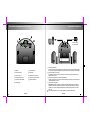
Making connections
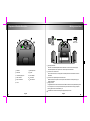
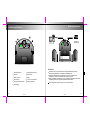
Diagram and Function Description
Connected
with AC power
SPEAKER OUT
SPEAKER OUT
LINE IN
MIN
MAX
LINE IN
MIN
MAX
BASS
DC IN
DC IN
BASS
1
1
Satellites
7
Bass adjustment
2
Subwoofer
8
DC jack
3
Volume adjusting knob
9
Power adapter
4
Power indicator
10
Audio cable
5
Output for satellite
11 User's Manual
6
Line-in
Operating Instructions.
Connection of the satellite speakers and the subwoofer: Connect the 3.5mm Stereo plug of
the satellite speakers to the output socket on the back panel of the subwoofer.
2 Connection of the sound source.
Connect the sound source to the input jack on the back panel of the subwoofer with the 3.5-3.5
audio cable.
3 Connection of the speaker system and the AC Power.
Please connect the DC IN jack on the rear panel of the subwoofer to the AC power using the
supplied AC adapter.
4 Playing the music:
Congratulations! All the above connections for the Edifier E1100 Plus are completed and the system
is now ready for use. Turn on the power switch of the system and sit back and enjoy the perfect
listening experience we have created for you!
All illustrations in this manual are subject to change without prior notice.
English
English