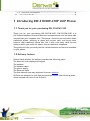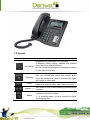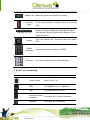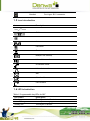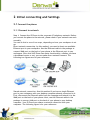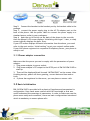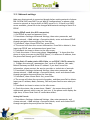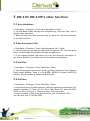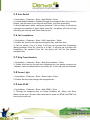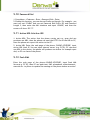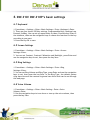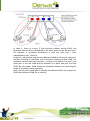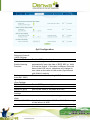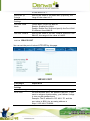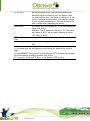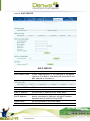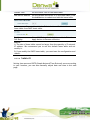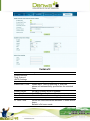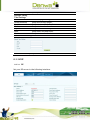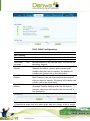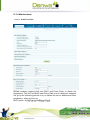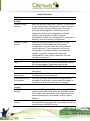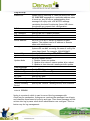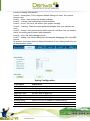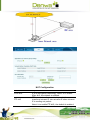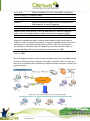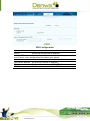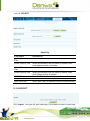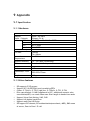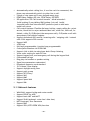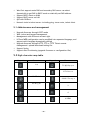
1
Safety Notices Please read the following safety notices before installing or using this phone. They are crucial for the safe and reliable operation of the device. Please use the external power supply that is included in the package. Other power supplies may cause damage to the phone, affect the behavior or induce noise. Before using the external power supply in the package, please check with home power voltage. Inaccurate power voltage may cause fire and damage. Please do not damage the power cord. If power cord or plug is impaired, do not use it, it may cause fire or electric shock. The plug-socket combination must be accessible at all times because it serves as the main disconnecting device. Do not drop, knock or shake it. Rough handling can break internal circuit boards. Do not install the device in places where there is direct sunlight. Also do not put the device on carpets or cushions. It may cause fire or breakdown. Avoid exposure the phone to high temperature, below 0℃ or high humidity. Avoid wetting the unit with any liquid. Do not attempt to open it. Non-expert handling of the device could damage it. Consult your authorized dealer for help, or else it may cause fire, electric shock and breakdown. Do not use harsh chemicals, cleaning solvents, or strong detergents to clean it. Wipe it with a soft cloth that has been slightly dampened in a mild soap and water solution. When lightning, do not touch power plug or phone line, it may cause an electric shock. Do not install this phone in an ill-ventilated place. You are in a situation that could cause bodily injury. Before you work on any equipment, be aware of the hazards involved with electrical circuitry and be familiar with standard practices for preventing accidents. Table of Content 1 2 INTRODUCING DW-310/DW-310P VOIP PHONE .......................................................... 6 1.1 THANK YOU FOR YOUR PURCHASING DW-310/DW-310P ..................................................... 6 1.2 DELIVERY CONTENT ......................................................................................... 6 1.3 KEYPAD ..................................................................................................... 7 1.4 PORT FOR CONNECTING ...................................................................................... 8 1.5 ICON INTRODUCTION ......................................................................................... 9 1.6 LED INTRODUCTION ......................................................................................... 9 INITIAL CONNECTING AND SETTINGS ..................................................................... 11 2.1 Connect to network ................................................................................ 11 2.1.2 Power adaptor connection......................................................................... 12 2.2 2.2.1 3 BASIC INITIALIZATION ....................................................................................... 12 Network settings .................................................................................... 13 DW-310/DW-310P’S BASIC FUNCTION ................................................................... 15 3.1 4 CONNECT THE PHONE ....................................................................................... 11 2.1.1 MAKING A CALL ............................................................................................. 15 3.1.1 Call Device ........................................................................................... 15 3.1.2 Call Methods ......................................................................................... 15 3.2 ANSWERING A CALL ......................................................................................... 15 3.3 DND ...................................................................................................... 16 3.4 CALL FORWARD ............................................................................................ 16 3.5 CALL HOLD ................................................................................................ 16 3.6 CALL WAITING ............................................................................................. 16 3.7 MUTE ...................................................................................................... 17 3.8 CALL TRANSFER ............................................................................................ 17 3.9 3-WAY CONFERENCE CALL ................................................................................... 17 3.10 MULTIPLE-WAY CALL ........................................................................................ 18 DW-310/DW-310P’S ADVANCED FUNCTION ............................................................. 19 4.1 CALL PICKUP ............................................................................................... 19 4.2 JOIN CALL ................................................................................................. 19 4.3 REDIAL / UNREDIAL ........................................................................................ 19 4.4 CLICK TO DIAL .............................................................................................. 20 4.5 CALL BACK ................................................................................................. 20 4.6 AUTO ANSWER .............................................................................................. 20 4.7 HOTLINE ................................................................................................... 20 4.8 APPLICATION ............................................................................................... 20 4.8.1 SMS .................................................................................................... 20 4.8.2 Memo ................................................................................................. 21 4.8.3 4.9 5 6 7 8 Voice Mail ............................................................................................ 21 PROGRAMMABLE KEY CONFIGURATION ....................................................................... 21 DW-310/DW-310P’S OTHER FUNCTIONS ................................................................. 24 5.1 AUTO HANDDOWN .......................................................................................... 24 5.2 BAN ANONYMOUS CALL ..................................................................................... 24 5.3 DIAL PLAN ................................................................................................. 24 5.4 DIAL PEER ................................................................................................. 24 5.5 AUTO REDIAL .............................................................................................. 25 5.6 CALL COMPLETION .......................................................................................... 25 5.7 RING FROM HEADSET ....................................................................................... 25 5.8 POWER LIGHT .............................................................................................. 25 5.9 HIDE DTMF ............................................................................................... 25 5.10 PASSWORD DIAL ............................................................................................ 26 5.11 ACTION URL & ACTIVE URI ................................................................................ 26 5.12 PUSH XML ................................................................................................. 26 DW-310/DW-310P’S BASIC SETTINGS..................................................................... 27 6.1 KEYBOARD ................................................................................................. 27 6.2 SCREEN SETTINGS .......................................................................................... 27 6.3 RING SETTINGS ............................................................................................. 27 6.4 VOICE VOLUME ............................................................................................. 27 6.5 TIME & DATE .............................................................................................. 28 6.6 GREETING WORDS .......................................................................................... 28 6.7 LANGUAGE ................................................................................................. 28 DW-310/DW-310P’S ADVANCED SETTINGS .............................................................. 29 7.1 ACCOUNTS ................................................................................................. 29 7.2 NETWORK .................................................................................................. 29 7.3 SECURITY .................................................................................................. 29 7.4 MAINTENANCE .............................................................................................. 29 7.5 FACTORY RESET ............................................................................................ 29 WEB CONFIGURATION....................................................................................... 30 8.1 INTRODUCTION OF CONFIGURATION .......................................................................... 30 8.1.1 Ways to configure ................................................................................... 30 8.1.2 Password Configuration ............................................................................ 30 8.2 SETTING VIA WEB BROWSER ................................................................................. 30 8.3 CONFIGURATION VIA WEB .................................................................................. 31 8.3.1 BASIC ................................................................................................. 31 8.3.1.1 STATUS ..................................................................................................... 31 8.3.1.2 WIZARD ..................................................................................................... 32 8.3.1.3 CALL LOG .................................................................................................. 35 8.3.1.4 8.3.2 NETWORK ............................................................................................ 36 8.3.2.1 WAN ........................................................................................................ 36 8.3.2.2 LAN ......................................................................................................... 38 8.3.2.3 QoS&VLAN ................................................................................................. 39 8.3.2.4 SERVICE PORT ............................................................................................. 42 8.3.2.5 DHCP SERVICE ............................................................................................. 44 8.3.2.6 TIME&DATE ................................................................................................ 45 8.3.3 VOIP................................................................................................... 47 8.3.3.1 SIP........................................................................................................... 47 8.3.3.2 IAX2 ......................................................................................................... 55 8.3.3.3 STUN ........................................................................................................ 56 8.3.3.4 DIAL PEER .................................................................................................. 58 8.3.4 PHONE ................................................................................................ 61 8.3.4.1 AUDIO....................................................................................................... 61 8.3.4.2 FEATURE ................................................................................................... 63 8.3.4.3 DIAL PLAN .................................................................................................. 67 8.3.4.4 CONTACT ................................................................................................... 69 8.3.4.5 REMOTE CONTACT ........................................................................................ 72 8.3.4.6 WEB DIAL ................................................................................................... 73 8.3.5 FUNCTION KEY....................................................................................... 73 8.3.5.1 FUNCTION KEY............................................................................................. 73 8.3.5.2 SOFTKEY.................................................................................................... 75 8.3.6 Maintenance ......................................................................................... 76 8.3.6.1 Auto Provision ............................................................................................. 76 8.3.6.2 SYSLOG ..................................................................................................... 78 8.3.6.3 CONFIG ..................................................................................................... 80 8.3.6.4 UPDATE ..................................................................................................... 81 8.3.6.5 ACCESS ..................................................................................................... 82 8.3.6.6 REBOOT .................................................................................................... 84 8.3.7 SECURITY ............................................................................................. 84 8.3.7.1 WEB FILTER ................................................................................................ 84 8.3.7.2 FIREWALL .................................................................................................. 85 8.3.7.3 NAT ......................................................................................................... 86 8.3.7.4 VPN ......................................................................................................... 89 8.3.7.5 SECURITY................................................................................................... 91 8.3.8 9 LANGUAGE ................................................................................................. 35 LOGOUT .............................................................................................. 91 APPENDIX ..................................................................................................... 93 9.1 SPECIFICATION ............................................................................................. 93 9.1.1 Hardware............................................................................................. 93 9.1.2 Voice features ....................................................................................... 93 9.1.3 Network features ................................................................................... 94 9.1.4 9.2 Maintenance and management ................................................................... 95 DIGIT-CHARACTER MAP TABLE ............................................................................... 95 1 Introducing DW-310/DW-310P VoIP Phone 1.1 Thank you for your purchasing DW-310/DW-310P Thank you for your purchasing DW-310/DW-310P. DW-310/DW-310P is a full-feature telephone that provides voice communication over the same data network that your computer uses. This phone’s functions not only much like a traditional phone, allowing to place and receive calls, and enjoy other features that traditional phone has, but it also own many data services features which you could not expect from a traditional telephone. This guide will help you easily use the various features and services available on your phone. 1.2 Delivery Content Please check whether the delivery contains the following parts: The base unit with display and keypad The handset The handset cable The power supply The Ethernet cable The User Manual (you may download from our website) IP Phone are designed to look like conventional phones, the following photo shows a broad overview of the IP Phone. 1.3 Keypad Key Key name Navigation Function Description Navigation key assist users for operating. In desktop, dialer, calling, desktop long pressed state they have special function. You can configure through the web page according to your patterns of use. Access to phone book, check the record list and add new records and revise the record. When Directory check the phone book record, press this key again will return to idle mode. Press this key in calling mode, you can hear the Mute other side, and the other side cannot hear you. Turn down or turn up the volume by pressing these Volume -/+ two keys. 1. In the hook off /hands-free mode, use the key to dial the last call number; Redial 2. In stand-by mode, it has a function to check the Outgoing Call. Hands-free Indicator light Soft key 1/2/3/4 History Make the phone into hands-free mode. If the light blinking, indicate there is incoming call. Keys combination, include functions such as History/Directory/DND/Menu/Del/Redial/Send/ Quit/Answer/Divert/Reject/Hold/Transfer/Conf/ Close and so on. View the Missed call, Incoming Call and dialed Call. Digital keyboard Inputting the phone number or DTMF. DSS keys You can configure them in the web page. 1.4 Port for connecting Port Port name description Power switch Input: 5V AC, 1A WAN 10/100M Connect it to Network LAN 10/100M Connect it to PC External console Port type: RJ-11 direct connector interface Headset Port type: RJ-9 connector Handset Port type: RJ-9 connector 1.5 Icon introduction Icon Description Call out Call in Call hold Auto answer Call mute Contact DND(Do not Disturb) In hand-free mode In handset mode In headset mode SMS Missed call Call forward 1.6 LED introduction Table 1 Programmable key LEDs for BLF LED Status Description Steady green The object is in idle status. Slow blinking red The object is ringing. Steady red The object is active. Fast blinking red Off The object is failed. No subscribe. Table 2 Programmable key LEDs for Presence LED Status Description Steady green The object is online. Slow blinking red The object is ringing. Steady red The object is active. Fast blinking red The object is failed. Off No subscribe. Table 3 Programmable key LEDs for line LED Status Description Steady green The account is active. Fast Blinking red There is an incoming call to the account. Slow Blinking red The call is on hold. Slow Blinking red Registration is unsuccessful. Off The line is not unapplied or idle. Table 4 Programmable key LEDs for MWI LED Status Description Blinking red There are new voice mails. Off There is no new voice mail. Table 5 Power Indication LED LED Status Description Steady red Power on. Fast Blinking red There is an incoming call. 2 Initial connecting and Settings 2.1 Connect the phone 2.1.1 Connect to network Step 1: Connect the IP Phone to the corporate IP telephony network. Before you connect the phone to the network, please check if your network can work normally. You can do this in one of two ways, depending on how your workspace is set up. Direct network connection—by this method, you need at least one available Ethernet port in your workspace. Use the Ethernet cable in the package to connect WAN port on the back of your phone to the Ethernet port in your workspace. Since this VoIP Phone has router functionality, whether you have a broadband router or not, you can make direct network connect. The following two figures are for your reference. Shared network connection—Use this method if you have a single Ethernet port in your workspace with your desktop computer already connected to it. First, disconnect the Ethernet cable from the computer and attach it to the WAN port on the back of your phone. Next, use the Ethernet cable in the package to connect LAN port on the back of your phone to your desktop computer. Your IP Phone now shares a network connection with your computer. The following figure is for your reference. Step 2: Connect the handset to the handset port by the handset cable in the package. Step 3: connect the power supply plug to the AC 5V adapter port on the back of the phone. Use the power cable to connect the power supply to a standard power outlet in your workspace. Step 4: push the on/off switch on the back of the phone to the one side, then the phone’s LCD screen displays “Initializing wait logon”. Later, a ready screen typically displays the date, time. If your LCD screen displays different information from the above, you need refer to the next section “Initial setting” to set your network online mode. If your VoIP phone registers into corporate IP telephony Server, your phone is ready to use. 2.1.2 Power adaptor connection Make sure that the power you use is comply with the parameters of power adaptor. 1. Plug power adaptor to power socket. 2. Plug power adaptor’s DC output to the DC5V port of DW-310/DW-310P to start up. 3. There will be displayed black line and “INITIALIZING” on the screen. After finishing startup, phone will show greeting, current date and time and so forth. 4. If phone has registered to the server, you can place or answer calls. 2.2 Basic Initialization DW-310/DW-310P is provided with a plenty of functions and parameters for configuration. User needs some network and VoIP knowledge so that user could understand the meanings of parameters. In order to make user use the phone more easily and convenient, there are basic configurations introduced which is mandatory to ensure phone calls. 2.2.1 Network settings Make sure that network is connected already before setting network of phone. DW-310/DW-310P uses DHCP to get WAN IP configurations, so phone could access to network as long as there is DHCP server in it. If there is no DHCP server available, phone has to be changed WAN network setting to Static IP or PPPoE. Setting PPPoE mode (for ADSL connection) 1. Get PPPoE account and password first. 2. Press Menu->Settings->Advanced Settings, then enter passwords, and choose network ->WAN settings->Connection Mode, enter and choose PPPoE through navigation keys and press the Save key. 3. Press Back, then choose PPPoE Set, press Enter. 4. The screen will show the current information. Press Del to delete it, then input your PPPoE user and password and press Save. 5. Press Back six times to return to the idle screen. 6. Check the status. If the screen shows “Negotiating…” it shows that the phone is trying to access to the PPPoE Server; if it shows an IP address, then the phone has already get IP with PPPoE. Setting Static IP mode (static ADSL/Cable, or no PPPoE / DHCP network) 1. Prepare the network’s parameters first, such as IP Address, Net mask, Default Gateway and DNS server IP address. If you don’t know this information, please contact the service provider or technician of network. 2. Press Menu->Settings->Advanced Settings, then enter passwords, and choose network ->WAN settings->Connection Mode, enter and choose Static through navigation keys and press the Save key. 3. Press Back, then choose Static Set, press Enter. 4. The screen will show the current information, and then press Del to delete. Input your IP address, Mask, Gateway, DNS and press Save to save what you input. 5. Press Back six times to return to the idle screen. 6. Check the status, the screen shows “Static” .the screen shows the IP address and gateway which were set just now, if the phone could display the right time, it shows that Static IP mode takes effect. Setting DHCP mode 1. Press Menu->Settings->Advanced Settings, then enter passwords, and choose network ->WAN settings->Connection Mode, enter and choose DHCP through navigation keys and press the Save key. 2. Press Back six times to return to the idle screen. 3. Check the status, the screen shows “DHCP”, If the screen shows the IP address and gateway which were set just now, it shows that DHCP mode takes effect. 3 DW-310/ DW-310P’s basic function 3.1 Making a call 3.1.1 Call Device You can make a phone call via the following devices: 1. Pick up the handset, icon will be showed in the idle screen. 2. Press the Speaker button, icon will be showed in the idle screen. 3. Press the Headset button if the headset is connected to the Headset Port in advance. The icon will be showed in the idle screen. You can also dial the number first, and then choose the method you will use to speak to the other party. 3.1.2 Call Methods You can press an available line button if there is more than one account, then 1. Dial the number you want to call. 2. Press History softkey, use the navigation buttons to highlight your choice (press Left/Right button to choose Missed Calls, Incoming Calls and Outgoing Calls. 3. Press the R/SEND button to call the last number called. 4. Press the programmable keys which are set as speed dial button. Then press the Send button or Dial softkey to make the call if necessary. 3.2 Answering a call Answering an incoming call 1. If you are not on another phone, lift the handset using, or press the Speaker button/ Answer softkey to answer using the speaker phone, or press the headset button to answer the headset. 2. If you are on another call, press the answer softkey. During the conversation, you can alternate between Headset, Handset and Speaker phone by pressing the corresponding buttons or picking up the handset. 3.3 DND Press DND softkey to active DND Mode. Further incoming calls will be rejected and the display shows: icon. Press DND softkey twice to deactivate DND mode. You can find the incoming call record in the Call History. 3.4 Call Forward This feature allows you to forward an incoming call to another phone number. The display showed icon. The following call forwarding events can be configured: Off: Call forwarding is deactivated by default. Always: Incoming calls are immediately forwarded. Busy: Incoming calls are immediately forwarded when the phone is busy. No Answer: Incoming calls are forwarded when the phone is not answered after a specific period. To configure Call Forward via Phone interface: 1. Press Menu ->Features->Enter->Call Forwarding->Enter. 2. There are 4 options: Disabled, Always, Busy, and No Answer. 3. If you choose one of them (except Disabled), enter the phone number you want to forward your call to. Press Save to save the changes. 3.5 Call Hold 1. Press the Hold button or Hold softkey to put your active call on hold. 2. If there is only one call on hold, press the hold softkey to retrieve the call. 3. If there are more than one call on hold, press the line button, and the Up/Down button to highlight the call, then press the Unhold button to retrieve the call. 3.6 Call Waiting 1. Press Menu ->Features->Enter->Call Waiting->Enter. 2. Use the navigation keys to active or inactive call waiting. 3. Then press the Save to save the changes. 3.7 Mute Press Mute button during the conversation, icon will be showed in the LCD. Then the called will not hear you, but you can hear the called. Press it again to get the phone to normal conversation. 3.8 Call transfer 1. Blind Transfer During talk, press the key Transf, and then dial the number that you want to transfer to, and finished by "#". Phone will transfer the current call to the third party. After finishing transfer, the call you talk to will be hanged up. User cannot select SIP line when phone transfers call. 2. Attended Transfer During talk, press the key Transf, then input the number that you want to transfer to and press Send. After that third party answers, then press Transfer to complete the transfer. (You need enable call waiting and call transfer first). If there are two calls, you can just talk to one, and keep hold to the other one. The one who is keep hold cannot speak to you or hear from you. In other way, if user wants to invite the third party during the call, they can press Conf to make calls mode in conference mode. If user wants to stop conference, user can press Split. (User must enable call waiting and three way call first). Note: the server that user uses must support RFC3515 or it might not be used 3. Alert Transfer During the talk, press Transf firstly, and then press Send after inputting the number that you want to transfer. You are waiting for connection, now, press Transf and the transfer will be done. (To use this feature, you need enable call waiting and call transfer first). 3.9 3-way conference call 1. Press the Conf softkey during an active call. 2. The first call is placed on hold. Then you will hear a dial tone. Dial the number to conference in, then press Send key. 3. When the call is answered, press Conf and add the first call to the conference. 4. If you want to release the conference, press Split key. 3.10 Multiple-way call If user has 2 line calls and wants to invite the three party during the call, they can press Conf or Transf “New Call”, press OK, enter the number ,then press Send and wait for the other party to answer. When the multiple-way calls, you can press the arrow keys to select a call. 4 DW-310/ DW-310P’s advanced function 4.1 Call pickup Call pickup is implemented by simulating pickup function of PBX. it’s that, when A calls B, B rings but no answer, at this moment, C can hook off and input an appointed prefix plus B’s number, pick up A’s call and talk with A. The following chart shows how to configure an appointed prefix in dial peer to have call pick up function. *1* means appointed prefix code. After making the above configuration, C can dial *1* plus B’s phone number to pick up A’s call. User can set prefix in random, in the case of no affecting current dialing rules. 4.2 Join call When B is calling C, A can join in the existing call by inputting an appointed prefix numbers plus B or C number, if B or C also supports join call. The following chart shows how to configure an appointed prefix in dial peer to have join call function. *2* means appointed prefix code. After making the above configuration, A can dial *2* plus B or C number to join B and C’s call. User can set prefix in random, in the case of no affecting current dialing rules. 4.3 Redial / Unredial If B is in busy line when A calls B, A will get notice: busy, please hang up. If A want to connect B as soon as B is in idle, he can use redial function at the moment and he can dials an appointed prefix number plus B’s number to realize redial function. What is redial function? A can’t not build a call with B when B is in busy, then A will subscribe B’s calling mode at 60 second intervals. Once B is available, A will get reminder of rings to hook off, while a hooks off, A will call B automatically. If at this time A is occupied temporarily and unwilling to contact B, A also can cancel the redial function by dialing an appointed prefix plus B’s number before making the redial function. *3* is appointed prefix code. After making the above configuration, A can dial *3* plus B’s phone number to make the redial function. *4* is appointed prefix code. After configuration, A can dial *4* to cancel redial function. User can set prefix in random, in the case of no affecting current dialing rules. 4.4 Click to dial When user A browses in an appointed Web page, user A can click to call user B via a link (this link to user B), then user A’s phone will ring, after A hooks off, the phone will dial to B. 4.5 Call back This function allows you dial out the last phone call you received. 4.6 Auto answer When there is an incoming call, after no answer time, the phone will answer the call automatically. 4.7 Hotline You can set hotline number for every sip, and then enter the dialer interface and after Warm Line Time, the phone will call out the hotline number automatically. 4.8 Application 4.8.1 SMS 1) Press Menu ->Applications->Enter->SMS->Enter. 2) Use the navigation keys to highlight the options. You can read the message in the Inbox/Outbox. 3) After view the new message, you can press Reply to reply the message, and use the 2aB softkey to change the Input Method, when enter the reply message, press OK, then use the navigation keys to select the line from which you want to send, then Send. 4) If you want to write a message, you can press New and enter message. Use the 2aB softkey to change the Input Method. When you input the message you want to send, press OK, then use the navigation keys to select the line from which you want to send, then Send. 5) If you want to delete the message, after view the message, press Del, then you have three options to choose: Yes, All, No. 4.8.2 Memo You can add some memos to record some important things to remind you. Press Menu->Application->Memo->Enter->Add. There are some options to configure: Mode, Date, Time, text, Ring. When the configuration is completed, press Save. 4.8.3 Voice Mail 1) Press Menu->Application->Voice Mail->Enter. 2) Use the navigation keys to highlight the line for which you want to set, press Edit, and use the navigation key to turn on the mode, and the input the number. Press 2aB softkey to choose the proper input method. 3) Press Save to save the change. 4) To view the new voicemail, Press the Voicemail softkey directly. Press Dial, then you may be prompted to enter the password, then you can listen to your new and old messages. 4.9 Programmable Key Configuration The phone has 4 programmable keys which are able to set up to many functions per key. The following list shows the functions you can set on the programmable keys and provides a description for each function. The default configuration for each key is N/A which means the key hasn’t been set for any functions. 1. Set the type as Memory Key Press Menu->Settings->Basic Settings->Enter->Keyboard->DSS Key Settings, you have two options: Line Key Settings and Function Key Settings, choose one you want to make the assignment, use the navigation key to choose the type as memory key. In the Dial field, you have some options, such as Normal, Speed Dial, Intercom, BLF, Presence, and MWI. Speed dial You can configure the key as a simplified speed dial key. This key function allows you to easily access your most dialed numbers. Intercom You can configure the key for Intercom code and it is useful in an office environment as a quick access to connect to the operator or the secretary. BLF BLF is also called “Busy lamp field”, and it is used to prompt the user to pay attention to the state of the object than has been subscribed, and used to cooperate with the server to pick up the phone call. You can configure the key for Busy Lamp Field (BLF) which allows you to monitor the status (idle, ringing, or busy) of other SIP account. User can dial out on a BLF configured key. Please refer to “LED Instruction” for more detail about the LED status in different situation. Note: In the Web interface, you can also set the pickup number to active the pickup function. For example, if you set the BLF number as 212, and the pickup number is 189, then when there is an incoming call to 212, press the BLF key, it will call out the 189 automatically to pick up the incoming call on 212. Presence Presence is called present, and compared to the BLF, it can also check whether object online. Note: You can subscribe the BLF and presence station of the same number at the same time. MWI When the key is configured as MWI, you are allowed to access voicemail quickly by pressing this key. 2. Set the type as Line You can set these keys as line keys, and press it, it will enter dialer interface. 3. Set the type as Key Event You can set these keys as Key Event, and the subtype have many options. Choose one and it will have corresponding function. None Auto Redial Off Auto Redial On Call Back Call Forward DND Flash Headset History Hold Hot Desking: Pressing the key, you can clear all sip information and register yourself sip information. Join Lock: Pressing the key, you can lock the keyboard. Memo MWI Phonebook Pickup Prefix Redial Release: Pressing the key, you can end the call. SMS Transfer 4. Set the type as Dtmf You can configure the key as Dtmf. This key function allows you to easily dial or edit dial number. 5. Set the type as URL You need to match a XML Phonebook address, pressing the button you can directly access the corresponding remote phonebook. 6. Set the type as BLF List Key It needs the cooperation with the Broadsoft server. The traditional BLF is that every number will need to be subscribed, so if the numbers that subscribed is so many that it will cause to obstruction. However, BLF List Key will put the numbers that needed to be subscribed in a group, and the phone use the URL of the group to subscribe and analyze the specific information of each number such as number, name, state and so on according to the notifications from the server. Then set the idle Memory key as BLF List Key, later if the state of an object changes, the corresponding LED will change. 5 DW-310/ DW-310P’s other functions 5.1 Auto Handdown 1. Press Menu ->Features-> Enter->Auto Handdown-> Enter. 2. Set the Mode Enable through the navigation key, then set Time, unit is minute, then press Save. 3. When the call ends, after the time that you have set, the phone will back to the idle interface. 5.2 Ban Anonymous Call 1. Press Menu ->Features-> Enter->Ban Anonymous Call-> Enter. 2. Choose which sip you want to enable Ban Anonymous Call, and then press Enter, choose Enabled or Disabled through navigation key. 3. If you choose Enabled, the others can’t call the phone by anonymous. If you choose Disabled, the others can call the phone by anonymous. 5.3 Dial Plan 1. Press Menu ->Features-> Enter->Dial Plan-> Enter. 2. The following plans you can set: Press # to Send, Timeout to Send, Timeout, Fixed Length Number, Press # to Do BXFER, BXFER On Onhook, AXFER On Onhook. You can enable or disable each dial plan. 5.4 Dial Peer 1. Press Menu ->Features-> Enter->Dial Peer-> Enter. 2. Press Add to enter the Edit interface, and then input some information. For example: Number: 1T, Dest.: 0.0.0.0, Port: 5060, Mode: SIP, Alisa: all:3333, Suffix: no suffix, Del Len: 0. Then press Save. Then press Save. 3. Input 1+number (1234) in the dial interface, you can dial out 3333. You can refer to 8.3.3.4 DIAL PEER. 5.5 Auto Redial 1. Press Menu ->Features-> Enter->Auto Redial-> Enter. 2. Choose Mode Enabled or Disabled through the navigation key. If you choose Enable, you also need to set Interval and Times, and then press Save. 3. After enable auto redial, calling out someone, if he is in busy, it will pop up a prompt box whether to auto redial, press OK, the phone will call out him according the Interval and Times that you set. 5.6 Call completion 1. Press Menu ->Features-> Enter->Call Completion-> Enter. 2. Enable the function through the navigation key, and then Save. 3. Call out others, if he is in busy, it will pop up a prompt Call Completion Waiting number? Press OK, when he is in idle, it will pop up a prompt Call Completion Call number? Press OK, the phone will call out the number automatically. 5.7 Ring From Headset 1. Press Menu ->Features-> Enter->Ring From Headset-> Enter. 2. Enable this function through the navigation key, the phone connects the headset, when the phone has an incoming call, it will ring from the headset. 5.8 Power Light 1. Press Menu ->Features-> Enter->Power Light-> Enter. 2. Enable this function through the navigation key. 5.9 Hide DTMF 1. Press Menu ->Features-> Enter->Hide DTMF-> Enter. 2. Through the navigation key to choose: Disabled, All, Delay, Last Show. When you set up a call with others and need to input the DTMF, the DTMF will show as you have set. 5.10 Password Dial 1. Press Menu ->Features-> Enter->Password Dial-> Enter. 2. Enable this function, you can also set Prefix and Length. For example,you want call out 1234567 and you set Password Dial Prefix 123 and Password Length 3, then enter the dial interface and input 1234567, and then the screen will show 123***7. 5.11 Action URL & Active URI 1. Action URL: The action that the phone carries out e.g. open dnd can produces one URL, then the phone can send the HTTP Get of the URL to PC, then the phone can report the action to the PC. 2. Active URI: Enter the web page of the phone, PHONE->FEATURE, input Active URL Limit IP, You can input internet server (e.g. PC'IP), PC can send one URL to the phone, the phone will produce one action for example open dnd, so PC can control the phone. 5.12 Push XML Enter the web page of the phone->PHONE->FEATURE, input Push XML Server(e.g. PC’IP), then PC can push text, SMS, phonebook, advertisement,, execute etc. to phone to update the message or the phone makes an action. 6 DW-310/ DW-310P’s basic settings 6.1 Keyboard 1. Press Menu ->Settings-> Enter->Basic Settings-> Enter->Keyboard->Enter. 2. There are four items: DSS Key settings, Programmable Keys, Desktop Long Pressed, SoftKey, You can set up respectively on them. Press the key Enter to the interface, then use the navigation keys to choose the function for the key according to you want. 3. Press the key OK to save. 6.2 Screen Settings 1. Press Menu ->Settings-> Enter->Basic Settings-> Enter->Screen Settings->Enter. 2. You can set Contrast, Contrast Calibration and Backlight, press Enter and use the navigation keys to set, then press the key Save. 6.3 Ring Settings 1. Press Menu ->Settings-> Enter->Basic Settings-> Enter->Ring Settings->Enter. 2. You can set Ring Volume and Ring Type, press Enter and use the navigation keys to set, then press the key Save. In the Ring Type, the default system rings have nine and the custom ringtones have three that can be set through the web page. 6.4 Voice Volume 1. Press Menu ->Settings-> Enter->Basic Setting-> Enter->Voice Volume->Enter. 2. Use the navigation keys to turn down or turn up the voice volume, then press the key Save. 6.5 Time & Date 1. Press Menu ->Settings->Enter->Basic Settings-> Enter->Time & Date->Enter. 2. You have two options to choose: Auto and Manual, use the navigation keys to choose, then press Save. 6.6 Greeting Words 1. Press Menu ->Settings-> Enter->Basic Settings-> Enter->Greeting Words->Enter. 2. You can enter the message and press Save, it will display in the phone screen when the phone start up. 6.7 Language 1. Press Menu ->Settings-> Enter->Basic Settings-> Enter->Language ->Enter. 2. DW-310/DW-310P support three languages, you can use the navigation keys to choose. The default two languages are English and Spanish. 7 DW-310/ DW-310P’s advanced settings 7.1 Accounts Press Menu->Enter->Advanced settings, and then input the password to enter the interface, the default password is 123. You can set it through the web page. Then choose Account then press Enter, you can do some sip settings. 7.2 Network Press Menu->Enter->Advanced settings, and then input the password to enter the interface. Then choose Network and press Enter, you can do network settings, you can refer to 2.2.1 Network settings. 7.3 Security Press Menu->Enter->Advanced settings, and then input the password to enter the interface. Then choose Security, you can configure Menu Password, Key lock Password, Key lock Status and whether to ban Outgoing. 7.4 Maintenance Press Menu->Enter->Advanced settings, and then input the password to enter the interface. Then choose Maintenance and press Enter, you can configure Auto Provision, Backup, and Upgrade. 7.5 Factory Reset Press Menu->Enter->Advanced settings, and then input the password to enter the interface. Then choose Factory Reset and press Enter, you can choose Yes or No. 8 Web configuration 8.1 Introduction of configuration 8.1.1 Ways to configure DW-310/DW-310P has three different ways to different users. Use phone keypad. Use web browser (recommendatory way). Use telnet with CLI command. 8.1.2 Password Configuration There are two levels to access to phone: root level and general level. User with root level can browse and set all configuration parameters, while user with general level can set all configuration parameters except SIP (1-2) or IAX2’s that some parameters cannot be changed, such as server address and port. User will has different access level with different username and password. Default user with general level: Username: guest Password: guest Default user with root level: Username: admin Password: admin The default password of phone screen menu is 123. 8.2 Setting via web browser When this phone and PC are connected to network, enter the IP address of the wan port in this phone as the URL (e.g. http://xxx.xxx.xxx.xxx/ or http://xxx.xxx.xxx.xxx:xxxx/). If you do not know the IP address, you can look it up on the phone’s display by pressing Status button. The login page is as below picture. After you configure the IP phone, you need click save button in config under Maintenance in the left catalog to save your configuration. Otherwise the phone will lose your modification after power off and on. 8.3 Configuration via WEB 8.3.1 BASIC 8.3.1.1 STATUS Status Field name Network Explanation Shows the configuration information on WAN and LAN port, including the connect mode of WAN port Accounts (Static, DHCP, PPPoE), MAC address, the IP address of WAN port and LAN port, ON or OFF of DHCP mode of LAN port and bridge mod Shows the phone numbers provided by the SIP LINE 1-2 servers and IAX2. The last line shows the version number and issued date. 8.3.1.2 WIZARD Wizard Please select the proper network mode according to the network condition. DW-310/DW-310P provide three different network settings: Static: If your ISP server provides you the static IP address, please select this mode, and then finish Static Mode setting. If you don’t know about parameters of Static Mode setting, please ask your ISP for them. DHCP: In this mode, you will get the information from the DHCP server automatically; need not to input this information artificially. PPPoE: In this mode, you must input your ADSL account and password. You can also refer to2.2.1 Network setting to speed setting your network. Choose Static IP MODE, click【NEXT】can config the network and SIP(default SIP1)simply, also can browse too. Click【BACK】can return to the last page. IP Address Subnet Mask IP Gateway Primary DNS Secondary DNS Input the IP address distributed to you. Input the Netmask distributed to you. Input the Gateway address distributed to you. Set DNS domain postfix. When the domain which you input cannot be parsed, phone will automatically add this domain to the end of the domain which you input before and parse it again. Input your primary DNS server address. Input your standby DNS server address. Display Name Server Address Server Port Authentication Set the display name. Input your SIP server address. Set your SIP server port. Input your SIP register account name. DNS Domain User Authentication Password SIP User Enable Registration Input your SIP register password. Input the phone number assigned by your VOIP service provider. Start to register or not by selecting it or not. Display detailed information that you manual config. Choose DHCP MODE, click Nest can config SIP (default SIP1) simply, also can browse too. Click Back can return to the last page. Like Static IP MODE. Choose PPPoE MODE, click Nest can config the PPPoE account/password and SIP (default SIP1) simply, also can browse too. Click Back can return to the last page. Like Static IP MODE. Service Name User It will be provided by ISP. Input your ADSL account. Password Input your ADSL password. Notice: Click【Finish】button after finished your setting, IP Phone will save the setting automatically and reboot, After reboot, you can dial by the SIP account. 8.3.1.3 CALL LOG You can query all the outgoing through this page. Call Log Field name Start Time Duration Dialed Calls explanation Display the start time of the outgoing record. Display the conversation time of the outgoing record. Display the account/protocol/line of the outgoing record. 8.3.1.4 LANGUAGE LANGUAGE Field name Language explanation Set the language of phone, English is default. The greeting words will display on LCD when phone is Greeting Words idle. It can support 12 chars. the default chars are VOIP PHONE. Notice: the maximal length of the greeting message is sixteen English and Spanish characters. 8.3.2 NETWORK 8.3.2.1 WAN WAN Status Active IP Address Current Subnet The current IP address of the phone. The current Netmask address. Mask MAC Address Current IP Gateway The current MAC address of the phone. The current Gateway IP address. Please select the proper network mode according to the network condition. DW-310/DW-310P provide three different network settings: Static: If your ISP server provides you the static IP address, please select this mode, and then finish Static Mode setting. If you don’t know about parameters of Static Mode setting, please ask your ISP for them. DHCP: In this mode, you will get the information from the DHCP server automatically; need not to input this information artificially. PPPoE: In this mode, you must input your ADSL account and password. You can also refer to 2.2.1 Network setting to speed setting your network. Obtain DNS server Select it to use DHCP mode to get DNS address, if you automatically don’t select it, you will use static DNS server. The default is selecting it. If you use static mode, you need set it. IP Address Input the IP address distributed to you. Subnet Mask Input the Netmask distributed to you. IP Gateway Input the Gateway address distributed to you. Set DNS domain postfix. When the domain which you DNS Domain input cannot be parsed, phone will automatically add this domain to the end of the domain which you input before and parse it again. Primary DNS Input your primary DNS server address. Secondary DNS Input your standby DNS server address. If you uses PPPoE mode, you need to make the above setting. Service Name It will be provided by ISP. User Input your ADSL account. Password Input your ADSL password. Notice: 1) Click “Apply” button after finished your setting, IP Phone will save the setting automatically and new setting will take effect. 2) If you modify the IP address, the web wills not response by the old IP address. Your need input new IP address in the address column to logon in the phone. 3) If networks ID which is DHCP server distributed is same as network ID which is used by LAN of system, system will use the DHCP IP to set WAN, and modify LAN’s networks ID (for example, system will change LAN IP from 192.168.10.1 to 192.168.11.1) when system uses DHCP client to get IP in startup; If system uses DHCP client to get IP in running status and network ID is also same as LAN’s, system will refuse to accept the IP to configure WAN. So WAN’s active IP will be 0.0.0.0. 8.3.2.2 LAN LAN Config Field name IP Address Subnet Mask DHCP Service explanation Specify LAN static IP. Specify LAN Netmask. Select the DHCP server of LAN port or not. After you modify the LAN IP address, phone will amend and adjust the DHCP Lease Table and save the result amended automatically according to the IP address and Netmask. You need reboot the phone and the DHCP server setting will take effect. NAT Select NAT or not. Port Mirror Select Port Mirror or not, it only works in bridge mode, the function of the port mirror is that copy the data stream from the WAN port to the LAN port of the phone. Select Bridge Mode or not: If you select Bridge Mode, Enable Bridge Mode the phone will no longer set IP address for LAN physical port,LAN and WAN will join in the same network. Click “Apply”, the phone will reboot. Notice: When LAN IP or bridge mode status is changed, the system will reboot! If you choose the bridge mode, the LAN configuration will be disabled. 8.3.2.3 QoS&VLAN The VOIP phone support 802.1Q/P protocol and DiffServ configuration. VLAN functionality can use different VLAN IDs by setting signal/voice VLAN and data VLAN. The VLAN application of this phone is very flexible. In chart 1, there is a layer 2 that switches without setting VLAN. Any broadcast frame will be transmitted to the other ports except the send port. For example, a broadcast information is sent out from port 1 then transmitted to port 2,3and 4. In chart 2, red and blue indicate two different VLANs in the switch, and port 1 and port 2 belong to red VLAN, port 3 and port 4 belong to blue VLAN. If a broadcast frame is sent out from port 1, switch will transmit it to port 2, the other port in the red VLAN and not transmit it to port3 and port 4 in blue VLAN. By this means, VLAN divide the broadcast domain via restricting the range of broadcast frame transition. Note: chart 2 use red and blue to identify the different VLAN, but in practice, VLAN uses different VLAN IDs to identify. QoS Configuration Link Layer Discovery Protocol (LLDP) Settings Enable LLDP Enable Learning Function Package Interval(1-3600) Quality of Service (Qos) Settings Enable DSCP SIP DSCP Audio RTP DSCP WAN Port VLAN Settings Enable WAN Port VLAN WAN Port VLAN ID SIP 802.1p Priority Enable LLDP by selecting it. After enabling LLDP Learn, telephone can automatically learn the data of DSCP, 802.1p, VLAN ID from the switch. If the data is different from the data of the LLDP server, telephone will change its own value as the value of the switch (Synchronous with VLAN in switch). The time interval of sending LLDP Packet. Enable DSCP by selecting it. Specify the value of the SIP DSCP. Specify the value of the Audio RTP DSCP. Enable WAN Port VLAN by selecting it. Specify the value of the WAN Port VLAN ID, the range of the value is 0-4095. Specify the value of the sip 8021.p priority, the range Audio 802.1p Priority LAN Port VLAN Settings LAN Port VLAN Mode LAN Port VLAN ID of the value is 0-7. Specify the value of the audio 802.1p priority, the range of the value is 0-7. Follow WAN: Follow the WAN ID. Disable: Disable Port VALN. Enable: Enable Port VLAN and specify the Port VLAN ID different from WAN ID. Specify the value of the Port VLAN ID different from WAN ID, the range of the value is 0-4095. 8.3.2.4 SERVICE PORT You can set the port of telnet/HTTP/RTP by this page. SERVICE PORT Field name Service Port Settings Web Server Type HTTP Port explanation Specify Web Server Type. Set web browser port, the default is 80 port, if you want to enhance system safety, you'd better change it into non-80 standard port; Example: The IP address is 192.168.1.70. and the port value is 8090, the accessing address is http://192.168.1.70:8090. HTTPS Port Telnet Port RTP Port Range Start RTP Port Quantity Before using the https, you must download https authentication certification into the phone, then set web browser port, the default is 443 port, if you want to enhance system safety, you'd better change it into non-443 standard port. You can access to the web in https after rebooting the phone. Set Telnet Port, the default is 23. You can change the value into others. Example: The IP address is 192.168.1.70. The telnet port value is 8023, the accessing address is telnet 192.168.1.70 8023. Set the RTP Start Port. It is dynamic allocation. Set the maximum quantity of RTP Port, the default is 200. Notice: 1) You need save the configuration and reboot the phone after set this page. 2) Please REBOOT the system if you modify the HTTP or telnet port number (the new number should be greater than 1024). 3) If you set 0 for the HTTP port, it will disable HTTP service. 8.3.2.5 DHCP SERVICE DHCP SERVICE Field name DHCP Lease Table explanation IP-MAC mapping table. If the LAN port of the phone connects to a device, this table will show the IP and MAC address of this device. Shows the DHCP Lease Table, the unit of Lease time is Minute. Lease Table Name Specify the name of the lease table. Start IP Address Set the start IP address of the lease table. Set the end IP address of the lease table, the network End IP Address device connected to LAN port will get IP address between Start IP and End IP by DHCP. Subnet Mask Set the Netmask of the lease table. IP Gateway Set the Gateway of the lease table. Leased Time DNS Server Address Set the Lease Time of the lease table. Set the default DNS server IP of the lease table; Click the Add button to submit and add this lease table. Select name of lease table, click the Delete button will delete the selected lease table from DHCP lease table. Enable Select DNS Relay, the default is enabled. Click the DNS Relay Apply button to become effective. Notice: 1) The size of lease table cannot be larger than the quantity of C network IP address. We recommend you to use the default lease table and not modify it. 2) If you modify the DHCP lease table, you need save the configuration and reboot. 8.3.2.6 TIME&DATE Setting time zone and SNTP (Simple Network Time Protocol) server according to your location, you can also manually adjust date and time in this web page. TIME&DATE Field name Simple Network Time Protocol (SNTP) Settings Enable SNTP Enable DHCP Time Primary Server Secondary Server Time Zone Resync Period 12 -Hour Clock explanation Enable SNTP by selecting it. Enable DHCP Time by selecting it, then the phone will automatically synchronize the standard time. Set SNTP Primary Server IP address. Set SNTP Secondary Server IP address. Select the Time zone according to your location. Set the time out, the default is 60 seconds. Switch the time mechanism between 12 hours and 24 hours. Default is 24 hours mode. Date format Specify the date format. Daylight Saving Time Settings Enable Enable daylight saving time. Offset(minutes) Setup the variety length. Month Setup start and end month. Week Setup start and end week. Day Setup start and end day. Hour Setup start and end hours. Minute Setup start and end minutes. Manual Time Settings Notice: You need specify the above all items. 8.3.3 VOIP 8.3.3.1 SIP Set your SIP server in the following interface. SIP Config Field name explanation SIP Line Choose line to set info about SIP, there are 4 lines to choose. You can switch by【Load】button. Basic Settings Status Shows if the phone has been registered the SIP server or not; or so, show Unapplied. Server Address Input your SIP server address. Server Port Set your SIP server port. Authentication User Input your SIP register account name. Authentication Input your SIP register password. Password SIP User Input the phone number assigned by your VoIP service provider. Phone will not register if there is no phone number configured. Display Name Set the display name. Set proxy server IP address (Usually, Register SIP Server configuration is the same as Proxy SIP Proxy Server Address Server. But if your VoIP service provider gives different configurations between Register SIP Server and Proxy SIP Server, you need make different settings). Proxy Server Port Set your Proxy SIP server port. Proxy User Input your Proxy SIP server account. Proxy Password Input your Proxy SIP server password. Set the sip domain if needed, otherwise this VoIP Domain Realm phone will use the Register server address as sip domain automatically. (Usually it is same with registered server and proxy server IP address). Backup Server Input the Backup Server Address, if the primary Address server is unavailable, then the phone will enable the Backup Server Address. Backup Server Port Specify the Backup Server Port. Enable Registration Start to register or not by selecting it or not. Codecs Settings Disable Use the navigation keys to highlight the desired one Codecs/Enable in the Enable/Disable Codecs list, and press the Codecs desired to move to the other list. Advanced SIP Setting Select call forward mode, the default is Off. Off: Close down calling forward. Forward Type Busy: If the phone is busy, incoming calls will be forwarded to the appointed phone. No answer: If there is no answer, incoming calls will be forwarded to the appointed phone after a specific. Always: Incoming calls will be forwarded to the appoint phone immediately. The phone will prompt the incoming while doing forward. Forward Number Specify the number you want to forward. No Answer Forward Specify the No Answer Forward Delay Time, if the Wait Time Forward Type is No answer, incoming calls will be forwarded after the no answer forward wait time. Transfer Timeout For the phone supports the transfer of certain special features server, set interval time between sending “bye” and hanging up after the phone transfers a call. Enable Hot Line Specify Hot Line by selecting it. Hot Line Number Specify Hot Line Number, the phone dial the hot line number automatically at hands-free mode or handset mode after warm line time. Warm Line Wait Time Specify the Warm Line Time. SIP Encryption Enable/Disable SIP Encryption. SIP Encryption Key Set the key for sip encryption. RTP Encryption Enable/Disable RTP encryption. RTP Encryption Key Set the key for RTP encryption. Enable Auto Answer Enable Auto Answer by selecting it. Auto Answer Timeout Specify Auto Answer Time, the phone auto answers the incoming call after Auto Answer Time. Enable Session Timer Set Enable/Disable Session Timer, whether support RFC4028.It will refresh the SIP sessions. Session Timeout Set the session timeout. Subscribe for MWI Enable the Subscribe for MWI by selecting it, the phone will send subscribe message for MWI to the SIP Server. MWI Number Specify the MWI Number; Please contact your system administrator for the connecting code. Different systems have different codes. Subscribe Period(s) Overtime of resending subscribe packet. Suggest using the default configuration. Conference Type Specify the Conference Type, if you select the local, you needn’t input the conference number. Conference Number Specify the network conference number, please contact your system administrator for the network conference number. Registration Expire(s) Set expire time of SIP server register, default is 60 seconds. If the register time of the server requested is longer or shorter than the expired time set, the phone will change automatically the time into the time recommended by the server, and register again. Enable Service Code If you want to realize the following function by the server, please enter the On Code and Off Code option, then when you choose to enable/disable following function on your IP phone, it will send message to the server, and the server will turn on/off the function immediately. DND On Code Set the DND On Code, When you press the DND hot key, the phone will send a message to the server, and the server will turn on the DND function. Then any calls to the extension will be rejected by the server automatically. And the incoming call record will not be displayed in the Call History. DND Off Code Set the DND Off Code, When you press the DND hot key, the phone will send a message to the server, and the server will turn off the DND function. Always CFwd On Code Set the Always CFwd On Code, when you choose to enable the always forward function on your phone, it will send message to the server, and the server will turn on the function immediately. When there are calls to the extension, the server will always forward it to the set number automatically. And the IP phone will not show the record in the call history anymore. Always CFwd Off Set the Always CFwd Off Code, when you choose to Code disable the always forward function on your phone, it will send message to the server, and the server Busy CFwd On Code Busy CFwd Off Code No Answer CFwd On Code No Answer CFwd Off Code Anonymous On Code Anonymous Off Code Keep Alive Type will turn off the function immediately. Set the Busy CFwd On Code, when you choose to enable the busy forward function v on your phone, it will send message to the server, and the server will turn on the function immediately. When there are calls to the extension, the server will forward it to the set number automatically based the forward type. And the IP phone will not show the record in the call history anymore. Set the Busy CFwd Off Code, when you choose to disable the busy forward function on your phone, it will send message to the server, and the server will turn off the function immediately. Set the No Answer CFwd On Code, when you choose to enable the on answer forward function on your phone, it will send message to the server, and the server will turn on the function immediately. When there are calls to the extension, the server will forward it to the set number automatically based the forward type. And the IP phone will not show the record in the call history anymore. Set the No Answer CFwd Off Code, when you choose to disable the busy forward function on your phone, it will send message to the server, and the server will turn off the function immediately. Set the Anonymous On Code, When you choose to enable the anonymous call function on your IP phone, it will send information to the server, and the server will enable the anonymous call function for your IP phone automatically. Set the Anonymous Off Code, When you choose to disable the anonymous call function on your IP phone, it will send information to the server, and the server will disable the anonymous call function for your IP phone automatically. Specify the keep alive type, if the type is option, the phone will send option sip message to server every NAT Keep Alive Period(s), then the server responses with 200 to keep alive. If the type is UDP, the phone will send UDP message to server to keep alive every NAT Keep Alive Period(s). Keep Alive Interval User Agent DTMF Type Local Port Ring Type Enable Via Rport Enable PRACK Enable Long Contact Convert URI Dial Without Registered Ban Anonymous Call Enable DNS SRV Server Type RFC Protocol Edition Transport Protocol RFC Protocol Edition Keep Authentication Answer With A Single Codec Set examining interval of the server, default is 60 seconds. Set the user agent if have, the default is VoIP Phone 1.0. Select DTMF sending mode, there are three modes: DTMF_RELAY DTMF_RFC2833 DTMF_SIP_INFO Different VoIP Service providers may provide different modes. Set sip port of each line. Set ring type of each line. Enable/Disable system to support RFC3581. Via rport is special way to realize SIP NAT. Enable or disable SIP PRACK function, suggest use the default config. Set more parameters in contact field; connection with SEM server. Convert # to %23 when send the URI. Set call out by proxy without registration; Set to ban Anonymous Call; Support DNS looking up with _sip.udp mode. Select the special type of server which is encrypted, or has some unique requirements or call flows. Select SIP protocol version to adapt for the SIP server which uses the same version as you select. For example, if the server is CISCO5300, you need to change to RFC2543; else phone may not cancel call normally. System uses RFC3261 as default. Set transport protocols, TCP or UDP; Set Anonymous call out safely; Support RFC3323and RFC3325; Enable/Disable Keep Authentication System will take the last authentication field which is passed the authentication by server to the request packet. It will decrease the server’s repeat authorization work, if it is enable. Enable/Disable the function when call is incoming, phone replies SIP message with just one codec which phone supports. Auto TCP Enable Strict Proxy Enable GRUU Enable Display name Quote Enable user=phone Enable Missed Call Log Click to talk Enable BLF List BLF List Number SIP Global Settings Strict Branch Enable Group Registration Failure Retry Time Set to use automatically TCP protocol to guarantee usability of transport as message is above 1300 byte Support the special SIP server-when phone receives the packets sent from server,phone will use the source IP address, not the address in via field. Set to support GRUU Set to make quotation mark to display name as the phone sends out signal, in order to be compatible with server. Enable user=phone by selecting it, it is contained in the invite sip message, in order to be compatible with server. Enable the missed call log by it, the phone will save the missed call log into the call history record and display the missed calls on the idle screen, or won’t save the missed call log into the call history record and display the missed calls on the idle screen. Set click to Talk (need practical software support). Enable BLF List by selecting it, BLF list is a function which can monitor the group status, it is not one to one monitoring, but the information feedback from the server to decide which BLF list will monitor. Specify the BLF List Number. Enable the Strict Branch, the value of the branch must be in the beginning of z9hG4k in via field of the invite sip message received, or the phone won’t response to the invite sip message. Notice: the deployment will become effective in all sip lines. Enable Group by selecting it, then the phone enable the sip group backup function. Notice: the deployment will become effective in all sip lines. Specify the registration failure retry time, if the phone register failed, the phone will register again after registration failure retry time. Notice: the deployment will become effective in all sip lines. 8.3.3.2 IAX2 IAX2 Config Field name Status Server Address Server Port Account Password Phone Number Local Port explanation Shows if the phone has been registered the IAX2 server or not. Input your IAX2 server address. Set your IAX2 server port, the default is 4569. Input your IAX2 register account name. Input your IAX2 register password. Input your assigned phone number (usually it is same you’re your IAX2 account name). Set your local sport, the default is 4569. Voice Mail Number Voice Mail Text Specify the voice mail’s number. Specify the voice mail’s name. Set echo test number. If IAX2 server supports echo Echo Test Number test, and echo test number is non- numeric, system could set an echo test number to replace the echo test text. So user can dial the numeric number to test echo voice test. This function is provided with server to make endpoint to test whether endpoint could talk through server normally. Echo Test Text Specify echo test text’s name. Refresh Time Set expire time of IAX2 server register, you can set it between 60 and 3600 seconds. Enable Start to register the IAX2 server or not by selecting it Registration or not. Enable G.729AB Enable or disable code G.729 by selecting it or not. 8.3.3.3 STUN In this web page, you can config SIP STUN. STUN: By STUN server, the phone in private network could know the type of NAT and the NAT mapping IP and port of SIP. The phone might register itself to SIP server with global IP and port to realize the device both calling and being called in private network. STUN Field name Simple Traversal of UDP through NATs (STUN) Settings STUN NAT Traversal Server Address Server Port Blinding Period(s) SIP Waiting Time explanation Shows STUN NAT Transverse estimation, true means STUN can penetrate NAT, while False means not. Set your SIP STUN Server IP address. Set your SIP STUN Server Port. Set STUN blinding period(s). If NAT server finds that a NAT mapping is idle after time out, it will release the mapping and the system need send a STUN packet to keep the mapping effective and alive. Specify the sip wait stun time; you can input the time depended on your network condition. Sip Line Using STUN Choose line to set info about SIP, There are 2 lines to choose. You can switch by 【Load】 button. Use STUN Enable/Disable SIP STUN. Notice: SIP STUN is used to realize SIP penetration to NAT. If your phone configures STUN Server IP and Port (default is 3478), and enable SIP Stun, you can use the ordinary SIP Server to realize penetration to NAT. 8.3.3.4 DIAL PEER This functionality offers you more flexible dial rule, you can refer to the following content to know how to use this dial rule. When you want to dial an IP address, the entry of IP addresses is very cumbersome, but by this functionality, you can set number 156 to replace 192.168.1.119 here. When you want to dial a long distance call to Beijing, you need dial an area code 010 before local phone number, but you can also dial number 1 instead of 010 after we make a setting according to this dial rule. For example, you want to dial 01062213123, but you need dial only 162213123 to realize your long distance call after you make this setting. To save the memory and avoid abundant input of user, add the follow functions: 1.* Match any single digit that is dialed. If user makes the above configuration, after user dials 11 digit numbers started with 13, the phone will send out 0 plus the dialed numbers automatically. 2. [] Specifies a range that will match digit. It may be a range, a list of ranges separated by commas, or a list of digits. If user makes the above configuration, after user dials 11 digit numbers started with from 135 to 139, the phone will send out 0 plus the dialed numbers automatically. Use this phone you can realize dialing out via different lines without switch in web interface. DIAL PEER Field name Phone number explanation There are two types of matching conditions: one is full matching, the other is prefix matching. In the Full matching, you need input your desired phone number in this blank, and then you need dial the phone number to realize calling to what the phone number is mapped. In the prefix matching, you need input your desired prefix number and T; then dial the prefix and a phone number to realize calling to what your prefix number is mapped. The prefix number supports at most 30 digits. Destination Set Destination address. This is optional config item. If you want to set peer to peer call, please input destination IP address or domain name. If you want to use this dial rule on SIP2 line, you need input 255.255.255.255 or 0.0.0.2 in it.SIP3 into 0.0.0.3 Port Set the Signal port, the default is 5060 for SIP. Alias Set alias. This is optional config item. If you don’t set Alias, it will show no alias. Note: There are four types of aliases. 1) Add: xxx, it means that you need dial xxx in front of phone number, which will reduce dialing number length. 2) All: xxx, it means that xxx will replace some phone number. 3) Del: It means that phone will delete the number with length appointed. 4) Rep: It means that phone will replace the number with length and number appointed. You can refer to the following examples of different alias application to know more how to use different aliases and this dial rule. Call Mode Select different signal protocol, SIP or IAX2 Suffix Set suffix, this is optional config item. It will show no suffix if you don’t set it. Delete Length Set delete length. This is optional config item. For example: if the delete length is 3, the phone will delete the first 3 digits then send out the rest digits. You can refer to examples of different alias application to know how to set delete length. Examples of different alias application Set by web explanation example You need set phone number, Destination, Alias and Delete Length. Phone number is XXXT; Destination is 255.255.255.255 (0.0.0.2) and Alias is del. This means any phone No. that starts with your set phone number will be sent via SIP2 line after the first several digits of your dialed phone number are deleted according to delete length. This setting will realize speed dial function, after you dialing the numeric key “2”, the number after all will be sent out. If you dial “93333”, the SIP2 server will receive “3333”. When you dial “2”, the SIP1 server will receive 33334444. The phone will automatically send out alias number adding your dialed number, if your dialed number starts with your set phone number. When you dial “8309“, the SIP1 server will receive “07558309”. You need set Phone Number, Alias and Delete Length. Phone number is XXXT and Alias is rep: xxx If your dialed phone number starts with your set phone number, the first digits same as your set phone number will be replaced by the alias number specified and New phone number will be send out. If your dialed phone number starts with your set phone number. The phone will send out your dialed phone number adding suffix number. When you dial “0106228”, the SIP1 server will receive “86106228”. When you dial “147”, the SIP1 server will receive “1470011”. 8.3.4 PHONE 8.3.4.1 AUDIO In this page, you can configure voice codec, input/output volume and so on. AUDIO Configuration Field name First Codec Second Codec Third Codec Fourth Codec Fifth Codec Sixth codec Handset Input Volume Hands-free Volume G729AB Payload Length Onhook Time Default Ring Type Handset Output Volume explanation The first preferential DSP codec: G.711A/u, G.722, G.723, G.729. The second preferential DSP codec: G.711A/u, G.722, G.723, G.729. The third preferential DSP codec: G.711A/u, G.722, G.723, G.729. The forth preferential DSP codec: G.711A/u, G.722, G.723, G.729. The fifth preferential DSP codec: G.711A/u, G.722, G.723, G.729. The sixth preferential DSP codec: G.711A/u, G.722, G.723, G.729. Specify Input (MIC) Volume grade. Specify Hands-free Volume grade. Set G729 Payload Length. Specify the least reflection time of Hand down, the default is 200ms. Select Ring Type. Specify Output (receiver) Volume grade. Speakerphone volume Ring Volume G722 Timestamps G723.1 Bit Rate Default Ring Type Tone Standard Enable VAD DTMF Payload Type Specify Speakerphone Volume grade. Specify Ring Volume grade. 160/20ms or 320/20ms is available. 5.3 kb/s or 6.3 kb/s is available. Set up the ring by default. Select Tone Standard. Select it or not to enable or disable VAD. If enable VAD, G729 Payload length could not be set over 20ms. Set DTMF Payload Type. 8.3.4.2 FEATURE In this web page, you can configure Hotline, Call Transfer, Call Waiting, 3 Ways Call, Black List, white list Limit List and so on. FEATURE Field name Do Not Disturb Ban Outgoing Enable Call Transfer Semi-Attend ed Transfer Enable Auto explanation Select DND, the phone will reject any incoming call, the callers will be reminded by busy, but any outgoing call from the phone will work well. If you select Ban Outgoing to enable it, and you cannot dial out any number. Enable Call Transfer by selecting it. Enable Semi-Attended Transfer by selecting it. Enable Auto Redial by selecting it, then the phone reminds Redial whether redial, when the caller is busy or rejects. Auto Redial interval Auto Redial Times Enable Call Completion Enable Call Waiting Specify the Auto Redial interval. Enable 3-way Conference Accept Any Call Enable Auto Hand down Auto Hand down Time Ring From Headset Enable Intercom Enable Intercom Mute Enable Intercom Tone Enable Intercom Barge Enable Silent Mode Turn Off Power Light Emergency Specify the Auto Redial interval. Enable Call Completion by selecting it. Enable Call Waiting by selecting it. Then the phone reminds whether redial, when the caller is busy or rejects. if it’s ok and the phone finds out that the caller is idle by sip message, it will reminds whether redial. Enable 3-way conference by selecting it. If select it, the phone will accept the call even if the called number is not belong to the phone. The phone will hang up and return to the idle automatically at hands-free mode. Specify Auto Hand down Time, the phone will hang up and return to the idle automatically after Auto Hand down Time at hands-free mode, and play dial tone Auto Hand down Time at handset mode. Enable Ring From Handset by selecting it, the phone plays ring tone from handset. Enable Intercom Mode by selecting it. Enable mute mode during the intercom call. If the incoming call is intercom call, the phone plays the intercom tone. Enable Intercom Barge by selecting it, the phone auto answers the intercom call during a call. If the current call is intercom call, the phone will reject the second intercom call. Enable Silent Mode by selecting it, the phone light will red blink to remind that there is a missed call instead of playing ring tone. Enable Turn Off Power Light by selecting it. Specify the Emergency Call Number. Despite the keyboard is Call Number Enable Password Dial Password Dial Prefix Password Length DND Return Code Busy Return Code Reject Return Code Hide DTMF Push XML Server P2P IP Prefix Active URI Limit IP Action URL Settings Action URL Settings locked, you can dial the emergency call number. Enable Password Dial by selecting it, When number entered is beginning with the password prefix, the following N numbers After the password prefix will be hidden as *, N stand for the value which you enter in the Password Length field. For example: you set the password prefix is 3, enter the Password Length is 2, then you enter the number 34567, it will display 3**67 on the phone. Specify the prefix of the password call number. Specify the Password length. Specify DND Return code. Specify Busy Return Code. Specify Reject Return Code. Specify the hide DTMF mode. Specify the Push XML Server, when phone receives request, it will determine whether to display corresponding content on the phone which sent by the specified server or not. Set Prefix in peer to peer IP call. For example: what you want to dial is 192.168.1.119, If you define P2P IP Prefix as 192.168.1., you dial only #119 to reach 192.168.1.119. Default is “.”. If there is no “.” Set, it means to disable dialing IP. Specify the server IP that remote control phone for corresponding operation. Specify the Action URL that Record the operation of phone; send this corresponding information to server, url: http://InternalServer /FileName.xml? (Internal Server is server IP. Filename is name of xml that contains the action message). Block Out Settings Block out Set Add/Delete Limit List. Please input the prefix of those phone numbers which you forbid the phone to dial out. For example, if you want to forbid those phones of 001 as prefix to be dialed out, you need input 001 in the blank of limit list, and then you cannot dial out any phone number whose prefix is 001. X and are wildcard x means matching any single digit. For example, 4xxx expresses any number with prefix 4 which length is 4 will be forbidden to dialed out means matching any arbitrary number digit. For example, 6 expresses any number with prefix 6 will be forbidden to dialed out. Notice: Black List and Limit List can record at most10 items respectively. 8.3.4.3 DIAL PLAN This system supports 4 dial modes: 1) End with “#”: dial your desired number, and then press #. 2) Fixed Length: the phone will intersect the number according to your specified length. 3) Time Out: After you stop dialing and waiting time out, system will send the number collected. 4) User defined: you can customize digital map rules to make dialing more flexible. It is realized by defining the prefix of phone number and number length of dialing. In order to keep some users' secondary dialing manner when dialing the external line with PBX, phone can be added a special rule to realize it. so user can dial a number as external line prefix and get the secondary dial tone to keep dial the external number. After finishing dialing, phone will send the prefix and external number totally to the server. For example, there is a rule 9, xxxxxxxx in the digital map table. After dialing 9, phone will send the secondary dial tone, user may keep going dialing. After finished, phone will call the number which starts with 9; actually the number sent out is 9-digit with 9. DIAL PLAN Configuration Field name Basic Setting Press "#" to Send Dial Fixed Length Send after (3-30) seconds Press # to Do Blind Transfer Blind Transfer on OnHook Attend Transfer on OnHook explanation Set Enable/Disable the phone ended with “#” dial. Specify the Fixed Length of phone ending with. Set the timeout of the last dial digit. The call will be sent after timeout. Enable Blind Transfer On Hook, when executing Blind Transfer End with #, press # after inputting the number that you want to transfer, the phone will transfer the current call to the third party. Enable Blind Transfer on On Hook, when executing Blind Transfer, hang up after inputting the number that you want to transfer, the phone will transfer the current call to the third party. Enable Attend Transfer on On Hook, when executing Attended Transfer, hang up after the third party answers, the phone will transfer the current call to the third party. Below is user-defined digital map rule: [] Specifies a range that will match digit. May be a range, a list of ranges separated by commas, or a list of digits. * Match any single digit that is dialed. . Match any arbitrary number of digits including none. Tn Indicates an additional time out period before digits are sent of n seconds in length. n is mandatory and can have a value of 0 to 9 seconds. Tn must be the last 2 characters of a dial plan. If Tn is not specified it is assumed to be T0 by default on all dial plans. Cause extensions 1000-8999 to be dialed immediately. Cause 8 digit numbers started with 9 to be dialed immediately. Cause 911 to be dialed immediately after it is entered. Cause 99 to be dialed after 4 seconds. Cause any number started with 9911 to be dialed 4 seconds after dialing ceases. Notice: End with “#”, Fixed Length, Time out and Digital Map Table can be used simultaneously, System will stop dialing and send number according to your set rules. 8.3.4.4 CONTACT You can input the name, phone number and select ring type for each name here. Contact Field name Phonebook Table Name explanation Shows the name corresponding to the phone number. Shows the detail of current phonebook. Notice: the maximum capability of the phonebook is 500 items, you can select many or a contact to add to group and add to blacklist, and delete many or a contact, and delete all contacts. Add Contact List Name Specify the name corresponding to the phone number. Office Number Specify the office number. Mobile Number Specify the mobile number. Other Number Specify the other number. Ring Type Specify the ring type for the phone number. Line Specify the sip line for the each number. Group setting Select the group from the unselected group to selected list for the contact; you can select many groups for the contact. Notice: the add button for adding a new contact, the modify button for modifying the added contact, the clear all button for clear all input information of the contact. Group Option Group Select the added groups then modify or delete and so on. Name Input the name of the group, then click the add button, you can add a new group. Ring Type Specify the ring type for the group as adding a new group. Blacklist Settings Type Select the blacklist type, you can select number or prefix of number. Value Input number or prefix of number. Line Select the sip line. Notice: the add button for adding a new blacklist, the delete button for deleting one item, the delete all button for deleting all items. If user does not want to answer some phone calls, add these phone numbers to the Black List, and these calls will be rejected x and are wildcard x means matching any single digit. For example, 4xxx expresses any number with prefix 4 which length is 4 will be forbidden to be responded. DOT (.) means matching any arbitrary number digit. For example, 6. expresses any number with prefix 6 will be forbidden to be responded. If user wants to allow a number or a series of number incoming, he may add the number(s) to the list as the white list rule. The configuration rule is -number, for example, -123456, or -1234xx. Means any incoming number is forbidden except for 4119 Note: End with DOT (.) when set up the white list. 8.3.4.5 REMOTE CONTACT You need to match a XML Phonebook address and you can directly access to the corresponding remote phonebook on the phone. For example: Set the Phonebook Name as DENWA, Server URL is tftp://192.168.1.3/admin/phonebook/index.xml. Or Set the Phonebook Name as ldap, Server URL is ldap://192.168.1.3/dc=winline,dc=com. Remote Phonebook Setting Phonebook Name Custom the phonebook name displayed on the phone. Server URL Specify the server url of the remote phonebook. SIP Line Specify the sip line for the remote phonebook. Authentication Specify the authentication mode for remote phonebook. User/password Input the authentication username and password. 8.3.4.6 WEB DIAL You can make a call through the WEB DIAL, enter the Dial Number then press Dial, if you want to finish the talk, press Hang-up. 8.3.5 FUNCTION KEY 8.3.5.1 FUNCTION KEY Function Key Field name explanation Contrast Set contrast of screen. Enable Backlight Set enable/disable backlight. Line Key Settings Line: select Auto, SIP1, SIP2 or IAX2 in function key type. After you set it, you pick up handset or hands-free, press this function key, and then you can use the corresponding SIP line. Function Key Settings key Show the function key's serial number. Type Memory Key: settings can be stored in key storage for each number, the standby or off-hook, select the function keys on the keyboard can call this number. Line, set the dial mode (Auto, SIP1, SIP2, IAX2).Key Event functions, monitor state. DTMF: In the call, send DTMF. URL: You can input remote book url. Value Set the type parameter values. Line Choose which lines to use this feature. Subtype Select the function parameters Key Event and Memory Event. NOTICE: Memory keys can be configured through the following: Speed Dial function, through the configuration of the key corresponding to the number of ways as shown below. User can press the F1 key to allocate this number by line1 line. Intercom function, you can press this key in standby to automatically answer the call and make each other. User can be configured in accordance with push to talk function the way: 4116 was the other number; Then press the standby button and make it automatically answer the call 4116. key can be configured through the following events: For example: 8.3.5.2 SOFTKEY SOFTKEY You can configure different functions in different screens for every softkey. 8.3.6 Maintenance 8.3.6.1 Auto Provision DENWA endpoint supports PnP and DHCP and Phone Flash to obtain the parameters. The PnP and DHCP and Phone Flash are all deployed, endpoint will go by the following process to try to obtain the server address and other parameters, when it boots up: DHCP option Auto Provision Field name Auto Update Setting Current Config Version Common Config Version CPE Serial Number User Password Config Encrypt Key Common Config Encrypt Key Save Autoprovision Information DHCP Option Setting DHCP Option Setting Custom DHCP Option explanation Show the current config file’s version. If the version of the configuration downloaded is higher than the version of the running configurations, the auto provision would upgrade, or stop here. If the endpoints confirm the configuration by Digest method, the endpoints wouldn’t upgrade configuration unless the configuration in the server is different with the running configuration. Show the common config file’s version. If the configuration downloaded and the running configurations are the same, the auto provision would stop here. If the endpoints confirm the configuration by Digest method, the endpoints wouldn’t upgrade configuration unless the configuration in the server is different with the running configuration. Show CPE Serial Number. Specify FTP/HTTP/HTTPS server Username. System will use anonymous if username keep blank. Specify FTP/HTTP/HTTPS server Password. Input the Encrypt Key, if the configuration file is encrypted. Input the Common Encrypt Key, if the Common Configuration file is encrypted. Save the username and password authentication message of http/https/ftp and input ID message in the phone until the url in the server changes. Specify DHCP Option. DHCP option supports DHCP custom option and DHCP option 66 and DHCP option 43 to obtain the parameters. You could choose one method among them; the default is DHCP option disable. A valid Custom DHCP Option is from 128 to 254. The Custom DHCP Option must be in accordance with the one defined in the DHCP server. Plug and Play Enable PnP PnP Server PnP Port PnP Transport PnP Interval Phone Flash Server Address Config File Name Protocol Type Update Interval Update Mode TR069 Settings Enable TR069 ACS Server Type ACS Server URL ACS User ACS Password TR069 Auto Login "Inform" Sending Period Enable PnP by selecting it, than the phone will send SIP SUBSCRIBE messages to a multicast address when it boots up. Any SIP server understanding that message will reply with a SIP NOTIFY message containing the Auto Provisioning Server URL where the phones can request their configuration. Specify the PnP Server. Specify the PnP Server. Specify the PnP Transfer protocol. Specify the Interval time, unit is hour. Set FTP/TFTP/HTTP server IP address for auto update. The address can be IP address or Domain name with subdirectory. Set configuration file’s name which need to update. System will use MAC as config file name if config file name keep blank. For example, 000102030405. Specify the Protocol type FTP, TFTP or HTTP. Specify update interval time, unit is hour. Different update modes: 1. Disable: means no update. 2. Update after reboot: means update after reboot. 3. Update at time interval: means periodic update. Enable TR069 by selecting it. Specify the ACS Server Type. Specify the ACS Server URL. Specify ACS User. Specify ACS Password. Enable TR069 Auto Login by selecting it. Specify the “inform” Sending Period, unit is second. 8.3.6.2 SYSLOG Syslog is a protocol which is used to record the log messages with client/server mechanism. Syslog server receives the messages from clients, and classifies them based on priority and type. Then these messages will be written into log by some rules which administrator can configure. This is a better way for log management. 8 levels in debug information: Level 0---emergency: This is highest default debug info level. You system cannot work. Level 1---alert: Your system has deadly problem. Level 2---critical: Your system has serious problem. Level 3---error: The error will affect your system working. Level 4---warning: There are some potential dangers. But your system can work. Level 5---notice: Your system works well in special condition, but you need to check its working environment and parameter. Level 6---info: the daily debugging info. Level 7---debug: the lowest debug info Professional debugging info from R&D person. At present, the lowest level of debug information is info; debug level only can be displayed on telnet. Syslog Configuration Field name Syslog Setting Server Address Server Port MGR Log Level SIP Log Level IAX2 Log Level Enable Syslog Web Capture Start explanation Set Syslog server IP address. Set Syslog server port. Set the level of MGR log. Set the level of SIP log. Set the level of IAX2 log. Select it or not to enable or disable syslog. Click the start button when you need capture the Stop WAN packet stream of the phone, then open or save the file as the interface. Click the end button to stop capturing the packet stream. 8.3.6.3 CONFIG Config Setting Field name Save Configuration Backup Configuration Clear Configuration Explanation You can save all changes of configurations. Click the Save button, all changes of configuration will be saved, and be effective immediately. Right clicks on “Right click here…” and select “Save Target As config File(.txt)” then you will save the config file in .txt format, or select “Save Target As config File(.xml)” then you will save the config file in .xml format. User can restore factory default configuration and reboot the phone. If you login as Admin, the phone will reset all configurations and restore factory default; if you login as Guest, the phone will reset all configurations except for VoIP accounts (SIP1-2 and IAX2) and version number. 8.3.6.4 UPDATE You can update your configuration with your config file in this web page. Update Field name Web Update Web Update TFTP/FTP Update Server Address Explanation Click the browse button, find out the config file saved before or provided by manufacturer, download it to the phone directly, press “Update” to save. You can also update downloaded update file, logo picture, ring, mmiset file by web. Set the FTP/TFTP server address for download/upload. The address can be IP address or Domain name with subdirectory. User Set the FTP server Username for download/upload. Password Set the FTP server password for download/upload. File name Set the name of update file or config file. The default name is the MAC of the phone, such as 000102030405. Notice: You can modify the exported config file. And you can also download config file which includes several modules that need to be imported. For example, you can download a config file just keep with SIP module. After reboot, other modules of system still use previous setting and are not lost. Type Action type that system want to execute: 1. Application update: download system update file. 2. Config file export: Upload the config file to FTP/TFTP server, name and save it. 3. Config fie import: Download the config file to phone from FTP/TFTP server. The configuration will be effective after the phone is reset. 4. Phone book export (.vcf): Upload the phonebook file to FTP/TFTP server, name and save it. 5. PhoneBook import (.vcf): Download the phonebook file to phone from FTP/TFTP server. Protocol Select FTP/TFTP server. Update Logo File Select File Specify the url of the logo file. Delete Logo File Select File Select the logo that you want to delete. Logo File Logo File Show the logo file. 8.3.6.5 ACCESS You can add or delete user account, and change the authority of each user account in this web page. Access Configuration Field name Keyboard Password explanation Set the password for entering the setting menu of the phone by the phone‘s key board. The password is digit. This table shows the current user existed. User Set account user name. User Level Set user level, Root user has the right to modify configuration, General can only read. Password Set the password. Confirm Confirm the password. Select the account and click the Modify to modify the selected account, and click the Delete to delete the selected account. General user only can add the user whose level is General. 8.3.6.6 REBOOT If you modified some configurations which need the phone’s reboot to be effective, you need click the Reboot, then the phone will reboot immediately. Notice: Before reboot, you need confirm that you have saved all configurations. 8.3.7 SECURITY 8.3.7.1 WEB FILTER WEB Filter User could make some device own IP, which is pre-specified, access to the MMI of the phone to config and manage the phone. Field name explanation Web Filter Table Settings: Add or delete the IP address segments that access to the phone. Set initial IP address in the Start IP column, Set end IP address in the End IP column, and click Add to add this IP segment. You can also click Delete to delete the selected IP segment. Web Filter setting Select it or not to enable or disable Web Filter. Click Apply to make it effective. Notice: Do not set your visiting IP outside the Web filter range, otherwise, you cannot logon through the web. 8.3.7.2 FIREWALL Firewall Configuration In this web interface, you can set up firewall to prevent unauthorized Internet users from accessing private networks connected to the Internet (input rule), or prevent unauthorized private network devices from accessing the Internet (output rule). Firewall supports two types of rules: input access rule and output access rule. Each type supports at most 10 items. Through this web page, you could set up and enable/disable firewall with input/output rules. System could prevent unauthorized access, or access other networks set in rules for security. Firewall, is also called access list, is a simple implementation of a Cisco-like access list (firewall). It supports two access lists: one for filtering input packets, and the other for filtering output packets. Each kind of list could be added 10 items. We will give you an instance for your reference. Field name explanation Enable Input Rules Select it to Enable Input Rules. Enable Output Select it to Enable Output Rules. Rules Input / Output Specify current adding rule by selecting input rule or output rule. Deny/Permit Specify current adding rule by selecting Deny rule or Permit rule. Protocol Filter protocol type. You can select TCP, UDP, ICMP, or IP. Port Range Set the filter Port range. Src Address Set source address. It can be single IP address, network address, complete address 0.0.0.0, or network address similar to *.*.*.0. Des Address Set the destination address. It can be IP address, network address, complete address 0.0.0.0, or network address similar to *.*.*.*. Src Mask Set the source address’ mask. For example, 255.255.255.255 means just point to one host; 255.255.255.0 means point to a network which network ID is C type. Dest Mask Set the destination address’ mask. For example, 255.255.255.255 means just point to one host; 255.255.255.0 means point to a network which network ID is C type. Click the Add button if you want to add a new output rule. Then enable out access, and click the Apply button. So when devices execute to ping 192.168.1.118, system will deny the request to send icmp request to 192.168.1.118 for the out access rule. But if devices ping other devices which network ID is 192.168.1.0, it will be normal. Click the Delete button to delete the selected rule. 8.3.7.3 NAT NAT is abbreviated from Net Address Translation; it’s a protocol responsible for IP address translation. In other word, it is responsible for transforming IP and port of private network to public, also is the IP address mapping which we usually say. DMZ config: In order to make some intranet equipment support better service for extranet, and make internal network security more effectively, these equipment open to extranet need be separated from the other equipment not open to extranet by the corresponding isolation method according to different demands. We can provide the different security level protection in terms of the different resources by building a DMZ region which can provide the network level protection for the equipment environment, reduce the risk which is caused by providing service to distrust customer, and is the best position to put public information The following chart describes the network access control of DMZ. NAT Configuration Field name IPSec ALG FTP ALG explanation It is an encryption technology. Select it to enable IPSec ALG, the default is enabled. FTP is a service of connection layer which can transform intranet IP into extranet IP when intranet IP is sending out packet. Select it to enable FTP ALG, the default is enabled. PPTP ALG Select it enable PPTP ALG, the default is enabled. Shows the NAT TCP mapping table Shows the NAT UDP mapping table Transfer Type Select the NAT mapping protocol style, TCP or UDP Inside IP Set the IP address of device which is connected to LAN interface to do NAT mapping. Inside Port Set the LAN port of the NAT mapping Outside Port Set the WAN port of the NAT mapping Notice: After finish setting, click the Add button to add new mapping table; click the Delete button to delete the selected mapping table. Shows the outside WAN port IP address and the inside LAN port IP address. Notice: 10M/100M adaptive means the network card, and other equipment physical consultations speed, testing speed under bridge mode near to 100M, in order to ensure the quality of voice and communications real-time performance, we made some sacrifices of NAT under the transmission performance. Transmit with full capability only when system is idle, so cannot guarantee that the transmission speed reach to 100M. 8.3.7.4 VPN This web page provides us a safe connect mode by which we can make remote access to enterprise inner network from public network. That is to say, you can set it to connect public networks in different areas into inner network via a special tunnel. VPN Configuration Field name explanation VPN IP Shows the current VPN IP address. Select L2TP. You can choose only one for current state. After you select it, you’d better save configuration and reboot your phone. Enable VPN Select it or not to enable or disable VPN. VPN Server Address Set VPN L2TP Server IP address. VPN User Set User Name access to VPN L2TP Server. VPN Password Set Password access to VPN L2TP Server. 8.3.7.5 SECURITY Security Field name Update Security File Select Security File Delete Security File Select Security File SIP TLS File HTTPS File Open VPN Files explanation Select the security file you want to update, then click Update button to update. Select the security file you want to delete, then click Delete button to update. Show SIP TLS authentication certification file. Show HTTPS authentication certification file. Show Open VPN File authentication certification file. 8.3.8 LOGOUT Click Logout,and you will exit web page. If you want to enter it next time, you need input user name and password again. 9 Appendix 9.1 Specification 9.1.1 Hardware Item Adapter (Input / Output) port WAN LAN EXT headset Power Consumption LCD Size Operation Temperature Relative Humidity CPU SDRAM Flash Dimension(L x W x H) Weight DW-310/DW-310P Input: 100-240V Output: 5V 1A 10/100Base- T RJ-45 1 PORT 10/100Base- T RJ-45 1 PORT RJ-11 PORT RJ-9 PORT Idle: 2.5W/Active: 2.8W 128x48 74 x 28mm 0~50℃ 10~95% (Non-Condensing) Broadcom VoIP chipset 16MB 4MB 295×295×175mm 1.5kg 9.1.2 Voice features SIP supports 2 SIP servers Support SIP 2.0 (RFC3261) and correlative RFCs Codec: G.711A/u, G.723.1 high/low, G.729a/b, G.722, G.726 Echo cancellation: G.168 Compliance in LEC, additional acoustic echo cancellation(AEC) can reach 96ms max filter length in hands-free mode Support Voice Gain Setting, VAD, CNG Support full duplex hands-free Support multi line/HD Voice SIP support SIP domain, SIP authentication(none basic, MD5), DNS name of server, Peer to Peer/ IP call Automatically select calling line, if one line can’t be connected, the phone can automatically switch to other line to call. 9 kinds of ring types and 3 user-defined music rings DTMF Relay: support SIP info, DTMF Relay, RFC2833 SIP application: SIP Call forward/transfer(blind/attended) /hold/waiting/3 way talking/SMS/pickup /join call /redial /unredial/multi line/intercom/BLF/presence/push to talk/auto redial/call return Call control features: Flexible dial map, hotline, empty calling No. reject service, black list for reject authenticated call, white list, limit call, no disturb, caller ID, CLIR(reject the anonymous call), CLIP(make a call with anonymous), Dial without register. Support phonebook 500 records, Incoming calls / outgoing calls / missed calls. Each supports 300 records. Support IAX2 4 DSS keys Soft keys programmable, function keys programmable Code synchronization via IP PBX/IMS Support click to dial via web phone book/Group listening Voice codec setting for each SIP line Support keypad lock, and emergency call during the keypad lock Customized lcd logo Ring play via headset or speaker setting Signal tone parameters customized Phonebook supports vcard standard 12/24 hours’ time display Support daylight saving time Support path, group Support SIP Privacy Support SMS Support MWI Support Speed dial Support XML 9.1.3 Network features WAN/LAN: support bridge and router model Support PPPoE for xDSL Support basic NAT and NAPT Support VLAN (optional: voice vlan/ data vlan) NAT Penetrate, Stun Penetrate Support DMZ Support VPN (L2TP/OPEN VPN) function - 94 - Wan Port supports main DNS and secondary DNS server can select dynamically to get DNS in DHCP mode or statically set DNS address. Support DHCP client on WAN Support DHCP server on LAN QoS with DiffServ Network tools in telnet server: including ping, trace route, telnet client 9.1.4 Maintenance and management Upgrade firmware through POST mode Web ,telnet and keypad management Management with different account right LCD and WEB configuration can be modified into requested language, and support multi-language dynamically shifted Upgrade firmware through HTTP, FTP or TFTP Telnet remote management/ upload/download setting file Support Syslog Support Auto Provisioning (upgrade firmware or configuration file) 9.2 Digit-character map table Keypad Character Keypad 1@ Character 7PQRSpqrs 2ABCabc 8TUVtuv 3DEFdef 9WXYZwxyz 4GHIghi */. 5JKLjkl 0 6MNOmno #/SEND - 95 -