1
5.
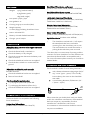
Final Connection
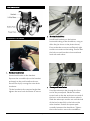
Connect the cable from the powerpack in to
the underneath of the handset (as shown
previously).
Place the top loop of the lift-up strap around
the opposite push handle to the handset.
Disassembly and Transportation
1.
2.
3.
4.
5.
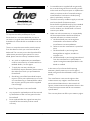
Switch the PowerStroll off at the ignition.
Disconnect / unclip the powerpack
connector from underneath the handset.
Remove the lift-up strap from the push
handle.
Disconnect the red and black connector on
battery pack from the red and black
connector on the powerpack. Lift out of the
battery tray using the handle.
Slacken the tristar knobs and slide the
telescopic bar inwards to remove the
powerpack from the wheelchair.
Notes:
The battery supplied with the PowerStroll is
classified as safe for air travel by compliance
with IATA special provision A67.
4.
Battery Pack Installation
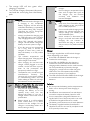
Place the battery in to the tray on top of the
powerpack, ensuring the pack handle is on
the left hand side of the powerpack (as
shown above)
Connect the red and black connector on the
battery pack to the red and black connector
on the powerpack (as shown above)
PowerStroll Owner’s Handbook
Page 4 of 8
The battery pack has a fabric handle to make
it easy to carry.
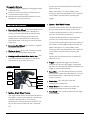
Battery Charging and Care
Follow the procedure below step by step:
1. Switch of the PowerStroll at the ignition.
2. Disconnect the red and black connector on
battery pack from the red and black
connector on the powerpack. Lift out of the
battery tray using the handle.
3. Plug the charger’s power cord into the
mains.
4. Plug the charger’s red and black connector
into the red and black connector from the
battery pack
5. Switch on the plug socket.
6. The charger’s LED will illuminate orange to
indicate the batteries are charging. The
charging duration is about 8 hours. To
ensure optimum performance a 12-hour
charge is recommended.
Part Code: Z24002 (Iss 02/13)