1
CD-MPX870H
Maintenance
Specifications
ENGLISH
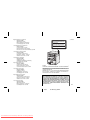
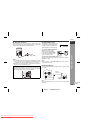
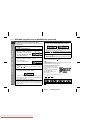
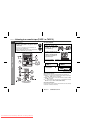
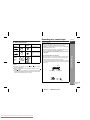
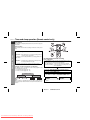
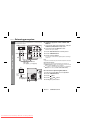
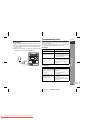
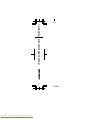
Cleaning the tape-handling parts
Dirty heads, capstans or pinch rollers can cause poor sound and
tape jams. Clean these parts with a cotton swab moistened with
commercial head/pinch roller cleaner or isopropyl alcohol.
When cleaning the heads, pinch rollers, etc., unplug the unit which
contains high voltages.
A
TAPE 1
D
E
B
B
C
C
References
TAPE 2
Playback head
Capstans
Pinch rollers
Erase head
Recording/Playback head
After long use, the deck's heads and capstans may become magnetised, causing poor sound. Demagnetise these parts once every 30 hours of playing/recording time by using a commercial tape
head demagnetiser. Read the demagnetiser's instructions carefully before use.
As part of our policy of continuous improvement, SHARP reserves
the right to make design and specification changes for product improvement without prior notice. The performance specification figures indicated are nominal values of production units. There may be
some deviations from these values in individual units.
General
Power source
AC 230 V, 50 Hz
Power
consumption
Power on: 120 W
Power stand-by: 0.6 W (*)
Dimensions
Width: 260 mm (10 - 1/4")
Height: 330 mm (13")
Depth: 323 mm (12 - 7/8")
Weight
7.78 kg (17.2 lbs.)
* This power consumption value is obtained when the demonstration
mode is cancelled in the power stand-by mode. Refer to page 8 to
cancel the demonstration mode.
Amplifier
Output power
PMPO: 1080 W
MPO: 540 W (270 W + 270 W) (DIN 45 324)
RMS: 300 W (150 W + 150 W) (DIN 45 324)
RMS: 240 W (120 W + 120 W) (DIN 45 500)
Output terminals
Speakers: 6 ohms
Headphones: 16 - 50 ohms
(recommended: 32 ohms)
Video output: 1Vp-p
Game/ Auxiliary (audio signal):
500 mV/ 47 k ohms
Game/Video: 1Vp-p
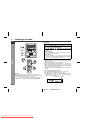
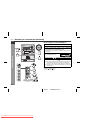
Cleaning the CD pickup lens
In order to ensure proper operation of the CD player, preventative
maintenance (cleaning of the laser pickup lens) should be performed
periodically. Lens cleaners are commercially available. Contact your
local CD software dealer for options.
Cleaning the cabinet
Periodically wipe the cabinet with a soft cloth and a diluted soap solution, then with a dry cloth.
Caution:
Do not use chemicals for cleaning (petrol, paint thinner, etc.). It
may damage the cabinet finish.
Do not apply oil to the inside of the unit. It may cause malfunctions.
Input terminals
E-43
03/12/17
Downloaded From DvDPlayer-Manual.com Sharp Manuals
CD-MPX870 EN.fm