1
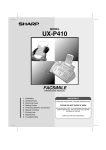
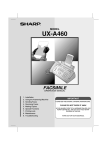
MODEL
UX-P400
FACSIMILE
OPERATION MANUAL
1.
2.
3.
4.
5.
6.
7.
8.
9.
Installation
Sending Faxes
Receiving Faxes
Making Copies
Answering Machine Connection
Special Functions
Printing Lists
Maintenance
Troubleshooting
IMPORTANT
PLEASE KEEP THE EXTERNAL & INTERNAL PACKAGING SAFE.
PLEASE DO NOT THROW IT AWAY.
IN THE UNLIKELY EVENT OF A HARDWARE FAILURE, OUR
REPAIR CENTRE WILL ASK YOU TO PUT YOUR SHARP
FACSIMILE IN THIS BOX.
A COURIER WILL COLLECT YOUR SHARP FACSIMILE.
THANK YOU FOR YOUR ASSISTANCE.
all.book
Page 1
Wednesday, October 17, 2001 1:44 PM
MAINS PLUG WIRING INSTRUCTIONS
This equipment is fitted with a moulded type mains plug which incorporates a detachable
fuse cover, under no circumstances should the plug be used without the fuse cover fitted.
In the unlikely event of the socket outlet in your home not being compatible with the plug
supplied, cut off the mains plug and fit an appropriate type observing the wiring code
below.
DANGER: The fuse from the cut-off plug should be removed and the plug should be
disposed of in a safe manner. Under no circumstances should the cut-off plug be
inserted into a socket outlet as a serious electric shock may occur.
If you are not sure how to do this, get help from a qualified electrician.
IMPORTANT
The wires in this mains lead are coloured in accordance with the following code:
GREEN-AND-YELLOW:
Earth
BLUE:
Neutral
BROWN:
Live
As the colours of the wires in the mains lead of this apparatus may not correspond with
the coloured markings identifying the terminals in your plug, proceed as follows:The wire
which is coloured GREEN-AND-YELLOW must be connected to the terminal in the plug
which is marked by the letter E, or by the safety earth symbol
or coloured green or
green-and-yellow.The wire which is coloured BLUE must be connected to the terminal
which is marked with the letter N or coloured black.The wire which is coloured BROWN
must be connected to the terminal which is marked with the letter L or coloured red.
This apparatus must be protected by a 13A fuse in the mains plug or distribution board.
"WARNING: THIS APPARATUS MUST BE EARTHED"
This equipment complies with the requirements of Directive 1999/5/EC.
Dieses Gerät entspricht den Anforderungen der EU-Richtlinie 1999/5/EG.
Cet appareil est conforme aux exigences de la directive 1999/5/CE.
Este aparato satisface las exigencias de las Directiva 1999/5/CE.
Quest’apparecchio è conforme ai requisiti delle direttiva 1999/5/CE.
Dit apparaat voldoet aan de eisen van de richtlijn 1999/5/EG.
Este equipamento obedece às exigências da directiva 1999/5/CE.
Η συσκευή αυτή ανταποκρίνεται στις απαιτήσεις των οδηγια 1999/5/ΕK.
Denna utrustning uppfyller kraven enligt direktiv 1999/5/EC.
Dette udstyr overholder kravene i direktiv 1999/5/EF.
Dette produktet oppfyller kravene i direktiv 1999/5/EC.
Tämä laite täyttää direktiivi 1999/5/EY.
This is a facsimile product operating in British and Irish analogue public switched telephone networks which
follow the CTR21 Standard.
The Declaration of Conformity can be viewed at the following URL address.
http://www.sharp.de/doc/UX-P400.pdf
all.book
Page 1
Wednesday, October 17, 2001 1:44 PM
Introduction
Welcome, and thank you for
choosing a Sharp fax
machine! The features and
specifications of your new
Sharp fax are shown below.
Automatic dialling
30 numbers
Imaging film
Initial starter roll (included with machine):
10 m (approx. 30 A4 pages)
Replacement roll (not included):
UX-6CR 50 m (one roll yields
approx. 150 A4 pages)
Memory size*
448 KB (approx. 24 average pages)
Modem speed
9,600 bps with automatic fallback to lower
speeds.
Transmission time*
Approx. 15 seconds
Resolution
Horizontal: 8 pels/mm
Vertical:
Standard: 3.85 lines/mm
Fine /Halftone: 7.7 lines/mm
Super fine: 15.4 lines/mm
Automatic document
feeder
10 pages max. (A4, 80 g/m2 paper)
Recording system
Thermal transfer recording
Halftone (grayscale)
64 levels
Compression scheme
MR, MH, H2
Paper tray capacity
(60 to 80-g/m2 paper)
Approx. 50 A4-size sheets
(at room temperature; maximum stack height
should not be higher than the line on the tray)
*Based on Sharp Standard No. 1 Chart at standard resolution is Sharp special mode,
excluding time for protocol signals (i.e., ITU-T phase C time only).
1
all.book
Page 2
Wednesday, October 17, 2001 1:44 PM
Display
16-digit LCD display
Applicable telephone line Analog public switched telephone network
(CTR21) / PBX
Compatibility
ITU-T (CCITT) G3 mode
Input document size
Automatic feeding:
Width: 148 to 210 mm
Length: 140 to 297 mm
Manual feeding:
Width: 148 to 210 mm
Length: 140 to 600 mm
Effective scanning width
210 mm max.
Effective printing width
204 mm max.
Contrast control
Automatic/Dark selectable
Reception modes
TEL/FAX,TEL, FAX, A.M. (Note: A.M. mode is
for connecting an answering machine)
Copy function
Single / Multi (99 copies/page)
Telephone function
Yes (cannot be used if power fails)
Power requirements
230 V AC, 50 Hz
Operating temperature
5 - 35°C
Humidity
25 - 85% RH
Power consumption
Standby: 2.5 W
Maximum: 110 W
Dimensions (without
attachments)
Width: 327 mm
Depth: 193 mm
Height: 163 mm
Weight (without
attachments)
Approx. 2.8 kg
As a part of our policy of continuous improvement, SHARP reserves the right to make design
and specification changes for product improvement without prior notice. The performance
specification figures indicated are nominal values of production units. There may be some
deviations from these values in individual units.
2
all.book
Page 3
Wednesday, October 17, 2001 1:44 PM
Important safety information
Do not disassemble this machine or attempt any procedures not described in this manual.
Refer all servicing to qualified service personnel.
Do not install or use the machine near water, or when you are wet. For example, do not use the
machine near a bath tub, wash bowl, kitchen sink or laundry tub, in a wet basement, or near a
swimming pool. Take care not to spill any liquids on the machine.
Unplug the machine from the telephone socket and then the power outlet and consult a
qualified service representative if any of the following situations occur:
- Liquid has been spilled into the machine or the machine has been
exposed to rain or water.
- The machine produces odors, smoke, or unusual noises.
- The power cord is frayed or damaged.
- The machine has been dropped or the housing damaged.
Do not allow anything to rest on the power cord, and do not install the machine where people
may walk on the power cord.
This machine must only be connected to a 230 V, 50 Hz, earthed (3-prong) outlet. Connecting
it to any other kind of outlet will damage the machine and invalidate the warranty.
Never insert objects of any kind into slots or openings on the machine. This could create a risk
of fire or electric shock. If an object falls into the machine that you cannot remove, unplug the
machine and consult a qualified service representative.
Do not place this machine on an unstable cart, stand or table. The machine could be seriously
damaged if it falls.
Never install telephone wiring during a lightning storm.
Never install telephone sockets in wet locations unless the socket is specifically designed for
wet locations.
Never touch bare telephone wires or terminals unless the telephone line has been
disconnected at the network interface.
Use caution when installing or modifying telephone lines.
Avoid using a telephone (other than a cordless type) during an electrical storm. There may be
a remote risk of electric shock from lightning.
Do not use a telephone to report a gas leak in the vicinity of the leak.
The power outlet must be installed near the equipment and must be easily accessible.
Important:
This facsimile is only designed for use in the country where approved.
3
all.book
Page 4
Wednesday, October 17, 2001 1:44 PM
Table of Contents
A Look at the Operation Panel
6
1. Installation
8
Unpacking Checklist . . . . . . . . . . . . . . . . . . . . . . . . . . . . . . . . . . . . . . 8
Connections . . . . . . . . . . . . . . . . . . . . . . . . . . . . . . . . . . . . . . . . . . . . 9
Loading the Imaging Film . . . . . . . . . . . . . . . . . . . . . . . . . . . . . . . . . 12
Loading Printing Paper . . . . . . . . . . . . . . . . . . . . . . . . . . . . . . . . . . . 14
Entering Your Name and Fax Number . . . . . . . . . . . . . . . . . . . . . . . 16
Setting the Date and Time . . . . . . . . . . . . . . . . . . . . . . . . . . . . . . . . 18
Setting the Reception Mode . . . . . . . . . . . . . . . . . . . . . . . . . . . . . . . 20
Volume Adjustment . . . . . . . . . . . . . . . . . . . . . . . . . . . . . . . . . . . . . 21
Flash Select Setting for PBX . . . . . . . . . . . . . . . . . . . . . . . . . . . . . . 23
2. Sending Faxes
Transmittable Documents. . . . . . . . . . . . . . . . . . . . . . . . . . . . . . . . .
Loading the Document . . . . . . . . . . . . . . . . . . . . . . . . . . . . . . . . . . .
Adjusting the Resolution and Contrast . . . . . . . . . . . . . . . . . . . . . . .
Sending a Fax by Normal Dialling . . . . . . . . . . . . . . . . . . . . . . . . . .
Sending a Fax by Automatic Dialling . . . . . . . . . . . . . . . . . . . . . . . .
Sending a Fax From Memory . . . . . . . . . . . . . . . . . . . . . . . . . . . . . .
3. Receiving Faxes
Using TEL/FAX Mode. . . . . . . . . . . . . . . . . . . . . . . . . . . . . . . . . . . .
Using A.M. Mode . . . . . . . . . . . . . . . . . . . . . . . . . . . . . . . . . . . . . . .
Using FAX Mode . . . . . . . . . . . . . . . . . . . . . . . . . . . . . . . . . . . . . . .
Using TEL Mode. . . . . . . . . . . . . . . . . . . . . . . . . . . . . . . . . . . . . . . .
Optional Reception Settings . . . . . . . . . . . . . . . . . . . . . . . . . . . . . . .
Substitute Reception to Memory . . . . . . . . . . . . . . . . . . . . . . . . . . .
24
24
25
26
28
30
36
38
38
39
40
41
43
46
4. Making Copies
47
5. Answering Machine Connection
49
Connecting an Answering Machine . . . . . . . . . . . . . . . . . . . . . . . . . 49
Using the Answering Machine Connection. . . . . . . . . . . . . . . . . . . . 50
Optional A.M. Mode Settings . . . . . . . . . . . . . . . . . . . . . . . . . . . . . . 51
4
all.book
Page 5
Wednesday, October 17, 2001 1:44 PM
Table of Contents
6. Special Functions
55
Caller ID (Requires Subscription to Service) . . . . . . . . . . . . . . . . . . 55
Blocking Reception of Unwanted Faxes . . . . . . . . . . . . . . . . . . . . . . 60
Polling (Requesting a Fax Transmission) . . . . . . . . . . . . . . . . . . . . . 61
PBX operations . . . . . . . . . . . . . . . . . . . . . . . . . . . . . . . . . . . . . . . . . 62
7. Printing Lists
63
8. Maintenance
66
9. Troubleshooting
69
Problems and Solutions . . . . . . . . . . . . . . . . . . . . . . . . . . . . . . . . . . 69
Messages and Signals . . . . . . . . . . . . . . . . . . . . . . . . . . . . . . . . . . . 74
Clearing Paper Jams . . . . . . . . . . . . . . . . . . . . . . . . . . . . . . . . . . . . 77
Quick Reference Guide
79
Index
80
5
all.book
Page 6
Wednesday, October 17, 2001 1:44 PM
A Look at the Operation Panel
1
2
3
4
ABC
UP
1
TEL FAX
GHI
TEL/FAX A.M.
Z
A
STOP
COPY/HELP START/MEMORY
FUNCTION
7
4
7
9
3
MNO
5
6
WXYZ
TUV
8
9
0
D OW N
8
2
R
POLL
6
DEF
JKL
PQRS
RESOLUTION/ REDIAL
RECEPTION MODE
5
10
11
12
1
Display
This displays messages and prompts to help you operate the machine.
2
RESOLUTION / RECEPTION MODE key
When a document is in the feeder, press this key to adjust the resolution for
faxing or copying. At any other time, press this key to select the reception
mode (an arrow in the display will point to the currently selected reception
mode).
3
Left and right arrow keys
Auto-dial numbers: When sending a fax or making a phone call, press these
keys to scroll through your auto-dial numbers, the “REVIEW CALLS” list (only
available if you have Caller ID), and the last number dialled (redial).
FUNCTION key settings: Press the right arrow key after scrolling with the up
and down arrow keys to select a FUNCTION key setting.
4
Number keys
Use these keys to dial numbers, and enter numbers and letters when storing
auto-dial numbers.
5
Panel release
Press this release to open the operation panel.
6
STOP key
Press this key to cancel an operation before it is completed.
6
all.book
Page 7
Wednesday, October 17, 2001 1:44 PM
7
COPY/HELP/POLL key
When a document is in the feeder, press this key to make a copy of a
document. When a document is not in the feeder, press this key to print out
the Help List, a quick reference guide to the operation of your fax machine.
This key is also used after dialling to poll (request fax transmission from)
another machine.
8
START/MEMORY key
Press this key after dialling to begin fax transmission. Press this key before
dialling to send a fax through memory.
9
FUNCTION key
Press this key followed by the arrow keys to select special functions and
settings.
10
R key
If you are on a Flash-type PBX, use this key to dial out (first press the R key
and then dial the number).
11
UP and DOWN arrow keys
Enlarge/reduce setting: When making a copy of a document, press these
keys to select an enlarge/reduce setting.
Volume setting: When a document is not in the feeder, press these keys to
change the speaker volume when the
key has been pressed, or the ringer
volume at any other time.
FUNCTION key settings: Press these keys after pressing the FUNCTION
key to scroll through the FUNCTION MODE settings.
12
key
Press this key to listen to the line and fax tones through the speaker when
faxing a document.
Monitoring phone conversations
When speaking through the handset, you can press
to allow a third
person to listen to the conversation through the speaker. (To turn off
the speaker, press the key again.)
To adjust the volume of the speaker when monitoring a conversation,
press
for high or
for low (the volume setting reverts to low
each time the handset is replaced). Note that the speaker cannot be
used for speaking; it is only for listening. To avoid feedback (a loud
howling sound), be sure to turn off the speaker (press
once again)
7
all.book
Page 8
Wednesday, October 17, 2001 1:44 PM
1. Installation
Unpacking Checklist
Before setting up,
make sure you
have all of the
following items.
If any are missing,
contact your
dealer or retailer.
Extension
telephone
adapter
Paper tray
Paper tray
extension
Operation
manual
Gears (2)
Handset
Handset cord
Telephone
line cord
Imaging film
(initial starter roll)
Points to keep in mind when setting up
Do not place the
machine in direct
sunlight.
Do not place the
machine near
heaters or air
conditioners.
Keep dust away from
the machine.
Keep the area
around the
machine clear.
About condensation
If the machine is moved from a cold to a warm place, it is possible that
condensation may form on the scanning glass, preventing proper scanning of
documents for transmission. To remove the condensation, turn on the power
and wait approximately two hours before using the machine.
8
Page 9
Wednesday, October 17, 2001 1:44 PM
Connections
Connections
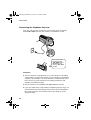
Connecting the handset
Connect the handset as shown and place it on the handset rest.
♦ The ends of the handset cord are identical, so they will go into either
socket.
Make sure the handset
cord goes into the
socket marked with a
handset symbol on the
side of the machine!
Use the handset to make ordinary phone calls,
or to transmit and receive faxes manually.
Connecting the power cord
Plug the power cord into a 230 V, 50 Hz, earthed (3-prong) AC outlet.
Caution!
The power outlet must be installed near the equipment and must be easily
accessible.
The machine does not
have a power on/off
switch, so the power is
turned on and off by
simply plugging in or
unplugging the power
cord.
9
1. Installation
all.book
all.book
Page 10
Wednesday, October 17, 2001
1:44 PM
Connections
Connecting the telephone line cord
Insert one end of the line cord into the socket on the back of the machine
marked TEL. LINE. Insert the other end into a wall telephone socket.
TE
SEL. T
T EL
LIN .
E
Be sure to insert
the line into the
TEL. LINE socket.
Do not insert it
into the TEL. SET
socket!
Comments:
♦ The fax machine is not designed for use on a line which has call waiting,
call forwarding, or certain other special services offered by your telephone
company. If you attempt to use the fax machine in conjunction with any of
these services, you may experience errors during transmission and
reception of facsimile messages.
♦ The fax machine is not compatible with digital telephone systems.
♦ If your area experiences a high incidence of lightning or power surges, we
recommend that you install surge protectors for the power and telephone
lines. Surge protectors can be purchased from your dealer or at most
electronics shops..
10
Page 11
Wednesday, October 17, 2001
1:44 PM
Connections
Attach the paper tray and paper tray extension
Attach the paper tray and paper tray extension.
Insert
horizontally
and rotate up
Note: The paper tray extension has a top side
and a bottom side. If you cannot insert the
tabs into the holes, turn the support over.
Extension phone (optional)
If desired, you can connect an extension phone to the TEL. SET socket on the
fax.
♦ To connect an answering machine to your fax, see page 49.
1
Remove the seal covering the TEL. SET
socket.
TE
SEL. T
T EL
LIN .
E
2
Connect the extension phone line to
the TEL. SET socket using the
provided adapter.
• Eire: Insert the extension phone line
TE
SEL. T
T EL
LIN .
E
directly into the TEL. SET socket.
11
1. Installation
all.book
all.book
Page 12
Wednesday, October 17, 2001
1:44 PM
Loading the Imaging Film
Loading the Imaging Film
Your fax uses a roll of imaging film to create printed text and images. The print
head in the fax applies heat to the imaging film to transfer ink to the paper.
Follow the steps below to load or replace the film.
The initial starter roll of
imaging film included with
your fax can print about
30 A4-size pages.
1
When replacing the film,
use a roll of Sharp UX6CR imaging film. One
roll can print about 150
A4-size pages.
Remove the paper from the paper tray
and open the operation panel (press
➊).
2
If you are loading the imaging film for
the first time, go to Step 4.
12
2
Remove the used film and
empty spool.
3
Remove the two green gears from the
spools.
DO NOT DISCARD THE TWO GREEN
GEARS!
1
Page 13
Wednesday, October 17, 2001
1:44 PM
Loading the Imaging Film
4
Remove the new roll of imaging film
from its packaging.
• Cut the band that holds the rolls
together.
5
Insert the green gears.
1 slot
Make sure the
gears fit into the
slots in the ends
of the rolls.
6
Insert the film into the print
compartment.
2 slots
Fit ends of rolls
onto hubs
Thick roll
to rear
7
Rotate the front gear as shown until
the film is taut.
8
Close the operation panel (press down
on both sides to make sure it clicks
into place).
13
1. Installation
all.book
all.book
Page 14
Wednesday, October 17, 2001
1:44 PM
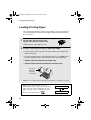
Loading Printing Paper
Loading Printing Paper
You can load up to 50 sheets of A4-size, 60 - 80 g/m2 paper in the paper tray
(at room temperature; maximum stack height should not be higher than the
line on the tray).
1
Fan the paper, and then tap the edge
against a flat surface to even the stack.
• Make sure the stack edges are even.
2
Insert the stack of paper into the tray, PRINT SIDE DOWN.
• If paper remains in the tray, take it out and combine it into a single stack
with the new paper.
• Be sure to load the paper so that printing takes place on the print side of
the paper. Printing on the reverse side may result in poor print quality.
• GENTLY LOAD THE PAPER IN THE PAPER TRAY.
• DO NOT FORCE THE PAPER DOWN INTO THE FEED SLOT.
The stack
should not
be higher
than this line
Note: Do not use paper that has already been printed on, or paper that is curled.
Note: If at any time the display shows the
alternating messages at right, check the printing
paper. If the tray is empty, add paper. If there is
paper in the tray, take it out and then reinsert it.
When you are finished, press
14
START/MEMORY
.
ADD PAPER &
PRESS START KEY
Page 15
Thursday, November 1, 2001 3:10 PM
Loading Printing Paper
Print contrast setting
Your fax has been set at the factory to print at normal contrast. If desired, you
can change the print contrast setting to LIGHT or DARK.
1
Press
2
Press
once and
3
Press
once.
4
Select the print contrast:
FUNCTION
NORMAL:
5
Press
STOP
once and
1
once.
Display:
twice.
OPTION SETTING
PRINT CONTRAST
1:NORMAL
LIGHT:
The display briefly shows
your selection, then:
2
DARK:
3
COPY CUT-OFF
to return to the date and time display.
15
1. Installation
islp.fm
all.book
Page 16
Wednesday, October 17, 2001
1:44 PM
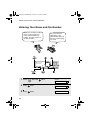
Entering Your Name and Fax Number
Entering Your Name and Fax Number
Before you can begin sending
faxes, you must enter your
name and fax (telephone)
number. You also need to set
the date and time.
Once you enter this
information, it will
automatically appear at
the top of each fax page
you send.
STOP
1
2
3
4
5
6
8
9
7
0
START/MEMORY
1
Press
FUNCTION
once and
FUNCTION
twice.
Display:
ENTRY MODE
16
2
Press
once.
3
Press
once.
OWN NUMBER SET
ENTER FAX #
Page 17
Wednesday, October 17, 2001
1:44 PM
Entering Your Name and Fax Number
4
Enter your fax number by pressing the number keys (max. 20 digits).
• To insert a space between digits, press
• To clear a mistake, press
START/MEMORY
. To enter a “+”, press
.
.
5
Press
6
Enter your name by pressing number keys for each letter as shown in
the chart below. Up to 24 characters can be entered.
to enter the fax number in memory.
Example: SHARP = 7777 44 2 777
7
G=
N=
A=
H=
O=
V=
B=
I =
P=
W=
C=
J=
Q=
X=
D=
K=
R=
Y=
E=
L=
S=
Z=
F=
M=
T=
SPACE =
U=
♦ To enter two letters in succession that require the same key, press
after entering the first letter.
♦ To clear a mistake, press
.
♦ To enter a lower case letter, continue pressing the key for the letter until the
lower case letter appears. To enter one of the following symbols, press
or
7
Press
8
Press
repeatedly: . / ! " # $ % & ’ ( ) + + , - : ; < = > ? @ [ ¥ ] ^ _ ' { | } ) (
START/MEMORY
Display:
DATE&TIME SET
STOP
to return to the date and time display.
17
1. Installation
all.book
all.book
Page 18
Wednesday, October 17, 2001
1:44 PM
Setting the Date and Time
Setting the Date and Time
The date and time appear in the display and are printed at the top of every
page you fax. Set the date and time as shown below.
STOP
1
2
3
4
5
6
8
9
7
0
START/MEMORY
FUNCTION
1
Press
2
Press
once and
3
Press
once.
4
Enter a two-digit number for the day (“01” to “31”).
FUNCTION
once and
Example: the 5th
twice.
once.
0
5
then enter the correct number.
ENTRY MODE
DATE&TIME SET
The currently set date
appears (example):
• To correct a mistake, press
18
Display:
DATE 15-08-2001
DATE 05-08-2001
to move the cursor back to the mistake and
Page 19
Wednesday, October 17, 2001
1:44 PM
Setting the Date and Time
5
Enter a two-digit number for the month (“01” for January, “02” for
February, “12” for December, etc.).
Example: January
6
DATE 05-01-2001
1
Enter the year (four digits).
Example: 2001
7
0
2
0
The currently set time
appears (example):
0
1
TIME 12:19
Enter a two-digit number for the hour (“00” to “23”) and a two-digit
number for the minute (“00” to “59”).
Example: 9:25
8
Press
9
Press
START/MEMORY
STOP
0
9
2
5
to start the clock.
05-JAN 09:25
ANTI JUNK #
to return to the date and time display.
19
1. Installation
all.book
all.book
Page 20
Wednesday, October 17, 2001
1:44 PM
Setting the Reception Mode
Setting the Reception Mode
Your fax has four modes for receiving incoming faxes:
FAX mode:
Select this mode when you only want to receive faxes on your line. The fax
machine will automatically answer all calls and receive incoming faxes.
TEL mode:
This mode is the most convenient for receiving phone calls. Faxes can also be
received; however, all calls must first be answered by picking up the fax's
handset or an extension phone connected to the same line.
TEL/FAX mode:
This mode is convenient for receiving both faxes and voice calls. When a call
comes in, the fax will detect whether it is a voice call (including manually
dialled faxes), or an automatically dialled fax. If it is a voice call, the fax will
make a special ringing sound to alert you to answer. If it is an automatically
dialled fax, reception will begin automatically.
A.M. mode:
Use this mode only if you have connected an answering machine to the fax
(see Chapter 5). Select this mode when you go out to receive voice messages
in your answering machine and faxes on your fax machine.
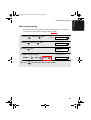
Setting the reception mode
Make sure a document is not loaded in the document feeder, and then
press
RESOLUTION/
RECEPTION MODE
until the arrow in the display points to the desired mode.
RESOLUTION/
RECEPTION MODE
TEL FAX
01-JAN 10:30
TEL/FAX A.M.
TEL FAX
1
2
3
4
5
6
7
8
9
RESOLUTION/
RECEPTION MODE
01-JAN 10:30
TEL/FAX A.M.
TEL FAX
01-JAN 10:30
TEL/FAX A.M.
0
TEL FAX
01-JAN 10:30
TEL/FAX A.M.
For more information on receiving faxes in FAX, TEL, and TEL/FAX modes,
see Chapter 3, Receiving Faxes (page 38). For more information on using
A.M. mode, see Chapter 5.
20
Page 21
Wednesday, October 17, 2001
1:44 PM
Volume Adjustment
Volume Adjustment
You can adjust the volume of the speaker and ringer using the up and down
arrow keys.
1
2
3
4
5
6
8
9
7
0
Speaker
1
Press
2
Press
or
until the display
shows the desired volume level.
• Press
again to turn off the speaker.
Display: SPEAKER: HIGH
SPEAKER: MIDDLE
SPEAKER: LOW
21
1. Installation
all.book
all.book
Page 22
Wednesday, October 17, 2001
1:44 PM
Volume Adjustment
Ringer
1
Press
or
.
Display:
(Make sure
has not been pressed
and a document is not loaded in the
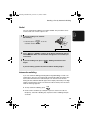
feeder.)
RINGER: HIGH
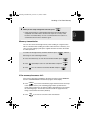
• The ringer will ring once at the selected
RINGER: MIDDLE
level, then the date and time will
reappear in the display.
RINGER: LOW
RINGER: OFF OK ?
2
If you selected RINGER: OFF OK ?,
press
22
START/MEMORY
.
Page 23
Wednesday, October 17, 2001
1:44 PM
Flash Select Setting for PBX
Flash Select Setting for PBX
Note: This setting is normally only used in Germany. In other countries, you
can try changing the setting if you encounter difficulty with the default setting.
If your fax machine is connected to a PBX and the PBX uses the “Flash”
method to connect to an outside line, you must select the appropriate Flash
Select setting depending on whether your PBX line is a normal telephone line
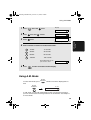
or a high-speed line (such as ISDN).
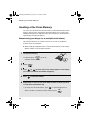
1
Press
2
Press
once and
3
Press
once.
4
Select 1 (SHORT TIME) if your PBX
line is a normal telephone line.
The display briefly shows
your selection, then:
Select 2 (LONG TIME) if your PBX
line is a high-speed line.
FAX SIGNAL RX
5
Press
FUNCTION
STOP
once and
once.
6 times.
Display:
OPTION SETTING
FLASH SELECT
1: SHORT TIME
to return to the date and time display.
23
1. Installation
all.book
all.book
Page 24
Wednesday, October 17, 2001
1:44 PM
2. Sending Faxes
2. Sending
Faxes
Transmittable Documents
Size and weight
The size and weight of documents that you can load in the document feeder
depend on whether you load one page at a time or several pages at once.
Loading one page at a time:
Loading up to 10 pages at once:
Minimum size
Minimum size
Maximum size
210 mm
148 mm
210 mm
148 mm
Maximum size
140 mm
140 mm
297 mm
600 mm
Minimum weight
Maximum weight
Minimum weight
52 g/m²
157 g/m²
52 g/m²
Maximum weight
80 g/m²
Note: Letters or graphics on the edges of a document will not be scanned.
5 mm
5 mm
Letters in the
shaded area will
not be scanned.
24
all.book
Page 25
Wednesday, October 17, 2001
1:44 PM
Loading the Document
Other restrictions
♦ Ink, glue, and correcting fluid on documents must be dry before they pass
through the document feeder.
♦ All clips, staples, and pins must be removed from documents before loading
in the feeder. If these are not removed, they may damage the machine.
♦ Documents which are patched, taped, torn, smaller than the minimum size,
carbon backed, easily smudged, or have a slippery coated surface should
be photocopied, and the copy loaded in the feeder.
Loading the Document
Up to 10 pages can be placed in the feeder at one time. The pages will
automatically feed into the machine starting from the bottom page.
♦ If you need to send or copy more than 10 pages, place the additional pages
gently and carefully in the feeder just before the last page is scanned. Do
not try to force them in, as this may cause double-feeding or jamming.
♦ If your document consists of several large or thick pages which must be
loaded one at a time, insert each page into the feeder as the previous page
is being scanned. Insert gently to prevent double-feeding.
1
Adjust the document guides to the
width of your document.
2
Insert the document face down in the
document feeder. The top edge of the
document should enter the feeder first.
• READY TO SEND will appear in the
display.
25
2. Sending
Faxes
♦ The scanner cannot recognise yellow, greenish yellow, or light blue ink.
all.book
Page 26
Wednesday, October 17, 2001
1:44 PM
Adjusting the Resolution and Contrast
3
Adjust the resolution and/or contrast settings as explained in
Resolution and Contrast below, then dial the receiving machine as
explained on page 28.
Adjusting the Resolution and Contrast
If desired, you can adjust the resolution and contrast before sending a
document.
♦ The default resolution setting is STANDARD and the default contrast setting
is AUTO.
♦ You must adjust the settings each time you don’t want to use the default
settings.
Note: The resolution and contrast settings are only effective for sending a
document. They are not effective for receiving a document.
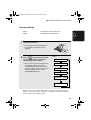
Resolution settings
26
STANDARD
Use STANDARD for ordinary documents. This
setting gives you the fastest and most
economical transmission.
FINE
Use FINE for documents containing small letters
or fine drawings.
SUPER FINE
Use SUPER FINE for documents containing
very small letters or very fine drawings.
HALF TONE
Use HALF TONE for photographs and
illustrations. The original will be reproduced in
64 shades of gray.
all.book
Page 27
Wednesday, October 17, 2001
1:44 PM
Adjusting the Resolution and Contrast
1
AUTO
Use AUTO for normal documents.
DARK
Use DARK for faint documents.
2. Sending
Faxes
Contrast settings
Load the document(s).
• The document must be loaded before
the resolution and contrast can be
adjusted.
2
RESOLUTION/
Press RECEPTION MODE one or more times until
the desired resolution and contrast
settings appear in the display.
• The first time you move through the list
of resolution settings, the contrast
setting AUTO will appear next to each
resolution setting. The second time you
move through the list, the contrast
setting DARK will appear.
Display:
STANDARD
:AUTO
FINE
:AUTO
SUPER FINE :AUTO
HALF TONE
:AUTO
STANDARD
:DARK
HALF TONE
:DARK
Note: In order to transmit in SUPER FINE resolution, the receiving fax machine
must also have that resolution. If it doesn’t, your machine will automatically step
down to the next best available setting.
27
all.book
Page 28
Wednesday, October 17, 2001
1:44 PM
Sending a Fax by Normal Dialling
Sending a Fax by Normal Dialling
With Normal Dialling, you pick up the handset (or press
) and dial by
pressing the number keys.
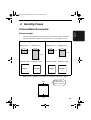
♦ If a person answers, you can talk with them through the handset before
sending the fax. (If you pressed
, you must pick up the handset to talk.)
♦ Normal Dialling allows you to listen to the line and make sure the other fax
machine is responding.
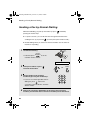
1
Load the document(s).
• If desired, press
RESOLUTION/
RECEPTION MODE
to set the
resolution and/or contrast.
READY TO SEND
2
Pick up the handset or press
Listen for the dial tone.
3
Dial the number of the receiving
machine by pressing the number keys.
.
• If you are on a Flash-type PBX and are
dialing out, press
R
, wait for the
SPEAKER
or
ABC
1
GHI
DEF
2
JKL
4
PQRS
7
3
MNO
5
6
WXYZ
TUV
8
9
0
connection to the outside line, and then
dial the number.
4
28
Wait for the connection. Depending on the setting of the receiving
machine, you will either hear a fax tone or the other person will answer.
all.book
Page 29
Wednesday, October 17, 2001
1:44 PM
Sending a Fax by Normal Dialling
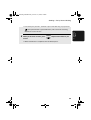
• If the other party answers, ask them to press their Start key (if you pressed
, pick up the handset to speak with them). This causes the receiving
5
When you hear the fax tone, press
used it.
START/MEMORY
2. Sending
Faxes
machine to issue a fax tone.
. Replace the handset if you
• When transmission is completed, the fax will beep once.
29
all.book
Page 30
Wednesday, October 17, 2001
1:44 PM
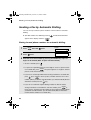
Sending a Fax by Automatic Dialling
Sending a Fax by Automatic Dialling
You can store up to 30 fax or phone numbers in the machine for automatic
dialling.
♦ Auto-dial numbers are dialled by pressing
appears in the display, and then
START/MEMORY
until the desired number
.
Storing fax and phone numbers for automatic dialling
Display:
1
Press
2
Press
3
Enter the fax or voice number by pressing the number keys. Up to 32
digits can be entered. (Note: A space cannot be entered.)
FUNCTION
once and
once.
<NEW NUMBER>
ENTER FAX #
once.
• To clear a mistake, press
.
• If a pause is required between any of the digits to access a special service
or an outside line, press
FUNCTION .
The pause appears as a hyphen. Several
pauses can be entered in a row.
• If you are on a Flash-type PBX and are storing a number for an outside line,
press
R
, press
FUNCTION
to insert a pause, and then enter the fax or voice
number. (When you dial the auto-dial number, you will automatically dial out
without the need to press the
R
key.)
• If you are on a PBX that requires dialing a number to dial out and are
storing a number for an outside line, enter the number, press
FUNCTION
to
insert a pause, and then enter the number of the receiving machine. (When
you dial the auto-dial number, you will automatically dial out without the
need to dial the number for an outside line.)
30
all.book
Page 31
Wednesday, October 17, 2001
1:44 PM
Sending a Fax by Automatic Dialling
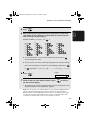
Press
5
Enter a name by pressing number keys for each letter as shown in the
chart below. Up to 15 characters can be entered. (If you do not wish to
enter a name, go directly to Step 6.)
Example: SHARP = 7777 44 2 777
7
G=
N=
A=
H=
O=
V=
B=
I =
P=
W=
C=
J=
Q=
X=
D=
K=
R=
Y=
E=
L=
S=
Z=
F=
M=
T=
SPACE =
2. Sending
Faxes
START/MEMORY
4
U=
♦ To enter two letters in succession that require the same key, press
after entering the first letter.
♦ To enter a lower case letter, continue pressing the key for the letter until the
lower case letter appears. To enter one of the following symbols, press
or
6
Press
repeatedly: ./ ! " # $ % & ’ ( ) + + , - : ; < = > ? @ [ ¥ ] ^ _ ' { | } ) (
START/MEMORY
Display:
<NEW NUMBER>
7
Return to Step 2 to store another number, or press
the date and time display.
STOP
to return to
• To confirm that an auto-dial number has been stored correctly, print out the
Telephone Number List as explained on page 63.
Note: The fax machine uses a lithium battery to keep automatic dialling numbers
and other programmed information in memory when the power is turned off.
Battery power is consumed primarily when the power is off. With the power kept
continuously off, the life of the battery is about 5 years. If the battery dies, have
your dealer or retailer replace it. Do not try to replace it yourself.
31
all.book
Page 32
Wednesday, October 17, 2001
1:44 PM
Sending a Fax by Automatic Dialling
Editing and clearing auto-dial numbers
If you need to make changes to a previously stored auto-dial number, or clear
a number, follow these steps:
1
Press
FUNCTION
once and
once.
Display:
<NEW NUMBER>
2
Press
or
the display.
3
Press
4
Select EDIT or CLEAR:
EDIT:
until the number you wish to edit or clear appears in
once.
1
1=EDIT, 2=CLEAR
CLEAR:
2
• If you selected CLEAR, go to Step 8.
5
If you selected EDIT, make the desired changes to the number.
• Press
or
to move the cursor to the digit or digits you wish to
change, and then enter the new digit. The new digit will replace the old
digit.
• If you do not wish to change the number, go directly to Step 6.
START/MEMORY
6
Press
7
Make the desired changes to the name.
• Press
or
to move the cursor to the letter or letters you wish to
change, and then press the appropriate number key repeatedly until the
desired letter appears (see Step 5 on page 31). The new letter will replace
the old letter.
• If you do not wish to change the name, go directly to Step 8.
32
all.book
Page 33
Wednesday, October 17, 2001
1:44 PM
Sending a Fax by Automatic Dialling
Press
9
Return to Step 2 to edit or clear another number, or press
return to the date and time display.
STOP
2. Sending
Faxes
START/MEMORY
8
to
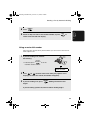
Using an auto-dial number
Once you have stored a fax or phone number, you can use it to send a fax or
make a phone call.
1
If you are sending a fax, load the
document(s).
• If desired, press
RESOLUTION/
RECEPTION MODE
to set the
resolution and/or contrast.
READY TO SEND
2
Press
(or
) until the name of the other party appears in the
display (if no name was stored, the number will appear).
3
If you are sending a fax, press
begins.
START/MEMORY
. Dialling and transmission
If you are making a phone call, lift the handset. Dialling begins.
33
all.book
Page 34
Wednesday, October 17, 2001
1:44 PM
Sending a Fax by Automatic Dialling
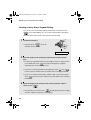
Sending a fax by Direct Keypad Dialling
You can also enter a full number with the number keys and then press the
START/MEMORY
key to begin dialling. You can use this method to dial a full number
when you don't need to speak to the other party before faxing.
1
Load the document(s).
• If desired, press
RESOLUTION/
RECEPTION MODE
to set the
resolution and/or contrast.
READY TO SEND
2
Enter the number of the receiving machine by pressing the number
keys.
• If a pause is required between any of the digits to access a special service
or an outside line, press
FUNCTION .
The pause will appear as a hyphen.
Several pauses can be entered in a row.
• If you are on a Flash-type PBX and are dialing out, press
R
, press
FUNCTION
to insert a pause, and then enter the number of the receiving machine.
• If you are on a PBX and must dial a number to dial out, enter the number,
press
FUNCTION
to insert a pause, and then enter the number of the receiving
machine.
3
Check the display. If the number of the receiving machine shown is
correct, press
START/MEMORY
.
• If the number is not correct, press
STOP
to backspace and clear one digit
at a time, and then re-enter the correct digit(s).
34
all.book
Page 35
Wednesday, October 17, 2001
1:44 PM
Sending a Fax by Automatic Dialling
Redial
1
2. Sending
Faxes
You can automatically redial the last number dialled. This procedure can be
used to send a fax or make a phone call.
If you are sending a fax, load the
document(s).
• If desired, press
RESOLUTION/
RECEPTION MODE
to set the
resolution and/or contrast.
READY TO SEND
2
Press
once. <REDIAL> appears in the display, followed by the last
number dialled. Make sure the number that appears is the number you
wish to dial.
3
If you are sending a fax, press
begins.
START/MEMORY
. Dialling and transmission
If you are making a phone call, lift the handset. Dialling begins.
Automatic redialling
If you use automatic dialling (including Direct Keypad Dialling) to send a fax
and the line is busy, the fax machine will automatically redial the number. The
fax machine will make three redial attempts at an interval of five minutes.
During this time, RECALLING will appear in the display, followed by a two-digit
number assigned to the fax job. You will not be able to dial any other locations
while the message appears.
♦ To stop automatic redialling, press
STOP
.
♦ Under certain conditions (for example if a person answers the call on a
telephone), automatic redialling may stop before three redialling attempts
are made.
35
all.book
Page 36
Wednesday, October 17, 2001
1:44 PM
Sending a Fax From Memory
Sending a Fax From Memory
You can scan a document into the fax’s memory and send the document from
memory. This increases transmission speed and allows you to send a fax to
multiple destinations in a single operation. After transmission, the document is
automatically cleared from memory.
Broadcasting (sending a fax to multiple destinations)
This function allows you to send the same fax to as many as 20 different
locations in just one operation.
♦ When sending to multiple locations, only auto-dial numbers can be used to
dial the numbers of the receiving machines.
1
Load the document(s).
• If desired, press
RESOLUTION/
RECEPTION MODE
to set the
resolution and/or contrast.
START/MEMORY
2
Press
3
Press
(or
) until the name of the number appears in the display
(if no name was stored, the number will appear).
4
Press
5
Repeat Steps 3 and 4 for each of the other locations to which you wish
to send the fax (maximum of 20).
to select the number.
• To check your selected locations, press
to scroll through them. To
delete a location, scroll to the location and then press
36
STOP
.
all.book
Page 37
Wednesday, October 17, 2001
1:44 PM
Sending a Fax From Memory
6
When you are ready to begin transmission, press
START/MEMORY
.
2. Sending
Faxes
• A Transaction Report is automatically printed out after Broadcasting is
completed. Check the "Note" column of the report to see if any of the
locations are marked "Busy" or have a communication error code. If so,
send the document to those locations again.
Memory transmission
You can also send a fax through memory when sending to a single location.
This is convenient when sending to locations where the line is often busy, as it
saves you from waiting to pick up the original document and frees the feeder
for other operations.
To send a fax through memory, load the document, press
START/MEMORY
, and then
dial using one of the following methods:
♦ Press the number keys to enter the fax number and then press
START/MEMORY
♦ Press
repeatedly to select an auto-dial number and press
START/MEMORY
♦ Press
once to select the last number dialled and press
START/MEMORY
.
.
.
If the memory becomes full...
If the memory becomes full while the document is being scanned, MEMORY
IS FULL and SEE MANUAL will alternately appear in the display.
♦ Press
START/MEMORY
if you want to transmit the pages which have been stored up
to that point in memory. The remaining pages will be ejected from the
feeder. After transmission, the memory will be cleared and you can transmit
the remaining pages. You will also need to transmit the page which was
being scanned when the memory filled up.
♦ Press
STOP
if you want to cancel the entire transmission.
37
all.book
Page 38
Wednesday, October 17, 2001
1:44 PM
3. Receiving Faxes
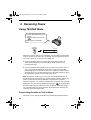
Using TEL/FAX Mode
To select TEL/FAX mode, press
RESOLUTION/
RECEPTION MODE
until the arrow in the
display points to TEL/FAX.
RESOLUTION/
RECEPTION MODE
TEL FAX
TEL/FAX A.M.
When the reception mode is set to TEL/FAX, your fax machine automatically
answers all calls on two rings. After answering, your fax monitors the line for
about five seconds to see if a fax tone is being sent.
♦ If your fax machine detects a fax tone (this means that the call is an
automatically dialled fax), it will automatically begin reception of the
incoming document.
♦ If your fax machine doesn't detect a fax tone (this means that the call is a
voice call or manually dialled fax), it will make a ringing sound (called
pseudo ringing) for 15 seconds to alert you to answer. If you don't answer
within this time, your fax will send a fax tone to the other machine to allow
the calling party to send a fax manually if they desire.
Note: Only the fax will alert you to voice calls or manually dialled faxes by
pseudo ringing. An extension phone connected to the same line will not ring
after the connection has been established. The handset of a parallel
extension telephone can, however, be picked up to answer the call. If pseudo
ringing does not stop when the handset is lifted, press
on the dial pad of
the phone (this is only possible from a tone dial phone). If pseudo ringing is
not cancelled in this way, the fax machine will send fax tones down the line,
rendering conversation impossible.
Pseudo Ring Duration for Tel/Fax Mode
If desired, you can change the duration of pseudo ringing in Tel/Fax mode.
38
all.book
Page 39
Wednesday, October 17, 2001
1:44 PM
Using A.M. Mode
1
Press
FUNCTION
once and
Display:
once.
OPTION SETTING
2
Press
once and
3
Press
once.
3 times.
PSEUDO RING
1=15 SECONDS
4
Enter a number as follows for the desired duration:
1
15 SEC
15 seconds
2
30 SEC
30 seconds
3
60 SEC
60 seconds
4
120 SEC
120 seconds
The display briefly shows
your selection, then:
5
3. Receiving
Faxes
(Selections appear alternately)
Press
STOP
QUIET TIME
to return to the date and time display.
Using A.M. Mode
To select A.M. mode, press
RESOLUTION/
RECEPTION MODE
until the arrow in the display points to
A.M.
RESOLUTION/
RECEPTION MODE
TEL FAX
TEL/FAX A.M.
In A.M. mode, your fax will automatically receive voice and fax messages if
you have connected an answering machine to the fax machine. See Chapter 5
for more details.
39
all.book
Page 40
Wednesday, October 17, 2001
1:44 PM
Using FAX Mode
Using FAX Mode
To select FAX mode, press
RESOLUTION/
RECEPTION MODE
until the arrow in
the display points to FAX.
RESOLUTION/
RECEPTION MODE
TEL FAX
TEL/FAX A.M.
When the reception mode is set to FAX, the fax machine will automatically
answer all calls on two rings and receive incoming faxes.
♦ If you pick up the handset before the machine answers, you can talk to the
other party and/or receive a fax as explained in Using TEL Mode on page
41.
2 rings
Fax reception
Changing the number of rings
If desired, you can change the number of rings on which the fax machine
answers incoming calls in FAX and TEL/FAX mode. Any number from 2 to 5
can be selected.
1
Press
FUNCTION
once and
once.
Display:
OPTION SETTING
40
all.book
Page 41
Wednesday, October 17, 2001
1:44 PM
Using TEL Mode
2
Press
once.
NUMBER OF RING
3
Press
once.
ENTER (2-5) (2)
4
Enter the desired number of rings (any
number from 2 to 5).
3. Receiving
Faxes
The display briefly shows
your selection, then:
FAX REMOTE #
Example: 3 rings
5
Press
STOP
3
to return to the date and time display.
Using TEL Mode
To select TEL mode, press
RESOLUTION/
RECEPTION MODE
until the arrow in
the display points to TEL.
RESOLUTION/
RECEPTION MODE
TEL FAX
TEL/FAX A.M.
When the reception mode is set to TEL, you must answer all calls by picking
up the fax machine’s handset or an extension phone connected to the same
line.
41
all.book
Page 42
Wednesday, October 17, 2001
1:44 PM
Using TEL Mode
Answering with the fax’s handset
1
When the fax machine rings, pick up
the handset.
2
If you hear a fax tone, wait until the
display shows RECEIVING and then
replace the handset.
Beep
RECEIVING
Note: If you have set the Fax Signal Receive setting
(page 43) to NO, press
3
If the other party first speaks with you
and then wants to send a fax, press
START/MEMORY
START/MEMORY
after speaking. (Press before
the sender presses their Start key.)
• When RECEIVING appears in the
display, hang up.
Answering on an extension phone
1
42
START/MEMORY
Answer the extension phone when it
rings.
to begin reception.
RECEIVING
all.book
Page 43
Wednesday, October 17, 2001
1:44 PM
Optional Reception Settings
2
If you hear a soft fax tone, wait until your fax responds (the extension
phone will go dead), then hang up.
Beep
3
If the fax doesn't respond, or if the other party first talks to you and then
wants to send a fax, press 5 once and
twice on the extension
phone (only on a tone dial phone). This signals the fax to begin
reception. Hang up.
• The above step is necessary if you have set the Fax Signal Receive setting
(see below) to NO.
• Your fax will not accept the signal to begin reception (5**) if a document is
loaded in its feeder.
Optional Reception Settings
Fax Signal Receive
Your fax will automatically begin reception if you hear a soft fax tone after
answering a call on your fax or an extension phone. If you use a computer fax
modem to send documents on the same line, you must turn this function off in
order to prevent your fax from mistakenly attempting to receive documents
from the computer fax modem. Follow the steps below to change the setting.
1
Press
FUNCTION
once and
once.
Display:
OPTION SETTING
2
Press
once and
5 times.
FAX SIGNAL RX
43
3. Receiving
Faxes
Phone goes dead
all.book
Page 44
Wednesday, October 17, 2001
1:44 PM
Optional Reception Settings
3
Press
4
Press
2
5
once.
1=YES, 2=NO
to turn on the function, or
1
to turn it off.
Press
STOP
The display briefly shows
your selection, then:
CALLER-ID
to return to the date and time display.
Changing the number for remote fax activation
If desired, you can use a number other than 5 to activate fax reception from an
extension telephone. You can select any number from 0 to 9.
1
Press
FUNCTION
once and
once.
Display:
OPTION SETTING
2
Press
once and
3
Press
once
4
Enter the desired number (any number
from 0 to 9).
once.
.
FAX REMOTE #
ENTER (0-9) (5)
The display briefly shows
your selection, then:
TRANSACTION
Example: 3
5
44
Press
STOP
3
to return to the date and time display.
all.book
Page 45
Wednesday, October 17, 2001
1:44 PM
Optional Reception Settings
Reception Ratio
The fax has been set at the factory to automatically reduce the size of
received documents to fit the size of the printing paper. This ensures that data
on the edges of the document are not cut off. If desired, you can turn this
function off and have received documents printed at full size.
♦ If a document is too long to fit on the printing paper, the remainder will be
♦ Automatic reduction may not be possible if the received document is too
large, contains too many fine graphics or images, or is sent at high
resolution. In this case, the remainder of the document will be printed on a
second page.
Display:
1
Press
2
Press
3
Press
4
Press 1 to select AUTO, or
select 100%.
5
FUNCTION
once and
once and
once.
OPTION SETTING
3 times.
RECEIVE RATIO
Press
once.
STOP
1=AUTO, 2=100%
2
to
The display briefly shows
your selection, then:
PRINT CONTRAST
to return to the date and time display.
45
3. Receiving
Faxes
printed on a second page. In this case, the cut-off point may occur in the
middle of a line.
all.book
Page 46
Wednesday, October 17, 2001
1:44 PM
Substitute Reception to Memory
Substitute Reception to Memory
In situations where printing is not possible, such as when your fax runs out of
paper, the imaging film needs replacement, or the paper jams, incoming faxes
will be received to memory.
When you have received a document in memory, FAX RX IN MEMORY will
appear in the display, alternating with ADD PAPER & PRESS START KEY or
CHECK FILM / CHECK COVER / CHECK PAPER JAM. When you add paper
(and press
START/MEMORY
), replace the imaging film, or clear the jam, the stored
documents will automatically print out.
Caution!
When documents are stored in memory, do not turn the power off. This will
erase all of the contents.
46
bocy.fm
Page 47
Friday, October 26, 2001 5:53 PM
4. Making Copies
Your fax machine can also be used to make copies. Single and multiple copies
(up to 99 per original) can be made.
1
Load the document(s) face down.
(Maximum of 10 pages.)
• If desired, press
RESOLUTION/
RECEPTION MODE
to set the
resolution and/or contrast.
(The default resolution setting for
copying is FINE.)
2
If desired, select an enlarge/reduce setting, and/or select the number of
copies per original:
• ENLARGE/REDUCE: Press
or
until the desired setting appears
in the display. Settings are 100%, 125%, 135%, 50%, 73%, 88%, 94%, and
AUTO. (The default setting is 100%.)
Example: Press
twice
RATIO: 125%
• Number of copies per original: Press the number keys to enter a number
from 1 to 99. (The default setting is 1.)
Example: Press 5
3
for five copies
5
When you are ready to begin copying, press
COPY/HELP
.
If MEMORY IS FULL appears...
If the memory becomes full while a document is being scanned, MEMORY IS
FULL and SEE MANUAL will alternately appear in the display and the
document will automatically feed out. This may happen if the resolution is set
to SUPER FINE, or if you selected an enlarge/reduce setting, or if you are
making more than one copy per original. To avoid using memory, use
STANDARD or FINE for the resolution, 100% for the enlarge/reduce setting,
and make only one copy per original.
47
4. Making
Copies
READY TO SEND
all.book
Page 48
Wednesday, October 17, 2001
1:44 PM
Making Copies
Copy Cut-off
When making a copy of a document that is longer than the printing paper, use
the copy cut-off setting to select whether the remaining part of the document
will be cut off or printed on a second page. The initial setting is YES (cut off
the remainder). To change the setting, follow the steps below.
1
Press
FUNCTION
once and
once.
Display:
OPTION SETTING
2
Press
once and
3
Press
once.
4
Press 1 to set copy cut-off to YES
(the remaining part of the document
once.
will not be printed), or 2 to set copy
cut-off to NO (the remaining part will be
printed on a second page).
5
48
Press
STOP
COPY CUT-OFF
1=YES, 2=NO
The display briefly shows
your selection, then:
NUMBER OF RING
to return to the date and time display.
all.book
Page 49
Wednesday, October 17, 2001
1:44 PM
5. Answering Machine Connection
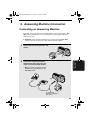
Connecting an Answering Machine
If desired, you can connect an answering machine to your fax machine's TEL.
SET socket. This will allow you to receive both voice messages and faxes
when you are out.
♦ Important: If the answering machine is not connected to the TEL. SET
socket on the fax as shown, the setup will not operate properly.
1
Remove the seal covering the TEL. SET
socket.
TE
SEL. T
T EL
LIN .
E
Connect the answering machine's
telephone line plug to the TEL. SET
socket using the provided adapter.
5. Answering
Machine
2
• Eire: Insert the anwering machine’s
telephone line plug directly into the
TEL. SET socket.
TE
SEL. T
T EL
LIN .
E
To answering
machine's telephone
line socket.
49
all.book
Page 50
Wednesday, October 17, 2001
1:44 PM
Using the Answering Machine Connection
Changing the outgoing message
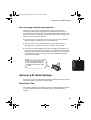
The outgoing message (OGM) of your answering machine should be changed
to inform callers who want to send a fax to press their Start key. For example,
your message might go as follows:
"Hello. You've reached the ABC company. No one is available to take your call
right now. Please leave a message after the beep or press your facsimile Start
key to send a fax. Thank you for calling."
♦ It is advisable to keep the length of the message under 10 seconds. If it is
too long, you may have difficulty receiving faxes sent by automatic dialling.
♦ If your outgoing message must be longer than 10 seconds, leave a pause
of about four seconds at the beginning of the message. This will give your
fax a chance to detect fax tones sent when automatic dialling is used.
Using the Answering Machine Connection
1
Set the reception mode to A.M.
RESOLUTION/
RECEPTION MODE
TEL FAX
TEL/FAX A.M.
2
Set your answering machine to auto
answer.
♦ Your answering machine must be set to answer on a maximum of two rings.
If not, you may not be able to receive faxes sent by automatic dialling.
Note: If your answering machine has a remote retrieval function, make sure the
code used to activate remote retrieval is different from the code used to activate
fax reception with an extension telephone (see page 44). If they are the same,
entering the code from an outside telephone to retrieve messages will cause the
fax machine to be activated.
50
all.book
Page 51
Wednesday, October 17, 2001
1:44 PM
Optional A.M. Mode Settings
How answering machine mode operates
While you are out, all of your incoming calls will be answered by your
answering machine and its outgoing message will play. Voice callers can
leave a message. During this time, your fax will quietly monitor the line. If your
fax detects a fax tone or a duration of silence greater than four seconds, it will
take over the line and begin reception.
♦ If the connection is not good or there is noise on the line, the answering
machine and/or fax machine may not respond properly.
♦ The call counter on your answering machine may indicate that voice
messages were received, when only fax messages were received.
♦ To prevent the fax from taking over the line and beginning reception if you
call in from an external phone or answer on an extension phone, press any
three keys (other than the code to activate fax reception, "5", "*", and "*")
on the dial pad of the phone. This can only be performed from a phone
capable of tone dialling.
5. Answering
Machine
When you return and turn off
your answering machine, be
sure to change the reception
mode back to TEL/FAX, FAX,
or TEL!
Optional A.M. Mode Settings
If necessary, you can use the following settings to improve the response of the
answering machine connection to incoming calls.
Quiet Detect Time
This function causes the fax machine to take over the line and begin reception
if a certain duration of silence is detected after the answering machine
answers.
51
all.book
Page 52
Wednesday, October 17, 2001
1:44 PM
Optional A.M. Mode Settings
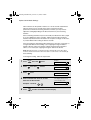
Time selections for the period of silence are 1 to 10 seconds. Quiet Detect
Time has been set to 4 seconds at the factory. This gives the best
performance with most answering machines; however, you may need to
adjust this setting depending on the disconnect time of your answering
machine.
Some answering machines may have unusually fast disconnect times (equal
to or very slightly less than 4 seconds), which means that the answering
machine may disconnect the line before fax reception can begin. In this case,
try a Quiet Detect Time setting of about 3 seconds.
If the fax machine is interrupting callers before they can leave a message, try
a longer Quiet Detect Time setting. If your outgoing message includes a
period of silence, make sure that the setting is longer than that period of
silence, or re-record your outgoing message to shorten the silence.
Note: Quiet Detect Time can be turned off by entering "00" for the time. Note,
however, that the fax machine will not be able to receive faxes sent manually by
Normal Dialling.
To change the setting, follow the steps below.
1
Press
FUNCTION
once and
once.
Display:
OPTION SETTING
2
Press
once and
3
Press
once.
4
Enter a number from 01 to 10, or enter
00 to turn off the function.
4 times
.
QUIET TIME
ENTER (00-10) 04
The display briefly shows
your selection, then:
QUIET START
Example: 3 seconds
5
52
Press
STOP
0
3
to return to the date and time display.
all.book
Page 53
Wednesday, October 17, 2001
1:44 PM
Optional A.M. Mode Settings
Quiet Detect Start Time
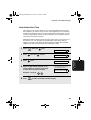
This setting can be used to delay the start of the Quiet Detect Time function.
For example, if you want to insert a pause at the beginning of your answering
machine’s outgoing message to ensure clear detection of fax signals, you can
use this setting to delay the start of silence detection so that the pause will not
cause the fax to take over the line.
Quiet Detect Start Timing has been turned off at the factory. If you want to use
this function, turn it on by entering a 2-digit number equal to the desired
number of seconds of the delay. As general guide, the delay time should be
slightly longer than the pause before the outgoing message.
1
Press
FUNCTION
once and
once.
Display:
OPTION SETTING
2
Press
once and
3
Press
once.
4
Enter a 2-digit number (from 01 to 15)
for the number of seconds of the delay,
or enter 00 to turn off the function.
Example: 5 seconds
5
Press
STOP
5 times
.
QUIET START
0
5. Answering
Machine
ENTER (00-15) 00
The display briefly shows
your selection, then:
ON A.M. FAILURE
5
to return to the date and time display.
53
all.book
Page 54
Wednesday, October 17, 2001
1:44 PM
Optional A.M. Mode Settings
On A.M. Failure
When this function is turned on, your fax will answer the call after 5 rings if the
answering machine for some reason fails to answer before that time. This
ensures that you will receive fax messages even if the answering machine’s
tape fills up or the answering machine is not turned on.
This function has been turned off at the factory. If you want to turn it on, follow
the steps below:
Note:
When this function is turned on, make sure that the answering machine is set to
answer on 4 rings or less. If it isn’t, the fax will always answer first, preventing
callers from leaving voice messages.
1
Press
FUNCTION
once and
once.
Display:
OPTION SETTING
2
Press
once and
3
Press
once.
4
Press
2
5
54
1
.
to turn on the function, or
to turn it off.
Press
6 times
STOP
ON A.M. FAILURE
1=YES, 2=NO
The display briefly shows
your selection, then:
FLASH SELECT
to return to the date and time display.
all.book
Page 55
Wednesday, October 17, 2001
1:44 PM
6. Special Functions
Caller ID (Requires Subscription to Service)
Note: The Caller ID function is not available in some countries.
If you subscribe to a caller identification service from your telephone
company, you can set your fax machine to display the name and number of
the caller while the fax rings.
Important:
♦ To use this function, you must subscribe to a caller identification service
from your telephone company.
♦ Your fax may not be compatible with some caller identification services.
1
Press
FUNCTION
once and
once.
Display:
OPTION SETTING
Press
once and
3
Press
once.
4
Press
1
4 times.
1=YES, 2=NO
(YES) to turn on Caller ID.
(To turn off Caller ID, press
CALLER-ID
2
.)
The display briefly shows
your selection, then:
6. Special
Functions
2
RECEIVE RATIO
5
STOP
Press
to return to the date and
time display.
55
all.book
Page 56
Wednesday, October 17, 2001
1:44 PM
Caller ID (Requires Subscription to Service)
How Caller ID operates
When you receive a call, the name and phone number of the caller will
alternately appear in the display, beginning just before the second ring. The
information will continue to be displayed until the line is disconnected.
Note: Some caller ID services may not provide the name of the caller. In this case,
only the phone number will appear.
Display example
JOHN DOE
5258693
Caller’s name
Caller’s number
Display messages
One of the following messages will appear while the fax rings if caller
information is not available.
NO SERVICE
No caller information was received from your telephone
company. Make sure that the telephone company has
activated your service.
CALLER-ID ERROR Noise on the telephone line prevented reception of
caller information.
56
OUT OF AREA
The call was made from an area which does not have a
caller identification service, or the caller’s service is not
compatible with that of your local phone company.
WITHHELD
Caller information was not provided by the telephone
company at the caller’s request.
all.book
Page 57
Wednesday, October 17, 2001
1:44 PM
Caller ID (Requires Subscription to Service)
Viewing the Caller ID list
If you subscribe to a Caller ID service and have turned on the Caller ID
function, your fax machine will keep information on the most recent 30 calls
and faxes you have received. You can view this information, which consists of
the name and number of each caller, in the Caller ID List.
♦ After you have received 30 calls, each new call will delete the oldest call.
♦ All calls will be erased if you unplug the fax or a power failure occurs.
Follow the steps below to view the Caller ID List in the display. If desired, you
can immediately dial a number when it appears.
1
Press
twice.
2
Press
or
3
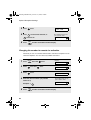
If you want to dial one of the numbers in the list, scroll through the list
until the number appears in the display.
<REVIEW CALLS>
to scroll through the list.
• Fax: If you want to send a fax, load the
START/MEMORY
.
Dialling and transmission begin.
Fax:
START/MEMORY
6. Special
Functions
document and then press
• Voice call: If you want to make a voice
call, pick up the handset (or press
).
Dialling begins automatically. (If you
pressed
, pick up the handset when
Voice
call:
the other party answers.)
4
Press
STOP
when you have finished viewing the list.
57
all.book
Page 58
Wednesday, October 17, 2001
1:44 PM
Caller ID (Requires Subscription to Service)
To delete calls from the Caller ID list
If you want to delete a single call from the caller list, press 0
while the call
appears in the display. If you want to delete all calls from the list, hold
0
down for at least 3 seconds while you are viewing any number in the list.
Priority Call
With Caller ID turned on, you can set your fax to make a special ringing sound
when you receive a call from a designated phone number. This lets you know
immediately who is calling without having to look at the display.
To use this function, enter the desired phone number by following the steps
below (only one phone number can be entered).
1
Press
2
Press
once and
3
Press
once.
4
Press
FUNCTION
1
once and
twice.
Display: ENTRY MODE
once.
1=SET, 2=CLEAR
to store a number.
(To clear a previously stored number, press
58
PRIORITY #
2
and go to Step 6.)
5
Enter the number by pressing the number keys (max. 20 digits).
6
Press
7
Press
START/MEMORY
STOP
to store (or clear) the number.
OWN NUMBER SET
to return to the date and time display.
all.book
Page 59
Wednesday, October 17, 2001
1:44 PM
Caller ID (Requires Subscription to Service)
Blocking voice calls
With Caller ID turned on, you can use the Anti Junk Fax function described in
Blocking Reception of Unwanted Faxes in this chapter to block voice calls as
well as faxes from your specified Anti Junk Number.
In this case, when a voice call or a fax transmission comes in from the number
you have specified as a "Junk Number", your fax will break the connection as
soon as it receives the calling phone number from the caller ID service (before
the second ring).
6. Special
Functions
To use this function, enter the number that you wish to block as explained in
Blocking Reception of Unwanted Faxes (see page 60). Only one number can
be blocked.
59
all.book
Page 60
Wednesday, October 17, 2001
1:44 PM
Blocking Reception of Unwanted Faxes
Blocking Reception of Unwanted Faxes
The Anti Junk Fax function allows you to block reception of faxes from a party
that you specify. This saves paper by not printing out unwanted "junk" faxes.
To use this function, follow the steps below to enter the fax number from which
you do not wish to receive faxes. One fax number can be entered.
1
Press
FUNCTION
once and
twice.
Display:
ENTRY MODE
60
2
Press
once and
3
Press
once.
4
Press 1 to store an Anti Junk number, or 2 to clear a previously
stored number (if you are clearing a number, go to Step 6).
5
Enter the fax number by pressing the number keys (max. 20 digits).
6
Press
7
press
twice.
ANTI JUNK #
1=SET, 2=CLEAR
START/MEMORY
STOP
to return to the date and time display.
all.book
Page 61
Wednesday, October 17, 2001
1:44 PM
Polling (Requesting a Fax Transmission)
Polling (Requesting a Fax Transmission)
Polling allows you to call another fax machine and have it send a document to
your machine without operator assistance. In other words, the receiving fax
machine, not the transmitting fax machine, initiates the transmission.
1
Dial the fax machine you want to poll
using one of the following methods:
• Enter the full number using the numeric keys.
• Pick up the handset (or press
) and dial the full number. Wait for the fax
answerback tone.
• If the number has been stored for automatic dialling, press
or
until the name (or number) of the other party appears in the display.
COPY/HELP
Press
POLL .
• If you used the handset, replace it when POLLING appears in the display.
Reception will begin.
6. Special
Functions
2
61
all.book
Page 62
Wednesday, October 17, 2001
1:44 PM
PBX operations
PBX operations
If your fax is connected to a PBX, you can use it to perform the following
operations:
Making enquiry calls: During a call, you can put the other party on hold,
make a further call to a third party, and then go back to your original caller.
Transferring calls: You can transfer a call to another number on the same
PBX without operator assistance.
Making enquiry calls
1
During the telephone conversation, press
on hold.
2
When you hear the dial tone, dial the number of the third party for the
enquiry call.
3
When you have finished the enquiry call, you will be automatically
returned to the original caller as soon as the third party hangs up.
R
. This puts the other party
Transferring calls
1
During the telephone conversation, press
on hold.
2
When you hear the dial tone, dial the number to which you want to
transfer the call. When the other party answers, hang up, and the call
will be transferred.
• If the other party does not answer, press
caller.
62
R
R
. This puts the other party
again to return to the original
all.book
Page 63
Wednesday, October 17, 2001
1:44 PM
7. Printing Lists
You can print lists showing settings and information entered in the fax
machine. The lists are described below. To print a list, follow these steps.
1
Press
FUNCTION
once and
once.
Display:
LISTING MODE
2
Press
once.
3
Press
or
4
Press
once.
5
Press
START/MEMORY
TEL # LIST
until the desired list appears in the display.
PRESS START KEY
to print the list.
Telephone Number List
This list shows the fax and phone numbers that have been stored for
automatic dialling.
Setup List
7. Printing
Lists
This list shows your current selections for the FUNCTION key settings. The
list also shows your name and fax/telephone number as entered in the
machine, and a sample of the header printed at the top of every page you
transmit (HEADER PRINT).
Caller-ID List
This list shows information about your 30 most recent calls. (This list is only
available if you are using the Caller ID function.)
63
all.book
Page 64
Wednesday, October 17, 2001
1:44 PM
Printing Lists
Transaction Report
This report is printed out automatically after an operation is completed to
allow you to check the result. Your fax machine is set at the factory to print out
the report only when an error occurs.
♦ The Transaction report cannot be printed on demand.
Headings in Transaction Report
SENDER/
RECEIVER
The name or fax number of the other machine involved in the
transaction. If that machine does not have an ID function, the
communication mode will appear (for example, "G3").
START
The time at which transmission/reception started.
TX/RX TIME
Total time taken for transmission/reception.
PAGES
Number of pages transmitted/received.
NOTE
(One of the following notes will appear under NOTE in the
report to indicate whether the transaction was successful,
and if not, the reason for the failure.)
OK - Transmission/reception was successful.
P.FAIL - A power failure prevented the transaction.
JAM - The printing paper or document jammed, preventing
the transaction.
BUSY - The fax was not sent because the line was busy.
COM.E-0 to COM.E-7 - A telephone line error prevented the
transaction. See Line error on page 69.
CANCEL - The transaction was cancelled because the
STOP key was pressed, no document was in the feeder, or
the other machine requested transmission using a function
which your fax machine does not have. If you were
attempting to fax, make sure a document is in the feeder. If
you were receiving, contact the faxing party to see how they
are trying to send to you.
64
all.book
Page 65
Wednesday, October 17, 2001
1:44 PM
Printing Lists
Transaction Report print condition
You can change the condition under which a Transaction Report is printed out.
Follow the steps below.
Display:
1
Press
2
Press
once and
3
Press
once.
FUNCTION
once and
once.
OPTION SETTING
twice.
TRANSACTION
1:ALWAYS PRINT
(Selections appear alternately)
Press a number from
to
1
5
to select the condition for printing.
1
ALWAYS PRINT
A report will be printed after each
transmission, reception, or error.
2
ERROR/MEMORY
A report will be printed after an error or a
memory operation.
3
SEND ONLY
A report will be printed after each
transmission.
4
ERROR ONLY
A report will be printed only when an error
occurs.
5
NEVER PRINT
A report will never be printed.
The display briefly shows
your selection, then:
5
Press
STOP
PSEUDO RING
to return to the date and time display.
7. Printing
Lists
4
Help List
This list provides a brief guide to the operation of the machine. Press
COPY/HELP
whilst no document is loaded in the feeder to print this list.
65
all.book
Page 66
Wednesday, October 17, 2001
1:44 PM
8. Maintenance
Print head
Clean the print head frequently to ensure optimum printing performance.
Note: Remove the paper from the paper tray before cleaning the print head.
1
Unplug the telephone line and then the
power cord, and open the operation
panel (press ➊).
2
1
2
Take the imaging film out of the print
compartment and place it on a sheet of
paper.
3
Wipe the print head with isopropyl
alcohol or denatured alcohol.
Caution!
• Do not use benzene or thinner. Avoid
touching the print head with hard
objects.
• The print head may be hot if your fax
machine has just received a large
number of documents. If this is the
case, allow the print head to cool prior
to cleaning.
66
Print head
Page 67
Wednesday, October 17, 2001
1:44 PM
Maintenance
4
Place the imaging film back in the print
compartment.
5
Rotate the front gear until the film is taut, and then close the operation
panel (press down on both sides to make sure it clicks into place).
Scanning glass and rollers
Clean the scanning glass and rollers frequently to ensure the quality of
transmitted images and copies.
Note: Remove the paper from the paper tray before cleaning the scanning
glass and rollers.
1
Open the operation panel (press ➊).
2
1
67
8. Maintenance
all.book
all.book
Page 68
Wednesday, October 17, 2001
1:44 PM
Maintenance
2
Flip up the green levers on each side of
the white roller.
3
Wipe the scanning glass (under the
white roller) and rollers with a cotton
swab.
• Make sure that all dirt and stains (such
as correcting fluid) are removed. Dirt
and stains will cause vertical lines on
transmitted images and copies.
If the scanning glass is difficult to clean
If you find it difficult to remove dirt from the scanning glass, you can try moistening
the swab with isopropyl alcohol or denatured alcohol. Take care that no alcohol
gets on the rollers.
4
Flip down the green levers on each side of the white roller. Rotate the
front gear until the film is taut, and then close the operation panel (press
down on both sides to make sure it clicks into place).
The housing
Wipe the external parts and surface of the machine with a dry cloth.
Caution! Do not use benzene or thinner. These solvents may damage or
discolor the machine.
68
all.book
Page 69
Wednesday, October 17, 2001
1:44 PM
9. Troubleshooting
9. Troubleshooting
Problems and Solutions
Line error
Problem
LINE ERROR appears in
the display.
Solution
Try the transaction again. If the error persists, check
the following:
• Check the connection. The cord from the TEL.
LINE socket to the wall socket should be no longer
than two meters.
• Make sure there are no modem devices sharing the
same telephone line.
• Check with the other party to make sure their fax
machine is functioning properly.
• Have your telephone line checked for line noise.
• Try connecting the fax machine to a different
telephone line.
• If the problem still occurs, your fax machine may
need service.
69
all.book
Page 70
Wednesday, October 17, 2001
1:44 PM
Problems and Solutions
Dialling and transmission problems
Problem
Solution
No dial tone when you
pick up the handset or
press the
key.
• Make sure the handset cord is connected to the
correct socket. See Connecting the handset on
page 9.
Dialling is not possible.
• Make sure the power cord is properly plugged into
a power outlet.
• Make sure that the telephone line is properly
connected to both the TEL. LINE socket and the
wall socket.
The power is on, but no
transmission takes place.
• Make sure that the receiving machine has paper.
• Make sure that the telephone line cord is plugged
into the TEL. LINE socket, and not the TEL. SET
socket.
• If the receiving machine is in manual mode with no
attendant, reception will not be possible.
• Check the display for error messages.
• Pick up the handset and check for a dial tone.
Nothing is printed at the
receiving end.
• Make sure that the document for transmission is
placed face down in the feeder.
A distorted image is
received at the other end.
• Noise on the telephone line may cause distortion.
Try sending the document again.
• Make a copy of the document on your fax machine.
If the copy is also distorted, your fax machine may
need service.
70
all.book
Page 71
Wednesday, October 17, 2001
1:44 PM
Problems and Solutions
Reception and copying problems
Solution
The power is on, but no
reception takes place.
• Make sure that the telephone line cord is plugged
into the TEL. LINE socket, and not the TEL. SET
socket.
The printing paper comes
out blank when you try to
receive a document.
• Make sure that the document is loaded properly in
the feeder of the transmitting machine. Make a
copy or print a report to confirm the printing ability
of your machine.
General print quality is
poor.
• It is important to select a paper that is appropriate
for the thermal transfer printer in your fax. We
recommend using laser quality paper that has a
very smooth finish. Copier paper will work, but it
sometimes tends to yield a lighter print quality.
The received document is
faint.
• Ask the other party to send higher contrast
documents. If the contrast is still too low, your fax
machine may need service. Make a copy or print a
report to check your machine’s printing ability.
Received images are
distorted.
• Noise on the telephone line may cause distortion.
Have the other party try sending the document
again.
9. Troubleshooting
Problem
• The print head may be dirty. See Print head on
page 66.
• Make a copy or print a report on your fax machine.
If the copy or report is also distorted, your fax
machine may need service.
A received document or
copy prints out in strips.
• Make sure the operation panel is completely closed
(press down on both sides of the panel).
The quality of copies is
poor and/or dark vertical
lines appear.
• Any dirt or material on the scanning glass will
cause spots to appear on copies and transmitted
faxes. Clean the scanning glass as explained on
page 67.
71
all.book
Page 72
Wednesday, October 17, 2001
1:44 PM
Problems and Solutions
Reception/copying is
interrupted.
• If reception or copying takes place continuously for
a long time, the print head may overheat. Turn off
the power and let it cool down. If overheating
frequently occurs, try changing the print contrast
setting to LIGHT (see page 15).
Dark vertical lines appear
on copies and received
faxes.
• Try changing the print contrast setting to LIGHT
(see page 15).
Answering machine connection
Problem
The answering machine
connection does not
operate properly.
Solution
• Make sure your fax machine's reception mode is
set to A.M.
• Make sure your fax machine's TEL. LINE socket is
connected to the wall socket. Make sure your fax
machine's TEL. SET socket is connected to your
answering machine's telephone line socket (not the
answering machine's extension phone socket).
• Make sure your answering machine's outgoing
message is under 10 seconds.
• Make sure that the Quiet Detect Time setting is set
to three or four seconds (see page 51).
72
all.book
Page 73
Wednesday, October 17, 2001
1:44 PM
Problems and Solutions
General problems
Solution
A loud howling sound
occurs when the speaker
is used.
• Feedback (a loud howling sound) may occur if you
replace the handset while the speaker is on. To
avoid feedback, turn off the speaker (press )
before you replace the handset.
Auto-dial numbers cannot
be stored in the fax.
• Make sure the fax is plugged in and the imaging
film has been loaded. (Auto-dial numbers cannot
be stored if the imaging film has not been loaded.)
See Loading the Imaging Film on page 12.
Nothing appears in the
display.
• Make sure the power cord is properly plugged into
a power outlet.
9. Troubleshooting
Problem
• Connect another electrical appliance to the outlet to
see if it has power.
The machine does not
respond when you press
any of its keys.
• If a beep sound is not made when you press the
keys, unplug the power cord and then plug it in
again several seconds later.
Automatic document
feeding does not work for
transmission or copying.
• Check the size and weight of the document (see
Transmittable Documents on page 24).
73
all.book
Page 74
Wednesday, October 17, 2001
1:44 PM
Messages and Signals
Messages and Signals
Display messages
Note: If you have turned on the Caller ID function, see page 56 for display
messages related to Caller ID.
ADD PAPER & /
PRESS START KEY
(alternating messages)
Check the printing paper. If the tray is empty, add
paper and then press the START/MEMORY key. If
there is paper in the tray, make sure it is inserted
correctly (take out the stack, align the edges evenly,
and then reinsert it in the tray) and then press the
START/MEMORY key.
A.M. OFF HOOK
When the fax is in A.M. reception mode, the message
appears when the handset of an answering machine
(or extension phone) connected to the fax has been
lifted.
CHECK FILM/
CHECK COVER/
CHECK PAPER JAM
(alternating messages)
These alternating messages appear when there is a
problem in the print compartment that prevents
printing. Check to see if the imaging film is not loaded
properly or if it has been used up and needs
replacement. Make sure the operation panel is
completely closed (press down on both sides). If a
paper jam has occurred, clear the jam as explained in
the following section, Clearing Paper Jams.
CHECK PAPER SIZE
An incorrect size of paper has been loaded in the
paper tray. Remove the paper and load A4-size
paper.
DOCUMENT JAMMED
The original document is jammed. See the following
section, Clearing Paper Jams. Document jams will
occur if you load more than 10 pages at once or load
documents that are too thick (see page 24).
FAX RX IN MEMORY
A fax has been received in memory because the
imaging film needs replacement, you have run out of
printing paper, or the paper is jammed. The fax will
print out automatically when the problem is fixed.
FUNCTION MODE
The FUNCTION key has been pressed.
74
all.book
Page 75
Wednesday, October 17, 2001
1:44 PM
Messages and Signals
Transmission or reception was not successful. Press
the STOP key to clear the message and then try
again. If the error persists, see Line Error on page 69.
MEMORY IS FULL/
SEE MANUAL
(alternating messages)
The memory is full. This may occur during fax
reception if too much data is received before the
pages can be printed out. If faxes have been received
to memory because printing is not possible (an
additional message will indicate the problem), resolve
the problem so that printing can continue (see
Substitute Reception to Memory on page 46). If you
are attempting to transmit from memory, see If the
memory becomes full on page 37. If you are copying,
see If MEMORY IS FULL appears on page 47.
MEMORY PRINTING
The fax is preparing to or printing out a document
from memory.
NO DATA
This appears if you attempt to search for an auto-dial
number when none have been stored.
OFF HOOK
This appears if you forgot to replace the handset after
using it to dial and send a fax. Replace the handset or
press the STOP key to clear the message.
ON HOOK DIAL
The
key has been pressed and the fax machine is
waiting for you to dial.
OVER HEAT
The print head has overheated. Operation can be
continued after it cools. If overheating frequently
occurs, try changing the print contrast setting to
LIGHT (see page 15).
PRINT HEAD FAIL/
YOU NEED SERVICE
(alternating messages)
The print head has failed and requires service.
READY TO SEND
A document has been loaded and the fax machine is
waiting for you to begin faxing or copying.
9. Troubleshooting
LINE ERROR
75
all.book
Page 76
Wednesday, October 17, 2001
1:44 PM
Messages and Signals
RECALLING
This appears if you attempt to send a fax by
automatic dialling and the line is busy or the receiving
fax machine does not answer. Your fax machine will
automatically reattempt the call. (See Automatic
redialling on page 35.)
TOTAL PAGE(S) 01
Number of pages transmitted, received, or copied.
Audible signals
Continuous tone
3 seconds
Indicates the end of transmission,
reception, or copying.
Intermittent tone
(3 beeps)
5 seconds
(1 second on, 1
second off)
Indicates incomplete transmission,
reception, or copying.
Rapid intermittent
tone
35 seconds
(0.7 seconds on,
0.3 seconds off)
Indicates that the handset is off hook.
76
all.book
Page 77
Wednesday, October 17, 2001
1:44 PM
Clearing Paper Jams
Clearing Paper Jams
If the original document doesn’t feed properly during transmission or copying,
or DOCUMENT JAMMED appears in the display, first try pressing
START/MEMORY
. If
the document doesn't feed out, remove it as explained below.
Important:
Do not try to remove a jammed document without releasing it as explained
below. This may damage the feeder mechanism.
1
Press ➊ and slowly open the operation
panel until it is half open.
2
1
2
Flip up the green levers on each side of
the white roller.
3
Gently and remove the document.
• Be careful not to tear the document.
77
9. Troubleshooting
Clearing a jammed document
all.book
Page 78
Wednesday, October 17, 2001
1:44 PM
Clearing Paper Jams
4
Flip down the green levers on each side of the white roller. Rotate the
front gear until the film is taut, and then close the operation panel (press
down on both sides to make sure it clicks into place).
Clearing jammed printing paper
1
Open the operation panel (press ➊).
2
1
78
2
Gently pull the jammed paper out of
the machine, making sure no torn
pieces of paper remain in the print
compartment or rollers.
3
Rotate the front gear until the film is taut, and then close the operation
panel (press down on both sides to make sure it clicks into place).
all.book
Page 79
Wednesday, October 17, 2001
1:44 PM
Quick Reference Guide
Sending Faxes
Receiving Faxes
TEL FAX
01-JAN 10:30
Place your document (up to 10 pages) face
down in the document feeder.
TEL/FAX A.M.
TEL FAX
RESOLUTION/
RECEPTION MODE
01-JAN 10:30
TEL/FAX A.M.
TEL FAX
01-JAN 10:30
TEL/FAX A.M.
TEL FAX
01-JAN 10:30
TEL/FAX A.M.
FAX mode: The fax machine automatically
answers and receives faxes.
TEL mode: Answer all calls (even faxes)
by picking up the handset. To begin fax
Normal Dialling
reception, press
1. Lift the handset or press
.
2. Dial the fax number.
3. Wait for the reception tone (if a person
answers, ask them to press their Start
key).
4. Press
START/MEMORY
START/MEMORY
.
TEL/FAX mode: The fax machine
automatically answers and receives faxes.
Voice calls are signalled by a special
ringing sound.
A.M. mode: Select this mode when an
answering machine is connected to the fax
and the answering machine is turned on.
.
Storing Auto Dial Numbers
1. Press
Automatic Dialling
FUNCTION
once and
twice.
2. Enter the full fax/phone number.
1. Press
or
until the name of the
other party appears in the display (if no
name was stored, the number will
appear).
2. Press
START/MEMORY
3. Press
START/MEMORY
.
4. Enter a name by pressing number keys.
(To enter two letters in succession that
require the same key, press
after
.
entering the first letter.)
G=
N=
A=
H=
O=
V=
B=
I =
P=
W=
SPACE =
Direct Keypad Dialling
1. Dial the fax number.
2. Press
START/MEMORY
.
U=
C=
J=
Q=
X=
D=
K=
R=
Y=
E=
L=
S=
Z=
F=
M=
T=
5. Press
START/MEMORY
and then
STOP
.
79
all.book
Page 80
Wednesday, October 17, 2001
1:44 PM
Index
A
F
A.M. reception mode, 50
Answering machine connection
Activating, 50
Connecting, 49
On A.M. Failure, 54
Quiet Detect Start Time, 53
Quiet Detect Time, 51
Troubleshooting, 72
Anti Junk Fax, 60
Audible signals, 76
Auto-dial numbers
Storing, 30
Using, 33
FAX reception mode, 20, 40
Fax Signal Receive, 43
Flash Select setting, 23
H
Halftone setting, 26
Handset, 9
Housing, cleaning, 68
I
Imaging film, replacing, 12
J
C
Caller ID, 55-59
Caller ID List, 63
Contrast, 27
Copies, 47
Copy cut-off setting, 48
D
Date, setting, 18
Dialling
Automatic, 33
Direct Keypad, 34
Normal, 28
Direct Keypad Dialling, 34
Display messages, 74
Document feeder, 25
Document guides, 25
Document restrictions, 25
Document sizes, 24
Document, maximum scanning size, 24
E
Extension telephone
Connecting, 11
Using, 42
80
Jams, clearing, 77-78
L
Letters, entering, 17, 31
Line error, 69
Loading paper, 14
Loading the document, 25
M
Memory transmission, 37
Memory, substitute reception to, 46
N
Normal Dialling, 28
Number of rings in FAX reception mode,
40
P
Paper jams, clearing, 77-78
Paper tray extension, 11
Paper, loading, 14
Polling, 61
Power cord, 9
Print contrast setting, 15
all.book
Page 81
Wednesday, October 17, 2001
1:44 PM
Index
Print head, cleaning, 66-67
Priority Call, 58
Pseudo Ring Duration, 38
R
Reception mode
A.M. mode, 50
FAX mode, 20, 40
TEL mode, 20, 41
TEL/FAX mode, 38
Reception Ratio setting, 45
Redialling, 35
Resolution, 26
Ringer volume, 22
S
Sender’s name and number, entering,
16-17
Setup List, 63
Speaker volume, 21
T
TEL reception mode, 20, 41
TEL. LINE socket, 10
TEL. SET socket, 11, 49
TEL/FAX reception mode, 38
Tel/Fax Remote Number, 44
Telephone line cord, 10
Telephone Number List, 63
Time, setting, 18
Transaction Report, 64
Setting print condition, 65
Scanning glass, cleaning, 67
81
all.book
Page 108
Wednesday, October 17, 2001
1:44 PM
SHARP ELECTRONICS (UK) LTD.
Sharp House, Thorp Road, Newton Heath, Manchester, M40
5BE
SHARP CORPORATION
PRINTED IN THAILAND
(TINSE4255XHTZ)