1
SAGEM
MF 3725
User Manual
S
Date en cours : 9 février 2005
C:\Documents and Settings\G097447\Bureau\MFK V2 LU 251 816 433A MF 3725 GB\1 COUVGb.fm
WELCOME
You have just acquired a new generation communications terminal from SAGEM and we congratulate
you on your choice. This multi-function terminal will meet all your professional requirements.
This User's Manual present the model in the range:
Model
MF 3725
Equipement
•
•
•
•
•
Duplex unit scanner colour
28 ppm Black & White laser printer
Front/back module
Connection Kit PC
LAN 10/100 Base T
It combines power, user-friendliness and simplicity thanks to its navigator, its multitask access and its
direct access directory.
Denpending on model, you can also print to PCL® 6 and KPDL/SGScript 3 formats (emulation of
Postscript® level 3 language).
We strongly recommend that you take the time to read this manual so that you can get the most out of
your terminal's many features. Please read the safety instructions carefully (see the Safety chapter on
page 8-1).
List of accessories1
The following additional accessories are proposed for the Fax Laser range:
• Directory card.
• 500-page paper tray.
• Companion Suite Pro PC Kit.
Consumables
To refer to the last page of this user manual for the references.
1.
The list of accessories is subject to change without prior notice.
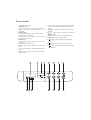
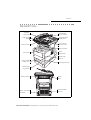
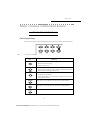
Scanner console
1. Key
: stops current printing.
2. Key
: help in terminal use.
3. Key
: local photocopy.
4. Key
: reduce or enlarge.
fax reception icon reception:
* On : reception possible.
* Flashing : non-printed document(s) in memory
or being received.
* Out : reception impossible.
18. Digital keyboard.
19. Alphabetical keyboard.
20. Key Í : deletes the character to the left of the
cursor
21. Key
: input or line feed.
17. Icon
5. Key PC : scan to PC / scan to FTP / scan to Disk
: scan to e-mail (sending of Internet fax).
6. Key
7. Key
: double sided printing
8. Key
: selection of colour mode.
9. Key
: scan resolution.
10. Key
: contrast setting.
11. Scan resolution (Fine (Fin), SFine (Super Fin),
Photo).
12. Icon "Ligne"
* On :
* Out :
:
: access to menu and browsing in menus
downwards.
27. Key C : return to previous menu and correction of
text
26. Key
:
28. Key
duplex mode activated.
printing mode deactivated.
15. Indicator reserve "Toner"
: stops current operation.
: access to directory and quick dial
numbers.
On : end of toner,
Flashing : near the end of toner.
2
3
4
6
5
e-mail).
.
7
: multiple contact sending (fax,
31. Key
11
1
: browsing in menus upwards.
29. Key
30. Key
:
16. Indicator printer paper jam
: Shift.
24. Key
: send fax.
25. Key OK : validates displayed selection.
* On : communication in progress.
* Flashing : communication setting up.
13. Icon
: color mode selected.
14. Recto/Verso print indicated
: access to special characters.
22. Key
23. Key
8
9
13
12
10
15
14
16
21
17
19
18
20
PRINT
COPY
SCAN
Fine Sfine Photo
30
31
28
29
1
27
1
1
26
24
25
23
22
Print console
1. The console's LCD screen.
2. WARNING indicator:
On: A problem or error (e.g. a paper jam) has occurred.
Blinking: The printer requires maintenance or is
warming up.
3. READY indicator:
On: The printer is ready. It prints out any data it receives.
Blinking: An error has occurred.
Off: The printer is idle. The data has been received but
not printed out (see GO key).
4. DATA indicator:
On: The data has been processed or stored on the
memory card,
Blinking: Data transfer in progress.
5. GO key: Used to take the printer into or out of idle
mode.
6. < key: Used to navigate the submenus and make certain
settings.
7.
key: Used to navigate the menus and to increase
numerical values.
1
15
14
2
13
3
4
8. > key: Used to navigate the submenus, make certain
settings and display help messages when certain errors
occur.
9. ENTER key: Confirms the numerical values and other
selections.
10.
key: Used to navigate the menus and to devease
numerical values.
11. MENU key: Used to access or exit the printer's menu.
12. CANCEL key: Used to cancel a print job.
TYPE
13.
indicator: Shows the paper type used in the tray.
SIZE
14.
15.
indicator: Shows the paper size used in the tray.
INTERFACE
indicator: Shows the interface being used (PAR,
USB, OPT and --).
5
6
7
8
12
11
10
9
Installing the terminal
Installing the removable components
Installing the scanner document feeder
Adjusting the original document output tray
Loading paper
Loading the multipurpose tray
Installing Consumables
Wall connections
Lan connections
Power line connection and switch on
Configuring the printer driver
2
GETTING
STARTED
Navigation methods
2-1
2-1
2-1
2-3
2-5
2-8
2-8
2-9
2-10
Presentation
Access to functions
Guide to function list
Print console navigation basics
Navigating the menus
Access to functions
Guide to functions
3
SETTING
YOUR MACHINE
Main settings
Before transmission
Before reception
Technical parameters
Local Area Network settings
Local network settings
Print function settings
Remote configuration
Fax Server (depending on option)
Message service and the Internet
Initialisation parameters
Settings
I
Date en cours : 9 février 2005
C:\Documents and Settings\G097447\Bureau\MFK V2 LU 251 816 433A MF 3725 GB\LU MFK 24 Sagem GbTDM3.fm
3-1
3-1
3-2
3-3
3-5
3-6
3-6
3-8
3-10
3-10
3-12
3-12
3-14
Getting started
Description
Setting your
machine
Unpacking the additional paper tray (depending on option)
Unpacking the front/back module
Unpacking the scanner
Unpacking the printer
Directory
Installation requirements
Unpacking the components
1-1
1-1
1-1
1-4
1-4
1-5
1-6
1-7
1-8
1-9
1-24
1-24
1-25
1-25
1-28
1-30
1-33
1-33
1-33
1-33
Operation
Installing your terminal
Print function
INSTALLATION
Maintenance
1
Safety
CONTENTS
Installation
Contents
Contents
Contents
Network Connection
Deactivating the Internet function
4
DIRECTORY
Creating subscribers record
Adding a record
Creating subscribers lists
Adding a list
Adding or deleting a number from the list
Consulting a record or a list
Modifying a record or a list
Deleting a record or a list
Printing the directory
Importing a directory
The file structure
Procedure
Exporting a directory
LDAP server
Configuration
Accessing server contacts
Adding a server contact to the local directory
5
OPERATION
Sending
Document depositing
Choosing the resolution/contrast
Dialling
Transmitting Over the Fax Server (depending on option)
Transmission over the Internet
Transmission waiting queue
Cancelling a transmission in progress
Reception
Copying
Local copy
Specific copy settings
Other functions
Logs
Printing the functions list
Printing the machine settings
Counters
Lock
Scan to PC (depends on model)
6
PRINT
FUNCTION
Using the console
3-17
3-18
4-1
4-2
4-2
4-4
4-4
4-5
4-5
4-6
4-6
4-6
4-6
4-7
4-7
4-8
4-8
4-9
4-9
4-9
5-1
5-1
5-1
5-2
5-3
5-5
5-5
5-9
5-10
5-10
5-10
5-11
5-13
5-15
5-15
5-15
5-16
5-16
5-16
5-18
6-1
6-1
6-1
6-4
The console
Printing test pages
II
Date en cours : 9 février 2005
C:\Documents and Settings\G097447\Bureau\MFK V2 LU 251 816 433A MF 3725 GB\LU MFK 24 Sagem GbTDM3.fm
Maintenance
General
Replacing the consumables (toner and drum)
Cleaning
Servicing
Scanner calibration
Incidents
Printer incidents
Scanner incidents
Miscellaneous incidents
Storage
Packing and transporting the unit
Specifications
SAFETY
8-1
Safety
Maintenance
Print function
Operation
Directory
8
7-1
7-1
7-1
7-2
7-10
7-11
7-11
7-11
7-12
7-15
7-17
7-17
7-17
7-20
Installation
MAINTENANCE
Getting started
7
6-5
6-11
6-16
6-17
Setting your
machine
Paper size and type settings
Pagination
Interface
Configuring the printer
Contents
Contents
III
Date en cours : 9 février 2005
C:\Documents and Settings\G097447\Bureau\MFK V2 LU 251 816 433A MF 3725 GB\LU MFK 24 Sagem GbTDM3.fm
Contents
The mark
attests that the products comply with the essential requirements of Directive R&TTE 1999/05/EC.
For user safety, in accordance with Directives 73/23/EC. For electromagnetic interference, in accordance with Directive
89/336/EC.
The manufacturer declares that the products are manufactured in accordance with ANNEX II of Directive R&TTE 1999/
5/EC.
IV
Date en cours : 9 février 2005
C:\Documents and Settings\G097447\Bureau\MFK V2 LU 251 816 433A MF 3725 GB\LU MFK 24 Sagem GbTDM3.fm
1 INSTALLATION
INSTALLING YOUR TERMINAL
INSTALLATION REQUIREMENTS
A proper location helps to ensure that your printer provides you with the long service life for which
it is designed. Double-check to make sure that the location you select has the following
characteristics.
• Choose a location that is well ventilated.
• Make sure you do not obstruct the ventilation grilles located on the left and right-hand sides of
the unit and at the rear of the Front/Back module. If there is a wall nearby when you install the
unit, make sure you install the terminal at the distances shown in the illustration below in order
to make it easier to open the various covers.
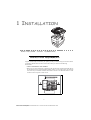
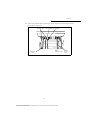
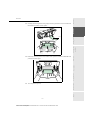
30 cm
30 cm
20 cm (40 cm with front/back module)
1-1
Date en cours : 9 février 2005
C:\Documents and Settings\G097447\Bureau\MFK V2 LU 251 816 433A MF 3725 GB\Installation Gb.fm
Installation
• Make sure there is no chance of ammonia or other organic gasses being generated in the area.
• The grounded power outlet (refer to the safety instructions in the Safety section) you plan to connect to for power should be nearby and not obstructed.
• Make sure that the printer is not exposed to direct sunlight.
• Avoid areas in the direct airflow of air conditioners, heaters, or ventilators and areas subject to
temperature and humidity extremes.
• Choose a sturdy, level surface where the printer will not be exposed to strong vibration.
• Keep the printer away from any objects that might block its heat vents.
• Do not locate the printer near curtains or other combustible objects.
• Choose an area where there is no possibility of the printer being splashed with water or other
liquids.
• Make sure that the surrounding area is clean, dry, and free of dust.
Operational precautions
Note the following important precautions whenever using the printer.
Operating Environment
The following describes the operating environment required when using the printer:
• Temperature:
10°C to 35°C (50°F to 95°F) with fluctuation of 10°C (18°F) per hour.
• Humidity:
20% to 80% (no condensation) with fluctuation of 20% per hour.
Terminal
The following describes precautions for using the terminal.
• Never switch the power to the terminal off and never open the covers while the unit is printing.
• Never turn the terminal off or open any of its covers during a print operation.
• Never place flammable gasses, liquids or objects that generate magnetic forces near the terminal.
• When unplugging the power cord, always grasp the plug and never pull on the cord. A damaged
cord creates the danger of fire or electrical shock.
• Never touch the power cord when your hands are wet. Doing so creates the danger of electrical
shock.
• Always unplug the power cord before moving the terminal. Failure to do so can damage the
power cord, creating the danger of fire or electrical shock.
• Always unplug the power cord if you do not plan to use the terminal for a long time.
• Never try to remove any secured panel or cover. The terminal contains high-voltage circuit which
creates the danger of electrical shock when exposed.
• Make sure that the power to the printer is switched off before connecting or disconnecting an
interface lead to the printer (use a shielded interface lead).
• Never try to modify the terminal. Doing so creates the danger of fire or electrical shock.
• Never place any heavy objects on the power cord, pull on it or bend it. Doing so creates the danger of fire or electrical shock.
• Always make sure the terminal is not placed on the electrical cord or the communications cables
of any other electrical equipment. Also make sure that cords and cables do not get into the terminal’s mechanism. Any of these conditions create the danger of malfunction and fire.
1-2
Date en cours : 9 février 2005
C:\Documents and Settings\G097447\Bureau\MFK V2 LU 251 816 433A MF 3725 GB\Installation Gb.fm
• Whenever the terminal emits unusually high amounts of heat, smoke, an unusual odor, or
noise, immediately turn it off, unplug it, and contact your dealer. Failure to take this immediate action creates the danger of fire or electrical shock.
• Avoid using the terminal during an "electrical storm" as this may involve a risk of electric
shock caused by the lightning.
• Paper for printer: do not use paper previously printed by your terminal or any other
printer: the ink or toner deposited on that paper might damage the printing system of
your terminal.
Safety
Maintenance
Print function
Operation
Directory
Caution - Be sure to locate the terminal in a well-ventilated location. A minimal amount of
ozone is generated during normal operation of this terminal. Because of this, an unpleasant odor
may result when the printer is used for extensive printing in a poorly ventilated area. For a
comfortable, healthy, and safe operation, be sure to locate the terminal in a well-ventilated area.
Installation
• Should liquid or any piece of metal accidently get inside the printer, immediately turn it off,
unplug the power cord, and contact your dealer. Failure to take this immediate action creates
the danger of fire or electrical shock.
Getting started
• Do not allow water or other liquids to spill on or near the terminal. Fire or electrical shock
can occur should water or liquid come into contact with the terminal.
Setting your
machine
• Always take care that paper clips, staples, or other small pieces of metal do not get into the
terminal through its vents or other openings. Such objects create the danger of fire or electrical shock.
Contents
Installation
1-3
Date en cours : 9 février 2005
C:\Documents and Settings\G097447\Bureau\MFK V2 LU 251 816 433A MF 3725 GB\Installation Gb.fm
Installation
UNPACKING THE COMPONENTS
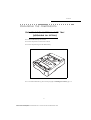
UNPACKING THE ADDITIONAL PAPER TRAY
(DEPENDING ON OPTION)
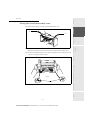
Take the additional tray out of its box.
Remove the protective side sections in the box.
Remove the plastic bag from the additional tray.
To install the additional tray please see the paragraph on Installing the terminal, page 1-9.
1-4
Date en cours : 9 février 2005
C:\Documents and Settings\G097447\Bureau\MFK V2 LU 251 816 433A MF 3725 GB\Installation Gb.fm
Remove the front/back module from its box.
Remove the protective side sections.
Remove the plastic bag from the front/back module.
To install the front/back module, please see the paragraph on Installing the front/back
module on top of the additional trays (depending on model or option), page 1-9.
Safety
Maintenance
Print function
Operation
Directory
Setting your
machine
Getting started
Installation
UNPACKING THE FRONT/BACK MODULE
Contents
Installation
1-5
Date en cours : 9 février 2005
C:\Documents and Settings\G097447\Bureau\MFK V2 LU 251 816 433A MF 3725 GB\Installation Gb.fm
Installation
UNPACKING THE SCANNER
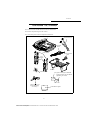
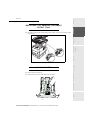
Take the scanner module and its accessories out of the box.
Remove the plastic bag from the scanner.
Check that you have all the components listed below.
Scanner
Centronics lead
Document
feeder
Cable holder
Mains extension
lead
Feet
Interface
Interface
Cable fasteners
Mains power cord
(model depending
on country)
User guide / Printing kit CD-ROM
Companion Suite Pro CD-ROM
(depending on model)
Installation guide
1-6
Date en cours : 9 février 2005
C:\Documents and Settings\G097447\Bureau\MFK V2 LU 251 816 433A MF 3725 GB\Installation Gb.fm
Contents
Installation
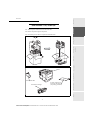
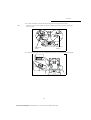
Take the printer and its accessories out of the box.
Remove the plastic bag from the printer.
Check that you have all the components illustrated below.
Waster Toner Box
A plastic sachet used
to store the developer
(see packing procedure)
Safety
Toner drum/cartridge
Maintenance
Print function
Printer
Operation
Directory
Setting your
machine
Getting started
Installation
UNPACKING THE PRINTER
1-7
Date en cours : 9 février 2005
C:\Documents and Settings\G097447\Bureau\MFK V2 LU 251 816 433A MF 3725 GB\Installation Gb.fm
Installation
DESCRIPTION
Adjustable
paper guide
Document feed
tray for scanning
Scroll scanner
(ADF)
Original document
output stacker
Access handle
Flatbed scanner
Scanner console
Chip card reader
Printer
output stacker
Print console
Manual paper
feed tray
Rear front/back
module cover
Printer paper feed tray
Addional paper
tray (optional)
Mains connection
On/Off
button
Front/back module
rear cover
Mains / LAN/ USB/
lead outlets
1-8
Date en cours : 9 février 2005
C:\Documents and Settings\G097447\Bureau\MFK V2 LU 251 816 433A MF 3725 GB\Installation Gb.fm
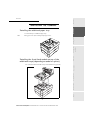
Installing the additional paper tray
You can install up to 3 additional paper trays.
stacking paper feeders. (When installing multiple paper feeders).
Install the front/back module on top of the additional tray (optional).
Safety
Maintenance
Print function
Operation
Installing the front/back module on top of the
additional trays (depending on model or option)
Directory
Setting your
machine
Getting started
Note:
Installation
INSTALLING THE TERMINAL
Contents
Installation
1-9
Date en cours : 9 février 2005
C:\Documents and Settings\G097447\Bureau\MFK V2 LU 251 816 433A MF 3725 GB\Installation Gb.fm
Installation
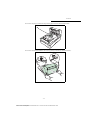
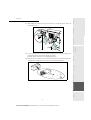
Remove the plug (A) and all the strips of fixing tape stuck onto the front/back module.
A
Remove the front/back module's rear cover by pressing it inwards (see illustration below).
1-10
Date en cours : 9 février 2005
C:\Documents and Settings\G097447\Bureau\MFK V2 LU 251 816 433A MF 3725 GB\Installation Gb.fm
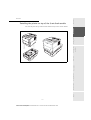
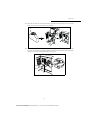
Installing the printer on top of the front/back module
Place the printer on top of the front/back module and lay it down onto this module.
Safety
Maintenance
Print function
Operation
Directory
Setting your
machine
Getting started
Installation
Contents
Installation
1-11
Date en cours : 9 février 2005
C:\Documents and Settings\G097447\Bureau\MFK V2 LU 251 816 433A MF 3725 GB\Installation Gb.fm
Installation
Installing the feet on the scanner/printer interface
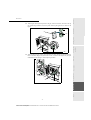
Position the scanner/printer interface unit on top of the printer, around 3 centimetres back from
the rear.
Left
Right
2
2
1
1
Right interface
foot
Left interface
foot
Insert the scanner/printer interface feet into the slots provided for this purpose, located on both
sides at the rear of the scanner/printer interface, both of the feet have a fool-proofing device and
can only be fitted in a single place.
Once both of the feet have been positioned in their respective slots, press upwards until they clip
and then lock into place (see illustration below).
Clipping area
1-12
Date en cours : 9 février 2005
C:\Documents and Settings\G097447\Bureau\MFK V2 LU 251 816 433A MF 3725 GB\Installation Gb.fm
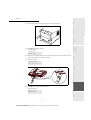
Place the terminal's scanner on top of the scanner/printer interface and then lay it down.
Safety
Maintenance
Print function
Operation
Directory
Setting your
machine
Getting started
Installation
Installing the scanner on top of the scanner/printer
interface
Contents
Installation
1-13
Date en cours : 9 février 2005
C:\Documents and Settings\G097447\Bureau\MFK V2 LU 251 816 433A MF 3725 GB\Installation Gb.fm
Installation
Fitting the scanner interface to the printer
Lift up the scanner/printer interface unit and then position the 4 locking tabs (B) opposite the 4
slots (A) located on the left and right-hand side at the rear of the printer. Insert the 4 tabs into
these slots then press downwards so that the unit is properly fixed onto the printer.
After fixing the unit onto the printer, make sure that the two blades on the positioning latches (C)
are in a vertical position, if not turn them so that they are in the correct position.
B
A
C
B
C
A
1-14
Date en cours : 9 février 2005
C:\Documents and Settings\G097447\Bureau\MFK V2 LU 251 816 433A MF 3725 GB\Installation Gb.fm
A
Contents
Installation
Terminal connections
LAN
Port
socket
Mains socket
Parrallel
Mains extension
socket
On / Off switch
Mains extension
socket
Directory
Setting your
machine
port
Getting started
USB
Installation
If you stand at the rear of the unit you will be able to see all the available connections.
Parrallel
LAN
Port
socket
Safety
Maintenance
USB
Print function
Operation
port
1-15
Date en cours : 9 février 2005
C:\Documents and Settings\G097447\Bureau\MFK V2 LU 251 816 433A MF 3725 GB\Installation Gb.fm
Installation
Connect your terminal's leads as shown below. Do not forget to lock the Centronics lead into
place using the 2 metal clips.
Locking clips
USB lead
LAN lead
(not supplied) (not supplied)
Mains
extension lead
Centronics
lead
1-16
Date en cours : 9 février 2005
C:\Documents and Settings\G097447\Bureau\MFK V2 LU 251 816 433A MF 3725 GB\Installation Gb.fm
scanner
mains
load
Once the various leads have been connected, position them by inserting them into the
sockets provided for this purpose in the scanner/printer interface's two side feet as shown
below.
After carefully pushing the various leads into their respective sockets, clip the fasteners (A)
onto the scanner/printer interface feet supplied with the scanner (6 cable fasteners), see
illustrations below.
Left
A
Safety
A
Maintenance
Print function
Operation
Right
Directory
Setting your
machine
Getting started
Installation
Connecting up the scanner/printer/front/back module
Contents
Installation
1-17
Date en cours : 9 février 2005
C:\Documents and Settings\G097447\Bureau\MFK V2 LU 251 816 433A MF 3725 GB\Installation Gb.fm
Installation
Installing the cable holders
Clip the 2 cable holders (see illustration below) onto the scanner/printer interface feet to hide the
leads inside the feet.
Start by fitting the right-hand holder. Position the upper part of the holder (A) underneath the
interface (B). Bring the lower part of the holder (C) against the foot making sure that the middle
clip (D) is in the right position. Clip the whole unit together.
B
A
A
D
C
Then fit the left-hand holder in the same way.
1-18
Date en cours : 9 février 2005
C:\Documents and Settings\G097447\Bureau\MFK V2 LU 251 816 433A MF 3725 GB\Installation Gb.fm
Connecting the scanner's mains lead to the printer
Connect the end of the male/female mains lead (A) to the printer's male connector (E).
Pass the scanner's mains lead (B) from underneath the printer's mains lead (A) see
illustrations below.
Make a loop with the mains lead (A) by inserting it into the grommet (D), see illustrations
below.
A
B
Directory
Setting your
machine
Getting started
Installation
Contents
Installation
D
A
Safety
Maintenance
B
Print function
Operation
E
1-19
Date en cours : 9 février 2005
C:\Documents and Settings\G097447\Bureau\MFK V2 LU 251 816 433A MF 3725 GB\Installation Gb.fm
Installation
Connecting the printer's LAN and USB leads
Connect the printer's LAN lead (C) and USB lead (B) as shown in the illustration below.
A
B
C
1-20
Date en cours : 9 février 2005
C:\Documents and Settings\G097447\Bureau\MFK V2 LU 251 816 433A MF 3725 GB\Installation Gb.fm
Connect the end of the lead (A) to the parallel port connector located on the left-hand side
at the back of the printer and lock it into place with the 2 metal tabs.
Pass the USB and LAN leads underneath the parallel lead (A).
Position the lead (A) on the bottom of the front/back module by running it over the mains
lead and the scanner line lead as shown in the illustrations below.
Directory
Setting your
machine
Getting started
Installation
Connecting the scanner's parallel port to the printer
Contents
Installation
Safety
Maintenance
Print function
Operation
A
1-21
Date en cours : 9 février 2005
C:\Documents and Settings\G097447\Bureau\MFK V2 LU 251 816 433A MF 3725 GB\Installation Gb.fm
Installation
Taking the various leads out of the terminal
Once you have connected all of the terminal's leads, push them into the slot (A) provided for this
purpose on the left of the front/back module, see illustration below.
A
1-22
Date en cours : 9 février 2005
C:\Documents and Settings\G097447\Bureau\MFK V2 LU 251 816 433A MF 3725 GB\Installation Gb.fm
Contents
Installation
Fitting the front/back module cover
Remove the two flaps (A) from the rear front/back module cover.
A
Pass the leads (mains scanner, USB and LAN) through the hole (B) which is provided for
this purpose, located on the left-hand side at the rear of the front/back module cover.
Fix the rear front/back module cover into place by clipping to its base. Make sure that the
2 clips (C) are properly locked into place.
Print function
Operation
Directory
Setting your
machine
Getting started
A
Installation
B
Safety
Maintenance
C
1-23
Date en cours : 9 février 2005
C:\Documents and Settings\G097447\Bureau\MFK V2 LU 251 816 433A MF 3725 GB\Installation Gb.fm
Installation
INSTALLING THE REMOVABLE COMPONENTS
This section tells you how to install the terminal's removable components.
INSTALLING THE SCANNER DOCUMENT FEEDER
Fix the document feeder into place by clicking its two tabs into the appropriate holes (A) on the
terminal.
A
1-24
Date en cours : 9 février 2005
C:\Documents and Settings\G097447\Bureau\MFK V2 LU 251 816 433A MF 3725 GB\Installation Gb.fm
OUTPUT TRAY
Depending on the format of the document to be scanned - A4 or LGAL (LEGAL) adjust
the paper stop.
Remove the printer paper tray.
Push the lower tray downwards until it clicks into place.
Safety
Maintenance
Print function
LOADING PAPER
Operation
Directory
Setting your
machine
Getting started
Installation
ADJUSTING THE ORIGINAL DOCUMENT
Contents
Installation
1-25
Date en cours : 9 février 2005
C:\Documents and Settings\G097447\Bureau\MFK V2 LU 251 816 433A MF 3725 GB\Installation Gb.fm
Installation
Note:
Turn the format dial so that the desired format appears in the paper format window.
If the paper format dial is set to OTHER you will need to adjust the paper format on the printer's control panel.
See the user guide.
Paper format
indicator
Paper format
selector
Adjust the paper guides to the paper format by lifting the lever (A) located on the left-hand guide.
A
1-26
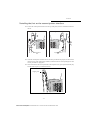
Date en cours : 9 février 2005
C:\Documents and Settings\G097447\Bureau\MFK V2 LU 251 816 433A MF 3725 GB\Installation Gb.fm
Adjust the stop which is located at the rear of the tray by pulling the lever upwards.
Place the paper into the tray. Be careful to slide the stack under the 2 hooks located at the
bottom of the tray (A).
B5
Kinds of paper which the printer will take:
Printer paper tray
60 to 105 g/m2
Manual feeder
60 to 200 g/m2
Close the printer paper tray back up again.
1-27
Date en cours : 9 février 2005
C:\Documents and Settings\G097447\Bureau\MFK V2 LU 251 816 433A MF 3725 GB\Installation Gb.fm
Maintenance
Caution - Never add paper to the tray while the machine is printing.
Safety
Caution - Never exceed the loading limits shown on the tray, the tray is designed to hold
500 sheets of 80g/m² paper.
Print function
Operation
Directory
A4
A
Setting your
machine
Getting started
Installation
Contents
Installation
Installation
LOADING THE MULTIPURPOSE TRAY
If you are printing onto special paper such as 60 to 200 g/m2 maximum colour paper or transparent film
(laser printer-compatible), you should use the multipurpose tray which will hold up to 100 sheets of
paper (A4).
Open the multipurpose tray cover.
1-28
Date en cours : 9 février 2005
C:\Documents and Settings\G097447\Bureau\MFK V2 LU 251 816 433A MF 3725 GB\Installation Gb.fm
Contents
Installation
Put the paper support into place.
Adjust the width between the guides according to the type of paper you are using.
B5
A5
Put the paper in.
Safety
Maintenance
Print function
Operation
Directory
A4
LTR
Setting your
machine
Getting started
Installation
1-29
Date en cours : 9 février 2005
C:\Documents and Settings\G097447\Bureau\MFK V2 LU 251 816 433A MF 3725 GB\Installation Gb.fm
Installation
INSTALLING CONSUMABLES
Open the printer top cover (A) all the way.
(A)
With the label side down, thoroughly shake the new toner container (B) (in the direction of the
arrow) ten times or more to ensure that the toner is evenly distributed inside.
(B)
1-30
Date en cours : 9 février 2005
C:\Documents and Settings\G097447\Bureau\MFK V2 LU 251 816 433A MF 3725 GB\Installation Gb.fm
Carefully remove the protective seal [orange colored (C)] from the new toner container and
then install the container into the printer.
Push firmly on the top of the toner container at the positions marked PUSH HERE until
you hear it click into place.
Close the printer top cover.
Safety
Maintenance
Print function
Operation
Directory
Setting your
machine
(C)
Getting started
Installation
Contents
Installation
1-31
Date en cours : 9 février 2005
C:\Documents and Settings\G097447\Bureau\MFK V2 LU 251 816 433A MF 3725 GB\Installation Gb.fm
Installation
First open the left cover (D) on the left side of the printer.
(D)
Open the cap of the new waste toner box (E). Insert the new waste toner box as shown in the
figure. The box will be locked when it fits into place.
(E)
Close the left cover.
1-32
Date en cours : 9 février 2005
C:\Documents and Settings\G097447\Bureau\MFK V2 LU 251 816 433A MF 3725 GB\Installation Gb.fm
Note:
Connect the end of the LAN lead (supplied by your network administrator) into your
terminal's local network socket (please see the paragraph on Terminal connections,
page 1-15, for instructions on how to connect the scanner).
the printer and the scanner may have a LAN connection. If you only have one connection, you will need a hub
or a switch.
POWER LINE CONNECTION AND SWITCH ON
Installation
LAN CONNECTIONS
Getting started
Caution - Make sure that the On/Off switch is in the 0 (Off) position.
Setting your
machine
WALL CONNECTIONS
Contents
Installation
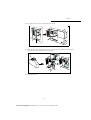
Set the printer's On/Off switch to the "I" (On) position then do the same with the scanner's
switch.
After a few seconds, when the printer has warmed up, the date and time will appear. To adjust the
language and time of your terminal, please see the paragraph on Setting your machine, page 3-1.
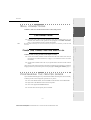
CONFIGURING THE PRINTER DRIVER
If you install the additional paper tray or the front/back module when the printer driver is already
installed, you will need to configure the printer driver on your PC.
Click on the START button, select CONTROL PANEL and then click on PRINTERS.
Right click on the MFK28 icon then choose "Properties".
Click on the peripheral's PROPERTIES tab.
Check the boxes for the options you have installed.
Safety
Operation
Print function
Connect the end of the terminal's scanner mains lead to the mains socket on the wall (see
the paragraph on Terminal connections, on page 1-15, for instructions on how to connect
the scanner).
Maintenance
Directory
Caution - Refer to safety procedures in the chapter on Safety.
1-33
Date en cours : 9 février 2005
C:\Documents and Settings\G097447\Bureau\MFK V2 LU 251 816 433A MF 3725 GB\Installation Gb.fm
Installation
1-34
Date en cours : 9 février 2005
C:\Documents and Settings\G097447\Bureau\MFK V2 LU 251 816 433A MF 3725 GB\Installation Gb.fm
2 GETTING STARTED
NAVIGATION METHODS
PRESENTATION
The navigator gives you access to the menus visible on screen.
The navigator
This navigator has 4 keys and allows you to move within the menus available on your machine.
2-1
Date en cours : 9 février 2005
C:\Documents and Settings\G097447\Bureau\MFK V2 LU 251 816 433A MF 3725 GB\PriseEnMains Gb.fm
Getting started
Moving within the menus
Function
Use key
Symbol used
Enter the main menu or select the next line
in a menu.
Enter the main menu or select the previous
line in a menu.
Confirm entry and go to the following
menu.
OK
Return to the previous menu.
C
Confirm and exit from the current menu.
Exit without confirming from the current
menu.
Moving within a data entry field
To
Use key
Move to the right.
Move to the left.
2-2
Date en cours : 9 février 2005
C:\Documents and Settings\G097447\Bureau\MFK V2 LU 251 816 433A MF 3725 GB\PriseEnMains Gb.fm
Symbol used
Use key
Symbol used
Confirm your entry.
OK
Delete a character by moving the cursor to
the left.
Getting
started
C
Setting your
machine
Confirm your entry and return to the initial
screen.
The display screen
The screen has two lines of 16 characters.
1
DIRECTORY
2
SETUP
For menus with more than two choices, use the arrows
next (hidden) lines of the menu (3,4, etc.).
or
of the navigator to obtain the
Directory
shows the line you selected.
Operation
The cursor
Installation
To
Contents
Getting started
ACCESS TO FUNCTIONS
Access to functions may be achieved in two ways.
Print function
• Menu-driven access.
• Direct function access.
Menu-driven access
Press the
Use the
key, the functions menu appear.
or
3
FAX
5
PRINT
navigator arrows to move the cursor
in front of the required function.
Validate your choice by pressing OK.
2-3
Date en cours : 9 février 2005
C:\Documents and Settings\G097447\Bureau\MFK V2 LU 251 816 433A MF 3725 GB\PriseEnMains Gb.fm
Maintenance
the key or by
Safety
You can print the guide to find out the number of a function by pressing
scrolling through the menus, as indicated below.
Getting started
When in the selected menu, use the
or
navigator arrows to move the cursor
in front
of the required sub-function.
51
FUNCTIONS LIST
52
LOGS
Validate your choice by pressing OK.
Caution - The Duplex version cannot be used to print the guide.
Therefore it can only be printed on
one side.
Direct access by number
You may print the functions list (
51 OK) to find out the number of a function.
From the stand-by mode:
Press the
key, enter the number of the required function and validate your choice by
pressing OK.
2-4
Date en cours : 9 février 2005
C:\Documents and Settings\G097447\Bureau\MFK V2 LU 251 816 433A MF 3725 GB\PriseEnMains Gb.fm
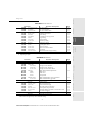
-
-
Page
p. 4-2
p. 4-4
p. 4-6
p. 4-6
p. 4-6
p. 4-7
p. 4-8
p. 4-9
p. 4-9
p. 4-9
p. 4-9
p. 4-9
p. 4-9
Directory
A.Inaccessible if Menu 91 SUPPLIER is on WITHOUT ACCESS
MAIN MENU 2: SETUP
Functions
21 OK
22 OK
24 OK
241 OK
242 OK
244 OK
245 OK
25 OK
252 OK
253 OK
2531 OK
2532 OK
2533 OK
2534 OK
2535 OK
2536 OK
2537 OK
2538 OK
2539 OK
254 OK
2541 OK
2542 OK
2543 OK
-
-
DATE/TIME
NUMBER / NAME
RECEPTION
REC. PAPER
NBR OF COPIES
DUPLEX
ADJUST PAGE
NETWORKS
PREFIX
LOCAL NETWORK
CONFIGURATION
IP ADRESSE
SUBNET MASK.
GATEWAY
IEEE ADRESSE
NETBIOS 1
NETBIOS 2
SRV. WINS 1
SRV. WINS 2
DOM LOGIN
USER
PASSWORD
DOM. NAME
Function description
Enter the date and the time
Enter your name and your number
Reception settings
Accept reception without paper
Number of copies of received documents
Received fax printing in Recto /Verso mode
Adapt the print scaling
Setting networks
Dialing prefix activation
LAN prameters settings (depending of model)
Sélect configuration mode
Fax IP address
Subnet mask
Gateway #1 address
Fax IEEE address
NetBIOS name 1
NetBIOS name 2
Address of the NetBIOS name server 1
Address of the NetBIOS name server 2
Domain login parameters for the Scan to Disk function
User name for login on the local network
Password for login on the local network
Domain name of the local network
2-5
Date en cours : 9 février 2005
C:\Documents and Settings\G097447\Bureau\MFK V2 LU 251 816 433A MF 3725 GB\PriseEnMains Gb.fm
Page
p. 3-2
p. 3-2
p. 3-4
p. 3-4
p. 3-4
p. 3-4
p. 3-4
p. 3-6
p. 3-7
p. 3-7
p. 3-7
p. 3-7
p. 3-7
p. 3-7
p. 3-7
p. 3-8
p. 3-8
p. 3-8
p. 3-8
p. 3-8
Operation
-
Enter a new contact in the directory
Enter a relay broadcast list
Modify a record or a list
Delete a record or a list
Print the directory
Store the directory on a chip card
Save the directory to a chip card
Load the directory from a chip card
Enable directory importation by e-mailA
Export the directory by e-mailA
Access to a directory server
address or server name
Connection identifier
Connection password
Search database
Connection port
Print function
-
Description de la fonction
NEW CONTACT
NEW LIST
MODIFY
CANCEL
PRINT
SAVE/LOAD
SAVE
LOAD
IMPORTATION
EXPORTATION
LDAP SERVER
ADRESSE IP
IDENTIFIER
PASSWORD
DN BASE
PORT
Maintenance
-
Safety
Fonctions
11 OK
12 OK
13 OK
14 OK
15 OK
16 OK
161 OK
162 OK
17 OK
18 OK
19 OK
191 OK
192 OK
193 OK
194 OK
195 OK
Getting
started
MAIN MENU 1: DIRECTORY
Setting your
machine
GUIDE TO FUNCTION LIST
Installation
Contents
Getting started
Getting started
MAIN MENU 2: SETUP
Functions
29 OK
20 OK
203 OK
-
Function description
TECHNICALS
GEOGRAPHICAL
LANGUAGE
Technicals parameters
Geographical settings
Choice of language
Page
p. 3-5
p. 3-2
p. 3-2
MAIN MENU 3: FAX
Functions
38 OK
39 OK
391 OK
392 OK
393 OK
-
Function description
FAX ANSW.
REROUTING
ACTIVATION
Control of fax answering machine
Rerouting of received messages
Rerouting activation
Choice your destination
Printing activation of rerouting fax
DESTINATION
COPY
Page
p. 3-3
p. 5-4
p. 5-4
p. 5-4
p. 5-4
MAIN MENU 5: PRINT
Functions
51 OK
52 OK
53 OK
54 OK
55 OK
-
Function description
FUNCTIONS LIST
LOGS
DIRECTORY
SETUP
COMMANDS
Function list printing
Print TX and RX logs
Print the directory
User parameters printing
Commands list printing (see 65 OK)
Page
p. 5-15
p. 5-15
p. 4-6
p. 5-16
MAIN MENU 6: COMMANDS
Functions
61 OK
62 OK
63 OK
64 OK
65 OK
-
Function description
PERFORM
MODIFY
CANCEL
PRINT
PRINT LIST
Perform a command
Update of command
Delete a command
Printing of a document in wait queue
Printing of the command list
Page
p. 5-9
p. 5-9
p. 5-9
p. 5-10
p. 5-10
MAIN MENU 8: ADVANCED FCT
Functions
80 OK
81 OK
811 OK
812 OK
813 OK
814 OK
82 OK
821 OK
822 OK
823 OK
824 OK
825 OK
83 OK
831 OK
833 OK
-
-
-
CALIBRATION
LOCK
LOCKING CODE
LOCK KEYBD.
LOCK NUMBER
LOCK PARAMETERS
COUNTERS
SENT PAGES
RECEIVED PG
SCANNED PAGE
DUPLEX SCAN
PRINTED PG
FAX SERVER
CONNECT TYPE
LOCK
Function description
Scanner calibration
Activate an access limitation lock
Locking code
Activate keyboard lock
Activate dialling lock
Activate Internet settings lock
See the activity counters
Printed pages counter
Local copies counter
Sent pages counter
Received pages counter
Printed pages counter
Fax server settingsA
Connection type choice
Defining and activating an access limiting lock
2-6
Date en cours : 9 février 2005
C:\Documents and Settings\G097447\Bureau\MFK V2 LU 251 816 433A MF 3725 GB\PriseEnMains Gb.fm
Page
p. 7-11
p. 5-17
p. 5-17
p. 5-17
p. 5-17
p. 5-18
p. 5-16
p. 5-16
p. 5-16
p. 5-16
p. 5-16
p. 5-16
p. 3-10
p. 3-10
p. 3-11
Contents
Getting started
MAIN MENU 8: ADVANCED FCT
-
-
Page
p. 3-11
p. 3-11
p. 3-11
p. 5-13
p. 5-13
p. 5-13
p. 5-13
p. 5-13
p. 5-13
p. 5-14
p. 5-14
p. 5-14
p. 5-14
p. 5-14
p. 5-14
p. 5-14
p. 5-15
p. 7-2
Installation
Fax server name
Fax server IP adress
Fax server domain name
CIS scanner settings
Resolution type choice
Zoom setting
Assembled or not copy choice
Origin setting
Contrast setting
Luminosity setting
Binding type choice
Réglages imprimante
Type of paper choice
Paper tray choice
Paper save activation mode
Set margins
Sheet-feed scanner margins setting
Consumables status
Getting
started
-
Function description
FAX-SERVER NAME
IP ADRESS
DOMAIN NAME
COPY
RESOLUTION
ZOOMING
ASSEMBLED
ORIGIN
CONTRAST
LUMINOSITY
BINDING
SCAN. & PRINT
PAPER
PAPER TRAY
PAPER SAVE
S.F MARGINS
FLATBED MARG
CONSUMABLES
Setting your
machine
Functions
834 OK
835 OK
836 OK
84 OK
841 OK
842 OK
843 OK
844 OK
845 OK
846 OK
847 OK
85 OK
851 OK
852 OK
853 OK
854 OK
855 OK
86 OK
94 OK
941 OK
942 OK
943 OK
944 OK
945 OK
946 OK
Page
Choix du fournisseur d’accès
Initialisationof your ProviderA
-
SETTINGS
95 OK
-
CONNEC. TYPE
SEND TYPE
PERIOD
DEPOSIT NOTI
E-MAIL ADDR
PRINT
E-MAIL
Internet settinsA
Select connection type
Select transmission type
Select the period of connection
Select to print a deposit notice
Choose the address to which an e-mail will be sent
Print Internet settings
Send an E-MailA
p. 3-15
p. 3-15
p. 3-15
p. 3-16
p. 3-16
p. 3-16
p. 5-6
96 OK
-
TRI MAILS
Select the reception typeA
p. 3-16
-
Message service identifier
Message service password
Message service E-Mail address
SMTP, POP3 and DNS parameters
SMTP server
POP3 server
Primary DNS
Primary DNS
SMTP authentification access parameters
SMTP authentification activation
Immediat access to ISPA
A.These menus will appear only with valid ISPN setting
2-7
Date en cours : 9 février 2005
C:\Documents and Settings\G097447\Bureau\MFK V2 LU 251 816 433A MF 3725 GB\PriseEnMains Gb.fm
p. 3-18
p. 3-12
p. 3-12
p. 3-13
p. 3-13
p. 3-18
Operation
93 OK
Function description
SUPPLIER
INIT. ETHERNET
MESS. SERV
IDENTIFIER
PASSWORD
E-MAIL ADR
SERVERS
SMTP
POP3
DNS 1
DNS 2
SMTPAUTHENT.
ACTIVATION
IMMED ACCES
Print function
-
Maintenance
Functions
91 OK
92 OK
921 OK
9211 OK
9212 OK
9213 OK
922 OK
9221 OK
9232 OK
9233 OK
9224 OK
923 OK
9231 OK
Safety
MAIN MENU 9: INTERNET
Directory
A. Depending on option
Getting started
PRINT CONSOLE NAVIGATION BASICS
NAVIGATING THE MENUS
Control panel keys
The keys on the console are used to configure the printer. Some keys also have secondary functions.
GO
?
ENTER
Note:
Any settings made using these keys affect only the current interface.
Key
Function
• Connects and disconnects the printer.
• Prints and then ejects a page.
GO
• Cancels specific errors.
• Cancels a print job.
• Reinitialises the numerical values or cancels a configuration procedure.
• Stops the alarm sound triggered by an error.
• If you press this key during mode selection: the configuration ends and
the printer returns to Ready.
• Selects the emulation, font and character encoding, in order to read a
CompactFlash card, etc.
Used to access a section or to enter numerical values. The > and < keys are
used to access or exit a subsection in some of the control procedures.
Used to access a section or to enter numerical values. The > and < keys are
used to access or exit a subsection in some of the control procedures.
Used in the same way as the < key in the mode selection function.
2-8
Date en cours : 9 février 2005
C:\Documents and Settings\G097447\Bureau\MFK V2 LU 251 816 433A MF 3725 GB\PriseEnMains Gb.fm
Key
Function
Contents
Getting started
ACCESS TO FUNCTIONS
This section explains how to use the menu selection system. The MENU key on the operator
console allows you to use the menu to configure or adapt the printer environment, making settings
such as the number of copies to be made, the emulation, etc. depending on your own specific
needs. You can make these settings when the printer screen shows Ready.
The printer applies the most recent settings sent from the application software or from the printer driver,
and these always take priority over any settings made from the operator console.
and
To navigate horizontally within the functions, use the > and < keys. To change or confirm the
configuration of a component, press the ENTER key.
Printing out the menu guide
The list of menus may vary according to which options you have installed.
You can print out the print menu guide by moving within the menus as shown below.
MENU Press ENTER, a blinking "?" appears.
Press ENTER again to start printing.
- PRINT MENU STRUCTURE
Safety
Getting
started
keys (access the menu shown by
Operation
To navigate vertically within the functions, use the
repeatedly pressing one of the keys).
Print function
Note:
Setting your
machine
ENTER
Directory
Confirms the numerical values and other selections.
Maintenance
?
• Displays on-line help messages on the screen when there is a paper
jam:
If you press this key when the printer is Ready : it displays explanations about the on-line help messages.
If you press this key when the on-line help is displayed:
the on-line help is cancelled.
Installation
• Used in the same way as the > key in the mode selection function.
2-9
Date en cours : 9 février 2005
C:\Documents and Settings\G097447\Bureau\MFK V2 LU 251 816 433A MF 3725 GB\PriseEnMains Gb.fm
Getting started
GUIDE TO FUNCTIONS
Functions
-
PRINT MENU MAP
PRINT STATUS PAGE
INTERFACE
PARALLEL
USB
OPTIONAL
NETWARE
TCP/IP
ETHERTALK
OPT. STATUSPAGE
-
-
-
-
EMULATION
FONT
FONT SELECT
CODE SET
LIST OF INTERNAL FONTS
PAGE SET
COPIES
ORIENTATION
LF ACTION
CR ACTION
WIDE A4
PRINT QUALITY
KIR MODE
DRAFT MODE
RESOLUTION
PRINT DENSITY
OPT. ROM
RAM DISK :ODE
MEMORY CARD
PAPER HANDLING
MP TRAY MODE
MP TRAY SIZE
MP TRAY TYPE
CASSETTE 1 TYPE
CASSETTE 2 TYPE
FEED SELECT
DUPLEX MODE
STACK SELECT
OVERRIDE A4/LT
TYPE ADJUST
PAPER WEIGHT
Description of the function
Print out the menu guide
Print out the printer configuration
Page
p. 2-10
p. 6-4
p. 6-16
Parallel interface configuration
USB interface configuration
p. 6-16
Network interface configuration
p. 6-16
Turn this menu on if you are using the Netware
protocol
Turn this menu on if you are using the TCP/IP protocol
Turn this menu on if you are networking with a
Macintosh
When this menu is turned on, the network
configuration page is printed out at the same time as
the printer status page.
Select emulation type
p. 6-11
p. 6-13
Select font
Select character encoding
List of available fonts
Set the number of copies to be made
Choose the paper orientation
Action following a line break
Action following a carriage return
Optimise the number of characters per line
Sets the print quality
Image antialiasing mode
Draft mode
Choose resolution type
Choose print density
p. 6-14
p. 6-14
p. 6-17
p. 6-18
p. 6-18
p. 6-15
p. 6-16
p. 6-16
p. 6-18
Multipurpose tray operating mode
Choose the paper format in the multipurpose tray
Choose the paper type in the multipurpose tray
Choose the paper type in tray 1
Choose the paper type in tray 2 (depending on option)
Choose the source tray
Switch front/back mode on
p. 6-10
p. 6-7
p. 6-10
p. 6-8
p. 6-8
p. 6-10
Force the printing of letter documents in A4 format
p. 6-11
Choose the paper weight
p. 6-9
2-10
Date en cours : 9 février 2005
C:\Documents and Settings\G097447\Bureau\MFK V2 LU 251 816 433A MF 3725 GB\PriseEnMains Gb.fm
Choose the language in which messages will be
displayed
Set the time before printing out an incomplete page.
Set the time before entering standby mode
Switch the standby mode on
p. 6-19
p. 6-19
p. 6-19
Reinitialise the settings to their default values
Save downloaded PCL6 parameters
Turn the error alarm on or off
Continue printing after error
Waiting time before continuing
Manage front/back errors
p. 6-19
p. 6-19
p. 6-20
p. 6-20
p. 6-20
p. 6-21
p. 6-18
p. 6-21
Print out the status page or log
Installation
p. 6-18
Safety
Maintenance
Print function
Operation
FORM FEED
SLEEP TIMER
SLEEP MODE
PRINT
PRINTER RESET
RESOURCE PROT.
BUZZER
AUTO CONTINUE
AUTO CONTINUE TIMER
FINISHING
DUPLEX
SERVICE
PRINT
DEVELOPER
DRUM-CTRL
DRUM
Number of pages printed counter
Getting
started
-
Page
Directory
-
DUPLEX PATH
RESET TYPE
LIFE COUNTERS
OTHERS
MSG LANGUAGE
Description of the function
Setting your
machine
Functions
Contents
Getting started
2-11
Date en cours : 9 février 2005
C:\Documents and Settings\G097447\Bureau\MFK V2 LU 251 816 433A MF 3725 GB\PriseEnMains Gb.fm
Getting started
2-12
Date en cours : 9 février 2005
C:\Documents and Settings\G097447\Bureau\MFK V2 LU 251 816 433A MF 3725 GB\PriseEnMains Gb.fm
3 SETTING YOUR
MACHINE
MAIN SETTINGS
At machine powerup, the screen displays:
FRI 31 DEC 23:59
PLEASE WAIT
Fine Sfine Photo
You have to set the date and time, language parameter and verify the other parameters listed
below.
3-1
Date en cours : 9 février 2005
C:\Documents and Settings\G097447\Bureau\MFK V2 LU 251 816 433A MF 3725 GB\Configuration Gb.fm
Setting your machine
BEFORE TRANSMISSION
Date/Time
At any moment you may change the date and time on your fax machine.
To change the date and time:
21 OK - SETUP / DATE/TIME
Enter the numbers of the required time and date one after another,
(for example November 8 2004 at 9h33, press 0 8 1 1 0 4 0 9 3 3) and press OK to confirm.
Your terminal number/your name
Your fax will print out your fax number on each document it transmits if you save this number and if
the machine is set to SENDING HEADER (please see the paragraph on Technical parameters,
page 3-5).
To save your fax number and your name:
22 OK - SETUP / NUMBER / NAME
The number field appears and press OK to confirm.
Enter your name (20 characters max) then press OK to confirm.
Geographical settings
Language
This setting enables you to choose a language other than that imposed by the COUNTRY setting.
To select the language:
203 OK - SETUP / GEOGRAPHICAL / LANGUAGE
Select the required option and press the OK key to confirm.
Local prefix
The prefix is to define when your terminal is localized on a local area network and that you send
documents via a compatible fax server.
Programming your fax with the local prefix consists of two steps:
• defining the minimal size (or equal) of the company’s outside numbers,
• defining the outgoing local prefix of the network. This prefix will automatically be added as soon
as an external number is dialled.
Caution - If you define a local prefix, do not add it to the numbers stored in the directory, it will be
automatically dialled with each number.
3-2
Date en cours : 9 février 2005
C:\Documents and Settings\G097447\Bureau\MFK V2 LU 251 816 433A MF 3725 GB\Configuration Gb.fm
You can change the default value for the minimal size of the company’s outside numbers
and validate with OK. The minimal size will range between 1 and 30.
Enter the outgoing local prefix of the company’s telephone network (maximum
5 characters) and validate with OK.
BEFORE RECEPTION
Fax answering machine
The Fax answering machine allows you to keep confidential documents in storage and to avoid
printing them as you receive them.
The "Fax Messages" indicator light lets you know the state of your Fax answering machine:
• Light on: the answering machine is on.
Installation
Getting started
252 OK - SETUP / NETWORKS / PREFIX
Setting your
machine
Defining the minimal size and the local prefix
Sommaire
Contents
Setting your machine
• Blinking: your fax has documents in storage or is in the process of receiving faxes.
• printing fax messages in memory,
Directory
• Light off: memory full, the terminal cannot receive any more documents.
You can assure document confidentiality by using the 4 digit access code. Once saved, you will
require this access code for:
Enter the code (4 digits) and confirm with OK.
Activating or deactivating the answering machine
382 OK - FAX / FAX ANSW. / ACTIVATION
If you saved an access code for your fax answering machine, enter it and validate with OK.
Select the required option WITH or WITHOUT answering machine and confirm you choice
with OK.
Print fax messages stored in the memory
381 OK - FAX / FAX ANSW. / PRINT
If you have defined an access code for your fax answering machine, enter it and press OK.
Safety
Documents received and stored in the memory are printed.
Print function
383 OK - FAX / FAX ANSW. / ANSWER CODE
Maintenance
Saving an access code
Operation
• activate or deactivate the fax answering machine.
3-3
Date en cours : 9 février 2005
C:\Documents and Settings\G097447\Bureau\MFK V2 LU 251 816 433A MF 3725 GB\Configuration Gb.fm
Setting your machine
Reception without paper
Your fax offers you the possibility to either accept or refuse document reception if your printer is
unavailable (no paper...).
If your fax printer is unavailable, you may choose between two modes of reception:
• reception mode WITHOUT PAPER, your fax saves the incoming messages in the memory,
• reception mode WITH PAPER, your fax refuses all incoming subscribers.
To select the reception mode:
241 OK - SETUP / RECEPTION / REC. PAPER
Remark
:
Select the option WITH PAPER or WITHOUT PAPER and confirm your choice with OK.
Paper out is indicated by a beep and a message on the screen.
Received faxes are then stored in memory (icon "Fax messages" flashing) to be printed as soon as you add paper
into the feeder.
Number of copies
You may print incoming documents more than once (1 to 99).
To set the number of each document received:
242 OK - SETUP / RECEPTION / NBR OF COPIES
Enter the wanted number of copies and confirm with OK.
At each document reception, your fax will print the number of copies requested.
Duplex printing
This function is only available if you have previously installed the duplex module and the additional
paper tray at the back of your terminal.
After installing the Duplex module at the back of your multi-function terminal, you can print faxes
received in two ways:
• SINGLE SIDED
• DOUBLE SIDED
All faxes received are printed according to the mode selected from the menu, no matter how the duplex
key is set.
To select the fax print mode :
244 OK - SETUP / RECEPTION / DUPLEX
Select the required option SINGLE SIDED or DOUBLE SIDED and validate your choice with
the OK key.
Adjust to page
This option allows you to print out documents automatically adjusting them to the page format.
To turn adjust to page mode on:
245 OK - SETUP / RECEPTION / ADJUST PAGE
Select the WITH option and confirm your choice using the OK key.
3-4
Date en cours : 9 février 2005
C:\Documents and Settings\G097447\Bureau\MFK V2 LU 251 816 433A MF 3725 GB\Configuration Gb.fm
With the keys
press OK.
, modify the parameter settings by following the table below and
Setting
Signification
1 - SCANNING
MODE
1 - NORMAL
2 - FINE
3 - SFINE
4 - PHOTO
Default value of the scan mode resolution for the documents
to be transmitted.
8 - ECO ENERGY
1 - WITHOUT
2 - DELAY 5 MIN
3 - DELAY 15 MIN
4 - DELAY 30 MIN
5 - DELAY 60 MIN
Choosing the printer standby delay: the printer will switch to
standby after a delay (in minutes) of NON-operation or during
the period of time of your choice.
10 - RX HEADER
1 - WITH
2 - WITHOUT
If this parameter is on, all documents received by your fax
will include the subscriber’s header with his name, number (if
available) fax print date and the page number.
70 - NET VALID
06:01 TO 21:59
This parameter lets you modify the period when the fax
connects automatically to the Internet.
This menu is available only if the connection type is set to
PERIODIC (
941).
74 - ERASE
MAILBOX
76 - ATTACHMENT
FORMAT
1 - WITH
When the fax machine receives an e-mail with an attachment
and cannot open it, it erases the message from the ISP MBX,
prints and transmits with a notice of uncomprehension to the
message sender.
2 - WHITHOUT
At E-mail reception, the fax does not destroy the MBX
message, it prints a notice of uncomprehension asking you
to recuperate this message with your computer equipment.
This parameter is useful only if you have PC equipment. The
memory capacity is limited, you need to empty your MBX or
else new messages may not be received.
1 - IMAGE
2 - PDF
Default format of document sent on the Internet :
Installation
PDF : monochrome or colour
IMAGE : monochrome (TIFF) or colour (JPEG)
3-5
Date en cours : 9 février 2005
C:\Documents and Settings\G097447\Bureau\MFK V2 LU 251 816 433A MF 3725 GB\Configuration Gb.fm
Safety
Parameter
or
Getting started
Select the desired parameter and confirm with OK.
Setting your
machine
Directory
29 OK - SETUP / TECHNICALS
Operation
To set the technical parameters:
Print function
As delivered your fax is preset by default. However, you may adjust it to meet your requirements
by resetting the technical parameters.
Maintenance
TECHNICAL PARAMETERS
Sommaire
Contents
Setting your machine
Setting your machine
Parameter
Setting
Signification
77 - LAN SPEED
AUTO
100 FULL
100 HALF
10 FULL
10 HALF
To define the communication speed of the peripheral units in
relation to the implemented Local Area Network (LAN).
80 - TONER SAVE
1 - WITH
2 - WHITHOUT
Makes printing lighter to save toner cartridge ink
LOCAL AREA NETWORK SETTINGS
Your terminal is a new generation machine that will be part of your local network just like a PC. Its
built-in local network access card will enable you to send documents through an SMTP/POP3 local
message server (internally or externally, depending on the settings of your message server).
To benefit from all the available network options, you should make the following settings, described in
the sections below:
• local network settings, to introduce your fax machine into your local network.
• message service settings, for all your faxes and E-mails to be automatically managed by your
message server.
Caution - Although rather simple, network settings sometimes require a sound knowledge of your
own computer configuration. If that is administrated by anyone in your company, we recommend you
ask that person for the settings described below.
LOCAL NETWORK SETTINGS
Automatic configuration
We recommend that you carry out a manual configuration of your terminal. The automatic
configuration of the local network settings may be considered, if your local network features a DHCP
or BOOTP server that can dynamically assign addresses to the peripheral devices present on the LAN.
To automatically configure the local network settings:
2531 OK - SETUP / NETWORKS / LOCAL NETWORK / CONFIGURATION
Choose AUTOMATIC and press OK to confirm. The terminal scans the local network for a DHCP
or BOOTP server that can assign it its settings dynamically (the message SELF-CONF is
displayed).
Once the message SELF-CONF has disappeared, check for the IP Address, Sub-network mask
and Gateway address. If these are missing, you should carry out a manual configuration (see
below).
3-6
Date en cours : 9 février 2005
C:\Documents and Settings\G097447\Bureau\MFK V2 LU 251 816 433A MF 3725 GB\Configuration Gb.fm
To configure the local network setting manually:
2531 OK - SETUP / NETWORKS / LOCAL NETWORK / CONFIGURATION
Choose MANUAL and press OK to confirm.
IP address
2532 OK - SETUP / NETWORKS / LOCAL NETWORK / IP ADRESSE
Enter the IP address of your terminal and press OK to confirm.
Sub-network mask
2533 OK - SETUP / NETWORKS / LOCAL NETWORK / SUBNET MASK.
Enter the sub-network mask of your terminal and press OK to confirm.
Gateway address
Getting started
To configure your terminal manually, you should obtain the usual information used to set a
peripheral device (IP address, sub-network mask, network and gateway address).
Setting your
machine
Manual configuration
Installation
Sommaire
Contents
Setting your machine
Enter the IP address of the network gateway and press OK to confirm.
IEEE address (or Ethernet address) or MAC address
Directory
2534 OK - SETUP / NETWORKS / LOCAL NETWORK / GATEWAY
2535 OK - SETUP / NETWORKS / LOCAL NETWORK / IEEE ADRESSE
The NetBIOS name, which can be used with the network options, are used to identify your
terminal machine from a PC connected to a local network (for instance with the name
"IMP-NETWORK-1"
2536 OK - SETUP / NETWORKS / LOCAL NETWORK / NETBIOS 1
2537 OK - SETUP / NETWORKS / LOCAL NETWORK / NETBIOS 2
Enter the selected name (15 characters max) and press OK to confirm.
The WINS1 and WINS2 servers, used with the network options, allow access to terminals on
other sub-networks by means of their NetBIOS name.
These two addresses must be filled in for the Scan To Disk function.
2538 OK - SETUP / NETWORKS / LOCAL NETWORK / SRV. WINS 1
2539 OK - SETUP / NETWORKS / LOCAL NETWORK / SRV. WINS 2
Maintenance
NetBIOS
Print function
Operation
The Ethernet card of your terminal already has an unmodifiable, yet consultable, IEEE address.
Remark
:
If the terminal is set up in Automatic configuration mode (
matically by certain DHCP servers.
2531), these addresses can be filled in auto-
3-7
Date en cours : 9 février 2005
C:\Documents and Settings\G097447\Bureau\MFK V2 LU 251 816 433A MF 3725 GB\Configuration Gb.fm
Safety
Enter the IP address of each server, then validate with OK.
Setting your machine
Case of connection to a domain (for instance with Windows NT,
2000 or XP)
The terminal can identify itself on the local network by using the parameters of a user account, before
it can, among others, archive documents by means of the Scan to Disk function.
Once these parameters have been filled in, they will be used by default, if you do not declare a user
name and password when using the function.
Login user name
2541 OK - SETUP / NETWORKS / DOM LOGIN / USER
Enter the user name for login on the local network, then validate with OK.
Login password
2542 OK - SETUP / NETWORKS / DOM LOGIN / PASSWORD
Enter the password for login on the local network, then validate with OK.
Nom de domaine
2543 OK - SETUP / NETWORKS / DOM LOGIN / DOM. NAME
Enter the domain name of the local network, then validate with OK.
PRINT FUNCTION SETTINGS
The printer can be connected to the local network as it has its own IP address.
Updating network settings
The print console allows you to:
• turn TCP/IP, NetWare and EtherTalk on or off
• turn DHCP on or off
• enter the IP address, the subnet mask address and the default gateway address.
To check or change the network card settings:
Press the MENU key.
Repeatedly press the
or
keys until INTERFACE appears.
One of the interface names below appears, showing that it is the current interface.
• PARALLEL (default setting)
• USB
• Optional (when the network card is installed)
Press ENTER, a blinking "?" appears.
3-8
Date en cours : 9 février 2005
C:\Documents and Settings\G097447\Bureau\MFK V2 LU 251 816 433A MF 3725 GB\Configuration Gb.fm
Press the > key.
This example shows how to switch the TCP/IP protocol on to connect the terminal to the
network. You can switch Netware or EtherTalk on in the same way.
If TCP/IP is OFF. Press ENTER, a blinking "?" appears. Select ON using the or keys.
Press ENTER again.
until OPTIONAL appears.
Automatically configuring IP settings
You can make these settings when the TCP/IP protocol is on. We recommend that you manually
configure your terminal. However, local network settings can be automatically configured if you
have a DHCP or BOOTP server on your local network which can dynamically distribute
addresses to peripherals on the LAN.
- TCP/IP > DHCP
Press ENTER, a blinking "?" appears.
Select ON using the
Press the MENU key.
Switch your terminal off and then back on again. You have now finished configuring the
IP address
, then press ENTER.
Manually configuring IP settings
Operation
You can make these settings when the TCP/IP protocol is on.
To configure your terminal manually, you will need the usual information for setting up a
peripheral (IP address, subnet mask and gateway address).
- INTERFACE > -
- TCP/IP > DHCP
Check that DHCP is set to OFF. If not press ENTER, then select OFF with the
Press ENTER.
Press
Press ENTER to enter the IP address. A cursor (_) starts to flash in the right-hand segment
or
. keys
.
(3 figures). Press the
key to increment the value and the
key to decrement it. Once
you have set the value for the right-hand segment, press the < key to place the cursor in the
next segment. Again, press the key to increment the value and the key to decrement
it. Proceed in the same way for all of the segments. Press ENTER once all the segments have
been set up.
Press
Enter the subnet mask address in the same way as for the IP address.
Press
Enter the gateway's IP address in the same way as for the IP address.
.
.
3-9
Date en cours : 9 février 2005
C:\Documents and Settings\G097447\Bureau\MFK V2 LU 251 816 433A MF 3725 GB\Configuration Gb.fm
Print function
To manually configure network local settings:
MENU -
Maintenance
or
Safety
To automatically configure network local settings:
MENU - INTERFACE > -
Getting started
or
Setting your
machine
Repeatedly press the keys
Press ENTER.
Directory
Installation
Sommaire
Contents
Setting your machine
Setting your machine
Remark
:
Press the MENU key.
Switch your terminal off and then back on again. You have now finished configuring the IP
address.
Other print-related settings are described in the Print Functions chapter.
REMOTE CONFIGURATION
You can configure the same settings either remotely or locally.
System requirements
To remotely configure your machine you will need:
• a Web browser (preferably Internet Explorer version 4),
• to make the Local Network settings for your machine (IP address, subnet mask, etc.). You should
ask your network administrator for these settings. Once you have this information, please see the
paragraph on Local network settings, page 3-6 on how to fill out the necessary fields.
Accessing the Web Server
Open a Web browser from a PC registered on the network.
Enter the IP address of the terminal you want to configure in the Address field.
Confirm by pressing ENTER.
The welcome window is displayed, choose the interface language.
Change the settings of your choice on the screen then confirm.
FAX SERVER (DEPENDING ON OPTION)
You can send telecopies to a fax machine which is compatible with your terminal. This type of emission
is only possible if a fax server is installed on your LAN network, and if the "Fax Server" function is
activated on your terminal (menu 83).
Access to Connexion Type
831 OK - ADVANCED FCT / FAX SERVER / CONNECT TYPE
Select one of the following connection option: DISABLE, EMAIL or DIRECT then validate by
pressing the OK key.
3-10
Date en cours : 9 février 2005
C:\Documents and Settings\G097447\Bureau\MFK V2 LU 251 816 433A MF 3725 GB\Configuration Gb.fm
Locking Fax Server Parameters
Sommaire
Contents
Setting your machine
This function allows you to lock the fax server access.
Enter your previous four-digit interlock code on the keypad and validate by pressing the
OK key.
Enter the new four-digit interlock code and validate by pressing the OK key.
Confirm the new four-digit interlock code and validate by pressing the OK key.
Activate the access locking
8332 OK - ADVANCED FCT / FAX SERVER / LOCK / VER. ACCES
Enter your interlock code and validate by pressing the OK key.
Using the
Validate by pressing the OK key.
or
keys of the navigator, choose the WITH option.
Getting started
8331 OK - ADVANCED FCT / FAX SERVER / LOCK / LOCKING CODE
Setting your
machine
Entering the access locking code
Installation
833 OK - ADVANCED FCT / FAX SERVER / LOCK
834 OK - ADVANCED FCT / FAX SERVER / FAX-SERVER NAME
Enter the name of the fax server.
Validate by pressing the OK key.
Directory
Setting the Fax Server Name
Enter the IP adress of the fax server.
Validate by pressing the OK key.
Setting the Fax Server Domain Name
836 OK - ADVANCED FCT / FAX SERVER / DOMAIN NAME
Enter the Domain Name of the fax server.
Validate by pressing the OK key.
Safety
Maintenance
Print function
835 OK - ADVANCED FCT / FAX SERVER / IP ADRESS
Operation
Setting the Fax Server IP adress
3-11
Date en cours : 9 février 2005
C:\Documents and Settings\G097447\Bureau\MFK V2 LU 251 816 433A MF 3725 GB\Configuration Gb.fm
Setting your machine
MESSAGE SERVICE AND THE INTERNET
Your terminal lets you send and receive documents and E-mails from subscribers throughout the world
over the Internet.
An E-mail is an electronic message sent over the Internet, to an E-mail address (which is a personal
Internet mailbox).
Access to the Internet is possible thanks to the local network settings.
Before worldwide transmission, you must:
• check that all initialisation parameters correspond to those provided by the network administrator,
• perform the proper settings, if needed, for the Internet connection.
You may then connect yourself to the Internet to send and receive fax-Internet or E-mails. Both
operations will be performed during a connection.
INITIALISATION PARAMETERS
You must define or, at least check all parameters needed to identify yourself with the local network.
Your network administrator will provide you with these parameters.
The parameters are divided in 3 categories:
• message service, allows you to define the message service identifier, the message service password and the E-Mail address,
• servers, allows you to identify the name of the OP address of Internet SMTP providers (send) and
POP3 (MBX reception) and the address of DNS 1 and DNS 2 servers. The server address is made
up of 4 groups of 3 digits maximum, separated by dots.
• SMTP Authentification, used to activate the authentification protocol when the SMTP server
used requests this to end e-mails.
Access to connection and message service parameters
91 OK - INTERNET / SUPPLIER
Select LOCAL NETWORK to show the connection parameters and validate by pressing the
OK key.
Choosing NO ACCESS disables access to Internet functions OK.
921 OK - INTERNET / INIT. ETHERNET / MESS. SERV
Enter Email IDENTIFIER, press OK.
Enter Email PASSWORD, press OK.
Enter E-MAIL ADR, press OK.
3-12
Date en cours : 9 février 2005
C:\Documents and Settings\G097447\Bureau\MFK V2 LU 251 816 433A MF 3725 GB\Configuration Gb.fm
Sommaire
Contents
Setting your machine
Access to servers parameters
923 OK - INTERNET / INIT. ETHERNET / SMTPAUTHENT.
In the ACTIVATION menu, select WITH to activate SMTP authentification then validate with
OK key.
In the PARAMETERS menu, select ID.MESS.SERV to keep the same identification
parameters as in the messaging service or AUTHENT. SPEC. to define other identification
parameters, then validate with Access to SMTP authentification parameters by pressing OK key.
When you select AUTHENT. SPEC, carry out the two following operations
Enter the IDENTIFIER then validate with OK key.
Enter the PASSWORD then validate with OK key.
Sample local network settings for the terminal
Your access provider should give you the following information:
CONNECTION IDENTIFIER:
demo jt12
CONNECTION PASSWORD:
*****
E-MAIL ADDRESS:
[email protected]
SERVER:
SMTP
mail.company.com
POP
mail.company.com
DNS 1
103.195.014.001
DNS 2
103.195.014.002
Safety
Maintenance
Non-functional data given by way of example.
Getting started
Access to the authentification SMTP parameters
Setting your
machine
Enter DNS 1 (primary), press OK.
Directory
Enter POP3, press OK.
Operation
Enter SMTP, press OK.
Print function
Installation
922 OK - INTERNET / INIT. ETHERNET / SERVERS
3-13
Date en cours : 9 février 2005
C:\Documents and Settings\G097447\Bureau\MFK V2 LU 251 816 433A MF 3725 GB\Configuration Gb.fm
Setting your machine
You should then complete the following MENUS on your fax machine:
91
SUPPLIER
LOAL NETWORK
MESS. SERV
9211
EMAIL ID
demo jt 12
9212
EMAIL PASSWORD
*****
9213
E-MAIL ADR
[email protected]
SERVERS
9221
SMTP
mail.gofornet.com
9222
POP3
mail.gofornet.com
9223
DNS 1
103.195.014.001
9224
DNS 2
103.195.014.002
SMTP AUTHENT.
9231
ACTIVATION
WITHOUT
Your terminal is now configured.
SETTINGS
The settings are divided into several categories:
• the standard settings define the connection type and frequency to the Internet as well as the
transmission type for your documents,
• the E-mail sorting defines treatment for all stored E-mail messages received.
3-14
Date en cours : 9 février 2005
C:\Documents and Settings\G097447\Bureau\MFK V2 LU 251 816 433A MF 3725 GB\Configuration Gb.fm
Sommaire
Contents
Setting your machine
Standard settings
PERIODIC
an Internet connection is established every 3 hours1.
(default value)
ON DEMAND
an Internet connection is established at your request by
IMMED. ACCESS (please see the paragraph on Network
Connection, page 3-17)
A.
To avoid Internet access saturation, the automatic connection will occur in reality 12 minutes,
give or take, around the requested time.
• Type of transmission over the Internet.
IMMEDIATE
document transmission will occur immediately at each
transmission request
DURING
CONNECTIONS
transmissions will only occur at programmed connections
SET TIMES or PERIODIC TYPE
At any moment you may print the settings of your machine to know their status.
Selecting the connection type
Getting started
an Internet connection is established every day at
9:00 am, 12:30 am and 5:00 pmA
Setting your
machine
SET TIMES
Directory
• The type and frequency of the connection to your ISP.
Installation
Your machine has two types of settings that let you define:
942 OK - INTERNET / SETTINGS / SEND TYPE
Select one of the send options IMMEDIATE or DURING CNX then press OK to validate.
Changing the connection period (PERIODIC type)
943 OK - INTERNET / SETTINGS / PERIOD
With the PERIODIC mode, enter the new connection period by means of the numerical
keypad (between 00:01 am and 11:59 pm) and press OK to confirm.
An Internet connection will be established every three hours (default value).
Changing the connection hours (PUNCTUAL type)
943 OK - INTERNET / SETTINGS / PERIOD
With the PUNCTUAL mode, use the or
navigator arrows to position the cursor under
the digit that needs to be changed. Enter the new hour(s) period by means of the numerical
keypad (between 00:01 am and 11:59 pm) and press OK to confirm.
3-15
Date en cours : 9 février 2005
C:\Documents and Settings\G097447\Bureau\MFK V2 LU 251 816 433A MF 3725 GB\Configuration Gb.fm
Print function
Selecting the transmission type
Maintenance
Select one of the connection options among SET TIMES, PERIODIC or ON DEMAND and
press OK to confirm.
Safety
Operation
941 OK - INTERNET / SETTINGS / CONNEC. TYPE
Setting your machine
Selecting the print mode for the deposit notice
944 OK - INTERNET / SETTINGS / DEPOSIT NOTI
Select one of the deposit notice options WITH, WITHOUT, ALWAYS or ON ERROR and press OK
to confirm.
Choosing the address to which an e-mail will be sent
945 OK - INTERNET / SETTINGS / E-MAIL ADDR
ENTER THE E-MAIL ADDRESS THEN CONFIRM USING THE OK KEY.
Printing the Internet settings
946 OK - INTERNET / SETTINGS / PRINT
The Internet settings are printed.
These settings may also be printed together with all the other settings of your machine (please see the
paragraph on Printing the machine settings, page 5-16).
Mail sorting
This function lets you choose the mode for all Internet documents stored in your mail box.
You have three choices:
• F@X ONLY, lets you poll and print E-Mails in your machine.
• PC ONLY, lets you keep your E-Mails in you mailbox for later use with a computer (no E-Mail
poll),
• SHARE PC lets you:
- if your PC and fax have two different addresses, transfer all mails or only those with attachments
to a PC,
- if your PC and fax share the same address, use the fax as a printer for E-Mails for the PC.
96 OK - INTERNET / TRI MAILS
F@X Only mode
Select option F@X ONLY and press OK to confirm.
All E-Mails are polled and printed.
PC Only mode
Select option PC ONLY and press OK to confirm.
The E-mails are neither polled nor printed and they may be used with a computer.
At each connection, the number of E-mails in your mailbox is displayed on the screen.
Share PC mode
Select option SHARE PC and press OK to confirm.
You may choose to transfer your E-mails to a PC or use the fax as an E-mail printer.
3-16
Date en cours : 9 février 2005
C:\Documents and Settings\G097447\Bureau\MFK V2 LU 251 816 433A MF 3725 GB\Configuration Gb.fm
Select option WITH PC TRANS. and press OK to confirm.
Enter the E-Mail address of the computer you wish to transfer your E-Mail and press OK
to confirm.
Select your option from the table below and press OK to confirm.
Menu
Description
SEND ALL MAILS
All E-Mails are sent to the PC.
UNUSABLE ATTAC
The fax machine polls and prints the usable E-mails and transfers to
the PC mailbox all the E-mails containing attachments it cannot use.
To use the fax as an E-Mail printer:
Select option W/O PC TRANS and press OK to confirm.
Select your option from the table below and validate with OK.
SAVE MAILS
The E-mails opened and read by the fax are not erased.
At each connection, the number of E-mails still present in your mailbox are displayed on the
screen.
NETWORK CONNECTION
An Internet connection is made with an ISP. It allows both document sending and reception while
connected.
A connection takes place the following way:
• Send to one or more of your subscriber’s Internet mailboxes, all fax-Internet documents
waiting for transmission.
If you are sending to a computer, the transmitted fax will be received as an attachment to an
E-Mail.
• Reception of all fax-Internet and E-Mails deposited in your personal Internet mailbox.
Safety
You may connect either immediately or automatically depending on the time periods defined.
The triggering of a programmed Internet connection depends on the standard settings of your
machine.
Operation
The E-mails opened and read by the fax (w/o attachment) are erased
after the fax has printed.
Print function
DELETE MAILS
Directory
Description
Maintenance
Menu
Getting started
Setting your
machine
To transfer the E-Mails to a PC:
Installation
Sommaire
Contents
Setting your machine
3-17
Date en cours : 9 février 2005
C:\Documents and Settings\G097447\Bureau\MFK V2 LU 251 816 433A MF 3725 GB\Configuration Gb.fm
Setting your machine
Immediate connection to the Internet
There are two methods to immediately connect to the Internet:
Access through the menu:
93 OK - INTERNET / IMMED ACCES
Direct access:
Press the
key twice.
Programmed connection
An automatic connection to the Internet depends on how your machine is programmed and more
particularly on the standard settings (please see the paragraph on Standard settings, page 3-15).
DEACTIVATING THE INTERNET FUNCTION
If you do not wish to use the Internet functions:
91 OK - INTERNET / SUPPLIER
Select NO ACCESS in the ISP list and confirm with OK.
3-18
Date en cours : 9 février 2005
C:\Documents and Settings\G097447\Bureau\MFK V2 LU 251 816 433A MF 3725 GB\Configuration Gb.fm
4 DIRECTORY
Your fax lets you create a directory by memorising subscriber records and subscriber lists.
• Your machine can store up to 500 subscriber records with names and phone numbers.
• You may also group several names to build a subscriber list with up to 32 subscriber lists.
A subscriber list is made from the subscriber records already stored.
For all subscriber records or subscriber lists you may:
• create
• consult
• modify contents
• delete
• print the directory
You may save and if needed load your directory. To proceed, you need to contact your reseller and
purchase the optional "Directory card". This gives you access to functions 161 and 162 (please see
the paragraph on Guide to function list, page 2-5). To proceed, you need to contact your reseller and
purchase the optional kit "save".
4-1
Date en cours : 9 février 2005
C:\Documents and Settings\G097447\Bureau\MFK V2 LU 251 816 433A MF 3725 GB\Répertoire Gb.fm
Directory
CREATING SUBSCRIBERS RECORD
For each contact record, complete the fields listed below. Only fields with the Name and Telephone
number have to be completed:
• Contact NAME,
• TEL and fax number of contact,
• E-mail address, example: [email protected],
or
• FTP address, example: 134.1.22.9,
or
• network sharing address: an IP address (for example 134.1.22.10) or NetBIOS name (for example PC1015687).
Remark
:
If you have not entered an e-mail address, then you have the possibility of entering an FTP address (for archiving
purposes).
If you have entered neither an E-MAIL address nor an FTP address, you can enter a network sharing address for
archiving (address of the terminal on which the directory is shared).
• FORMAT: by default, the attachment is PDF or Image (.tiff or .jpeg)
• RECORD NUMBER: this number is automatically allocated by the fax (you can, none the less,
modify it). It gives you quick access to the directory,
• RATE send fax you can choose for each contact the minimum send rate for faxes you send to him.
Available rates are 2400, 4800, 7200, 9600, 12000, 14400 and 33600 bits per second. The maximum speed can be used if the telephone line is of good quality, meaning appropriate, without
echo.
Remark
:
If a contact has the two fields TEL and E-MAIL completed, the validation key (
the document is sent by telephone network or via the internet.
or
) will define whether
ADDING A RECORD
11 OK - DIRECTORY / NEW CONTACT
Your fax has just created a new record, fill in it by first entering your subscriber’s name then
validate with OK.
To associate an e-mail address:
Remark
:
you can stop the list creation at any time by pressing
.
Enter the person’s fax number and press OK to confirm.
Enter the E-Mail address of your subscriber and press OK to confirm.
Your subscriber’s ID number will automatically appear on the screen, if you wish to modify this
number you may do so by choosing another free number and validate with OK.
4-2
Date en cours : 9 février 2005
C:\Documents and Settings\G097447\Bureau\MFK V2 LU 251 816 433A MF 3725 GB\Répertoire Gb.fm
Enter the FTP address of the contact, then validate with OK key (for example: 134.1.22.9).
Enter the FTP user name (for example: Durand).
Enter the PASSWORD of the FTP user.
If necessary, enter the file destination directory (when this field is not completed, the files
are stored directly under the root) of the FTP server (for example: server name / Durand).
Define the attachment format (Image or PDF) OK.
A number allocated to your contact will be automatically displayed on the screen. If you
do not want to use this number, it can be modified by entering another number, then
validating with OK key.
Select the option WITH the associated key if you want to associate a letter (shortcut key)
with your contact. The first letter free is displayed by default. If you want to modify this,
scroll through the alphabet by using keys
or
, then validate your choice with the
OK key.
Select, if necessary, the appropriate send rate for a fax intended for your contact, then
validate your choice with the OK key.
Or, to create a shortcut to a network sharing address:
Do not enter an e-mail address or an FTP address.
Enter the IP address or the NetBIOS name of the contact for the Scan to Disk function, then
validate with the OK key (for instance: 134.1.22.10).
Enter the domain name followed by the user name for login on the network, and separated
by \ (for instance : Domain\UserName).
Enter the password for login on the network.
Enter the file destination directory.
Define the format of the attachment (Image or PDF) and validate with OK.
A number is attributed to your contact and appears automatically on the screen. If this
number does not suit you, you can modify it by entering another unused number and
validating it with the OK key.
Select the option WITH shortcut key if you want to link a letter (shortcut key) to your
contact. By default, the first available letter is shown. If you want to change it, scroll
through the alphabet by means of the
or
key, then validate with the OK key.
4-3
Date en cours : 9 février 2005
C:\Documents and Settings\G097447\Bureau\MFK V2 LU 251 816 433A MF 3725 GB\Répertoire Gb.fm
Installation
Getting started
Do not enter the e-mail address.
Setting your
machine
Directory
To associate an FTP address:
Operation
If need be, select the appropriate transmission speed to send your faxes, and confirm your
choice by pressing the OK key.
Print function
Maintenance
Select the option WITH assigned key if you want to assign a letter (shortcut key) to your
subscriber. The first available letter appears by default. If you want to change it, scroll the
letters by menas of the
or
keys, and press OK to confirm.
Safety
Contents
Directory
Directory
If required, select the appropriate transmission rate for faxes to your contact, and validate your
selection with the OK key.
CREATING SUBSCRIBERS LISTS
A subscriber list is made from the subscriber records already stored.
For each list fill in the following lines:
• NAME of the list
• NUMBER ASSIGNED to the list, this number is automatically assigned by the fax. It allows quick
access to the answering machine
• LIST COMPOSITION, its lists the ID numbers assigned to the subscribers records included in the
list
• LIST NUMBER, a number lets you identify the list filed under (L).
A list may include both fax and internet subscribers.
The same subscriber may be included in different lists.
Caution - It is impossible to add one subscriber list to another subscriber list.
ADDING A LIST
To add a list:
12 OK - DIRECTORY / NEW LIST
Remark
:
Your fax machine has just created a new list, fill it in by first entering the name of this list then
confirm with OK.
You can stop a list or record creation at any time by pressing
. Also, you do not have to complete all the list
characteristics as you create it; you can save the list as it is by pressing
.
The empty field ENTER ABR. NUM. appears, you must fill in the ID numbers assigned to the subscriber
records included in this list.
There are three ways detailed in the table below, to choose and add one or more subscribers to
your list. Then confirm your choice by pressing OK.
From ...
Procedure
With the alphanumeric keypad enter the first
letters of your subscriber’s name and continue
until the whole name is displayed on the screen.
Enter directly the subscriber’s ID number.
Press key
subscriber’s name
subscriber’s ID number
subscribers directory
or
then select by means of the
keys.
4-4
Date en cours : 9 février 2005
C:\Documents and Settings\G097447\Bureau\MFK V2 LU 251 816 433A MF 3725 GB\Répertoire Gb.fm
For every subscriber included in the list repeat the above step then validate with OK.
Press
to confirm your entry.
ADDING OR DELETING A NUMBER FROM THE LIST
13 OK - DIRECTORY / MODIFY
Select the subscriber list (L) by means of the
with OK.
Press OK to display the ENTER ABR. NUM. field, and add or delete the subscriber as
shown in the table hereafter:
Procedure
Enter the subscriber ID number you wish to add and confirm
with OK.
Repeat this step for each added subscriber you want to add.
Place the keys
Press key C to delete the number assigned to the list.
Repeat these 2 steps for each subscriber you wish to delete from the
list.
add
delete
keys and validate your choice
Confirm the new list by pressing key
or
, on the number you wish to delete.
.
CONSULTING A RECORD OR A LIST
Press key
.
The directory appears in alphabetical order.
Select the subscriber record or subscriber list (L) you wish to consult.
Safety
Operation
To ...
or
Getting started
The list ID number will automatically appear on the screen, if you wish to modify this
number you may do so by choosing another free number and validate with OK.
Setting your
machine
Installation
.
Directory
you can stop record creation at any time by pressing
Print function
:
Maintenance
Remark
Contents
Directory
4-5
Date en cours : 9 février 2005
C:\Documents and Settings\G097447\Bureau\MFK V2 LU 251 816 433A MF 3725 GB\Répertoire Gb.fm
Directory
MODIFYING A RECORD OR A LIST
13 OK - DIRECTORY / MODIFY
The directory appears in alphabetical order.
Remark
:
Use the
confirm.
Modify the line or lines in the subscriber record or subscriber list and confirm each modification
with OK.
or
keys to select the subscriber list (L) you wish to modify and press OK to
You may confirm your modification by pressing
modify the following lines.
key , but you will exit the menu and may not be able to
DELETING A RECORD OR A LIST
14 OK - DIRECTORY / CANCEL
The directory appears in alphabetical order.
Use the
or
keys to select the subscriber record or subscribers list (L) you wish to delete
and confirm with OK.
Press again OK to confirm your deleting.
The record or list is deleted from the directory.
PRINTING THE DIRECTORY
You may print all the numbers stored in the directory, including all the existing subscriber
records or subscriber lists.
To print the directory:
15 OK - DIRECTORY / PRINT
The directory is printed in alphabetical order.
IMPORTING A DIRECTORY
You can import an existing directory of contacts into your fax machine as an electronic file. This file
must be in a specific format and must not comprise more than 500 entries.
The process of importing a directory uses electronic mail as the transfer mechanism. The electronic file
containing the directory is received and processed as an e-mail attachment.
Caution - Importing a new directory completely overwrites any existing directory entries.
4-6
Date en cours : 9 février 2005
C:\Documents and Settings\G097447\Bureau\MFK V2 LU 251 816 433A MF 3725 GB\Répertoire Gb.fm
The electronic file containing the data in the directory must be structured into lines or records
each comprising five fields separated from one another by a unique character (a tab stop, a
comma or a semi-colon). The lines themselves are separated by a line break (carriage return).
A unique identifier in your directory, up to 20 characters long. This field is
mandatory; the name should not include the field separator character.
Fax number
Your contacts’ fax number, without spaces or dots, can be up to 30 characters
long (including any * and # characters). This field may be left empty, for
instance, in the case of contacts to whom you only send e-mails.
E-mail
address
Your contacts’ e-mail address. Can be up to 80 characters long, but must not
comprise the field separator character. Any other characters may be used in this
field, which can also be left blank.
Shortcut key
A capital letter (A to Z), unique to the directory, which is associated with a
specific contact and enables quick selection. As with the two previous fields,
this field can be left blank.
Reserved
Nothing must be entered in this field.
Setting your
machine
Name
Getting started
Contents
Directory
Fields
Installation
THE FILE STRUCTURE
Contents
Directory
Caution - You must enter a value for at least one of the E-mail address fields. To enter a blank
Smith;[email protected];J;;
O'Connor;[email protected];U;;
Remark
:
@ alone is the indication that no associated key is assigned to the entry.
Caution - You must always enter the field separator character, even if one or more of the fields
are left blank. In the example above, which uses a semi-colon as a separator, the entry for
« Jones » lacks both E-mail address and shortcut key.
PROCEDURE
Maintenance
For example:
Print function
Operation
line, key in four field separator characters in a row.
17 OK - DIRECTORY / IMPORTATION
Select WITH to authorise the importation of a directory.
4-7
Date en cours : 9 février 2005
C:\Documents and Settings\G097447\Bureau\MFK V2 LU 251 816 433A MF 3725 GB\Répertoire Gb.fm
Safety
To import a directory:
Directory
Create your directory on a PC in a file whose structure corresponds to that set out above. In order
to be recognised as a directory, the file name must include the word directory and must have a
.csv extension. For example: smithdirectory01.csv, jonesdirectory.csv, or simply
directory.csv.
Create an e-mail addressed to your fax E-mail address, attach the file to it, and send your
message via your mail server.
Your fax will receive the e-mail containing the directory when it connects to the mail server, and
will automatically import the attached file into its directory.
Repeat the procedure as many times as required, for instance to update all the LAN faxes on your
network with the same directory.
Caution - Importing a new directory completely overwrites any existing directory entries on the fax
machine. Once your fax machine has a complete directory, we advise you to disable importing in order
to protect the data already on the fax.
To disable importing:
17 OK - DIRECTORY / IMPORTATION
Select WITHOUT to prevent users from importing a directory.
EXPORTING A DIRECTORY
You may also export a directory from a fax machine as a text file, and send it to any mail client (be it
PC or fax based), in the form of an e-mail attachment entitled directoryxxx.csv.
To export the directory:
18 OK - DIRECTORY / EXPORTATION
Key in the e-mail address of the PC or other fax machine to which you want to export the
directory. You may export a directory to several fax machines simultaneously (please see the
paragraph on Dialling, page 5-3).
Confirm by pressing OK.
Repeat the procedure as many times as required, for instance to update all your fax machines or
send the same file to several PC users on your local network.
LDAP SERVER
The LDAP server allows you to access a directory server, for contacts or lists of contacts (maximum
500 recipients).
The LDAP function can be switched on only once there are at least 50 free entries in the unit's local
directory. If this is not the case a message will ask you to delete the necessary number of entries.
4-8
Date en cours : 9 février 2005
C:\Documents and Settings\G097447\Bureau\MFK V2 LU 251 816 433A MF 3725 GB\Répertoire Gb.fm
Enter the identifier for connecting to the server and press the OK key to confirm.
193 OK - DIRECTORY / LDAP SERVER / PASSWORD
Enter the password for connecting to the server and press the OK key to confirm.
194 OK - DIRECTORY / LDAP SERVER / DN BASE
Enter the database name and press the OK key to confirm.
195 OK - DIRECTORY / LDAP SERVER / PORT
Enter the port number for connection to the server and press the OK key to confirm.
ACCESSING SERVER CONTACTS
When the LDAP function on your terminal is switched on, you can send documents or e-mails to
contacts in the server's directory.
This is what happens when you search for a contact: when you enter the first letter of the
recipient's name, all the entries in the server's directory which begin with this letter will be
alphabetically added to the local ones.
If there are too many entries on the server, a message will ask you to enter more of the letters in
the name to refine the search.
Note:
If a list contains too many recipients, a message will inform you that the list cannot be used.
ADDING A SERVER CONTACT
TO THE LOCAL DIRECTORY
Getting started
Setting your
machine
Enter the IP address or the server name and press the OK key to confirm..
192 OK - DIRECTORY / LDAP SERVER / IDENTIFIER
Directory
Operation
191 OK - DIRECTORY / LDAP SERVER / ADRESSE IP
Print function
CONFIGURATION
Installation
Contents
Directory
Use the
or
arrows to select the server contact to add to the local directory and press
the OK key to confirm.
Change the desired field(s) in the contact's file and press the OK key to confirm each
change.
When you reach the last setting: choose the Local option instead of Remote and press the
OK key to confirm.
4-9
Date en cours : 9 février 2005
C:\Documents and Settings\G097447\Bureau\MFK V2 LU 251 816 433A MF 3725 GB\Répertoire Gb.fm
Safety
13 OK - DIRECTORY / MODIFY
Maintenance
On the Change menu:
Directory
Note:
You can confirm your changes by pressing the
access to the following fields.
key, but in that case you exit the menu and you do not have
4-10
Date en cours : 9 février 2005
C:\Documents and Settings\G097447\Bureau\MFK V2 LU 251 816 433A MF 3725 GB\Répertoire Gb.fm
5 OPERATION
SENDING
Documents sent over the Internet are first memorised and sent at the time of network connection.
You can send black and white documents (TIFF format or PDF) or colour documents (JPEG format
or PDF).
DOCUMENT DEPOSITING
Scanner
From the automatic feeder tray
Paper guides
Place your original documents in the
document feeder:
- face printed on the top,
- first page under the stack.
PAGE 1
Set the paper guide to the document
width.
Once the operation is over, take your
original documents back from the
document exit tray.
Caution - If you put the documents to send upside down, the contact will receive a blank page.
Remark
:
Since the addressee’s number is generally on the document to be transmitted, you may also dial before positioning the document.
5-1
Date en cours : 9 février 2005
C:\Documents and Settings\G097447\Bureau\MFK V2 LU 251 816 433A MF 3725 GB\Utilisation Gb.fm
Operation
From the flat scanner
Using the handle, lift up the document
feeder tray.
Put your document, with the printed face
down on the scanner window. The
scanner origin is located at your end, to
the left, as shown opposite.
Once the operation is complete, lift the
document feeder tray and recover your
document.
Scanner origin
CHOOSING THE RESOLUTION/CONTRAST
Resolution
You have 4 modes for document transmission.
The mode choice depends on the type of document to be transmitted:
• Normal mode, to be used for good quality documents, without drawings or small details
• Fine mode, symbolised by Fine at the bottom of the display screen. To be used for documents
with drawings or small characters
• Super Fine mode, symbolised by SFine at the bottom of the display screen. To be used for documents with very fine or small character drawings
• Photo mode symbolised by Photo at the bottom of the display screen. To be used for photographic documents
To select the resolution mode:
Press
key as many times as necessary to select the required mode. A
shows the current mode.
5-2
Date en cours : 9 février 2005
C:\Documents and Settings\G097447\Bureau\MFK V2 LU 251 816 433A MF 3725 GB\Utilisation Gb.fm
icon on the screen
To set the contrast:
Press
as many times as necessary to choose the desired contrast, as shown by the
position of a cursor.
DIALLING
From the directory
Dialling alphabetically
Enter the first letter of your subscriber’s name with the alphanumeric keypad, then add the
remaining letters until your subscriber’s name is complete.
Getting started
You can set the contrast if your document is too light or too dark. If the document is light, you
must raise the contrast and if it is dark, you must reduce it.
Setting your
machine
Contrast
Installation
Contents
Operation
use keys
or
of the navigator to scroll all subscribers for choice, and choose the
required subscriber or subscriber list.
or
Press key
Then press the letter assigned to the subscriber (please see the paragraph on
11 OK - DIRECTORY / NEW CONTACT, page 4-2)
The screen displays the corresponding name.
or
Enter the subscriber or subscriber list assigned number.
The screen displays the name of the subscriber or subscriber list assigned to this number.
Using the last number dialled key
You can redial one number among the ten last numbers you just dialled before.
Press the
key.
The display show the last Email adress that has been used.
Use the
keys of the navigator to select an other Email adress.
Safety
or
Operation
then
Print function
Press key
Your fax lists the subscribers records and lists in the Directory in alphabetical order,
Maintenance
Directory
Assigned number dialling
5-3
Date en cours : 9 février 2005
C:\Documents and Settings\G097447\Bureau\MFK V2 LU 251 816 433A MF 3725 GB\Utilisation Gb.fm
Operation
To multiple numbers
You may dial to send a document simultaneously to multiple call numbers.
Caution - This may be achieved only if the machine is parametered to send from the memory.
Enter the fax or E-mail address, or use the Directory (refer to above paragraphs).
Press key
Repeat this last step for all subscribers or subscriber lists (maximum 10 subscribers or subscriber
lists).
Confirm the last subscriber by pressing OK, or
and enter the number of the second subscriber or second subscriber list
.
Rerouting
This function is used to reroute faxes received to a directory contact. To use this function, you have to
perform two operations: set the rerouting address of the fax and activate rerouting.
Activate rerouting
391 OK - FAX / REROUTING / ACTIVATION
Remark
:
Using the keys
Confirm with the OK key.
or
within the navigator select option >>3911 WITH.
If the function WITHOUT is selected the menus 392 and 393 will not be included in the functions overview,
when it is printed out.
Set the re-direction contact.
392 OK - FAX / REROUTING / DESTINATION
Remark
:
Using the keys
or
within the navigator select the subscriber from the directory (If the
directory is empty the display will show DIRECTORY EMPTY). Enter the number of the
subscriber manually or store the name and related number in the directory. (please see the
paragraph on Creating subscribers record, page 4-2).
You may forward a fax to the e-mail address of the subscriber stored in your directory if the fax is not available.
The Fax will then be sent as an attachment in the pre-defined file format (page 3-10 for the configuration of the
attachment files format).
393 OK - FAX / REROUTING / COPY
Using the keys
or
within the navigator select the COPY option (local printout of the
information relayed to your system) either WITH or WITHOUT.
Confirm with the OK key.
5-4
Date en cours : 9 février 2005
C:\Documents and Settings\G097447\Bureau\MFK V2 LU 251 816 433A MF 3725 GB\Utilisation Gb.fm
Position the document (please see the paragraph on Document depositing, page 5-1).
Enter the fax number or choose your dialling mode (please see the paragraph on Dialling,
page 5-3) then press
.
At the end of transmission, the initial screen is displayed.
TRANSMISSION OVER THE INTERNET
Installation
Getting started
You can send telecopies to a fax machine which is compatible with your terminal. This type of
emission is only possible if a fax server is installed on your LAN network, and if the "Fax Server"
function is activated on your terminal (menu 83).
Setting your
machine
TRANSMITTING OVER THE FAX SERVER
(DEPENDING ON OPTION)
Contents
Operation
Position the document (please see the paragraph on Document depositing, page 5-1).
Press the
key and enter the recipient’s E-mail address
or choose your dialling mode (please see the paragraph on Dialling, page 5-3).
Adjust the contrast and the resolution if necessary (please see the paragraph on Choosing
the resolution/contrast, page 5-2).
Press the
key.
If your contact has a PC, he will receive an E-mail to which your fax is attached in monochrome
PDF or TIFF format, depending on the format choice you made.
Operation
Directory
Sending a black and white document to an E-Mail address
Position the document (please see the paragraph on Document depositing, page 5-1).
Press the
key and enter the addressee’s E-mail address
or choose your dialling mode (please see the paragraph on Dialling, page 5-3).
Adjust the contrast and the resolution if necessary (please see the paragraph on Choosing
the resolution/contrast, page 5-2).
Press the
key.
Maintenance
Sending a colour document to an E-mail address
Print function
If your subscriber has an Internet fax, he will receive a paper fax.
If your contact has a PC, he will receive an E-mail to which your fax is attached in colour PDF
or TIFF format, depending on the format choice you made.
If your subscriber has an Internet fax, he will receive a paper fax.
5-5
Date en cours : 9 février 2005
C:\Documents and Settings\G097447\Bureau\MFK V2 LU 251 816 433A MF 3725 GB\Utilisation Gb.fm
Safety
The document is scanned and memorised, it will be sent at the time of Internet connection.
Operation
Sending a typed message to an E-Mail address
You can send a typed message to an E-mail mailbox. You can also add an attachment to this keypad
message (the attachment is a scanned paper document).
Access through the menu.
95 OK - INTERNET / E-MAIL
Direct access.
Press key
.
Then, to send to E-mail address.
Enter the addressee’s E-mail address or choose your dialling mode (please see the paragraph on
Dialling, page 5-3).
Enter the address of who you want to receive a copy of the document (CC:), and press OK to
confirm.
Enter the object for mail (80 characters max.) and press OK.
Enter the text with the alphabetical keypad (100 lines of 80 characters) and confirm with OK.
To go to the next line, use key
.
Then, you can choose between two options:
Send the typed mail directly. Press OK, the mail is memorised and will be sent at the next
Internet connection, validate by pressing the
Your subscriber will receive an E-mail.
key.
Add an attachment (scanned document) to your mail:
Select the scanner to use to scan your document. SCANNER ADF (scroll scanner) or FLAT
SCANNER (please see the paragraph on Description, page 1-8).
Validate with OK key.
Select B&W SCAN to send a black and white document or COLOR SCAN to send a color
document, and validate with OK key (this setting can be changed at any time during the send
procedure, using the colour key).
Enter the name of the attachment and validate with OK key.
If necessary, change the attachment format: PDF or IMAGE and validate with OK key.
If you have started to scan with the flat scanner, the unit will scan the other pages. Put your
second page to scan, select NEXT and validate with OK.
Press key @.
Set contrast and resolution if necessary (please see the paragraph on Choosing the resolution/
contrast, page 5-2).
Press key
.
The document is scanned and the mail sent to memory. It will be sent during the next connection to the
Internet.
5-6
Date en cours : 9 février 2005
C:\Documents and Settings\G097447\Bureau\MFK V2 LU 251 816 433A MF 3725 GB\Utilisation Gb.fm
Contents
Operation
Your contact will receive an E-mail with an attachment.
Remark
:
Press key PC. A choice screen is displayed.
Select Scan to FTP with keys
Enter the FTP address of the server or select it from the directory by pressing the
Enter the name of the FTP user (operation prohibited when the address is in the directory).
Enter the password of the FTP user (operation not necessary when the address is selected
in the directory).
Select the scanner to use to scan the document, SCANNER ADF (scroll scanner) or FLAT
SCANNER.
Validate with OK key.
Select B&W SCAN to send a document in black and white or COLOR SCAN to send a
document in colour. Validate with OK key (this setting may be changed at any time during
the send procedure with the colour key).
Enter the name of the attachment and validate with OK key.
or
then press OK key.
key.
To avoid "name collisions", a suffix is automatically added to the name that was entered, and incremented
as necessary. If you entered DOCUMENT as the file name, you will find the file archived as, for instance,
DOCUMENT000016.pdf.
If necessary, change the attachment format: PDF or IMAGE et validate with OK key.
If you have started to scan with the flat scanner, the unit will scan the other pages. Put your
second page to scan, select NEXT and validate with OK.
Multi-contact sending
Multi-contact sending is not possible with the key dedicated to this function.
To make this type of send, you have to create a group containing exclusively the FTP addresses.
Getting started
Put the document in one of the scanners (please see the paragraph on Document
depositing, page 5-1).
Setting your
machine
Directory
Simply put the file in an FTP server:
Operation
When sending files, the machine connects to the FTP server using the defined connection
parameters.
Print function
To connect to the FTP server, you must know the name of the FTP user and the PASSWORD.
Maintenance
The scan to FTP function enables you to put your TIFF, JPEG and PDF files in an FTP server,
for example, for archiving.
Installation
Scan to FTP
Safety
Then carry out the same operations as for sending to one address, except that you select an FTP
address group in the directory, and not a single address.
5-7
Date en cours : 9 février 2005
C:\Documents and Settings\G097447\Bureau\MFK V2 LU 251 816 433A MF 3725 GB\Utilisation Gb.fm
Operation
Scan to Disk
The Scan to Disk function allows you to place your TIFF, JPEG and PDF files in a shared
directory, on your PC for instance.
To access the shared folder you have to supply a user name and password for login on the
network.
When files are to be sent, the machine connects itself to the terminal on which the directory is
shared (for instance your PC) using the defined login parameters.
Basic recording of a file in the shared directory:
Remark
:
Place a document in one of the scanners please see the paragraph on Document depositing,
page 5-1).
Press the PC key. A selection screen is displayed.
Select Scan to Disk with the
Enter the network sharing address, i.e., the address of the terminal on which the directory is
shared and the name of the shared directory (for instance 134.1.22.10\DirectoryName), or select
an entry in the directory by pressing the
key.
Enter the network login user name (this operation is inhibited if the address in in the directory).
Enter the network login password (this operation is not necessary if the address is selected in the
directory).
Select B&W SCAN to send a black-and-white document or COLOR SCAN to send a colour
document, then validate with the OK key (this setting can be changed at any time during the send
procedure with the colour key).
Enter the name of the attachment and validate with the OK key.
or
key, then press the OK key.
To avoid "name collisions", a suffix is automatically added to the name that was entered, and incremented as
necessary. If you entered DOCUMENT as the file name, you will find the file archived as, for instance,
DOCUMENT000016.pdf.
If necessary, change the attachment format (PDF or IMAGE) and validate with the OK key.
If you are using the flat-bed scanner, you can scan more than one page. Place the next page on
the scanner, select NEXT and validate with OK.
Multi-contact transmission
Multi-contact transmission (transmission to several destinaries at the same time) is not possible
by means of the key dedicated to this function.
To perform this kind of transmission, you first need to create a group that contains only the
shared addresses.
Next, perform the same operations as for a transmission to a single address, but instead of
selecting a single address, select a group of shared addresses in the directory.
5-8
Date en cours : 9 février 2005
C:\Documents and Settings\G097447\Bureau\MFK V2 LU 251 816 433A MF 3725 GB\Utilisation Gb.fm
This function lets you obtain a recap of all documents queuing, for transmission, including those
in deposit or in delayed transmission, etc.
It allows you to:
• consult or modify the waiting queue. In this waiting queue the documents are coded the following way:
Order number in the queue / document status / subscriber’s telephone number.
Documents may have the following status:
- TR: ongoing commands
- CNX: Internet connection
Setting your
machine
- NET: transmission
Getting started
TRANSMISSION WAITING QUEUE
Installation
Contents
Operation
• immediately perform a transmission from the waiting queue
• print a document in storage, waiting to be transmitted or in deposit
• print the waiting queue, to get the status of each document in the queue, by either:
- queue order number
- document name or number
61 OK - COMMANDS / PERFORM
Select the document in the waiting queue and confirm your choice with OK or
immediately perform the selected transmission.
to
Consult or modify the waiting queue
62 OK - COMMANDS / MODIFY
In the waiting queue select the required document and confirm your choice with OK.
You may now modify the parameters of the given document then confirm your
modifications by pressing key
.
Deleting a transmission on hold
Print function
Immediately perform transmission from the waiting
queue
Maintenance
- document size (percentage of space stored in memory)
• cancel a transmission request in the waiting queue.
Operation
Directory
- number of pages of the document
In the waiting queue select the desired document and confirm your choice with OK.
5-9
Date en cours : 9 février 2005
C:\Documents and Settings\G097447\Bureau\MFK V2 LU 251 816 433A MF 3725 GB\Utilisation Gb.fm
Safety
63 OK - COMMANDS / CANCEL
Operation
Printing a document in waiting or in deposit
64 OK - COMMANDS / PRINT
In the waiting queue select the desired document and confirm your choice with OK.
Print the waiting queue
65 OK - COMMANDS / PRINT LIST
A document called ** COMMAND LIST ** is printed.
CANCELLING A TRANSMISSION IN PROGRESS
Cancelling a transmission in progress is possible whatever the type of transmission but varies
depending on whether the transmission is a single call number or a multi-call number.
• For a single call number from the memory, the document is erased from the memory.
• For a multi-call number, only the call number in progress at the time of the cancellation is erased
from the transmission queue.
To cancel transmission in progress
Press key
.
A message will ask you to confirm cancellation by pressing the key
Press key
a second time.
to confirm cancellation in progress.
If your machine is set to print a transmission report, it will print that the communication was cancelled
by the user.
RECEPTION
Whatever the document received, reception is automatic at each network connection.
Incoming documents other than fax files (Word process file, CAD, etc.) may not be opened by your
terminal. However, you may keep this (or these) document(s) in your Internet mailbox until computer
use or automatic transfer (please see the paragraph on Main settings, page 3-1).
COPYING
Your fax offers to print out one more copies of one or more pages.
You can also make copies in tiled or poster mode. The tiling function allows you to print a number of
pages imported from the ADF scanner onto a page, at a reduced scale (there are 2 modes available:
2 scanned pages onto a sheet or 4 scanned pages onto a sheet).
5-10
Date en cours : 9 février 2005
C:\Documents and Settings\G097447\Bureau\MFK V2 LU 251 816 433A MF 3725 GB\Utilisation Gb.fm
Standard copy
Position the document (please see the paragraph on Document depositing, page 5-1).
Press key
twice.
Duplex photocopies (depending on model)
Press once,the
When the duplex mode is activated, a pictogram is shown on the screen.
key.
Installation
The internal memories of your terminal can be printed one side only, except in PAPER SAVE mode.
The features available are described in the following table:
ORIGINAL FORMAT
➨
FINAL FORMAT
DUPLEX/DUPLEX
➨
DUPLEX/DUPLEX
ONE SIDE
➨
DUPLEX/DUPLEX
DUPLEX/DUPLEX
➨
ONE SIDE
ONE SIDE
➨
ONE SIDE
"Sophisticated" copy
Position the document (please see the paragraph on Document depositing, page 5-1).
Press key
Enter the required number of copies and confirm with the OK key.
Operation
Print function
:
This duplex module only works with A4 (210 x 297 mm) format paper.
Maintenance
Remark
:
.
5-11
Date en cours : 9 février 2005
C:\Documents and Settings\G097447\Bureau\MFK V2 LU 251 816 433A MF 3725 GB\Utilisation Gb.fm
Safety
Remark
This function is available for photocopying if you have previously installed the duplex
module and an additional paper tray at the rear of your terminal.
Getting started
LOCAL COPY
Setting your
machine
If the front/back module (depending on model) is installed on your terminal you can make
photocopies in front/back mode.
Directory
The poster function allows you to do the opposite; in other words you can print a scanned page
onto a number of pages (there are 2 modes available: 1 scanned page onto 4 pages or 1 scanned
page onto 9 pages).
Contents
Operation
Operation
Using the keys
or
select the scan modes1 DUPLEX->DUPLEX (Front/Rear) or
SIDE->DUPLEX or DUPLEX->SIDE or SIDE->SIDE and confirm with the OK key.
Using the keys
or
select the resolution: ULTRA FAST, FAST, QUALITY or PHOTO and
confirm with the OK key.
Choose one of the tiling (see examples below) print options (ADF scanner): 1 page onto 1, 2
pages on 1 or 4 pages onto 1 or one of the poster printing options: 1 page to 1, 1 page to 4 or
1 page to 9 (flatbed scanner) using the
or
keys, then press the OK key to confirm.
TILED copy
POSTER copy
Output
Scanned pages
1
1 pages onto 1
1
Scanned pages
Output
A
1 page to 1
A
1 page to 4
A
1 page to 9
A
2
1
1
2 pages onto 1
2
1
2
4 pages onto 1
1
2
3
4
3
4
Using the keys
or
select the degree of contrast and confirm with the OK key.
Using the keys
or
select the degree of brightness and confirm with the OK key.
Using the keys
or
or the numeric key pad or eventually the key dedicated for zoom set
up the degree of zoom between 25% TO 400% and confirm with the OK key.
Select the collation mode COPY ASSEMBLED or NOT ASSEMBLED and confirm with the OK
key.
Using the keys
or
with the OK key.
or the numerical key pad select the required base values and confirm
Using the keys
the OK key.
or
select the type of paper NORMAL PAPER or THICK and confirm with
Using the keys
or
select the required paper tray, AUTOMATIC TRAY, UPPER TRAY or
LOWER TRAY and confirm with the OK key.
1.
If you have previously installed the duplex module at the back of your terminal
5-12
Date en cours : 9 février 2005
C:\Documents and Settings\G097447\Bureau\MFK V2 LU 251 816 433A MF 3725 GB\Utilisation Gb.fm
Scanner settings
841 OK - ADVANCED FCT / COPY / RESOLUTION
The RESOLUTION parameter adjusts the photocopying resolution. Select HIGH
SPEED, QUALITY or Photo resolution using keys
with the OK key.
or
, then validate the choice
842 OK - ADVANCED FCT / COPY / ZOOMING
The ZOOM setting is used to reduce or enlarge part of the document by choosing the
original and the zoom value to apply to the document, 25 to 400 %. Enter the zoom value
required using the keys of the digital key pad. Validate the choice with the OK key.
843 OK - ADVANCED FCT / COPY / ASSEMBLED
The ASSEMBLED parameter is used to define the choice of your printer outputs; either
assembled or not assembled. Validate the choice with the OK key.
Getting started
Moreover, a high number of controls let you improve the copy quality.
Setting your
machine
When the copy quality is no longer satisfactory, you can perform a calibration. To do so, please
see the paragraph on Scanner calibration, page 7-11.
Directory
SPECIFIC COPY SETTINGS
Installation
Contents
Operation
If you wish, you can change the origin of the scanner.
By entering new values of X and Y given in mm (X < 210 and Y < 286), you will move the
scanning zone as shown on the figure below.
Operation
844 OK - ADVANCED FCT / COPY / ORIGIN
x
Top view: scanned side down
Select the X and Y coordinates with keys
Set the required coordinates with the numeric keypad or
Confirm your setting by pressing key OK.
or
.
or
.
Print function
y
Maintenance
END OF SHEET
TOP OF SHEET
scanned area
The CONTRAST parameter is used to select the photocopy contrast. Adjust the contrast
using
keys
and
, then validate the choice with the OK key.
5-13
Date en cours : 9 février 2005
C:\Documents and Settings\G097447\Bureau\MFK V2 LU 251 816 433A MF 3725 GB\Utilisation Gb.fm
Safety
845 OK - ADVANCED FCT / COPY / CONTRAST
Operation
You can also directly adjust the desired contrast using the
key, press this key several times
845.
until the required adjustment is obtained without using
846 OK - ADVANCED FCT / COPY / LUMINOSITY
The LUMINOSITY parameter is used to make your original document lighter or darker. Adjust
the brightness required using keys
, then validate the choice with the OK key.
and
847 OK - ADVANCED FCT / COPY / BINDING
The BINDING parameter is used to choose the long or short side according to the type of binding
and
of your document. Make your choice using keys
OK key.
, then validate the choice with the
Caution - All settings made using this menu become default settings of the machine.
85 OK - ADVANCED FCT / SCAN. & PRINT
Use keys
Validate your setting by pressing the OK key.
or
of the browser to scroll the setting described below that you want to modify.
851 OK - ADVANCED FCT / SCAN. & PRINT / PAPER
Remark
:
Select NORMAL or THICK paper using keys
Validate your setting by pressing the OK key.
and
.
1) When THICK paper type is selected, the print speed is slowed down.
2) Use the manual feeder for paper with a weight greater than 90 g/m2.
852 OK - ADVANCED FCT / SCAN. & PRINT / PAPER TRAY
Select the paper tray that you want to use; AUTOMATIC, LOWER or UPPER using keys
and
.
Validate by pressing the OK key.
853 OK - ADVANCED FCT / SCAN. & PRINT / PAPER SAVE
This function prints all your documents duplex.
Remark
:
This function requires the prior installation on the rear of your machine of the duplex module and the additional
paper tray (option or depending on model).
Select WITH or WITHOUT using keys
Validate by pressing the OK key.
and
.
854 OK - ADVANCED FCT / SCAN. & PRINT / S.F MARGINS
If you want to offset the side margins of your document to the left or to the right when scanning with
your scroll scanner.
Adjust the offset of the left/right margins (in 0.5mm steps mm) using keys
5-14
Date en cours : 9 février 2005
C:\Documents and Settings\G097447\Bureau\MFK V2 LU 251 816 433A MF 3725 GB\Utilisation Gb.fm
and
.
Contents
Operation
Validate by pressing the OK key.
If you want to offset the side margins of your document to the left or to the right when scanning
with your flat scanner:
Adjust the offset of the left/right margins (in 0.5mm steps mm) using keys
Validate by pressing the OK key.
and
.
Getting started
Installation
855 OK - ADVANCED FCT / SCAN. & PRINT / FLATBED MARG
Setting your
machine
OTHER FUNCTIONS
LOGS
An automatic print out will take place after every 30 transmissions. However, you may request a
print out at any time.
Each log (incoming or outgoing) contains a table with the following information:
• date and time of the incoming or outgoing document
Directory
The incoming and outgoing logs list the last 30 transmissions (incoming and outgoing) made by
your machine.
• transmission mode (Norm, Fine, SFine or Photo)
• number of pages sent or received
• call duration
• incoming or outgoing results: noted CORRECT if properly transmitted
Operation
• subscriber’s number or E-mail address
PRINTING THE FUNCTIONS LIST
You may print the functions list of your fax machine at any time.
To print the functions list:
Maintenance
52 OK - PRINT / LOGS
The incoming and outgoing logs are printed on the same page.
Print function
• reason for call error
To print the logs:
Safety
51 OK - PRINT / FUNCTIONS LIST
5-15
Date en cours : 9 février 2005
C:\Documents and Settings\G097447\Bureau\MFK V2 LU 251 816 433A MF 3725 GB\Utilisation Gb.fm
Operation
PRINTING THE MACHINE SETTINGS
At any moment, you may print the list of your fax’s parameter settings to control any changes possibly
made to the default parameters.
Printing the machine settings:
54 OK - PRINT / SETUP
Your fax prints the list of stored parameters.
COUNTERS
At any time, you may consult the activity counters of your machine.
To get access to the counters of the machine:
82 OK - ADVANCED FCT / COUNTERS
These counters indicate the number of:
• transmitted pages
821 OK - ADVANCED FCT / COUNTERS / SENT PAGES
• received pages
822 OK - ADVANCED FCT / COUNTERS / RECEIVED PG
• scanned pages
823 OK - ADVANCED FCT / COUNTERS / SCANNED PAGE
• scanned sheets
824 OK - ADVANCED FCT / COUNTERS / DUPLEX SCAN
• printed pages
825 OK - ADVANCED FCT / COUNTERS / PRINTED PG
LOCK
There are restrictions to the use of your fax:
• To lock the printing of received documents (please see the paragraph on Fax answering
machine, page 3-3)
• locking the keyboard
• locking the numbers
• locking the Internet settings.
5-16
Date en cours : 9 février 2005
C:\Documents and Settings\G097447\Bureau\MFK V2 LU 251 816 433A MF 3725 GB\Utilisation Gb.fm
To access the locking code:
811 OK - ADVANCED FCT / LOCK / LOCKING CODE
Remark
:
Enter your four-digit interlock code on the keypad.
Confirm by pressing OK.
Confirm the interlock code by entering the code one more time.
Press OK to confirm.
when a code is already registered, the machine asks you to give the former code before allowing you to
modify it.
Locking the keyboard
This function allows you to prevent access to non-authorised persons. An access code must be
entered each time a person wants to use the machine.
Getting started
The operator access parameters are confidential; they are protected by a four-digit interlock code
that the authorised operators must know.
Setting your
machine
Entering the locking code
Installation
Contents
Operation
To access the keypad unlocking menu:
Press key OK to confirm.
With keys
Press key OK to confirm.
of the navigator, select the option WITH.
after each operation, the machine interlocks automatically.
Locking the numbers
This function locks dialling and the numerical keypad is disabled. Transmissions are only
possible from numbers included in the directory.
You can still send mails by typing in the addressee’s address (if this has no numbers in it).
To access the number interlocking option:
813 OK - ADVANCED FCT / LOCK / LOCK NUMBER
Enter the four-digit interlock code with the keypad.
Press key OK to confirm.
With keys
Press key OK to confirm.
or
of the navigator, select the option DIRECT ONLY.
Operation
or
Print function
:
Enter the four-digit interlock code.
Maintenance
Remark
Directory
812 OK - ADVANCED FCT / LOCK / LOCK KEYBD.
This function prevents access to all the Internet settings of menu 9.
5-17
Date en cours : 9 février 2005
C:\Documents and Settings\G097447\Bureau\MFK V2 LU 251 816 433A MF 3725 GB\Utilisation Gb.fm
Safety
Locking the Internet settings
Operation
As a matter of fact, any untoward change to these settings might result in repeated connection failures.
You can still send documents to an E-mail address ( 95) and get connected ( 93).
To access the Internet settings locking menu:
814 OK - ADVANCED FCT / LOCK / LOCK PARAMETERS
Enter the four-digit locking code with the numerical keypad.
Press OK to confirm.
With keys
Press OK to confirm.
or
, select the option WITH.
SCAN TO PC (DEPENDS ON MODEL)
Remark
:
your machine is provided with a Scan to PC key. This key activates, first of all, the SCAN -TO - PC, function,
which associated with the Companion Suite Pro kit makes it possible to send an opening notice of a scan function
of a PC connected to your machine. For more information, refer to the User Manual provided with your PC Kit
(Companion Suite Pro).
5-18
Date en cours : 9 février 2005
C:\Documents and Settings\G097447\Bureau\MFK V2 LU 251 816 433A MF 3725 GB\Utilisation Gb.fm
6 PRINT FUNCTION
USING THE CONSOLE
The console is made up of an LCD screen, three indicators and eight keys. Navigation basics are
described in the paragraph on Navigating the menus, page 2-8.
THE CONSOLE
Messages displayed
The console screen displays information in the form of short messages. The eight following messages
are displayed while the machine is warming up and printing.
Other messages are displayed if the printer requires any action from an operator. These messages are
explained in the "Printer technical guidelines" documentation.
Message
Definition
Self test
The printer carries out self tests after the power has been switched
on.
Please wait
LThe printer is warming up and is not ready.
When the power is first switched on after the installation of a toner
cartridge, the message (Adding toner) is also displayed.
Ready
The printer is ready to print.
Processing
The printer is processing: it is receiving data, generating graphics,
reading a CompactFlash card or printing.
6-1
Date en cours : 9 février 2005
C:\Documents and Settings\G097447\Bureau\MFK V2 LU 251 816 433A MF 3725 GB\Fonction impression Gb.fm
Contents
Message
Definition
On standby
The printer is in standby mode. Standby mode is switched off
every time that the GO key on the printer console is pressed or the
cover is opened or closed, or whenever the printer receives data.
The printer then starts warming up and connects. The period of
inactivity before entering standby mode can be set in the standby
configuration section.
Delete data
The print jobs are currently being cancelled.
Waiting
The printer is waiting for the end of job command before printing
the last page. Pressing the GO key allows you to print the last page
out immediately.
page break
The printer prints the last page after a period of waiting.
Interface indicator
INTERFACE
The indicator shows the interface being used.
PAR
Parallel port
USB
USB port
OPT
Network card
---
No active interface.
Paper size indicator
SIZE
The following abbreviations are displayed to show the size of the paper in the tray which is currently
being used.
Message
Displayed
Message
Displayed
Paper size
Paper size
A4
ISO A4 (21 × 29.7 cm)
EX
Executive (7-1/4 × 10-1/2
inches)
A5
ISO A5 (14.8 × 21 cm)
#6
Commercial 6-3/4
(3-5/8 × 6-1/2 inches)A
A6
ISO A6
#9
(10.5 × 14.8 cm)A
Commercial 9
(3-7/8 × 8-7/8 inches)A
B5
JIS B5 (18.2 × 25.6 cm)
O2
Oficio II (8-1/2 × 13 inches)
B6
JIS B6
16K
16 kai (19.7 × 27.3 cm)
ST
Statement (5-1/2 × 8-1/2
inches)A
FO
Folio (21 × 33 cm)
(12.8 × 18.2 cm)A
LT
Letter
(8-1/2 × 11 inches)
LG
Legal
(8-1/2 × 14 inches)
6-2
Date en cours : 9 février 2005
C:\Documents and Settings\G097447\Bureau\MFK V2 LU 251 816 433A MF 3725 GB\Fonction impression Gb.fm
Japanese Postcard (10 × 14.8
cm)A
BU
Business
OH
Return Postcard (20 × 14.8 cm)A
Y2
Envelope (Youkei 2)
(4-1/8 × 9-1/2 inches)A
ISO DL (11 × 22 cm)A
DL
(11.4 × 16.2 cm)A
C5
ISO C5
Y4
Envelope (Youkei 4)
(10.5 × 23.5 cm)A
(16.2 × 22.9 cm)
b5
ISO B5 (17.6 × 25 cm)
CU
Custom Size
(14.8 × 21 cm à 21.6 × 35.6 cm)
A.
Note:
Only with the multipurpose tray.
When the printer is processing data, the SIZE indicator shows the size of the of the paper selected by the
application software.
Paper type indicator
Installation
HA
(3-7/8 × 7-1/2 inches)A
Getting started
Monarch
Paper size
Setting your
machine
MO
Message
Displayed
Paper size
TYPE
The paper type indicator displays the type of paper set for the current paper tray. The paper type
triggers the automatic changing of the paper tray.
You can specify the paper type on the operator's console, please see the paragraph on Creating a
custom paper type, on page 6-9.
Directory
Message
Displayed
Contents
Print function
Paper type
Auto
HEADER
Header
Normal
COLOUR
Colour
TRANSPARE
Transparent
PRE-PRINTED
Pre-printed
A.
Message
Displayed
A
PERFORATED
Perforated
ENVELOPE
Envelope
LABEL
Labels
CARD
Card
BOUND
Bound
THICK
Thick
RECYCLE
Recycled
VELLUN
Vellum
ROUGH
Rough
HIGHT QLTY
SPECIFIC 1 (to 8)
Hight quality
Specific 1 (to 8)
Only with the multipurpose tray.
Print function
None
NORMAL
Paper type
Maintenance
Message
Displayed
Operation
The following abbreviations are used to show the paper type.
The following indicators light up during normal use and when the printer requires action.
6-3
Date en cours : 9 février 2005
C:\Documents and Settings\G097447\Bureau\MFK V2 LU 251 816 433A MF 3725 GB\Fonction impression Gb.fm
Safety
READY, DATA and ATTENTION indicators
Contents
Indicator
Description
READY
Blinking: Indicates that there is an error which you can resolve yourself.
On: Indicates that the printer is connected.
The printer prints out any data it receives.
Off: Indicates that the printer is disconnected. It is receiving data but
does not print it out. Also indicates that printing is automatically
suspended due to an error.
DATA
WARNING
Blinking: Data transfer in progress.
On: Indicates that the data is currently being processed or that it is
currently being written to the memory card.
Blinking: Indicates that the printer requires maintenance or that the
printer is warming up. (Please wait).
On: Indicates that there is an error or a problem which you can resolve
yourself.
(e.g. a paper jam.)
PRINTING TEST PAGES
This paragraph describes the procedures for printing out internal information. You can use the menu
map as a guide to find your way around the printer's menu structure.
The configuration page contains a list of printer configuration parameters and settings.
Printing out the menu map
The printer prints out a list of the menus. The list of menus may vary according to which options you
have installed.
MENU -
Press ENTER, a "?" appears.
Press ENTER to start printing.
- PRINT MENU MAP
Printing out the current configuration page
The configuration page provides information about the machine's configuration (memory, options, etc.)
MENU -
Press ENTER, a "?" appears.
Press ENTER to start printing.
- PRINT STATUS PAGE
6-4
Date en cours : 9 février 2005
C:\Documents and Settings\G097447\Bureau\MFK V2 LU 251 816 433A MF 3725 GB\Fonction impression Gb.fm
Contents
Print function
Printing out the detailed configuration page
Press ENTER, a "?" appears.
Press ENTER to start printing.
- PRINT STATUS PAGE
Printing out the network interface card configuration
Note:
You can only use this function if the network card is installed.
The following information is available: software version, network address and miscellaneous
information about the network protocols. You need to authorise the printing out of this
information.
MENU -
- INTERFACE - > -
- OPT. STATUSPAGE
Select the optional interface, please see the paragraph on Print function settings, on
page 3-12
Press ENTER, a "?" appears.
Press
Press ENTER to allow printing. It will then be printed out at the same time as the printer's
configuration page.
and choose ON.
Getting started
- SERVICE > -
Setting your
machine
- OTHERS - > -
Directory
MENU -
Installation
This page gives you more details about the machine's configuration.
Press ENTER, a "?" appears.
Press ENTER to start printing.
- FONT - > -
- LISTS OF INTERNAL FONTS
PAPER SIZE AND TYPE SETTINGS
This chapter describes how to use the control console to change the paper size and type for each
paper source, as well as the multipurpose tray settings.
Paper size settings
Print function
MENU -
Maintenance
Printing out this list can help you to choose a font.
Operation
Printing out the font list
If the selected paper does not match the paper in the tray, the document will not be printed out
onto the right paper size when automatically selected by the application software (printer driver).
6-5
Date en cours : 9 février 2005
C:\Documents and Settings\G097447\Bureau\MFK V2 LU 251 816 433A MF 3725 GB\Fonction impression Gb.fm
Safety
Select the paper size according to the paper which will be in the tray and in the multipurpose tray.
Contents
Setting the paper size for the tray
Use the following procedure to set a standard paper size (A5, A4, B5, Letter and Legal (for the USA.))
for the tray.
For more details about the paper formats which can be used please see the "Printing technical guideline"
documentation.
If you wish to use a non-standard paper size, please see the paragraph Custom paper size, page 6-6.
Set the paper size indicator on the front of the tray.
Set the guides and the stop inside the tray according to the paper you will be using. Load the
paper into the tray, please see the paragraph Loading paper, page 1-25 for more details.
Custom paper size
Formats other than A5, A4, B5, Letter and Legal (for the USA) can be used in the tray, in this case
please following the procedure below. If an additional tray is installed, the procedures for making
settings remain the same.
This menu appears when the tray's paper size indicator is set to OTHER.
Set the paper size indicator to OTHER and configure the menu:
MENU -
Press ENTER, a blinking "?" appears.
Press the
and
- PAPER HANDLING - > - TRAY SIZE
keys to choose the desired format. The following formats are available:
• Specific
• Oficio II
• Folio
• 16k
• C5
• A5
• B5
• ISO B5
• A4
• Executive
• Lettre
• Legal
Press ENTER. If the selected size is Specific, you may need to set the paper dimensions and the
measurement unit.
Selecting the measurement unit
This procedure allows you to select the measurement unit.
Press the > key.
6-6
Date en cours : 9 février 2005
C:\Documents and Settings\G097447\Bureau\MFK V2 LU 251 816 433A MF 3725 GB\Fonction impression Gb.fm
Press the
Dimension Y
key to enter the paper dimensions.
210 to 356 mm
(8.27 to 14.02 pouces)
Dimension X
148 to 216 mm
(5.83 to 8.5
pouces)
A screen displays the width "Dimension in X", press ENTER. A blinking cursor appears
underneath the units figure. Set the width using the
and
buttons to increment or
decrement the selected figure and the < and > buttons to move to the tens and hundreds.
Press ENTER.
As soon as the width has been set, press the
Set the length in the same way as for the width. Press ENTER.
key to set the length.
When printing using the custom paper size defined above, you need to set the same size on
the printer driver.
Setting the paper size for the multipurpose tray
When you use the multipurpose tray in cassette mode, you must use the same paper format as that
specified for the print job.
MENU -
Press ENTER, a blinking "?" appears.
Press the
and
- PAPER HANDLING - > -
- MP TRAY SIZE
keys to choose the desired format. The following formats are available:
• Executive
• Lettre
• Legal
• Custom
• Oficio II
• Statement
• Folio
• Youkei 2
• Youkei 4
• 16k
• Hagaki
• OufukuHagaki
• Monarch
• Business
• Comm. #9
• Comm. #6 3/4
• DL
• C5
• A6
• B6
• A5
• B5
• ISO B5
Safety
• A4
Getting started
Select the unit (MM or INCHES), press ENTER.
Setting your
machine
Directory
Press ENTER, a blinking "?" appears.
Operation
Print function
Press the key until UNIT appears.
Maintenance
Installation
Contents
Print function
Press ENTER.
6-7
Date en cours : 9 février 2005
C:\Documents and Settings\G097447\Bureau\MFK V2 LU 251 816 433A MF 3725 GB\Fonction impression Gb.fm
Contents
Paper type settings
Select the paper type according to the paper which will be in the cassette and in the multipurpose tray.
Setting the paper type for the tray
Make this setting to adapt the type of paper loaded from the printer's paper tray.
If the paper type is correctly configured, you can print using the automatic paper type selection function
from the application software (printer driver). The default setting is Normal.
MENU -
- PAPER HANDLING - > -
Press ENTER, a blinking "?" appears.
Press the
and
- CASSETTE 1 TYPE (CASSETTE 2 TYPE)
keys to choose the desired type. The following types are available:
• Normal
• Pre-printed
• Bound
• Recycled
• Rough
• Header
• Colour
• Perforated
• High quality
• Specific (1 to 8)
Press ENTER.
Setting the paper type for the multipurpose tray
You can automatically select the paper using an automatic selection function in the application software
(printer driver). The default setting is Normal.
For further details about the paper types which can be used.
MENU -
Press ENTER, a blinking "?" appears.
Press the
and
- PAPER HANDLING - > -
- MP TRAY TYPE
keys to choose the desired type. The following types are available:
• Normal
• Transparent
• Pre-printed
• Labels
• Bound
• Recycled
• Vellum
• Rough
• Header
• Colour
• Perforated
• Envelope
• Card
• Thick
• High quality
• Specific (1 to 8)
Press ENTER.
Creating a custom paper type
Use the procedure shown below to customise the printer's paper type. You can save up to eight different
custom types. Once they have been configured, each of these custom types can be called up when you
configure the paper type.After you have selected the paper type (see procedure below), you can
configure the paper weight and front/back mode (please see the paragraph Selecting the paper weight,
page 6-9, and please see the paragraph Switching the "Duplex path" on and off, page 6-10). To
reinitialise the customising process, please see the paragraph Reinitialising the custom paper type,
page 6-10.
6-8
Date en cours : 9 février 2005
C:\Documents and Settings\G097447\Bureau\MFK V2 LU 251 816 433A MF 3725 GB\Fonction impression Gb.fm
Contents
Print function
Press the
and
keys to choose the desired type. The following types are available:
• Normal
• Transparent
• Pre-printed
• Labels
• Bound
• Recycled
• Vellum
• Rough
• Header
• Colour
• Perforated
• Envelope
• Card
• Thick
• High quality
• Specific (1 to 8)
Press ENTER.
Press > to set the paper weight, please see the paragraph Selecting the paper weight,
page 6-9.
Selecting the paper weight
Installation
Press ENTER, a blinking "?" appears.
- TYPE ADJUST
Getting started
- PAPER HANDLING - > -
Setting your
machine
MENU -
Press ENTER, a blinking "?" appears.
Press the
and
- TYPE ADJUST > PAPER WEIGHT
keys to choose the desired type. The following types are available:
• Light
• Normal 1
• Normal 2
• Normal 3
• Heavy 1
• Heavy 2
• Heavy 3
• Very heavy
Press ENTER.
Safety
Maintenance
If the paper type is specific and the front/back module is installed, you must choose whether or not to
allow front/back printing, please see the paragraph Switching the "Duplex path" on and off, page 6-10.
Operation
Note:
- PAPER HANDLING - > -
Print function
MENU -
Directory
You can configure the paper weight to customise your paper type.
6-9
Date en cours : 9 février 2005
C:\Documents and Settings\G097447\Bureau\MFK V2 LU 251 816 433A MF 3725 GB\Fonction impression Gb.fm
Contents
Switching the "Duplex path" on and off
Note:
The front/back module must be installed on the printer to use this function.
If the paper type is specific and the front/back module is installed, you can choose whether or not to
allow printing via the front/back module as shown in the following procedure.
MENU -
- PAPER HANDLING - > -
Press ENTER, a blinking "?" appears.
Press the
Press ENTER.
and
- TYPE ADJUST > DUPLEX PATH
keys to choose the desired type. The following types are available:
Reinitialising the custom paper type
MENU -
- PAPER HANDLING - > -
- RESET TYPE
Press ENTER, a blinking "?" appears.
Press ENTER.
All custom settings (paper weight and duplex path) are reinitialised to their default values.
Multi tray mode
The multipurpose tray can be used in two modes – Priority or cassette. The multipurpose tray loads the
paper differently depending on which mode has been chosen:
• Cassette mode
Default mode. The multipurpose tray acts like all the other paper sources. The printer can load
paper from any other source controlled from the printer driver. Cassette mode allows quicker
printing than Priority mode.
• Priority mode
The paper placed in the multipurpose tray is automatically loaded and replaces any other paper
source selected from the printer driver. Once all the sheets of paper in the multipurpose tray have
been used, (approximately 100 sheets [size A4, 0.11 mm in thickness], the printer is again fed
from the previously selected paper source. This mode allows you to load paper of an individual
size or type without needing to reload the current paper source. To feed the printer from the chosen paper source, empty the multipurpose tray.
Note:
The manual feeder's maximum capacity is 100 sheets with A4 paper. If you are using Legal paper, the number of
pages must be below 100 in order to avoid paper jams.
To switch the multipurpose tray to priority mode, follow the procedure below:
MENU -
Press ENTER, a blinking "?" appears.
Select CASSETTE or PRIORITY using the
- PAPER HANDLING - > -
or
- MP TRAY MODE
keys. Press ENTER.
Selecting the source tray
This menu allows you to select the source tray to be used for a print job. If no options are installed, only
tray 1 and the MULTI tray are available. If additional trays are installed, they will appear on the list.
MENU -
- PAPER HANDLING - > -
Press ENTER, a blinking "?" appears.
6-10
Date en cours : 9 février 2005
C:\Documents and Settings\G097447\Bureau\MFK V2 LU 251 816 433A MF 3725 GB\Fonction impression Gb.fm
- FEED SELECT
MENU -
- PAPER HANDLING - > -
- STACK SELECT
Press ENTER, a blinking "?" appears.
Select BC SP F-TO BOTTON (output at the top) or TRAY ABOVE FABOVE (output at the
rear) using the
and
keys. Press ENTER.
Printing Letter documents in A4 format
This menu allows you to turn the difference between A4 format and Letter format on and off.
When set to Off this prevents printing if the size of the paper in the paper source does not match
the paper size used for the print jobs. If this size is different, an error message is displayed on the
screen. The default setting of On forces printing even if the size of the paper in the paper source
does not match the paper size used for the print jobs.
MENU -
- PAPER HANDLING - > -
Press ENTER, a blinking "?" appears.
Select ON or OFF using the
or
- OVERRIDE A4/LT
keys. Press ENTER.
PAGINATION
The following settings can be made:
• emulation,
Print function
• font,
Installation
This menu allows you to choose the paper output tray when printing.
Getting started
Selecting the paper output tray
Setting your
machine
and
Directory
Select TRAY 1 (or TRAY 2, etc., depending on option) or MULTI TRAY using the
keys. Press ENTER. Selecting the paper output tray.
Operation
Contents
Print function
• code set,
• number of copies,
• page orientation,
• KIR (image antialiasing),
Maintenance
• draft mode,
• resolution.
Emulation
Safety
This procedure allows you to set the emulation type for the printer.
6-11
Date en cours : 9 février 2005
C:\Documents and Settings\G097447\Bureau\MFK V2 LU 251 816 433A MF 3725 GB\Fonction impression Gb.fm
Contents
Change emulation
MENU -
Press ENTER, a blinking "?" appears.
Select the emulation type using the
and
- EMULATION
keys in the list shown:
• PCL 6
• KPDL (PostScript
emulation)
• KPDL (auto)
• Imprim. Line
• IBM Proprinter
• DIABLO 630
• EPSON LQ-850
Press ENTER.
Alternative emulation for KPDL emulation
When it is switched on, the KPDL (auto) emulation allows you to automatically change the emulation
depending on the print job received.
MENU -
- EMULATION
Press ENTER, a blinking "?" appears.
Select the KPDL (AUTO) emulation using the
Press the > key.
Select ALT. EMULATION using the
and
keys. Press ENTER, a blinking "?" appears.
Select the emulation using the
or
keys from the following list:
and
• PCL 6 (default)
• Print Line
• DIABLO 630
• EPSON LQ-850
keys.Press ENTER.
• IBM Proprinter
Press ENTER.
Printing out KPDL errors
You can print out a description of any printing errors which may occur in KPDL emulation mode. To
do this you need to switch this option on (it is switched off by default).
MENU -
Press ENTER, a blinking "?" appears.
Select the KPDL or KPDL (AUTO) emulation using the
Press the > key.
Select KPDL PRINT. ERR. using the
Press ENTER, a blinking "?" appears.
Select ON for using the
or
and
and
- EMULATION
keys. Press ENTER.
keys.
keys. Press ENTER.
6-12
Date en cours : 9 février 2005
C:\Documents and Settings\G097447\Bureau\MFK V2 LU 251 816 433A MF 3725 GB\Fonction impression Gb.fm
Font
You can select the default font for the current interface. Any additional fonts downloaded into the
printer's memory or stored on a CompactFlash card can be chosen as the default font.
This menu also allows you to configure the type and pitch for the Courier and Letter Gothic fonts.
Default font
- FONT - > -
- FONT SELECT
Press ENTER, a blinking "?" appears.
Select where the fonts come from (IINTERNAL or others) using the
ENTER.
Press the > key. A font number appears on screen. The letter shows where the font is
located, as shown in the table below:
Setting your
machine
keys. Press
I
Internal fonts
S
Software fonts
M
Fonts from a flash card
H
RAM disk
O
Optional ROM
Press ENTER, a blinking "?" appears.
Select the default font to use with the
and
Directory
Description
Operation
Letter
and
Getting started
MENU -
Installation
Contents
Print function
keys.
- FONT - > -
- FONT SELECT - > -
- FONT SIZE
Press ENTER, a blinking cursor appears. Use the and keys to increment or decrement
the selected figure and the < and > keys to move the cursor to the left or the right (the font
size is between 4 and 999.75 in increments of 0.25). Press ENTER.Changing the Courier/
Letter Gothic font Types.
Changing the Courier/Letter Gothic font Types
The Courier or Letter Gothic font type can be Normal or dark.
MENU -
- FONT - > -
- FONT SELECT - > -
- COURIER (LETTER
GOTHIC)
Press ENTER, a blinking "?" appears.
6-13
Date en cours : 9 février 2005
C:\Documents and Settings\G097447\Bureau\MFK V2 LU 251 816 433A MF 3725 GB\Fonction impression Gb.fm
Safety
MENU -
Maintenance
Follow the procedure below to configure the default font size. If the default font is a fixed font
such as Courier or Letter Gothic, you can change the character pitch instead of the font size.
Print function
Default font size
Contents
Select the NORMAL or DARK option using the
and
keys. Press ENTER.
Character tilt for the Courier/Letter Gothic fonts
Character tilt can be set when the default font is Courier or Letter Gothic.
MENU -
- FONT - > -
- FONT SELECT - > -
- PITCH
Press ENTER, a blinking cursor appears. Use the and
keys to increment or decrement the
selected figure and the < and > keys to move the cursor to the left or the right (the font size is
between 0.44 and 99.99 in increments of 0.01). Press ENTER.
Character encoding
You can change the character encoding. The available character encoding varies depending on the
current font. (The default character encoding is IBM PC-8.).
MENU -
Press ENTER, a blinking "?" appears.
Select the desired character encoding using the
and
- FONT - > -
- CODE SET
keys. Press ENTER.
Number of Copies
VYou can programme the number of copies to be printed for each interface. The number of copies must
be between 1 and 999.
MENU -
- PAGE SET > -
- COPIES
Press ENTER, a blinking cursor appears. Use the
and
keys to increment or decrement the
selected figure and the < and > keys to move the cursor to the left or the right Press ENTER.
Page orientation
You can choose the default page orientation for printing to either landscape or portrait.
MENU -
Press ENTER, a blinking "?" appears.
Select PORTRAIT or LANDSCAPE using the
and
- PAGE SET - > -
keys. Press ENTER.
6-14
Date en cours : 9 février 2005
C:\Documents and Settings\G097447\Bureau\MFK V2 LU 251 816 433A MF 3725 GB\Fonction impression Gb.fm
- ORIENTATION
KIR
The printer includes an antialiasing function (KIR). This function gives high print quality by
improving the resolution in software.
Getting started
Q
KIR on
Set the print density to 3 when you configure the KIR function. For more details about print density, please
see p. 6-19.
Setting your
machine
KIR off
Note:
Installation
Contents
Print function
Optimised stripes
STATUS PAGE
Firmware Version:
Network Status
Released:
Memory
The KIR configuration is the best.
Installed Options
Emulation
Black vertical stripes
Error Log
Toner Gauge
100
0
Set KIR mode to Off. Print the status page
out again. If there are still black stripes,
reduce the print density.
Interfaces
Check line
KIR Test pattern
ON
White vertical stripes
Set KIR mode to On. Print the status page out
again. If there are still white stripes, reduce the
print density.
MENU -
Press ENTER, a blinking "?" appears.
Select ON or OFF using the
keys. Press ENTER.
- KIR MODE
Safety
and
- PRINT QUALITY - > -
Operation
Page Information
Print function
Hardware Information
Maintenance
Status page
Directory
For the best possible KIR function settings, look at the check line, which is the last line on a status
page.
6-15
Date en cours : 9 février 2005
C:\Documents and Settings\G097447\Bureau\MFK V2 LU 251 816 433A MF 3725 GB\Fonction impression Gb.fm
Contents
Draft mode
The "Draft mode" function allows you to reduce the amount of toner on the page in order to cut printing
costs. This function has no effect on printing speed.
Draft mode off (default)
MENU -
Press ENTER, a blinking "?" appears.
Select ON or OFF using the
and
Draft mode on
- PRINT QUALITY - > -
- DRAFT MODE
keys. Press ENTER.
Resolution
Allows you to set the print resolution. The higher the resolution the sharper the printed characters and
graphics will be.
MENU -
Press ENTER, a blinking "?" appears.
Select 1200 DPI, 600 DPI or 300 DPI using the
- PRINT QUALITY - > -
and
- RESOLUTION
keys. Press ENTER.
INTERFACE
The printer has a parallel port and a USB port. A network card is also installed. You can independently
change the printing environment settings (such as the default emulation) on different interfaces using
the printer's menu selection system. Select the interface before making the changes described in the
procedure below.
Note:
Selecting the interface as described below does not select the interface from which the data will be received.
Parallel interface
Warning - To ensure that your terminal works properly, you MUST retain the AUTO option for the
parallel interface settings.
USB Interface mode
Press the MENU key.
6-16
Date en cours : 9 février 2005
C:\Documents and Settings\G097447\Bureau\MFK V2 LU 251 816 433A MF 3725 GB\Fonction impression Gb.fm
Select Interface > using the
or
keys.
The name of an interface appears underneath: this is the current interface.
Parallel (default)
USB
Optional (when a network card is installed).
Press the ENTER key. A blinking question mark (?) appears.
Select USB using the
Press the ENTER key.
Press the MENU key. The message Ready appears on the screen again.
keys.
Getting started
or
Installation
Contents
Print function
Network interface settings
MENU -
- PAGE SET - > -
- PAGE PROTECTION
Press ENTER, a blinking "?" appears on the left of the current status (on or off).
Select the option (On, Off or Auto) using the [image] and [image] keys. Press ENTER.
Line break
This setting allows you to define what action the printer should take when it receives a line break.
MENU -
- PAGE SET - > -
Press ENTER, a blinking "?" appears on the left of the current status.
Choose one of the available options:
- ONLY: a line break will be added,
- CR + LF: a carriage return and a line break will added,
- NO EFFECT: the line break will be ignored
Press ENTER.
Safety
- LF ACTION
Operation
The Page protection menu does not normally appear. However, if there is a printing error due to
a lack of memory on the printer, the Page protection menu will be forced to On. When this occurs,
reset the Page protection menu to Auto (default) to maintain the best possible use of the printer's
memory.
Print function
Page protection mode
Maintenance
CONFIGURING THE PRINTER
Directory
Setting your
machine
For further details, please see the paragraph Updating network settings, page 3-8.
6-17
Date en cours : 9 février 2005
C:\Documents and Settings\G097447\Bureau\MFK V2 LU 251 816 433A MF 3725 GB\Fonction impression Gb.fm
Contents
Carriage return
This setting allows you to define what action the printer should take when it receives a carriage return.
MENU -
- PAGE SET - > -
Press ENTER, a blinking "?" appears on the left of the current status.
Choose one of the available options:
- CR ACTION
- ONLY: a carriage return will be added,
- CR + LF: a carriage return and a line break will added,
- NO EFFECT:the carriage return will be ignored.
Press ENTER.
80 character mode
This setting allows you to increase the maximum number of characters which can be printed on one line
of an A4 and Letter page.
MENU -
- PAGE SET - > -
Press ENTER, a blinking "?" appears on the left of the current status.
Select ON for using the
or
- WIDE A4
keys. Press ENTER.
Print density
The print density can be set over 5 levels: from 1 (light) to 5 (dark). The default setting is 3.
MENU -
- PRINT QUALITY - > -
- PRINT DENSITY
Press ENTER, a blinking "?" appears on the left of the current status.
Select the desired print density by incrementing or decrementing the values using the
keys. Press ENTER.
and
Number of pages printed counter
This menu allows you to display the total number of pages printed by the printer.
MENU -
- LIFE COUNTERS > TOTAL PRINT
The number of pages printed appears on screen.
Language selection
You can choose the language for messages displayed on the screen.
MENU -
- OTHERS - > -
- MSG LANGUAGE
Choose the language from the list. Press ENTER twice, the first time to choose and the second to
confirm your choice.
6-18
Date en cours : 9 février 2005
C:\Documents and Settings\G097447\Bureau\MFK V2 LU 251 816 433A MF 3725 GB\Fonction impression Gb.fm
The time to wait before printing the current page, when the printer stops receiving data. The time
can be set from 0 to 495 seconds incrementing the values by 5.
MENU -
- OTHERS - > -
- FORM FEED
Press ENTER, a blinking cursor appears underneath the units figure.
Set the time using the and buttons to increment or decrement the selected figure and
the < and > buttons to move to the tens and hundreds.
Press ENTER to confirm.
Standby mode
Getting started
Automatic page break
Installation
Contents
Print function
MENU -
- OTHERS - > -
- SLEEP TIMER > SLEEP MODE
Press ENTER, a blinking "?" appears on the left of the current status.
Select the option (ON or OFF) using the
and
keys. Press ENTER.
Setting your
machine
Switching standby mode on and off
- SLEEP TIMER
Press ENTER, a blinking cursor appears underneath the units figure.
Set the time before entering standby mode using the
and
buttons to increment or
decrement the selected figure and the < and > buttons to move to the tens and hundreds.
Press ENTER to confirm.
Reinitialising the printer
The printer's settings are restored to their default values.
MENU -
- OTHERS - > -
- PRINTER RESET
Press ENTER twice, the first time to choose and the second to confirm your choice.
The SELF TEST message appears on the screen during reinitialisation.
Resource protection
This setting prevents you from losing any fonts and macros you have downloaded when going
from PCL6 to another emulation.
MENU -
- RESOURCES PROT.
Press ENTER, a blinking "?" appears on the left of the current status.
Safety
- OTHERS - > -
Operation
- OTHERS - > -
Print function
MENU -
Maintenance
The time before entering standby mode is between 5 and 240 minutes in 5-minute steps.
Directory
Setting the time before entering standby mode
6-19
Date en cours : 9 février 2005
C:\Documents and Settings\G097447\Bureau\MFK V2 LU 251 816 433A MF 3725 GB\Fonction impression Gb.fm
Contents
Choose one of the available options:
- OFF,
- PERMANENT,
- PERM / TEMP.
Press ENTER.
Setting the alarm
MENU -
- OTHERS - > -
Press ENTER, a blinking "?" appears on the left of the current status.
Select the option (ON or OFF) using the
and
- BUZZER
keys. Press ENTER.
Auto mode
Switching this mode on allows you to continue printing the document, without any interaction on the
printer, following one of the following errors:
- Memory full Press GO
- Page offset Press GO
- KPDL error ## Press GO
- File missing Press GO
- RAM disk Err## Press GO
- Mem. Card Err ## Press GO
- Front back off Press GO
MENU -
- OTHERS - > -
- AUTO CONTINUE MODE
Press ENTER, a blinking "?" appears on the left of the current status.
Select the option (ON or OFF) using the
and
keys. Press ENTER.
Setting auto mode time
MENU -
- OTHERS - > -
- AUTO CONTINUE MODE > AUTO CONTINUE
TIMER
Press ENTER, a blinking cursor appears underneath the units figure.
Set the time using the and buttons to increment or decrement the selected figure and the <
and > buttons to move to the tens and hundreds.
Press ENTER to confirm.
6-20
Date en cours : 9 février 2005
C:\Documents and Settings\G097447\Bureau\MFK V2 LU 251 816 433A MF 3725 GB\Fonction impression Gb.fm
When it is switched on, this setting allows you to detect an error when the size or type of paper
used does not match the format to be used for front/back printing. In this case the printing is halted
and the message "Front back off Press GO" is displayed. Pressing the GO button starts front
printing only.
MENU -
- OTHERS - > -
- FINISHING ERROR > DUPLEX
Press ENTER, a blinking "?" appears on the left of the current status.
Select the option (ON or OFF) using the
keys. Press ENTER.
Safety
Maintenance
Print function
Operation
Directory
Setting your
machine
and
Getting started
Front/back printing error detection
Installation
Contents
Print function
6-21
Date en cours : 9 février 2005
C:\Documents and Settings\G097447\Bureau\MFK V2 LU 251 816 433A MF 3725 GB\Fonction impression Gb.fm
Contents
6-22
Date en cours : 9 février 2005
C:\Documents and Settings\G097447\Bureau\MFK V2 LU 251 816 433A MF 3725 GB\Fonction impression Gb.fm
7 MAINTENANCE
MAINTENANCE
GENERAL
To ensure the best operating conditions for your fax, it is recommended that you regularly clean the
inside.
For normal usage, please respect the following rules:
• Never leave the cover open unless required.
• Protect the machine from direct sunlight.
• Do not attempt to oil the machine.
• Always gently close the cover and avoid vibrations.
• Do not open the cover while printing.
• Never try to dismantle the machine.
• Do not use paper that has stayed in the paper tray for a long time.
Look at the safety rules in the Safety chapter at the end of this user manual.
7-1
Date en cours : 9 février 2005
C:\Documents and Settings\G097447\Bureau\MFK V2 LU 251 816 433A MF 3725 GB\MaintenanceGb.fm
Maintenance
REPLACING THE CONSUMABLES
(TONER AND DRUM)
To check the remaining capacities of the consumables:
86 OK - ADVANCED FCT / CONSUMABLES
The toner cartridge and the drum cartridge come with a chip card.
After replacing a consumable item in the printer, you need to inform the machine about its features.
For this purpose, the chip card supplied with each toner cartridge must be read by the machine
each time a new consumable item is installed.
Replacing cartridges
Open the printer top cover (A) all the way.
Pull the lock lever (blue colored (B)) to the right and gently lift the old toner container.
(B)
(A)
7-2
Date en cours : 9 février 2005
C:\Documents and Settings\G097447\Bureau\MFK V2 LU 251 816 433A MF 3725 GB\MaintenanceGb.fm
With the label side down, thoroughly shake the new oner container (C) (in the direction of
the arrow) ten times or more to ensure that the toner is evenly distributed inside.
Installation
Contents
Maintenance
Carefully remove the protective seal [orange colored (D)] from the new toner container
and then install the container into the printer.
Safety
Maintenance
Print function
(D)
Operation
Directory
Setting your
machine
Getting started
(C)
7-3
Date en cours : 9 février 2005
C:\Documents and Settings\G097447\Bureau\MFK V2 LU 251 816 433A MF 3725 GB\MaintenanceGb.fm
Maintenance
Push firmly on the top of the toner container at the positions marked PUSH HERE until you hear
it click into place. Close the top cover.
Replace the waste toner box as follows. First open the left cover (E) on the left side of the printer.
(E)
7-4
Date en cours : 9 février 2005
C:\Documents and Settings\G097447\Bureau\MFK V2 LU 251 816 433A MF 3725 GB\MaintenanceGb.fm
While holding the waste toner box, press the lock lever (F) and then gently remove the
waste toner box (G).
(G)
Cap the waste toner box (I) after removing from the printer.To avoid toner spilling, place
the capped waste toner box in the plastic bag (J) supplied.
Place the old toner container (C) in the supplied plastic bag.
Place the old toner container as well as the waste toner box into the cardboard of the new
cartridge before sending them to be recycled ; see the attached instructions.
Operation
Directory
(F)
Setting your
machine
Getting started
Installation
Contents
Maintenance
Safety
Maintenance
Print function
(H)
7-5
Date en cours : 9 février 2005
C:\Documents and Settings\G097447\Bureau\MFK V2 LU 251 816 433A MF 3725 GB\MaintenanceGb.fm
Maintenance
Open the cap of the new waste toner box (K). Insert the new waste toner box as shown in the
figure. The box will be locked when it fits into place.
(K)
Clean the printer as follows. First pull the cleaning knob [green colored (L)] slowly in and out a
few times. The charger wire inside the printer is cleaned by this procedure. After cleaning the
charger wire, push the cleaning knob firmly all the way in.
(L)
7-6
Date en cours : 9 février 2005
C:\Documents and Settings\G097447\Bureau\MFK V2 LU 251 816 433A MF 3725 GB\MaintenanceGb.fm
Take the grid cleaner (M) from protective bag (N) in the new toner kit, and remove the cap
(O). Attach the grid cleaner (M) to the printer with the pad uppermost, as shown in the
figure.
(O)
(N)
After attaching the grid cleaner, repeat the action of slowly pulling out and then pushing
back in the main charger unit (P) at least 5 times, as shown in the figure. The grid part
underneath the main charger is cleaned by this procedure.
Directory
(M)
Setting your
machine
Getting started
(M)
Installation
Contents
Maintenance
Operation
(1)
(2)
Safety
Maintenance
(P)
Print function
(3)
7-7
Date en cours : 9 février 2005
C:\Documents and Settings\G097447\Bureau\MFK V2 LU 251 816 433A MF 3725 GB\MaintenanceGb.fm
Maintenance
Remove the grid cleaner from the printer and dispose of it. The grid cleaner is not re-usable.
After cleaning the charger wire, push the main charger unit all the way in and close the left cover.
While pulling the paper transfer unit release lever (Q) pull out the paper transfer unit (R).
(Q)
(R)
Wipe the paper dust on the registration roller (S) and the paper ramp (T) using the wiper cloth
included in the toner kit.
(U)
(S)
(T)
Caution - Do not touch the transfer roller [the black roller (U)]when wiping the paper ramp.
7-8
Date en cours : 9 février 2005
C:\Documents and Settings\G097447\Bureau\MFK V2 LU 251 816 433A MF 3725 GB\MaintenanceGb.fm
After cleaning, return the paper transfer unit to its original position.
Press OK on the scanner keypad.
The display shows:
INSERT THE
Setting your
machine
Getting started
Installation
Contents
Maintenance
Insert chip card (supplied with the toner cartridge) into the card reader ensuring that the
chip is entered as shown in the drawing below.
The display shows:
CHANGE TONER?
Directory
TONER CARD
Press OK once the chip card has been read.
The display shows:
NEW TONER
Maintenance
Print function
Operation
YES= OK - NO = C
Safety
REMOVE CARD
7-9
Date en cours : 9 février 2005
C:\Documents and Settings\G097447\Bureau\MFK V2 LU 251 816 433A MF 3725 GB\MaintenanceGb.fm
Maintenance
CLEANING
Cleaning the scanner’s reading devices
When one or more vertical lines appear on transmitted copies or faxes, follow these steps:
Open the scanner cover by
pushing it backwards until held
vertically in position.
Clean the two transparent
scanning windows with a soft,
lint-free cloth, dampened with
alcohol.
Close the scanner cover.
Make a copy to check that the
symptoms have been cleared.
Cleaning the printer
Dust, dirt and paper debris on the outer surfaces and inside the printer can interfere with printer
performance. Clean the printer regularly.
Remark
:
If the message "Clean Printer Press GO" appears after replacing the toner cartridge. Carry out the printer cleaning
procedures (corona, grille, etc.) described in the paragraph on Replacing cartridges, page 7-2 then press the GO
button. The message will disappear and the printer will be ready to print.
Caution - Use a soft cloth to clean the printer. Never use abrasive or corrosive detergents.
The fusing unit can become very hot during operation. To avoid injury - do not touch.
Wait for at least 10 minutes after the printer has been turned off and make sure that the fusing unit has
cooled before cleaning the interior of the printer.
7-10
Date en cours : 9 février 2005
C:\Documents and Settings\G097447\Bureau\MFK V2 LU 251 816 433A MF 3725 GB\MaintenanceGb.fm
Contents
Maintenance
Cleaning the outside of the printer
SCANNER CALIBRATION
You can perform this operation when the quality of photocopied documents is no longer
satisfactory.
80 OK - ADVANCED FCT / CALIBRATION
Directory
Confirm your choice by pressing the OK key.
INCIDENTS
Internet codes
Codes 40 and 41 - No reply from supplier
The modem cannot connect to the Internet service provider. If this error always occurs, check the
supplier’s dial-up number.
Operation
Getting started
For guaranteed performance of your terminal, some maintenance work (replacing the fusing unit
and the transfer roll) has to be done on the printer approximatly every 300,000 printed pages.
Please contact your supplier for this operation.
Setting your
machine
SERVICING
Installation
Clean the outside of the printer with a smooth duster.
Code 43 - Xmission server unavailable
Cannot connect to the SMTP server for sending mail, the service is temporarily unavailable. If
the error always occurs, check the Internet e-mail and server parameters.
Code 44 - Reception server unavailable
Cannot connect to the POP3 server for mail reception, the service is temporarily unavailable. If
the error always occurs, check the Internet e-mail and server parameters.
Code 45 - Supplier disconnected
The service is temporarily unavailable; try again later.
Maintenance
The service provider refuses the connection, the service is temporarily unavailable. If this error
always occurs, check the Internet connection parameters.
Print function
Code 42 - Cannot access supplier
The SMTP server for sending mail is disconnected. The service is temporarily unavailable- try
again later.
7-11
Date en cours : 9 février 2005
C:\Documents and Settings\G097447\Bureau\MFK V2 LU 251 816 433A MF 3725 GB\MaintenanceGb.fm
Safety
Code 46 - Xmission server disconnect
Maintenance
Code 47 - Reception server disconnect
The POP3 server for mail reception is disconnected. The service is temporarily unavailable- try again
later.
Code 48 - Disconnection from Internet
The service is temporarily unavailable- try again later.
Code 49 - Cannot connect to Internet
Check the call number and eventually the associated prefix of the machine.
To check the Internet parameters, print them by pressing in turn the keys
, 9, 4, 5 and OK.
Network codes:
Code 50 - Protected disk or file already found
The file could not be archived, either because the file folder is write-protected, or because a file with
the same name already exists in the directory.
Code 51 - Wrong authentification
The "user name" and/or "password" parameters are incorrect.
Code 52 - Authentification method not supported.
Check that the authentification proposed by the server is indeed HTML.
Code 53 - Password unvailable or directory not found.
PRINTER INCIDENTS
Caution - To ensure that your terminal works properly, you MUST retain the AUTO option for the
parallel interface settings.
Paper jam inside the printer
Follow the procedure below to remove any sheets of paper which may have got trapped in the printer.
Take out the paper tray and remove the paper which has got trapped.
7-12
Date en cours : 9 février 2005
C:\Documents and Settings\G097447\Bureau\MFK V2 LU 251 816 433A MF 3725 GB\MaintenanceGb.fm
Put the paper tray back into its housing. Whilst pulling on the lever which unlocks the
paper transfer unit, take out the paper transfer unit.
If the sheet of paper is trapped in front of the synchronisation roller, remove it as shown in
illustration A. If the sheet is trapped underneath the synchronisation roller, remove it as
shown in illustration B.
A
Synchronisation roller
Open the rear cover and remove the paper which has become trapped.
Maintenance
Print function
Operation
Directory
B
Setting your
machine
Paper transfer unit
Getting started
Installation
Contents
Maintenance
Insert the paper tray and the transfer unit and close the rear cover.
7-13
Date en cours : 9 février 2005
C:\Documents and Settings\G097447\Bureau\MFK V2 LU 251 816 433A MF 3725 GB\MaintenanceGb.fm
Safety
Rear cover
Maintenance
Paper jam in the front/back module
The figures below show various types of paper jams which can occur when using your device.
Open the front/back module's rear cover and remove the trapped paper.
Rear cover
Remove the draw from the front/back module.
7-14
Date en cours : 9 février 2005
C:\Documents and Settings\G097447\Bureau\MFK V2 LU 251 816 433A MF 3725 GB\MaintenanceGb.fm
Remove the trapped paper.
Close the drawer and the rear cover of the front/back module.
Scanner paper jam
When a paper jam occurs, the following message appears on the control panel screen
REMOVE DOCUMENT.
If jams often occur in a specific part of the unit, the latter needs to be checked, cleaned or repaired.
Open the scanner cover.
Safety
Maintenance
Print function
Operation
Directory
SCANNER INCIDENTS
Setting your
machine
Getting started
Installation
Contents
Maintenance
7-15
Date en cours : 9 février 2005
C:\Documents and Settings\G097447\Bureau\MFK V2 LU 251 816 433A MF 3725 GB\MaintenanceGb.fm
Maintenance
Remove the jammed paper (A) without tearing it.
A
Then, close the scanner cover.
7-16
Date en cours : 9 février 2005
C:\Documents and Settings\G097447\Bureau\MFK V2 LU 251 816 433A MF 3725 GB\MaintenanceGb.fm
Check that the mains cable is plugged in, and check the mains plug if necessary.
The fax does not detect the presence of your inserted document. The message READY does
not appear on the screen.
At the start and during scanning, REMOVE DOCUMENT appears on the screen.
Remove the document or press key
.
Check the thickness of the document (50 sheets of paper of 80 g/m2).
Iron out the sheets if needed.
Help the sheets along.
Installation
At switch-on nothing appears on screen
Getting started
MISCELLANEOUS INCIDENTS
Contents
Maintenance
PACKING AND TRANSPORTING THE UNIT
If you wish to transport the unit, always use the original packaging. If you do not pack the unit
correctly, you could void the warranty.
1 - Turn the power to your terminal off (button set to 0). Disconnect the unit from the
network and from the mains.
2 - Uninstall the various components of your unit in reverse installation order (please see
the paragraph on Installation, page 1-1).
3 - Pack the printer as follows:
Safety
- Remove the toner cartridge and the printer's toner bin. Place the toner cartridge into the
plastic bag supplied to avoid any toner leakage. Make sure that the toner bin is properly
closed.
Directory
We recommend that you consult your dealer about any precautions to be taken in order to avoid
any damage when using the printer again.
Operation
If you will not be using the printer for a long time, remove the mains lead from the wall socket.
Print function
STORAGE
Maintenance
Make a photocopy of a document ; if it is correct then your fax is functioning normally. Call back
the subscriber and have him resend the document. It was probably sent with the sheet inserted
backwards.
Setting your
machine
You receive a blank page
7-17
Date en cours : 9 février 2005
C:\Documents and Settings\G097447\Bureau\MFK V2 LU 251 816 433A MF 3725 GB\MaintenanceGb.fm
Maintenance
- Disconnect the printer's developer connector (1) and pull on the unlocking lever (2), remove
the printer's developer (3). Close the developer's protective cover (4) and place the developer
into the plastic bag supplied (5).
1
2
4
5
3
- Place the printer into the box (8) carrying out the unpacking operations in reverse order (please
see the paragraph on Unpacking the printer, on page 1-7). Place the packing piece (7) as shown
in the illustration below, then install the toner cartridge (6) and the bin (9).
9
6
7
8
- Press on the centre of the packing piece as shown in the illustration below to make room for the
developer.
7-18
Date en cours : 9 février 2005
C:\Documents and Settings\G097447\Bureau\MFK V2 LU 251 816 433A MF 3725 GB\MaintenanceGb.fm
4 - Pack the other components into their original boxes with all the original packing pieces,
carrying out the unpacking operations in reverse order (please see the paragraph on
Unpacking the components, page 1-4).
5 - Place all the documentation (printed documents and CD-ROM (depending on model))
into the boxes.
6 - Make sure that you properly close the boxes with adhesive tape.
Safety
Maintenance
Print function
Operation
Directory
Getting started
10
Setting your
machine
- Place the developer (10) into its location.
Installation
Contents
Maintenance
7-19
Date en cours : 9 février 2005
C:\Documents and Settings\G097447\Bureau\MFK V2 LU 251 816 433A MF 3725 GB\MaintenanceGb.fm
Maintenance
SPECIFICATIONS
Type of device: fast professional terminal, for use with all group 3 devices according to the UIT-T
recommendations.
Dimensions (excluding optional components):
Width: 457 mm
Depth: 478 mm (excluding front/back module)
Height: 655 mm (excluding collector and 500-sheet
tray)
Weight:
20,4 kg
Electrical power supply:
220-240 V - 50/60 Hz - 4,5 A
Electrical consumption (maximum values):
- standby mode: below 15 W
- wait mode: below 80 W
- when operating: 580 W when copying
(peak: 987 W)
Admissible ambient temperature:
- when operating: +10 °C to 32.5 °C (50 to 90 °F)
with a maximum variation of 10 °C per hour.
- storage: 0 °C to 40 °C (32 to 104 °F) with a
maximum variation of 10 °C per hour.
Admissible humidity rate:
When operating or in storage: 20% to 80% HR
(without condensation) with a maximum variation of
20% per hour.
Scanner / communication
Original document format:
A4 format
Legal
60 to 90 g/m² paper
Document feeder:
Max. capacity: normal capacity of 50 pages
(80g/m²)
Format on receipt (A4 format) and Legal:
Width: 210 / 216 mm
Length: 297 / 355 mm
Scanned image resolution:
Scanner: 600 dpi
Reading system:
CIS opto-electronic reading
Communication speed:
In group 3: 33600/14400/12000/9600/7200/4800/
2400 bps
The effective transmission time for an A4 page varies from a few seconds to around a minute (depending
on the line quality, the modem speed, the amount of information in the original and the resolution) (*).
(*) Without including the exchange initialisation procedure
Internet: general specifications
TCP/IP/PPP protocols
SMTP/POP3/MIME protocols for electronic mail
V90 modem (up to 56 kbps/s)
SDRAM memory
32 Mo
7-20
Date en cours : 9 février 2005
C:\Documents and Settings\G097447\Bureau\MFK V2 LU 251 816 433A MF 3725 GB\MaintenanceGb.fm
Processor
ARM 9 to 92 MHz
Connectivity
USB
Contents
Maintenance
Printing
Printing speed
28 pages/minute (A4) for a multiple impression of the same page.
Resolution
1200 fast mode with KIR
600 dpi with KIR
300 dpi with KIR
Starts printing
Approx. 19.5 seconds or less (A4), depending on input data
Warm-up time
Approx. 10 seconds or less (from standby mode)
Getting started
- PDF: black and white and colour
The specifications may be altered without prior notice in order to make improvements.
Setting your
machine
- Image: TIFF-F for black/white documents and
JPEG for colour documents
Installation
Ethernet 10/100 Base Tx
File formats:
Processor
PowerPC 405 (266 MHz)
Connectivity
USB Full-Speed 2.0,
Ethernet using 10/100 Base Tx network card
Paper
Ordinary paper (60 to 90 g/m²) / thick paper (90 to 105 g/m²)
Paper trays
Cassette:
- A5 to A4/Letter 148 to 216 mm × 210 to 297 mm.
- Capacity for 500 sheets (80 g/m²)
Multipurpose tray:
Operation
32 MB, can be expanded to 288 MB
Directory
Approx. 18 seconds or less (from powering on) at 23°C, 230 V
Memory
Output tray capacity
Upper tray − 250 pages (80 g/m²)
Emulation
- PCL® 6
- KPDL / SG Script (PostScript® level 2 language emulation and
PostScript® level 3 language emulation with configuration file)
The specifications may be altered without prior notice in order to make improvements.
Safety
Recommended maximum monthly volume: 15,000 pages (5 years) with an overhaul every
300,000 pages.
Maintenance
- Capacity for 100 sheets (80 g/m²)
Print function
- 70 to 216 mm × 148 to 297 mm
7-21
Date en cours : 9 février 2005
C:\Documents and Settings\G097447\Bureau\MFK V2 LU 251 816 433A MF 3725 GB\MaintenanceGb.fm
Maintenance
Registered trademarks
PRESCRIBE is a registered trademark of the Kyocera Corporation. KPDL and KIR (Kyocera Image
Refinement) are commercial trademarks of the Kyocera Corporation.
Diablo 630 is a product from Xerox Corporation. IBM Proprinter X24E is an International Business
Machines Corporation product. Epson LQ-850 is a Seiko Epson Corporation product.
Hewlett-Packard, PCL and PJL are registered trademarks of the Hewlett-Packard Company.
Centronics is a trademark of Centronics Data Computer Inc. PostScript is a registered trademark of
Adobe Systems Incorporated. Adobe and Acrobat are commercial trademarks of Adobe Systems
Incorporated. Macintosh is a registered trademark of Apple Computer, Inc. Microsoft, Windows and
Windows NT are registered trademarks of the Microsoft Corporation. PowerPC and Microdrive are
trademarks of the International Business Machines Corporation. Compact Flash is a trademark of the
ScanDisk Corporation. Energy Star is a registered trademark in the USA. All other trademarks and
product names mentioned are registered trademarks of their respective owners.
This Kyocera printer uses the PeerlessPrintXL process to provide an emulation compatible with the
PCL6 language used by HP LaserJet printers.
PeerlessPrintXL is a trademark of The Peerless Group, Redondo Beach, CA 90278, United States.
This product has been developed using the TornadoTM Real Time Operating System and utilities from
Wind River Systems.
It includes UFSTTM nd Micro Type® from Agfa Corporation.
7-22
Date en cours : 9 février 2005
C:\Documents and Settings\G097447\Bureau\MFK V2 LU 251 816 433A MF 3725 GB\MaintenanceGb.fm
IBM PROGRAM LICENSE AGREEMENT
Contents
Maintenance
1. License
Under this license, you may use the Programs only with the device on which they are installed
and transfer possession of the Programs and the device to another party.
If you transfer the Programs, you must transfer a copy of this license and any other documentation
to the other party. Your license is then terminated. The other party agrees to these terms and
conditions by its first use of the Program.
You may not:
1) use, copy, modify, merge, or transfer copies of the Program except as provided in this license;
2) reverse assemble or reverse compile the Program; or
3) sublicense, rent, lease, or assign the Program.
Getting started
The term "Programs" means the original and all whole or partial copies of it, including modified
copies or portions merged into other programs. IBM retains title to the Programs. IBM owns, or
has licensed from the owner, copyrights in the Programs.
Setting your
machine
The Programs are licensed not sold. IBM, or the applicable IBM country organization, grants you
a license for the Programs only in the country where you acquired the Programs. You obtain no
rights other than those granted you under this license.
Directory
The device you have purchased contains one or more software programs ("Programs") which
belong to international business machines corporation ("IBM"). This document defines the terms
and conditions under which the software is being licensed to you by IBM. If you do not agree with
the terms and conditions of this license, then within 14 days after your acquisition of the device
you may return the device for a full refund. If you do not so return the device within the 14 days,
then you will be assumed to have agreed to these terms and conditions.
Installation
The following instructions can be supplied in English.
The Programs are provided "AS IS."
There are no other warranties covering the Programs (or conditions), express or implied,
including, but not limited to, the implied warranties of merchantability and fitness for a particular
purpose.
Operation
2. Limited Warranty
IBM’s entire liability under this license is the following;
1) For any claim (including fundamental breach), in any form, related in any way to this license,
IBM’s liability will be for actual damages only and will be limited to the greater of:
a) the equivalent of U.S.$25,000 in your local currency; or
b) IBM’s then generally available license fee for the Program
This limitation will not apply to claims for bodily injury or damages to real or tangible personal
property for which IBM is legally liable.
Safety
IBM will not be liable for any lost profits, lost savings, or any incidental damages or other
economic consequential damages, even if IBM, or its authorized supplier, has been advised of the
possibility of such damages. IBM will not be liable for any damages claimed by you based on any
third party claim. This limitation of remedies also applies to any developer of Programs supplied
Maintenance
3. Limitation of Remedies
Print function
Some jurisdictions do not allow the exclusion of implied warranties, so the above exclusion may
not apply to you.
7-23
Date en cours : 9 février 2005
C:\Documents and Settings\G097447\Bureau\MFK V2 LU 251 816 433A MF 3725 GB\MaintenanceGb.fm
Maintenance
to IBM. IBM’s and the developer’s limitations of remedies are not cumulative. Such developer is an
intended beneficiary of this Section. Some jurisdictions do not allow these limitations or exclusions, so
they may not apply to you.
4. General
You may terminate your license at any time. IBM may terminate your license if you fail to comply with
the terms and conditions of this license. In either event, you must destroy all your copies of the
Program. You are responsible for payment of any taxes, including personal property taxes, resulting
from this license. Neither party may bring an action, regardless of form, more than two years after the
cause of action arose. If you acquired the Program in the United States, this license is governed by the
laws of the State of New York. If you acquired the Program in Canada, this license is governed by the
laws of the Province of Ontario. Otherwise, this license is governed by the laws of the country in which
you acquired the Program.
Typeface Trademark Acknowledgement
All resident fonts in this printer are licensed from Agfa Corporation.
Helvetica, Palatino and Times are registered trademarks of Linotype-Hell AG.
ITC Avant Garde Gothic, ITC Bookman, ITC ZapfChancery and ITC Zapf Dingbats are registered
trademarks of International Typeface Corporation.
Agfa Japan License Agreement
1.“Software” shall mean the digitally encoded, machine readable, scalable outline data as encoded in a
special format as well as the UFST Software.
2.You agree to accept a non-exclusive license to use the Software to reproduce and display weights,
styles and versions of letters, numerals, characters and symbols (“Typefaces”) solely for your own
customary business or personal purposes at the address stated on the registration card you return to Agfa
Japan. Under the terms of this License Agreement, you have the right to use the Fonts on up to three
printers. If you need to have access to the fonts on more than three printers, you need to acquire a
multi-user license agreement which can be obtained from Agfa Japan. Agfa Japan retains all rights, title
and interest to the Software and Typefaces and no rights are granted to you other than a License to use
the Software on the terms expressly set forth in this Agreement.
3.To protect proprietary rights of Agfa Japan, you agree to maintain the Software and other proprietary
information concerning the Typefaces in strict confidence and to establish reasonable procedures
regulating access to and use of the Software and Typefaces.
4.You agree not to duplicate or copy the Software or Typefaces, except that you may make one backup
copy. You agree that any such copy shall contain the same proprietary notices as those appearing on
the original.
5.This License shall continue until the last use of the Software and Typefaces, unless sooner terminated.
This License may be terminated by Agfa Japan if you fail to comply with the terms of this License and
such failure is not remedied within thirty (30) days after notice from Agfa Japan. When this License
expires or is terminated, you shall either return to Agfa Japan or destroy all copies of the Software and
Typefaces and documentation as requested.
6.You agree that you will not modify, alter, disassemble, decrypt, reverse engineer or decompile the
Software.
7.Agfa Japan warrants that for ninety (90) days after delivery, the Software will perform in accordance
with Agfa Japan-published specifications, and the diskette will be free from defects in material and
workmanship. Agfa Japan does not warrant that the Software is free from all bugs, errors and
omissions.
The parties agree that all other warranties, expressed or implied, including warranties of fitness for a
particular purpose and merchantability, are excluded.
7-24
Date en cours : 9 février 2005
C:\Documents and Settings\G097447\Bureau\MFK V2 LU 251 816 433A MF 3725 GB\MaintenanceGb.fm
10.You shall not sublicense, sell, lease, or otherwise transfer the Software and/or Typefaces
without the prior written consent of Agfa Japan.
11.Use, duplication or disclosure by the Government is subject to restrictions as set forth in the
Rights in Technical Data and Computer Software clause at FAR 252-227-7013, subdivision
(b)(3)(ii) or subparagraph (c)(1)(ii), as appropriate. Further use, duplication or disclosure is
subject to restrictions applicable to restricted rights software as set forth in FAR 52.227-19 (c)(2).
Safety
Maintenance
Print function
Operation
Directory
12.You acknowledge that you have read this Agreement, understand it, and agree to be bound by
its terms and conditions. Neither party shall be bound by any statement or representation not
contained in this Agreement. No change in this Agreement is effective unless written and signed
by properly authorized representatives of each party. By opening this diskette package, you agree
to accept the terms and conditions of this Agreement.
Installation
9.New York, U.S.A. law governs this Agreement.
Getting started
In no event will Agfa Japan be liable for lost profits, lost data, or any other incidental or
consequential damages, or any damages caused by abuse or misapplication of the Software and
Typefaces.
Setting your
machine
8.Your exclusive remedy and the sole liability of Agfa Japan in connection with the Software and
Typefaces is repair or replacement of defective parts, upon their return to Agfa Japan.
Contents
Maintenance
7-25
Date en cours : 9 février 2005
C:\Documents and Settings\G097447\Bureau\MFK V2 LU 251 816 433A MF 3725 GB\MaintenanceGb.fm
Maintenance
7-26
Date en cours : 9 février 2005
C:\Documents and Settings\G097447\Bureau\MFK V2 LU 251 816 433A MF 3725 GB\MaintenanceGb.fm
8 SAFETY
!
SAFETY WARNING
Before powering on your unit, make sure the mains outlet it is connected to meets the requirements
printed on the warning label on your unit, or on the separate power supply (depending on the model).
This unit must not be installed on the floor.
If your unit works with a separate Power Supply, use only the one delivered with your unit; never use
another power supply.
If your unit works with a battery, replace it only with the same type of battery or an equivalent type recommended by the manufacturer.
Warning:incorrect replacement of the battery may cause an explosion. Replace only with the same or
equivalent type recommended by the manufacturer. Dispose of used batteries according to the manufacturer’s instructions.
Used batteries must be disposed of following the manufacturer’s instructions.
Depending on the model, the unit’s mains plug may be the only way to disconnect the unit from the
power network. Therefore you must respect the following:
• Your unit must be connected to a mains outlet located nearby.
• The mains outlet must remain easily accessible.
Your unit is supplied with a mains lead fitted with an earthed plug.
An earthed mains plug must be connected to a wall socket with an earth connected to the building's protective earthing system.
Warning: disposing of toner cartridges
Do not incinerate the toner or toner cartridges. The sparks could cause burns.
•
Never open the cartridge or throw away the toner bin.
•
Do not inhale the toner, do not rub your eyes or touch your mouth if your hands have any toner on
them. Make sure that the toner does not come into contact with your skin.
•
To dispose of used toner cartridges or bins, consult your dealer; or dispose of the toner and toner
cartridges in places designated by national or local authorities.
•
Keep toner cartridges and bins away from children.
!
APPAREIL A RAYONNEMENT LASER
DE CLASSE 1
CLASS 1 LASER PRODUCT
LASER KLASSE 1
APPARECCHIO LASER DI CLASSE 1
PRODUCTO LASER DE CLASE 1
APARELHO A LASER DE CLASSE 1
Repairs-maintenance: Have any repair and maintenance work carried out by a qualified technician. Contains no user-reparable parts.
To avoid any danger of electrocution, you should not attempt to carry
out these operations yourself because opening or removing the covers
exposes you to danger in two ways:
• Laser beam interception by human eye can produce irremediable injuries.
• Human contact with parts electrically powered can produce a
very dangerous electric shock.
8-1
Date en cours : 9 février 2005
C:\Documents and Settings\G097447\Bureau\MFK V2 LU 251 816 433A MF 3725 GB\Sécurité Gb.fm
Safety
8-2
Date en cours : 9 février 2005
C:\Documents and Settings\G097447\Bureau\MFK V2 LU 251 816 433A MF 3725 GB\Sécurité Gb.fm
CONSUMABLE
Toner cartridge TNR 380:
CONSUMABLE
Toner cartridge:
REFERENCE
251 586 569
CHARACTERISTICS
The standard toner cartridge can produce up to 15,000
pages (when printing on A4 paper with a 5% max. black
and white ratio).
The initial toner cartridge can produce up to 7,500 pages
(when printing on A4 paper with a 5% max. black-andwhite ratio).
The service life of the toner cartridge mainly depends on
the type of printed document and the average number of
pages per print operation).
The declaration of compliance can be consulted on the site www.sagem.com category
"support", or can be requested at the following address:
E - Customer relations department
4 rue du Petit Albi - 95800 Cergy Saint-Christophe - FRANCE
Date en cours : 9 février 2005
C:\Documents and Settings\G097447\Bureau\MFK V2 LU 251 816 433A MF 3725 GB\3 COUVGb.fm
Data subject to change without notice
*251816433A*
E
Société anonyme à directoire et conseil de surveillance au capital de 35 500 000 € - 562 082 909 R.C.S. PARIS
27, rue Leblanc - 75512 PARIS CEDEX 15 - FRANCE
http://www.sagem.com
Date en cours : 9 février 2005
C:\Documents and Settings\G097447\Bureau\MFK V2 LU 251 816 433A MF 3725 GB\4 COUVGb.fm