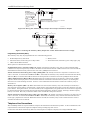
1
5110XM Installation and Setup Guide
Turning Off Fire Alarm Sounding
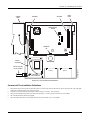
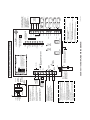
You can turn off Fire alarm sounding by pressing the Silence/Reset key on the control's pc board or by entering the user's
code + [OFF] key on any keypad. To clear the "Alarm Silenced" message and to reset the detector's alarm, press the
Silence/Reset key or enter the User's Code + [OFF] again.
Determining the Control’s Power Supply Load
In the event of an AC power loss the 5110XM must be supported by a backup, rechargeable 12VDC 7AH min./14AH max.
battery.
The battery's capacity must be sized to provide 24 hours (UL Central Station Fire) or 60 hours (UL Remote Station Fire)
of standby time followed by 6 minutes of alarm time. Use the steps below to calculate the required battery capacity.
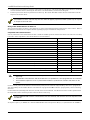
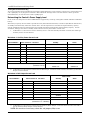
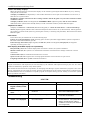
Use the worksheets below to determine the total standby and alarm loads and the required battery capacity. In each
worksheet, multiply each device’s standby and/or alarm current by the number of units used.
1.
In Worksheet 1, enter devices used on Auxiliary Power. Calculate standby and alarm currents, then add to get
Auxiliary Power current subtotal.
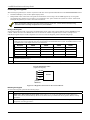
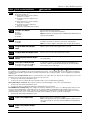
Worksheet 1: Auxiliary Power Current Load
Total Current
Device Model #
Device Current X # of Units =
Auxiliary Power Subtotal
(terminals 17 & 18)
2.
Standby
Alarm
350mA max.
350mA max.
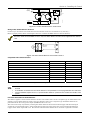
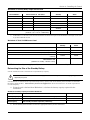
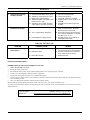
In Worksheet 2, enter devices connected to the Bell Output. Calculate alarm currents, then add to get the Bell
Output current subtotal.
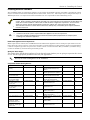
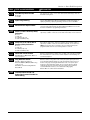
Worksheet 2: Bell Output Current Load
Total Current
Device Model #
Device Current X # of Units =
Standby
Alarm
XXXXXX
XXXXXX
XXXXXX
XXXXXX
XXXXXX
XXXXXX
XXXXXX
XXXXXX
Bell Output Subtotal
(terminals 3 & 4 – 1.0A max.)
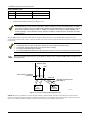
3.
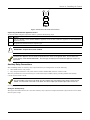
In Worksheet 3, enter devices connected to the Auxiliary Relay Output. Calculate alarm currents, then add to
get the Auxiliary Relay Output current subtotal.
NOTE: No entries are necessary when the red jumper (W3) is cut.
2-12