1
5110XM Installation and Setup Guide
Keypad Functions
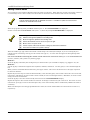
The keypad, if used, allows the user to silence alarm and trouble sounders and perform other system functions, such as
bypassing zones, and display zone descriptors. Zone and system conditions (alarm, trouble, and bypass) are displayed in
the Display Window. The system is in the "System Normal" condition when all zones are intact. If NOT, faulted zones
are displayed in numerical order.
System Commands
The following is a brief list of system commands. For detailed information concerning system functions, refer to the
User's Manual.
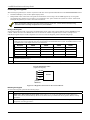
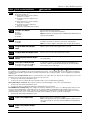
Summary of System Commands
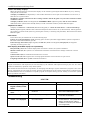
Silencing Sounders
Code + [OFF] or press Silence/Reset button
Resetting Smoke Detectors and Clearing Alarm
Memory
Code + [OFF] or press Silence/Reset button Twice
Bypassing Zones (installer only function)
Code + [BYPASS] + Zone number(s)
Un-bypassing Zones (installer only function)
Code + [BYPASS] + Zone Number(s)
Fire Walk Test Mode
Installer Code + [#] + [68]
To exit, Code + [OFF]
Fire Drill Mode
Installer or User 2 Code + [#] + [69]
To exit, Code + [OFF]
Emergency Keys
The emergency keys are not programmed or used.
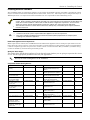
Fixed-Word Keypad Displays
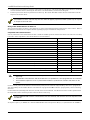
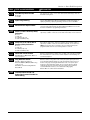
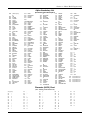
The following is a brief list of fixed-word keypad displays. For detailed information concerning fixed-word keypad
displays, refer to the User's Manual.
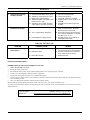
Display
Description
FC
Fail Communication – A message to the central station (alarm, trouble, etc.) was not properly received.
CC
Site Initiated Download – A site initiated download occurred.
OC
Open Circuit – The keypad has lost communication with the control panel.
dF
Fire Drill – Displays while the Fire Drill test is in progress.
CF
Fire Walk Test Mode - Displays while the Fire Walk Test is in progress
AA
Program Mode Communicating – Displays while the system communicates the Program Mode Entry
message to the central station.
8-2