1
Telit GE864 and GC864
Product Description
80273ST10008A Rev. 3 - 10/02/06
5.4 AT Commands
The Telit GE864 / GC864 module can be driven via the serial interface using the standard AT
commands 1.
The Telit GE864 / GC864 module is compliant with:
1. Hayes standard AT command set, in order to maintain the compatibility with existing SW
programs.
2. ETSI GSM 07.07 specific AT command and GPRS specific commands.
3. ETSI GSM 07.05 specific AT commands for SMS (Short Message Service) and CBS (Cell
Broadcast Service)
4. FAX Class 1 compatible commands
Moreover the Telit GE864 / GC864 module supports also Telit proprietary AT commands for special
purposes.
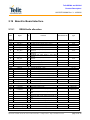
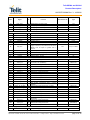
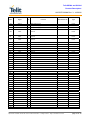
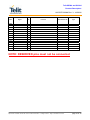
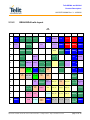
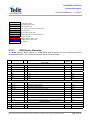
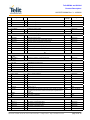
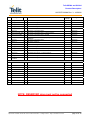
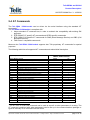
The following table lists all supported AT commands and related brief description.
Hayes Compliant AT Commands
Generic Modem Control
&F
&F1
Z
+FCLASS
&Y
&P
&W
&Z
&N
+GMI
+GMM
+GMR
+GCAP
+GSN
&V
&V0
&V1
&V2
&V3
\V
%L
%Q
+GCI
L
M
Reset base section factory profile configuration
Reset full factory profile configuration
Soft reset
Select active service class
Designate a default reset basic profile
Designate a default reset full profile
Store current configuration
Store telephone number in the internal phonebook
Display internal phonebook stored numbers
Request manufacturer identification
Request model identification
Request revision identification
Request capabilities list
Request serial number
Display current configuration & profile
Display current configuration & profile
Display S registers values
Display last connection statistics
Display S registers values
Single line connect message
Report line signal level
Report line quality
Select the country of installation
Monitor speaker loudness
Monitor speaker mode
At Commands availability for
GE864, GC864 models:
QUAD
PY
•
•
•
•
•
•
•
•
•
•
•
•
•
•
•
•
•
•
•
•
•
•
•
•
•
•
•
•
•
•
•
•
•
•
•
•
•
•
•
•
•
•
•
•
•
•
•
•
•
•
1
The AT is an ATTENTION command and is used as a prefix to other parameters in a string. The
AT command combined with other parameters can be set up in the communications package or
typed in manually as a command line instruction.
Reproduction forbidden without DAI Telecom written authorization – All Right reserved – Right of modification reserved
page 57 of 72