1
5. OPERATION
5.3.7 DVR SETUP
Set up DVR ID Range, the Protocol , Baud Rate of the DVR, and Output Port.
You can select Individual Setup or Whole Setup. Navigate the Cursor by pushing the joy stick up or
down. Cursor moves to the desired position.
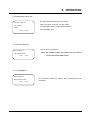
1 DVR ID Setting : You can select the DVR ID which you want to set from DVR ID to DVR ID.
○
Input the Camera ID number
and Press ENT
→ DVR ID:[001 – 001]
COMM.:ENBEDDED DVR
Push the joystick right.
→ DVR ID:[255 -– 255]
COMM.: ENBEDDED DVR
BAUD :9600 BPS
BAUD :9600 BPS
PORT :RS-485
PORT :RS-485
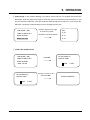
2 COMMUNICATION PROTOCOL Setting : There is only Embedded DVR protocol.
○
DVR ID:[255 – 255]
→COMM.:EMBEDDED DVR
BAUD :9600 BPS
PORT :RS-485
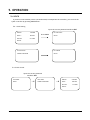
3 BAUD RATE Setting : In the DVR ID Range, You need to decide the baud rate.
○
To navigate and choose the baud rate, push the joystick left/right or twist the joy stick
clockwise/counterclockwise.
DVR ID:[255 – 255]
COMM.:EMBEDDED DVR
→BAUD :9600 BPS
Push the joystick left/right
or twist the joystick
clockwise/counterclockwise.
PORT :RS-485
BAUD RATE
2400 BPS
4800 BPS
9600 BPS
38400 BPS
22