1
BlueSecure™ Access Point 1800 Installation Guide
•
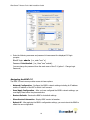
Site Survey Configuration - In site survey mode, the BSAP beacons known SSIDs on its
802.11a/n and 802.11 b/g/n radios operating at a configurable power level and channel to
facilitate a WLAN site survey. Rebooting the BSAP following a site survey, restores the
BSAP’s existing configuration. See
•
•
Using the BSAP’s Site Survey Mode for details on using the BSAP’s site survey mode.
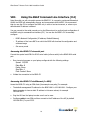
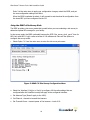
When operating in a submenu, press h to return directly to the main menu (or home menu).
Press p to return to the previous menu.
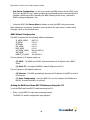
BSAP Default Configuration
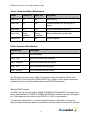
The BSAP is shipped with the following default configuration.
IP_ADDR_MODE:
IP_ADDR
NETMASK
GW_ADDR
DNS_ADDR
WG_ADDR_MODE
WG_ADDR
MNGMT_IP_ADDR
DHCP (0)
0.0.0.0
0.0.0.0
0.0.0.0
0.0.0.0
Discover BSC (0)
0.0.0.0
192.168.190.1
The two options for IP address mode are:
•
(0) DHCP - The BSAP runs a DHCP client and receives its IP address from a DHCP
server.
•
(1) Static IP - You assign the BSAP a static IP address via its CLI.
The two options for WG address mode are:
•
(0) Discover - The BSAP automatically discovers the IP address of the BSC to which it
is to connect.
•
(1) Static Configuration - Using the BSAP CLI, you will configure the IP address of
the BSC to which the BSAP is to connect.
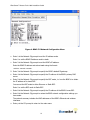
Setting the BSAP and Home BSC IP Addresses Using the CLI
To set the BSAP and Home BSC IP addresses using the CLI:
1.
Enter 1 at the BSAP CLI main menu command prompt.
The BSAP CLI network configuration menu appears:
20