1
Introduction
Thank you for choosing the SoundPoint®
IP 301 SIP. This unit provides business
telephony features and functions such as
Multiple Call Appearances, Call Hold,
Transfer, and Conference over an IP
network. In this User Guide you will find
everything you need to quickly use your
new phone. Be sure to verify with your
system administrator that your network
is prepared for configuring your SoundPoint® IP 301 SIP phone. As well, be
sure to read the Parts List and the Safety
Notices section in this guide before you
set up and use the SoundPoint® IP 301 SIP
phone.
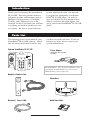
Parts List
The following items are included in your
SoundPoint® IP 301 SIP package. Check
this list before installation to ensure that
you have received each item. If you are
missing any items, please contact your
system administrator.
Polycom SoundPoint® IP 301 SIP
Power Adapter
(specification varies according
to country)
ABC
DEF
2
3
JKL
MNO
PQRS
7
TUV
WXYZ
*
OPER
1
GHI
4
5
8
6
9
Menu
DoNotDisturb
Redial
Hold
For SoundPoint® 301, the power adapter is not
included in the PoE bundle. See your system
administrator if you require one.
0
Handset & Handset Cord
Phone Base
Quick Start Guide
Network / Power Cable