1
25
Main Menu
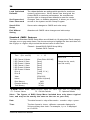
Once you enter the Award BIOS CMOS Setup Utility, the Main Menu will appear on the
screen. The Main Menu allows you to select from various setup functions and two exit
choices. Use the arrow keys to select among the items and press <Enter> to accept and
enter the sub-menu.
Phoenix - Award BIOS CMOS Setup Utility
8
8
8
8
8
8
8
Standard CMOS Features
Advanced BIOS Features
Advanced Chipset Features
Integrated Peripherals
Power Management Setup
PnP/PCI Configurations
PC Health Status
Esc : Quit
F10 : Save & Exit Setup
8 Frequency/Voltage Control
Load Fail-Safe Defaults
Load Optimized Defaults
Set Supervisor Password
Set User Password
Save & Exit Setup
Exit Without Saving
éêèç : Select Item
Time, Date, Hard Disk Type ... ...
(Note : The figures of BIOS Setup Menu included here only show a typical
case, and may not be exactly the same as the one on your unit.)
Note that a brief description of each highlighted item will appear at the bottom of the
screen.
Standard
This setup page includes all the items of Award™ special standard
CMOS Features features.
Advanced BIOS
Features
This setup page includes all the items of Award™ special enhanced
features.
Advanced
This setup page includes all the items of chipset special features.
Chipset Features
Integrated
Peripherals
This section page includes all the items of IDE hard drive and
Programmed Input / Output features.
Power
Management
Setup
This entry only appears if your system supports Power
Management “Green PC” standards.
PnP/PCI
Configurations
This entry appears if your system supports PNP/PCI.
PC Health Status Display CPU and Case Fan Speed,etc.
Frequency/
CPU speed setting are settings of CPU speed. You should refer to
Voltage Control your CPU marking.
Load Fail-Safe
Defaults
The BIOS defaults have been set by the manufacturer and represent
settings which provide the minimum requirements for your system
to operate.
BIOS Setup