1
QT-UH4H
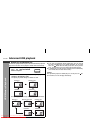
Recording to a cassette tape
ENGLISH
Tape Recording
Before recording:
When recording important selections, make a preliminary test to
ensure that the desired material is properly recorded.
SHARP is not liable for damage or loss of your recording arising
from malfunction of this unit.
The volume and sound controls can be adjusted with no effect
on the recorded signal (Variable Sound Monitor).
For recording, use only normal tapes. Do not use metal or
CrO tapes.
Erase-prevention tab of cassette tapes:
When recording on a cassette tape, make sure that the eraseprevention tabs are not removed. Cassettes have removable
tabs that prevent accidental recording or erasing.
To protect the recorded sound, remove the tab after recording.
Cover the tab hole with adhesive tape to record on the tape without the tab.
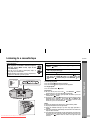
Side A
Tab for side B
Tab for side A
TAPE (STAND-BY)
CD/USB
RADIO
PAUSE STOP/EJECT F.FWD REWIND
PLAY
RECORD
FUNCTION
/
MIC
Recording from the radio
1
2
3
4
Set the FUNCTION switch to RADIO.
5
6
7
Press the PAUSE
Set the BAND SELECTOR switch to FM or AM.
Tune in to the station to be recorded.
Load a blank cassette into the cassette compartment with
the side to be recorded on facing up.
button.
Press the RECORD
Press the PAUSE
button.
button again to begin recording.
To stop recording:
Press the STOP/EJECT /
button.
Note:
Play and record buttons will automatically released when the end of
tape has been reached.
Beat cancel switch:
If a whistling noise occurs when recording from an FM or AM station,
set the BEAT CANCEL switch to 1 or 2, whichever gives the best reception.
Downloaded From Disc-Player.com Sharp Manuals
E-17