1
Resetting the Pegaso
Cold Reset
A cold reset is a complete reset of the Pegaso in which all applications are forcibly closed and working RAM is cleared.
Datalogic recommends that you always attempt a warm reset before
initiating a cold reset. Once you initiate a cold reset, all applications
are forcibly closed and working RAM and files are cleared.
Any applications, files, or data in RAM will be lost on cold reset. Only
CAUTION applications and files in persistent memory are preserved. Refer to
Persistent Memory on page 22 for information on preserving applications and files with persistent flash storage memory.
Reason to Cold Reset — Use a cold reset when the Windows CE operating
system locks up and the warm reset command does not work.
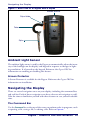
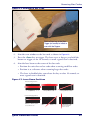
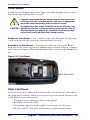
Procedure to Cold Reset — To perform a cold reset, remove the Battery
Pack and use the Stylus to press the <Reset> button inside the Battery Compartment, shown in Figure 15. Reinstall the Battery Pack, and press the <Power> but-
ton.
Figure 15. Cold Reset
Cold Reset Button
After Cold Reset
Cold reset clears the working RAM and initializes the file system. You will lose
any applications and data which are not stored in persistent flash memory (refer
to the PRG for more information).
• The splash screen will appear after a short period.
• Recalibrate the touch screen.
• The desktop appears with the application shortcuts on the screen.
• RF Network PC Card (if present) connects to the network system.
24
Pegaso™ Industrial PDA with Windows® CE