1
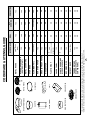
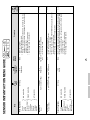
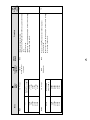
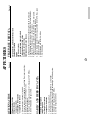
OPERATION MANUAL
AND
COOKBOOK
TM
DOUBLE GRILL CONVECTION
MICROWAVE OVEN
MODEL
R-880F(S) J
WARRANTY
Consumer Electronic Products
Congratulations on Your Purchase!
This Sharp product is warranted against faults in materials and manufacture for a period of twelve (12) months
from the date of original purchase.
If service is required during the warranty period, please contact your nearest Sharp Approved Service Centre. These repairs would be carried out at no charge to the owner, subject to the conditions specified herein.
The owner is responsible for any transportation and insurance costs if the product has to be returned for
repair.
This warranty does not extend to accessories or defects or injuries caused by or resulting from causes not
attributable to faulty parts or the manufacture of the product, including but not limited to, defect or injury
caused by or resulting from misuse, abuse, neglect, accidental damage, improper voltage, liquid spillage,
vermin infestation, software, or any alterations made to the product which are not authorised by Sharp.
Please retain your sales documentation, as this should be produced to validate a warranty claim.
This warranty is in addition to and in no way limits, varies or excludes any express and implied rights and
remedies under any relevant legislation in the country of sale.
IMPORTANT
DO NOT RETURN THIS PAGE TO SHARP
For your reference, please enter the particulars of your purchase below and retain, with your purchase
documentation.
Model No.
Serial No.
Date of Purchase
Retailer
FOR LOCATION ENQUIRIES WITHIN
FOR PRODUCTS PURCHASED IN
AUSTRALIA
NEW ZEALAND
REGARDING YOUR
LOCAL
SHARP APPROVED SERVICE CENTRE
CALL THE
SHARP SERVICE REFERRAL CENTRE
TOLL FREE 1 300 135 022
CONTACT YOUR SELLING DEALER/RETAILER
OR CALL
SHARP CUSTOMER SERVICES
telephone: 09 573 0111
DURING NORMAL BUSINESS HOURS
(Eastern Standard Time)
www.sharpnz.co.nz
FACSIMILE: 09 573 0113
or contact our web site
or contact our web site
www.sharp.net.au
SHARP CORPORATION OF AUSTRALIA PTY. LIMITED
ABN 40 003 039 405
1 Huntingwood Drive Blacktown NSW 2148
SHARP CORPORATION OF NEW ZEALAND LIMITED
59 Hugo Johnson Drive
Penrose, Auckland
IMPORTANT NOTICE: This warranty applies only to products sold in Australia & New Zealand.
1
CONTENTS
Warranty
INTRODUCTION
®
INFO DISPLAY COOKING SYSTEM
Thank you for buying a Sharp Microwave Oven.
Your new oven has an "Information Display System"
which offers you step-by-step instructions to easily guide
you through each feature.
Your oven also has a HELP key for instructions on using
Auto Start, Information Guide On / Off, Demonstration
Mode, Child Lock, Info on pads and Help.
After gaining experience and confidence using your oven,
the information display can be turned off.
We strongly recommend however that you read this
operation manual thoroughly before operating your oven,
paying particular attention to the safety warnings and
special notes.
Inside of front cover
Introduction
1
Warning
2
Special Notes
3
Installation Instructions
4
Oven Diagram
4
Operation of Touch Control Panel
5
Control Panel Display
5
Touch Control Panel Layout
5
Before Operating
6
Getting Started
6
Clock Setting
6
Stop/Clear
6
To Cancel a Programme During Cooking 6
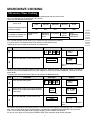
Microwave Cooking
7
Microwave Time Cooking
7
Sequence Cooking
8
Instant Cook
8
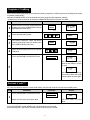
Heating without Food
Convection Cooking
To Cook by Convection
The manual is divided into two sections:
Page
9
9
9
To Preheat and Cook by Convection 10
1. OPERATION (P3~P26)
This section describes your oven and teaches you how to
use all the features.
2. COOKING GUIDE
This section is at the back of the manual, it contains the
more commonly used information such as how to prepare
food, which cooking utensil to use, standing time.
It also contains recipes for automatic cooking.
Please take some time to read your operation manual carefully, the automatic cooking menus programmed into your new
oven have been carefully developed to give optimum results
when the step-by-step instructions are followed.
When selecting another home appliance, please again consider our full range of Sharp products.
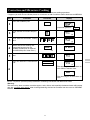
Convection and Microwave Cooking 11
Preheating
12
Grill Cooking
13
Mix Cooking
14
Automatic Operations
15
Notes for Automatic Operations
15
Sensor Instant Action
15
Reheat Sensor
16
Convenience/Pizza
17
Multi Cook
18
Easy Defrost
19
Other Convenient Features
Help Feature
20
Less/More Setting
23
Increasing or Decreasing Time
During a Cooking Programme
24
Alarm
24
Care and Cleaning
25
Service Call Check
26
Specifications
26
Cooking Guides
1
20
1 – 40
WARNING
IMPORTANT SAFETY INSTRUCTIONS : READ CAREFULLY AND KEEP FOR FUTURE REFERENCE.
Whenever the top heater, bottom heater or convection symbols are displayed the turntable, turntable
support, racks, oven door, outer cabinet, oven cavity and especially bottom heater will become very hot. To
prevent yourself from getting burnt use thick oven mittens.
Do not put things on top of the oven or cover the outer cabinet.
To reduce the risk of fire in the oven cavity:
a. Do not overcook food.
b. Remove wire twist-ties from paper or plastic bags before placing bag in the oven.
c. Do not heat oil or fat for deep frying. The temperature of the oil cannot be controlled.
d. Look at the oven from time to time when food is heated in disposable containers made of plastic, paper
or other combustible materials for signs of smoke or burning.
e. If materials inside the oven should ignite, or smoke is observed, keep oven door closed, turn oven
off, and disconnect the power cord, or shut off power at the fuse or circuit breaker panel.
To reduce the risk of an explosion or delayed eruptive boiling:
Your microwave oven is capable of heating food and beverages very quickly therefore, it is very important
that you select the appropriate cooking time and power level for the type and quantity of food to be heated.
If you are unsure of the cooking time and power level required, begin with low cooking times and power levels
until the food is sufficiently heated evenly throughout.
Additionally:
a. Do not place sealed containers in the oven. Babies bottles fitted with a screw cap or teat are
considered to be sealed containers.
b. Do not use excessive amount of time.
c. When boiling liquids in the oven, use a wide-mouthed container.
d. Stand at least for 20 seconds at the end of cooking to avoid delayed eruptive boiling of liquids.
e. Stir the liquid before and during cooking. Use extreme care when handling the container or inserting
a spoon or other utensil into the container.
This oven is for home food preparation only and should only be used for heating, cooking and defrosting food
and beverage.
It is not suitable for commercial, laboratory use, or heating therapeutic devices eg. Wheat bags.
Never operate the oven whilst any object is caught or jammed between the door and the oven.
Do not try to adjust or repair the oven yourself.
It is hazardous for anyone other than a qualified service technician trained by SHARP to carry out any service
or repair operation. Especially those which involve the removal of a cover which gives protection against
exposure to microwave energy are very hazardous.
Do not operate the oven if it is not working correctly or damaged until it has been repaired by a qualified service
technician trained by SHARP. It is particularly important that the oven door closes properly and that there
is no damage to:
(1) Door (warped), (2) Hinges and Latches (broken or loosened), (3) Door Seals, Sealing Surfaces and oven
cavity (buckled or deformed), (4) Burn marks on the door seal faces.
Do not bump, or catch utensils, loose clothes and your accesories on the door safety latches when removing
food from the oven.
Never poke an object, particularly a metal object, through a grille or between the door and the oven while the
oven is operating.
Never tamper with or deactivate the door safety latches.
Always use oven gloves to prevent burns when handling utensils that are in contact with hot food. Enough
heat from the food can transfer through utensils to cause skin burns.
Should the power supply cord become damaged, it must be replaced with a special cord supplied by a
SERVICE CENTRE APPROVED BY SHARP. And it must be replaced by a qualified service technician
trained by SHARP.
If the oven lamp fails please consult your dealer or a qualified service technician trained by SHARP.
Avoid steam burns by directing steam away from the face and hands.
Slowly lift the furthest edge of a dish's cover and microwave plastic wrap and carefully open popcorn and oven
cooking bags away from the face.
Make sure that the power supply cord is undamaged, and that it does not run under the oven or over any hot
surfaces or sharp edges.
Do not place anything on the outer cabinet.
This appliance must be earthed.
Do not store food or any other items inside the oven.
Make sure the utensil does not touch the interior walls during cooking.
Only allow children to use the oven without supervision when adequate instructions have been given so that
the child is able to use the oven in a safe way and understands the hazards of improper use.
This appliance is not intended for use by young children or infirm persons without supervision.
Young children should be supervised to ensure that they do not play with the appliance.
2
SPECIAL NOTES
DO
DON’T
Eggs, fruits,
nuts, seeds,
vegetables,
sausages and
oysters
* Puncture egg yolks and whites and
oysters before cooking to prevent
"explosion".
* Pierce skins of potatoes, apples,
squash, hot dogs, sausages and
oysters so that steam escapes.
* Cook eggs in shells. This prevents
"explosion", which may damage the
oven or injure yourself.
* Reheat whole eggs.
* Overcook oysters.
* Dry nuts or seeds in shells.
Popcorn
* Use specially bagged popcorn for the
microwave oven.
* Listen while popping corn for the
popping to slow to 1-2 seconds.
* Pop popcorn in regular brown bags or
glass bowls.
* Exceed maximum time on popcorn
package.
Baby food
* Transfer baby food to small dish and
heat carefully, stirring often. Check for
suitable temperature to prevent burns.
* Remove the screw cap and teat
before warming baby bottles. After
warming shake thoroughly. Check for
suitable temperature.
* Heat disposable bottles.
* Overheat baby bottles.
Only heat until warm.
* Heat bottles with nipples on.
* Food with filling should be cut after
heating, to release steam and avoid
burns.
* Use a deep bowl when cooking liquids
or cereals to prevent boiling over.
* Heat or cook in closed glass jars or air
tight containers.
Liquids
(Beverages)
* For boiling or cooking liquids see
WARNING on page 2 to prevent
explosion and delayed eruptive boiling.
* Heat for longer than recommended
time. See REHEATING-FOOD CHART
on page \.
Canned foods
* Remove food from can.
* Heat or cook food while in cans.
Sausage rolls,
Pies, Christmas
pudding
* These foods have high sugar and/or
fat contents.
* Cook for the recommended time.
* Overcook as they may catch fire.
Meats
* Use a microwave proof roasting rack
to collect drained juices.
* Place meat directly on the turntable for
cooking.
Utensils
* Check the utensils are suitable for
MICROWAVE cooking before you use
them.
* Use metal utensils for MICROWAVE
cooking. Metal reflects microwave
energy and may cause an electrical
discharge known as arcing.
Aluminium foil
* Use to shield food to prevent over
cooking.
* Watch for sparking. Reduce foil or
keep clear of cavity walls.
* Use too much.
* Shield food close to cavity walls.
Sparking can damage the cavity.
Browning dish
* Place a suitable insulator such as a
microwave and heat proof dinner plate
between the turntable and the
browning dish.
* Exceed the preheating time recommended by the manufacturer. Excessive preheating can cause the glass
turntable to shatter and/or damage
internal parts of the oven.
General
3
* Heat baby food in original jars.
* Deep fat fry.
* Heat or dry wood, herbs, wet papers,
clothes or flowers.
* Operate the oven without a load (i.e. an
absorbing material such as food or water)
in the oven cavity except when conditioning or cleaning the heater elements as
described in the operation manual.
INSTALLATION INSTRUCTIONS
1. Remove all packing materials from the oven cavity, (do not remove the waveguide cover, item 11 below),
and the feature sticker from the outside of the door, if there is one. Check the unit for any damage, such as
a misaligned door, damaged door seals around the door or dents inside the oven cavity or on the door. If there
is any damage, please do not operate the oven until it has been checked by a SERVICE CENTRE
APPROVED BY SHARP and repaired, if necessary.
2. Accessories provided
4) High rack
5) Combined operation manual and cookbook
1) Turntable tray
2) Roller stay
3) Low rack
3. Since the door may become hot during cooking, you should place or mount the oven so that the bottom of
the oven is 80 cm or more above floor. You should also keep children away from the door to prevent them
burning themselves.
4. Ensure that the bottom heater is in the lowest position as shown in the OVEN DIAGRAM below (never touch
or move the bottom heater while it is hot). Then fit the turntable support to the turntable motor shaft on the
floor of the oven cavity. And place the turntable on the turntalbe support. Make sure the turntable and turntable
support are centrally located and locked together. NEVER operate the oven without the turntable support and
turntable.
5. The oven should not be installed in any area where excessive heat and steam are generated, for example,
next to a conventional oven unit.
The oven should be installed so as not to block ventillation openings.
Allow at least 40 cm on the top, 5 cm on the both sides and at the rear of the oven for free air space.
6. Neither the manufacturer nor the distributors can accept any liability for damage to the machine or personal
injury for failure to observe the correct electrical connecting procedure.
The A.C. voltage must be single phase 230-240V, 50Hz.
7. Operate the oven from a general purpose domestic outlet. If a generator is used, do not operate the oven with
non-sinusoidal outputs.
8. Before using top or bottom heater for the first time, operate the oven without food for 20 minutes using both
heaters. This will allow the oil that is used for rust protection to be burned off.
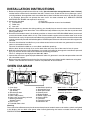
OVEN DIAGRAM
3
1
2
0
r
o
t
4
9
e
u
i
y
w
5
6
780 q 5
1. Oven lamp
2. Top grill heater
(top heater)
3. See through door
4. Door hinges
5. Door safety latches
6. Door seals and sealing surfaces
7. Bottom grill heater
(bottom heater)
8.Oven cavity
9.Turntable motor shaft
10.Ventilation openings
11.Waveguide cover
12.Door open button
13.Control panel
14.Digital readout
15.Power supply cord
16.Outer cabinet
17.Turntable
18.Turntable support
19.Ventilation slit
Metal racks——High and low
The racks are for Grill, Mix,
Convection and recommended
automatic operations.
Warning:
The accessories will become very hot whenever the top heater, bottom heater or convection symbols are lighted
in the display and use thick oven gloves when inserting/removing the food or turntable from the oven to
PREVENT BURNS.
4
OPERATION OF TOUCH CONTROL PANEL
The operation of the oven is controlled by pressing the appropriate pads arranged on the surface of the control
panel.
An entry signal tone should be heard each time you press the control panel to make a correct entry.
In addition the oven will beep for approximately 2 seconds at the end of the cooking cycle, or 4 times when a
cooking procedure is required.
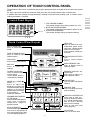
Control Panel Display
COOK
HELP
1. TOP HEATER SYMBOL
The symbol will light when the top heater is in use.
2. BOTTOM HEATER SYMBOL
The symbol will light when the bottom heater is in use.
3. CONVECTION SYMBOL
Indicator
The symbol will light during convection cooking.
1 2 3
Control
Panel Display
Touch Control
Panel Layout
HELP PAD
Press to select auto start,
information guide on/off,
child lock, demonstration
modes or info on pads.
Press to obtain cooking information.
MULTI COOK PAD
Press to select Multi Cook
mode.
REHEAT SENSOR PAD
Press to select 3 popular
Reheat menus.
CONVENIENCE/PIZZA
PAD
Press to select 6 popular
menus.
GRILL PAD
Press to select grill cooking.
EASY DEFROST PAD
Press to defrost meat by
entering weight.
MIX PAD
Press to select mix
cooking.
SENSOR INSTANT ACTION PADS
Press once to cook or reheat 6 popular menus.
POWER LEVEL PAD
Press to select microwave
power setting.
If not pressed, HIGH is
automatically selected.
CONVEC PAD
Press to select convection
cooking.
MORE(
), LESS(
)
PADS
Press to adjust the
doneness of food in one
minute increments during
cooking or to increase/
decrease the time whilst
programming
the
automatic opertions.
PREHEAT PAD
Press to preheat the oven
prior to cooking.
INSTANT COOK/START PAD
Press once to cook for 1
minute on HIGH or increase
by 1 minute multiples each
time this pad is pressed
during manual cooking.
Press to start oven after
setting programs.
NUMBER AND TEMPERATURE PADS
Press to enter cooking times,
clock time, convection
temperature, weight or
quantity of food.
STOP/CLEAR PAD
Presstoclearduringprogramming.
Press once to stop operation of
oven during cooking; press twice
to cancel cooking programme.
CLOCK PAD
Press to set clock time.
5
BEFORE OPERATING
* This oven is preset with the INFORMATION GUIDE ON.
To assist you in operating your oven useful information will appear on the display.
In this manual, the display information guide is abbreviated.
* When you become familiar with your oven, the information guide can be turned off. Check page 21.
Getting Started
Step
Procedure
1
Plug the oven into a power point and switch
on the power.
Ensure the oven door is closed.
2
Pad Order
Display
SHARP, MICRO-WAVE,
OVEN will be displayed repeatedly.
Press the STOP/CLEAR pad so that the
oven beeps.
STOP
CLEAR
Only the dots will remain.
Clock Setting
* To enter the present time of day 11:34 (AM or PM).
Step
Procedure
Pad Order
Display
Press the CLOCK pad.
CLOCK
1
(operation guide off:
)
Enter the correct time of day by pressing the numbers in sequence.
2
The dots (:) will flash on and
off.
Press the CLOCK pad again.
CLOCK
3
This is a 12 hour clock. If you attempt to enter an incorrect clock time (Eg. 13:45) ERROR will appear in the
display. Press the STOP/CLEAR pad and re-enter the time of day (Eg. 1:45).
If you wish to know the time of day during the cooking or timer mode, press the CLOCK pad. As long as your
finger is pressed the CLOCK pad, the time of day will be displayed.
Stop/Clear
Press the STOP/CLEAR pad once to:
1.Stop the oven temporarily during cooking.
2.Clear if you make a mistake during programming.
3.Clear the message on the display after cooking.
To Cancel a Programme During Cooking
Press the STOP/CLEAR pad twice.
6
MICROWAVE COOKING
Microwave Time Cooking
This is a manual cooking feature, first enter the cooking time then the power level.
You can programme up to 99 minutes, 99 seconds.
There are five different power levels.
–
–
–
–
–
–
–
–
Power level
Approximate percentage of
microwave power
Examples of foods typically cooked on different microwave power levels
LOW
10%
–
–
–
–
–
–
–
–
Keeping food
warm
–
–
–
–
–
–
–
–
MEDIUM – M•HIGH – HIGH –
–
–
–
–
–
–
–
–
–
–
–
–
–
–
–
– 50% – 70%
100%
30%
–
– Cakes –
Defrosting – Casseroles– Muffins – Fruit
–
–
– Vegetables
–
Softening –
Slices –
–
–
–
–
–
–
butter
Rice/Pasta
–
–
–
Seafood
–
–
–
M•LOW
This variable cooking control allows you to select the rate of microwave cooking.
If a power level is not selected, then HIGH power is automatically used.
*Suppose you want to cook for 10 minutes on HIGH power.
Step
1
Procedure
Pad Order
Display
Enter desired cooking time.
INSTANT COOK
START
Press the INSTANT COOK/START pad.
2
COOK
The timer begins to count
down.
To lower the power press the POWER LEVEL pad once. Note the display will indicate “HIGH”. To lower to
“M•HIGH” press the POWER LEVEL pad again. Repeat as necessary to select “MEDIUM”, “M•LOW” or “LOW”
power levels.
* Suppose you want to cook Fish Fillets for 10 minutes on MEDIUM power.
Step
Procedure
Pad Order
Display
Enter desired cooking time.
1
2
Select power level by pressing the POWER
LEVEL pad as required (for MEDIUM press
three times).
POWER
LEVEL
x3
Press the INSTANT COOK/START pad.
INSTANT COOK
START
3
COOK
The timer begins to count
down.
If the door is opened during the cooking process, the cooking time in the display automatically stops. The cooking
time starts to count down again when the door is closed and the INSTANT COOK/START pad is pressed.
If you want to check the power level during the cooking, press POWER LEVEL pad.
As long as your finger is pressing the POWER LEVEL pad, the power level will be displayed.
7
Sequence Cooking
Your oven can be programmed up to 4 automatic cooking sequences, switching from one variable power setting
to another automatically.
Note that POWER LEVEL must be entered first when programming sequence cooking.
* Suppose you want to cook for 10 minutes on MEDIUM followed by 5 minutes on HIGH.
Step
Procedure
Pad Order
1
Select microwave cooking and desired power
level by pressing the POWER LEVEL pad (for
MEDIUM press three times).
POWER
LEVEL
2
Display
x3
Enter desired cooking time.
3
For second sequence, select microwave
cooking and power level (for HIGH press
the POWER LEVEL pad once)
4
Enter desired cooking time for the second
sequence.
POWER
LEVEL
Press the INSTANT COOK/START pad.
INSTANT COOK
START
COOK
The timer begins to count
down to zero. When it reaches zero,
5
COOK
the second sequence will appear and the timer will begin
counting down to zero again.
Instant Cook™
For your convenience Sharp’s Instant Cook allows you to easily cook for one minute on HIGH power.
Step
Procedure
Pad Order
INSTANT COOK
START
Press the INSTANT COOK/START pad.
1
Display
COOK
The timer begins to count
down.
Within one minute of closing the door.
Press the INSTANT COOK/ START pad until desired time is displayed.
Each time the pad is pressed, the cooking time is increased by 1 minute.
8
A37416, R-880F(S) O/M
HEATING
WITHOUT FOOD
Before the first use and after cleaning the top and bottom heaters must be conditioned. The procedure involves
heating the heaters for a period of 20 minutes. You may notice some smoke and odour during this process, the
oven is not out of order. Follow the procedure below.
Step
Procedure
1
Ensure that no food is in the
oven.
Press the GRILL pad three
times.
Pad Order
Display
GRILL
X3
2
Enter the heating time (20
min.).
3
Press the INSTANT COOK/
START pad.
IMPORTANT: During this operation, some smoke and odour
will occur. Therefore open the
windows or run the ventillation
fan in the room.
4
Open the door to cool the oven cavity. The cooling fan will remain on until the oven cavity has cooled.
WARNING: The oven door, outer cabinet, turntable and oven cavity will be hot to PREVENT BURNS
allow the oven to cool.
INSTANT COOK
START
COOK
The timer begins to count down to zero. When
timer reaches zero, all indicators will go out
and the oven will "beep". END will appear on
the display.
CONVECTION COOKING
To Cook by Convection
Your Convection Microwave Oven can be programmed for ten different convection cooking temperatures up
to 99 minutes, 99 seconds.
* Suppose you want to cook for 20 minutes at 180°C.
Step
1
Procedure
Place turntable in the oven.
Press the CONVEC pad.
Pad Order
Display
CONVEC
)
(Operation guide off :
Enter desired temperature.
2
3
Enter desired cooking time.
Press the INSTANT COOK/
START pad.
4
INSTANT COOK
START
COOK
The timer begins to count down to zero. When timer
reaches zero, all indicators will go out and the oven will
"beep". END will appear on the display. The cooling
fan will remain on until the oven cavity has cooled.
Warning: The oven cavity, door, turntable, turntable support, racks, dishes and especially the bottom heater will become very
hot, use thick oven gloves when inserting/removing the food or turntable from the oven to PREVENT BURNS.
Helpful Hints: If you are cooking and wish to check the temperature you have programmed, simply press the CONVEC pad.
The programmed temperature will be displayed as long as CONVEC pad is pressed.
For the best cooking results please closely follow the steps in the operation manual/cookbook. For your convenience a
selection of popular menus have been preprogrammed into the oven.
Note : Temperature measurements whilst in convection mode will differ from the displayed level. This is due to the grill
elements turning on and off in order to regulate the oven temperature. Manual convection cooking temperature is limited to
a maximum of 160°C. Higher radiant temperatures can be achieved in conjunction with the grill features (browning/crisping).
9
To Preheat and Cook by Convection
* Suppose you want to preheat the oven to 200°C then cook for 20 minutes at 200°C.
Step
Procedure
Press the PREHEAT pad.
Pad Order
Display
PREHEAT
2
(Operation guide off :
)
(Operation guide off :
)
PREHEAT
1
Press desired preheat temperature
pad.
Press the CONVEC pad.
CONVEC
3
5
Press desired cooking temperature
pad.
Enter desired cooking time.
Press the INSTANT COOK/START
pad.
6
When "ADD FOOD" is displayed, the
oven is preheated. If the oven door is
not opened, the oven will automatically hold at the preheat temperature
for 30 minutes.
7
Open the door. Place food in oven.
Close the door.
8
Press the INSTANT COOK/START
pad.
INSTANT COOK
START
COOK
will be displayed repeatedly.
When preheat is over, the oven will
"beep" 4 times and ADD FOOD will be
displayed.
PRESS START will be displayed.
INSTANT COOK
START
COOK
The timer begins to count down to
zero.
Warning:
The oven cavity, door, turntable, turntable support, racks, dishes and especially the bottom heater will become
very hot, use thick oven gloves when inserting/removing the food or turntable from the oven to PREVENT
BURNS.
10
COOKING
4
Convection and Microwave Cooking
Your oven can be programmed to combine convection and microwave cooking operations.
* Suppose you want to roast chicken pieces for 15 minutes at 180°C and then cook at 8 minutes on MEDIUM.
Step
Procedure
Pad Order
Display
Press the CONVEC pad.
CONVEC
1
(Operation guide off:
2
3
4
5
)
Enter desired convection temperature.
Enter desired convection cooking
time.
Select microwave cooking and
power level by pressing the
POWER LEVEL pad as required
(for MEDIUM press three times.)
POWER
LEVEL
x3
Enter desired microwave cooking
time.
Press the INSTANT COOK/START
pad.
INSTANT COOK
START
COOK
The timer begins to count down to
zero. When it reaches zero,
6
COOK
The timer begins to count down to
zero.
Do not use plastic (non-heat proof) cookware if combining Convection and Microwave mode.
Warning:
The oven cavity, door, turntable, turntable support, racks, dishes and especially the bottom heater will become
very hot, use thick oven gloves when inserting/removing the food or turntable from the oven to PREVENT
BURNS.
11
PREHEATING
For best results, preheat to the required temperature with the turntable in the oven. Add food after preheating.
* To preheat the oven to 200°C
Step
Procedure
Pad Order
Display
Press the PREHEAT pad.
PREHEAT
1
(Operation guide off:
)
Select preheating temperature.
2
3
4
Press the INSTANT COOK/
START pad.
INSTANT COOK
START
COOK
Preheat is over. If the oven door is not opened, the oven
will automatically hold at the preheat temperature for 30
minutes.
COOK
After preheating, Suppose you want to cook profiteroles for 20 minutes on convection 200°C.
5
Open the door and place food.
Close the door.
Press the CONVEC pad.
6
CONVEC
(Operation guide off:
)
Enter desired temperature.
7
Enter desired cooking time.
8
9
Press the INSTANT COOK/
START pad.
INSTANT COOK
START
COOK
The timer begins to count down.
If you are in the process of preheating and wish to check the actual oven temperature, simply press the CONVEC
pad. The actual oven temperature will be displayed as long as the CONVEC pad is pressed. If the oven
temperature is below 40°C at this time,
will be displayed.
Warning:
The oven cavity, door, turntable, turntable support, racks, dishes and especially the bottom heater will become
very hot, use thick oven gloves when inserting/removing the food or turntable from the oven to PREVENT
BURNS.
12
GRILL COOKING
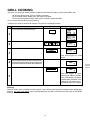
Your oven has three grill cooking modes. Select the desired grill mode by pressing the GRILL pad.
For the top heater mode, press the GRILL pad once.
For the bottom heater mode, press the GRILL pad twice.
For the top and bottom heaters mode, press the GRILL pad three times.
It is not necessary to preheat for grill cooking.
* Suppose you want to cook for 20 minutes using the top and bottom heaters.
Step
Procedure
Pad Order
Display
Press the GRILL pad three times.
GRILL
1
x3
Enter desired cooking time.
2
Press the INSTANT COOK/START pad.
INSTANT COOK
START
COOK
3
The timer begins to count
down.
4
When the timer reaches about 2/3 of the way
through the cooking time, open the door and
turn over the steak. And then close the door.
Press the INSTANT COOK/START pad.
INSTANT COOK
START
COOK
The timer begins to count
down again. When it reaches
zero, all indicators will go off
and the oven will "beep". The
cooling fan will remain on until the oven cavity has cooled.
5
Warning:
The oven cavity, door, turntable, turntable support, racks, dishes and especially the bottom heater will become
very hot, use thick oven gloves when inserting/removing the food or turntable from the oven to PREVENT
BURNS.
13
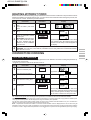
MIX COOKING
Your oven has four preprogrammed settings that make it easy to cook with both grill heaters and microwave.
Select the desired mix setting by pressing the MIX pad. It is not necessary to preheat for the mix cooking.
Preset programme
Setting
The times
pressing
MIX pad
Microwave
power
Grill heater
HIGH MIX TOP GRILL
Once
70%
Top heater
LOW MIX TOP GRILL
Twice
50%
Top heater
HIGH MIX BOTTOM GRILL
three times
50%
Bottom heater
LOW MIX BOTTOM GRILL
four times
10%
Bottom heater
* Suppose you want to cook for 6 minutes on LOW MIX TOP GRILL.
Step
Procedure
Pad Order
Display
Press the MIX pad twice.
MIX
1
2
x2
Enter desired cooking time.
Press the INSTANT COOK/START
pad.
INSTANT COOK
START
COOK
The timer begins to count down.
When it reaches zero, all indicators will go
off and the oven will "beep". END will
appear on the display.
The cooling fan will remain on until the
oven cavity has cooled.
3
Warning:
The oven cavity, door, turntable, turntable support, racks, dishes and especially bottom heater will become very
hot, use thick oven gloves when inserting/removing the food or turntable from the oven to PREVENT BURNS.
14
AUTOMATIC OPERATIONS
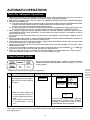
Notes for Automatic Operations
1. Wipe off any moisture from the outside of cooking containers and the interior of the oven with a dry cloth or
paper towel prior to cooking on SENSOR INSTANT ACTION or REHEAT SENSOR.
2. After oven is plugged in, wait 2 minutes before using SENSOR INSTANT ACTION or REHEAT SENSOR.
3. ERROR will be displayed if:
(a) more or less than the quantity or weight of foods suggested in the MULTI COOK, CONVENIENCE/PIZZA
or EASY DEFROST MENU GUIDE are programmed when the START pad is pressed.
To clear, press the STOP/CLEAR pad and reprogramme.
(b) the door is opened or the STOP/CLEAR pad is pressed until the cooking time is displayed. To clear, press
the STOP/CLEAR pad and cook manually. Refer to manual cooking charts in RECIPES section.
4. When using the automatic features (SENSOR INSTANT ACTION, REHEAT SENSOR, MULTI COOK,
CONVENIENCE/PIZZA, EASY DEFROST), carefully follow the details provided in each MENU GUIDE to
achieve the best result.
If the details are not followed carefully, the food may be overcooked or undercooked or ERROR may be
displayed.
5. When cooking small quantities of food on SENSOR INSTANT ACTION or REHEAT SENSOR, the food may
be cooked without displaying any remaining cooking time.
6. Food weighing more or less than the quantity or weight listed in each MENU GUIDE, cook manually. Refer
to manual cooking charts in RECIPES section.
7. When entering the weight of the food, round off the weight to the nearest 0.1kg(100g). For example, 1.65kg
would become 1.7kg.
8. To change the final cooking or defrosting result from the standard setting, press the MORE( ) or LESS( )
pad prior to pressing the each automatic operation pad. See page 23.
9. The fianl cooking result will vary according to the food condition (e.g. initial temperature, shape, quality).
Check the food after cooking and if necessary continue cooking manually.
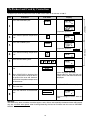
Sensor Instant Action
Press once to cook 6 popular menus. Follow the details provided in
SENSOR INSTANT ACTION MENU GUIDE on page 4 - 5 in the
cooking guides.
* Suppose you want to cook 1.0 kg Fresh Vegetables.
Step
Procedure
Pad Order
Press the SENSOR INSTANT
ACTION pad for Fresh Vegetables (within 1 minute of closing
the door).
Fresh
Vegetables
Display
COOK
COOK
COOK
COOK
1
*When the sensor detects the
vapour from the food, the remaining cooking time will appear.
(eg. remaining cooking time
is approximately. 1 min.42
sec.)
COOK
The timer begins to count down. When the
cooking time reaches zero, STAND,
COVERED, 1-5MIN, STIR, ENJOY YOUR,
VEGETABLES will be displayed.
NOTE:
You can get a cooking hint by pressing the HELP pad before pressing the desired SENSOR INSTANT ACTION
pad. See page 23.
15
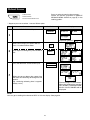
Reheat Sensor
Press to select 3 popular reheat menus.
Follow the details provided in REHEAT
SENSOR MENU GUIDE on page 6 in the
cooking guides.
1.Dinner Plate
2.Reheat Pizza
3.Casseroles/Canned Food
* Suppose you want to reheat 1 serve of Dinner plate.
Step
Procedure
Pad Order
Press the REHEAT SENSOR pad.
Display
REHEAT
SENSOR
1
)
(Operation guide off:
Select food category for Reheat Sensor.
Press 1 to reheat Dinner Plate.
HELP
2
If you require a cooking hint, press the HELP
pad.
HELP
Press the INSTANT COOK/START pad.
HELP
HELP
HELP
HELP
INSTANT COOK
START
COOK
HELP
COOK
HELP
3
* When the sensor detects the vapour from
the food, the remaining reheating time will
appear.
(eg. remaining reheating time is approximately 1 min.)
COOK
HELP
COOK
HELP
The timer begins to count down.
When the cooking time reaches
zero, STAND, COVERED 2MIN,
ENJOY YOUR, DINNER will be
displayed.
NOTE:
You can get a cooking hint whenever HELP is lit in the display. See page 23.
16
Convenience / Pizza
1.Frozen Pizza
2.Fresh Pizza
3.Fries
Press to select 6 popular menus.
Follow the details provided in CONVENIENCE
/ PIZZA MENU GUIDE on page 7 in the
cooking guides.
4.Frozen Pasta
5.Crumbed Fish
6.Finger Food
* Suppose you want to cook 0.5 kg Frozen Pizza.
Step
Procedure
Pad Order
Press the CONVENIENCE / PIZZA pad.
Display
CONVENIENCE
/PIZZA
1
(Operation guide off:
2
3
Select food category for
Convenience / Pizza.
Press 1 to cook Frozen Pizza.
)
HELP
Enter the weight.
HELP
Press the INSTANT COOK/START pad.
INSTANT COOK
START
4
COOK
HELP
The timer begins to count down.
When the cooking time reaches
zero, ENJOY YOUR, PIZZA will
be displayed repeatedly.
NOTE:
You can get a cooking hint whenever HELP is lit in the display. See page 23.
Warning:
The oven cavity, door, turntable, turntable support, racks, dishes and especially bottom heater will become very
hot, use thick oven gloves when inserting/removing the food or turntable from the oven to PREVENT BURNS.
17
Multi Cook
1.Roast Beef
2.Roast Lamb
3.Roast Chicken
4.Roast Pork
5.Grilled Steak/Chops
6.Grilled Chicken Pieces
Press to select 6 popular Grill and Mix cooking
menus.
Follow the details provided in MULTI COOK
MENU GUIDE on page 8 - 9 in the cooking
guides.
* Suppose you want to cook 1.0 kg Roast Beef (Medium).
Step
1
Procedure
Pad Order
Press the MULTI COOK pad.
Display
MULTI
COOK
(Operation guide off:
2
3
Select food category for Multi Cook.
Press 1 to cook Roast Beef.
HELP
Enter the weight.
HELP
Press the INSTANT COOK/START pad.
INSTANT COOK
START
COOK
HELP
The timer begins to count down.
The oven will "beep" 4 times and
will stop.
TURN BEEF, OVER will be displayed repeatedly.
4
5
)
PRESS START will be displayed repeatedly.
Open the door. Turn over the meat. Close
the door.
Press the INSTANT COOK/START pad.
INSTANT COOK
START
6
COOK
HELP
When the cooking time reaches
zero, STAND, COVERED, 515MIN, FOIL, ENJOY YOUR,
BEEF will be displayed repeatedly.
NOTE:
You can get a cooking hint whenever HELP is lit in the display. See page 23.
Warning:
The oven cavity, door, turntable, turntable support, racks, dishes and especially bottom heater will become very
hot, use thick oven gloves when inserting/removing the food or turntable from the oven to PREVENT BURNS.
18
Easy Defrost
The Easy Defrost feature allows you to defrost meats by entering weight.
Follow the details provided in EASY DEFROST MENU GUIDE on page 0 in the cooking
guides.
* Suppose you want to defrost 2.0 kg of Poultry.
Step
Procedure
Pad Order
Press the EASY DEFROST pad.
Display
EASY
DEFROST
1
HELP
HELP
(Operation guide off:
)
Press number pads to enter weight.
2
HELP
Press the INSTANT COOK/START pad.
INSTANT COOK
START
COOK
HELP
The cooking time will begin
counting down. The oven will
“beep” 4 times and will stop.
REMOVE, DEF-, ROSTED,
PORTION, TURN FOOD,
OVER, SHIELD EDGES, OR,
WARM, PORTION will be
displayed repeatedly.
3
4
COOK
HELP
Open the door. Turn over meat.
Close the door.
PRESS START will be displayed
repeatedly.
INSTANT COOK
START
Press the INSTANT COOK/START pad.
COOK
HELP
COOK
HELP
The cooking time will begin counting to zero, when it reaches zero,
the oven will “beep”.
STAND, COVERED, 5-50MIN,
FOIL will be displayed repeatedly.
5
NOTE:
You can get a cooking hint whenever HELP is lit in the display. See page 23.
19
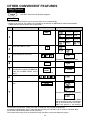
OTHER CONVENIENT FEATURES
Help Feature
The HELP feature has 6 different programs.
Auto Start
The Auto Start feature allows you to set your oven to start automatically.
* Suppose you want to start cooking a casserole for 20 minutes on MEDIUM at 4:30 in the afternoon.
(Check that the correct time of day is displayed.)
Step
Procedure
Press the HELP pad.
Pad Order
Display
HELP
1
Press the number 1 pad.
2
Enter the desired start time.
3
The dots (:) will flash on and off.
4
5
6
Press the CLOCK pad.
Set the desired cooking mode.
(for microwave cooking on MEDIUM,
press the POWER LEVEL pad 3
times)
CLOCK
POWER
LEVEL
x3
Enter the desired cooking time.
Press the INSTANT COOK/START
pad.
INSTANT COOK
START
7
The oven will start cooking at 4:30 P.M.
COOK
The timer begins to count down. When
the timer reaches zero, all indicators
will go off and the oven will "beep".
END will appear in the display.
To check the current time, simply press the CLOCK pad, the time will be displayed.
If the door is opened after step 7, close the door and press the START pad to continue with Auto Start.
Press the STOP/CLEAR pad to cancel Auto Start.
The correct time of day must be set before using Auto Start, see clock setting on page 6.
20
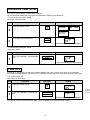
Information Guide On/Off
This oven is preset with the Information Guide On.
As you get more familiar with your oven, the Information Guide can be turned off.
* To turn off the Information Guide.
After step 1 for Auto Start.
Step
Procedure
Pad Order
Display
Press the number 2 pad.
2
Press the STOP/CLEAR pad.
3
STOP
CLEAR
The time of day will appear in the display.
* To restore the Information Guide.
After step 2 above.
Step
3
Procedure
Pad Order
Press the INSTANT COOK/START
pad.
INSTANT COOK
START
Display
The time of day will appear in the display.
Child Lock
If the oven is accidentally started with no food or liquid in the cavity, the life of the oven can be reduced.
To prevent accidents like this, your oven has a "Child Lock" feature that you can set when the oven is not in use.
* To set the Child Lock.
After step 1 for Auto Start.
Step
Procedure
Pad Order
Display
Press the number 3 pad.
2
3
Press the INSTANT COOK/START
pad.
INSTANT COOK
START
The time of day will appear in the display.
The control panel is now locked, each time a pad is pressed, the display will show "LOCK".
21
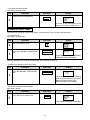
* To unlock the control panel.
After step 2 for Child Lock.
Step
Procedure
Press the STOP/CLEAR pad.
3
Pad Order
Display
STOP
CLEAR
The time of day will appear in the
display. The oven is ready to use.
Demonstration Mode
This feature is mainly for use by retail outlets, and also allows you to practice key operations.
* To demonstrate.
After step 1 for Auto start.
Step
2
3
Procedure
Pad Order
Display
Press the number 4 pad.
Press the INSTANT COOK/START
pad.
INSTANT COOK
START
Then DEMO,SHARP, MICROWAVE,
OVEN will appear repeatedly.
Cooking operations can now be demonstrated with no power in the oven.
* Suppose you demonstrate Instant Cook.
Step
Procedure
Press the INSTANT COOK/START
pad.
Pad Order
Display
INSTANT COOK
START
1
COOK
The cooking time will begin counting
down to zero at ten times the speed.
When the timer reaches zero,
END will appear in the display.
* To cancel the Demonstration Mode.
After step 2 above.
Step
Procedure
Press the STOP/CLEAR pad.
3
Pad Order
Display
STOP
CLEAR
The time of day will appear in the display.
22
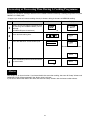
Info on Pads
Each pad carries useful guide.
* To get the guide for MULTI COOK pad. After step 1 for Auto Start.
Step
Procedure
Press the MULTI COOK pad.
Pad Order
Display
MULTI
COOK
2
The guide message will be repeated twice, and then the display will show the time of day.
If you want to cancel the guide, press the STOP/CLEAR pad.
Help
Each setting of Automatic Operations has a cooking hint.
If you wish to check, press the HELP pad whenever HELP is lit in the display.
NOTE : For SENSOR INSTANT ACTION, HELP is not lit in the display, so press the HELP pad before pressing
the desired SENSOR INSTANT ACTION pad.
Less/More Setting
The cooking times programmed into the automatic menus are tailored to the most
popular tastes. To adjust the cooking time to your individual preference use the
“more” or “less” feature to either add (more) or reduce (less) cooking time.
The LESS/MORE pads can be used to adjust the cooking time of the following features
– SENSOR INSTANT ACTION – REHEAT SENSOR – MULTI COOK
– CONVENIENCE / PIZZA – EASY DEFROST
To adjust cooking time, press the LESS or MORE pad at the beginning of the procedure.
* Suppose you want to cook 1.0 kg Fresh Vegetables for less time than the standard setting.
Step
1
2
Procedure
Pad Order
Display
Press the LESS pad.
LESS
Press the SENSOR INSTANT
ACTION pad for Fresh Vegetables
(Within 1 minute of closing the door).
Fresh
Vegetables
23
COOK
COOK
COOK
COOK
Increasing or Decreasing Time During A Cooking Programme
Microwave, Convection, Grilling or Mix time can be added or decreased during a cooking programme using the
“MORE” or “LESS” pads.
* Suppose you want to increase cooking time by 2 minutes during 5 minutes on MEDIUM cooking.
Step
Procedure
1
Select microwave cooking and power level
by pressing the POWER LEVEL pad as
required.
(for MEDIUM press three times)
2
Pad Order
Display
POWER
LEVEL
x3
Enter desired cooking time.
Press the INSTANT COOK/START pad.
INSTANT COOK
START
COOK
The timer starts to count down.
3
COOK
4
Press the MORE pad twice to increase time
by two minutes.
MORE
COOK
x2
Alarm
Your oven has an alarm function. If you leave food in the oven after cooking, the oven will "beep" 3 times and
REMOVE FOOD will be appeared in the display after 2 minutes.
If you do not remove the food at that time, the oven will "beep" 3 times after 4 minutes and 6 minutes.
24
CARE AND CLEANING
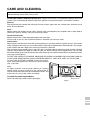
Disconnect the power supply cord before cleaning or leave the door open to inactivate the oven.
Before cleaning ensure oven cavity is cool.
CLEAN THE OVEN AT REGULAR INTERVALS - Keep the oven clean, or it could lead to deterioration of the
surface. This could adversely affect the life of the appliance and possibly result in a hazardous situation.
Exterior:
The outside may be cleaned with mild soap and warm water, wipe clean with a damp cloth. Avoid the use of
harsh abrasive cleaners.
Door:
Wipe the door and window on both sides, the door seals and adjacent parts frequently with a damp cloth to
remove any spills or spatters. Do not use abrasive cleaner.
Touch Control Panel:
Wipe the panel with a cloth dampened slightly with water only.
Do not scrub or use any sort of chemical cleaners. Avoid the use of excess water.
Interior walls:
Wipe spatters and spills with a little dish washing liquid on a soft damp cloth for hygienic reasons. For heavier
stains inside the oven cavity only, use a mild stainless steel cleaner applied with a soft damp cloth. Do not apply
to the inside of the door. Wipe clean ensuring all cleaner is removed.
After use wipe the waveguide cover in the oven with a soft damp cloth to remove any food splashes. Built-up
splashes may overheat and begin to smoke or catch fire. Do not remove the waveguide cover. You can hold
the bottom heater up by hand for cleaning only. After cleaning, sit the bottom heater down in the lowest position
(see page 4 and Figure 1).
DO NOT USE CAUSTIC CLEANERS, ABRASIVE OR HARSH CLEANSERS OR SCOURING PADS ON
YOUR OVEN. NEVER SPRAY OVEN CLEANERS DIRECTLY ONTO ANY PART OF YOUR OVEN.
DO NOT USE A STEAM CLEANER. Avoid using excess
water. After cleaning the oven, ensure any water is remove
with a soft cloth.
Note:
At regular intervals, heat the oven referring to "Heating
without Food" on page 9. Because, the splashed dirt or
food oil remained around the top and bottom heaters and
oven walls may cause the smoke and odour.
Turntable/Turntable Support/Racks:
Wash with mild soapy water and dry thoroughly.
Bottom heater
Figure 1
25
SERVICE CALL CHECK
Check the following before calling service:
No
1. Does the display light?
Yes
2. When the door is opened, does the oven lamp come on?
Yes
No
3. Place one cup of water (approx. 250 ml) in a glass measure in the oven and close the door securely.
Press the INSTANT COOK / START.
No
A. Does the oven lamp light?
Yes
B. Does the cooling fan work?
Yes
No
(Put your hand over the rear ventilation openings.)
No
C. Does the turntable rotate?
Yes
(The turntable can rotate clockwise or counterclockwise. This is quite normal.)
No
D. Does the COOK indicator light?
Yes
E. After one minute, did an audible signal sound?
Yes
No
F. Is the water inside the oven hot?
Yes
No
4. Remove water from the oven and programme the oven for 3 minutes on GRILL mode using top and bottom
heaters.
No
A. Do the top and bottom heater symbols and COOK indicator light?
Yes
B. After 3 minutes, do the both heaters become red? (Pay special attention to prevent burns when checking
No
the bottom heater)
Yes
If "NO" is the answer to any of the above questions, please check your wall socket and the fuse in your meter
box.
If both the wall socket and the fuse are functioning properly, CONTACT YOUR NEAREST SERVICE CENTRE
APPROVED BY SHARP.
NOTE: 1. If time in the display is counting down very rapidly, check Demonstration Mode.
(Please see page 22 for detail.)
2. The following thing is not trouble;
Each cooking mode has a maximum cooking time. If you operate the oven longer than the maximum
time, the power will automatically be reduced. The table below shows the maximum time for each
cooking mode.
Cooking mode
Maximum cooking time
20 min.
Microwave 100% cooking
Grill cooking
Top heater
Bottom heater
Top and bottom
heaters
30 min.
15 min.
Top heater
10 min.
Bottom heater
10 min.
SPECIFICATIONS
AC Line Voltage
AC Power Required
Microwave
Grill
Output Power
Microwave
Grill Heater
Microwave Frequency
Outside Dimensions
Cavity Dimensions
Cooking Uniformity
Weight
: Single phase 230-240V, 50Hz.
:
1.6 kW
2.1kW
:
900W* (IEC)
1200W (Top heater)
800W (Bottom heater)
2000W (Top and bottom heater)
: 2450 MHz (Class B/Group 2)**
: 520mm(W) x 309mm(H) x 502mm(D)
: 352mm(W) x 207mm(H) x 368mm(D)
: Turntable (325mm in diameter) system
: Approx. 20kg
* When tested in accordance with AS/NZS 2895.1.1995
** This is the classification of ISM (Industrial, Scientific and Medical) equipment described in the International
Standard CISPR11.
26
NOTE
27
1
HELPFUL HINTS
COOKWARE
AND
UTENSIL GUIDE 3
SENSOR INSTANT REHEAT SENSOR CONVENIENCE/PIZZA
ACTION
MENU GUIDE
MENU GUIDE
MENU GUIDE
7
6
4
CONTENTS COOKING GUIDE
MULTI COOK
MENU GUIDE
8
EASY DEFROST
MENU GUIDE
10
COOKING GUIDES
11 - 40
RECIPES
EGG
CHICKEN
STIR
6. STANDING TIME
Standing time is important. After cooking or defrosting ensure adequate
standing time. This allows the food to continue cooking or heating. Refer to
cooking guides for each menu or according to manufacturers instructions.
7. STIRRING
Stir foods from the outside to the centre of the dish, once or twice during cooking
if possible.
Eg. Casseroles and Sauces.
FISH
5. SHIELDING
Shield using small pieces of aluminium foil to shield thin areas of meat, fish and
poultry or edges of cakes to prevent overcooking.
TOMATO
LID
PLASTIC WRAP
PAPER TOWEL
4. PIERCING
Pierce potatoes, eggs, oysters, tomatoes or any foods with a skin or membrane
to allow steam to escape.
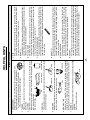
1. ARRANGEMENT
Arrange foods carefully. Place thickest areas toward outside of dish.
Eg. Arrange vegetables in a shallow dish in the following way:
Hard Vegetables around the outside, Soft Vegetables
in the centre, Medium Vegetables in-between.
2. TURNING
Foods such as poultry and joints of meat should be turned over after half the
cooking time.
3. COVERING
Cover foods in the microwave if you would normally cover the food in your
ordinary oven, or to retain moisture. Cover foods such as Vegetables, Casseroles, or when Reheating.
Use to cover foods:
1
12. QUANTITY
Microwave cooking times are directly related to the amount of food in the oven.
Because energy is absorbed by the food itself, one potato or a single piece of
chicken cooks rapidly. When the energy is divided among several items,
cooking takes more time.
13. CONDENSATION
Condensation is a normal part of microwave cooking. The humidity and
moisture in food will influence the amount of condensation in the oven.
Generally, covered foods will not cause as much condensation as uncovered
foods. Ensure that the ventilation openings are not blocked.
14.GENERAL
Your microwave oven is capable of heating food and beverages very quickly
therefore, it is very important that you select the appropriate cooking time and
power level for the type and quantity of food to be heated. If you are unsure of
the cooking time and power level required, begin with low cooking times and
power levels until the food is sufficiently heated evenly throughout.
8. SIZE
Small pieces cook faster than large ones. To speed cooking, cut pieces
smaller than 5 cm so microwaves can penetrate to the centre from all sides.
For even cooking, make all the pieces the same size.
9. DENSITY
The depth to which microwaves penetrate food varies depending on the food's
density. Porous foods like minced beef or mashed potatoes microwave faster
than dense ones like steak or whole potatoes.
10. FAT AND BONE
Marbling within meat, or a thin, even layer of fat on a roast, speeds cooking.
Large fatty areas or excess drippings in dish attract energy away from meat,
and slows cooking. Centre bones do not affect cooking, but bone on the side
of meat conducts heat to the areas next to it.
11. STARTING TEMPERATURE
Frozen or refrigerated food takes longer to heat than food at room temperature.
Cooking times in this book are based on normal storage temperatures. Since
rooms, refrigerators and freezers differ in temperature, check for doneness at
the minimum time.
MICROWAVE COOKING
HELPFUL HINTS
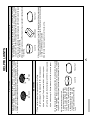
3. Metal cookware can be used.
During mix cooking some metal utensils may cause arcing when they
come in contact with oven walls or
accessory racks. To prevent arcing
when using a metal tin, place a heat
resistant dish (Pyrex
pie plate,
dinner plate) between the tin and the
rack.
CAKE TIN
PIZZA TRAY
2. Use thick oven gloves when removing the food or turntable from the oven to
PREVENT BURNS. Because the oven cavity, door, turntable, turntable
support, racks, dishes and especially bottom heater will become very hot.
d) Low mix bottom grill - Bottom browner with 10% microwave power.
c) High mix bottom grill - Bottom browner with 50% microwave power.
b) Low mix top grill - Top browner with 50% microwave power.
a) High mix top grill - Top browner with 70% microwave power.
1. There are four automatic, preprogrammed mix settings.
MIX COOKING
HIGH RACK
2
SQUARE DISH
PIZZA TRAY
4. If you are cooking and wish to check the temperature you have programmed,
simply press the CONVEC pad. The programmed temperature will be displayed
as long as CONVEC pad is pressed.
5. Do not cook 2 layers of eg. biscuits at the same time.
CAKE TIN
1. Use thick oven gloves when removing the food or turntable from the oven to
PREVENT BURNS. Because the oven cavity, door, turntable, turntable
support, racks, dishes and especially bottom heater will become very hot.
2. For best results, preheat to required temperature with the turntable in the oven.
Add food after preheating.
3. Metal cookware can be used. Round pizza trays are excellent cooking utensils
for cooking.
1. Use thick oven gloves when removing the food or turntable from the oven to
PREVENT BURNS. Because the oven cavity, door, turntable, turntable
support, racks, dishes and especially bottom heater will become very hot.
2. Foods may be cooked either directly on turntable, or using the high or low racks.
LOW RACK
CONVECTION COOKING
GRILL COOKING
HELPFUL HINTS
For Shielding
YES
For Shielding
NO
NO
YES
PAPER TOWEL
THERMOMETERS
MICROWAVE SAFE
CONVENTIONAL
YES
NO
Defrost Only
DEFROST RACK
YES
YES
*3
BROWNING DISH
PLASTIC COOKWARE
MICROWAVE SAFE
3
NO
NO
NO
NO
NO
NO
NO
NO
NO
NO
NO
*2 YES
(microwave safe
wrap only)
PLASTIC WRAP
NO
NO
NO
YES
WAXED PAPER
NO
NO
YES
GREASE-PROOF PAPER
NO
YES
NON-STICK PAPER
NO
ALUMINIUM FOIL
NO
NO
YES
OVEN BAGS
YES
YES
*1
YES
NO
YES
YES
MIX
COOKING
METAL COOKWARE
YES
YES
YES
(LOW RACK
ONLY)
*1 When using metal utensil, place a heat resistant dish between the metal utensil and the rack (refer to page 2).
*2 For cooking food with high fat contents, do not bring the wrap in contact with the food as it may melt.
*3 Some microwave safe plastic cookware are not suitable for cooking foods with high fat and sugar content.
DEFROST RACK
;;;;;;;;
;;;;;;
;;;;;;;;
;;;;;;
;;;;;;;;
;;;;;;
SQUARE DISH
FOIL
PAPER TOWEL
RING CENTRE DISH
PIZZA TRAY
METAL RACKS
CAKE TIN
OVENPROOF GLASS
GLASSWARE/CERAMIC
(HEAT RESISTANT)
METAL RACKS
GRILL
MICROWAVE
COOKWARE & UTENSIL GUIDE
NO
NO
NO
NO
NO
NO
NO
NO
NO
NO
YES
NO
YES
YES
YES
CONVECTION
Carrots
Beans
Brussels Sprouts
Broccoli
Cauliflower
Corn
Green Peas
Mixed Vegetables
Frozen Vegetables
soft vegetables
medium vegetables
hard vegetables
0.1-1.0 kg
–18°C
Frozen
1-10 pieces
+20°C
(1 piece, approx. 150g) Room temperature
Jacket Potato
Potato (whole)
4
Micro
Micro
Procedure
• Wash the vegetables.
• Pierce skin of squash with folk.
• Arrange the vegetables in a shallow dish in the following way : hard
vegetables around the outside, soft vegetables in the centre, medium
vegetables in-between.
• Cover with a glass lid or plastic wrap.
• After cooking, stand coverd and stir.
• Before cooking, separate vegetables eg. broccoli as much as possible.
• Arrange the vegetables in a shallow dish in the following way : hard
vegetables around the outside, soft vegetables in the centre, medium
vegetables in-between.
• Cover with a glass lid or plastic wrap.
• After cooking, stand covered and stir.
Use washed new potatoes.
Pierce twice with fork on each side.
Place on outside of turntable.
When oven stops and TURN, POTATO OVER is displayed, turn over
potatoes and continue cooking.
• After cooking, stand, covered with aluminium foil.
•
•
•
•
Micro
• Remove from package.
Top/bottom • Place directly onto turntable.
grill
• After cooking, stand.
Micro
+3°C
Refrigerated
+3°C
Refrigerated
Cooking
Method
Initial
Temperature
(approx.)
1-4 pieces
(1 piece, approx. 180g)
soft vegetables
medium vegetables
hard vegetables
0.1-1.0 kg
Weight
Range
Reheat Pie
meat
Carrots
Potato
Beans
Brussels Sprouts
Broccoli
Cauliflower
Zucchini
Spinach
Cabbage
Squash
Fresh Vegetables
Menu
SENSOR INSTANT ACTION MENU GUIDE
1-5
3-10
1-3
1-5
Standing
Time
(minutes)
Pasta
Rice
/2 cup
1 cup
1 1/2 cups
2 cups
3 cups
4 cups
1
Pasta
/2 cup
1 cup
1
1 /2 cups
2 cups
3 cups
4 cups
1
Rice
Menu
2 cups
2 cups
3 cups
4 cups
5 cups
6 cups
Hot tap water
(1cup = 250ml)
1/2 - 4 cups
1 cup
1 1/2 cups
2 cups
4 cups
4 1/2 cups
6 cups
Soup stock or Hot tap
water (1cup = 250ml)
1/2 - 4 cups
Weight
Range
+60°C
Hot tap water
+60°C
Hot tap water or
soup stock
Initial
Temperature
(approx.)
5
Micro
Micro
Cooking
Method
•
•
•
•
Place into a Pyrex® bowl and cover with hot tap water.
Cook uncovered.
When oven stops and STIR is displayed, stir and continue cooking.
After cooking, stand and stir.
• Wash rice until water runs clear.
• Place into a Pyrex® bowl and cover with hot soup stock or with hot tap
water.
• Cook uncovered.
• When oven stops and STIR is displayed, stir and continue cooking.
• After cooking, stand and stir.
Procedure
1-5
1-5
Standing
Time
(minutes)
3
2
1
No.
Weight
Range
+20°C
Room temperature
+3°C
Refrigerated
1-4 cups (1 cup, 250 ml)
Casseroles
Beef Stroganoff
Springtime Lamb
Apricot Chicken
Canned Food
Baked Beans
Spaghetti
+3°C
Refrigerated
2 varieties
eg. sliced Carrot,Zucchini
Broccoli
6
Micro
Micro
Micro
+3°C
Refrigerated
1-4 pieces
(1 pieces, approx. 90 g)
sliced
Beef, Lamb
Chicken, T-Bone
VEGETABLES
100g
Cooking
Method
Initial
Temperature
(approx.)
Procedure
• Place into a casserole dish, and cover with lid.
• After cooking, stir and stand covered.
• Place pizza on the low rack.
• Cover with plastic wrap.
• Place on the low rack.
• After cooking, stand covered.
When you reheat the following menus with REHEAT
SENSOR, press the REHEAT SENSOR pad and the
number pad of the menu.
Reheat Pizza
POTATO
125g
1 serve (approx. 400 g)
MEAT
175-180g
Dinner Plate
Menu
1. Dinner Plate
2. Reheat Pizza
3. Casseroles/Canned Food
REHEAT SENSOR MENU GUIDE
1-5
2
Standing
Time
(minutes)
6
5
4
3
2
1
No.
-18 °C
Frozen
temperature
Finger Food
0.2 - 0.8kg
Includes:
Party pies
Party sausage rolls
Cocktail spring rolls
Mini chicken drum sticks
Sea shantys
Chicken chippees, Calamari
-18 °C
Frozen
temperature
-18 °C
Frozen
temperature
+ 3 °C
Refrigerated
-18 °C
Frozen
temperature
Initial
Temperature
(approx.)
-18 °C
Frozen
temperature
0.3 - 1.0kg
0.1 - 0.5kg
1 pizza
(500 - 700g)
0.2 - 0.5 kg
Weight
Range
4. Frozen Pasta
5. Crumbed Fish
6. Finger Food
0.1 - 0.5kg
Crumbed Fish
Includes:
Fish fingers
Battered Fish
Frozen Pasta
Includes:
Lasagne
Cannelloni
Fries
Includes:
Wedges
Crinkle cut
Shoe string
Fresh pizza
Topping include:
Ham
Cheese
Onion
Olives
Capsicum
Mushrooms
Peperoni
Cabanossi
Pineapple
Frozen pizza
Menu
1. Frozen Pizza
2. Fresh Pizza
3. Fries
Micro
Top/bottom
grill
Top grill
Micro
Top/bottom
grill
Top grill
Micro
Mix
Micro
Top/bottom
grill
Top grill
Top/bottom
grill
Top grill
Micro
Top/bottom
grill
Cooking
Method
7
• Remove from package.
• Place directly onto turntable.
• Remove from package.
• Place directly onto turntable.
• Remove the pasta from foil tray and place in a heat - resistant ceramic dish.
• Place on the low rack.
• Do not cover.
• After cooking, stand
• Place directly onto turntable.
• When oven stops and TURN FRIES, OVER is displayed, turn over fries and
continue cooking.
• Add paste and toppings of your choice to fresh pizza base.
• Place directly onto turntable.
• Remove from package.
• Place directly onto turntable.
Procedure
To cook the following CONVENIENCE/PIZZA menus.
Press the CONVENIENCE/PIZZA pad and the number pad of the menu.
CONVENIENCE/PIZZA MENU GUIDE
2-5
Standing
Time
(minutes)
3
2
1
No.
8
• Place breast side down on the low rack.
• When oven stops and TURN, CHICKEN OVER is displayed, turn chicken
over.
• After cooking, stand covered with aluminium foil.
Mix
+3°C
Refrigerated
1.0-2.0 kg
Preparation before cooking
• Remove neck and excess fat from chicken.
• Wash and dry chicken.
• Tie legs together.
Roast Chicken
• Place fat side down on the low rack.
• When oven stops and TURN LAMB, OVER is displayed, turn lamb over.
• After cooking, stand covered with aluminium foil.
Mix
+3°C
Refrigerated
Tie meat with string.
Place fat side down on the low rack.
When oven stops and TURN BEEF, OVER is displayed, turn beef over.
After cooking, stand covered with aluminium foil.
•
•
•
•
Mix
+3°C
Refrigerated
Procedure
Cooking
Method
5-15
5-15
5-15
Standing
Time
(minutes)
When you cook the following menus with MULTI COOK, press the MULTI COOK pad and the number
pad of the menu.
Initial
Temperature
(approx.)
0.5-2.5 kg
0.5-3.0 kg
Roast Beef
* You can select desired
cooking result.
MORE - Well done
STD - Medium
LESS - Rare
Roast Lamb
* You can select desired
cooking result.
MORE - Well done
STD - Medium
Weight
Range
4. Roast Pork
5. Grilled Steak/Chops
6. Grilled Chicken Pieces
Menu
1. Roast Beef
2. Roast Lamb
3. Roast Chicken
MULTI COOK MENU GUIDE
6
5
4
No.
Grilled Chicken Pieces
Grilled Steak/Chops
Includes:
T-bone Steak
Rump Steak
Pork Chops
Lamb Chump Chops
Lamb Ioin Chops
Roast Pork
Menu
0.3 - 1.0 kg
0.3 - 1.0 kg
0.5 - 3.0 kg
Weight
Range
+3°C
Refrigerated
+3°C
Refrigerated
+3°C
Refrigerated
Initial
Temperature
(approx.)
9
Mix
Top grill
Top/bottom
grill
Mix
Cooking
Method
• Place chicken skin side down on the high rack and season.
• When oven stops and TURN, CHICKEN, PIECES, OVER is displayed, turn chicken over and season.
• After cooking, stand covered with aluminium foil.
• Place directly onto turntable.
• When oven stops and DRAIN, JUICES, TURN, STEAK CHOPS,
OVER is displayed, DRAIN FAT JUICES and
turn meat over.
• Tie meat with string (loins only).
• Brush rind lightly with oil and season with salt.
• Place rind side down on the low rack.
• When oven stops and TURN PORK, OVER is displayed, turn pork
over.
• After cooking, stand covered with aluminium foil.
Procedure
5
5-15
Standing
Time
(minutes)
0.1-3.0
0.1-3.0
0.1-3.0
1.0-3.0
0.5-3.0
Minced Meat
Beef
Steak/Chops
Chicken Pieces
Poultry
Roast Meat
Beef/Lamb/Pork
•
•
•
•
Shield the bone and the edge with foil strips about 2.5cm wide.
Place joint with lean side face upwards (if possible) on a defrost rack.
When the oven has stopped, turn over and shield the warm portions.
After defrost time, stand covered with aluminium foil.
• Remove from original wrapper. Shield wing and leg tips with foil.
• Place breast side down on a defrost rack.
• When the oven has stopped, turn over and shield the warm portions.
• After defrost time, stand covered with aluminium foil.
N.B. After standing run under cold water to remove giblets if necessary.
• Shield the exposed bone with foil.
• Place chicken pieces on a defrost rack.
• When the oven has stopped, remove any defrosted pieces, turn over and shield the warm
portions of remaining pieces.
• After defrost time, stand covered with aluminium foil.
• See NOTE below.
• Shield thin end of chops or steaks with foil.
• Position the food with thinner parts in the centre in a single layer on a defrost rack.
If pieces are stuck together, try to separate as soon as possible.
• When the oven has stopped, remove defrosted pieces, turn over and shield the warm
portions of remaining pieces.
• After defrost time, stand covered with aluminium foil.
• See NOTE below.
• Place shielded frozen minced meat on a defrost rack.
• When the oven has stopped, remove defrosted portions of mince, turn over and shield
edges with foil strips.
• After defrost time, stand covered with aluminium foil.
• See NOTE below.
Procedure
10
Foods not listed in the Guide can be defrosted using M•LOW setting.
NOTE: When freezing minced meat, shape it into flat even sizes.
For chicken pieces, steaks and chops, freeze separately in single flat layers and if necessary interleave with freezer plastic to separate layers.
This will ensure even defrosting.
It is also a good idea to label the packs with the correct weights.
Quantity
min-max
(kg's)
Menu
EASY DEFROST MENU GUIDE
15-50
15-50
5-15
10-15
10-15
Standing
Time
(minutes)
B
B
B
G
F
D
F
D
C
D
G
H
H
E
G
E
C
F
H
H
C
G
D
F
E
E
K
K
I
K
L
APPETISERS
GARLIC AND HERB FOCACCIA
QUICK NACHOS
VEGETABLE FRITTATA
MEAT
APRICOT AND ALMOND CRUSTY LAMB
BEEF MADEIRA
BEEF STROGANOFF
CHILLI CON CARNE
CORNED BEEF
CRUSTY ROSEMARY LAMB
CURRIED SAUSAGES
FILLET MIGNON
GRILLED KEBABS
HAMBURGER
HERBED LOIN OF LAMB
HONEY ROAST LAMB
ITALIAN SPAGHETTI SAUCE
LASAGNE
MINTED PICNIC LOAF
MIXED GRILL
PORK RIBS WITH CHILLI PLUM SAUCE
SHEPHERD'S PIE
SPINACH LOIN OF LAMB
SPRINGTIME LAMB CASSEROLE
TROPICAL CURRY LAMB
VEAL À LA MEDALLION
VEAL AND PINEAPPLE
POULTRY
APRICOT CHICKEN
CHEESE AND HERB CHICKEN LEGS
CHICKEN AND APRICOT SALAD
CHICKEN AND MACARONI BAKE
CHICKEN CACCIATORE
INDEX
R
U
S
U
R
VEGETABLES
CAULIFLOWER AU GRATIN
CAULIFLOWER POLONAISE
CHOKOS WITH SOUR CREAM AND BACON
GRILLED TOMATOES
EASY HOME-MADE RICE RISOTTO
11
N
P
P
M
O
N
O
M
Q
M
Q
N
O
O
P
N
L
K
L
J
J
L
I
I
J
J
I
SEAFOOD
BOMBAY AVOCADO SCALLOPS
BOUILLABAISSE
CHEESY SALMON ROLLS
CRAB MORNAY
CRISPY MARINATED CRAB STICKS
GARLIC MUSSELS
GARLIC PRAWNS
OYSTERS KILPATRICK
PAELLA
PRAWN CUTLETS
PRAWN CREOLE
SEAFOOD LASAGNE
SESAME PRAWNS
SQUID IN TOMATO AND WINE SAUCE
STEAMED SCALLOPS IN
BLACK BEAN SAUCE
TAGLIATELLE AND CRAB SALAD
POULTRY continued
CHICKEN FILLET BURGERS
CHICKEN FRICASSEE
CHICKEN IN A POT
CHICKEN PROVENCALE
CHICKEN TERRINE
CHICKEN WITH BACON AND
LEEK SEASONING
CRUNCHY CAMEMBERT CHICKEN
HONEY CHICKEN LEGS
ROAST CHICKEN
TANDOORI CHICKEN
WHOLEMEAL CHICKEN
RECIPES
CHARTS
DEFROSTING CHARTS
FRESH VEGETABLE CHART
FROZEN VEGETABLE CHART
GLOSSARY OF TERMS
GRILLING CHART
GUIDE TO COOKING EGGS
REHEATING CONVENIENCE
DEFROSTING CONVENIENCE-FOOD CHART
RICE AND PASTA COOKING CHART
DESSERTS
APRICOT WHEATGERM CRUNCHIES
AUSTRALIAN FRUIT CAKE
BAKED APPLES
BREAD AND BUTTER PUDDING
CALIFORNIAN APPLE CRUNCH
CARAMEL RICE PUDDING
CHOCOLATE MOUSSE
CHOCOLATE CAKE
CHOCOLATE CHIP COOKIES
CHOCOLATE SELF-SAUCING PUDDING
MUESLI CUSTARD DELIGHT
VEGETABLES continued
HONEY CARROTS
HONEY GINGERED VEGETABLES
HOT CURRIED SLAW
MINESTRONE
POTATOES PIZZAIOLA
POTATO, AVOCADO AND ONION SALAD
PUMPKIN SALAD
SCALLOPED POTATOES
SQUASH WITH YOGHURT
STUFFED BAKED POTATOES
SUNSHINE BRUSSELS SPROUTS
VEGETABLE PLATTER
\
[
Y
Z
[
`
]
[
X
V
V
W
V
W
W
V
X
W
X
R
T
T
S
U
S
U
R
T
S
T
R
Carefully cut bread in half.
Mix margarine, garlic and herbs together in a small bowl.
Spread evenly over focaccia. Place onto the high rack side by side.
Cook for 4-5 minutes on TOP GRILL.
Cut into strips and serve hot.
1 focaccia (rectangular)
100 g margarine
2 cloves garlic, crushed
1 teaspoon mixed herbs
1.
2.
3.
4.
5.
Serves 4
Place corn chips in base of a flan dish.
Mix salsa and sour cream together in a small bowl.Pour over corn chips.
Spread tomato paste over the top of salsa.
Sprinkle with cheese.
Place on the high rack and cook for 41/2 minutes on TOP GRILL.
Serve immediately with guacamole.
GARLIC AND HERB FOCACCIA
1.
2.
3.
4.
5.
6.
200 g packet corn chips
250 g jar of salsa
1
/2 cup sour cream
2 tablespoons tomato paste
1
/4 cup grated tasty cheese
QUICK NACHOS
12
Serves 4
Arrange potatoes and onion over base of greased 23 cm pie plate.
Combine eggs and sour cream. Pour half the mixture over potatoes.
Cook for 10-12 minutes on 70% on the low rack.
Arrange asparagus, capsicum and zucchinis in a circle over potato.
Pour over remaining egg mixture. Sprinkle with cheese.
5. Cook on the low rack for 10-12 minutes on HIGH MIX TOP GRILL, and 4
minutes on TOP GRILL.
6. Stand covered with foil for 5 minutes.
7. Cut into wedges.
1.
2.
3.
4.
2 large potatoes, peeled and thinly sliced
1 onion,thinly sliced
5 eggs
450 mL sour cream
340 g can asparagus spears, drained
1
/2 red capsicum, cut into strips
2 zucchinis, cut into strips
2 tablespoons parmesan cheese
VEGETABLE FRITTATA
APPETISERS
Serves 4-6
1 tablespoon gravy powder
2
/3 cup tomato sauce
1 tablespoon Worcestershire sauce
1 tomato, chopped
2 tablespoons parsley
1 egg, beaten
Serves 6-8
1. Peel and cut potatoes into 2.5 cm cubes. Place in a large bowl. Add 2
tablespoons water; cover and cook for 12-14 minutes on 100% or until
tender. Drain.
2. Mash potatoes; add butter, milk, salt and pepper.
3. In a large bowl, combine mince and onion and cook for 10-12 minutes on
70%, stirring every 2 minutes. Drain juices from meat.
4. Add gravy powder, tomato sauce, Worcestershire sauce, tomato and
parsley. Mix well.
5. Spoon mixture into a 25 cm x 20 cm rectangular dish.
6. Spread mashed potato evenly over top of mixture. Brush with beaten egg.
7. Cook for 23-25 minutes on HIGH MIX TOP GRILL and 6 minutes on TOP
GRILL.
8. Allow to stand coverd with foil for 10 minutes before serving.
4 large potatoes (approx.1 kg)
1 tablespoon butter
1 tablespoon milk
salt and pepper
1 kg minced beef
1 onion, chopped
SHEPHERD'S PIE
1. Combine brown sugar, mustard, lemon juice and rosemary in a small bowl.
2. Place fat side down on the low rack.
3. Cook for 14 minutes on HIGH MIX TOP GRILL and 3 minutes on TOP
GRILL. Turn over, shielding shank with foil to prevent overcooking. Spread
combined ingredients over leg of lamb. Cook for a further 14 minutes on
HIGH MIX TOP GRILL and 3 minutes on TOP GRILL (for medium). Or cook
for 16 minutes on HIGH MIX TOP GRILL and 3 minutes on TOP GRILL.
Turn over, shielding shank with foil to prevent overcooking. Spread
combined ingredients over leg of lamb. Cook for a further 16 minutes on
HIGH MIX TOP GRILL and 3 minutes on TOP GRILL (for well done).
4. Allow to stand 10 minutes covered with foil before carving.
/4 cup brown sugar
2 tablespoons seeded mustard
1 tablespoon lemon juice
2 tablespoons chopped fresh rosemary
1.5 kg leg lamb
1
CRUSTY ROSEMARY LAMB
13
Serves 4-6
1. Use a 20 x 20 cm deep casserole dish.
2. Dip lasagne sheets in hot water, then cover base of dish.
3. Spoon over sheets one-third of meat sauce. Cover with one-third of cheese
sauce.
4. Repeat the process 3 times, ending with the cheese sauce.
5. Sprinkle with mozzarella cheese.
6. Cook for 24-26 minutes on HIGH MIX TOP GRILL and 4 minutes on TOP
GRILL.
7. Allow to stand 10 minutes before serving.
8. Serve with a fresh garden salad and bread.
TO COMBINE
1. Melt butter for 50-60 seconds on 100%. Stir in flour; cook for further 1
minute on 100%.
2. Gradually stir in milk. Cook for 4-6 minutes on 100%, stirring every minute.
3. Stir in tasty cheese.
CHEESE SAUCE METHOD
1. Place butter and onion in a Pyrex bowl. Cook for 2-3 minutes on 100%.
2. Stir in mince. Cook, uncovered, for 12-14 minutes on 70%, stirring every 2
minutes. Drain excess fat.
3. Stir in tomato paste, bolognese sauce, champignons and garlic.
MEAT SAUCE METHOD
90 g butter
1
/3 cup flour
1 3/4 cups milk
125 g tasty cheese, grated
200 g packet instant lasagne sheets
100 g mozzarella cheese, grated
CHEESE SAUCE INGREDIENTS
30 g butter
1 onion, chopped
1 kg topside mince
1
/4 cup tomato paste
240 g jar bolognese sauce
200 g can champignons, drained
1 clove garlic, crushed (optional)
MEAT SAUCE INGREDIENTS
LASAGNE
MEAT
3 teaspoons curry powder
/4 cup sultanas
1 beef stock cube
11/2 cups water
1
/4 cup flour
1
1. Pierce sausages with a fork twice. Arrange sausages on the low rack.
2. Cook for 14-16 minutes on 50%, turning halfway through cooking. Cut
sausages into thirds.
3. In a 2-3-litre casserole dish, place butter, onions, apple, curry powder and
sultanas; mix well. Cover and cook for 4-6 minutes on 100%.
4. Dissolve stock cube in water.
5. Mix in flour and stock, cover and cook for 4-5 minutes on 100%, stirring
once.
6. Add sausages and stir.
7. Cover and cook for an extra 6-7 minutes on 50%. Serve with boiled rice or
noodles.
1 kg sausages
2 tablespoons butter
2 onions, chopped
1 small Granny Smith apple,
peeled and finely chopped
14
1. Place in a casserole dish just large enough to contain it.
2. Add brown sugar, malt vinegar and hot water.
3. Cover with lid and cook for 70 minutes on 50%, turning over halfway through
cooking. Allow to stand covered with foil for 10 minutes before serving.
4. Serve with white sauce.
2 tablespoons brown sugar
2 tablespoons malt vinegar
3 cups hot water
1.5 kg corned beef
Serves 6-8
CORNED BEEF
CURRIED SAUSAGES
Serves 4-6
1. Toss steak with flour, salt and pepper in a freezer bag until evenly coated.
2. Place steak, left-over flour, onion, tomato purée, beef stock and red wine in a
3-litre casserole dish.
3. Cook, covered, for 35 minutes on 50%, stirring twice during cooking.
4. Stir in mushrooms and sour cream. Cook for a further 4-5 minutes on 50%.
5. Serve with boiled rice.
Serves 6
1. Combine French onion soup mix and flour in a 2-3-litre casserole dish. Toss
the lamb in flour mixture, coating thoroughly.
2. Add onions and carrots, stir in chicken stock and mix well.
3. Cover and cook for 22-24 minutes on 50%, stirring during cooking.
4. Add corn, celery and sour cream. Mix well.
5. Cook a further 16-18 minutes on 50%.
1
1
BEEF STROGANOFF
1 kg rump steak, cut into strips
/2 cup plain flour
salt and pepper
1 onion, finely chopped
2 tablespoons tomato purée
11/2 cups beef stock
1
/4 cup red wine
100 g mushrooms, thinly sliced
300 mL sour cream
Serves 4
1 packet (30 g) French onion soup
/4 cup plain flour
750 g lamb, cubed
4 spring onions, quartered
2 carrots, thinly sliced
1 cup chicken stock
310 g can corn kernels, drained
2 sticks celery, finely chopped
300 mL carton sour cream
SPRINGTIME LAMB CASSEROLE
/2 teaspoon grated lemon rind
2 rashers bacon, chopped
250 g fresh mushrooms, sliced
300 mL carton sour cream
1 tablespoon chopped chives
Serves 4-6
Serves 4-6
1. Mix first 4 ingredients together in a large casserole dish.
2. Add the veal; toss to coat in the seasonings. Stir in bacon, shallots, pineapple pieces and tomato sauce.
3. Cover and cook for 35 minutes on 50%, stirring 2-3 times during cooking.
4. Sprinkle with parsley and serve with rice.
2 tablespoons flour
2 teaspoons mixed herbs
1 teaspoon chicken stock powder
black pepper
750 g veal, diced
4 rashers bacon, chopped
3 shallots, chopped
440 g can pineapple pieces, drained
1 cup tomato sauce
2 tablespoons chopped parsley
VEAL AND PINEAPPLE
1. Toss veal in flour. Place in a 3 litre casserole dish. Stir in salt, pepper, water,
shallots, carrots, lemon rind and bacon.
2. Cover and cook for 40 minutes on 50%, stirring 2-3 times during cooking.
3. Stir in mushrooms and sour cream.
4. Cover and cook a further 5-7 minutes on 50%.
5. Sprinkle with chives.
1 kg veal, cubed
1
/2 cup plain flour
salt and pepper
3
/4 cup water
1 cup finely chopped shallots
2 carrots, thinly sliced
1
VEAL À LA MEDALLION
15
Serves 8
Serves 4-6
1. Mix mince, onion and garlic together in a large bowl. Cook for 8-10 minutes
on 70%, stirring every 2 minutes. Drain well.
2. Stir in canned tomatoes, tomato paste, mushrooms, parsley, salt, oregano
and basil.
3. Cook a further 8-11 minutes on 70%. Stir halfway through cooking.
4. Serve over hot spaghetti.
500 g topside mince
1 onion, chopped
1 clove garlic, crushed
410 g can whole tomatoes
1
/2 cup tomato paste
100 g mushrooms, sliced
1 tablespoon chopped parsley
1 teaspoon salt
1
/2 teaspoon dried oregano leaves
1
/2 teaspoon dried basil leaves
ITALIAN SPAGHETTI SAUCE
1. Mix all ingredients except lamb together to form a marinade in a small bowl.
2. Place loin of lamb in a large shallow dish and pour over marinade; leave
overnight.
3. Remove loin of lamb from marinade and roll loin tightly, securing with string.
4. Place on the low rack.Cook for 10-12 minutes on HIGH MIX TOP GRILL and 3
minutes on TOP GRILL. Turn meat over and cook for a further 10-12 minutes
on HIGH MIX TOP GRILL and 3 minutes on TOP GRILL. (for medium). Or cook
for 14-16 minutes on HIGH MIX TOP GRILL and 3 minutes on TOP GRILL.
Turn meat over and cook for a further 14-16 minutes on HIGH MIX TOP GRILL
and 3 minutes on TOP GRILL (for well done).
5. Allow to stand 10 minutes covered with foil before carving.
1
/2 cup white wine
/4 cup oil
3 cloves garlic, crushed
freshly ground black pepper
1 teaspoon rosemary spikes
1 kg loin of lamb
1
HERBED LOIN OF LAMB
1
/2 cup beef stock
/2 cup madeira or sherry
1
/2 teaspoon paprika
350 g beans, washed and sliced
1 green capsicum, sliced
1
Serves 4-6
Serves 4-6
1. Place onion, lamb, chicken stock, stock powder and curry powder into a 3litre casserole dish.
2. Cover and cook for 28-30 minutes on 50%; stir twice during cooking.
3. Drain lamb and reserve 1/2 cup of liquid.
4. Combine liquid, apricot syrup and arrowroot. Cook for 1-2 minutes on 100%.
5. Combine lamb, apricots and stock mixture and liquid, together in a 3-litre
casserole dish and cover.
6. Heat through for 12-14 minutes on 50%.
7. Serve with boiled rice.
1 onion, thinly sliced
1 kg lamb, trimmed and cubed
1 cup chicken stock
1 teaspoon chicken stock powder, extra
3 teaspoons curry powder
825 g can apricot halves, drained, reserving 1/2 cup syrup
2 tablespoons arrowroot
TROPICAL CURRY LAMB
1. In a 3-litre casserole dish, combine meat and flour; mix well.
2. Add onions and carrots.
3. In a jug, combine garlic, beef stock, madeira or sherry, and paprika; stir well.
Pour over beef.
4. Cook, covered, for 20-22 minutes on 50%, stirring 2-3 times during cooking.
5. Add beans and capsicum. Cover and cook a further 24-26 minutes on 50%,
stirring twice during cooking.
750 g blade or round steak, cubed
1
/4 cup plain flour
1 large onion, sliced
2 carrots, thinly sliced
1 clove garlic, crushed
BEEF MADEIRA
16
Combine breadcrumbs and milk in medium bowl; stand for 5 minutes.
Add potato, mince, tomato sauce and mint to breadcumb mixture; mix well.
Press mixture into an 11 cm x 25 cm loaf dish lined with paper towels.
Place on low rack. Cook for 24-26 minutes on 50%.
Drain excess liquid from loaf dish.
1 tablespoon vinegar
1 teaspoon sugar
375 g jar tomato paste
425 g can red kidney beans, drained
Serves 4-6
1. Mix mince and onion together in a large bowl. Cook for 10-12 minutes on
70%, stirring every 2 minutes.
2. Stir in tomatoes, salt and pepper, chilli powder, vinegar, sugar, tomato paste
and kidney beans.
3. Cook for 20-22 minutes on 70%, stirring twice during cooking.
4. Serve with boiled rice.
1 kg mince
1 large onion, finely chopped
825 g can peeled tomatoes
salt and pepper
1-2 teaspoons chilli powder
CHILLI CON CARNE
1. Combine topping ingredients and press evenly over loaf. Cook for a further
3-4 minutes on TOP GRILL.
2. Allow to stand 10 minutes before turning out. Serve hot or cold.
TOPPING
1.
2.
3.
4.
5.
Serves 6-8
500 g minced beef
1
/2 cup tomato sauce
2 tablespoons chopped fresh mint
1 cup grated fresh parmesan cheese
1 cup stale breadcrumbs
1 tablespoon chopped fresh mint
TOPPING
2 cups stale breadcrumbs
1
/2 cup milk
1 large potato, grated
500 g sausage mince
MINTED PICNIC LOAF
Serves 4
Serves 4
Remove rind of bacon.
Wrap 1 rasher of bacon around each fillet, secure with a toothpick.
Place directly onto turntable.
Cook for 10 minutes on TOP and BOTTOM GRILL.
Turn over and drain juices, cook for a further 6 1/2 minutes on TOP and
BOTTOM GRILL.
6. Remove toothpick before serving.
7. Serve with mushroom sauce.
1.
2.
3.
4.
5.
4x scotch fillet steaks, approx 2.5 cm thick
4 rashers bacon
FILLET MIGNON
1. Mix together in a small bowl, apricots, breadcrumbs, ground almonds,
rosemary and egg.
2. Brush lamb with apricot jam.
3. Place apricot crust on top of lamb.
4. Place on the low rack. Cook for 22-24 minutes on 50% and 3 minutes on
TOP GRILL. Allow to stand 10 minutes covered with foil before carving.
200 g dried apricots, finely chopped
1 cup fresh breadcrumbs
1
/2 cup ground almonds
2 teaspoons dried rosemary
1 egg, lightly beaten
1 rack of lamb (approx. 8 chops)
1 tablespoon apricot jam
APRICOT AND ALMOND CRUSTY LAMB
17
Serves 4-6
Serves 4-6
1. Butterfly loin of lamb and flatten slightly with a meat mallet.
2. Spread with shredded spinach.
3. Place butter and onion in a Pyrex bowl. Cook for 3 minutes on 100%.
Sprinkle over spinach.
4. Season with salt and pepper.
5. Roll up loin and secure with string.
6. Place on the low rack, fat-side down, cook for 14-16 minutes on 70% and 3
minutes on TOP GRILL. Turn over and cook for a further 14-16 minutes on
70% and 5 minutes on TOP GRILL (for medium). Or cook for 17-19 minutes
on 70% and 5 minutes on TOP GRILL. Turn over and cook for a further 17-19
minutes on 70% and 3 minutes on TOP GRILL (for well done).
1.0 kg loin of lamb
1 large spinach leaf, shredded
1 tablespoon butter
1 large onion, chopped
salt and pepper
SPINACH LOIN OF LAMB
1. Combine honey and Dijon mustard in a small bowl.
2. Place fat-side down on the low rack.
3. Cook for 14 minutes on HIGH MIX TOP GRILL and 3 minutes on TOP
GRILL. Turn meat over, brush combined ingredients over leg of lamb, and
shield shank with foil to prevent over cooking.
Cook for a further 14 minutes on HIGH MIX TOP GRILL and 3 minutes on
TOP GRILL (for medium).
Or cook for 16-18 minutes on HIGH MIX TOP GRILL and 3 minutes on TOP
GRILL.Turn meat over, brush combined
ingredients over leg of lamb, and shield shank with foil to prevent overcooking.
Cook for a further 16-18 minutes on HIGH MIX TOP GRILL and 3 minutes
on TOP GRILL (for well done).
4. Allow to stand 10 minutes covered with foil before carving.
1.5 kg leg lamb
3 tablespoons honey
1 tablespoon Dijon mustard
HONEY ROAST LAMB
Serves 6
1.
2.
3.
4.
5.
Cut chicken into cubes.
Thread capsicum, onion and chicken onto 8 skewers.
Place on the high rack and cook for 10-15 minutes on TOP GRILL.
Turn over and cook for a further 10-15 minutes on TOP GRILL.
Serve on a bed of rice.
500 g chicken breasts
1 large onion, coarsely chopped
1 green capsicum, coarsely chopped
GRILLED KEBABS
Serves 4
1. In a large bowl, combine mince, onion, egg, tomato sauce, mixed herbs and
seasoned pepper.
2. Shape into 6 equal patties. Place directly onto turntable. Cook for 9-10
minutes on TOP and BOTTOM GRILL.
3. Drain juices, turn patties over and cook for a further 9-10 minutes on TOP
and BOTTOM GRILL.
4. Serve on hambuger bun with lettuce and tomato.
500 g mince
1 onion, chopped
1 egg
1 tablespoon tomato sauce
1 teaspoon mixed herbs
1 teaspoon seasoned pepper
3
/4 cup breadcrumbs
HAMBURGER
18
2 teaspoons oil
1 clove garlic
1
/2 teaspoon grated green ginger
2 shallots
170 mL bottle plum sauce
1
/2 teaspoon chilli sauce
1 chicken stock cube
1
/3 cup water
2 teaspoons soy sauce
2 teaspoons cornflour
CHILLI PLUM SAUCE
Serves 4
1 thick sausage
1 egg
Serves 1
1. Place steak, chop, sausage (pierced 3 times ) and bacon directly onto
turntable. Cook for 10 minutes on TOP and BOTTOM GRILL.
2. Turn steak, chop, and sausage over, and pierce 3 times again. Drain juices.
Add egg.
3. Cook for 6 minutes on TOP and BOTTOM GRILL.
1 steak
1 chump chop
1 rasher bacon
MIXED GRILL
1. Remove excess fat from ribs.
2. Cover black beans with water, leave soak for 15 minutes, drain mash with
fork.
3. In a large bowl combine oyster sauce, sherry, soy sauce, black beans
sauce, five spice powder, pepper and salt.
4. Dip each rib into black bean mixture. Cook for 11 minutes on TOP and
BOTTOM GRILL.
5. Turn ribs over, brush each side with chilli plum sauce. Cook for a further
11 minutes on TOP and BOTTOM GRILL until golden brown.
6. Serve with remaining sauce.
Method
1. Add oil, crushed garlic, ginger, chopped shallots. Cook for 1-2 minutes on
100%.
2. Add plum and chilli sauce, stir until combined.
3. Combine water, stock cube, soy sauce and cornflour. Add to mixture. Cook
for a further 2 minutes on 100%, until mixture begins to thicken.
Sauce Method
750 g pork ribs
1 tablespoon oyster sauce
2 tablespoons dry sherry
1 tablespoon soy sauce
3 teaspoons black beans sauce
11/2 teaspoons five spice powder
1
/2 teaspoon pepper
1
/4 teaspoon salt
PORK RIBS WITH
CHILLI PLUM SAUCE
2 tablespoons tomato paste
2 chicken stock cubes
1 tablespoon soy sauce
salt and pepper
200 g mushrooms, sliced
Serves 4-6
1
/4 cup cream
/4 teaspoon nutmeg
400 g can artichoke hearts, halved
4 slices processed cheese
chopped parsley
1
Serves 4
1. Remove meat from chicken and chop into cubes.
2. Melt butter for 40-50 seconds on 100% in a jug. Stir in flour; cook a further
40 seconds.
3. Gradually stir in chicken stock. Cook for 5-6 minutes on 100%, stirring
halfway through cooking.
4. Stir in chopped chicken, egg yolk, cream, nutmeg and artichokes.
5. Pour into a 11/2-litre casserole dish. Cover and cook for 4-6 minutes on 70%.
Stir well.
6. Lay cheese slices across middle of dish.Cook a further 12-14 minutes on
70%.
7. Sprinkle with parsley.
1 large cooked chicken
60 g butter
3 tablespoons flour
2 cups chicken stock
1 egg yolk
CHICKEN FRICASSEE
1. Toss chicken thighs in flour.
2. Combine all ingredients, except mushrooms, in a 3 litre casserole dish.
3. Cover and cook on low rack for 30 minutes on 70%. Stir 2-3 times during
cooking.
4. Add mushrooms. Cook, uncovered, a further 5-7 minutes on 70%.
1.5 kg chicken thighs
1
/4 cup plain flour
2 rashers bacon, finely chopped
1 green capsicum, diced
1 onion, finely chopped
425 g can peeled tomatoes
CHICKEN IN A POT
19
11/2 cups wholemeal breadcrumbs
1 egg yolk
salt and pepper
Serves 4
Serves 6
NOTE: Leftover turkey may be substituted for chicken.
1. Melt butter for 20 seconds on 100%, brush chicken with butter. Cook on the
low rack for 12-14 minutes on HIGH MIX TOP GRILL and 7 minutes on TOP
GRILL.
2. Turn over, brush chicken with butter, and cook for a further 12-14 minutes
on HIGH MIX TOP GRILL and 7 minutes on TOP GRILL. Cool.
3. Remove chicken flesh from the bone.
4. Combine mayonnaise, sour cream and lemon juice. Stir in apricots, chicken,
celery and tarragon until coated. Chill for 1-2 hours.
5. To serve, line a salad bowl with lettuce leaves. Spoon in salad.
No.15 chicken
20 g butter
1
/2 cup mayonnaise
1
/4 cup sour cream
1 tablespoon lemon juice
6 ripe fresh apricots, cut into wedges
2 sticks celery, thinly sliced
1
/4 teaspoon dried tarragon
CHICKEN AND APRICOT SALAD
Combine butter, leek and bacon in a bowl. Cook for 1-2 minutes on 100%.
Stir in breadcrumbs, egg yolk and seasonings. Mix well.
Fill cavity of chicken with stuffing and secure with a toothpick.
Place chicken on the low rack, breast-side down, cook for 12-14 minutes on
HIGH MIX TOP GRILL and 7 minutes on TOP GRILL.
5. Turn over, cook a further 12-14 minutes on HIGH MIX TOP GRILL and 7
minutes on TOP GRILL.
6. Stand covered with foil for 10 minutes before carving.
1.
2.
3.
4.
No.15 chicken
60 g butter, melted
1 leek, finely chopped
2 rashers bacon, chopped
CHICKEN WITH BACON
AND LEEK SEASONING
POULTRY
1 teaspoon curry powder
1.25 kg chicken pieces (or 4 marylands)
250 g button mushrooms
chopped parsley
Serves 4
250 g cream cheese, softened
1 cooked chicken, chopped
2 teaspoons green peppercorns, chopped
3 teaspoons gelatine
1
/2 cup water
6 rashers bacon
Serves 6-8
1. Melt butter for 40 seconds on 100%. Add shallots and flour. Cook for 1
minute on 100%.
2. Gradually stir in stock and milk. Cook for 4-5 minutes on 100%, stirring
every 2 minutes.
3. Stir in tabasco sauce and pepper.
4. Beat cream cheese. Gradually stir in the sauce. Add chicken and
peppercorns.
5. Dissolve gelatine in water. Cook for 40 seconds -1 minute on 100%; add
to chicken mixture.
6. Line 25 cm x 11 cm loaf dish with paper towel and place bacon across
paper towel.
7. Cover with paper towel and cook for 3-5 minutes on 100%.
8. Remove top layer of paper towel.
9. Pour in chicken mixture. Refrigerate overnight.
10. Turn out and slice. Serve with Melba toast.
60 g butter
6 shallots, chopped
1
/2 cup flour
1 cup chicken stock
1 cup milk
1
/4 teaspoon tabasco sauce
pepper
CHICKEN TERRINE
1. In a large jug combine wine, tomatoes, onion, apple, olives and curry
powder. Mix well.
2. Arrange chicken pieces in a casserole dish. Pour over sauce. Cover and
cook for 26-28 minutes on 70%. Stir once during cooking.
3. When oven stops, stir in mushrooms. Cover and cook for a further 4-6
minutes on 70%.
4. Sprinkle with parsley.
1
/2 cup white wine
425 g can peeled tomatoes
1 large onion, chopped
1 apple, peeled and chopped
1
/2 cup black olives
CHICKEN PROVENCALE
20
Serves 4
1
/4 teaspoon cinnamon
1 bay leaf
1
/2 teaspoon turmeric
1
/2 teaspoon nutmeg
2 teaspoons paprika
6 chicken thighs, skin removed
1 tablespoon vinegar
200 g low-fat yoghurt
Serves 4-6
1. Pure´e chillies, onion, garlic, ginger and lemon juice until smooth.
2. Mix cumin, pepper, coriander, cloves, cinnamon, bay leaf, turmeric, nutmeg
and paprika in a small bowl.
3. Cook for 1 minute on 100%, stirring halfway through cooking. Remove bay
leaf and cloves.
4. Combine chilli mixture and spices together. Spread over chicken.
5. Sprinkle with vinegar and pour over yoghurt. Cover and marinate overnight,
stirring occasionally.
6. Place on the low rack, cook for 20-22 minutes on HIGH MIX TOP GRILL and
9 minutes on TOP GRILL.
7. Turn over and cook for 10 minutes on TOP GRILL.
8. Serve with boiled rice.
2 fresh red chillies, seeded
1 onion
2 cloves garlic, crushed
2 teaspoons crushed ginger
2 tablespoons lemon juice
2 teaspoons ground cumin
1
/2 teaspoon black pepper
3 teaspoons ground coriander
2 whole cloves
TANDOORI CHICKEN
1. Dip chicken thighs in butter.
2. Coat with combined cheese, flour and parsley.
3. Place on the low rack. Cook for 14 minutes on HIGH MIX TOP GRILL and
5-6 minutes on TOP GRILL.
4. Turn over and cook for a further 8-9 minutes on TOP GRILL.
1 kg chicken thighs
100 g butter, melted
1
/4 cup finely grated parmesan cheese
1 cup wholemeal flour
1 tablespoon chopped parsley
WHOLEMEAL CHICKEN
Serves 4-6
1.
2.
3.
4.
5.
6.
Toss chicken in combined French onion soup and plain flour.
Place in a 3 litre casserole dish and put on low rack.
Cook chicken for 13-15 minutes on 70%. Turn chicken over.
Pour over apricot nectar and apricots.
Cook, covered, for 13-15 minutes on 70%.
Serve hot with pasta.
4 chicken thighs
1 packet French onion soup
2 tablespoons plain flour
125 mL apricot nectar
825g can apricot halves, drained
APRICOT CHICKEN
Serves 4
1. Melt butter for 20 seconds on 100%. Brush chicken with butter. Place on the
low rack. Cook for 12-14 minutes on HIGH MIX TOP GRILL and 5 minutes
on TOP GRILL. Turn over. Cook for 12-14 minutes on HIGH MIX TOP
GRILL and 5 minutes on TOP GRILL.
2. Place macaroni in a large bowl. Cover with hot water. Cook for 22-25
minutes on 100% or until pasta is tender. Drain.
3. Remove flesh from chicken.
4. Mix together plain flour, sour cream and chicken stock.
5. Combine chicken, macaroni and sauce mixture. Sprinkle with cheese and
cook for 10-12 minutes on 70% and 4-5 minutes on TOP GRILL.
6. Sprinkle with parsley.
7. Serve immediately with a tossed salad.
No. 15 chicken
20 g butter, melted
2 cups macaroni
1
/4 cup plain flour
300 mL sour cream
1 cup chicken stock
1 cup grated cheese
1 tablespoon chopped parsley
CHICKEN AND MACARONI BAKE
21
Serves 4
Serves 4
1. Combine soy sauce, honey, lemon juice, garlic, ginger and oil in a small
bowl. Pour over chicken and marinate for 2-3 hours.
2. Arrange chicken legs on the low rack. Cook for 18-20 minutes on HIGH MIX
TOP GRILL and 10 minutes on TOP GRILL.
3. Turn chicken over and cook for a further 10 minutes onTOP GRILL.
4. Sprinkle with sesame seeds.
250 mL soy sauce
4 tablespoons honey
1 tablespoon lemon juice
1 clove garlic, crushed
1
/2 teaspoon freshly grated ginger
2 tablespoons oil
8 large chicken legs
sesame seeds
HONEY CHICKEN LEGS
1. Mix parsley, basil, tarragon, dill, mustard powder, paprika, salt and pepper,
sesame seeds and one-third of butter together in a small bowl.
2. Using a sharp knife, lift skin back from the chicken drumsticks.
3. Spread a teaspoon of herb mixture between skin and chicken.
4. Brush chicken with remaining butter, coat with biscuit crumbs.
5. Place on the low rack, cook for 16-18 minutes on HIGH MIX TOP GRILL and
4-5 minutes on TOP GRILL.
6. Turn over and cook for a futher 6 minutes on TOP GRILL.
7. Allow to stand for 5-10 minutes before serving.
2 tablespoons chopped parsley
1 teaspoon basil
2 teaspoons tarragon
2 teaspoons dill
2 teaspoons mustard powder
1 teaspoon paprika
salt and pepper
1 teaspoon sesame seeds
90 g butter, melted
8 large chicken drumsticks
125 g country cheese biscuits, crushed
CHEESE AND HERB CHICKEN LEGS
1. Mix camembert, bacon, almonds and 1 tablespoon mustard together in a
small bowl.
2. Press camembert mixture between skin and flesh of chicken. Tie chicken
legs together.
3. Mix remaining mustard and honey. Brush over chicken.
4. Place breast side down on the low rack, cook for 12-14 minutes on HIGH
MIX TOP GRILL.
5. Turn chicken over and brush with remaining mixture.
Cook for a further 12-14 minutes on HIGH MIX TOP GRILL.
6. Allow to stand covered with foil for 10 minutes before serving.
125 g camembert cheese, finely chopped
2 rashers bacon, finely chopped
1
/2 cup toasted, slivered almonds
2 tablespoons seeded mustard
No.15 chicken
2 tablespoons honey
Serves 6
22
Wash and dry chicken well.
Tie legs of chicken together with string.
Place breast-side down on the low rack.
Baste with butter and sprinkle with Season All salt.
Cook for 12-14 minutes on HIGH MIX TOP GRILL and 7 minutes on TOP
GRILL.
6. Turn chicken over. Baste with butter and sprinkle with Season All salt.
7. Cook a further 12-14 minutes on HIGH MIX TOP GRILL and 7 minutes on
TOP GRILL.
8. Allow to stand covered with foil for 10 minutes before serving.
1.
2.
3.
4.
5.
No.15 chicken
30 g butter, melted
Season All salt
Serves 4
ROAST CHICKEN
Serves 4
CRUNCHY CAMEMBERT CHICKEN
4 chicken breast fillets (approx. 500 g)
2 tablespoons flour
1 teaspoon paprika
2 slices ham, sliced in half
2 slices pineapple, sliced in half
4 slices processed cheese
CHICKEN FILLET BURGERS
1. Place chicken, flour and paprika into a freezer bag. Toss until chicken is
coated.
2. Place chicken fillets on the low rack.
3. Cook for 8-10 minutes on 70%, turning over halfway through cooking.
4. Place ham and pineapple slices on top of each chicken piece.
5. Top with cheese.
6. Cook for 10 minutes on TOP GRILL.
7. Serve on a hamburger bun with lettuce and tomato.
2 tablespoons tomato paste
440 g can peeled tomatoes
2 chicken stock cubes
1
/2 cup white wine
1 green capsicum, thinly sliced
6 black olives, sliced
Serves 6
1. Place chicken, flour and season all salt into a freezer bag.Toss until chicken
is coated.
2. Combine chicken thighs, remaining flour, onion, butter, garlic, tomato paste,
juice from tomatoes, stock cubes and white wine in a 5 litre casserole dish.
3. Cover and cook for 26-28 minutes on 70%. Stir 2-3 times during cooking.
4. Add capsicum and chopped tomatoes. Cover and cook a further 10-12
minutes on 70%.
5. Garnish with black olives.
1
6 chicken thighs
/4 cup flour
1 tablespoon Season All salt
1 onion, sliced
30 g butter
1 clove garlic, crushed
CHICKEN CACCIATORE
1
/2 teaspoon turmeric
paprika
2 cups white wine
1 kg fish fillets, cubed
24 green prawns, peeled with
tails intact and deveined
2 calamari tubes, sliced into
rings
6 mussels
Serves 8
1. Combine rice and chicken stock together in a large casserole dish.
Cook for 45-50 minutes on 100%, until tender.
2. Combine oil, garlic and onion together in a small bowl. Cook for 2-3
minutes on 100%.
3. Stir in tomatoes and tomato paste. Cover and cook for 3-5 minutes on
100%, stirring halfway through cooking.
4. Stir in peas, capsicums, turmeric and paprika. Cook for 5-6 minutes on
100%, stir in cooked rice.
5. In a large bowl, heat white wine for 4-5 minutes on 100%. Add fish fillets.
Cover and cook for 4-6 minutes on 50%. Remove fish.
6. Stir in prawns and calamari. Cover and cook a further 8-10 minutes on 50%
until prawns turn pink. Remove from wine.
7. Place mussels in remaining white wine. Cook for 3-5 minutes on 70%, until
mussels open.
8. Gently fold seafood into rice mixture.
9. Cover and reheat Paella for 14-16 minutes on 50%.
10. Serve with French bread.
3 cups brown rice
6 cups chicken stock
1 tablespoon olive oil
2 cloves garlic, crushed
1 onion, chopped
4 ripe tomatoes, chopped
1
/4 cup tomato paste
1 cup frozen peas
1 red capsicum, diced
1 green capsicum, diced
PAELLA
23
/3 cup olive oil
1 tablespoon chopped
parsley
1
Serves 4
Peel and devein prawns, leaving tails intact.
Combine butter and garlic. Cook for 11/2-2 minutes on 100%.
Stir in oil and prawns.
Cook for 4-6 minutes on 50%, tossing every 2 minutes. Spinkle with
parsley.
5. Serve in individual dishes with garlic bread.
1.
2.
3.
4.
24 green king prawns
2 tablespoons butter
3 cloves garlic, crushed
GARLIC PRAWNS
1. Combine cornflour with 2 tablespoons of tomato purée to form a
smooth paste. Stir in remaining purée and parsley.
2. Pour tomato purée over salmon rolls and cook for 18-20 minutes on
70% or until noodles are tender.
SAUCE
1. Soak noodles (4 at a time) in a large bowl of boiling water, till noodles are
pliable to roll.
2. Combine ricotta cheese, cheddar cheese, salt and pepper, eggs, salmon
and lemon juice; mix well.
3. Place a spoonful of salmon mixture into each lasagne sheet. Roll up tightly.
Place in a single layer in a shallow heat-proof dish, seam-side down.
SAUCE
1 tablespoon cornflour
415 g can tomato purée
2 tablespoons parsley, chopped
12 lasagne noodles (200 g packet)
250 g ricotta cheese
90 g cheddar cheese, grated
salt and pepper to taste
2 eggs, lightly beaten
210 g can red salmon, drained
2 teaspoons lemon juice
Serves 4-6
ROLLS
CHEESY SALMON ROLLS
SEAFOOD
1
1 teaspoon sugar
/4 cup oil
1 tablespoon soy sauce
8 rashers bacon, rind
removed
Makes 24
1. Cut crab sticks in half.
2. Place lemon juice, garlic, ginger, sugar, oil and soy sauce in a bowl. Mix
well.
3. Place crab sticks in marinade and allow to stand 2 hours. Drain.
4. Cut bacon into 3 pieces. Wrap each piece around each crab stick; secure
with a toothpick.
5. Place on the low rack.
6. Cook for 14-16 minutes on LOW MIX TOP GRILL.
7. Cook for 11/2 minutes on TOP GRILL.
12 crab sticks
2 tablespoons lemon juice
1 clove garlic, crushed
2 teaspoons grated ginger
CRISPY MARINATED CRAB STICKS
1.
2.
3.
4.
1 tablespoon oil
2 spring onions, finely sliced
1 chilli, seeded and finely chopped
1 tablespoon cornflour
2 teaspoons sugar
1 tablespoon soy sauce
2 tablespoons black bean
sauce
500 g scallops
In a large bowl combine oil, onions and chilli; cook for 1 minutes on 100%.
Stir in cornflour, sugar, soy sauce and black bean sauce.
Add scallops; stir well.
Cook for 10-12 minutes on 50%, stirring twice during cooking.
STEAMED SCALLOPS IN BLACK BEAN
SAUCE
Serves 4
24
/2 cup French dressing
300 mL cream
salt and pepper
1
Serves 6-8
1 cup chicken stock
1 tablespoon parsley
2 teaspoons sugar
1
/2 teaspoon salt
1
/2 teaspoon chilli powder
500 g green prawns, peeled and deveined
Serves 4
1. In a large bowl, combine butter, onion, capsicum and celery. Cook for
4-5 minutes on 100%.
2. Stir in flour, tomatoes, tomato paste, chicken stock, parsley, sugar, salt and
chilli powder; mix well.
3. Cook, uncovered, for 5 minutes on 100%, stirring once.
4. Add prawns and cook for 18-20 minutes on 50%, stirring twice. Serve with
rice.
1 tablespoon butter
1 medium onion, chopped
1 capsicum, chopped
1 stick celery, sliced
2 tablespoons flour
425 g can whole tomatoes
1
/2 cup tomato paste
PRAWN CREOLE
1. Place tagliatelle into a large bowl. Cover with hot tap water. Cook for 14-16
minutes on 100%, until tender. Drain well.
2. Toss sliced crab sticks, pine nuts and shallots through pasta.
3. Mix French dressing and cream. Season with salt and pepper. Pour over
pasta. Toss well.
500 g tagliatelle pasta
12 crab sticks, sliced
1
/2 cup toasted pine nuts
6 shallots, chopped
TAGLIATELLE AND CRAB SALAD
500 g seafood marinara
1 packet precooked lasagne
noodles
11/2 cups grated tasty cheese
Serves 6-8
Serves 4
1. Peel prawns, leaving tails intact, and devein. Place in a shallow dish.
2. Combine port, oil, parsley, shallots and lemon pepper. Pour over prawns.
Marinate for 1-2 hours.
3. Thread 3-4 prawns onto each bamboo skewer. Coat in sesame seeds.
4. Place skewers on the high rack. Cook for 15-17 minutes on TOP GRILL.
Turn over halfway.
5. Serve with satay sauce and rice.
24 green king prawns (approx. 1 kg)
1
/4 cup port
1
/4 cup oil
1
/4 cup chopped parsley
3 shallots, finely chopped
lemon pepper to taste
1
/2 cup toasted sesame seeds
6 bamboo skewers
SESAME PRAWNS
1. Melt butter for 1-2 minutes on 100% in a large bowl.
2. Stir in flour and dry mustard. Cook for 11/2 minutes on 100%.
3. Gradually stir in milk. Cook for 6-8 minutes on 100% or until sauce is thick.
Stir every 2 minutes.
4. Stir in marinara. Cook for 4-6 minutes on 50%.
5. Dip noodles individually into a large bowl of boiling water.
6. Layer noodles over base of a 2-litre rectanglar casserole dish.
7. Cover noodles with 1/3 marinara sauce and 1/2 cup cheese.
Repeat process, ending with marinara sauce and cheese.
8. Cook for 16-19 minutes on HIGH MIX TOP GRILL and 3 minutes on TOP
GRILL.
9. Allow to stand for 10 minutes before serving.
125 g butter
11/2 cups plain flour
1 teaspoon dry mustard
4 cups milk
SEAFOOD LASAGNE
25
2 x 170 g cans crab meat, drained
2 hard-boiled eggs, sliced
salt and pepper
1
/2 cup finely grated cheese
2 tablespoons cornflake crumbs
Serves 6
2 tablespoons butter
2 tablespoons olive oil
2 cloves garlic, crushed
pepper
GARLIC BUTTER
Serves 4 as entree
1. Melt butter in jug for 30 seconds on 100%, add oil, garlic and pepper.
Pour 1/2 garlic sauce over mussels; toss well.
2. Arrange mussels in serving bowl and pour remaining sauce over mussels.
GARLIC BUTTER
1. Wash mussels under running water; remove all traces of mud, seaweed and
barnacles with brush or knife; remove beards. Discard cracked, broken or
open mussel shells.
2. In a large bowl, cover mussels with wine, water and garlic. Cook for
16-18 minutes on 50% or until open, removing from liquid as they open.
Discard unopened mussels.
500 g mussels
1 cup wine
2 cups water
1 clove garlic, crushed
GARLIC MUSSELS
1. In a large bowl, melt butter for 1-11/2 minutes on 100%. Stir in flour and
mustard. Cook for a further 1 minute on 100%.
2. Gradually stir in milk. Cook for 4-5 minutes on 100%, stirring every 2
minutes.
3. Stir in onion, crab meat, eggs, salt and pepper and 1/4 cup cheese.
4. Place into a 1-litre serving dish. Sprinkle with cornflake crumbs and remaining cheese.
5. Cook for 13-15 minutes on LOW MIX TOP GRILL.
6. Serve with fresh garden salad.
60 g butter
1
/3 cup plain flour
1
/2 teaspoon dry mustard
2 cups milk
1 onion, finely chopped
CRAB MORNAY
1 clove garlic, crushed
410 g can tomato, drained and chopped
1
/4 cup dry white wine
2 tablespoons tomato paste
1 tablespoon chopped fresh basil
Serves 6
1 clove garlic, crushed
11/2 cups fish stock
425 g can tomatoes, pure´ ed
1
/2 cup white wine
2 tablespoons tomato paste
1
/4 teaspoon turmeric
grated rind of 1 lemon
salt and pepper
1
/4 cup chopped fresh basil
Serves 8
1. Wash and clean seafood.
2. Cook oil, onion and garlic in a large casserole dish for 1-2 minutes on 100%.
3. Stir in fish stock, tomatoes, white wine and tomato paste. Cover and cook for
8 minutes on 100%, stirring halfway through cooking.
4. Place mussels into hot stock, cover and simmer for 8-10 minutes on 70% or
until mussels open. Discard any which stay closed.
5. Stir in scallops, prawns, turmeric, lemon rind, salt and pepper. Cover and
cook for 5-6 minutes on 70%.
6. Stir in fish fillets, crab sticks and oysters. Cover and cook for 14-16 minutes
on 70% or until fish flakes.
7. Garnish with fresh basil.
6 mussels
750 g scallops
500 g green prawns,
peeled and deveined
500 g firm fish fillets,
cut into bite-size pieces
5 crab sticks, sliced
6 oysters
1 tablespoon olive oil
1 onion, finely chopped
BOUILLABAISSE
1. Cut squid tubes into rings. Sprinkle with combined meat tenderiser and
cornflour. Refrigerate for 30 minutes.
2. Combine oil, onion and garlic. Cook for 1 minute on 100%.
3. Stir in tomatoes, white wine and tomato paste. Cook for 5-6 minutes on
100%.
4. Stir in squid. Cook for 10-12 minutes on 50%, tossing every minute until
squid is firm.
5. Sprinkle with fresh basil.
6. Serve with French bread and tossed salad.
500 g squid tubes
1
/2 teaspoon meat tenderiser
1 tablespoon cornflour
1 tablespoon olive oil
1 spring onion, chopped
SQUID IN TOMATO AND WINE SAUCE
26
Serves 4
1. Remove flesh from avocado, leaving shell intact. Either scoop out with a
teaspoon or by making horizontal and vertical cuts in flesh, easing out with a
round-bladed knife. Mix halved scallops with the avocado flesh.
2. In a large bowl, combine butter, onion, apple, cumin, coriander and turmeric.
Cover and cook for 5-6 minutes on 100%.
3. Add flour and cook, uncovered, a further 1 minute on 100%.
4. Stir in cream, blend well.
5. Add the scallop and avocado mixture.
6. Cook for 18-20 minutes on 50%. Stir during cooking and after cooking.
7. Scoop mixture evenly back into the avocado shells. Serve hot.
4 avocados, halved
500 g scallops, halved
2 tablespoons butter
1 onion, finely chopped
1 Granny Smith apple, chopped
1
/2 teaspoon cumin
1
/2 teaspoon coriander
1
/2 teaspoon turmeric
1 tablespoon flour
1
/2 cup cream
BOMBAY AVOCADO SCALLOPS
Serves 1-2
1. Place bacon in a small bowl, cover and cook for 3 minutes on 100%.
2. Sprinkle bacon over top of oysters, and add sauce. Place on the high rack
and cook for 8-10 minutes on TOP GRILL.
3 rashers bacon, chopped
1 dozen oysters in the half shell
2 tablespoons worcestershire sauce
OYSTERS KILPATRICK
27
Serves 4
1. Peel prawns, leaving tails intact and devein.
2. Cut prawn down the back, flatten slightly with hand to form a cutlet shape.
3. Dust prawns lightly with flour, dip into egg, and coat with breadcrumbs.
4. Spray turntable with non-stick spray.
5. Place directly onto turntable, cook for 7 minutes on BOTTOM GRILL.
6. Turn over and lightly brush each side with oil, cook for a further 7 minutes on
BOTTOM GRILL.
7. Serve with tartare sauce.
16 green king prawns
1 cup breadcrumbs
1
/2 cup plain flour
1 egg (lightly beaten)
2 tablespoons olive oil
PRAWN CUTLETS
Serves 6-8
1. Place onion, butter and bacon in large casserole dish. Cook for 3-4 minutes
on 100%. Stir well.
2. Dissolve stock cubes in boiling water; add to onion and bacon. Add all other
ingredients. Cover with a lid and cook for 16-18 minutes on 100%. Do not
stir while cooking.
3. At the end of this time, all the liquid will have been absorbed.
4. Leave to stand for 5 minutes and stir with a fork before serving.
1 onion, diced
60 g butter
4 rashers bacon, diced
(or 1 cup cooked chicken or ham)
3 chicken or beef stock cubes
2 cups boiling water
1 cup long-grain rice, well washed
1 cup assorted finely chopped vegetables,
e.g. carrots, zucchinis, mushrooms
EASY HOME-MADE RICE RISOTTO
28
Serves 4
Serves 4
1. Arrange vegetables in a shallow dish with the harder vegetables positioned
around the outside and the softer vegetables in the centre.
2. Cover with a lid or plastic wrap.
3. Cook for 41/2-51/2 minutes on 100%.
4. Stand covered for 3 minutes before serving.
200 g carrots, sliced
200 g broccoli, cut into florets
100 g zucchinis, sliced
VEGETABLE PLATTER
1. Combine all ingredients in a casserole dish.
2. Cover and cook for 6-8 minutes on 100%.
3. Stand covered for 3 minutes before serving.
500 g carrots, sliced lengthwise
60 g butter
1 tablespoon honey
HONEY CARROTS
1. Place potatoes in a round or oval shallow dish, add water, cover, and cook
for 6-8 minutes on 100% on the low rack.
2. Drain off water.
3. Arrange sliced onion over potatoes.
4. Combine sour cream and egg. Mix well and pour over potatoes. Sprinkle
with cheese and a little paprika if desired.
5. Cook uncovered, 6 minutes on HIGH MIX TOP GRILL and 8-10 minutes on
TOP GRILL.
Serves 4-6
1. Place cauliflower in a pie dish. Cover and cook on the low rack for 4-6
minutes on 100%, until tender. Drain.
2. Melt butter in a Pyrex jug for 40-50 seconds on 100%.
3. Stir in flour. Cook for 1 minute on 100%.
4. Gradually stir in milk and mustard. Cook for 2-21/2 minutes on 100%, stirring
every minute.
5. Stir in cheese until melted.
6. Pour over cauliflower. Sprinkle with paprika.
7. Cook for 6-8 minutes on TOP GRILL.
1
SCALLOPED POTATOES
3 large potatoes (approx. 500 g), peeled and sliced thinly
/4 cup water
1 large onion, sliced
200 g carton light sour cream
1 egg
90 g cheddar cheese, finely grated
paprika
Serves 4-6
500 g cauliflower florets
30 g butter
2 tablespoons flour
1 cup milk
1 teaspoon mustard
1
/2 cup grated cheese
paprika
CAULIFLOWER AU GRATIN
VEGETABLES
Serves 6
Serves 4-6
1. Cook bacon in a large bowl for 2-3 minutes on 100%. Drain on absorbent
paper.
2. Add chokos to bacon fat in bowl; cover and cook for 8-10 minutes on 100%
or until tender.
3. Combine sour cream, basil, oregano, cheese and shallots with chokos.
4. Sprinkle with bacon.
5. Cook for 2-3 minutes on 100%.
2 rashers bacon, chopped
3 medium chokos (500 g), peeled, cored and thinly sliced
150 mL sour cream
1
/4 teaspoon dried basil leaves
1
/4 teaspoon dried oregano leaves
1
/2 cup grated tasty cheese
6 shallots, chopped
CHOKOS WITH
SOUR CREAM AND BACON
1. Cut unpeeled potatoes in half. Place in a large dish and cover with water.
Cook, covered with a lid, for 16-18 minutes on 100% (potatoes should be
tender but holding their shape). Drain.
2. Place onion rings, caster sugar and butter in a Pyrex dish. Cook for 8-10
minutes on 100%, stirring twice.
3. Combine mayonnaise, sour cream and black pepper. Pour over potatoes.
4. Toss in onions and avocado; sprinkle with chives.
5. Chill serve.
1 kg small new potatoes
1 large onion, sliced into rings
1 tablespoon caster sugar
1 tablespoon butter
1
/2 cup mayonnaise
150 mL sour cream
black pepper
1 large avocado, cubed
chives
POTATO, AVOCADO AND ONION SALAD
29
2 zucchinis, chopped
1
/4 cabbage, shredded
3 cups beef stock
2 x 400 g cans peeled tomatoes
salt and pepper
parmesan cheese
Serves 6
Serves 4
1. Pierce potatos with a fork; place on turntable. Cook for 10-12 minutes on
100%. Stand in foil for 5 minutes.
2. Cut a thin slice from top of each potato; scoop out cooked potato with a
spoon, leaving a thin shell.
3. Stir milk, cream, half the cheese, butter, parsley, mustard and potato. Mix
well until no lumps remain.
4. Spoon mixture into each potato shell. Place on the low rack.
5. Sprinkle with remaining cheese and paprika. Cook for 2-3 minutes on 100%
and 8 minutes on TOP GRILL.
1
4 large potatoes
/4 cup milk
1
/4 cup cream
1
/2 cup grated cheddar cheese
30 g butter
2 teaspoons dried parsley flakes
1
/4 teaspoon dry mustard
paprika
STUFFED BAKED POTATOES
1. Combine oil, butter and onion in a large casserole dish. Cook for 2-3 minutes
on 100%.
2. Add carrots and potato. Cover and cook for 5 minutes on 100%.
3. Add celery, zucchini and cabbage. Cover and cook for 3 minutes on 100%.
Add stock, undrained tomatoes, salt and pepper. Cook, covered, for 20-25
minutes on 100%, stirring occasionally.
4. Serve hot, topped with parmesan cheese.
1
/2 cup oil
60 g butter
2 onions, peeled and chopped
3 carrots, finely chopped
1 potato, peeled and chopped
3 sticks celery, chopped
MINESTRONE
salt and pepper
60 g butter
2 tablespoons plain flour
1 tablespoon curry powder
3
/4 cup cream
1
/4 cup dry breadcrumbs
2 teaspoons butter, extra
Serves 6-8
Serves 4-6
1. Wash and trim squash. Slice thinly, place in a pyrex pie plate.
2. Cover and cook for 4-6 minutes on 100%, or until just tender. Drain juice
prior to adding yoghurt.
3. Combine yoghurt, mustard and pepper and gently fold through the squash.
4. Serve hot.
500 g squash
200 g carton natural yoghurt
2 teaspoons seeded mustard
ground black pepper
SQUASH WITH YOGHURT
1. Place cabbage, carrot, stock, onion halves with cloves pressed in, garlic, bay
leaves, salt and pepper in a large casserole dish. Cover and cook for 10-12
minutes on 100%, stirring halfway through cooking.
2. Remove onion and bay leaves.
3. Melt butter for 40 seconds on 100% in a jug. Stir in flour and curry powder.
Cook for 40 seconds on 100%.
4. Gradually stir in cream. Pour over slaw, then toss. Sprinkle with breadcrumbs and dot with extra butter.
5. Cook covered for 8-10 minutes on 100%. Then cook uncovered for 3
minutes on TOP GRILL.
6. Serve hot.
1
/2 large cabbage, finely shredded
1 large carrot, grated
1
/2 cup chicken stock
1 onion, peeled and halved
4 whole cloves
2 cloves garlic
2 bay leaves
HOT CURRIED SLAW
30
Serves 6
Serves 4
Place brussels sprouts into a pie plate with 1 tablespoon water.
Cover and cook for 5-6 minutes on 100%.
Combine butter and onion in a jug. Cook for 2-3 minutes on 100%.
Blend remaining ingredients into onion and butter mixture. Cook for 5-6
minutes on 50% until thick, stirring every minute.
5. Pour over brussels sprouts. Heat for 2-3 minutes on 50%.
1.
2.
3.
4.
500 g brussels sprouts
30 g butter
1 small onion, finely chopped
1
/2 cup milk
4 egg yolks, lightly beaten (ensure all yolks have broken.)
2 tablespoons lemon juice
salt and pepper
SUNSHINE BRUSSELS SPROUTS
1. In a large bowl,heat dressing, ginger, honey, soy sauce and lemon juice for
3-4 minutes on 100%.
2. Add pumpkin and cook covered 4-6 minutes on 100%, until just tender.
3. Stir in beans and zucchinis, cook covered a further 6-7 minutes on 100%.
4. Spoon onto a serving plate. Sprinkle with pecans.
1
/2 cup salad dressing
2 teaspoons grated ginger
2 tablespoons honey
1 tablespoon soy sauce
2 tablespoons lemon juice
500 g butternut pumpkin, peeled and thinly sliced
1 cup frozen beans
2 zucchinis, sliced
1
/2 cup pecans
HONEY GINGERED VEGETABLES
Serves 4-6
1.
2.
3.
4.
Cut tomatoes in half.
Place directly onto turntable.
Cook for 5 minutes on TOP and BOTTOM GRILL.
Turn over, cook for 5 minutes on TOP and BOTTOM GRILL.
2 tomatoes
GRILLED TOMATOES
Serves 4
1. Peel and dice potatoes into 1.5 cm cubes, rinse and place in a large bowl
with 2 tablespoons of water, cover and cook for 8 minutes on 100%, stirring
halfway through cooking. Drain.
2. In a small bowl, combine butter and garlic and cook for 50 seconds on
100%.
3. Combine oregano and pepper to garlic mixture.
4. Add tomatoes and garlic mixture to potatoes, ensuring potatoes are well
coated.
5. Cook, uncovered, for 10 minutes on 100%, stirring halfway through cooking.
4 large potatoes
1 tablespoon butter
1 clove garlic, crushed
425 g can tomatoes, roughly chopped
2 teaspoons fresh (or 1/2 teaspoon dried) oregano
ground black pepper
POTATOES PIZZAIOLA
31
Serves 4-6
Serves 6-8
1. Place pumpkin in large bowl, add 2 tablespoons of water, cover and cook for
12-14 minutes on 100% or until pumpkin is just cooked, but still firm.
2. Refresh by running cold water over pumpkin. Drain and chill.
3. Mix walnuts, shallots, parsley, nutmeg and pepper with mayonnaise.
4. Fold mayonnaise mixture gently into the pumpkin. Serve chilled.
1 kg pumpkin, peeled and cubed
/4 cup walnuts
6 shallots, chopped
1
/4 cup finely chopped parsley
1
/2 teaspoon nutmeg
ground black pepper
1 cup mayonnaise
3
PUMPKIN SALAD
1. Trim cauliflower and break into florets.
2. Place cauliflower in a 20 cm pie plate. Cover and cook for 4-6 minutes on
100%.
3. Heat peanut butter and honey in a large jug for 40 seconds on 100%.
4. Add yoghurt to the mixture, stir well.
5. Pour over cooked cauliflower. Combine parsley, eggs and breadcrumbs and
sprinkle over peanut butter sauce.
6. Cook for 4-5 minutes on 100% or until hot.
7. Serve hot.
500g cauliflower
1 cup peanut butter
2 tablespoons honey
200 mL carton natural yoghurt
1 tablespoon parsley
2 hard-boiled eggs, finely chopped (optional)
1
/2 cup wholemeal breadcrumbs
CAULIFLOWER POLONAISE
Serves 6-8
1 cup plain flour, sifted
1 teaspoon baking powder
salt
1
/2 teaspoon nutmeg
1 teaspoon cinnamon
2 tablespoons brandy, extra
Serves 4-6
1. Preheat oven to 130°C.
2. Combine the first 4 ingredients in a large bowl. Cover and cook for 5 minutes
on 100%, stirring once. Allow to cool slightly.
3. Stir in eggs and parisienne essence, followed by dry ingredients.
4. Pour into a greased 20cm square cake tin.
5. Cook for 45-50 minutes on CONVECTION 130°C.
6. Using a 3 cm foil strip, place around the outside of cake container at halfway
of cooking time. (This will prevent the outside from overcooking before the
centre is cooked.)
7. Stand 5-10 minutes before turning out.
8. Pour over extra brandy. Decorate with extra glacé fruits if desired.
1 kg mixed fruit
1 cup brown sugar
250 g butter, chopped
2 tablespoons brandy
4 eggs, lightly beaten
2 teaspoons parisienne essence
AUSTRALIAN FRUIT CAKE
Place pie apple in a shallow casserole dish.
Sprinkle evenly with dry cake mix.
Layer sliced butter over cake mix, covering completely.
Combine last 4 ingredients and sprinkle over sliced butter.
Cook on the low rack for 6 minutes on 100% and 31/2 minutes on TOP
GRILL.
6. Serve warm with whipped cream.
1.
2.
3.
4.
5.
800 g can pie apple
11/2 cups White Wings buttercake mix
125 g hard butter, cut into thin slices
3 tablespoons brown sugar
3 tablespoons coconut
2 tablespoons crushed nuts
1 teaspoon cinnamon
CALIFORNIAN APPLE CRUNCH
32
4 large apples
2 tablespoons lemon juice
30 g butter, melted
Serves 4
2 eggs, lightly beaten
21/2 cups self-raising flour, sifted
1 cup brown sugar
1
/2 teaspoon baking powder
1. Melt chocolate and coffee for 1-2 minutes on 100%.
2. Add sour cream and beat well.
ICING
1. Place chocolate and butter in a large bowl. Melt for 1-11/2 minutes on 100%,
stirring during cooking.
2. Add sour cream and water. Cook a further 1 minute on 100%. Mix well.
3. Stir in eggs, flour, sugar and baking powder.
4. Mix well, pour into a greased microwave safe gugelhopf container.
5. Cook for 11 minutes on 50% followed by 11 minutes on CONVECTION
130°C. Allow to stand 10 minutes before turning out.
6. Allow to cool before icing.
250 g chocolate
2 tablespoons black coffee
50 mL sour cream
ICING
175 g Nestlé Milk Choc Melts
100 g butter
125 mL (1/2 cup) sour cream
11/4 cups warm water
CHOCOLATE CAKE
1. Place walnuts, sugar and mixed spice in a blender or food processor,
process until nuts are finely chopped.
2. Peel and core apples, brush with lemon juice.
3. Brush apples with butter. Toss in walnut mixture until evenly coated.
4. Place in base of a 20 cm pie plate. Fill centre of apples with any remaining
walnut mixture.
5. Cook for 4-6 minutes on 100% and 6-8 minutes on TOP GRILL.
Allow to stand for 5 minutes.
6. Serve with whipped cream.
1
/4 cup walnuts
/4 cup brown sugar
2 teaspoons mixed spice
3
BAKED APPLES
DESSERTS
Serves 4-6
Serves 4-6
1. Spread bread with butter and cut into 2 cm cubes.
2. Place bread, sugar and sultanas in a 1.25-litre pudding bowl.
3. Heat milk and vanilla in a small bowl for 3 minutes on 100%. Gradually whisk
into eggs, then pour over bread mixture.
4. Sprinkle with brown sugar and nutmeg.
5. Cook on low rack for 25-28 minutes on 30%.
6. Allow to stand for 5 minutes before serving.
4 slices multigrain bread, crusts removed
butter
3 tablespoons caster sugar
1
/4 cup sultanas
21/2 cups milk
1
/2 teaspoon vanilla essence
4 eggs, lightly beaten
3 tablespoons brown sugar
1
/4 teaspoon nutmeg
BREAD AND BUTTER PUDDING
Place butter in a large Pyrex pudding bowl; melt for 40 seconds on 100%.
Stir in flour, sugar, cocoa, milk and vanilla. Beat until smooth.
Combine brown sugar and extra cocoa. Sprinkle over pudding mixture.
Pour boiling water over the mixture.
Cook for 12 minutes on 50% and 3 minutes on TOP GRILL. Allow to stand
for 5 minutes before serving.
6. Serve hot with ice-cream.
1.
2.
3.
4.
5.
60 g butter
11/2 cups self-raising flour
1
/2 cup caster sugar
1
/4 cup cocoa powder
3
/4 cup milk
1 teaspoon vanilla essence
1 cup brown sugar
1
/3 cup cocoa powder, extra
2 cups boiling water
CHOCOLATE
SELF-SAUCING PUDDING
33
3 eggs, separated
1 tablespoon vanilla essence
2 tablespoons caster sugar
cinnamon sugar
Serves 4-6
3 egg whites
300 mL carton thickened cream
extra cream for decoration
30 g chocolate, grated
Serves 4
1. Place chocolate, water and rum in a large heatproof bowl. Melt for 30
seconds-1 minute on 100%. Stir in sugar.
2. Allow mixture to cool, then whip until aerated.
3. Beat egg whites until stiff peaks form.
4. Whip the cream until thick but not stiff. Fold cream and beaten egg whites
into chocolate mixture.
5. Divide mixture evenly between four dessert glasses. Refrigerate until set.
6. Serve decorated with cream and chocolate shavings.
200 g cooking chocolate
2 tablespoons water
2 tablespoons rum
1
/4 cup caster sugar
CHOCOLATE MOUSSE
1. Place rice and water in a large Pyrex bowl. Cook for 12-15 minutes on
100%, or until tender. Stir at halfway. Drain.
2. Mix condensed milk and butter together. Cook for 4-6 minutes on 100%,
stirring every 20 seconds. (Caramel will boil over if not stirred.)
3. Stir cooked rice, lemon juice, egg yolks and vanilla essence into caramel.
Pour into a 2-litre pudding bowl.
4. Beat egg whites until stiff, gradually beat in sugar. Spoon over rice pudding.
5. Sprinkle with cinnamon sugar. Cook for 3-5 minutes on 50% and 3 minutes
on TOP GRILL.
6. Stand 5 minutes before serving.
1 cup rice
3 cups water
400 g can condensed milk
1 tablespoon butter
1 tablespoon lemon juice
CARAMEL RICE PUDDING
Makes18
Makes24
Preheat oven to 160°C.
Cream butter, sugars and vanilla until light and fluffy. Beat in egg.
Mix in flour, salt, choc bits and walnut pieces.
Shape tablespoonfuls of mixture into balls. Place on a lightly greased pizza
tray: press down slightly, allowing room for spreading.
5. Place on the low rack. Bake for 12-14 minutes on CONVECTION 160°C.
1.
2.
3.
4.
125 g butter
1
/2 cup caster sugar
1
/2 cup brown sugar, lightly packed
1
/2 teaspoon vanilla essence
1 egg
13/4 cups self-raising flour, sifted
1
/2 teaspoon salt
125 g choc bits
60 g walnut pieces
CHOCOLATE CHIP COOKIES
1. Preheat oven to 160°C.
2. Cream butter and sugar together until light and fluffy. Add vanilla and egg.
Beat well.
3. Mix in flour, wheatgerm, coconut, rolled oats, apricots and cornflakes.
4. Shape tablespoonfuls of mixture into balls.
5. Place on a greased pizza tray: flatten slightly with a fork.
6. Place on the low rack. Bake for 10-12 minutes on CONVECTION 160°C.
125 g butter
3
/4 cup brown sugar, lightly packed
1
/2 teaspoon vanilla essence
1 egg
1
/2 cup self-raising flour, sifted
3
/4 cup wheatgerm
1
/3 cup coconut
1
/3 cup rolled oats
125 g dried apricots, chopped
11/2 cups cornflakes
APRICOT WHEATGERM
CRUNCHIES
34
Serves 6-8
1. Spread sour cream evenly over base of a 20 cm pie plate. Sprinkle with
drained peaches.
2. Combine butter cake mix, muesli, coconut and butter in a small bowl. Mix
well.
3. Spread muesli mixture over peaches.
4. Cook on the low rack for 6 minutes on 100% and 4 minutes on TOP GRILL.
5. Stand 5 minutes before serving.
300 g carton, sour cream
3 x 425 g can, sliced peaches, drained
1 cup butter cake mix
2 cups toasted muesli
1
/2 cup coconut
175 g butter, melted
MUESLI CUSTARD DELIGHT
10-15 minutes
5-10 minutes
5-10 minutes
10-15 minutes
7-9 minutes
5-10 minutes
5-10 minutes
7-9 minutes/500 g
6-8 minutes/500 g
8-10 minutes/500 g
10 minutes/500 g
10-12 minutes/500 g
8-10 minutes/500 g
8-10 minutes/500 g
8-10 minutes/500 g
10-12 minutes/500 g
8-12 minutes/500 g
10-12 minutes/500 g
PORK (Roast)
Chops
Ribs
Minced Pork
LAMB (Roast)
Shoulder
Chops
POULTRY
Turkey Pieces
Chicken (Whole)
Pieces
Duck
10-15 minutes
9-11 minutes
10-15 minutes
8-10 minutes
10-15 minutes
10-15 minutes
7-9 minutes
STANDING TIME
MICROWAVE TIME
10-12 minutes/500 g
8-9 minutes/500 g
10-12 minutes/500 g
CUT
BEEF (Roast)
Steaks
Minced Beef
DEFROSTING TIMES AND TECHNIQUES
FOR MEAT AND POULTRY
Procedure:
1. Remove wrapping from meat.
2. Place frozen meat on a defrost rack. Shield.
3. Defrost using MEDIUM LOW/DEFROST power level (30%).
4. Halfway through defrosting, remove any defrosted portions, e.g. steak,mince.
Turn over and shield. Continue defrosting.
DEFROSTING FROZEN FOODS
35
4-6 minutes/500 g
Prawns
Individual
Whole
PIES
2 slices
4 slices
Bread Rolls
4-5 minutes
8-10 minutes
MICROWAVE TIME
30 seconds
50 seconds
30 seconds per roll
PROCEDURES
PROCEDURES
Separate as soon as
possible.
Separate as soon as
possible.
Shield head and tail
with foil.
Separate and
rearrange halfway
through defrosting.
Place between paper towel
on a rack. Allow to stand
5 minutes before reheating.
PROCEDURES
Place between paper towel
directly on turntable.
2-3 minutes
2-3 minutes
5 minutes
STANDING TIME
MICROWAVE TIME
6-8 minutes/500 g
Scallops
BREAD
MICROWAVE TIME
4-6 minutes/500 g
SEAFOOD
DEFROSTING TIMES AND TECHNIQUES
FOR SEAFOOD, BREAD AND PIES
Whole Fish
CHARTS
3-31/2 minutes
5-51/2 minutes
3-31/2 minutes
3-4 minutes
5-6 minutes
5-6 minutes
7-8 minutes
15-17 minutes
4-5 minutes
500 g
500 g
500 g
500 g
500 g
500 g
500 g
500 g (2)
500 g (2)
1 kg (4)
500 g
Asparagus
Beans
Broccoli
Brussels
sprouts
Cabbage
Carrots
Cauliflower
Chokos
Corn (on cob)
Eggplant
4-6 minutes
7-8 minutes
MICROWAVE TIME
AT HIGH (100%)
AMOUNT
VEGETABLE
Wash and place in a freezer bag. Allow to stand
3 minutes before serving.
Cut into 4 cm pieces. Place in a dish with 1
tablespoon water. Cook covered. Allow to stand
3 minutes before serving.
Cut into uniform florets. Arrange with flower
towards centre. Cook covered. Allow to stand 3
minutes before serving.
Arrange in a 23 cm flan dish. Arrange with stalk
towards outside. Cook covered. Allow to stand 3
minutes before serving.
Shred and cook in a dish with 2 tablespoons
water. Cook covered. Allow to stand 3 minutes
before serving.
Peel and slice. Arrange in a dish. Cook covered.
Allow to stand 3 minutes before serving.
Cut into uniform florets. Arrange with flower
towards centre, with 1 tablespoon water. Cook
covered. Allow to stand 3 minutes before
serving.
Cut into quarters. Place in a 20 cm pie plate with
1 tablespoon of water. Cook covered. Allow to
stand 3 minutes before serving.
Arrange in a dish with 1/4 cup water. Cook
covered. Turn over during cooking. Allow to
stand 3 minutes before serving.
Arrange in a dish with 1/3 cup water. Cook
covered. Turn over during cooking. Allow to
stand 5 minutes before serving.
Cut into 2 cm cubes. Place in a dish with 2
tablespoons water. Cook covered. Allow to stand
3 minutes before serving.
COOKING PROCEDURE
36
500 g
500 g
500 g
AMOUNT
4-5 minutes
2-4 minutes
500 g
Vegetables
(canned)
21/2-31/2 minutes
5-6 minutes
12-14 minutes
4-5 minutes
5-6 minutes
9-10 minutes
500 g
500 g
500 g
1 kg
500 g
500 g
500 g
5-6 minutes
5-51/2 minutes
3-4 minutes
4-5 minutes
4-5 minutes
MICROWAVE TIME
AT HIGH (100%)
Zucchini
Tomatoes
Sweet Potato
Squash
Spinach
Pumpkin
(baked) 2 medium
4 small
Potatoes (jacket) 2 medium
4 small
- Snow
Peas - Green
Mushrooms
VEGETABLE
FRESH VEGETABLE CHART
Wash and place in a dish. Pierce whole
squash with a fork. Cook covered. Allow to
stand 3 minutes before serving.
Peel and quarter potatoes. Cook, covered, in
a dish with 1/2 cup water. Allow to stand 3-5
minutes before serving.
Cut into quarters. Place in a dish. Season
and cook covered. Allow to stand 3 minutes
before serving.
Cut into uniform-size pieces. Place in a dish
with 1 tablespoon covered water and 1
tablespoon butter. Cook covered. Allow to
stand 3 minutes before serving.
Drain, reserving 2 tablespoons liquid. Place
vegetables and reserved liquid in a dish and
cook covered. Allow to stand 3 minutes
before serving.
Peel and cut into serving-size pieces. Place
in a dish and cook covered. Allow to stand 15 minutes before serving.
Wash and shred. Cook, covered, in a dish
with 2 tablespoons water. Allow to stand 3
minutes before serving.
Sliced or whole. Place in a dish with 2
teaspoons butter. Cook covered Allow to
stand 3 minutes before serving.
Cook in a dish with 1 teaspoon sugar and 1
tablespoon water. Cook covered. Allow to
stand 1-5 minutes before serving.
Remove string from pod. Cook in a dish with
1 tablespoon water. Cook covered. Allow to
stand 3 minutes before serving.
Pierce skin with a fork. Place on turntable.
Turn over halfway through cooking. Allow to
stand wrapped in foil 3 minutes.
Peel and quarter potatoes. Cook in a dish
with 1/3 cup water. Cook covered. Allow to
stand 3 minutes before serving.
COOKING PROCEDURE
Mixed Vegetables
(kernel)
Peas (green)
Spinach
Corn (on cob)
Brussels sprouts
Carrots (whole)
(sliced)
Cauliflower
8-81/2 minutes
7-8 minutes
8-9 minutes
MICROWAVE TIME
AT HIGH (100%)
Break apart as soon as
possible. Arrange with flower
towards the centre.
500 g
500 g
500 g
500 g
71/2-81/2 minutes
7-8 minutes
8-9 minutes
8-10 minutes Break apart as soon as
possible.Arrange with flower
towards the centre.
4 pieces 71/2-81/2 minutes
(500 g)
500 g
8-9 minutes
Add 1 teaspoon of butter.
500 g
8-9 minutes
250 g
Break apart as soon as
5-6 minutes
possible.
500 g
9-10 minutes Break apart as soon as
possible.
500 g
500 g
500 g
Asparagus
Beans (green, cut)
Broccoli
WEIGHT
VEGETABLE
SPECIAL PROCEDURES
FROZEN VEGETABLE CHART
1. Place vegetables in a dish. Cover with a lid.
2. Allow to stand 1-3 minutes before serving.
37
Milk
3 tsp.
3 tsp.
1 tbsp.
1
/3 cup
Butter
1 tsp.
11/2 tsp.
2 tsp.
21/2 tsp.
Egg(s)
1
2
3
4
13/4 min.
21/4 min.
33/4 min.
4 min.
Cook
MEDIUM
HIGH (70%)
Place butter, eggs, and milk in a small
bowl.
Beat with a fork until well combined
and yolks of eggs are completely stirred
in. Cook uncovered, stirring halfway
through cooking.
SCRAMBLED EGG GUIDE
GUIDE TO COOKING EGGS
Place rice/pasta/oats in a large bowl with water. Cook uncovered, stirring twice
during cooking. Allow to stand 2 minutes.
Procedure:
51/2-61/2 minutes minutes
on HIGH
21/4 cups water/milk
/4 cup water/milk
3
1
/3 cup quick-cooking
oats
1 cup quick-cooking
oats
COOKING TIME
12-13 minutes on HIGH
23-25 minutes on HIGH
11-13 minutes on HIGH
9-11 minutes on HIGH
9-11 minutes on HIGH
1-2 minutes on HIGH
OTHER INGREDIENTS
2 cups hot water
2 cups hot water
4 cups boiling water
4 cups boiling water
4 cups boiling water
1 cup white rice
1 cup brown rice
1 cup macaroni
250 g spaghetti
250 g fettuccine
FOOD
RICE AND PASTA COOKING CHART
+3°C
-18°C
Frozen Temperature
+20°C
1
2
400 g
1 serve
2 seves
1
2
600 g
1 slice
2 slices
1 serve
500-750 g
300-500 g
Refrigerator Temperature
NOTE: Room Temperature
Fruit Pie individual (frozen)
135 g each
Danish Pastry whole
(frozen)
Fruit Pie whole (frozen)
Pizza (refrigerated)
100 g per slice
Dinner Plate (refrigerated)
350 g-400 g per serve
Casserole (refrigerated)
250 g per serve
Croissants (frozen)
Frozen Pasta Dinners
(e.g. Lasagne)
1 cup
2 cups
1 cup
2 cups
1 cup
2 cups
1 pie
Beverage (room temp.)
250 mL per cup
Canned Food (room temp.)
(e.g. Spaghetti, Baked Beans)
Canned Soup (room temp.)
250 mL per cup
Meat Pie (refrigerated)
Individual 180 g each
4 pies
WEIGHT
FOOD
38
6-7 minutes on 50%
11-12 minutes on 50%
40 sec-1 minute on 30%
11/4-11/2 minutes on 30%
10 minutes on LOW MIX TOP GRILL
followed by 2 minutes on TOP/BOTTOM GRILL
11/2 minutes on 50%
followed by 4 minutes on TOP/BOTTOM GRILL
41/2 minutes on 70% followed by 5 minutes on TOP
GRILL
2 minutes on 100%
4 minutes on 100%
5-51/2 minutes on 50%
10 minutes on 50%
2-21/2 minutes 100%
5 minutes on 100%
2-21/2 minutes on 50% followed by 4-41/2 minutes on
TOP/BOTTOM GRILL
6-61/2 minutes on 50% followed by 6-61/2 minutes on
TOP/BOTTOM GRILL
5-7 minutes on 100% followed by 4-6 minutes on 50%,
and 3-4 minutes on TOP/BOTTOM GRILL
7-9 minutes on 100% followed by 6-8 minutes on 50%,
and 3-5 minutes on TOP/BOTTOM GRILL
1-2 minutes on 70%
11/2-21/2 minutes on 70%
61/2-7 minutes on 50%
COOKING TIME AND POWER LEVEL
Place on paper towel. Place directly on turntable. Allow to
stand.
Slice potato. Cover plate with plastic wrap. Place directly
on turntable. Allow to stand.
Place in a bowl, cover with plastic wrap. Place directly on
turntable. Stir halfway. Allow to stand, then stir.
Place between paper towels. Place directly on the
turntable.
Keep in foil container. Place on turntable. Allow to stand.
Remove from foil container. Place directly on the
turntable. Allow to stand.
Remove from foil container. Place on dinner plate. Allow
to stand.
Remove from foil container. Place in a dish same size.
Allow to stand.
Place directly on turntable, face side down. When oven
stops, turn pie over and continue cooking.
Place food in bowl. Cover plastic wrap or lid.
Stir halfway.
Stir halfway through cooking. Stir after heating.
Stir after heating.
SPECIAL INSTRUCTIONS
REHEATING CONVENIENCE
– FOOD CHART
DEFROSTING CONVENIENCE
2-3 minutes
1-2 minutes
2-3 minutes
—
1-2 minutes
2 minutes
—
2-3 minutes
1-3 minutes
—
1-2 minutes
—
STANDING TIME
2 rashers
4 rashers
per/500g
per/500g
1-2 breasts
per/4 tomatoes halved
per/1serve
includes: 1 steak, 1chop, 1 sausage
1 rasher bacon and 1 egg
1-2 (whole)
(filling: cheese, ham, tomato)
1-2 (open)
(filling: cheese, ham, tomato)
Sausages
(thick, thin)
Steak/Chops
Chicken Breasts
Grilled
Tomato
Mixed
Grill
Toasted
Sandwiches
OpenToasted
Sandwiches
AMOUNT
Bacon
FOOD
1.
2.
1.
2.
1.
2.
1.
2.
STAGE
39
5 minutes on TOP and BOTTOM GRILL
5 minutes on TOP and BOTTOM GRILL
10 minutes on TOP and BOTTOM GRILL
6 minutes on TOP and BOTTOM GRILL
5 minutes on TOP and BOTTOM GRILL
5 minutes on TOP and BOTTOM GRILL
8 minutes on TOP and BOTTOM GRILL
8 minutes on TOP and BOTTOM GRILL
14-15 minutes on TOP and BOTTOM GRILL
10 minutes on TOP and BOTTOM GRILL
6 minutes on TOP and BOTTOM GRILL
6 minutes on TOP and BOTTOM GRILL
8 minutes on TOP and BOTTOM GRILL
COOKING TIME AND POWER LEVEL
GRILLING CHART
INSTRUCTIONS
Place directly onto turntable.
Place directly onto turntable.
Place directly onto turntable.
Turn over after stage 1. Drain juices. Add egg,
and continue cooking.
Place directly onto turntable. Spray with nonstick cooking spray.
Turn over after stage 1, continue cooking.
Place directly onto turntable.
Turn over after stage 1. continue cooking.
Place directly onto turntable.
Place directly onto turntable, pierce 3 times.
Turn over after stage 1, drain juices, and
pierce skin again 3 times. Continue cooking.
Place directly onto turntable
15 g
30 g
60 g
90 g
125 g
185 g
250 g
500 g
1000 g (1 kg)
Metric
=
=
=
=
=
=
=
=
=
DRY INGREDIENTS
Metric
250 mL
125 mL
80 mL
60 mL
1 cup
1
/2 cup
1
/3 cup
1
/4 cup
=
=
=
=
Cups
LIQUID MEASURES
=
=
=
=
SPOON MEASURES
1 tablespoon = 20 mL
1 teaspoon
= 5 mL
1
/2 teaspoon
= 2.5 mL
1
/4 teaspoon
= 1.25 mL
Imperial
1
/2 oz.
1 oz.
2 oz.
3 oz.
4 oz.
6 oz.
8 oz.
1 lb.
2 lb.
Imperial
8 fl. oz.
4 fl. oz.
2.5 fl. oz.
2 fl. oz.
Metric
140 g
250 g
185 g
185 g
250 g
375 g
60 g
125 g
220 g
185 g
125 g
90 g
40
NOTE
• Recipes in this book use standard metric equipment approved by
the Australian Standards Association.
• All spoon and cup measures are level.
• All recipes in this book that include eggs require 55 g unless
otherwise specified.
1 cup flour
1 cup sugar
1 cup brown sugar
1 cup icing sugar
1 cup butter/margarine
1 cup honey/golden syrup
1 cup fresh breadcrumbs
1 cup crushed biscuits
1 cup uncooked rice
1 cup mixed fruit
1 cup chopped nuts
1 cup coconut
CUP MEASURES
GLOSSARY OF TERMS
Imperial
41/2 oz.
8 oz.
6 oz.
6 oz.
8 oz.
12 oz.
2 oz.
4 oz.
7 oz.
6 oz.
4 oz.
3 oz.
A37416, R-880F(S) O/M
QUICK REFERENCE GUIDE
QUICK OPERATION GUIDE
FEATURE
Sensor Instant
Action
Reheat Sensor
JACKET
POTATO
REHEAT
SENSOR
PRESS
Once to automatically cook 1 to 10 potatoes.
Menu Number
INSTANT COOK
START
eg. Dinner Plate
Convenience/Pizza
Multi Cook
Menu Number
Weight
INSTANT COOK
START
MULTI
COOK
eg. Roast Beef
eg. 1.0kg
Weight
Easy Defrost
EASY
DEFROST
INSTANT COOK
START
eg. 1.0kg
Variable Cooking
Control
To soften Cream Cheese or Butter for 40 seconds on M•LOW.
Cooking Time
INSTANT COOK
START
POWER
LEVEL
eg. 40 seconds
x4
Temp
Preheat
INSTANT COOK
START
PREHEAT
eg. 160°C
Manual Convection
Cooking
Temp
INSTANT COOK
START
CONVEC
eg. 180°C
Grill Cooking
Grill Mode
x1
eg. TOP heater
Mix Setting
INSTANT COOK
START
eg. 15 minutes
Cooking Time
INSTANT COOK
START
MIX
x1
eg. High mix top grill
eg. 15 minutes
Cooking Time
GRILL
Mix Cooking
Cooking Time
eg. 15 minutes
®
SHARP CORPORATION OSAKA, JAPAN
TINSEA956 WRRZ - J32
PRINTED IN THAILAND