1
4.2.13 Exit Without Saving...................................................... 37
Chapter
5 PCI Graphic Setup.........................................40
5.1
Introduction ..................................................................... 40
5.1.1
5.1.2
5.1.3
5.1.4
5.2
Installation of the PCI Graphic driver ............................. 42
5.2.1
5.3
Chapter
Installation for Windows 98/ME/2000/XP ................... 42
Further Information ......................................................... 44
6 Audio Setup.....................................................46
6.1
6.2
Introduction ..................................................................... 46
Driver installation............................................................ 46
6.2.1
Chapter
Chipset .......................................................................... 40
Display memory............................................................ 40
Display types................................................................. 40
Dual/Simultaneous Display .......................................... 40
Figure 5.1:Selecting Display Settings........................... 42
Before you begin........................................................... 46
7 PCI Bus Ethernet Interface...........................50
7.1
7.2
7.3
Introduction ..................................................................... 50
Features ........................................................................... 50
Installation of Ethernet Driver......................................... 50
7.3.1
7.3.2
7.4
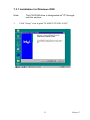
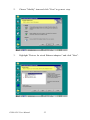
Installation for Windows 2000 ..................................... 51
Installation for Windows NT ........................................ 55
Further information ......................................................... 61
Appendix A Prog. GPIO & W’dog Timer.........................64
A.1
Supported GPIO Register................................................ 64
A.1.1
A.1.2
A.2
GPIO Registers ............................................................. 64
GPIO Example program-1 ............................................ 65
Watchdog programming.................................................. 68
Appendix B Pin Assignments .............................................72
B.1
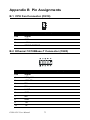
CPU Fan Connector (CN10) ........................................... 72
B.2
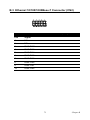
Ethernet 10/100Base-T Connector (CN23)..................... 72
B.3
Ethernet 10/100/1000Base-T Connector (CN2).............. 73
Table B.1: CPU Fan Connector (CN10)....................... 72
Table B.2:Ethernet 10/100Base-T Connector (CN23) . 72
Table B.3:Ethernet 10/100/1000Base-T Connector (CN2)
...........................................................................73
B.4
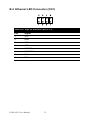
Ethernet LED Connector (CN1)...................................... 74
B.5
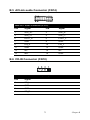
ACLink audio Connector (CN14) ................................... 75
B.6
CD-IN Connector (CN18)............................................... 75
B.7
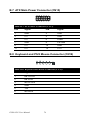
ATX Main Power Connector (CN15) ............................. 76
Table B.4:Giga bit Ethernet LED (CN1) ...................... 74
Table B.5:Audio Connector (CN14)............................. 75
Table B.6:CD-IN Connector (CN18)............................ 75
ix