1
User Guide
Site Master
S331E, S361E, S332E, S362E
Compact Handheld Cable & Antenna Analyzer
with Spectrum Analyzer
Anritsu Company
490 Jarvis Drive
Morgan Hill, CA 95037-2809
USA
Part Number: 10580-00252
Revision: A
Published: August 2009
Copyright 2009 Anritsu Company
WARRANTY
The Anritsu product(s) listed on the title page is (are) warranted against defects in materials and
workmanship for one year from the date of shipment.
Anritsu’s obligation covers repairing or replacing products which prove to be defective during the
warranty period. Buyers shall prepay transportation charges for equipment returned to Anritsu for
warranty repairs. Obligation is limited to the original purchaser. Anritsu is not liable for consequential
damages.
LIMITATION OF WARRANTY
The foregoing warranty does not apply to Anritsu connectors that have failed due to normal wear. Also,
the warranty does not apply to defects resulting from improper or inadequate maintenance by the
Buyer, unauthorized modification or misuse, or operation outside of the environmental specifications of
the product. No other warranty is expressed or implied, and the remedies provided herein are the
Buyer’s sole and exclusive remedies.
DISCLAIMER OF WARRANTY
DISCLAIMER OF WARRANTIES. TO THE MAXIMUM EXTENT PERMITTED BY APPLICABLE
LAW, ANRITSU COMPANY AND ITS SUPPLIERS DISCLAIM ALL WARRANTIES, EITHER
EXPRESS OR IMPLIED, INCLUDING, BUT NOT LIMITED TO, IMPLIED WARRANTIES OF
MERCHANTABILITY AND FITNESS FOR A PARTICULAR PURPOSE, WITH REGARD TO THE
SOFTWARE PRODUCT. THE USER ASSUMES THE ENTIRE RISK OF USING THE PROGRAM.
ANY LIABILITY OF PROVIDER OR MANUFACTURER WILL BE LIMITED EXCLUSIVELY TO
PRODUCT REPLACEMENT.
NO LIABILITY FOR CONSEQUENTIAL DAMAGES. TO THE MAXIMUM EXTENT PERMITTED BY
APPLICABLE LAW, IN NO EVENT SHALL ANRITSU COMPANY OR ITS SUPPLIERS BE LIABLE
FOR ANY SPECIAL, INCIDENTAL, INDIRECT, OR CONSEQUENTIAL DAMAGES WHATSOEVER
(INCLUDING, WITHOUT LIMITATION, DAMAGES FOR LOSS OF BUSINESS PROFITS,
BUSINESS INTERRUPTION, LOSS OF BUSINESS INFORMATION, OR ANY OTHER PECUNIARY
LOSS) ARISING OUT OF THE USE OF OR INABILITY TO USE THE SOFTWARE PRODUCTS,
EVEN IF ANRITSU COMPANY HAS BEEN ADVISED OF THE POSSIBILITY OF SUCH DAMAGES.
BECAUSE SOME STATES AND JURISDICTIONS DO NOT ALLOW THE EXCLUSION OR
LIMITATION OF LIABILITY FOR CONSEQUENTIAL OR INCIDENTAL DAMAGES, THE ABOVE
LIMITATION MAY NOT APPLY TO YOU.
TRADEMARK ACKNOWLEDGMENTS
VxWorks is a registered trademark, and WindML is a trademark of Wind River Systems, Inc. Site Master
is a trademark of Anritsu Company.
NOTICE
Anritsu Company has prepared this manual for use by Anritsu Company personnel and customers as a
guide for the proper installation, operation and maintenance of Anritsu Company equipment and
computer programs. The drawings, specifications, and information contained herein are the property of
Anritsu Company, and any unauthorized use or disclosure of these drawings, specifications, and
information is prohibited; they shall not be reproduced, copied, or used in whole or in part as the basis
for manufacture or sale of the equipment or software programs without the prior written consent of
Anritsu Company.
UPDATES
Updates, if any, can be downloaded from the Documents area of the Anritsu web site at:
http://www.us.anritsu.com
CE Conformity Marking
Anritsu affixes the CE Conformity marking onto its conforming products in accordance with
Council Directives of The Council Of The European Communities in order to indicate that
these products conform to the EMC and LVD directive of the European Union (EU).
C-tick Conformity Marking
Anritsu affixes the C-tick marking onto its conforming products in accordance with the
electromagnetic compliance regulations of Australia and New Zealand in order to indicate
that these products conform to the EMC regulations of Australia and New Zealand.
Notes On Export Management
This product and its manuals may require an Export License or approval by the government
of the product country of origin for re-export from your country.
Before you export this product or any of its manuals, please contact Anritsu Company to
confirm whether or not these items are export-controlled.
When disposing of export-controlled items, the products and manuals need to be broken or
shredded to such a degree that they cannot be unlawfully used for military purposes.
Mercury Notification
This product uses an LCD backlight lamp that contains mercury. Disposal may be regulated
due to environmental considerations. Please contact your local authorities or, within the
United States, the Electronics Industries Alliance (www.eiae.org) for disposal or recycling
information.
VxWorks Runtime
License 2000-1189
WindML Target License
2000-1372
NI Device License
3-2000-1486
WindRiver USB Runtime License
2000-1421
Safety Symbols
To prevent the risk of personal injury or loss related to equipment malfunction, Anritsu
Company uses the following symbols to indicate safety-related information. For your own
safety, please read the information carefully before operating the equipment.
Symbols Used in Manuals
Danger
This indicates a very dangerous procedure that could result in serious injury
or death, or loss related to equipment malfunction, if not performed properly.
Warning
This indicates a hazardous procedure that could result in light-to-severe
injury or loss related to equipment malfunction, if proper precautions are not
taken.
Caution
This indicates a hazardous procedure that could result in loss related to
equipment malfunction if proper precautions are not taken.
Safety Symbols Used on Equipment and in Manuals
The following safety symbols are used inside or on the equipment near operation locations to
provide information about safety items and operation precautions. Ensure that you clearly
understand the meanings of the symbols and take the necessary precautions before operating
the equipment. Some or all of the following five symbols may or may not be used on all
Anritsu equipment. In addition, there may be other labels attached to products that are not
shown in the diagrams in this manual.
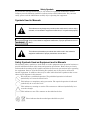
This indicates a prohibited operation. The prohibited operation is indicated
symbolically in or near the barred circle.
This indicates a compulsory safety precaution. The required operation is indicated
symbolically in or near the circle.
This indicates a warning or caution. The contents are indicated symbolically in or
near the triangle.
This indicates a note. The contents are described in the box.
These indicate that the marked part should be recycled.
Site Master User Guide
PN: 10580-00252 Rev. A
Safety-1
For Safety
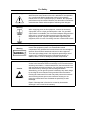
Warning
Always refer to the operation manual when working near locations at
which the alert mark, shown on the left, is attached. If the operation,
etc., is performed without heeding the advice in the operation
manual, there is a risk of personal injury. In addition, the equipment
performance may be reduced. Moreover, this alert mark is sometimes
used with other marks and descriptions indicating other dangers.
Warning
When supplying power to this equipment, connect the accessory
3-pin power cord to a 3-pin grounded power outlet. If a grounded
3-pin outlet is not available, use a conversion adapter and ground the
green wire, or connect the frame ground on the rear panel of the
equipment to ground. If power is supplied without grounding the
equipment, there is a risk of receiving a severe or fatal electric shock.
Warning
Caution
This equipment can not be repaired by the operator. Do not attempt to
remove the equipment covers or to disassemble internal
components. Only qualified service technicians with a knowledge of
electrical fire and shock hazards should service this equipment.
There are high-voltage parts in this equipment presenting a risk of
severe injury or fatal electric shock to untrained personnel. In
addition, there is a risk of damage to precision components.
Electrostatic Discharge (ESD) can damage the highly sensitive
circuits in the instrument. ESD is most likely to occur as test devices
are being connected to, or disconnected from, the instrument’s front
and rear panel ports and connectors. You can protect the instrument
and test devices by wearing a static-discharge wristband.
Alternatively, you can ground yourself to discharge any static charge
by touching the outer chassis of the grounded instrument before
touching the instrument’s front and rear panel ports and connectors.
Avoid touching the test port center conductors unless you are
properly grounded and have eliminated the possibility of static
discharge.
Repair of damage that is found to be caused by electrostatic
discharge is not covered under warranty.
Safety-2
PN: 10580-00252 Rev. A
Site Master User Guide
Table of Contents
Chapter 1—General Information
1-1
Introduction . . . . . . . . . . . . . . . . . . . . . . . . . . . . . . . . . . . . . . . . . . . . . . . . . 1-1
1-2
Chapter Overview . . . . . . . . . . . . . . . . . . . . . . . . . . . . . . . . . . . . . . . . . . . . 1-1
1-3
Available Models. . . . . . . . . . . . . . . . . . . . . . . . . . . . . . . . . . . . . . . . . . . . . 1-1
1-4
Available Options . . . . . . . . . . . . . . . . . . . . . . . . . . . . . . . . . . . . . . . . . . . . 1-2
1-5
Standard Accessories. . . . . . . . . . . . . . . . . . . . . . . . . . . . . . . . . . . . . . . . . 1-2
1-6
Optional Accessories . . . . . . . . . . . . . . . . . . . . . . . . . . . . . . . . . . . . . . . . . 1-3
1-7
Additional Documents. . . . . . . . . . . . . . . . . . . . . . . . . . . . . . . . . . . . . . . . . 1-3
1-8
General Description . . . . . . . . . . . . . . . . . . . . . . . . . . . . . . . . . . . . . . . . . . 1-3
1-9
Site Master Specifications . . . . . . . . . . . . . . . . . . . . . . . . . . . . . . . . . . . . . 1-4
1-10 Preventive Maintenance . . . . . . . . . . . . . . . . . . . . . . . . . . . . . . . . . . . . . . . 1-4
1-11 Calibration Requirements . . . . . . . . . . . . . . . . . . . . . . . . . . . . . . . . . . . . . . 1-4
1-12 Annual Verification . . . . . . . . . . . . . . . . . . . . . . . . . . . . . . . . . . . . . . . . . . . 1-4
1-13 ESD Caution . . . . . . . . . . . . . . . . . . . . . . . . . . . . . . . . . . . . . . . . . . . . . . . . 1-5
1-14 Battery Replacement . . . . . . . . . . . . . . . . . . . . . . . . . . . . . . . . . . . . . . . . . 1-5
1-15 Soft Carrying Case . . . . . . . . . . . . . . . . . . . . . . . . . . . . . . . . . . . . . . . . . . . 1-7
1-16 Tilt Bail Stand . . . . . . . . . . . . . . . . . . . . . . . . . . . . . . . . . . . . . . . . . . . . . . . 1-8
1-17 Secure Environment Workplace . . . . . . . . . . . . . . . . . . . . . . . . . . . . . . . . . 1-9
Site Master Memory Types . . . . . . . . . . . . . . . . . . . . . . . . . . . . . . . . . . 1-9
Erase All User Files in Internal Memory . . . . . . . . . . . . . . . . . . . . . . . . 1-9
Recommended Usage in a Secure Environment . . . . . . . . . . . . . . . . 1-10
Chapter 2—Instrument Overview
2-1
Introduction . . . . . . . . . . . . . . . . . . . . . . . . . . . . . . . . . . . . . . . . . . . . . . . . . 2-1
2-2
Chapter Overview . . . . . . . . . . . . . . . . . . . . . . . . . . . . . . . . . . . . . . . . . . . . 2-1
2-3
Turning On the Site Master. . . . . . . . . . . . . . . . . . . . . . . . . . . . . . . . . . . . . 2-1
2-4
Front Panel Overview . . . . . . . . . . . . . . . . . . . . . . . . . . . . . . . . . . . . . . . . 2-2
Front Panel Keys . . . . . . . . . . . . . . . . . . . . . . . . . . . . . . . . . . . . . . . . . . 2-3
Touch Screen Keys . . . . . . . . . . . . . . . . . . . . . . . . . . . . . . . . . . . . . . . . 2-5
Keypad Menu Keys (1 to 9) . . . . . . . . . . . . . . . . . . . . . . . . . . . . . . . . . . 2-5
LED Indicators . . . . . . . . . . . . . . . . . . . . . . . . . . . . . . . . . . . . . . . . . . . . 2-6
2-5
Display Overview . . . . . . . . . . . . . . . . . . . . . . . . . . . . . . . . . . . . . . . . . . . . 2-6
2-6
Test Panel Connector Overview . . . . . . . . . . . . . . . . . . . . . . . . . . . . . . . . . 2-8
Site Master User Guide
PN: 10580-00252 Rev. A
Contents-1
Table of Contents (Continued)
2-7
Symbols and Indicators. . . . . . . . . . . . . . . . . . . . . . . . . . . . . . . . . . . . . . . 2-10
Calibration Symbols. . . . . . . . . . . . . . . . . . . . . . . . . . . . . . . . . . . . . . . 2-10
Battery Symbols. . . . . . . . . . . . . . . . . . . . . . . . . . . . . . . . . . . . . . . . . . 2-10
Additional Symbols . . . . . . . . . . . . . . . . . . . . . . . . . . . . . . . . . . . . . . . 2-11
2-8
Data Entry . . . . . . . . . . . . . . . . . . . . . . . . . . . . . . . . . . . . . . . . . . . . . . . . . 2-12
Numeric Values . . . . . . . . . . . . . . . . . . . . . . . . . . . . . . . . . . . . . . . . . . 2-12
Parameter Setting . . . . . . . . . . . . . . . . . . . . . . . . . . . . . . . . . . . . . . . . 2-12
Text Entry . . . . . . . . . . . . . . . . . . . . . . . . . . . . . . . . . . . . . . . . . . . . . . 2-12
2-9
Mode Selector Menu . . . . . . . . . . . . . . . . . . . . . . . . . . . . . . . . . . . . . . . . 2-13
Chapter 3—Quick Start Guide
3-1
Introduction . . . . . . . . . . . . . . . . . . . . . . . . . . . . . . . . . . . . . . . . . . . . . . . . . 3-1
3-2
Measurement Mode Selection . . . . . . . . . . . . . . . . . . . . . . . . . . . . . . . . . . 3-1
3-3
Cable & Antenna Analyzer . . . . . . . . . . . . . . . . . . . . . . . . . . . . . . . . . . . . . 3-2
Select the Measurement Type. . . . . . . . . . . . . . . . . . . . . . . . . . . . . . . . 3-2
Set the Frequency . . . . . . . . . . . . . . . . . . . . . . . . . . . . . . . . . . . . . . . . . 3-2
Set the Amplitude . . . . . . . . . . . . . . . . . . . . . . . . . . . . . . . . . . . . . . . . . 3-2
Turn on Markers . . . . . . . . . . . . . . . . . . . . . . . . . . . . . . . . . . . . . . . . . . 3-3
Single Limit Line . . . . . . . . . . . . . . . . . . . . . . . . . . . . . . . . . . . . . . . . . . 3-4
DTF Setup . . . . . . . . . . . . . . . . . . . . . . . . . . . . . . . . . . . . . . . . . . . . . . . 3-5
Calibrate with OSL Calibration . . . . . . . . . . . . . . . . . . . . . . . . . . . . . . . 3-6
3-4
Spectrum Analyzer . . . . . . . . . . . . . . . . . . . . . . . . . . . . . . . . . . . . . . . . . . . 3-7
Set Start and Stop Frequencies. . . . . . . . . . . . . . . . . . . . . . . . . . . . . . . 3-7
Enter the Center Frequency . . . . . . . . . . . . . . . . . . . . . . . . . . . . . . . . . 3-7
Select a Signal Standard . . . . . . . . . . . . . . . . . . . . . . . . . . . . . . . . . . . . 3-7
Set the Measurement Frequency Bandwidth. . . . . . . . . . . . . . . . . . . . . 3-7
Set the Amplitude . . . . . . . . . . . . . . . . . . . . . . . . . . . . . . . . . . . . . . . . . 3-8
Power Offset Set Up for Compensating External Loss . . . . . . . . . . . . . 3-8
Set the Span . . . . . . . . . . . . . . . . . . . . . . . . . . . . . . . . . . . . . . . . . . . . . 3-8
Single Limit Line . . . . . . . . . . . . . . . . . . . . . . . . . . . . . . . . . . . . . . . . . . 3-9
Segmented Limit Lines . . . . . . . . . . . . . . . . . . . . . . . . . . . . . . . . . . . . . 3-9
Create a Limit Envelope . . . . . . . . . . . . . . . . . . . . . . . . . . . . . . . . . . . 3-10
Setting Up Markers . . . . . . . . . . . . . . . . . . . . . . . . . . . . . . . . . . . . . . . 3-11
Select a Smart Measurement Type . . . . . . . . . . . . . . . . . . . . . . . . . . . 3-12
Contents-2
PN: 10580-00252 Rev. A
Site Master User Guide
Table of Contents (Continued)
Chapter 4—File Management
4-1
Introduction . . . . . . . . . . . . . . . . . . . . . . . . . . . . . . . . . . . . . . . . . . . . . . . . . 4-1
4-2
Managing Files . . . . . . . . . . . . . . . . . . . . . . . . . . . . . . . . . . . . . . . . . . . . . . 4-1
Save Files . . . . . . . . . . . . . . . . . . . . . . . . . . . . . . . . . . . . . . . . . . . . . . . 4-1
Save Dialog Box . . . . . . . . . . . . . . . . . . . . . . . . . . . . . . . . . . . . . . . . . . 4-2
Quick Name Keys . . . . . . . . . . . . . . . . . . . . . . . . . . . . . . . . . . . . . . . . . 4-2
Recall Files . . . . . . . . . . . . . . . . . . . . . . . . . . . . . . . . . . . . . . . . . . . . . . 4-3
Recall Dialog Box . . . . . . . . . . . . . . . . . . . . . . . . . . . . . . . . . . . . . . . . . 4-3
Copying Files. . . . . . . . . . . . . . . . . . . . . . . . . . . . . . . . . . . . . . . . . . . . . 4-4
Deleting Files. . . . . . . . . . . . . . . . . . . . . . . . . . . . . . . . . . . . . . . . . . . . . 4-5
Delete Dialog Box . . . . . . . . . . . . . . . . . . . . . . . . . . . . . . . . . . . . . . . . . 4-5
4-3
File Menu Overview . . . . . . . . . . . . . . . . . . . . . . . . . . . . . . . . . . . . . . . . . . 4-6
4-4
File Menu . . . . . . . . . . . . . . . . . . . . . . . . . . . . . . . . . . . . . . . . . . . . . . . . . . 4-7
Save Menu . . . . . . . . . . . . . . . . . . . . . . . . . . . . . . . . . . . . . . . . . . . . . . 4-8
Save Location Menu . . . . . . . . . . . . . . . . . . . . . . . . . . . . . . . . . . . . . . . 4-8
Save On Event Menu . . . . . . . . . . . . . . . . . . . . . . . . . . . . . . . . . . . . . . 4-9
Recall Menu . . . . . . . . . . . . . . . . . . . . . . . . . . . . . . . . . . . . . . . . . . . . 4-10
Copy Menu . . . . . . . . . . . . . . . . . . . . . . . . . . . . . . . . . . . . . . . . . . . . . 4-11
Delete Menu . . . . . . . . . . . . . . . . . . . . . . . . . . . . . . . . . . . . . . . . . . . . 4-12
Chapter 5—System Operations
5-1
Introduction . . . . . . . . . . . . . . . . . . . . . . . . . . . . . . . . . . . . . . . . . . . . . . . . . 5-1
5-2
System Menu Overview . . . . . . . . . . . . . . . . . . . . . . . . . . . . . . . . . . . . . . . 5-2
5-3
System Menu . . . . . . . . . . . . . . . . . . . . . . . . . . . . . . . . . . . . . . . . . . . . . . . 5-3
System Options Menu . . . . . . . . . . . . . . . . . . . . . . . . . . . . . . . . . . . . . 5-4
Reset Menu . . . . . . . . . . . . . . . . . . . . . . . . . . . . . . . . . . . . . . . . . . . . . 5-5
5-4
Preset Menu . . . . . . . . . . . . . . . . . . . . . . . . . . . . . . . . . . . . . . . . . . . . . . . . 5-6
5-5
Self Test . . . . . . . . . . . . . . . . . . . . . . . . . . . . . . . . . . . . . . . . . . . . . . . . . . . 5-7
5-6
Updating Site Master Firmware . . . . . . . . . . . . . . . . . . . . . . . . . . . . . . . . . 5-7
5-7
Site Master Firmware Emergency Repair. . . . . . . . . . . . . . . . . . . . . . . . . . 5-8
Chapter 6—GPS (Option 31)
6-1
Introduction . . . . . . . . . . . . . . . . . . . . . . . . . . . . . . . . . . . . . . . . . . . . . . . . . 6-1
6-2
Chapter Overview . . . . . . . . . . . . . . . . . . . . . . . . . . . . . . . . . . . . . . . . . . . . 6-1
6-3
Activating the GPS Feature . . . . . . . . . . . . . . . . . . . . . . . . . . . . . . . . . . . . 6-1
6-4
Saving and Recalling Traces with GSP Information . . . . . . . . . . . . . . . . . . 6-3
Saving Traces with GPS Information. . . . . . . . . . . . . . . . . . . . . . . . . . . 6-3
Recalling GPS Information . . . . . . . . . . . . . . . . . . . . . . . . . . . . . . . . . . 6-3
6-5
GPS Menu . . . . . . . . . . . . . . . . . . . . . . . . . . . . . . . . . . . . . . . . . . . . . . . . . 6-4
Site Master User Guide
PN: 10580-00252 Rev. A
Contents-3
Table of Contents (Continued)
Chapter 7—Bias Tee (Option 10)
7-1
Overview . . . . . . . . . . . . . . . . . . . . . . . . . . . . . . . . . . . . . . . . . . . . . . . . . . . 7-1
Chapter 8—Master Software Tools
8-1
Introduction . . . . . . . . . . . . . . . . . . . . . . . . . . . . . . . . . . . . . . . . . . . . . . . . . 8-1
8-2
MST Overview . . . . . . . . . . . . . . . . . . . . . . . . . . . . . . . . . . . . . . . . . . . . . . 8-1
8-3
Feature Overview . . . . . . . . . . . . . . . . . . . . . . . . . . . . . . . . . . . . . . . . . . . . 8-1
8-4
Installing MST . . . . . . . . . . . . . . . . . . . . . . . . . . . . . . . . . . . . . . . . . . . . . . . 8-2
8-5
Connecting to the Instrument . . . . . . . . . . . . . . . . . . . . . . . . . . . . . . . . . . . 8-2
8-6
Updating Site Master Firmware . . . . . . . . . . . . . . . . . . . . . . . . . . . . . . . . . 8-2
Appendix A—Measurement Guides
A-1
Introduction . . . . . . . . . . . . . . . . . . . . . . . . . . . . . . . . . . . . . . . . . . . . . . . . A-1
Index
Contents-4
PN: 10580-00252 Rev. A
Site Master User Guide
Chapter 1 — General Information
1-1
Introduction
This chapter provides information about frequency range, available options, additional
documents, general overview, preventive maintenance, and annual verification requirements
for the Anritsu Handheld S331E, S361E, S332E, and S362E Site Master models. Throughout
this manual, the term Site Master will refer to the S331E, S361E, S332E, and S362E.
1-2
Chapter Overview
• “Available Models” on page 1-1
• “Available Options” on page 1-2
• “Standard Accessories” on page 1-2
• “Optional Accessories” on page 1-3
• “Additional Documents” on page 1-3
• “General Description” on page 1-3
• “Site Master Specifications” on page 1-4
• “Preventive Maintenance” on page 1-4
• “Calibration Requirements” on page 1-4
• “Annual Verification” on page 1-4
• “ESD Caution” on page 1-5
• “Battery Replacement” on page 1-5
• “Soft Carrying Case” on page 1-7
• “Tilt Bail Stand” on page 1-8
• “Secure Environment Workplace” on page 1-9
1-3
Available Models
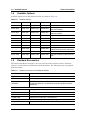
Table 1-1 lists the Site Master models and frequency ranges described in this User Guide.
Table 1-1.
Site Master Models
Model
Frequency Range
S331E
Cable & Antenna Analyzer, 2 MHz to 4 GHz
S361E
Cable & Antenna Analyzer, 2 MHz to 6 GHz
S332E
Cable & Antenna Analyzer, 2 MHz to 4 GHz, Spectrum Analyzer, 100 kHz to 4 GHz
S362E
Cable & Antenna Analyzer, 2 MHz to 6 GHz, Spectrum Analyzer, 100 kHz to 6 GHz
Site Master User Guide
PN: 10580-00252 Rev. A
1-1
1-4
Available Options
1-4
General Information
Available Options
Available options for the Site Master models are shown in Table 1-2.
Table 1-2.
Available Options
S331E
S332E
S361E
S362E
Description
S331E-0021
S332E-0021
S361E-0021
S362E-0021
2-Port Transmission Measurement
S331E-0010
S332E-0010
S361E-0010
S362E-0010
Bias-Tee (Requires Option 0021 on
S331E and S361E)
S331E-0031
S332E-0031
S361E-0031
S362E-0031
GPS Receiver (Requires Antenna
P/N 2000-1528-R)
S331E-0019
S332E-0019
S361E-0019
S362E-0019
High-Accuracy Power Meter
S332E-0029
S362E-0029
Power Meter
S332E-0025
S362E-0025
Interference Analyzer
S332E-0027
S362E-0027
Channel Scanner
S332E-0090
S362E-0090
Gated Sweep
S332E-0028
S362E-0028
C/W Signal Generator (Requires
CW Signal Generator Kit, P/N 69793)
S331E-0098
S332E-0098
S361E-0098
S362E-0098
Standard Calibration to Z540
S331E-0099
S332E-0099
S361E-0099
S362E-0099
Premium Calibration to Z540 plus test
data
1-5
Standard Accessories
The Anritsu Site Master includes a one year warranty which includes: battery, firmware,
software, and Certificate of Calibration and Conformance. The following items are supplied
with the product.
Table 1-3.
Standard Accessories for Site Master Models
Part Number
Description
10580-00252
Site Master User Guide
3-68736
Soft Carrying Case
2300-498
MST CD: Master Software Tools, User/Measurement Guides,
Programming Manual, Troubleshooting Guides, Application Notes,
Data Sheet
633-44
Rechargeable Li-Ion Battery
40-168-R
AC-DC Adapter
806-141-R
Automotive Cigarette Lighter 12 VDC Adapter
3-2000-1498
USB A/5-pin mini-B Cable, 10 feet/305 cm
11410-00484
Site Master S331E, S332E, S361E, S362E Technical Data Sheet
1-2
PN: 10580-00252 Rev. A
Site Master User Guide
General Information
Caution
1-6
1-6
Optional Accessories
When using the Automotive Cigarette Lighter 12 VDC Adapter, Anritsu Part
Number 806-141-R, always verify that the supply is rated for a minimum of
60 Watts at 12 VDC, and that the socket is clear of any dirt or debris. If the adapter
plug becomes hot to the touch during operation, then discontinue use immediately.
Optional Accessories
The Site Master Technical Data Sheet (P/N 11410-00484) contains a list and description of
available optional accessories. The data sheet is available on the Master Software Tools
CD-ROM provided with the instrument or the Anritsu web site: http://us.anritsu.com.
1-7
Additional Documents
This user guide is specific to the Site Master and includes a general description about the
Site Master. For information about Cable & Antenna Measurement, Spectrum Analysis,
Interference Analysis, 2-port Transmission Measurements, Power Meter, and Master
Software Tools, refer to the individual Measurement Guides listed in Appendix A,
“Measurement Guides”.
1-8
General Description
The Site Master S331E/S361E is a hand held cable and antenna analyzer designed to make
Return Loss, VSWR, Cable Loss, and Distance-To-Fault (DTF) measurements in the field.
The cable & antenna analyzer also includes 1-port phase and smith chart measurements.
The 2-port transmission measurement option includes two power levels and access to a
built-in 32V bias tee (Option 10).
The S332E/S362E is an integrated multi-functional test instrument that eliminates the need
to carry and learn multiple test sets. In addition to the cable & antenna measurements, the
S332E/S362E can be configured to include a Spectrum Analyzer, 2-port Transmission
Measurement, Interference Analyzer, Channel Scanner, CW Signal Generator, Power Meter,
and High Accuracy Power. A GPS receiver can be added to both the S331E/S361E and the
S332E/S362E Site Master models.
The bright 8.4" TFT color display provides easy viewing in a variety of lighting conditions.
All Site Master models are equipped with a Li-Ion battery delivering more than four hours of
battery life for the S331E/S361E and more than three hours of battery life for the
S332E/S362E Site Masters.
The combination of a touch screen and keypad enables users to navigate menus with the
touch screen and enter numbers with the keypad.
The internal memory is large enough to store approximately 2,000 traces or setups.
Measurements and setups can also be stored in a USB flash drive or transferred to a PC using
the included USB cable.
Master Software Tools (MST), a PC based software program, can be used to create reports,
view and organize data, analyze historical data, add markers and limit lines, rename traces
and trace analysis. Please see Chapter 8 for a brief overview of Master Software Tools and the
Master Software Tools Users Guide for additional information. A .pdf file of the User Guide is
available on the MST CD-ROM provided with the Site Master.
Site Master User Guide
PN: 10580-00252 Rev. A
1-3
1-9
Site Master Specifications
1-9
General Information
Site Master Specifications
Refer to the Site Master Technical Data Sheet (P/N 11410-00484) for general specifications,
detailed measurement specifications for all available measurement modes, ordering
information, power sensors, and available accessories. The data sheet is included with the
instrument and also available on the Master Software Tools CD-ROM. It is also available on
the Anritsu web site: http://us.anritsu.com.
1-10
Preventive Maintenance
Site Master preventive maintenance consists of cleaning the unit and inspecting and cleaning
the RF connectors on the instrument and all accessories. Clean the Site Master with a soft,
lint-free cloth dampened with water or water and a mild cleaning solution.
Caution
To avoid damaging the display or case, do not use solvents or abrasive cleaners.
Clean the RF connectors and center pins with a cotton swab dampened with denatured
alcohol. Visually inspect the connectors. The fingers of the N(f) connectors and the pins of the
N(m) connectors should be unbroken and uniform in appearance. If you are unsure whether
the connectors are undamaged, gauge the connectors to confirm that the dimensions are
correct.
Visually inspect the test port cable(s). The test port cable should be uniform in appearance,
and not stretched, kinked, dented, or broken.
1-11
Calibration Requirements
Anritsu recommends annual calibration and performance verification by local Anritsu
service centers. The Cable and Antenna Analyzer mode requires calibration standards for
OPEN, SHORT, and LOAD (OSL) or InstaCal module, which are sold separately.
1-12
Annual Verification
Anritsu recommends an annual calibration and performance verification of the Site Master
and the OSL calibration components and InstaCal module by local Anritsu service centers.
The Site Master is self-calibrating and there are no field-adjustable components. The OSL
calibration components are crucial to the integrity of the calibration. As a result, they must be
verified periodically to ensure performance conformity. This is especially important if the
OSL calibration components have been accidentally dropped or over-torqued.
Contact information for Anritsu Service Centers is available at:
http://www.anritsu.com/Contact.asp
1-4
PN: 10580-00252 Rev. A
Site Master User Guide
General Information
1-13
1-13
ESD Caution
ESD Caution
The Site Master, like other high performance instruments, is susceptible to electrostatic
discharge ( ESD) damage. Coaxial cables and antennas often build up a static charge, which
(if allowed to discharge by connecting directly to the Site Master without discharging the
static charge) may damage the Site Master input circuitry. Site Master operators must be
aware of the potential for ESD damage and take all necessary precautions.
Operators should exercise practices outlined within industry standards such as JEDEC-625
(EIA-625), MIL-HDBK-263, and MIL-STD-1686, which pertain to ESD and ESDS devices,
equipment, and practices. Because these apply to the Site Master, it is recommended that any
static charges that may be present be dissipated before connecting coaxial cables or antennas
to the Site Master. This may be as simple as temporarily attaching a short or load device to
the cable or antenna prior to attaching to the Site Master. It is important to remember that
the operator may also carry a static charge that can cause damage. Following the practices
outlined in the above standards will ensure a safe environment for both personnel and
equipment.
1-14
Battery Replacement
The battery can be replaced without the use of tools. The battery compartment is located on
the lower left side of the instrument (when you are facing the measurement display). Slide
the battery door down, towards the bottom of the instrument, to remove it. Remove the
battery pack from the instrument by grabbing the battery lanyard and pulling out.
Replacement is the opposite of removal. The battery key side (slot below the contacts) should
be facing the front on the unit and slide in first.
Note
When inserting the battery the battery label should face the back of the instrument
and the guide slot on the battery should be below the contacts. If the battery door
does not latch closed, the battery may be inserted incorrectly.
Site Master User Guide
PN: 10580-00252 Rev. A
1-5
1-14
Battery Replacement
Figure 1-1.
General Information
Battery Compartment Door
The battery that is supplied with the Site Master may need charging before use. The battery
can be charged while it is installed in the Site Master by using either the AC-DC Adapter
(40-168-R) or the 12-Volt DC adapter (806-141-R), or outside the Site Master with the
optional Dual Battery Charger (2000-1374). Refer to “Battery Symbols” on page 2-10 for a
description of battery symbols.
Note
Caution
Note
1-6
Use only Anritsu Company approved batteries, adapters, and chargers with this
instrument.
When using the Automotive Cigarette Lighter 12 VDC Adapter, Anritsu Part
Number 806-141-R, always verify that the supply is rated for a minimum of 60
Watts @ 12 VDC, and that the socket is clear of any dirt or debris. If the adapter
plug becomes hot to the touch during operation, then discontinue use immediately.
Anritsu Company recommends removing the battery for long-term storage of the
instrument.
PN: 10580-00252 Rev. A
Site Master User Guide
General Information
1-15
1-15
Soft Carrying Case
Soft Carrying Case
The Site Master can be operated while in the soft carrying case. On the back of the case is a
large storage pouch for accessories and supplies.
To install the instrument into the soft carrying case:
1. The front panel of the case is secured with hook-and-loop fasteners. Fully close the front
panel of the case. When closed, the front panel supports the shape of the case while you
are inserting the Site Master.
2. Place the soft carrying case face down on a stable surface, with the front panel fully
closed and laying flat.
Note
The soft case has two zippers near the back. The zipper closer to the front of the
case opens to install and remove the instrument. The zipper closer to the back of
the case opens an adjustable support panel that can be used to provide support for
improved stability and air flow while the instrument is in the case. This support
panel also contains the storage pouch.
3. Open the zippered back of the case.
4. Insert the instrument face down into the case, take care that the connectors are
properly situated in the case top opening. You may find it easier to insert the
connectors first, then pull the corners over the bottom of the Site Master.
Figure 1-2.
Instrument Inserted into the Soft Carrying Case
5. Close the back panel and secure with the zipper to secure the Site Master.
Site Master User Guide
PN: 10580-00252 Rev. A
1-7
1-16
Tilt Bail Stand
General Information
The soft carrying case includes a detachable shoulder strap, which can be connected to the
D-rings of the case.
Caution
1-16
The soft case has panel openings for the fan inlet and exhaust ports. Do not block
the air flow through the panels when the unit is operating.
Tilt Bail Stand
A Tilt Bail is attached to the back of the Site Master for desktop operation. The tilt bail
provides two settings of backward tilt for improved stability. To deploy the tilt bail, pull the
bottom of the tilt bail away from the back of the instrument. To store the tilt bail, push the
bottom of the bail towards the back of the instrument until it attaches to the Site Master.
Note
Figure 1-3.
1-8
Do not use the tilt bail while the instrument is in the soft case. The soft case has an
adjustable support panel in the back zipper.
Tilt Bail Extended
PN: 10580-00252 Rev. A
Site Master User Guide
General Information
1-17
1-17
Secure Environment Workplace
Secure Environment Workplace
This section details the types of memory in the Site Master, how to delete stored user files in
internal memory, and recommended usage in a secure environment workplace.
Site Master Memory Types
The instrument contains non-volatile disk-on-a-chip memory, EEPROM, and volatile DRAM
memory. The instrument is also supplied with an external USB flash drive. The instrument
does not have a hard disk drive or any other type of volatile or non-volatile memory.
Disk-On-A-Chip (DOC)
DOC is used for storage of instrument firmware, factory calibration information, user
measurements, setups, and .jpg screen images. User information stored on the DOC is erased
by the master reset process described below.
EEPROM
This memory stores the model number, serial number, and calibration data for the
instrument. Also stored here are the user-set operating parameters such as frequency range.
During the master reset process all operating parameter stored in the EEPROM are set to
standard factory default values.
RAM Memory
This is volatile memory used to store parameters needed for the normal operation of the
instrument along with current measurements. This memory is reset whenever the
instrument is restarted.
External USB Flash Drive
This memory may be selected as the destination for saved measurements and setups for the
instrument. The user can also copy the contents of the internal disk-on-chip memory to the
external flash memory for storage or data transfer. The external Flash USB can be
reformatted or sanitized using software on a PC.
Refer to the Chapter 4, “File Management” for additional information on saving and copying
files to the USB flash drive.
Erase All User Files in Internal Memory
Perform a Master Reset:
1. Turn the instrument on.
2. Press the Shift button then the System (8) button.
3. Press the System Options submenu key.
4. Press the Reset key, then the Master Reset key.
5. A dialog box will be displayed on the screen warning that all settings will be returned to
factory default values and all user files will be deleted. This deletion is a standard file
delete and does not involve overwriting exiting information.
6. Press the ENTER button to complete the master reset.
7. The instrument will reboot and the reset is complete.
Site Master User Guide
PN: 10580-00252 Rev. A
1-9
1-17
Secure Environment Workplace
General Information
Recommended Usage in a Secure Environment
Set the Site Master to save files to the external USB Flash drive:
1. Attach the external Flash drive and turn the instrument on.
2. Press the Shift button then the File (7) button.
3. Press the Save submenu key.
4. Press the Change Save Location submenu key, then select the USB drive with the
rotary knob, Up/Down arrow keys, or the touchscreen.
5. Press the Set Location submenu key.
The external USB drive is now the default location for saving files.
1-10
PN: 10580-00252 Rev. A
Site Master User Guide
Chapter 2 — Instrument Overview
2-1
Introduction
This chapter provides a brief overview of the Anritsu Site Master. The intent of this chapter is
to acquaint the user with the instrument. For detailed measurement information, refer to a
specific measurement guide listed in Appendix A, “Measurement Guides”.
2-2
Chapter Overview
• “Turning On the Site Master” on page 2-1
• “Front Panel Overview ” on page 2-2
• “Display Overview ” on page 2-6
• “Test Panel Connector Overview” on page 2-8
• “Symbols and Indicators” on page 2-10
• “Data Entry” on page 2-12
• “Mode Selector Menu” on page 2-13
2-3
Turning On the Site Master
The Anritsu Site Master S331E/S361E models are capable of approximately four hours and
the S332E/S362E models are capable of approximately three hours of continuous operation
from a fully charged, field-replaceable battery (see Section 1-14 “Battery Replacement”
on page 1-5).
The Site Master can also be operated from a 12 Vdc source (which will also simultaneously
charge the battery). This can be achieved with either the Anritsu AC-DC Adapter (Anritsu
part number 40-168-R) or 12 Vdc Automotive Cigarette Lighter Adapter (Anritsu part
number 806-141-R). Both items are included with the Site Master (Table 1-3).
Caution
When using the Automotive Cigarette Lighter 12 VDC Adapter, Anritsu
Part Number 806-141-R, always verify that the supply is rated for a minimum of
60 Watts @ 12 VDC, and that the socket is clear of any dirt or debris. If the
adapter plug becomes hot to the touch during operation, discontinue use
immediately.
Site Master User Guide
PN: 10580-00252 Rev. A
2-1
2-4
Front Panel Overview
Instrument Overview
To turn on the Site Master, press the green On/Off button on the front panel (Figure 2-1)
Fan Inlet Port
Fan Exhaust
Port
Touch Screen
Submenu Keys
Calibration
Status and Type
Shift Key
Numeric Keypad/
Shift Menu Keys (1 to 9)
Printed in Blue
Fan Inlet Port
Touch Screen
Main Menu Keys
Figure 2-1.
On/Off Button
Site Master Overview
The Site Master takes approximately sixty seconds to complete power warm-up and to load
the application software. At the completion of this process, the instrument is ready for use.
2-4
Front Panel Overview
The Site Master menu-driven interface is easy to use and requires little training. The
Site Master uses a touch screen and keypad for data input. The five bottom menu keys and
eight submenu keys on the right side are touch screen keys. The menu and submenu keys will
vary depending upon the selected mode of operation, see “Mode Selector Menu” on page 2-13.
Numeric keys 1 through 9 are dual purpose, depending upon the current mode of operation.
The dual-purpose keys are labeled with a number on the key itself and the alternate function
is printed in blue above each of the keys. Use the blue Shift key to access the functions printed
on the panel. The Escape key, used for aborting data entry, is the oval button located above
numeric key 9. The rotary knob, the four arrow keys, and the keypad can be used to change
the value of an active parameter.
The Menu key provides graphical icons of all the installed measurement modes and user
defined short-cuts (see “Menu Key” on page 2-3). The locations of the keys are shown in
Figure 2-1.
Note
2-2
Keep the fan inlet and exhaust ports clear of obstructions at all times for proper
ventilation and cooling of the instrument.
PN: 10580-00252 Rev. A
Site Master User Guide
Instrument Overview
2-4
Front Panel Overview
Front Panel Keys
Menu Key
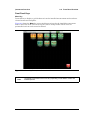
Press this key to display a grid of shortcut icons for installed measurement modes and user
selected menus and setup files.
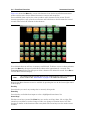
Figure 2-2 shows the Menu key screen with shortcut icons for the installed measurement
modes. Touch one of the icons in the top two rows to change modes. These icons are
preinstalled and can not be moved or deleted.
Figure 2-2.
Note
Menu Key Screen, Icons for Installed Measurements
The display of the Menu screen will vary depending on Site Master model and
installed options.
Site Master User Guide
PN: 10580-00252 Rev. A
2-3
2-4
Front Panel Overview
Instrument Overview
Figure 2-3 shows the Menu key screen with shortcut icons for the installed measurement
modes and four rows of user-defined shortcuts to menus and setup files.
Press and hold down any key for a few seconds to add a shortcut to this screen.To add
shortcut setup files (.stp), open the recall menu and hold down on the file name for several
seconds. Then select the location for the shortcut.
Figure 2-3.
Menu Key Screen
User-defined shortcuts will stay in memory until deleted. To delete or move a shortcut button,
press the Menu key then press and hold the shortcut for approximately 3 seconds. The
Customize Button dialog box will open to allow a button to be deleted or moved. Press Esc to
exit the Menu shortcut display.
Note
The Factory Default reset will delete all user created shortcut icons from the Menu
screen. Refer to the “Reset Menu” on page 5-5 for additional information.
Help for the Menu shortcut screen is available by pressing the icon in the lower-right corner
of the display.
Esc Key
Press this key to cancel any setting that is currently being made.
Enter Key
Press this key to finalize data input or select a highlighted item from a list.
Arrow Keys
The four arrow keys (around the Enter key) are used to scroll up, down, left, or right. The
arrow keys can often be used to change a value or to change a selection from a list. This
function is similar to the function of the rotary knob. The arrow keys are also used to move
markers.
2-4
PN: 10580-00252 Rev. A
Site Master User Guide
Instrument Overview
2-4
Front Panel Overview
Shift Key
Pressing the Shift key and then a number key executes the function that is indicated in blue
text above the number key. When the Shift key is active, its icon is displayed at the top-right
of the measurement display area by the battery charge indicator.
Figure 2-4.
Shift Key Icon
Number Keypad
The Number keypad has two functions: The primary function is number entry. The secondary
function of the number keypad is to list various menus. See “Keypad Menu Keys (1 to 9)”
on page 2-5.
Rotary Knob
Turning the rotary knob changes numerical values, scrolls through selectable items from a
list, and moves markers. Values or items may be within a dialog box or an edit window.
Touch Screen Keys
Main Menu Touch Screen Keys
These five main menu keys are horizontally arranged along the lower edge of the touch
screen. The main menu key functions change to match specific instrument Mode settings. The
main menu keys generate function-specific submenus. The various measurement modes are
selected by pressing the Shift key and then the Mode (9) key. Descriptions of the various
measurement modes can be found in the applicable Measurement Guides listed in
Appendix A, “Measurement Guides”.
Note
Available measurement modes are based on model and options purchased. Refer
to Table 1-1 and Table 1-2 for additional information.
Submenu Touch Screen Keys
These submenu keys are arranged along the right-hand edge of the touch screen. The
submenu labels change as instrument measurement settings change. The current submenu
title is shown at the top of the submenu key block.
Keypad Menu Keys (1 to 9)
Pressing the Shift key and then a number key selects the menu function that is printed in
blue characters above the number key. See Figure 2-1 on page 2-2.
Not all Secondary Function Menus are active in various measurement modes. If any one of
these menus is available in a specific instrument mode of operation, then it can be called from
the number keypad. It may also be available from a main menu key or a submenu key.
The Preset Menu (1) and System Menu (8) are described in Chapter 5, “System Operations ”.
The Sweep Menu (3), Measure Menu (4), Trace Menu (5), and Limit Menu (6) vary depending
on measurement mode, see the Measurement Guides listed in Appendix A for information.
The File Menu (7) is described in Chapter 4, “File Management”. The Mode Menu (9) is
described in “Mode Selector Menu” on page 2-13.
Site Master User Guide
PN: 10580-00252 Rev. A
2-5
2-5
Display Overview
Instrument Overview
LED Indicators
Power LED
The Power LED is located to the left of the On/Off key. The LED is solid green when the unit
is on and slowly blinks when the unit is off but has external power.
Charge LED
The Charge LED is located to the right of the On/Off key. The LED slowly blinks when the
battery is charging and is solid green when the battery is fully charged.
2-5
Display Overview
Figure 2-5 and Figure 2-6 illustrate some of the key information areas of the Site Master in
Cable & Antenna mode and Spectrum Analyzer mode. For detailed information on either
mode, refer to the Measurement Guides listed in Appendix A, “Measurement Guides”.
Frequency
Standard
Save
GPS Icon
Battery
Charge
Date/Time
GPS Location
Trace
Measurement
Title
Calibration
Status, Type
Submenu
Touch Screen
Keys
Measurement
Settings
Summary
Marker Table
Main Menu
Touch Screen Keys
Figure 2-5.
2-6
Cable & Antenna Analyzer Return Loss Measurement Display
PN: 10580-00252 Rev. A
Site Master User Guide
Instrument Overview
2-5
Save
GPS Icon
Battery
Charge
Date/Time
GPS Location
Display Overview
Trace
Measurement
Title
Submenu
Touch Screen
Keys
Frequency
Standard
Measurement
Settings
Summary
Marker Table
Main Menu
Touch Screen Keys
Figure 2-6.
Spectrum Analyzer Display (S332E and S362E only)
Site Master User Guide
PN: 10580-00252 Rev. A
2-7
2-6
Test Panel Connector Overview
2-6
Instrument Overview
Test Panel Connector Overview
Test panel connectors for the Site Master S332E are shown in Figure 2-7.
External
Reference
External
Trigger
RF In
USB Mini-B
GPS
External
Power
RF Out
Figure 2-7.
USB Type A
S332E Test Panel Connector
External Power
The external power connector is used to power the unit and for battery charging. Input is
12 VDC to 15 VDC at up to 5.0 A. The green flashing Power LED near the power switch
indicates that the instrument has external power.
Warning
When using the AC-DC Adapter, always use a three-wire power cable that is
connected to a three-wire power line outlet. If power is supplied without grounding
the equipment in this manner, then the user is at risk of receiving a severe or fatal
electric shock.
USB Interface – Type A
The Site Master has two Type A USB connectors that accept USB Flash Memory devices for
storing measurements, setups data, and screen images.
USB Interface – Mini-B
The USB 2.0 Mini-B connector can be used to connect the Site Master directly to a PC. The
first time the Site Master is connected to a PC, the normal USB device detection by the
computer operating system will take place. The CD-ROM that is shipped with the instrument
contains a driver for Windows XP that is installed when Master Software Tools is installed.
Drivers are not available for earlier versions of the Windows operating system. During the
driver installation process, place the CD-ROM in the computer drive and specify that the
installation wizard should search the CD-ROM for the driver.
Note
2-8
For proper detection, Master Software Tools should be installed on the PC prior to
connecting the Site Master to the USB port.
PN: 10580-00252 Rev. A
Site Master User Guide
Instrument Overview
2-6
Test Panel Connector Overview
Headset Jack
The headset jack provides audio output from the built-in AM/FM/SSB demodulator for testing
and troubleshooting wireless communication systems. The jack accepts a 2.5 mm 3-wire
miniature phone plug such as those commonly used with cellular telephones.
Ext Trigger In (S332E, S362E Models)
A TTL signal that is applied to the External Trigger female BNC input connector causes a
single sweep to occur. In the Spectrum Analyzer mode, it is used in zero span, and triggering
occurs on the rising edge of the signal. After the sweep is complete, the resultant trace is
displayed until the next trigger signal arrives.
RF In
50 Ω Type-N female connector. Maximum input is +26 dBm at 50 VDC.
RF Out/Reflection In
RF output, 50 impedance, for reflection measurements. Maximum input is +23 dBm at
±50 VDC.
GPS Antenna Connector
The GPS antenna connection on the Site Master is type SMA-female. GPS function is
described in Chapter 6, “GPS (Option 31) ”.
Site Master User Guide
PN: 10580-00252 Rev. A
2-9
2-7
2-7
Symbols and Indicators
Instrument Overview
Symbols and Indicators
The following symbols and indicators indicate the instrument status or condition on the
display.
Calibration Symbols
The current calibration status and type is displayed in the upper-left of the screen when in
Cable & Antenna Analyzer mode. See Figure 2-5 on page 2-6. The five status messages are
described next.
Cal Status: ON, Flex
The Site Master has been calibrated with discrete Open, Short, and Load components. This is
a FlexCal calibration indicating it is possible to change the frequency range after calibration.
Cal Status: ON, Standard
The Site Master has been calibrated with discrete Open, Short, and Load components. This is
a Standard calibration indicating it is not possible to change the frequency range after
calibration without performing another calibration.
Cal Status: ON, Flex, Insta
The Site Master has been calibrated with the InstaCal module. This is a FlexCal calibration
indicating it is possible to change the frequency range after calibration.
Cal Status: ON, Standard, Insta
The Site Master has been calibrated with the InstaCal module. The Site Master has been
calibrated with discrete Open, Short, and Load components. This is a Standard calibration
indicating it is not possible to change the frequency range after calibration without
performing another calibration.
Cal Status Off:
The Site Master has not been calibrated.
For calibration procedures refer to the Cable & Antenna Measurement Guide
(PN: 10580-00241) listed in Appendix A.
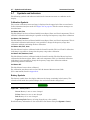
Battery Symbols
The battery symbol above the display indicates the charge remaining in the battery. The
colored section inside the symbol changes size and color with the charge level.
Figure 2-8.
Battery Status
Green: Battery is 30% to 100% charged
Yellow: Battery is 10% to 30% charged
Red: Battery 0% to 10% charged
Lightning Bolt: Battery is being charged (any color symbol)
Detailed battery information is also available in the Status dialog box (System > Status).
2-10
PN: 10580-00252 Rev. A
Site Master User Guide
Instrument Overview
2-7
Symbols and Indicators
When either the AC-DC Adapter (40-168-R) or the 12 Volt DC adapter (806-141-R) is
connected, the battery automatically receives a charge, and the battery symbol with the
lightning bolt is displayed (Figure 2-9).
Figure 2-9.
Battery Charging Icon
The green Charge LED flashes when the battery is charging, and remains on steady when the
battery is fully charged.
Caution
Use only Anritsu-approved batteries, adapters, and chargers with this instrument.
When operating from external power without a battery installed, the battery symbol is
replaced by a red plug body (Figure 2-10).
Figure 2-10. Battery Not Installed
Additional Symbols
Single Sweep
Single Sweep is selected. Press Continuous in the Sweep menu to resume continuous sweeping.
Floppy Icon
Shortcut to the Save submenu. Touch the icon to open the touch screen keyboard for saving
measurements, setups, or screen displays.
Site Master User Guide
PN: 10580-00252 Rev. A
2-11
2-8
2-8
Data Entry
Instrument Overview
Data Entry
Numeric Values
Numeric values are changed using the rotary knob, arrow keys, or the keypad. Pressing one
of the main menu keys will display a list of submenus on the right side of the touch screen.
When the value on a submenu key is displayed in red, it is ready for changing. When using
the rotary knob or arrow keys the changing value is shown on the submenu and in red on the
graticule. When using the keypad, the new value is shown in red on the graticule and the
submenu changes to Units. Selecting a unit for the new value completes the entry.
Parameter Setting
Pop-up list boxes or edit boxes are used to provide selection lists and selection editors. Scroll
through a list of items or parameters with the arrow keys, the rotary knob, or the touch
screen. These list boxes and edit boxes frequently display a range of possible values or limits
for possible values.
Finalize the input by pressing the Enter key. At any time before finalizing the input, press the
escape (Esc) key to abort the change and retain the previously existing setting.
Some parameters (such as for antennas or couplers) can be added to list boxes by creating
them and importing them using Master Software Tools.
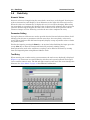
Text Entry
When entering text, as when saving a measurement, the touch screen keyboard is displayed
(Figure 2-11). Characters are entered directly with the touch screen keyboard. The keypad
can be used for numeric entry. The left and right arrow keys will scroll the cursor through the
filename. See “Save Menu” on page 4-8 for additional information.
Figure 2-11. Touch Screen Keyboard
2-12
PN: 10580-00252 Rev. A
Site Master User Guide
Instrument Overview
2-9
2-9
Mode Selector Menu
Mode Selector Menu
To access the functions under the Mode menu, select the Shift key, then the Mode (9) key. Use
the directional arrow keys, the rotary knob, or the touch screen to highlight the selection, and
press the Enter key to select. The list of modes that appear in this menu will vary depending
upon the options that are installed and activated in the instrument. Figure 2-12 is an
example of the Mode menu. Your instrument may not show the same list. The current mode is
displayed below the battery symbol.
Figure 2-12. Mode Selector Menu
The Menu key is another option to quickly change measurement modes. Press the Menu key
then select one of the Measurement icons in the top two rows (Figure 2-2 on page 2-3).
Site Master User Guide
PN: 10580-00252 Rev. A
2-13
2-14
PN: 10580-00252 Rev. A
Site Master User Guide
Chapter 3 — Quick Start Guide
3-1
Introduction
This chapter provides a brief overview of basic measurement setups. For detailed
measurement information, refer to a specific measurement guide listed in
Appendix A, “Measurement Guides”. This chapter provides quick start measurement
information for the following measurement modes:
• Section 3-3 “Cable & Antenna Analyzer” on page 3-2
• Section 3-4 “Spectrum Analyzer” on page 3-7
3-2
Measurement Mode Selection
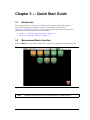
Press the Menu key and use the touch screen to select the appropriate measurement icon.
Figure 3-1.
Note
Menu Screen with Icons for Installed Measurement Modes
The display of the Menu screen will vary depending on installed options.
Site Master User Guide
PN: 10580-00252 Rev. A
3-1
3-3
Cable & Antenna Analyzer
3-3
Quick Start Guide
Cable & Antenna Analyzer
Set the instrument to Cable & Antenna Analyzer mode as described in the previous section.
Select the Measurement Type
Press the Measurement main menu key and select the appropriate measurement.
Figure 3-2.
Menu Screen with Icons for Installed Measurement Modes
Set the Frequency
1. Press the Freq/Dist main menu key.
2. Press the Start Freq submenu key and use the keypad, rotary knob, or the arrow keys to
enter the start frequency.
3. Press the Stop Freq submenu key and use the keypad, rotary knob, or the arrow keys to
enter the stop frequency.
Set the Amplitude
1. Press the Amplitude main menu key.
2. Press the Top submenu key and use the keypad, rotary knob, or the arrow keys to edit
the top scale value. Press Enter to set.
3. Press the Bottom submenu key and use the keypad, rotary knob, or the arrow keys to
edit the bottom scale value. Press Enter to set.
Note
3-2
For Amplitude in Smith Chart measurements, refer to “Smith Chart” on page 2-23
of the Cable & Antenna Measurement Guide listed in Appendix A.
PN: 10580-00252 Rev. A
Site Master User Guide
Quick Start Guide
3-3
Cable & Antenna Analyzer
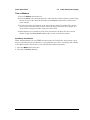
Turn on Markers
1. Press the Marker main menu key.
2. Press the Marker 1 2 3 4 5 6 submenu key and select the marker number 1 button using
the touch screen. The underlined number on the Marker submenu key indicates the
active marker.
3. Use the arrow keys, the keypad, or the rotary knob to move the marker. The current
value for the selected marker is shown above the upper-left corner of the graph. It is
also possible to drag the marker using the touch screen.
4. Delta Markers are available for each of the six reference markers. For the selected
marker, Toggle the Delta On/Off submenu key to turn on the Delta marker.
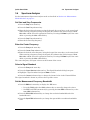
Peak/Valley Auto Markers
When making Return Loss and VSWR measurements, the Peak/Valley Auto feature can be
used to automatically turn on Marker 1 to peak, Marker 2 to valley, and display M1 and M2
in the Marker Table. This feature is not available for DTF measurements.
1. Press the Marker main menu key.
2. Press the Peak/Valley Auto key.
Site Master User Guide
PN: 10580-00252 Rev. A
3-3
3-3
Cable & Antenna Analyzer
Quick Start Guide
Single Limit Line
1. Press Shift and then Limit (6) to enter the Limit menu.
2. Press the Limit On/Off key to turn on the Limit.
3. Press Single Limit and then use the numeric keypad, the arrow keys, or the rotary knob
to change the limit value and then press Enter.
Note
Refer to the Cable & Antenna Measurement Guide listed in Appendix A for
creating multi-segment limit lines.
4. Press the Limit Alarm key to turn on or off the Limit Alarm.
Figure 3-3.
3-4
Single Limit Lines
PN: 10580-00252 Rev. A
Site Master User Guide
Quick Start Guide
3-3
Cable & Antenna Analyzer
DTF Setup
1. Press the Measurements main menu key and select DTF Return Loss or DTF VSWR.
2. Press the Freq/Dist main menu key.
3. Press the Units submenu key and select m to display distance in meters or ft to display
distance in feet.
4. Press DTF Aid and use the touch screen, or arrow keys to navigate through all the DTF
parameters.
a. Set Start Distance and Stop Distance. Stop Distance needs to be smaller than
Dmax.
b. Enter the Start and Stop frequencies.
c. Press Cable, select the appropriate cable from the cable list and press Enter.
d. Press Continue.
Figure 3-4.
DTF Aid
5. Press Shift then Calibrate (2) to calibrate the instrument. Refer to “Calibrate with OSL
Calibration” on page 3-6 for additional information.
6. Press the Marker main menu key and set the appropriate markers.
7. Press Shift and Limit (6) to enter and set the appropriate limit lines.
8. Press Shift and File (7) to save the measurement. See the User Guide for details.
Site Master User Guide
PN: 10580-00252 Rev. A
3-5
3-3
Cable & Antenna Analyzer
Quick Start Guide
Calibrate with OSL Calibration
Refer to the Cable & Antenna Measurement Guide listed in Appendix A for
calibration details.
Note
1. Press the Freq/Dist main menu key and enter the appropriate frequency range
2. Press Shift then Calibrate (2) key.
3. Select Standard or FlexCal.
4. Press Start Cal and follow instructions on screen.
5. Connect Open to RF Out and press the Enter key.
6. Connect Short to RF Out and press the Enter key.
7. Connect Load to RF Out and press the Enter key.
8. Verify that the calibration has been properly performed by checking that the Cal Status
message is now displaying “ON, Standard” or “ON, FlexCal”.
OPEN
SHORT
CALIBRATION
LOAD
TEST PORT CABLE (OPTIONAL)
RFOUT/REFLECTION
TEST PORT
S331E
SiteMaster
Menu
Enter
Esc
Shift
File
7
Measure
4
Preset
1
0
Power
Figure 3-5.
3-6
System
8
Trace
5
Calibrate
Mode
9
Limit
6
Sweep
2
3
.
+/Charge
Calibration Setup with OSL Cal
PN: 10580-00252 Rev. A
Site Master User Guide
Quick Start Guide
3-4
3-4
Spectrum Analyzer
Spectrum Analyzer
Set the instrument to Spectrum Analyzer mode as described in Section 3-2 “Measurement
Mode Selection” on page 3-1.
Set Start and Stop Frequencies
1. Press the Freq main menu key.
2. Press the Start Freq submenu key.
3. Enter the desired start frequency using the keypad, the arrow keys, or the rotary knob.
When entering a frequency using the keypad, the submenu key labels change to GHz,
MHz, kHz, and Hz. Press the appropriate unit key. Pressing the Enter key has the same
affect as pressing the MHz submenu key.
4. Press the Stop Freq submenu key.
5. Enter the desired stop frequency.
Enter the Center Frequency
1. Press the Freq main menu key.
2. Press the Center Freq submenu key.
3. Enter the desired center frequency using the keypad, the arrow keys, or the rotary knob.
When entering a frequency using the keypad, the submenu key labels change to GHz,
MHz, kHz, and Hz. Press the appropriate unit key. Pressing the Enter key has the same
affect as pressing the MHz submenu key.
The center frequency and span is shown at the bottom of the screen.
Select a Signal Standard
1. Press the Freq main menu key.
2. Press the Signal Standard submenu key. The Signal Standards dialog box opens.
3. Highlight a signal standard and press Enter to select.
4. Press the Channel submenu key to change the channel value in the Channel Editor.
The signal standard is shown in yellow at the top of the screen.
Set the Measurement Frequency Bandwidth
1. Press the BW main menu key to display the BW menu.
• Press the RBW and/or the VBW submenu key to manually change the values.
• Set RBW and VBW automatically by pressing the Auto RBW submenu key or the
Auto VBW submenu key.
2. Press the RBW/VBW submenu key to change the resolution bandwidth and video
bandwidth ratio.
3. Press the Span/RBW submenu key to change the span width to resolution bandwidth
ratio.
Site Master User Guide
PN: 10580-00252 Rev. A
3-7
3-4
Spectrum Analyzer
Quick Start Guide
Set the Amplitude
Press the Amplitude main menu key to display the Amplitude menu.
Set Amplitude Reference Level and Scale
1. Press the Reference Level submenu key and use the arrow keys, rotary knob, or the
keypad to change the reference level. Press Enter to set the reference level value.
2. Press the Scale submenu key and use the arrow keys, rotary knob, or the keypad to
enter the desired scale. Press Enter to set the scale value.
Set Amplitude Range and Scale
1. Press the Auto Atten submenu key to set an optimal reference level based on the
measured signal.
2. Press the Scale submenu key.
3. Enter the desired scale units by using the keypad, the arrow keys, or the rotary knob.
Press Enter to set. The y-axis scale is automatically renumbered.
Power Offset Set Up for Compensating External Loss
To obtain accurate results, compensate for any external attenuation by using power offset.
In power offset mode, the compensation factor is in dB. (External attenuation can be created
by using an external cable or an external high power attenuator.)
Press the RL Offset submenu key and use the keypad, the arrow keys, or the rotary knob to
enter the desired offset value. When using the rotary knob, the value changes in increments
of 0.1 dB. Using the Left/Right arrow keys changes the value in 10% increments of the value
shown on the Scale submenu key. When using the Up/Down arrow keys, the value changes in
the increment shown on the Scale submenu key. When using the keypad, enter the new value
then press Enter or the dB submenu key to set the value. The power offset is displayed in the
instrument settings summary column on the left side of the measurement display.
Set the Span
1. Press the Span main menu key or the Freq main menu key followed by the
Span submenu key.
2. To select full span, press the Full Span submenu key. Selecting full span overrides any
previously set Start and Stop frequencies.
3. For a single frequency measurement, press the Zero Span submenu key.
Note
3-8
To quickly move the span value up or down, press the Span Up 1-2-5 or Span
Down 1-2-5 submenu keys These keys facilitate a zoom-in, zoom-out feature in a
1-2-5 sequence.
PN: 10580-00252 Rev. A
Site Master User Guide
Quick Start Guide
3-4
Spectrum Analyzer
Single Limit Line
Press the Limit menu key to display the Limit menu.
1. Press the Limit (Upper / Lower) submenu key to select the desired limit line,
Upper or Lower.
2. Activate the selected limit line by pressing the On Off submenu key so that On is
underlined.
3. Press the Limit Move submenu key to display the Limit Move menu. Press the first
Move Limit submenu key and use the arrows keys, rotary knob, or keypad to change the
dBm level of the limit line.
4. Press the Back submenu key to return to the Limit menu.
5. If necessary, press the Set Default Limit submenu key to redraw the limit line in view.
Segmented Limit Lines
The following procedure creates limit lines for a Return Loss Measurement. Limits are set to
12 dB between 1000 MHz and 1400 MHz and to 15 dB between 1600 MHz and 2000 MHz.
1. Press the Limit (Upper / Lower) submenu key to select the desired limit line, Upper or
Lower.
2. Activate the selected limit line by pressing the On Off submenu key so that On is
underlined.
3. Press the Limit Move submenu key to display the Limit Move menu.
Create a Sample Segmented Limit Line
4. Press the Move Limit submenu key and use the number keys to enter a limit value of
12 dB. The limit value can also be moved by using the arrow keys or the rotary knob.
Press the Back submenu key to return to the Limit menu.
5. Press the Limit Edit submenu key to display the Edit menu.
6. Press the Add Point submenu key.
7. Press the Frequency submenu key and enter 1400 MHz.
8. Press the Add Point submenu key
9. Press the Frequency submenu key and enter 1600 MHz.
Site Master User Guide
PN: 10580-00252 Rev. A
3-9
3-4
Spectrum Analyzer
Quick Start Guide
Create a Limit Envelope
1. Press Shift then Limit (6) to open the Limit menu.
2. Select Limit Envelope.
3. Press the Create Envelope key.
Figure 3-6.
3-10
Limit Envelope
PN: 10580-00252 Rev. A
Site Master User Guide
Quick Start Guide
3-4
Spectrum Analyzer
Setting Up Markers
Press the Marker main menu key to display the Marker menu.
Selecting, Activating, and Placing a Marker
1. Press the Marker 1 2 3 4 5 6 submenu key and then select the desired marker using the
touch screen marker buttons. The selected marker is underlined on the Marker
submenu key.
2. Press the On Off submenu key so that On is underlined. The selected marker is
displayed in red and ready to be moved.
3. Use the rotary knob to place the marker on the desired frequency.
4. Repeat steps 1 through 3 to activate and move additional markers.
Selecting, Activating, and Placing a Delta Marker:
1. Press the Marker 1 2 3 4 5 6 submenu key and select the desired delta marker. The
selected marker is underlined.
2. Press the Delta On Off submenu key so that On is underlined. The selected marker is
displayed in red and ready to be moved.
3. Use the rotary knob to place the delta marker on the desired frequency.
4. Repeat steps 1 through 3 to activate and move additional markers.
Viewing Marker Data in a Table Format
1. Press the More submenu key.
2. Press the Marker Table On Off submenu key so that On is underlined. All marker and
delta marker data are displayed in a table under the measurement graph.
Figure 3-7.
Marker Table
Site Master User Guide
PN: 10580-00252 Rev. A
3-11
3-4
Spectrum Analyzer
Quick Start Guide
Select a Smart Measurement Type
In Spectrum Analyzer mode, press Shift then Measure (4) and select a smart measurement
using the submenu keys.
Figure 3-8.
3-12
Spectrum Analyzer Measure Menu
PN: 10580-00252 Rev. A
Site Master User Guide
Chapter 4 — File Management
4-1
Introduction
This chapter will review the file management features of the Site Master and detail the
File menu. The submenus under this menu allow the user to save, recall, copy, and delete files
in internal memory or an external USB flash drive.
4-2
Managing Files
Press the Shift key then the File (7) key on the numeric keypad to list the File menu. Follow
the additional steps below.
Note
When navigating through the File menu, pressing the Esc key will return to the
previous menu.
Save Files
Set the Save Location
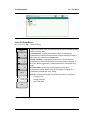
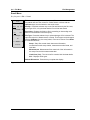
Press the Save submenu key then the Change Save Location and select the location to save
files. You can save files to the internal memory or to an external USB flash drive. You can
also create new folders. If an external USB flash drive is connected or disconnected, press
Refresh Directories to update the location tree. Press the Set Location key to store the save
location.
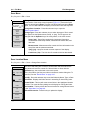
Save Measurement As
The Save Measurement As key is used to quickly save measurements with a specific file
name. The Site Master saves the measurement with the latest file name that was used to
save a measurement and with a number that is automatically incremented and appended to
the end of the file name. For instance, if the last measurement was saved with the name
System Return Loss, Save Measurement As saves the next measurement as System Return
Loss_#1, System Return Loss_#2 etc. The file name used can be changed using the Save
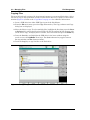
dialog box (Figure 4-1).
Save a Measurement
Press the Save Measurement key and enter the name for the measurement file. The file type
will default to measurement and the appropriate extension will be added based on the current
measurement mode.
Save a Setup
Press the Save submenu key, type a name for the setup file, confirm that the file type is Setup
using the Change Type key or the touchscreen and press Enter to save.
Create a Menu Shortcut for a Setup file
Press the Recall submenu key to display saved setup files. Locate the setup file to shortcut
and then press and hold on the file name for a few seconds. Select a location in the shortcut
grid to save the setup file.
Site Master User Guide
PN: 10580-00252 Rev. A
4-1
4-2
Managing Files
File Management
Save a Measurement Screen as JPEG
Press the Save submenu key, type a name for the JPEG file, confirm that the file type is Jpeg,
and press Enter to save.
Save Dialog Box
The save dialog box (Figure 4-1) is used to store files on the internal memory or an external
flash drive. The file type, file name, and save location are set at this display. See “Save Menu”
on page 4-8 and “Save Location Menu” on page 4-8 for details.
Figure 4-1.
Save Dialog Box
Quick Name Keys
Quick Name keys below the keyboard in Figure 4-1 allow users to enter quick names for
frequently used file measurement names. To edit the keys, press the Shift key, then the
File (7) key. Press Save then the Change Quick Name key, select one of the Quick Names for
editing, press Enter and enter the new name for the key. Press Enter again and the new name
will be displayed on the key.
4-2
PN: 10580-00252 Rev. A
Site Master User Guide
File Management
4-2
Managing Files
Recall Files
The recall menu enables you to view all the Measurement and Setup files in the internal
memory and external USB flash drive.
You can sort the recall menu by name, date, or type. You can also select to view only
measurement files or setup files by pressing File Type on the Recall dialog box and selecting
the file type you want to view.
Recall a Measurement
From the File menu, press the Recall Measurement submenu key, select the measurement
with the touchscreen, rotary knob or the Up/Down arrow keys and press Enter.
Recall a Setup
Press the Recall submenu key. Confirm that the file type is Setup or All. Select the setup file
(.stp) with the touchscreen, rotary knob or the Up/Down arrow keys and press Enter.
Recall Dialog Box
The Recall dialog box (Figure 4-2) will open previously saved measurements and setups.
See the “Recall Menu” on page 4-10 for additional information.
Figure 4-2.
Recall Dialog Box
Site Master User Guide
PN: 10580-00252 Rev. A
4-3
4-2
Managing Files
File Management
Copying Files
The steps below detail copying a file from internal memory to an external flash drive. Select
the files to copy in the top window and the location for the files to be copied to in the bottom
window (Figure 4-3). Refer to the “Copy Menu” on page 4-11 for additional information.
1. Insert a USB drive into either USB Type A port of the Site Master.
2. From the File main menu, press the Copy submenu key. The Copy submenu and Copy
dialog box are displayed.
3. Select the file(s) to copy. To select multiple files, highlight the first then press the Select
or De-Select key to keep the file selected. The file will be outlined in blue. Repeat with
all the files to copy. To display files in a folder, select the folder and press the Enter key.
4. Press the Scroll key and highlight the USB drive in the lower window using the
touch screen or the Up/Down arrow keys. The Scroll submenu key toggles between
Src (top window) and Dst (bottom window).
5. Press the Copy key to copy the files to the flash drive.
Figure 4-3.
4-4
Copy Dialog Box
PN: 10580-00252 Rev. A
Site Master User Guide
File Management
4-2
Managing Files
Deleting Files
Delete a Selected File or Files
Press the Delete submenu key. Highlight the file to be deleted with the touchscreen or the
Up/Down arrow keys. Press the Select or De-Select key. The file will be outlined in blue when
selected. Press the Delete key and Enter to delete the selected file.
Delete Dialog Box
Press the Delete submenu key to open the Delete dialog box (Figure 4-4). The submenus allow
sorting by file type, name and saved date. See the “Delete Menu” on page 4-12 for additional
information.
Figure 4-4.
Delete Dialog Box
Site Master User Guide
PN: 10580-00252 Rev. A
4-5
4-3
File Menu Overview
4-3
File Management
File Menu Overview
Open this menu by pressing the Shift key, then the File (7) key.
File
Save Measurement As
FileName.rl
Save
Save
Measurement
Save
Spectrum
Analyzer
Mode Only
Save
On
Event
Change
Quick
Name
Save On...
Change
Save
Location
...Crossing Limit
Recall
On
Recall
Off
Save Location
Sort By
Measurement
Sort By
Change Type
...Sweep Complete
Name
Name
Recall
Type
Date
On
Type
Date
Setup/JPG/...
Off
Sort Order
Sort Order
Save Then Stop
Asc
A
Copy
Asc
Desc
On
Desc
Off
Create
File Type
Folder
Clear All
B
Delete
Measurement
Set
Refresh
Location
Directories
Refresh
Directories
Back
Copy
A
Delete
B
Sort By
Sort By
Name
Type
Name
Date
Date
Sort Order
Sort Order
Asc
Type
Asc
Desc
Desc
File Type
File Type
ALL
ALL
Refresh
Select
or
De-Select
Directories
Scroll
Delete
Scr
Dst
Select
or
De-Select
Refresh
Directories
Copy
Figure 4-5.
4-6
File Menu
PN: 10580-00252 Rev. A
Site Master User Guide
File Management
4-4
4-4
File Menu
File Menu
Key Sequence: File
File
Save Measurement As
FileName.rl
Save
Measurement
Save
Save
On
Event
Recall
Measurement
Recall
Copy
Delete
Save Measurement As: : This key will save the current setup with a user
defined file name. The default file name is changed using the Save
submenu. To change the default file name, type in a new file with the touch
screen keyboard and press Enter. After a few seconds the screen with return
to File menu. Press the Save Measurement As key again and the new file
name will be used. Measurement files names have a .rl extension.
Save Measurement: Press this submenu key to display the “Save Menu”
on page 4-8 and the touch screen keyboard. Measurements can be saved to
internal memory or to a USB flash drive. The Site Master is shipped with an
Anritsu-approved USB flash drive for external data storage. The saved
measurement can be named by using touch screen keyboard. By default,
measurements are saved in a directory named /user to internal memory. The
save destination is set with the “Save Location Menu” on page 4-8.
Save: Press this submenu key to display the “Save Menu” on page 4-8 and
the touch screen keyboard. Measurements can be saved to internal memory
or to a USB flash drive. The Site Master is shipped with an Anritsu-approved
USB flash drive for external data storage. The saved setup, measurement or
JPEG file can be named by using touch screen keyboard. By default,
measurements are saved in a directory named /user to internal memory. The
save destination is set with the “Save Location Menu” on page 4-8.
Save on Event (Spectrum Analyzer mode only): Press this submenu key to
display the “Save On Event Menu” on page 4-9.
Recall Measurement: Press this submenu key to display the “Recall Menu”
on page 4-10. This menu is for recalling measurements from internal
memory or a USB flash drive.
Recall: Press this submenu key to display the “Recall Menu” on page 4-10.
This menu is for recalling measurement or setup data from internal memory
or a USB flash drive.
Copy: Press this submenu key to display the “Copy Menu” on page 4-11.
This submenu is for copying files or folders from internal memory or a USB
flash drive.
Delete: Press this submenu key to display the “Delete Menu” on page 4-12
and a selection box that shows the setup and measurement names, the type
and the date and time that the information was saved. Use the rotary knob or
the Up/Down arrow keys to highlight the file that is to be deleted and press
the Delete submenu key, then Enter. Press the Esc key to cancel the
operation. Note that deleted files can not be recovered.
Figure 4-6.
File Menu
Site Master User Guide
PN: 10580-00252 Rev. A
4-7
4-4
File Menu
File Management
Save Menu
Key Sequence: File > Save
Change Quick Name: Press this submenu key to change the Quick Names
at the bottom of the touch screen keyboard (Figure 4-1). Select the Quick
Name to edit and press Enter. Type the new Quick Name and press Enter
again. The new Quick Name will display on the button below the keyboard.
Save
Change Save Location: Press this submenu key to open the
“Save Location Menu”.
Change
Quick
Name
Change Type: Press this submenu key to select what type of file is saved.
The options are the Measurement, Setup, or Jpeg. The file type can be
changed with the Up/Down keys, the rotary wheel, or the touch screen.
Change
Save
Location
Setup (.stp): Setup files contain basic instrument information,
measurement mode setup details, measurement marker data, and
limit data.
Change Type
Measurement: Measurement files contain all of the information in the
setup files and the measurement data.
Setup/JPG/...
Jpeg (.jpg): Jpeg files contain a screen capture of the display.
Limit Lines (.lim): The Limit line file contains limit line data details.
Figure 4-7.
Save Menu
Save Location Menu
Key Sequence: File > Save > Change Save Location
Save Location
Sort By
Name
Type
Date
Sort Order
Asc
Folder
Set
Location
Note: Only folders (not files) are visible in the Save Location dialog box. To
view files, use the “Recall Menu” on page 4-10.
Sort By: Press this submenu key to sort the folders by Name, Type, or Date.
Desc
Create
This menu and dialog box is used to create folders and select where the
Site Master will save the current file. Select folders or drives with the
Up/Down keys, the scroll wheel or the touch screen.
Sort Order: Displays the folder names in ascending or descending order .
Create Folder: This key will create a new folder in the highlighted location
or folder. The create directory dialog box will display for naming the folder.
Set Location: This key will set the current location for saving files and return
to the “Save Menu” on page 4-8.
Refresh Directories: Press this key to update the display.
Refresh
Directories
Figure 4-8.
4-8
Save Menu
PN: 10580-00252 Rev. A
Site Master User Guide
File Management
Figure 4-9.
4-4
File Menu
Select Save Location Dialog Box
Save On Event Menu
Key Sequence: File > Save On Event
In Spectrum Analyzer mode, this menu is used to auto save measurements
to internal memory after:
Save On...
...Crossing Limit
On
Off
...Sweep Complete
On
Off
Save Then Stop
On
Off
Clear All
...Crossing Limit: Toggling this submenu key to On will save the
measurement to internal memory when the measurement has crossed a
defined limit line created with the Limit menu.
...Sweep Complete: Toggling this submenu key to On will save the
measurement to internal memory after the current sweep is complete. If
Save Then Stop is toggled Off, a measurement will be saved after every
sweep.
Save Then Stop: Set this key to On to stop the sweep after a
measurement is saved. With this key Off and Sweep Complete On a
measurement is saved after every sweep.
Clear All: Pressing this key will turn Off the three save on event keys:
Crossing Limit
Sweep Complete
Save Then Stop
Back
Figure 4-10. Save On Menu
Site Master User Guide
PN: 10580-00252 Rev. A
4-9
4-4
File Menu
File Management
Recall Menu
Key Sequence: File > Recall
This menu and dialog box is used to create folders and select where the
Site Master will save the current file. Select folders or drives with the
Up/Down keys, the scroll wheel or the touch screen.
Recall
Sort By
Name
Type
Date
Sort Order
Asc
Desc
File Type
ALL
Refresh
Sort By: Press this submenu key to sort file and folders by the file name,
by the type of file, or by the date that the file or folder was saved.
Sort Order: Displays the folder or file in ascending or descending order
based on the selection in the Sort By key.
File Type: Press this submenu key to select what type of file is viewed. The
options are the ALL, Measurement, or Setup. The file type can be changed
with the Up/Down keys, the rotary wheel, or the touch screen. Press Enter
to make the selection.
Setup: Setup files contain basic instrument information,
measurement mode setup details, measurement marker data, and
limit data.
Directories
Measurement: Measurement files contain all of the information in
the setup files and the measurement data.
Limit Lines (.lim): The Limit line file contains limit line data details.
ALL: Displays all file types.
Refresh Directories: Press this key to update the display.
Figure 4-11. Recall Menu
4-10
PN: 10580-00252 Rev. A
Site Master User Guide
File Management
4-4
File Menu
Copy Menu
Key Sequence: File > Copy
Copy
Sort By
Name
Type
Date
Sort Order
Asc
Desc
File Type
Sort By: Press this submenu key to sort file and folder lists by name, by
type of file, or by the date that the file was saved.
Sort Order: Displays the folder or file in ascending or descending order
based on the selection in the Sort By key.
ALL
Refresh
Directories
Scroll
Scr
This menu and dialog box is used to copy folders and files. Select folders or
files with the Up/Down keys, the scroll wheel or the touch screen.
Figure 4-1 on page 4-2 shows the Copy dialog box with two Jpeg images
and one folder (including the folder’s contents) selected and ready to be
copied to the USB flash drive. Highlight a folder and press Enter to view the
contents.
File Type: Press this submenu key to select what type of file to view for
copying. The options are: ALL, Measurement, Setup, or Jpeg. The file type
can be changed with the Up/Down keys, the rotary wheel, or the touch
screen. Press Enter to make the selection.
Refresh Directories: Press this key to update the display.
Dst
Select
or
De-Select
Copy
Scroll Scr Dst: Press this submenu key to use the scroll function in the
Source Folder (Scr - top panel) or Destination Folder (Dst - bottom panel).
See Figure 4-3.
Scroll Destination Folder: This key toggles with the Scroll Files To Copy
key. It has the same function as touching the bottom (Select Destination)
window in Figure 4-1. When the circle is red you can use the Up/Down keys
or the rotary wheel to scroll through the folders or drives to select where the
files will be saved.
Note: Previously saved files are not visible in this window.
Select or De-Select: Use this key to select or deselect the file(s) or
folder(s) to be copied. When selected, a file or folder will be outlined in blue,
see Figure 4-3.
Copy: Copies the files or folders selected in the top window to the
destination selected in the bottom window. A dialog box will display showing
when the copying is complete. If a file with the same name exists in the
destination folder a warning box will display to allow file overwrite or to
cancel.
Figure 4-12. Copy Menu
Site Master User Guide
PN: 10580-00252 Rev. A
4-11
4-4
File Menu
File Management
Delete Menu
Key Sequence: File > Delete
This menu and dialog box is used to delete folders and files. Select folders
or files with the Up/Down keys, the scroll wheel or the touch screen.
Delete
Sort By
Name
Type
Date
Sort Order
Asc
Desc
File Type
ALL
Select
or
De-Select
Delete
Sort By: Press this submenu key to sort files and folders by name, by the
type of file, or by the date that the file or folder was saved.
Sort: Displays the folder or file in ascending or descending order based on
the selection in the Sort By key.
File Type: Press this submenu key to select what type of file view for
deleting. The options are the ALL, Measurement, Setup, Limit Lines,
or Jpeg. The file type can be changed with the Up/Down keys, the rotary
wheel, or the touch screen. Press Enter to make the selection.
Select or De-Select: Use this key to select or deselect the file(s) or
folder(s) to be deleted. When selected, a file or folder will be outlined in
blue.
Delete: Press this key to open the Delete dialog box. Press Enter to delete
the selected item or Esc to Cancel.
Refresh Directories: Press this key to update the display.
Refresh
Directories
Figure 4-13. Delete Menu
4-12
PN: 10580-00252 Rev. A
Site Master User Guide
Chapter 5 — System Operations
5-1
Introduction
This chapter will review the Site Master system operations.
• “System Menu Overview” on page 5-2
• “System Menu” on page 5-3
• “Preset Menu” on page 5-6
• “Self Test” on page 5-7
• “Updating Site Master Firmware” on page 5-7
• “Site Master Firmware Emergency Repair” on page 5-8
The other menus (Sweep Measure Trace and Limit) are detailed in the Measurement Guides
listed in Appendix A.
Site Master User Guide
PN: 10580-00252 Rev. A
5-1
5-2
5-2
System Menu Overview
System Operations
System Menu Overview
To access the functions under the System menu, select the Shift key, then the System (8) key.
System
Status
Self
Test
Application
Self
Test
GPS
GPS
GPS
On
Off
GPS Info
Calibrate
Touch
Screen
GPS Voltage
Application
3.3 V
5V
Options
System
System Options
Options
Date
&
Time
Reset
Back
Language
Reset
Factory
Brightness
Defaults
Master
Name
Reset
Update
Volume
Firmware
Reset
Back
Figure 5-1.
5-2
Back
System Menu
PN: 10580-00252 Rev. A
Site Master User Guide
System Operations
5-3
5-3
System Menu
System Menu
Key Sequence: Shift, System (8)
System
Status
Self
Test
Application
Self
Test
GPS
Status: Pressing this submenu key displays the current system status,
including the operating system and firmware versions, temperatures and
other details such as current battery information. Press Esc or Enter to
return to normal operation.
Self Test: This key initiates a series of diagnostic tests that check the
components of the instrument. A display will list the individual tests with a
pass or fail indication. Press Esc or Enter to return to normal operation.
Application Self Test: This key initiates a series of diagnostic tests related
to the performance of the instrument for specific applications. A display will
list the individual tests with a pass or fail indication. Press Esc or Enter to
return to normal operation.
GPS : Opens the “GPS Menu” on page 6-4.
Calibrate Touch Screen: Start the touch screen calibration. Run the
calibration procedure when instrument is not responding to your screen taps
as expected.
Calibrate
Touch
Screen
Application Options: This submenu key presents a menu to select
application options. This will vary depending upon the measurement mode.
System Options: This key opens the “System Options Menu” on page 5-4.
Application
Options
System
Options
Figure 5-2.
System Menu
Site Master User Guide
PN: 10580-00252 Rev. A
5-3
5-3
System Menu
System Operations
System Options Menu
Key Sequence: Shift, System (8) > System Options
System Options
Date
&
Time
Language
Brightness
Name
Volume
Reset
Back
Date and Time: This key brings up a dialog box for setting the current date
and time. Use the submenu keys or the Left/Right arrow keys to select the
field to be modified. Use the keypad, the Up/Down arrow keys or the rotary
knob to select the date and time. Press Enter to accept the changes, or
press the Esc key to return to normal operation without changing anything.
Language: This submenu key brings up a selection box allowing selection
from a list of built-in languages for the Spectrum Master displays. The
languages currently available are English, French, German, Spanish,
Japanese, Chinese, Korean, and Italian. In addition, up to two custom
languages may be loaded into the instrument if they have been defined using
the Master Software Tools. If a mode does not have language translations
available, English is the default language. Press Enter to accept the change,
or press the Esc key to return to normal operation without changing the
setting.
Brightness: The brightness of the display can be adjusted to optimize
viewing under a wide variety of lighting conditions. Use the keypad, the
Up/Down arrow keys or the rotary knob to select a brightness level from
1 to 9, with 9 being the brightest. Press Enter to accept the change.
Name: Opens a dialog box to name the instrument. The unit can be named
using the keypad to select numbers and the touch screen keys to select letter
groups. Use the Shift key to select an upper case letter. Use the Left/Right
directional arrows to move the cursor position. The Back Space key will
remove the last character entered. Press Enter to save the name.
Volume: The current volume setting is displayed on the screen. Use the
keypad, the Up/Down arrow keys or the rotary knob to change the volume
and press the Enter key to accept the change.
Reset: Press this submenu key to open the “Reset Menu” on page 5-5.
Back: Press this submenu key to return to the “System Menu” on page 5-3.
Figure 5-3.
5-4
System Options Menu
PN: 10580-00252 Rev. A
Site Master User Guide
System Operations
5-3
System Menu
Reset Menu
Key Sequence: Shift, System (8) > System Options > Reset
Reset
Factory
Defaults
Master
Reset
Update
Firmware
Back
Factory Defaults: Restores the instrument to the factory default values,
including language, volume, brightness setting, and user created shortcut
icons on the Menu screen. Press the Enter key to initiate the reset, and
power-cycle the instrument.
Master Reset: In addition to the functions described in Factory Defaults
above, all user files in the internal memory are deleted, and the original
language and antenna files are restored. Press the Enter key to initiate the
Master Reset and power-cycle the instrument. Press Esc to return to normal
operation without resetting.
Update Firmware: Press this submenu key to update the instrument
operating system with a USB memory device. Press Enter and follow the
onscreen instructions to update the firmware or press Esc to return to normal
operation without updating. The firmware can also be updated directly from
Master Software Tools when the instrument is connected to the PC with a
USB cable. Refer to “Updating Site Master Firmware” on page 5-7 for
additional information on both firmware update options.
Back: Press this submenu key to return to the “System Options Menu”
on page 5-4.
Figure 5-4.
Reset Menu
Site Master User Guide
PN: 10580-00252 Rev. A
5-5
5-4
5-4
Preset Menu
System Operations
Preset Menu
Key Sequence: Shift, Preset (1)
Preset
Preset
Save Setup: Opens the Save dialog box (Figure 4-1) to name and save
the current operating settings, allowing them to be recalled later to return
the instrument to the state it was in at the time the setup was saved.
Setup
The saved setup can be named using the touch screen keyboard. Use the
Caps key to select an upper case letter. Use the Left/Right directional
arrows to move the cursor position. Press Enter to save the setup.
Recall
Note: Set the File type as Setup. See “Save Menu” on page 4-8 for details.
Save
Setup
Figure 5-5.
5-6
Preset: This key resets the instrument to the default starting conditions.
Recall Setup: This key allows the selection and recall of a previously
stored instrument setup using the “Recall Menu” on page 4-10. Use the
rotary knob, the Up/Down arrow keys, or the touchscreen to highlight the
saved setup, and press Enter. All current instrument settings are replaced
by the stored setup information.
Preset Menu
PN: 10580-00252 Rev. A
Site Master User Guide
System Operations
5-5
5-5
Self Test
Self Test
At power on, the Site Master runs through a series of quick checks to ensure that the system
is functioning properly. The System self test runs a series of tests that are related to the
instrument. The Application Self Test runs a series of tests that are related to the current
operating mode of the instrument.
If the Site Master is within the specified operating range with a charged battery, and the self
test fails, then contact your Anritsu Service Center (http://www.anritsu.com/Contact.asp).
To start a self test when the system is already powered up:
1. Press the Shift key and then the System (8) key.
2. Press the Self Test submenu key. The Self Test results are displayed.
3. Press Esc to continue.
5-6
Updating Site Master Firmware
Please review the MST User Guide section on copying firmware to a USB memory device.
Update From USB Memory Device
1. Run Master Software Tools and load the firmware update onto the USB memory device.
Review the section (in MST Help) that discusses this process.
2. After the firmware is loaded, insert the USB memory device into the USB port of the
instrument.
3. Press the following key sequence: Shift > System (8) > System Options > Reset >
Update Firmware. The Load Firmware main menu key is displayed.
4. Press the Load Firmware main menu key to list the Firmware Update menu and
Update Application Firmware submenu key.
5. Press the Update Application Firmware submenu key and the Firmware Update dialog
opens.
6. Highlight each of the save choices: Save None, Save User Data, and Save & Restore User
Data. Read through each choice carefully and then select the desired save mode.
• Save None: No attempt will be made to save any user data.
• Save User Data: User data will be save to the selected external media device.
Warning
If there is not enough available memory space for all user data, then some data
may be lost during this process.
• Save & Restore: User data will be saved to the selected external media device.
The instrument will also attempt to restore the files to the instrument after the
update.
Warning
If there is not enough available memory space for all user data, then some data
may be lost during this process.
7. Press Enter to begin the firmware update process. To abort the process, press Esc then
choose another analyzer mode or power down.
Site Master User Guide
PN: 10580-00252 Rev. A
5-7
5-7
Site Master Firmware Emergency Repair
System Operations
8. The Firmware Update dialog will query you to confirm the process by pressing Enter to
continue or Esc to abort.
9. Select Enter and the firmware update process begins and the Firmware Update dialog
displays the following message
Updating firmware. Please Wait.
10. When complete, the instrument will reboot.
5-7
Site Master Firmware Emergency Repair
If you have problems with booting up or updating firmware on the instrument, use the
following steps to resolve the problem.
1. Press and hold the Shift, 4 (Measure), 0, and On/Off keys simultaneously until a green
bar displays at the top of the screen. The Bootstrap window opens.
2. Place the USB memory device with update firmware into the USB connector on the
instrument. Please review the MST User Guide section on copying firmware to a USB
memory device.
3. Touch the Load All command line on the screen.
4. A successful emergency repair returns:
Loading applications passed.
Loading DSP FPGA passed.
Loading SPA FPGA passed.
Loading OS passed.
5. Power down and power up the instrument.
5-8
PN: 10580-00252 Rev. A
Site Master User Guide
Chapter 6 — GPS (Option 31)
6-1
Introduction
The Site Master is available with a built-in GPS receiver feature (Option 31) that can provide
latitude, longitude, altitude, and UTC timing information. This option also enhances
frequency reference oscillator accuracy in the spectrum analyzer mode (S332E/S362E).
Within three minutes of satellite acquisition, the reference oscillator will have an accuracy of
better than 50 ppb (parts per billion).
In order to acquire data from the GPS satellites, the user must have line-of-sight to the
satellites or the antenna must be placed outside without any obstructions. Anritsu GPS
antenna 2000-1528-R is required.
6-2
Chapter Overview
• Section 6-3 “Activating the GPS Feature” on page 6-1
• Section 6-4 “Saving and Recalling Traces with GSP Information” on page 6-3
• Section 6-5 “GPS Menu” on page 6-4
6-3
Activating the GPS Feature
Install the Anritsu GPS antenna onto the GPS Antenna connector on the Site Master.
1. Press the Shift key, then the System (8) key.
2. Press the GPS submenu key.
3. Press the GPS On/Off submenu key to toggle the GPS feature on or off. When GPS is
first turned on, a RED GPS icon will be appear at the top of the display.
GPS
Figure 6-1.
GPS Icon, Red
Site Master User Guide
PN: 10580-00252 Rev. A
6-1
6-3
Activating the GPS Feature
GPS (Option 31)
4. When the GPS receiver has tracked at least three satellites, the GPS icon will change to
GREEN. Latitude and Longitude information is displayed in the white bar on top of the
display. Acquiring satellites may take as long as three minutes.
GPS
Figure 6-2.
GPS Icon, Green
5. Press the GPS Info submenu key to view information about:
• Tracked Satellites
• Latitude and Longitude
• Altitude
• UTC
• Fix Available
• Almanac complete
• Antenna Status
See Section 6-5 “GPS Menu” on page 6-4 for details about the GPS Info dialog box.
6. Press the Reset submenu key to reset the GPS.
7. The GREEN GPS icon with a RED CROSS through it, as shown below, appears when
GPS satellite tracking is lost (after actively tracking 3 or more satellites). The GPS
longitude and latitude are saved in the instrument memory until the Site Master is
turned off or until GPS is turned off by using the GPS On/Off key.
GPS
Figure 6-3.
6-2
GPS Icon, Tracking Lost
PN: 10580-00252 Rev. A
Site Master User Guide
GPS (Option 31)
6-4
6-4
Saving and Recalling Traces with GSP Information
Saving and Recalling Traces with GSP Information
Saving Traces with GPS Information
The GPS coordinates of a location can be saved along with a measurement trace. Refer to the
“Save Menu” on page 4-8 for more information. The current GPS coordinates will be saved
with the measurement traces whenever GPS is on and actively tracking satellites.
Recalling GPS Information
If the GPS coordinates were saved with a measurement, then when the measurement is
recalled, the coordinates that were saved are recalled as well. Refer to the “Recall Menu”
on page 4-10 for more information about recalling a saved trace.
Site Master User Guide
PN: 10580-00252 Rev. A
6-3
6-5
GPS Menu
6-5
GPS (Option 31)
GPS Menu
Key Sequence: Shift, System (8) > GPS
GPS: Press this submenu key to turn GPS on or off.
GPS
GPS Info: Press this submenu key to display the current GPS information.
GPS
On
Tracked Satellites: Shows the number of tracked satellites (three are
required to retrieve latitude and longitude, four are required to resolve
altitude). Generally, the larger number of satellites tracked, the more
accurate the information.
Off
GPS Info
Latitude and Longitude: Shows location in degrees, minutes, and
seconds.
GPS Voltage
3.3 V
Altitude: Shows altitude information in meters.
5V
UTC: Universal Coordinated Time.
Fix Available: The cold start search sets are established to ensure
that at least three satellites are acquired within the first couple of
minutes. When three satellites are found, the receiver will compute an
initial fix (typically in less than two minutes). Fix Not Available means
that the initial position has not been established.
Reset
Almanac Complete: The system Almanac contains information
about the satellites in the constellation, ionospheric data, and special
system messages. In a cold start, the GPS receiver does not have any
navigation data so the receiver does not have a current almanac. A
complete system almanac is not required to achieve a first position fix.
The availability of the almanac, however, can significantly reduce the
time to first fix.
Back
Antenna Status:
OK: Antenna is connected properly and antenna is working properly
Short/Open: A short or open exists between the antenna and the
connection. If this message is displayed, then remove and replace the
GPS antenna. If the message persists, then try another Anritsu GPS
antenna (part number 2000–1528-R). If the message persists, then
contact your nearest Anritsu Service Center.
Receiver Status: Current status of the receiver.
GPS Voltage: Press this submenu key to set the source voltage to be either
3.3 V or 5 V depending on the GPS receiver being used. GPS antenna
voltage is set to 3.3 V by default in order to prevent accidental damage to
lower-voltage GPS antennas.
Reset: The Reset key sets the tracked number of satellites to 0 and erases
any almanac data, along with saved coordinates. The process of searching
for and reacquiring satellites will begin again.
Back: Press this submenu key to return to the “System Menu” on page 5-3.
Figure 6-4.
6-4
GPS Menu
PN: 10580-00252 Rev. A
Site Master User Guide
Chapter 7 — Bias Tee (Option 10)
7-1
Overview
Option 10 provides a bias tee that is installed inside the instrument. The bias arm is
connected to a 12 VDC-to-32 VDC power source that can be turned on as needed to place the
voltage on the center conductor of the instrument’s RF In port. This supply of bias implies it is
mostly useful when conducting two-port transmission measurements. This voltage can be
used to provide power to block down-converters in satellite receivers and can also be used to
power some tower-mounted amplifiers.
The bias can be turned on only when the instrument is in transmission measurement or
spectrum analyzer mode.
When bias is turned on, the bias voltage and current are displayed in the lower left corner of
the display. The 12 VDC-to-32 VDC power supply is designed to continuously deliver a
maximum of 6 Watts.
The bias tee menu can be accessed from the applications options menu and in transmission
measurement, it can also be accessed from the Measure main menu.
TMA-DD
ANT
RX / TX
(Bias Tee)
RF OUT
RF IN
S331E
SiteMaster
Menu
Enter
Esc
Shift
File
7
Measure
4
Preset
1
0
Power
Figure 7-1.
System
8
Trace
5
Calibrate
Mode
9
Limit
6
Sweep
2
3
.
+/Charge
Variable Bias Tee
Site Master User Guide
PN: 10580-00252 Rev. A
7-1
7-2
PN: 10580-00252 Rev. A
Site Master User Guide
Chapter 8 — Master Software Tools
8-1
Introduction
This chapter provides a brief overview of Master Software Tools (MST). For detailed
information, refer to the MST Manual.
8-2
MST Overview
Anritsu Master Software Tools is a Microsoft Windows 2000 and Windows XP compatible
program for transferring and editing saved measurements, markers, and limit lines to a PC.
Master Software Tools will not function on earlier versions of the Microsoft Windows
operating system.
8-3
Feature Overview
Capturing or Retrieving Traces
MST includes a feature to capture the current screen and associated data from the test
instrument to the Master Software Tools Graphic Display Editor window. Saved files on the
test instrument can also be retrieved and displayed or edited with Master Software Tools.
Editing Graphs
MST can be used to change the scale, limit lines, and markers in a measurement through the
Edit Graph button in the workspace toolbar, or through the Context Menus.
Context Menus
Context Menus are accessed by right-clicking the mouse on an active measurement screen in
the Graphic Display Editor Window. Context Menu functions may include commands that are
also available on the pull down menus and toolbar buttons, or functions, commands, and
options specific to the active measurement window.
Overlaying Traces
Trace Math and Overlays allow for comparing multiple traces.
Folder Spectrogram
Folder Spectrogram provides a simulated three dimensional view of a large amount of data in
one set of graphs.
Site Master User Guide
PN: 10580-00252 Rev. A
8-1
8-4
Installing MST
8-4
Master Software Tools
Installing MST
MST is provided on the CD-ROM included with the instrument. Insert the CD-ROM into a PC
to run the installer. Follow the onscreen instruction.
8-5
Connecting to the Instrument
Use the USB cable supplied with the test instrument to make the connection.
1. Connect the USB cable to the USB-A port on the computer and to the USB-min B port
on the test instrument.
2. Turn on the test instrument. Run the Master Software Tools program.
3. Pull down the Connection menu and click on Connect – USB. This establishes
communication to the test instrument.
8-6
Updating Site Master Firmware
1. Follow the steps in Section 8-5 above to establish a connection between the instrument
and the PC.
2. From the Tools menu, click Product Updates.
3. Select the File that matches the Site Master Model and click Install to Unit.
4. Detailed information is available in the Master Software Tools User Guide.
8-2
PN: 10580-00252 Rev. A
Site Master User Guide
Appendix A — Measurement Guides
A-1
Introduction
This appendix provides a list of the Measurement Guides (Table A-1) that accompany this
User Guide. Table A-2 lists the analyzers and required options that are described in each
measurement guide.
Table A-1. Measurement Guides and Data Sheets
Title
Part Number
Cable and Antenna Analyzer Measurement Guide
10580-00241
Spectrum Analyzer Measurement Guide
10580-00231
– Interference Analyzer, Channel Scanner, Gated Sweep,
CW Signal Generator
10580-00240
Power Meter Measurement Guide
– High Accuracy Power Meter, Power Meter
2-Port Transmission Measurement Guide
10580-00242
ODTF-1 Optical Distance-to-Fault Module
10580-00215
Site Master Technical Data Sheet
11410-00484
Site Master Programming Manual
10580-00256
Master Software Tools
Help Content on
CD-ROM
These measurement guides are available as PDF files on the Master Software Tools CD-ROM
and the Anritsu web site.
Table A-2. Analyzers and Analyzer Options
Measurement Guide
Instrument Features (Required Option)
Cable and Antenna Analyzer Measurement
Guide
Cable and Antenna Analyzer
Spectrum Analyzer Measurement Guide
(S332E and S362E only)
Spectrum Analyzer
Interference Analyzer (0025)
Channel Scanner (0027)
Gated Sweep (0090)
CW Signal Generator (0028)
Power Meter Measurement Guide
Power Meter (0029) (S332E, S362E)
High Accuracy Power Meter (0019)
2-Port Transmission Measurement Guide
2-Port Transmission Measurement (0021)
Bias-Tee (0010)
Site Master User Guide
PN: 10580-00252 Rev. A
A-1
A-2
PN: 10580-00252 Rev. A
Site Master User Guide
A to S
Index
A
L
additional documents . . . . . . . . . . . . . . A-1
annual verification . . . . . . . . . . . . . . . . 1-4
application
self test . . . . . . . . . . . . . . . . . . . . . . 5-7
B
batteries and chargers . . . . . . . . . . . . 2-11
battery replacement . . . . . . . . . . . . . . . 1-5
battery symbols . . . . . . . . . . . . . . . . . . 2-10
bias tee . . . . . . . . . . . . . . . . . . . . . . . . . 7-1
C
calibrate touch screen . . . . . . . . . . . . . . 5-3
calibration symbols . . . . . . . . . . . . . . . 2-10
carrying case . . . . . . . . . . . . . . . . . . . . . 1-7
change directory . . . . . . . . . . . . . . . . . . 4-8
charging battery . . . . . . . . . . . . . . . . . . 1-6
connecting to a PC . . . . . . . . . . . . . . . . 8-2
connector panel . . . . . . . . . . . . . . . . . . . 2-8
copy menu . . . . . . . . . . . . . . . . . . . . . . 4-11
create folder . . . . . . . . . . . . . . . . . . . . . 4-8
D
date and time . . . . . . . . . . . . . . . . . . . . 5-4
display brightness . . . . . . . . . . . . . . . . . 5-4
E
electrostatic discharge . . . . . . . . . . . . . 1-5
emergency repair . . . . . . . . . . . . . . . . . 5-8
entering data . . . . . . . . . . . . . . . . . . . . 2-12
external power . . . . . . . . . . . . . . . . . . . 2-8
F
factory defaults . . . . . . . . . . . . . . . . . . . 5-5
file management . . . . . . . . . . . . . . . . . . 4-1
file menu . . . . . . . . . . . . . . . . . . . . . . . . 4-7
file types . . . . . . . . . . . . . . . . . . . . . . . . 4-8
firmware
updating . . . . . . . . . . . . . . 5-5, 5-7, 8-2
floppy icon . . . . . . . . . . . . . . . . . . . . . . 2-11
frequency range . . . . . . . . . . . . . . . . . . 1-1
G
GPS . . . . . . . . . . . . . . . . . . . . . . . . . . . . 6-1
GPS menu . . . . . . . . . . . . . . . . . . . . . . . 6-4
I
language, display . . . . . . . . . . . . . . . . . 5-4
M
maintenance . . . . . . . . . . . . . . . . . . . . . 1-4
master reset . . . . . . . . . . . . . . . . . . . . . 5-5
Master Software Tools . . . . . . . . . . 2-8, 8-1
measurement guides . . . . . . . . . . . . . . A-1
menu
copy . . . . . . . . . . . . . . . . . . . . . . . . 4-11
delete . . . . . . . . . . . . . . . . . . . . . . . 4-12
file . . . . . . . . . . . . . . . . . . . . . . . . . . 4-7
GPS . . . . . . . . . . . . . . . . . . . . . . . . . 6-4
mode selector . . . . . . . . . . . . . . . . 2-13
preset . . . . . . . . . . . . . . . . . . . . . . . 5-6
recall . . . . . . . . . . . . . . . . . . . . . . . 4-10
reset . . . . . . . . . . . . . . . . . . . . . . . . 5-5
save . . . . . . . . . . . . . . . . . . . . . . . . . 4-8
save location . . . . . . . . . . . . . . . . . . 4-8
save on event . . . . . . . . . . . . . . . . . 4-9
system . . . . . . . . . . . . . . . . . . . . . . . 5-3
system options . . . . . . . . . . . . . . . . 5-4
mode selector . . . . . . . . . . . . . . . . . . . 2-13
P
packaged items . . . . . . . . . . . . . . . . . . .
power supply . . . . . . . . . . . . . . . . . . . . .
preset menu . . . . . . . . . . . . . . . . . . . . .
product updates window . . . . . . . . . . .
1-2
2-1
5-6
8-2
R
recall menu . . . . . . . . . . . . . . . . . . 4-9, 4-10
refresh directories . . . . . . . . . . . . . . . . . 4-8
reset settings . . . . . . . . . . . . . . . . . . . . . 5-5
S
safety symbols
for safety . . . . . . . . . . . . . . . . . Safety-2
in manuals . . . . . . . . . . . . . . . Safety-1
on equipment . . . . . . . . . . . . . Safety-1
save menu . . . . . . . . . . . . . . . . . . . . . . . 4-8
select files and folders . . . . . . . . . . . . 4-11
self test . . . . . . . . . . . . . . . . . . . . . . 5-3, 5-7
single sweep . . . . . . . . . . . . . . . . . . . . 2-11
standard accessories . . . . . . . . . . . . . . . 1-2
system menu . . . . . . . . . . . . . . . . . . . . . 5-2
system self test . . . . . . . . . . . . . . . . . . . 5-7
internal memory . . . . . . . . . . . . . . . . . . 1-3
Site Master User Guide
PN: 10580-00252 Rev. A
Index-1
T to V
T
U
tilt bail . . . . . . . . . . . . . . . . . . . . . . . . . . 1-8
touch screen keyboard . . . . . . . . . . . . 2-12
touch screen keys . . . . . . . . . . . . . . . . . 2-5
updates, product updates window . . . . 8-2
USB connectors . . . . . . . . . . . . . . . . . . . 2-8
V
volume . . . . . . . . . . . . . . . . . . . . . . . . . . 5-4
Index-2
PN: 10580-00252 Rev. A
Site Master User Guide
Anritsu Company
490 Jarvis Drive
Morgan Hill, CA 95037-2809
P/N: 10000-00000
Revision: Prelim
Printed: August 2009
Anritsu prints on recycled paper with vegetable soybean oil ink.
Anritsu Company
490 Jarvis Drive
Morgan Hill, CA 95037-2809
USA
http://www.anritsu.com/