1
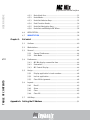
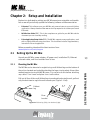
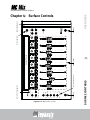
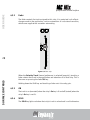
Knob Set Selector Keys
A knob set is an array of knobs used by EuCon applications to control plug-ins,
EQs, dynamics, aux sends, etc. One of the eight Knob Set Selector keys is always
selected and lit and displays its knob set until another Knob Set Selector key is
pressed. When the MC Mix first starts, the PAN knob set is selected by default.
INPUT
INSERTS
DYN
EQ
GROUP
AUX
MIX
PAN
Figure 4-11 Knob Selector keys
The Knob Set Selector keys enter the MC Mix menu system. Some of these knob
sets can display another knob set called a sub-menu. For example, the Inserts
knob set shows the names of every plug-in inserted on the track, one plug-in
name per knob (in channel mode). Pressing a plug-in’s Knob Top key displays its
parameters on the knobs for editing. This new knob set is a sub-menu of the
Inserts knob set. Press the BACK key (page 38) to return to the top of the Inserts
knob set.
Sub-menus are not directly supported in normal mode. When a sub-menu is
entered in normal mode, the MC Mix automatically changes to channel mode
and that track is attentioned and selected. When the top of that knob set is
displayed again, normal mode resumes. Since sub-menus can be more than one
level deep, this can be accomplished by pressing the TOP key (page 38) once or
the BACK key repeatedly. However, you can simply press another Knob Selector
key to navigate directly to another knob set.
INSERTS
Pressing the INSERTS key displays the inserts knob set for editing plug-ins. In
normal mode, the first plug-in is displayed on the knob. Pressing one of these
Knob Tops in normal mode toggles the MC Mix into channel mode and displays
the first eight plug-in parameters for editing. Pressing a plug-in’s Knob Top
displays its parameters for editing.
35
SURFACE CONTROLS
4.5.3
USER GUIDE
professional control surface