1
Dell_PERC5_UG.book Page 72 Tuesday, February 13, 2007 6:02 PM
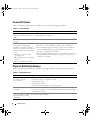
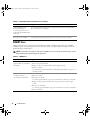
General Problems
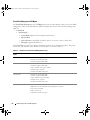
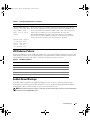
Table 6-1 describes general problems you might encounter, along with suggested solutions.
Table 6-1.
General Problems
Problem
Suggested Solution
The device displays in Device Manager Reinstall the driver. See the driver installation procedures in the section
but has a yellow bang (exclamation
"Driver Installation" on page 39.
point).
The device does not appear in Device
Manager.
Turn off the system and reseat the controller.
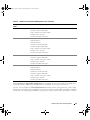
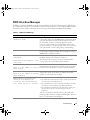
No Hard Drives Found
The corresponding solutions to the three causes of the message are:
1 Press <F6> to install the RAID Device Driver during installation.
2 Enter the BIOS Configuration Utility to configure the virtual disks. See
the section "RAID Configuration and Management" on page 49 for
procedures to configure the virtual disks.
3 Enter the BIOS Configuration Utility to enable the BIOS. See the section
"Hardware Installation and Configuration" on page 25 for procedures to
configure the virtual disks.
message appears during a CD
installation of Microsoft® Windows®
2000 Server, Windows Server® 2003, or
Windows XP because of the following
causes:
1 The driver is not native in the
operating system.
2 The virtual disks are not configured
properly.
3 The controller BIOS is disabled.
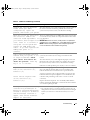
Physical Disk Related Issues
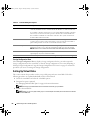
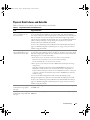
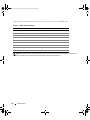
Table 6-2 describes physical disk-related problems you might encounter, along with suggested solutions.
Table 6-2.
Physical Disk Issues
Problem
Suggested Solution
One of the physical disks in
the disk array is in the
inaccessible state.
Perform the following actions to resolve this problem:
• Check the enclosure or backplane for damage.
• Check the SAS cables.
• Reseat the physical disk.
• Contact Dell Technical Support if the problem persists.
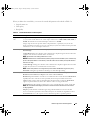
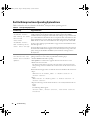
Cannot rebuild a fault tolerant This could result from any of the following:
virtual disk.
• The replacement disk is too small. Replace the failed disk with a good physical disk
with sufficient capacity.
Fatal errors or data corruption Contact Dell Technical Support.
are reported when accessing
virtual disks.
72
Troubleshooting