1
Contents
Safety Precautions .................................. EN-1
Quick Guide ............................................EN-12
Operating Precautions ............................ EN-7
Specifications .........................................EN-14
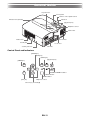
General Guide ........................................ EN-11
Unpacking
As you unpack the projector, check to make sure that all of the items listed below are present.
z Cable cover
z DATA PROJECTOR
z Wireless remote control (YT-140)
z Setup Guide
z Test Batteries (AAA-size × 2)
z “Read this first” Sheet
z Warranty
z AC Power Cord
z Wireless adapter
z RGB Cable
Projector Documentation and Software
The manuals for this projector can be downloaded from the CASIO website at the URL below.
http://world.casio.com/manual/projector/
Reference manual:
“User’s Guide” (UsersGuide.pdf), “Network Function Guide”
The software for the projector can be downloaded from the CASIO website at the URL below.
http://www.casio-intl.com/support/download/
Software for the projector:
Network Connection, EZ-Converter FA
z The contents of this User’s Guide are subject to change without notice.
z Copying of this manual, either in part or its entirety, is forbidden. You are allowed to use this manual for your
own personal use. Any other use is forbidden without the permission of CASIO COMPUTER CO., LTD.
z CASIO COMPUTER CO., LTD. shall not be held liable for any lost profits or claims from third parties arising
out of the use of this product or this manual.
z CASIO COMPUTER CO., LTD. shall not be held liable for any loss or lost profits due to loss of data caused
by malfunction or maintenance of this product, or any other reason.
z The sample screens shown in this manual are for illustrative purposes only, and may not be exactly the
same as the screens actually produced by the product.
EN