1
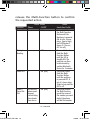
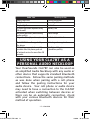
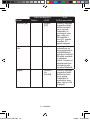
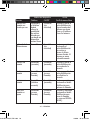
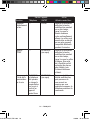
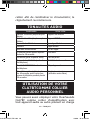
Audio Tone
Single High Tone
Ring Tone
Single High Tone
5 Rapid High tones repeated every
20 seconds
No Audio Indication (deteriorating
audio quality)
Singe Low Tone (depends on phone)
Neckloop Action
Pairing Successful
Incoming Call
End Call
Battery Low
Dual HI/LOW tone if supported by
the phone.
5 Rapid tones repeated every 60
seconds after the phone goes out
of network service for more than 20
seconds.
Voice tag not recognized
Out of Range
Initiate Voice Activation
No Network/Services
(handsfree profile)
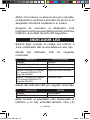
Using your CLA7BT as a
Personal Audio Neckloop
Your ClearSounds CLA7BT can also be used as
an amplified Audio Neckloop with any audio or
other device that supports standard Bluetooth
connections. Follow the same pairing methods
as was done when pairing with a cell phone
and follow the pairing instructions for your
audio device. Your cell phone or audio device
may need to have a connection to the CLA7BT
activated when switching between devices or
there can be an automatic connection, check
with your various Bluetooth devices for their
method of operation. Guide
CLA7BT-EN,SP,FR.indd 17
17 – ENGLISH
9/9/08 10:45:02 AM