1
32
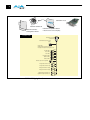
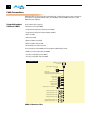
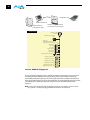
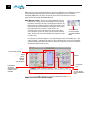
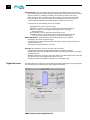
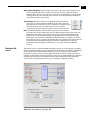
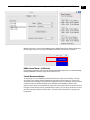
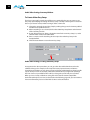
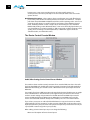
Color Meanings—All items in the KONA LHi Control Panel block diagram are color-coded
to show what is happening in realtime. This applies to both icons and text. These colors
have the following corresponding meanings:
Blue: video is same format as the Primary Format (framebuffer)
Red: the selected operation cannot be performed
Yellow: reference video (black burst or other reference source)
Green: indicates that KONA LHi is performing some kind of active change to the video,
to make it different from the Primary Format (e.g., down convert, format change, etc.).
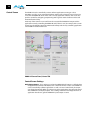
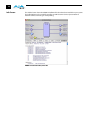
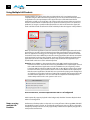
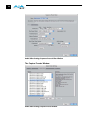
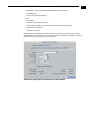
Tabbed Windows—The bottom area of the KONA LHi Control Panel provides different
information categorized by topic. Clicking on a “Tab”—or a block diagram element—
will result in an information screen corresponding to a tabbed topic. The arrows at
either side of the displayed tabs can be clicked to see any additional tabs not visible on
the screen. If an arrow is “grayed out”, then it means there are no additional tabs in that
direction. Each of these tabbed windows are described on the following pages. Tabs
that can be selected are:
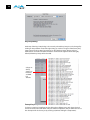
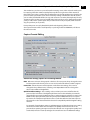
Inputs: view and edit input selections and how they are mapped
Formats: select the framebuffer primary video format and any secondary
formats and down conversion for inputs/outputs
Digital Out: assign outputs
Analog Out: configure the component/composite analog output
HDMI: configure the HDMI I/O
Control: configures KONA LHi operation (pass through, desktop, etc.) plus setting
output timing.
Setup: configures Video and Audio options such as composite black level and analog
audio monitor level.
Codec: used to select codec options such as whether a pause stops on a full frame or
a single field (jitter shown or not) and 24 to 30 fps padding patterns.
Timecode: monitor and configure timecode
Timelapse: enables the capture of select frames over a specified time interval.
Info: displays status information about the KONA LHi card and how it is
installed in the host Macintosh. This information is generally intended for
troubleshooting/support.