1
S D 8
P
O
W
E
R
E
D
MIXER
OWNERS MANUAL
®
Produced by On The Right Wavelength for Samson Technologies Corp.
Copyright 1997, Samson Technologies Corp.
Printed March 1997
Samson Technologies Corp.
575 Underhill Blvd.
P.O. Box 9031
Syosset, NY 11791-9031
Phone: 1-800-3-SAMSON (1-800-372-6766)
Fax: 516-364-3888
Introduction 1
SD8 Features 2
Guided Tour 4
Overview 4
Channel 5
Main Section 7
Rear Panel 9
Connecting The SD8 - General Suggestions 11
Setting Up and Using the SD8 12
Setting the Correct Gain Structure 13
Suggested Performance Application 15
Grounding Techniques 16
Using Equalization 17
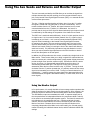
Using The Aux Sends and Returns
and Monitor Output 19
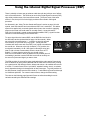
Using the Internal Digital Signal Processor (DSP) 20
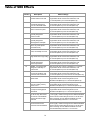
Table of SD8 Effects 21
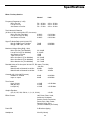
Specifications 22
Introduction
Congratulations—you’ve made an excellent choice in your purchase of the
Samson SD8 Stereo Mixer Amplifier! In this manual, we’ll take you on a guided
tour through all the features of this powerful and flexible device, and we’ll tell you
how to get the most out of the SD8. Although designed for easy operation, we
suggest you take some time out first to go through these pages so you can fully
understand how we’ve implemented a number of unique features.
The SD8 combines a flexible multi-channel stereo mixer with a clean, powerful
250 watt per channel amplifier, 10-band graphic equalizer, and a Zoom digital
multi-effects processor—all in a single compact chassis that mounts easily in
any standard 19" rack. Simply plug in your microphones and line-level
instruments (such as keyboards, tape decks, CD players, etc.), connect the SD8
to any standard loudspeakers, and you’ve got a complete PA system suitable for
use in small clubs or similar environments, or in permanent installations such as
churches or conference rooms.
In these pages, we’ll begin with an overview of the main SD8 features, followed
by a guided tour of the front and rear panels. Then we’ll describe the various
input and output connections (including wiring diagrams) and tell you in detail
how to set up your SD8 and how best to use the unit in live performance.
Finally, we’ll cover a number of specific topics (such as grounding techniques,
using equalization and auxiliary sends and returns, and details about the
onboard multi-effects processor) and then wrap things up with full specifications.
You’ll also find a warranty card enclosed—please don’t forget to fill it out and
mail it so that you can receive online technical support and so we can send you
updated information about this and other Samson products in the future.
SPECIAL NOTE: Should your unit ever require servicing, a Return Authorization
number (RA) is necessary. Without this number, the unit will not be accepted.
Please call Samson at 1-800-372-6766 for a Return Authorization number prior
to shipping your unit. Please retain the original packing materials and, if
possible, return the unit in its original carton and packing materials.
1
SD8 Features
The Samson SD8 utilizes state-of-the-art technology in integrated mixer/amplifier
design. Here are some of its main features:
• Convenient carrying handle and supplied standard 19" rack ears (the SD8
takes just four rack spaces) allows easy integration into any setup.
• Eight independent channels, with both mic and line inputs for each channel.
This allows you to blend together a variety of source signals, including
dynamic or condenser microphones, keyboards, CD/tape players, etc.
Standard XLR mic connectors (for microphone inputs) and electronically
balanced 1/4" jacks (for line-level inputs) are provided for each channel;
in addition, there is a dedicated stereo CD/Tape input that provides dual
phono (RCA) jacks.
• Full stereo control, with continuously adjustable Pan controls for each
channel that enable you to place each input signal independently in the
left-right plane.
• Power to spare—a full 250 watts per channel into four ohms. Any standard
speaker cabinets (four, eight, or sixteen ohms) can be connected to the four
rear-panel 1/4" speaker output jacks.
• A built-in Zoom Digital Signal Processor allows you to add a wide variety
of professional-quality effects without having to use an expensive external
signal processor. A front-panel DSP Mix Level control allows you to
precisely define the amount of effects to be blended into the signal.
• Independent three-band equalization for each channel, enabling you to
shape the sound of your input signal sources. In addition, a ten-band
graphic master equalizer allows you to “tune” the output of the SD8 to the
particular room environment you are in. This can be particularly useful for
eliminating ringing or feedback problems.
• Continuously adjustable wide-range input Trim and Level controls for
each channel allow you to precisely set the correct input and output gain
structure.
• Peak LEDs for each channel show you at a glance when an input signal is
on the verge of overloading. Other front-panel LEDs show the current status
of the amplifier’s protection relay circuitry and whether or not phantom power
is being applied to attached microphones.
• Two Aux sends per channel (one pre-fade and the other post-fade) allow
you to route multiple signals to the internal DSP, to a dedicated Monitor
output, or to external signal processors. The Monitor output enables you to
set up an onstage monitor mix that is independent of the main house mix.
A separate Monitor level control is provided on the front panel.
• Two Aux returns—with a dedicated front-panel Aux return level control—give
you the ability to blend in the return signal from external signal processors or
other line-level devices without having to utilize input channels.
• A phantom power switch enables you to use the SD8 with high-quality
condenser microphones or active DI boxes. When turned on, 48 volts of
phantom power is provided to the mic connectors of all input channels.
2
SD8 Features
• Protection relay circuitry prevents “thumps” when powering on or off. This
means that you can use the SD8 with a single power strip into which other
audio devices are connected, without danger of damage to connected
speakers.
• A rear-panel amplifier input allows you to bring external signals from other
mixers or audio devices into the SD8 power amplifier.
• A rear-panel preamplifier output allows you to connect the SD8 to external
power amplifiers when higher power ratings are required and/or when
additional amplifier feeds are necessary.
• A built-in headphone amplifier, complete with a front-panel 1/4" stereo
connector and dedicated level control, allows you to monitor your main mix.
• A convenient front-panel meter that allows you to see at a glance the
continuous output signal level.
We’ll elaborate on many of these terms and features later in this manual.
Now it’s time to take a guided tour of the SD8.
3
Guided Tour - Overview
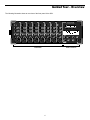
The following illustration shows an overview of the front panel of the SD8:
CHANNEL 1
CHANNEL 2
CHANNEL 3
CHANNEL 6
CHANNEL 5
CHANNEL 4
CHANNEL 7
CHANNEL 8
SAMSON
PEAK
PEAK
O
PEAK
O
∞LEVEL+10
O
∞LEVEL+10
O
∞LEVEL+10
∞LEVEL+10
O
O
-15
-9
-6
-3
0
+3
+6
-15
-9
-6
-3
0
+3
+6
L
O
O
O
O
O
O
O
O
O
SD8 STEREO MIXER AMPLIFIER
PEAK
O
∞LEVEL+10
∞LEVEL+10
∞LEVEL+10
O
O
PEAK
O
O
O
∞LEVEL+10
O
O
PEAK
PEAK
PEAK
R
O
PHANTOM
∞
+10
-15
∞
+15
HIGH
AUX1/MON
+10
-15
∞
+15
HIGH
AUX1/MON
+10
-15
∞
+15
HIGH
AUX1/MON
+10
-15
∞
+15
HIGH
AUX1/MON
+10
-15
∞
+15
HIGH
AUX1/MON
+10
-15
∞
+15
HIGH
AUX1/MON
+10
-15
∞
+15
HIGH
AUX1/MON
+10
-15
32Hz
O
O
O
O
O
O
POWER
PROTECT
8 CHANNEL STEREO MIXER 250 WATT AMPLIFIER
+15
HIGH
AUX1/MON
O
64Hz
125Hz
250Hz
500Hz
1K
4K
2K
8K
16K
O
+12dB
-6
+14
-50
-20
-15
+15
LOW
TRIM
-6
+14
-15
-50
-20
+15
LOW
N
LI
N
LI
N
LI
N
LI
N
LI
LI
N
+15
LOW
-6
+14
-50
-20
-15
+15
LOW
-6
+14
-50
-20
-12dB
-15
+15
32Hz
64Hz
125Hz
250Hz
500Hz
1K
4K
2K
O
L
LINE
L
R
PAN
LINE
L
R
PAN
LINE
L
R
PAN
LINE
L
R
PAN
LINE
L
R
PAN
LINE
L
R
PAN
LINE
L
R
PAN
LINE
R
PAN
∞
∞
+10
MAIN LEVEL
MIX
O
5
MIC
MIC
MIC
MIC
MIC
MIC
4
3
13
5
14
4
3
15
2 1 16
PRESET
+10
HEADPHONES
13
14
15
2 1 16
EFFECT
P O W E R E D
Main Section
4
16K
O
∞
+10
MONITOR
8 9 10
7
11
6
12
MIC
D S P
Channels
O
∞
+10
RETURN 1-2
8 9 10
7
11
6
12
∞ DSP+10
MIC
8K
LOW
TRIM
TRIM
TRIM
IC
-15
O
E
M
-50
-20
TRIM
0dB
0
O
E
IC
-6
+14
+12
MID
DSP AUX2
M
+15
LOW
-12
0
O
E
IC
-15
+12
MID
DSP AUX2
M
-50
-20
TRIM
IC
-6
+14
-12
0
O
E
M
+15
LOW
IC
-15
+12
MID
DSP AUX2
0
O
E
M
-50
-20
TRIM
IC
-6
+14
-12
+12
MID
DSP AUX2
0
O
E
M
+15
LOW
IC
-15
-12
+12
MID
DSP AUX2
0
O
E
M
IC
-50
-20
TRIM
MID
DSP AUX2
0
O
M
N
0
E
-6
+14
MID
DSP AUX2
-12
+12
N
MID
DSP AUX2
-12
+12
LI
-12
+12
LI
-12
Guided Tour - Channel
CHANNEL 1
PEAK
O
1
5
∞LEVEL+10
O
O
2
∞
+10
-15
+15
HIGH
AUX1/MON
O
3
-12
+12
MID
DSP AUX2
6
O
-20
4
-6
-50
TRIM
-15
+15
LOW
8
7
L
LINE
R
PAN
9
MIC
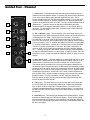
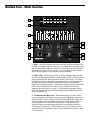
1: Level (white) - This knob determines the final signal level being sent by a
channel to the main speaker outputs. In practice, this will be used to adjust the
levels of the various signals being blended together by the SD8. The “0”
position indicates unity gain (no level attenuation or boost). Turning the Level
control clockwise from the “0” position (towards the “10” position) causes the
signal to be boosted by as much as 10 dB. Turning it counterclockwise from “0”
(towards the “∞” position) causes the signal to be attenuated (when fully
counterclockwise, the signal is attenuated infinitely—in other words, there is
no sound). For best signal-to-noise ratio, all channel level controls should be
kept at or near the 0 level.
2: Aux 1 / Monitor (violet) - This knob allows you to send signal from one or
more channels to the SD8’s monophonic Monitor output or to an external device
connected to the Aux Send 1 output jack on the rear panel. This send is
pre-fade; that is, the level of the signal is determined solely by the channel’s
input Trim (see #4 below), and is unaffected by its EQ settings and the position
of its Level control. At the “0” position, the signal is routed with unity gain (that
is, no boost or attenuation). As each Aux 1 / Monitor knob is turned clockwise
from the “0” position (towards the “10” position), the signal is boosted by as
much as 10 dB; as it is turned counterclockwise from the 0 position (towards
the “∞” position), the signal is attenuated. When turned fully counterclockwise,
the signal is attenuated infinitely—in other words, no signal is routed. For more
information, see the “Using Aux Sends and Returns” section on page 19 of this
manual.
3: DSP / Aux 2 (violet) - This knob allows you to send signal from one or more
channels to the SD8’s internal Zoom Digital Signal Processor (DSP) or to an
external device connected to the Aux Send 2 output jack on the rear panel.
This effects send is post-fade; that is, the level of the signal is determined by
the channel’s input Trim (see #4 below), its EQ settings (see #6 below), and the
position of its Level control. At the 12 o’clock position, there is no signal routed.
As the DSP / Aux 2 knob is turned clockwise (towards “Aux 2”), signal is routed
increasingly to Aux Send 2. As the DSP / Aux 2 knob is turned counterclockwise (towards “DSP”), signal is routed increasingly to the internal Zoom Digital
Signal Processor. For more information, see the “Using Aux Sends and
Returns” section on page 19 of this manual and the “Using the Internal DSP”
section on page 20 of this manual.
4: Trim (black) - This knob allows you to set the input gain of the connected
mic or line signal over an exceptionally wide range. Continuously adjustable
from -6 dB to -50 dB, the input gain is raised when the Trim knob is turned
clockwise and attenuated when it is turned counterclockwise. For information
on how to use this, see the “Setting The Correct Gain Structure” on page 13 in
this manual.
5: Peak LED (red) - This warning light indicates an overload situation. It lights
whenever a channel’s signal is 5 dB short of clipping. To stop it from lighting
(and to eliminate the accompanying sonic distortion), turn down the channel’s
input Trim knob (see #4 above) or reduce the amount of equalization boost (see
#6 on the next page).
5
Guided Tour - Channel
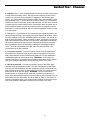
6: Equalizer (blue) - These knobs determine the amount of boost or attenuation
in each of three frequency areas. The high and low frequency knobs provide
15 dB of cut or boost at 10 kHz and 80 Hz, respectively, with shelving-type
control. The mid frequency knob provides 12 dB of cut or boost at 800 Hz, with
a bell (peaking) curve. A center detent in each knob (at the 12 o’clock position)
indicates no boost or attenuation (that is, flat response). As each knob is turned
clockwise from the center detent position, the frequency area is boosted; as it is
turned counterclockwise from the center detent position, the frequency area is
attenuated. For more information, see the “Using Equalization” section on page
17 of this manual.
7: Pan (green) - This knob allows you to place the input signal anywhere in the
left-right stereo spectrum, while keeping the overall signal level constant. When
the knob is placed at its center (detented) position, the signal is sent equally to
both left and right outputs. When moved left of center, less signal is sent to the
right output and more signal is sent to the left output, making the sound appear
left of center; when moved right of center, less signal is sent to the left output
and more signal is sent to the right output, making the sound appear right of
center. To route a signal hard left or right, place the pan knob either fully
counterclockwise or fully clockwise.
8: Line input connector - Connect line-level sources (such as synthesizers,
drum machines, CD players, tape decks, or effects processors) to any of the
SD8’s eight channels using this electronically balanced 1/4" jack (balanced or
unbalanced signals can be accepted here). WARNING: Do not connect a
channel’s line input if you already have something connected to its microphone
input; each channel is designed to accept only one source or the other.
9: Mic input connector - Connect a microphone to any of the SD8’s eight
channels using this standard XLR jack. This jack is intended to accept signal
from low-level, low-impedance mics but can also be used to accept signal from
other sources (such as direct injection boxes) if the input Trim control is turned
down (see #4 on the previous page). WARNING: Do not turn the SD8’s
Phantom power on if signal sources other than condenser microphones (or
active direct injection boxes requiring 48 volts of power) are connected to any of
these inputs (for more information, see #3 on page 9). Also, do not connect a
channel’s microphone input if you already have something connected to its line
input; each channel is designed to accept only one source or the other.
6
Guided Tour - Main Section
1
-15
-9
-6
-3
0
-15
-9
-6
-3
0
+3
+6
+3
+6
L
R
2
PROTECT
PHANTOM
POWER
8 CHANNEL STEREO MIXER 250 WATT AMPLIFIER
32Hz
64Hz
125Hz
250Hz
500Hz
1K
4K
2K
8K
16K
+12dB
3
0dB
-12dB
32Hz
64Hz
125Hz
250Hz
500Hz
1K
4K
2K
8K
16K
5
6
O
4
∞
∞
+10
MAIN LEVEL
MIX
O
5
4
3
∞ DSP+10
10
D S P
∞
+10
RETURN 1-2
8 9 10
7
11
6
12
9
O
13
5
14
4
3
15
2 1 16
PRESET
+10
MONITOR
8 9 10
7
11
6
12
13
14
15
2 1 16
EFFECT
O
∞
7
+10
HEADPHONES
8
11
P O W E R E D
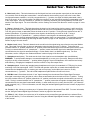
1: Meter - This seven-segment bar meter shows the continuous output level of
the SD8. For optimum signal-to-noise ratio, try to adjust all Levels (channel and
main) so that program material is usually at or around 0 VU, with occasional but
not steady excursions to the +3 segment. See the “Setting Up and Using the
SD8” section on page 12 in this manual for more information.
2: Status LEDs - These show the status of various conditions within the SD8.
The leftmost LED (labeled “Phantom”) lights steadily red when Phantom power is
being supplied to all mic inputs (see #3 on page 9 in this manual). The center
LED (labeled “Protect”) lights yellow for approximately five seconds whenever
the SD8 is powered on and lights steadily whenever there is a potentially
dangerous overheating situation. It indicates the activity of the built-in protection
relay circuitry during which time 0 volts DC are provided to all connected
speakers, thus preventing any “thump.” The rightmost LED (labeled “Power”)
lights steadily green whenever the SD8 is powered on and fades slowly when
the unit is powered off.
3: Ten-Band Graphic Master EQ - These sliders allow you to add 12 dB of
boost or attenuation to ten different frequency areas, affecting the main output
signal of the SD8. When a slider is at its center detented (“0 dB”) position, the
selected frequency area is unaffected (it is said to be flat). When a slider is
moved up (above the “0 db” position, towards the “+12 dB” position), the
selected frequency area is boosted, and when it is moved down (below the
“0 dB” position, towards the “-12 dB” position), the selected frequency area is
attenuated. For more information, see the “Using Equalization” section on page
17 in this manual.
7
Guided Tour - Main Section
4: Main Level (white) - This knob determines the final signal level sent to the speaker output jacks on the rear panel.
You can think of this as being the “master fader”—and we made this knob extra big so you won’t miss it even under
low-light performance conditions. At its fully counterclockwise (“∞”) position, the signal is infinitely attenuated—that is,
there is no sound. At its 2 o’clock position, the SD8 mixer section is at unity gain and is providing no attenuation or boost
to the output signal. At its fully clockwise (“0”) position, the maximum amount of gain is being added by the SD8 mixer
section to the output signal. For more information, see the “Setting The Correct Gain Structure” section on page 13 in this
manual.
5: Return 1-2 Level (violet) - This knob determines the input level of signal arriving via Aux returns 1 and 2 (see #4 on
page 9), with Aux return 1 automatically panned hard left and Aux return 2 automatically panned hard right. This signal
is at unity gain (no boost or attenuation) when the knob set to the “0” position. Turning the knob clockwise from the “0”
position (towards the “10” position) causes the return signal to be boosted by as much as 10 dB. Turning it
counterclockwise from “0” (towards the “∞” position) causes the return signal to be attenuated (when fully
counterclockwise, the signal is attenuated infinitely—in other words, there is no return signal). For information on how to
properly set this, see the “Setting Up and Using the SD8” section on page 12 and “Using the Aux Sends and Returns”
section on page 19 in this manual.
6: Monitor Level (violet) - This knob determines the overall level of the signal being output from the rear panel Monitor
jack. This signal is at unity gain (no boost or attenuation) when the knob set to the “0” position. Turning the knob
clockwise from the “0” position (towards the “10” position) causes the Monitor signal to be boosted by as much as 10 dB.
Turning it counterclockwise from “0” (towards the “∞” position) causes the Monitor signal to be attenuated (when fully
counterclockwise, the signal is attenuated infinitely—in other words, there is no Monitor signal sent). For more
information, see the “Using the Aux Sends and Returns” section on page 19 in this manual.
7: Headphone Level (white) - This knob sets the level of the signal sent to the headphone jack (see #8 below).
WARNING: To avoid possible damage to connected headphones (or, worse yet, to your ears!), always turn this all the
way off (to the fully counterclockwise “∞” position) before plugging in a pair of headphones—then raise the level slowly
while listening. Changing the Headphone Level has no effect on any other output levels.
8: Headphone jack - Connect any standard stereo headphones to this jack (via a standard 1/4" TRS plug) for private
monitoring of the final output signal. NOTE: The SD8 main speaker outputs are not muted when headphones are
inserted into the Headphone jack—to monitor your main mix in privacy, set the Main Level control to its fully
counterclockwise (“∞”) position. The built-in SD8 headphone amplifier delivers 20 mW into 8 ohms.
9: DSP Mix Level - Determines the level of “wet” signal returning from the onboard Zoom Digital Signal Processor.
Wet signal is returning at unity gain (that is, with no boost or attenuation) when the knob set to the “0” position. Turning
the knob clockwise from the “0” position (towards the “10” position) causes the wet signal to be boosted by as much as
10 dB. Turning it counterclockwise from “0” (towards the “∞” position) causes the wet signal to be attenuated (when fully
counterclockwise, the wet signal is attenuated infinitely—in other words, there is no return from the DSP—you’ll hear the
signal completely “dry”). For more information, see the “Using the Internal Digital Signal Processor” section on page 20 of
this manual.
10: Preset (1 - 16) - Allows you to select any of 16 preset effect types for the onboard Zoom DSP. For more information,
see the “Using the Internal Digital Signal Processor” section on page 20 of this manual.
11: Effect (1 - 16) - Allows you to select any of 16 variations on the preset effect type selected for the onboard Zoom
DSP (see #10 above). For more information, see the “Using the Onboard Digital Signal Processor” section on page 20
of this manual.
8
Guided Tour - Rear Panel
3
4
6
5
SD8 STEREO MIXER AMPLIFIER
PHANTOM
POWER
SAMSON
AUX RETURN
2 (+4dBu 10KΩ) 1
AUX SEND 1
(+4dBu <75Ω)
PRE OUT
R (+4dBu <75Ω) L
AUX SEND 2
(+4dBu <75Ω)
+48V
POWER
O
ON
1
MON OUT
(+4dBu <75Ω)
AMP IN
R (+4dBu 10KΩ) L
OFF
7
SPEAKER OUT
R MINIMUM 4Ω L
TAPE/CD IN
CAUTION
RISK OF ELECTRIC SHOCK
DO NOT OPEN
!
CH8
2
CH7
SERIAL NUMBER
AC INPUT
115V 50/60Hz
9
10 8
11
12
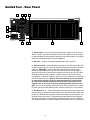
1: Power switch - As you may have guessed, this is what you use to turn the
SD8 on and off. The built-in protection relay circuitry (which mutes the outputs
for approximately five seconds after powering on) prevents power-on “thumping,”
which can potentially damage connected speakers.
2. AC input - Connect the supplied standard 3-pin “IEC” plug here.
3: Phantom switch - When this switch is pressed in, the SD8 delivers 48 volts
of phantom power to pins 2 and 3 of all XLR microphone connectors in all eight
channels. WARNING: Only use this switch with the SD8 powered down.
Before turning phantom power on, be sure to disconnect all non-microphone
signal sources (such as passive direct injection boxes) from the XLR mic jacks.
Although phantom power will have no adverse affect on connected dynamic
microphones, it should be used only when one or more condenser microphones
are connected to the SD8. Refer to the owners manual of your microphone
or active direct injection (DI) box to determine whether or not it requires
48 volts phantom power—Samson cannot assume responsibility if you
damage a mic or DI box by incorrectly applying phantom power from the
SD8. If you’re not completely certain that one or more connected mics or active
DI boxes require 48 volts phantom power, leave this switch off (its out position).
4: Aux Returns 1 - 2 - These unbalanced inputs allow you to route signal from
external devices such as effects processors to the Aux Return knob on the front
panel of the SD8 (see #5 on page 8). Because the SD8 is a stereo system, the
signal arriving at Aux return 1 is automatically panned hard left and the signal
arriving at Aux return 2 is automatically panned hard right. See the “Using the
Aux Sends and Returns” section on page 19 in this manual for more information.
9
Guided Tour - Rear Panel
5: Aux Sends 1 - 2 - These unbalanced outputs allow you to route signal from each of the two discrete Effects Sends to
external devices such as effects processors. Aux Send 1 is pre-fade and pre-EQ, while Aux Send 2 is post-fade and
post-EQ. See the “Using the Aux Sends and Returns” section on page 19 in this manual for more information.
6: Pre Out (L, R) - These two unbalanced outputs provide a stereo line-level output from the SD8 mixer section; they
are normally used to connect the unit to self-powered speakers or to an external power amplifier and speakers where
additional power is required or where additional amplifier feeds are necessary. The Pre outputs are not affected by the
ten-band graphic master equalizer but are affected by the SD8’s Main Level control.
7: Amp In (L, R) - These two unbalanced inputs allow you to connect any external stereo line-level signal directly to the
SD8 power amplifier. When connection is made to either of these jacks, the internal connection between the SD8 mixer
and SD8 power amplifier is broken, and all channel inputs are muted. The Amp inputs are not affected by either the
ten-band graphic master equalizer or the SD8’s Main Level control. The Amp In jacks can optionally also be used as
insert patch points as follows:
• Ring - A preamp output which is affected by both the ten-band graphic master equalizer and the SD8’s Main
Level control.
• Tip - An amp input which is not affected by either the ten-band graphic master equalizer or the SD8’s Main
Level control.
For more information about the use of the Amp In jacks as insert patch points, contact Samson Technical Support
(1-800-372-6766) between 9 AM and 5 PM EST.
8: Monitor Out - This unbalanced output provides a monophonic line-level output, affected by the front panel Monitor
level control (see #6 on page 8) but unaffected by the Main Level control (see #4 on page 8). It is normally used to
connect the unit to an external monitor mixer/amplifier/speaker system so that the performers can receive an onstage
monitor mix independent of the house mix. See the “Using the Aux Sends and Returns” section on page 19 of this
manual for more information.
9: Speaker Outputs - These are the SD8’s main outputs; use these four unbalanced jacks (two of which carry the left
signal and two of which carry the right) to connect the SD8 to loudspeakers rated at 4 ohms or greater (that is, 4, 8, or 16
ohms). The lower the ohm rating, the greater the power output. We recommend the use of 4 ohm speakers for long-term
usage. The SD8 delivers 250 watts of power per channel into 4 ohms at less than 1% THD (Total Harmonic Distortion).
In order to ensure correct phase correlation, the tip of the SD8 speaker jack should be connected to the “+” (hot) input
of your loudspeaker, and the sleeve of the SD8 speaker jack should be connected to the “-” (ground) input of your
loudspeaker.
10: CD/Tape In - Use these dual RCA input jacks to connect the output from a CD or tape player to the SD8. When
connected, the stereo signal appears at Channels 7 and 8, at unity gain (the Trim control for those channels will have no
effect), mixed in with any mic or line signal connected to those channels. From there, the signals can be panned as
required, equalized if necessary, and routed to either Aux send (for routing to connected external processors), to the
internal DSP, and/or to the Monitor output.
11: Heat sink - Make sure this anodized aluminum heat sink is unobstructed when the SD8 is powered on. In particular,
we recommend that you keep the rear of the rack open in order to release heat. If your rack does not have a removable
rear, space should be left open on the front of the rack cabinet, especially immediately above the SD8—remember, heat
rises!
12: Carrying handle - Use this convenient carrying handle whenever transporting the SD8. Alternatively, the SD8 can
be mounted in any standard 19" rack (taking just four spaces) by removing this handle and installing the supplied rack
ears.
10
Connecting The SD8 - General Suggestions
The actual connections you’ll make to and from the SD8 will vary according to
the environment you use it in and the particular equipment you have. However,
here are a few basic rules concerning connections that will apply in pretty much
all situations:
• In general, it’s best to make all connections with the SD8 turned off—this
particularly applies to speaker connections. If you must make connections
with the power on, make sure that the Main Level control is completely down
(turn the knob fully counterclockwise). Before powering down, turn the Main
Level control completely down.
• When using line inputs, try to use balanced connectors and cabling
wherever possible. These kind of connections do a better job of rejecting
extraneous noise and hum and generally provide a cleaner signal. If your
equipment doesn’t provide balanced outputs, however, not to worry:
All SD8 channel line inputs will accept either balanced or unbalanced
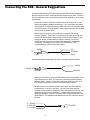
connectors. The diagram below shows how balanced 1/4" TRS
(Tip/Ring/Sleeve) connectors should be wired:
SLEEVE
TIP +
GROUND
RING -
TIP
RING
Unbalanced cables use standard 1/4" phone connectors, wired as follows:
+ SIGNAL
+ SIGNAL
GROUND
GROUND
• Make one connection at a time and then monitor the incoming signal. If you
hear a distinct hum or buzz, you may have a grounding problem with that
particular device. See the “Grounding Techniques” section on page 16 in
this manual for information on how to avoid grounding problems.
• NEVER connect a microphone and line level input to the same channel
simultaneously—use one or the other. You can have some channels
connected to microphones and others to line level signals (for example, you
might want to plug mics into channels 1 - 4 and line level signals into the
remaining channels)—just don’t have both kinds of inputs connected to the
same channel. The diagram below shows how your mic connectors should
be wired:
3 - SIGNAL
1 GROUND
2 + SIGNAL
TO MIXER
11
Setting Up and Using the SD8
Setting up your SD8 is a simple procedure which takes only a few minutes:
1. Remove all packing materials (save them in case of need for future service)
and decide where the SD8 is to be physically placed—if desired, remove the
carrying handle and install the supplied rack ears so that it can be mounted in
any standard 19" rack (it requires four rack spaces). Be careful when handling
the SD8—the rear heat sink fins and side rack panels have sharp edges.
Make sure that the rear heat sink fins are unobstructed and that there is good
ventilation around the entire unit. If the SD8 is mounted in a rack that contains
multiple amplifiers, we recommend that you avoid potential overheating
problems by using spacer panels to ensure that the amps are not directly on top
of one another—remember, heat rises!
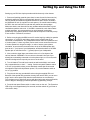
2. Before even plugging the SD8 into an AC socket, begin by making its speaker
connections. It is never a good idea to power up any amplifier that is not
connected to loudspeakers. Any loudspeakers with a minimum impedance load
of 4 ohms (that is, 4 ohms or greater) can be used, but we recommend the use
of 4 ohm speakers for long-term usage. In order to ensure correct phase
correlation, be sure that the connection from the tip of the SD8 speaker jack
goes to the “+” (hot) input of your loudspeaker, and that the sleeve of the SD8
speaker jack is connected to the “-” (ground) input of your loudspeaker.
3. Next, make the signal input connections to the mic or line inputs of the
various channels. WARNING: Do not connect a channel’s line input if you
already have something connected to its microphone input, or vice versa; each
channel is designed to accept only one source or the other.
4. Turn all channel Trim and Level controls as well as the Main Level control
fully counterclockwise, to their “∞” setting. Set the rear-panel Phantom switch
to its “off” (out) position unless you are absolutely certain that all connected
microphones require 48 volt phantom power; if so, set the Phantom switch to
its “on” (in) position.
5. Plug the unit into any grounded AC socket using the supplied IEC cord.
Because of the special relay protection circuitry built into the SD8, you can even
plug it into the same power strip that other audio devices are connected to.
You can then turn on all devices at once with the single power strip on-off switch,
with no danger of damaging connected speakers by generating “thumps.”
6. Press the rear panel Power switch in order to turn on the unit. The Protection
LED will go on for approximately five seconds, and then switch off (you’ll hear a
click when it does).
12
SPEAKER OUT
R MINIMUM 4Ω L
Setting the Correct Gain Structure
You’re now ready to establish the correct gain structure—the key to getting the
best performance from the SD8, or from any mixer, for that matter. This is a
simple procedure that ensures optimum input and output levels so that no
unnecessary noise (caused by too low a signal) or overload distortion (caused by
too high a signal) is created. Here’s a step-by-step description of how to do so:
a. With all connections made (as described above) but with the power off, start
by setting all channel Level controls fully counterclockwise (to their “∞” position),
and then set the Main Level knob to its “0” position.
b. Set all channel input Trim knobs to their fully counterclockwise (-6) position.
c. Set all channel equalizer knobs to their center detent “0” positions and set the
ten-band graphic master equalizer completely flat (all sliders at their center
detent “0” positions).
d. Set all channel Aux 1 / Monitor send knobs and the main section Aux return
Level knob to their fully counterclockwise (“∞”) position. Set all channel
DSP / Aux 2 knobs to their center detented 12 o’clock position and set the main
section DSP Mix Level knob to its fully counterclockwise (“∞”) position.
e. Turn on all devices connected to channel line inputs and Aux returns and set
their level controls to unity gain or, if there is no unity gain indicated on their
output control, to maximum. If you’ve got outboard effects processors connected
to the Aux returns, make sure they are sending completely “wet” (processed)
signal, with no “dry” (unprocessed) signal mixed in.
f. If condenser microphones are connected to the SD8, turn on the Phantom
switch.* Finally, turn on the SD8’s main power.
g. Play an instrument connected to one of the SD8’s line inputs** and, while
doing so, raise the corresponding channel Level control to the “0” position. You
should see the segment meter begin to move—adjust the input Trim control for
that channel so that the “0” segment lights frequently and the “+3” segment lights
only occasionally. The Peak LED for that channel should not flash at even the
highest level input signals. If the incoming signal seems too hot even with the
input channel Trim all the way at its minimum (-6) setting, you may need to lower
the output level of the instrument, though this will rarely occur. Conversely, if the
signal is too low even with the input channel trim all the way up, something’s
definitely wrong: in all likelihood, the connecting audio cable is faulty.
h. Once you’ve set the optimum level in step (g) above, continue playing the
instrument and slowly raise the main Level knob until you reach the desired
listening level.
i. Repeat step (g) above for each instrument connected to the SD8 channel line
inputs.
* CAUTION: Before turning phantom power on, be sure to verify that all
connected mic(s) and/or active DI boxes require 48 volts. Also, disconnect all
other signal sources (such as passive DI boxes) from the XLR mic jacks.
** If you’re using an instrument such as electric guitar or bass, connect it to the
SD8 with a direct injection box to ensure correct impedance.
13
Setting the Correct Gain Structure
j. The procedure for setting optimum microphone levels is virtually identical; sing
or speak into the mic at the level you expect to use in performance while slowly
raising the Level control for that channel to its “0” position. Then adjust the input
Trim control for that channel while watching the segment meter and Peak LED.
You should expect that microphone inputs will require rather more in the way of
input Trim boost than line inputs.
k. The general idea behind using the internal DSP is to drive it as hot as
possible (short of overloading it) and to then use the DSP Mix Level control to
carefully set the amount of processed signal you want to hear. Begin by
selecting Preset 1, Effect 1 (this is a general Hall reverb) for the DSP—the
DSP Mix Level control should still be at its fully counterclockwise “∞” position, as
specified in step (d) above. Using a channel that has already had its gain
structure adjusted in step (g) or (j) above, turn the DSP / Aux 2 knob for that
channel to its fully counterclockwise “DSP” position. Play the instrument (or sing
into the microphone) connected to that channel while slowly turning the DSP Mix
Level knob clockwise until you hear the desired amount of processed signal
added to the dry signal. If you hear any distortion, lower the amount of signal
being sent to the DSP by turning that channel’s DSP / Aux 2 knob clockwise
(towards its center detented “off” position. For more information, see the “Using
the Internal Digital Signal Processor” section on page 20 in this manual.
l. If you have any outboard signal processors connected to the Aux send jacks
on the rear panel, follow this step. Because outboard effects processors can
sometimes be quite noisy, it’s particularly important to maximize the amount of
signal being sent to them via the SD8 Aux sends. As with the internal DSP, the
idea is to drive these devices as hot as possible (short of overloading them) and
then to use the Aux return Level to carefully adjust the amount of processed
signal being blended with the dry signal. To set optimum Aux send levels, use a
channel that has already had its gain structure adjusted in step (g) or (j) above.
Turn the Aux send 1 / Monitor knob for that channel to its “0” (unity gain) position
and then play the instrument (or sing into the microphone) connected to that
channel. Adjust the input levels of connected outboard effects processors so
that their meter shows incoming signal normally in the 0 vu range (with just
occasional higher excursions). Then it’s time to optimize the Aux return Level.
While continuing to play your instrument (or continuing to sing into the
microphone), slowly raise the Aux return Level control until you hear the desired
amount of processed signal added to the dry signal. Repeat for any external
device connected to the Aux 2 send jack. For more information, see the “Using
the Aux Sends and Returns” section on page 19 in this manual.
m. The gain structure is now correctly set—you’ve optimized the level of all
signals coming into and out of the SD8, and the end result will be minimum
noise and distortion and maximum clean sound. You’ll now find that the majority
of your mixes can be accomplished with most channel Level controls at or near
their 0 (unity gain) position and that the channel peak LEDs rarely if ever light
(remember, if they do light, it means that something is distorting!). If you need to
make adjustments to the overall level, use the main Level control.
If you encounter difficulty with any aspect of setting up or using your SD8, you
can call Samson Technical Support (1-800-372-6766) between 9 AM and 5 PM
EST.
14
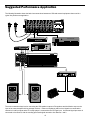
Suggested Performance Application
The following illustration shows the basic interconnections between an SD8 and external equipment when used in a
typical live performance application:
CHANNEL 1
CHANNEL 2
CHANNEL 3
CHANNEL 6
CHANNEL 5
CHANNEL 4
CHANNEL 7
CHANNEL 8
SAMSON
PEAK
PEAK
PEAK
PEAK
PEAK
PEAK
PEAK
O
O
O
O
O
O
O
∞LEVEL+10
∞LEVEL+10
∞LEVEL+10
∞LEVEL+10
∞LEVEL+10
∞LEVEL+10
∞LEVEL+10
O
O
O
O
O
O
O
O
O
O
O
-15
-9
-6
-3
0
-15
-9
-6
-3
0
+10
-15
∞
+15
HIGH
+10
-15
∞
+15
HIGH
AUX1/MON
O
+10
-15
∞
+15
HIGH
AUX1/MON
O
+10
-15
∞
+15
HIGH
AUX1/MON
O
+10
-15
∞
+15
HIGH
AUX1/MON
+10
-15
+10
-15
∞
+15
HIGH
AUX1/MON
O
O
O
∞
+15
HIGH
AUX1/MON
+10
+6
R
O
PHANTOM
∞
AUX1/MON
+3
L
O
O
O
O
SD8 STEREO MIXER AMPLIFIER
PEAK
O
∞LEVEL+10
-15
PROTECT
+3
+6
POWER
8 CHANNEL STEREO MIXER 250 WATT AMPLIFIER
+15
HIGH
AUX1/MON
O
32Hz
64Hz
125Hz
250Hz
500Hz
1K
2K
4K
8K
16K
32Hz
64Hz
125Hz
250Hz
500Hz
1K
2K
4K
8K
16K
O
+12dB
-6
+14
-50
-20
-15
+15
LOW
TRIM
-6
+14
-15
-50
-20
+15
LOW
N
LI
N
LI
N
LI
N
N
LI
N
LI
N
LI
N
+15
LOW
-6
+14
-50
-20
-15
+15
LOW
-6
+14
-50
-20
0dB
-12dB
-15
+15
LOW
TRIM
TRIM
TRIM
IC
-15
O
E
M
-50
-20
TRIM
+12
MID
0
IC
-6
+14
-12
DSP AUX2
O
E
M
+15
LOW
IC
-15
+12
MID
0
O
E
M
-50
-20
TRIM
IC
-6
+14
-12
DSP AUX2
0
O
E
M
+15
LOW
IC
-15
TRIM
+12
MID
DSP AUX2
0
O
E
M
-50
-20
IC
-6
+14
-12
+12
MID
DSP AUX2
0
O
E
M
+15
LOW
IC
-15
-12
+12
MID
DSP AUX2
0
O
E
M
IC
-50
-20
TRIM
-12
+12
MID
DSP AUX2
0
M
-6
+14
-12
+12
MID
DSP AUX2
O
LI
-12
+12
MID
0
E
LI
-12
DSP AUX2
O
L
LINE
L
R
PAN
LINE
L
R
PAN
LINE
L
R
PAN
LINE
L
R
PAN
LINE
L
R
PAN
LINE
L
R
PAN
LINE
L
R
PAN
LINE
R
PAN
∞
∞
+10
MAIN LEVEL
MIX
O
∞ DSP+10
MIC
MIC
MIC
MIC
MIC
MIC
MIC
12
4
3
O
∞
+10
HEADPHONES
12
5
14
4
3
15
2 1 16
PRESET
+10
MONITOR
8 9 10
7
11
6
13
13
14
15
2 1 16
EFFECT
MIC
D S P
MIC 1 MIC 2
O
∞
+10
RETURN 1-2
8 9 10
7
11
6
5
P O W E R E D
LINE LINE
3
4
MIDI TONE GENERATOR
MIDI KEYBOARD
CD OR DAT
SIGNAL PROCESSOR
SD8 STEREO MIXER AMPLIFIER
PHANTOM
POWER
SAMSON
AUX RETURN
2 (+4dBu 10KΩ) 1
AUX SEND 1
(+4dBu <75Ω)
PRE OUT
R (+4dBu <75Ω) L
AUX SEND 2
(+4dBu <75Ω)
+48V
POWER
O
ON
MON OUT
(+4dBu <75Ω)
AMP IN
R (+4dBu 10KΩ) L
OFF
SPEAKER OUT
R MINIMUM 4Ω L
TAPE/CD IN
CAUTION
RISK OF ELECTRIC SHOCK
DO NOT OPEN
!
CH8
CH7
SERIAL NUMBER
AC INPUT
115V 50/60Hz
SAMSON
L
SERVO - 240
R
The main connections here involve connecting the SD8 speaker outputs to PA speakers and the Monitor output to the
input of an external amplifier driving onstage monitors. Various microphones and line level signals are connected to
channel mic and line inputs and a CD or tape player is connected to the CD/Tape input. An external signal processor is
connected to Aux Send 2, with the resulting processed signal returned to Aux Returns 1 and 2.
15
Grounding Techniques
Hum and buzz are the biggest enemies you face when interconnecting a large number of different pieces of equipment
to a central audio mixer. This is because each piece of equipment may operate at a marginally different voltage (this
difference is called potential) and, when two devices at slightly different potential are physically connected with audio
cabling, the end result can be nasty, extraneous noise (mind you, connecting two devices at very different potential can
result in a major electrical shock!).
However, there are several steps you can take to avoid grounding problems. First, assuming you have an isolated
electrical circuit that can handle the electrical demands of your mixer and all connected audio equipment (these needs
will usually be modest), you should always plug your mixer and all connected equipment into the same circuit. If possible,
nothing else but this equipment should be connected to that circuit. If you can’t do this, at least avoid plugging your mixer
and audio equipment into the same circuit that is already powering things like heavy machinery, air conditioners, heaters,
refrigerators, washing machines, neon signs or fluorescent light fixtures. One particular culprit that will almost certainly
create problems is the standard light dimmer (the kind that uses silicon controlled rectifiers). Where low-level lighting is
desired, use incandescent fixtures with autotransformer-type dimmers (sometimes called Variacs) instead—these cost
considerably more than the standard dimmer you’ll find at your local hardware store, but are well worth the extra expense.
Three-prong plugs (such as the one used by the SD8) should always be used as is; don’t use adapters to lift the ground
(unless you’re using a “star ground network”—see below). If you hear hum or buzz from a device that uses a two-prong
plug (or an external two-prong AC/DC adapter), you can try reversing the plug in the socket. If that doesn’t work, you
may need to physically ground that device’s chassis by connecting a wire (called a strap) from it to a grounded piece of
metal. Some pieces of equipment have a screw-type ground post to which the strap can be connected; if not, you can
attach some kind of metallic binding post to the case itself. If you are using rack-mounted audio devices and are
experiencing hum or buzz, there’s a simple test to determine the source of the problem: while keeping all devices
powered on and connected with audio cabling, physically remove each device, one by one, from the rack. If the hum
disappears when a particular device is removed, you’ll know that that device is probably the culprit.
We also recommend that you use balanced audio cabling and connectors wherever possible. The SD8 provides
electronically balanced connectors for all mic and line channel inputs. The wiring diagram in the “Connecting The SD8”
section on page 11 of this manual shows how XLR and 1/4" TRS (Tip/Ring/Sleeve) connectors should be wired for use
with these inputs.
In addition, you can minimize possible interference by planning your audio, electrical, and computer cable runs so that
they are as far apart from one another as possible and so they don’t run parallel to one another. If they have to cross,
try to ensure that they do so at a 90° angle (that is, perpendicular to one another). In particular, try to keep audio cabling
away from external AC/DC adapters
If you’re using the SD8 or in a fixed location such as a recording studio, you may want to invest the time and money into
creating a star ground network. This is by far the best technique for avoiding grounding problems. It involves using a
formidable ground source such as a cold water pipe or a copper spike driven into the earth. A thick grounding cable is
connected to that source and is then brought to a central distribution point; from there, individual cables are connected to
each piece of equipment. This setup also requires that you lift the ground plug of all three-prong AC connectors, so there
is the possibility of danger if it is done incorrectly. We strongly recommend that you contract with a qualified professional
to carry out this or any kind of electrical work.
Another, less common problem you may encounter is that of oscillation (a ringing tone), which, apart from being
annoying, is potentially dangerous to your speakers. This is generally caused either by poor outside wiring or by
returning a signal out of phase (most commonly from an outboard signal processor). If audible oscillation occurs, try
isolating each input signal by turning down all other inputs. If one signal alone is causing the problem, you should be
able to eliminate the oscillation by reversing that signal’s phase (many signal processors have a switch that allows you
to do this).
16
Using Equalization
One of the most exciting aspects to using a mixer such as the SD8 is having the
ability to shape a sound, using a process called equalization. But there are few
areas of audio engineering more misunderstood than equalization, and, just as
good EQ can really help a sound, bad EQ can really hurt it, so read on...
O
-15
+15
HIGH
Every naturally occurring sound consists of a broad range of pitches, or
frequencies, combined together in a unique way. This blend is what gives every
sound its distinctive tonal color. The EQ section in a mixer allows you to alter a
sound by boosting or attenuating specific frequency areas. The SD8 provides a
ten-band graphic master equalizer (more about this shortly) as well as
independent three-band equalization for each channel, with center frequency
areas of, from high to low: 10 kHz, 800 Hz, and 80 Hz. Each channel EQ knob is
labeled with the maximum amount of cut or boost provided (± 15 db in the case
of the high and low frequencies and ± 12 db in the case of the mid frequency).
O
-12
+12
MID
O
-15
+15
LOW
We provided these particular frequency areas because they have maximum
impact on musical signals—that’s why they are sometimes known as “sweet
spots.” When an EQ knob is in its center detented position (“0”), it is having no
effect. When it is moved right of center, the particular frequency area is being
boosted; when it is moved left of center, the frequency area is being attenuated.
The high and low EQ controls employ what is known as a shelving curve (where
frequencies either above or below the specified area are affected) while the mid
frequency control employs what is known as a bell curve (where frequencies
both above and below the specified area are affected).
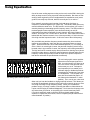
The ten-band graphic master equalizer
affects the overall output signal of the
+12dB
SD8. Its main function is to allow you to
“tune” the device to the particular room
environment you are in. Perhaps its
0dB
most important job is to enable you to
eliminate ringing or feedback problems
-12dB
caused when a microphone is too close
to a loudspeaker. To accomplish this,
32Hz
64Hz
125Hz 250Hz 500Hz
1K
4K
8K
16K
2K
start with all ten bands flat (that is, all
Ten-band graphic master equalizer
ten sliders at their detented “0” center
position). Then, one by one, raise each
slider until you hear the feedback or ringing markedly increase. This allows you
to identify the problematic frequency area (it will most commonly be one or more
of the high mid-range or high frequency areas). When you’ve located the
problem area(s), it’s simply a matter of lowering that slider or sliders below the
0 point until the ringing or feedback disappears. Don’t lower the frequency area
any further than you need to, or the quality of the overall sound may suffer.
If you don’t specifically need to utilize the SD8’s ten-band graphic master
equalizer in a particular environment, leave it completely flat (all sliders at their
center detented “0” position).
32Hz
64Hz
125Hz
250Hz
500Hz
1K
2K
4K
8K
17
16K
Using Equalization
In most instances, the best way to approach equalization is to think in terms of which
frequency areas you need to attenuate, as opposed to which ones you need to boost.
(Boosting a frequency area also has the effect of boosting the overall signal; too much
EQ boost can actually cause overload—with the accompanying Peak LED warning!)
Be aware of the phenomenon of masking, where loud sounds in one frequency range
obscure softer sounds in the same range; by cutting EQ “notches” in a loud signal, you
can actually make room for a softer one to shine through. And try not to think of EQ as
a miracle worker—no amount of equalization can put a singer in tune or remove the
distortion from an overloaded input signal! The key is to get the signal right in the first
place, by using correct gain structure and mic placement.
Although the specific EQ you will apply to a channel signal is very much a matter of
personal taste, here are a few general suggestions: Boosting the low frequency of
instruments such as bass drums or bass guitar will add warmth and make the sound
“fatter”; conversely, you may want to attenuate the low frequency component of
instruments such as cymbals, high-hats, and shakers so as to “thin” them out. The
mid-range control is particularly effective for vocals—attenuating it can give a vocal
performance more of an “FM-radio” feel and boosting it can help a vocal cut through
dense instrumentation. Be careful not to boost high frequencies too much or you risk
adding hiss to the signal, though just a touch can help add “shimmer” to an acoustic
guitar, ride cymbal, or high-hat.
18
Using The Aux Sends and Returns and Monitor Output
The two Aux sends provided by the SD8 allow you to combine the signal from
multiple channels and send the resulting mix to the rear panel Monitor output
jack, to the internal Zoom Digital Signal Processor (DSP), or to external devices
such as effects processors.
O
∞
+10
AUX1/MON
Aux Send 1 / Monitor knob
DSP AUX2
DSP / Aux Send 2 knob
AUX SEND 1
(+4dBu <75Ω)
AUX SEND 2
(+4dBu <75Ω)
Aux Send jacks
AUX RETURN
1 (+4dBu 10KΩ) 2
Aux Return jacks
O
∞
+10
RETURN 1-2
The Aux 1 / Monitor send knob works as follows: when it is at the “0” position,
the signal is routed with unity gain (that is, no boost or attenuation). As it is
turned clockwise from the “0” position, the signal is boosted; as it is turned
counterclockwise from the “0” position, it is attenuated. Aux send 1 is
pre-fade; that is, the level of the signal is determined solely by the input trim and
is unaffected by the EQ settings or the position of the channel level control.
The DSP/ Aux 2 send knob works differently: At the 12 o’clock position, there is
no signal routed. As it is turned clockwise (towards “Aux 2”), signal is routed
increasingly to Aux Send 2. As it is turned counterclockwise (towards “DSP”),
signal is routed increasingly to the internal Zoom Digital Signal Processor.
In contrast to Aux send 1, this Aux send is post-fade; that is, the level of the
signal is determined by the input trim, the EQ settings, and the position of the
channel level control (raising or lowering the level of the channel will affect the
send level as well). It is particularly important to keep this distinction in mind
when you connect external signal processors to the SD8 via either or both of
the two Aux Send jacks on the rear panel.
In addition, the SD8 provides two Aux returns, controlled by a single knob in the
Main section. These returns allow you to bring in signal from outboard devices,
either as a stereo pair or dual monophonically (many popular effects processors
provide a single mono input but a stereo output). Because the SD8 is a stereo
device, Aux return 1 is automatically panned hard left and Aux return 2 is
automatically panned hard right. This signal is at unity gain (no boost or
attenuation) when the Aux return knob set to the “0” position. Turning the knob
clockwise from the “0” position (towards the “10” position) causes the Aux return
signal to be boosted by as much as 10 dB. Turning it counterclockwise from “0”
(towards the “∞” position) causes the return signal to be attenuated (when fully
counterclockwise, the signal is attenuated infinitely—in other words, there is no
return signal).
Aux Return knob
Using the Monitor Output
MON OUT
(+4dBu <75Ω)
Monitor output jack
O
∞
+10
MONITOR
Monitor Level knob
In live performance, it is usually desirable to have onstage monitor speakers that
allow the performer to clearly hear the music being played. Often, however, the
performer requires a different mix than that being sent to the house speakers.
The SD8 Monitor output accommodates this need. A separate output jack on
the rear panel allows an independent Monitor mix (sometimes called a submix)
to be routed to an external amplifier/speaker system. The blend of sounds sent
to the Monitor mix is controlled by the Aux 1 / Monitor send knob for each
channel, with the master Monitor mix volume controlled by the main section
Monitor Level knob. Because this aux send is pre-fade, the Monitor mix is
completely independent of the Main Level control setting, the 10-band graphic
master EQ setting, the individual channel levels, and the individual channel EQ
settings.
19
Using the Internal Digital Signal Processor (DSP)
There’s probably no better way to enhance audio than with the judicious use of effects
such as reverb and echo. The SD8 has its own built-in Digital Signal Processor (DSP)
chip which provides some of the best effects around. These are some of the same
effects, in fact, that you’ll find in the highly acclaimed Zoom Studio 1202 signal
processor.
As discussed in the “Using The Aux Sends and Returns” section on page 19 in this
manual, each SD8 channel has its own discrete DSP/ Aux 2 send knob. This allows
effects to be applied only to certain signals and not just to the overall mix (applying
effects to the overall mix could make for a muddy sound). As each channel’s
DSP/ Aux 2 send knob is turned counterclockwise (towards “DSP”), signal from that
channel is routed increasingly to the internal DSP.
To return signal from the internal DSP, use the DSP Mix Level knob in
the SD8 main section (as described on page 8 of this manual). When
set to the fully counterclockwise (“∞”) position, no signal is returned
from the DSP, so you’ll hear only “dry” signal. Turning the knob
clockwise will cause more and more DSP (“wet”) signal to be added to
the overall mix. When set to the fully clockwise (“+10”) position, the
wet signal is boosted by 10 dB. Wet signal is returning at unity gain
(that is, with no boost or attenuation) when the knob set to the “0”
position. For best signal-to-noise ratio, you should use the
DSP/ Aux 2 send knobs to drive the DSP as hot as possible (short of
overloading it) and then use the DSP Mix Level knob to carefully set
the amount of processed signal you want to hear.
DSP AUX2
MIX
7
O
8 9 10
11
12
5
∞ DSP+10
4
3
P O W E R E D
The chart on the following page lists each Preset as well as describing the sonic
variation caused by the different Effect settings
7
6
13
5
14
4
3
15
2 1 16
PRESET
D S P
The SD8 provides 16 preset effect types (selected with the main section Preset knob),
and 16 variations for each preset (selected with the main section Effect knob), making
for a grand total of 256 different reverbs, delays and echoes—all available at the touch
of a knob. For each Preset, Effect 1 provides a “standard” setting—that is, a variation
that is deemed as being most characteristic of that Preset type. To quickly audition all
the SD8 Presets, simply leave the Effect knob at “1” and rotate the Preset knob through
its 16 different positions. For unusual custom effects, change the Effect setting.
20
6
8 9 10
11
12
13
14
15
2 1 16
EFFECT
Table of SD8 Effects
Preset #
Description
Effect settings
1
Hall reverb - simulates a
medium-sized concert hall
Alter the reverb time. Effect 1 (standard) is 2.2 seconds.
Larger Effect values increase the reverb time, from
1.0 second (Effect 2) to 3.8 seconds (Effect 16).
2
Room reverb - simulates an
acoustically dead space
such as a rehearsal studio
Alter the reverb time. Effect 1 (standard) is 0.7 seconds.
Larger Effect values increase the reverb time, from
0.5 seconds (Effect 2) to 3.3 seconds (Effect 16).
3
Plate reverb - simulates the
effect of a bass-rich plate
Alter the reverb time. Effect 1 (standard) is 4.2 seconds.
Larger Effect values increase the reverb time, from
3.0 seconds (Effect 2) to 9.0 seconds (Effect 16).
4
Vocal reverb - a reverb
specially designed to
enhance vocals
Alter the reverb time. Effect 1 (standard) is 4.5 seconds.
Larger Effect values increase the reverb time, from
1.7 seconds (Effect 2) to 4.5 seconds (Effect 16).
5
Ambience - a reverb
specially designed to
add brightness and depth
Alter the reverb time. Effect 1 (standard) is 1.2 seconds.
Larger Effect values increase the reverb time, from
0.6 seconds (Effect 2) to 3.4 seconds (Effect 16).
6
Orchestral - a reverb
with a very wide spread
and distinct body
Alter the reverb time. Effect 1 (standard) is 1.5 seconds.
Larger Effect values increase the reverb time, from
0.5 seconds (Effect 2) to 3.3 seconds (Effect 16).
7
Session - simulates a
small, acoustically live room
Alter the reverb time. Effect 1 (standard) is 1.0 seconds.
Larger Effect values increase the reverb time, from
0.6 seconds (Effect 2) to 3.4 seconds (Effect 16).
8
Studio - simulates a
Alter the reverb time. Effect 1 (standard) is 0.9 seconds.
large studio with a high ceiling Larger Effect values increase the reverb time, from
0.5 seconds (Effect 2) to 3.3 seconds (Effect 16)
9
Percussion - a reverb
specially designed to
enhance percussion
Alter the reverb time. Effect 1 (standard) is 1.8 seconds.
Larger Effect values increase the reverb time, from
0.6 seconds (Effect 2) to 3.4 seconds (Effect 16).
10
Drums - a reverb specially
designed to add body to
snare drums
Alter the reverb time. Effect 1 (standard) is 1.7 seconds.
Larger Effect values increase the reverb time, from
0.5 seconds (Effect 2) to 3.3 seconds (Effect 16).
11
Solo - a reverb with a
pronounced predelay, well
suited for reed instruments
Alter the reverb time. Effect 1 (standard) is 3.5 seconds.
Larger Effect values increase the reverb time, from
2.3 seconds (Effect 2) to more than 25 seconds (Effect 16).
12
Gate - an intense, short
gated reverb
Alter the gate time. Effect 1 (standard) is 448 milliseconds.
Larger Effect values increase the gate time, from
88 milliseconds (Effect 2) to 1.152 seconds (Effect 16).
13
Power - a short gated reverb
good for creating a heavy
power sound
Alter the gate time. Effect 1 (standard) is 312 milliseconds.
Larger Effect values increase the gate time, from
88 milliseconds (Effect 2) to 1.152 seconds (Effect 16).
14
Reverse - simulates the effect Alter the gate time. Effect 1 (standard) is 858 milliseconds.
of a tape recording played
Larger Effect values increase the gate time, from
backwards
88 milliseconds (Effect 2) to 1.152 seconds (Effect 16).
15
Delay - a long stereo delay
(up to 740 ms), with varied
amounts of cross-feedback
between the left and right
channels
Effect 1 (standard) uses delay times of 185 ms (left) and
173 ms (right). Effects 2 through 8 have different feedback
amounts and increased delay times from 0.4 to 180 msec.
Effects 9 through 16 have different feedback amounts
and increased delay times from 11 to 370 msec.
16
Echo - a fully discrete
two-channel echo with
varied amounts of feedback
Effect 1 (standard) uses delay times of 173 ms (left) and
185 ms (right). Effects 2 through 8 have different feedback
amounts and increased delay times from 0.4 to 180 msec.
Effects 9 through 16 have different feedback amounts
and increased delay times from 11 to 370 msec.
21
Specifications
Mixer / Pre Amp Section:
Frequency Response (± 3 dB)
Mic to Pre Out
Line to Pre Out
Aux Return to Pre Out
Normal
Limit
DC ~ 65 kHz
DC ~ 58 kHz
DC ~ 70 kHz
20 Hz - 50 kHz
20 Hz - 50 kHz
20 Hz - 50 kHz
Total Harmonic Distortion
(20 Hz to 20 kHz, with 30 kHz LPF, trim center)
Mic to Pre Out (Trim Max)
0.060%
Line to Pre Out (Trim Min)
0.015%
Aux Return to Pre Out
0.008%
0.10% Max
0.03% Max
0.03% Max
Signal To Noise Ratio (with 30 kHz LPF)
Mic @ -50dBu input, Trim Max
Mic @ -6 dBu input, Trim Min
70 dB
90 dB
65 dB Min
85 dB Min
Maximum Voltage Gain (dB @ 1 kHz)
Mic to Pre Out (Trim Min/Max)
Line to Pre Out (Trim Min/Max)
Aux Return to Pre Out
Tape In to Pre Out
Mic to Aux Send 1 (Trim Min/Max)
Mic to Aux Send 2 (Trim Min/Max)
Mic to Monitor Out (Trim Min/Max)
20 / 64 dB
0 / 44 dB
10 dB
14 dB
20 / 64 dB
30 / 74 dB
30 / 74 dB
Residual Noise at Pre Out (with 30 kHz LPF, EQ center, Trim Min)
Main Mix
-102 dBu
Main Mix with all channel Level Min83 dBu
-78 dBu
Main Mix with all channel Level Max
-71 dBu
-65 dBu
Crosstalk (@ 1 kHz with EQ center)
Channel vs. channel
Input vs. output
83 dB
84 dB
80 dB Min
80 dB Min
Tone Control
High (10 kHz)
Mid (800 Hz)
Low (80 Hz)
±12 dB
±12 dB
±12 dB
±15 dB Max
±15 dB Max
Graphic Equalizer
(32, 64, 125, 250, 500 Hz, 1, 2, 4, 8, 16 kHz)
±12 dB
Effect Presets
Hall, Room, Plate, Vocal,
Ambience, Orchestral,
Session, Studio, Percussion,
Drums, Solo, Gate, Power,
Reverse, Delay, Echo
(16 Effect variations per Preset)
Peak LED
5 dB before clipping
Headphone
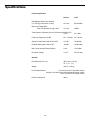
20 mW (8 ohms)
22
Specifications
Power Amp Section:
Normal
Limit
Rated Output Power (per channel)
(1% THD @ 1 kHz stereo, 4 ohm)
275 watt
250 watt Min
Maximum Voltage Gain
Amp In to Speaker Out (@ 1 kHz)
27.5 dB
28 dB ±
Total Harmonic Distortion (20 Hz to 20 kHz with 30 kHz LPF)
0.02%
0.1% Max
Frequency Response (±3 dB)
DC ~ 130 kHz 20 ~ 50 kHz
Signal To Noise Ratio (with 30 kHz LPF)
112 dB
105 dB Min
Residual Noise ((with 30 kHz LPF)
-84 dBu
-80 dBu Max
Idle Current across Emitter Resistor)
6 mA
15 mA Max
DC Offset Voltage
+5 mV
±30 mV Max
General:
Dimensions (W x D x H)
482 x 280 x 178 mm
19 x 11 x 7 in
Weight
34.8 lb • 15.8 kg
Power Requirements
115 V ac 60 Hz for UL and CSA Version
230/240 V ac 50/60 Hz for BSI and Central Europe Version
100 V ac 50/60 Hz for Japan Version
Power Consumption
982 w
23