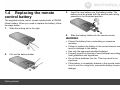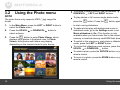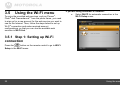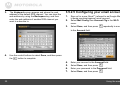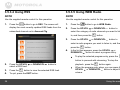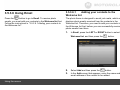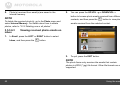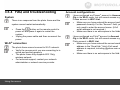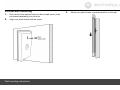
1
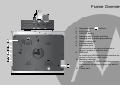
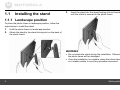
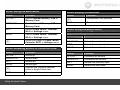
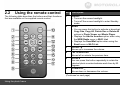
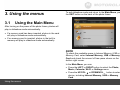
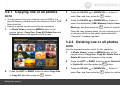
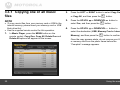
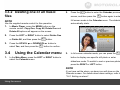
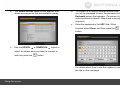
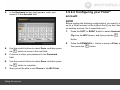
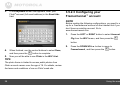
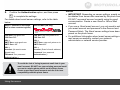
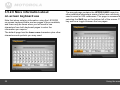
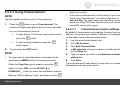
User’s Guide For LS1000W 10.4” (26.4 cm) Digital Photo Frame Wi-Fi® Enabled Warning Use only the power adapter supplied with your product. Welcome... to your new Motorola Digital Photo Frame! Please retain your original dated sales receipt for your records. For warranty service of your Motorola product, you will need to provide a copy of your dated sales receipt to confirm warranty status. Registration is not required for warranty coverage. For product-related questions, please call: 1-888-331-3383 in US and Canada 0845 218 0890 in UK (65) 68412668 in Singapore +49 1805 938802 in Europe On the Web: www.motorola.com This User’s Guide provides you with all the information you need to get the most from your digital photo frame. Before you start using, you will need to set up your digital photo frame. Follow the simple instructions in “Getting started”, on the next few pages. IMPORTANT z Only use the supplied power adapter. Key features z Got everything? z z z z z z 1 x Digital Photo Frame 1 x Stand 1 x Power adapter 1 x Remote control 1 x Quick Start Guide 1 x User’s Guide z z z z 3 view modes: Clock/Calendar mode, slideshow mode and thumbnail mode 5 slideshow transition effects Date and Time settings Programmable On/Off Time Supports flash drive, SD, SDHC and MMC memory cards. Frame Overview 1. 2. 3. 4. 5. 6. 7. 8. Navigation and buttons EXIT button ON/OFF button Hanging slot (Portrait position) Hanging slot (Landscape position) Stand locking slot Loudspeakers Earphone jack for connecting to an earphone/headset or external speaker to play the audio. 9. USB port for inserting a USB flash drive that contains the photos or music you want to play. 10. Memory card slot for inserting an SD, SDHC, MMC memory card that contains the photos or music you want to play. 11. Power jack Getting started 3 Table of Contents 1. 2. 3. 4 Getting started ................................................................................5 1.1 Installing the stand ..........................................................6 1.1.1 Landscape position ..............................................6 1.1.2 Portrait position ....................................................7 1.2 Connecting to power .......................................................8 1.3 Inserting a memory card or a USB flash drive .................8 1.4 Replacing the remote control battery...............................9 Using the photo frame..................................................................10 2.1 Using the control buttons ..............................................10 2.2 Using the remote control ...............................................13 Using the menus...........................................................................15 3.1 Using the Main Menu ....................................................15 3.2 Using the Photo menu...................................................16 3.2.1 Copying one or all photos ...................................17 3.2.2 Deleting one or all photos ...................................17 3.2.3 Auto rotation.......................................................18 3.3 Using the Music menu...................................................19 3.3.1 Copying one or all music files .............................20 3.3.2 Deleting one or all music files .............................21 3.4 Using the Calendar menu .............................................21 3.5 Using the Wi-Fi menu....................................................22 3.5.1 Step 1: Setting up Wi-Fi connection ....................22 3.5.2 Step 2: Configuring your accounts ......................26 3.5.2.1 Configuring your Picasa™ account.........26 3.5.2.2 Configuring your Flickr® account ...........27 3.5.2.3 Configuring your Framechannel™ account .................................................28 3.5.2.4 Configuring RSS ...................................29 3.5.2.5 3.5.2.6 4. 5. 6. Configuring your email account .............30 More information about on-screen keyboard use ........................................32 3.5.3 Step 3: Using web services.................................33 3.5.3.1 Using Picasa™.......................................33 3.5.3.2 Using Flickr® .........................................34 3.5.3.3 Using Framechannel™ ...........................35 3.5.3.3.1 Framechannel custom settings ...................................35 3.5.3.4 Using RSS ............................................36 3.5.3.5 Using WEB Radio .................................36 3.5.3.6 Using Email...........................................39 3.5.3.6.1 Adding your contacts to the Welcome list ...........................39 3.5.3.6.2 Receiving photo emails...........40 3.5.3.6.3 Viewing received photo emails on inbox..................................42 3.5.3.6.4 Sending a photo by email........43 3.5.3.6.5 Editing or deleting the contacts in the Welcome list..................44 3.5.4 FAQ and troubleshooting ....................................45 3.6 Using the Settings menu ...............................................48 3.6.1 Setting an alarm....................................51 3.6.2 Enabling auto on/off ..............................52 General information .....................................................................53 Technical specifications ..............................................................60 Wall mounting instructions..........................................................61 Getting started 1. Getting started WARNING z z z z z Do not place your digital photo frame in the bathroom or other humid areas. Do not place your digital photo frame near sources of heat and extreme temperatures, such as fluorescent lighting, microwave ovens, heating appliances and direct sunlight. Do not disassemble your digital photo frame; there are no user-serviceable parts inside. If the LCD screen breaks, do not touch the glass or liquid. Contact Motorola customer support for assistance. Use only the power adapter supplied with your digital photo frame. Care and maintenance Wipe the frame and the LCD screen gently with a soft, clean, dry cloth. To remove fingerprints on the LCD screen, wipe gently with a soft, lint-free cloth. Do not use cleaning solutions unless they are designed specifically for LCD screens. IMPORTANT Always switch off and disconnect the power adapter before cleaning the digital photo frame. Compatible photo format Your digital photo frame can only display photos that are in JPEG format. Other photo formats may not be detected or displayed correctly. Getting started 5 1.1 Installing the stand 3. Insert the stand into the stand locking slot as illustrated, until the stand is secured to the photo frame. 1.1.1 Landscape position To place the photo frame in landscape position, follow the steps below to install the stand. 1. 2. Hold the photo frame in landscape position. Attach the stand to the stand locking slot on the back of the photo frame. WARNING z z 6 Do not rotate the stand during the installation. Otherwise, the photo frame will be damaged. Once the installation is complete, place the photo frame on a stable surface to avoid any possible movement. Getting started 1.1.2 Portrait position 3. To place the photo frame in portrait position, follow the steps below to install the stand. 1. 2. Insert the stand into the stand locking slot as illustrated, until the stand is secured to the photo frame. Hold the photo frame in portrait position. Attach the stand to the stand locking slot on the back of the photo frame. WARNING z z Getting started Do not rotate the stand during the installation. Otherwise, the photo frame will be damaged. Once the installation is complete, place the photo frame on a stable surface to avoid any possible movement. 7 1.2 Connecting to power Follow the steps below to connect the photo frame to a power outlet to turn on the power. 1. Plug one end of the AC power adapter to the power jack on the back of the photo frame. 2. Plug the other end into a power outlet. The power of the photo frame will be turned on. 1.3 Inserting a memory card or a USB flash drive The photo frame is preloaded with some photos in the internal memory. On the top of the photo frame, you can also insert a memory card or a USB flash drive containing the content you want to show on this unit. NOTE z z z z 3. Place the photo frame in landscape or portrait position on a stable surface. z After you insert a photo-loaded memory card or USB flash drive and connect the photo frame to power, the photo frame will automatically start to display photos in slideshow mode. The memory card slot and USB port both support hot-swap function. The memory card slot accepts these types of memory cards: SD, SDHC, MMC. You can play audio and image files on the photo frame. The supported audio file format is MP3 (*.mp3). The supported image file format is JPEG (*.jpg). Video files are not supported on this photo frame. NOTE Available plug types may vary depending on where you purchased this photo frame. 8 Getting started 1.4 Replacing the remote control battery 3. Insert the new battery into the battery holder. The battery must be placed with the positive pole facing upwards in the illustrated position. 4. Slide the battery holder into the remote control. The supplied remote control comes installed with a CR2025 lithium battery. When you need to replace the battery, follow the steps below. 1. Slide the locking tab to the right. WARNING z z z 2. Pull out the battery holder. z z z Getting started Protect the battery from overheating or excessive moisture. Failure to replace the battery in the correct manner may result in damage to the battery. Use only the approved specified batteries. Properly recycle or dispose of used batteries according to local guidelines and regulations. Do not throw batteries into fire. This may result in an explosion. If the battery is completely drained or the remote control is not in use for a long time, remove the battery to prevent leakage. 9 2. Using the photo frame No. 1 Description Navigation and buttons To operate the photo frame, you can: z Use the control buttons on the back of the photo frame Or z Use the supplied remote control 2.1 Using the control buttons a. UP/VOL+: moves up/increases the volume. b. DOWN/VOL-: moves down/decreases the volume. c. RIGHT: moves right. d. LEFT: moves left. e. 2 3 : Enters/confirms the selection, or starts/pauses the playback. EXIT button z Returns to the Main Menu. z Goes back to the previous page. z Stops the playback. ON/OFF button Turns on the screen backlight. z Turns off the screen backlight to enter Standby mode. z 10 Using the photo frame When using the Main Menu When playing a slideshow Button Function Button UP/VOL+ Selects Internal Memory, USB or Memory Card. Selects Internal Memory, USB or Memory Card. Selects Photo, Music, Calendar, Wi-Fi or Settings menu. Selects Photo, Music, Calendar, Wi-Fi or Settings menu. Enters sub-pages of Photo, Music, Calendar, Wi-Fi or Settings menu. DOWN/VOL- LEFT RIGHT When browsing photos in thumbnail view Button Function UP/VOL+ DOWN/VOL- LEFT RIGHT Moves up. Moves down. Moves left. Moves right. Displays the currently selected photo in Single Photo view. Goes back to the previous page. EXIT Using the photo frame Function Starts/pauses the playback. EXIT Goes back to the previous page. When using the Music menu Before playing music / When music is paused Button Function UP/VOL+ Selects the previous track. DOWN/VOL- Selects the next track. LEFT Selects the previous track. RIGHT Selects the next track. When playing music Button Function UP/VOL+ Increases the volume. DOWN/VOL- Decreases the volume. LEFT Selects the previous track. RIGHT Selects the next track. 11 When using the Calendar menu When using the Settings menu Button Function Button Function LEFT Selects Photo, Music, Calendar, Wi-Fi or Settings menu. Selects Photo, Music, Calendar, Wi-Fi or Settings menu. Enters Calendar full screen mode when the Calendar menu is selected. Goes back to the previous page. UP/VOL+ Moves up to the previous sub-menu in Settings. Moves down to the next sub-menu in Settings. Selects Photo, Music, Calendar, Wi-Fi or Settings menu. Selects Photo, Music, Calendar, Wi-Fi or Settings menu. z Enters sub-menus in Settings. z Enters/confirms the selection. z Quits sub-menus in Settings. z Goes back to the previous page. RIGHT EXIT When using the Wi-Fi menu Button Function UP/VOL+ DOWN/VOL- LEFT Moves up to select an item. Moves down to select an item. Selects Wi-Fi List, Wi-Fi Setup or Account Cfg. Selects Wi-Fi List, Wi-Fi Setup or Account Cfg. Enters the sub-page of Wi-Fi List, Wi-Fi Setup or Account Cfg. Goes back to the previous page. RIGHT EXIT 12 DOWN/VOL- LEFT RIGHT EXIT Using the photo frame 2.2 Using the remote control The following table describes the buttons and their functions that are available on the supplied remote control. No. Description 1 ON/OFF Turns on the screen backlight. z Turns off the screen backlight to enter Standby mode. MENU z You can press this button to activate or deactivate Copy One, Copy All, Delete One or Delete All options in Photo Viewer and Music Player. z Displays the Add to favorites option when using the WEB Radio menu in Wi-Fi List. z Displays the Send Mail option when using the Email menu in Wi-Fi List. UP/VOL+ Moves up or increases the volume. LEFT/PREVIOUS Moves left or selects the previous item. ROTATE You can press this button repeatedly to rotate the selected photo counterclockwise each time by 90 degrees. DOWN/VOL- Moves down or decreases the volume. z 2 3 4 5 6 (Continued on next page) Using the photo frame 13 No. Description 7 WEB Radio You can press this shortcut key to access WEB Radio in Wi-Fi List to listen to radio stations on the ® web, when a Wi-Fi connection has been set up. EMAIL You can press this shortcut key to access Email in Wi-Fi List to operate photo emails, when a Wi-Fi connection has been set up. Wi-Fi SETUP You can press this button to set up a Wi-Fi connection. SETUP You can press this button to access the Settings menu. EXIT Goes back to the previous page. RIGHT/NEXT Moves right or selects the next item. 8 9 10 11 12 13 14 14 15 16 17 RSS You can press this shortcut key to access RSS reader, when a Wi-Fi connection has been set up. PICASA ™ You can press this shortcut key to access Picasa web album service, when a Wi-Fi connection has been set up and your account has been configured. FRAME CHANNEL You can press this shortcut key to access ™ Framechannel service, when a Wi-Fi connection has been set up and your account has been configured. (OK/PLAY/PAUSE) Enters and confirms the selection, or starts/pauses the playback. ZOOM Zooms in the photo by a factor of 2x, 4x, 8x and 16x. Using the photo frame 3. Using the menus 3.1 To exit slideshow mode and return to the Main Menu, press the EXIT button on the back of the photo frame. Using the Main Menu After turning on the power of the photo frame, photos will play in slideshow mode automatically. z z If a memory card has been inserted, photos in the card will play in slideshow mode automatically. If no memory card is inserted, photos in the built-in memory will play in slideshow mode automatically. NOTE To check the available space in Internal Memory, USB or Memory Card, select Internal Memory, USB or Memory Card and check the amount of free space shown on the bottom right corner. In the Main Menu, you can: z z Using the menus Press the LEFT or RIGHT button to select the Photo, Music, Calendar, Wi-Fi or Settings menu. Press the UP/VOL+ or DOWN/VOL- button to select a device, including Internal Memory, USB or Memory Card. 15 3.2 Using the Photo menu NOTE The photo frame only supports JPEG (*.jpg) image file format. 1. In the Main Menu, press the LEFT or RIGHT button to select the Photo menu. 2. Press the UP/VOL+ or DOWN/VOL- button to select a device. 3. Press the button to enter Photo Viewer, which displays your photos in thumbnail view. In Photo Viewer, both photos and folders may display, depending on the content stored in your device. z z To play photos in full screen single photo mode, press the button. Press the button again to start running slideshow. z z z z z 16 To browse or select a photo, use the UP/VOL+, DOWN/VOL-, LEFT and RIGHT buttons. To make photos play with background music in slideshow mode, go to the Settings menu to set Music slideshow to On. (This function is only available when you have music files in the internal memory or inserted memory card/USB flash drive.) To switch to the previous or next photo in slideshow mode, press the LEFT or RIGHT button. To control the slideshow music volume, press the UP/VOL+ or DOWN/VOL- button. To rotate a photo, press the ROTATE button on your remote control. To zoom in a photo, press the ZOOM button on your remote control. Using the menus 3.2.1 Copying one or all photos 3. select Yes, and then press the NOTE z z 1. Press the UP/VOL+ or DOWN/VOL- button to To copy photos from your memory card or USB to the internal memory, please insert your memory card or USB flash drive first. Use the supplied remote control for this operation. 4. button. Press the UP/VOL+ or DOWN/VOL- button to select the destination (USB, Memory Card or Internal Memory), and then press the In Photo Viewer, press the MENU button on the remote control. Copy One, Copy All, Delete One and Delete All options will appear on the screen. button to confirm. Once the copy process starts, do not remove your USB or memory card from the photo frame before the “Complete” message appears. 3.2.2 Deleting one or all photos NOTE Use the supplied remote control for this operation. 1. In Photo Viewer, press the MENU button on the remote control. Copy One, Copy All, Delete One and Delete All options will appear on the screen. 2. Press the LEFT or RIGHT button to select Delete One or Delete All, and then press the 3. 2. Press the LEFT or RIGHT button to select Copy One or Copy All, and then press the Using the menus button. Press the UP/VOL+ or DOWN/VOL- button to select Yes, and then press the button to confirm. button. 17 3.2.3 Auto rotation The photo frame has a built-in tilt sensor that allows auto rotation of photos. Follow the instructions below to enable auto rotation. • 18 • When the photo frame is placed in portrait position, rotate the photo frame 90 degrees clockwise to enable auto rotation. When the photo frame is placed in landscape position, rotate the photo frame 90 degrees counterclockwise to enable auto rotation. Using the menus 3.3 Using the Music menu NOTE The photo frame only supports MP3 (*.mp3) audio file format. 1. In the Main Menu, press the LEFT or RIGHT button to select the Music menu. 2. Press the UP/VOL+ or DOWN/VOL- button to select a device. 3. Press the z z z z To select the next track, press the DOWN/VOL- or RIGHT button. To play the selected track, press the button. During music playing, volume bar shows on top right corner. To increase or decrease the volume, press the UP/VOL+ or DOWN/VOL- button. button to enter Music Player. To select the previous track, press the UP/VOL+ or LEFT button. Using the menus 19 3.3.1 Copying one or all music files 2. NOTE 3. z z 1. 20 To copy music files from your memory card or USB to the internal memory, please insert your memory card or USB flash drive first. Use the supplied remote control for this operation. In Music Player, press the MENU button on the remote control. Copy One, Copy All, Delete One and Delete All options will appear on the screen. Press the LEFT or RIGHT button to select Copy One or Copy All, and then press the Press the UP/VOL+ or DOWN/VOL- button to select Yes, and then press the 4. button. button. Press the UP/VOL+ or DOWN/VOL- button to select the destination (USB, Memory Card or Internal Memory), and then press the button to confirm. Once the copy process starts, do not remove your USB or memory card from the photo frame before the “Complete” message appears. Using the menus 3.3.2 Deleting one or all music files 2. Press the button to enter the Calendar preview screen, and then press the button again to enter NOTE full screen mode in the Calendar menu. The slideshow Use the supplied remote control for this operation. automatically starts. 1. In Music Player, press the MENU button on the remote control. Copy One, Copy All, Delete One and Delete All options will appear on the screen. 2. Press the LEFT or RIGHT button to select Delete One or Delete All, and then press the 3. Press the UP/VOL+ or DOWN/VOL- button to select Yes, and then press the 3.4 1. button. button to confirm. Using the Calendar menu In the Main Menu, press the LEFT or RIGHT button to select the Calendar menu. 3. In full screen calendar mode, you can press the button to display one specific still photo or enter slideshow mode. To switch to next or previous photo, press the RIGHT or LEFT button. NOTE If you have set the alarm, an alarm icon will show on the Calendar screen. For details about alarm settings, refer to “3.6.1 Setting an alarm”. Using the menus 21 3.5 Using the Wi-Fi menu ™ To enjoy the provided web services, such as Picasa , ® ™ Flickr and Framechannel from the photo frame, you need to sign up for a new account for the web service you want to use on the Internet. Then, follow the steps below to set up ® Wi-Fi connection and make required account configurations, so that you can use the available web services in Wi-Fi List. If you are using automatic IP network: a. Select DHCP for automatic connection in the Wi-Fi Setup menu. 3.5.1 Step 1: Setting up Wi-Fi connection Press the button on the remote control to go to Wi-Fi Setup in the Wi-Fi menu. 22 Using the menus b. The Select Access Point screen appears and shows access points that are available nearby. d. To connect to a security-enabled access point, you will be prompted to enter the password in the Keyboard screen that appears. (To connect to a security-disabled network, Step d and e are not required.) e. Enter the password in the KEY field. When finished, select Done, and then press the button. c. Use the UP/VOL+ or DOWN/VOL- button to select an access point you want to connect to, and then press the button. For details about how to use the keyboard, see the tips on the next page. Using the menus 23 TIPS f. On-screen keyboard use: z z shows the “Your connection was successful” To select an item, press the message in the middle and the buttons on the remote control. top right corner. Press the EXIT button to return to To enter/confirm your selection, press the the Wi-Fi menu. NOTE button. z To switch between uppercase and lowercase z letters or switch to other symbols, select Shift, and then press the z z z button. z icon on the ® When you have set up Wi-Fi connection using DHCP, the photo frame will connect to the Wi-Fi network automatically every time it is powered on. To manually disconnect from the currently active Wi-Fi To cancel your last input, select Backspace, network, go to the Settings menu, select Default and then press the settings and press the button. button, and then select OK To enter a space, select Space, and then press and press the the also clear all the settings in Account Cfg. button. button. Please note that this option will To go to the next field or move among fields, select Done, and then press the 24 Once the connection is established, the screen button. Using the menus If you are using static IP connection: a. The Choose AP screen appears. Use the keyboard to enter your IP address, subnet mask, gateway and DNS server settings. b. Select Static IP Address in the Wi-Fi Setup menu. For details about how to use the keyboard, see the tips below. TIPS On-screen keyboard use: z To select an item, press the buttons on the remote control. z To move the cursor forwards, select Next, and then press the z Using the menus button. To move the cursor backwards, select Prev, 25 and then press the z z To go to the next field or move among fields, select Done, and then press the button. To cancel your last input, select , and then press the c. button. button. When finished, select Done, and then press the button. d. Once the connection is established, the screen shows the “Your connection was successful” message in the middle and the icon on the 3.5.2 Step 2: Configuring your accounts 3.5.2.1 Configuring your Picasa™ account NOTE Before making the following configurations, you need to sign up for a Picasa account on the Internet first if you don’t have an existing account. Go to www.picasa.google.com 1. Cfg from the Wi-Fi menu, and then press the top right corner. Press the EXIT button to return to the Wi-Fi menu. button. 2. NOTE Press the LEFT or RIGHT button to select Account Press the button to select Picasa. ® When you have set up Wi-Fi connection using Static IP Address, the photo frame will save the settings you have entered in the Choose AP page. However, every time the photo frame is powered on, you need to select Done in the Choose AP page and press the button repeatedly to manually connect to the Wi-Fi network. 26 Using the menus 3. In the Keyboard screen that appears, enter your account in the Account field. 3.5.2.2 Configuring your Flickr® account NOTE Before making the following configurations, you need to sign up for a Flickr account on the Internet first if you don’t have an existing account. Go to www.flickr.com 1. Press the LEFT or RIGHT button to select Account Cfg from the Wi-Fi menu, and then press the button. 2. 4. Use the control buttons to select Done, and then press the Continue to enter your password in the Password field. 6. Use the control buttons to select Done, and then press 7. then press the button. button to move to the next field. 5. the Press the DOWN/VOL- button to move to Flickr, and button to complete. Now you will be able to use Picasa in the Wi-Fi List. Using the menus 27 3. In the Keyboard screen that appears, enter your ® Flickr account (full email address) in the Email Adr: field. 3.5.2.3 Configuring your Framechannel™ account NOTE Before making the following configurations, you need to sign up for a Framechannel account on the Internet first if you don’t have an existing account. Go to www.framechannel.com 1. Press the LEFT or RIGHT button to select Account Cfg from the Wi-Fi menu, and then press the button. 2. 4. When finished, use the control buttons to select Done, 5. and then press the button to complete. Now you will be able to use Flickr in the Wi-Fi List. Press the DOWN/VOL- button to move to Framechannel, and then press the button. TIPS The photo frame is limited to access public photos from Flickr account owners over the age of 18. For details, review the terms and conditions of use on Flickr's web site. 28 Using the menus 3. In the Keyboard screen that appears, enter your account in the Account field. 6. Use the control buttons to select Done, and then press the 7. button to complete. Now you will be able to use Framechannel in the Wi-Fi List. 3.5.2.4 Configuring RSS 4. Use the control buttons to select Done, and then press the 5. button to move to the next field. Continue to enter the 4-digit PIN code you set for your ™ Framechannel account in the PIN field. RSS (Really Simple Syndication) is a method used to publish frequently updated web site content, such as news headlines, blog entries or podcasts. An RSS document (called a “feed”) contains a summary of content from an associated web site or the full text. When you subscribe to an RSS feed, you will receive an update once the publisher releases new content. You can view RSS feeds that you have subscribed to with the provided RSS Feed Viewer in the Wi-Fi List. 1. Cfg from the Wi-Fi menu, and then press the button. NOTE A 4-digit PIN code is different from a Framechannel password. The PIN code is a unique identifier that Framechannel uses to create your Framechannel slideshow and send it to your photo frame. The Password is what you use to log into the www.framechannel.com web site. Using the menus Press the LEFT or RIGHT button to select Account 2. Press the DOWN/VOL- button to move to RSS, and then press the button. 29 3. The Keyboard screen appears and shows the web address of the default RSS channel. You can clear the web address by using the Backspace key, and then enter the web address of another RSS channel you want to subscribe to. 3.5.2.5 Configuring your email account 1. 2. 3. ™ Sign up for a new Gmail (referred to as Google Mail in some countries/regions) email account. Select Mail Config from Account Cfg in the Wi-Fi menu. Select Done, and then press repeatedly to move to the Account field. 4. Use the control buttons to select Done, and then press the 30 button to complete. 4. Enter your account in the Account field. 5. 6. Select Done, and then press . Enter your password in the Password field. 7. Select Done, and then press . Using the menus 8. Confirm the Authentication option, and then press to complete the settings. NOTE z For details about email server settings, refer to the table below. Gmail™ (Referred to as Google Mail in some countries/regions) Yahoo!® MAIL (UK only) POP Serv: pop.gmail.com POP Port: 995 SSL: y SMTP Serv: smtp.gmail.com SMTP Port: 465 SSL: y Account: (No need to enter @gmail.com) Password: Your password Authentication: y POP Serv: pop.mail.yahoo.co.uk POP Port: 995 SSL: y SMTP Serv: smtp.mail.yahoo.co.uk SMTP Port: 465 SSL: y Account: (Enter full email address.) Password: Your password Authentication: y z z IMPORTANT: Depending on server settings, emails may be deleted from server after received by the photo frame. DO NOT use email account currently using for email communication. Create a new Gmail or Yahoo! Mail account. If you use a Gmail email account, you only need to enter your email account and password in the Account and Password fields. The Gmail server settings have been preset on the photo frame. For additional information about email server settings or mail server accessibility, contact your network administrator or network service provider. To avoid the risk of losing important email data in your email account, DO NOT use your existing personal email account to receive photo emails on this photo frame. Create a new Gmail email account and use it for best compatibility with this photo frame. Using the menus 31 3.5.2.6 More information about on-screen keyboard use Note that when entering information using the LS1000W on-screen keyboard there are two pages of keys available, and there may be times when you will need to use characters from both keyboard pages to enter the information you require. The second page contains the UPPER CASE keys plus other additional characters some of which are commonly used in email or URL addresses. This page is accessed by selecting the Shift key on the bottom left of the screen. This key acts as a toggle between the two pages. The default page has the lower case characters plus other characters and symbols you may need. 32 Using the menus 3.5.3 Step 3: Using web services NOTE 3.5.3.1 Using Picasa™ To copy a photo, select the photo in thumbnail mode and NOTE Use the supplied remote control for this operation. 1. Press the button to go to Picasa. The screen will display web albums that you have created on your press the MENU button on the remote control. When the Copy One option appears, press the button to select YES, use the UP/VOL+ or DOWN/VOL- button to select the destination (Internal Memory, USB or Memory Card), and then press the button to proceed. Picasa account. 2. Press the UP/VOL+, DOWN/VOL-, LEFT and RIGHT buttons to select an album if you have multiple ones. 3. Press the z button to enter the selected album. To play photos in full screen single photo mode, press the z button. To start running slideshow, press the button again. 4. To quit, press the EXIT button. Using the menus 33 3.5.3.2 Using Flickr® 4. Press the z NOTE z z 1. 2. 3. 34 The photo frame is limited to access public photos from Flickr account owners over the age of 18. For details, review the terms and conditions of use on Flickr's web site. Use the supplied remote control for this operation. button to enter the selected album. To play photos in full screen single photo mode, press the z button. To start running slideshow, press the button again. 5. To quit, press the EXIT button. Press the LEFT or RIGHT button to select Wi-Fi List NOTE from the Wi-Fi menu, and then press the button. To copy a photo, select the photo in thumbnail mode and Press the DOWN/VOL- button to select Flickr, and press the MENU button on the remote control. When the then press the Copy One option appears, press the button. The screen will display button to select public web albums that have been created on your YES, use the UP/VOL+ or DOWN/VOL- button to select Flickr account. the destination (Internal Memory, USB or Memory Card), Press the UP/VOL+, DOWN/VOL-, LEFT and RIGHT buttons to select an album if you have multiple ones. and then press the button to proceed. Using the menus 3.5.3.3 Using Framechannel™ button to proceed. • NOTE Use the supplied remote control for this operation. 1. Press the button to go to Framechannel. The screen will display web photos that you have uploaded on your Framechannel account. z To play photos in full screen single photo mode, press the button. Framechannel custom settings By default, Framechannel only displays 5 photos from each channel. To increase the number of photos to be displayed on this photo frame, follow the steps below: Log into www.framechannel.com 5. Type in a value you prefer in the Maximum number of photos field. and press the MENU button on the remote control. 6. Click Save. When the Copy One option appears, press the The new settings will take effect the next time you access Framechannel on this photo frame. To start running slideshow, press the button again. To quit, press the EXIT button. NOTE • 3.5.3.3.1 1. 2. 3. 4. z 2. If the photos displayed are not the photos of your own, ™ check your Framechannel account configuration in Account Cfg. You might have input the wrong account name and 4-digit PIN code. Please verify your account name/PIN code and try again. To copy a photo, select the photo in thumbnail mode Go to My Account. Click Edit Channel Rules. In My channels, choose a channel to modify and click on the Rules link. button to select YES, use the UP/VOL+ or DOWN/VOL- button to select the destination (Internal Memory, USB or Memory Card), and then press the Using the menus 35 3.5.3.4 Using RSS 3.5.3.5 Using WEB Radio NOTE NOTE Use the supplied remote control for this operation. Use the supplied remote control for this operation. 1. 1. Press the 2. Press the UP/VOL+ or DOWN/VOL- button to Press the button to go to RSS. The screen will display the most recently updated RSS feeds from the subscribed channel set in Account Cfg. button to go to WEB Radio. select the category of radio channels you want to listen to, and then press the 3. button. Press the UP/VOL+ or DOWN/VOL- button to select a radio program you want to listen to, and then press the 4. button. In the list that appears, press the UP/VOL+ or DOWN/VOL- button to select a program entry. z To play the selected program entry, press the button to proceed with streaming. To stop the 2. 3. 4. 36 Press the UP/VOL+ or DOWN/VOL- button to select a RSS feed. Press the button to view the selected RSS feed. To quit, press the EXIT button. playback, press the z button again. When the program entry plays, you can press the UP/VOL+ or DOWN/VOL- button to adjust the volume. Using the menus z 5. To add the selected program entry to the Favorites list, press the MENU button on the remote control. When Add to favorites appears, the selected program entry has been added to the Favorites list. To quit, press the EXIT button. 6. If you have added radio program entries to the Favorites list, the WEB Radio screen will show Favorites, Search and Delete One options when you access WEB Radio next time. z Favorites: In this option, you can press the UP/VOL+ or DOWN/VOL- button to select a program entry, and then press the button to start streaming and playback. To stop playback, press the button again. Using the menus 37 NOTE To play another program entry in the Favorites list, you need to stop the current program playback first by pressing the button. Use UP/VOL+ or DOWN/VOL- button to select another program entry, and then press the button to start streaming and playback. z Search: In this option, you can press the UP/VOL+ or DOWN/VOL- button to search for all radio programs that are available for playback. z Delete One: In this option, you can press the UP/VOL+ or DOWN/VOL- button to select the radio program entry to be removed from the Favorites list, and then press the button to delete it. WEB Radio powered by SHOUTcast 38 Using the menus 3.5.3.6 Using Email 3.5.3.6.1 Adding your contacts to the Welcome list Press the button to go to Email. To receive photo emails, you must add your contacts to the Welcome list first. Follow the instructions in “3.5.3.6.1 Adding your contacts to the Welcome list”. The photo frame is designed to avoid junk mails, which only displays photo emails received from the contacts in the Welcome list. Therefore, you need to add your contacts to the Welcome list first, before you can successfully receive photo emails from them. 1. In Email, press the LEFT or RIGHT button to select Welcome list, and then press the 2. 3. Using the menus Select Add and then press the button. button. In the Add screen that appears, enter the name and email address of the contact to be added. 39 4. 5. When finished, use the control buttons to select Done, 3.5.3.6.2 and then press the 1. button to complete. Once you have added your contacts to the Welcome list, you will be able to receive photo emails from these contacts. WARNING Receiving photo emails Press the button on the remote control to access Email in Wi-Fi List. The “Checking email” message appears. 2. When you have incoming photo email(s), the “Downloading E-mail images …” message appears. When receiving a photo email from a contact that is not in the Welcome list, the photo frame only shows the mail receiving progress, but will not download and save the photos sent by the contact. The screen shows the “Not match to welcome list” message. 40 Using the menus 3. Once the download completes, downloaded photo(s) will be saved into the internal memory of the photo frame. 4. Once the photo(s) have been downloaded and saved to the internal memory, the following screen appears, asking whether you want to play photo(s) received in email(s) in slideshow mode. • If you select Yes and press , the new photo(s) received in email(s) will start running slideshow with all the existing photo(s) stored in the internal memory. • • If you select No and press , it will go to Inbox. If you do not make any selection and the photo frame is idle for over 30 seconds, slideshow begins automatically. WARNING z z z Do not disconnect the power of the photo frame during email receiving. Otherwise, internally memory may crash, causing all data lost in memory. If there is insufficient free space in the internal memory, photo(s) downloaded from the email(s) may not be saved. When the “Downloading E-mail images…” message appears, all the current activities on the photo frame, such as copying music and photos, will be interrupted and stopped. Manually resume the unfinished activities after email downloading is complete. Using the menus 41 5. Photo(s) received from email(s) are saved in the internal memory. 2. button to browse photo emails received from different NOTE contacts, and then press the To delete the received photo(s), go to the Photo menu and select Internal Memory. For details about how to delete photos, refer to “3.2.2 Deleting one or all photos”. 3.5.3.6.3 inbox 1. You can press the UP/VOL+ or DOWN/VOL- button to view photo emails received from the selected contact. Viewing received photo emails on In Email, press the LEFT or RIGHT button to select Inbox, and then press the button. 3. To quit, press the EXIT button. NOTE The photo frame only receives the emails that contain photos in JPEG (*.jpg) file format. Other file formats are not supported. 42 Using the menus 3.5.3.6.4 Sending a photo by email 6. Select Yes and then press the button to continue. NOTE Use the supplied remote control for this operation. 1. In Email, press the LEFT or RIGHT button to select Send Mail, and then press the 2. button. Select the source of the photo you want to send (Internal Memory, USB or Memory Card), and then press the button. 3. Press the UP/VOL+, DOWN/VOL-, LEFT and RIGHT buttons to select a photo you want to send. 4. Press the MENU or the z button on the remote select Sent directories, use the UP/VOL+ or control. 5. To look for history of email addresses sent before, DOWN/VOL- button to select an email address, When the Send Mail option appears, press the and then press the button. z button. To enter the email address directly, select New address, and then press the 7. button. Once you have entered an email address, press the button to proceed. The “Sending photo mail…” message appears. Using the menus 43 8. Editing a contact: a. Press the LEFT or RIGHT button to select Edit. b. Press the UP/VOL+ or DOWN/VOL- button to select the contact you want to edit. c. Use the keyboard to edit the selected contact. When the photo has been sent successfully, the “Send success” message appears. NOTE If the photo is not sent successfully, the “Send fail” message appears on the screen. Please verify the email address you entered. 3.5.3.6.5 Editing or deleting the contacts in the Welcome list 1. d. Use the control buttons to select Done, and then press the 2. button to complete. To quit, press the EXIT button. In Email, press the LEFT or RIGHT button to select Welcome list, and then press the button. Deleting a contact: a. Press the LEFT or RIGHT button to select Delete. b. Press the UP/VOL+ or DOWN/VOL- button to select the contact you want to remove from the list. c. Press the button to delete the selected contact. 44 Using the menus 3.5.4 FAQ and troubleshooting System There is no response from the photo frame and the system cannot restart automatically. • • button on the remote control to Press the power off and press it again to restart the system. Unplug the power cable and then reconnect the power. Wi-Fi® connection The photo frame cannot connect to Wi-Fi network. • • • Verify the access point you are connecting to is active and working properly. The photo frame only supports 802.11b/g wireless network. For technical support, contact your network administrator or network service provider. Using the menus Account configurations ™ I have configured my Picasa account in Account Cfg in the Wi-Fi menu, but still cannot access my Picasa account in Wi-Fi List. • Make sure you have entered the account and password correctly. For the “Account” field, you only need to enter the account name. (A full email address is not required.) • Make sure there is no extra space in the fields. ® I have configured my Flickr account in Account Cfg in the Wi-Fi menu, but still cannot access my Flickr account in Wi-Fi List. • Make sure you have entered the correct email address in the “Email Adr:” field. A full email address is required, including @yahoo.com or others. • Make sure there is no extra space in the field. 45 Account configurations (Continued) ™ I have configured my Framechannel account in Account Cfg in the Wi-Fi menu, but still cannot access my Framechannel account in Wi-Fi List. • Make sure you have entered the account and 4-digit PIN code correctly. • Make sure there is no extra space in the fields. • Make sure you have entered the 4-digit PIN code (not the Framechannel password) in the “PIN” field. I have configured Mail Config settings in Account Cfg in the Wi-Fi menu, but the photo frame still cannot receive photo emails. ™ • The photo frame only fully supports Gmail (referred to as Google Mail in some countries/regions) and Yahoo!® Mail. • Make sure you have entered the account and password correctly. • For the “Account” field, some email service providers require the full email address, while some require user name only. Refer to the email server settings in “3.5.2.5 Configuring your email account” or check with your email service provider. 46 Picasa™, Flickr®, Framechannel™, RSS, WEB Radio and Email web services When accessing web services in Wi-Fi List, a “No Wifi connection” message appears on the screen. Make sure you have connected to a wireless network. The icon will be displayed on the top right corner, when Wi-Fi connection is set up and running. When accessing web services in Wi-Fi List, a “Login Fail. Please check your account” message appears on the screen. Make sure you have entered correct account configurations in Account Cfg in the Wi-Fi menu. When accessing Picasa, Flickr, Framechannel, RSS, WEB Radio or Email in Wi-Fi List, the screen keeps for a long period of showing the progress icon time, and I cannot use these services. Check your network status in terms of its stability and speed with your network service provider. Press the EXIT button to quit and try again later. Using the menus Picasa™, Flickr®, Framechannel™, RSS, WEB Radio and Email web services (Continued) I cannot access the Flickr account that has been configured in Account Cfg. Make sure the Flickr account you are accessing meets the age requirements. The photo frame is limited to access public photos from Flickr account owners over the age of 18. For details, review the terms and conditions of use on Flickr's web site. I received a photo email, but the screen shows “Slideshow these 0 Picture(s)” after downloading. Photos in the received email are not in compatible file format. The photo frame only supports JPEG (*.jpg) file format. Other image file formats may not be detected or displayed correctly. ™ Some photos in my Framechannel account do not show on this photo frame. By default, Framechannel only displays 5 photos from each channel. To increase the number of photos to be displayed on this photo frame, follow the steps below: 1. Log into www.framechannel.com 2. Go to My Account. 3. Click Edit Channel Rules. 4. In My channels, choose a channel to modify and click on the Rules link. 5. Type in a value you prefer in the Maximum number of photos field. 6. Click Save. The new settings will take effect the next time you access Framechannel on this photo frame. Using the menus 47 3.6 Using the Settings menu 1. In the Main Menu, press the LEFT or RIGHT button to select the Settings menu. 2. Press the z z button to enter the Settings menu. To move among sub-menus under Settings, press the UP/VOL+ or DOWN/VOL- button. You can control all function settings of the photo frame from the Settings menu. Refer to the table below for more information. Sub-menu Option Description/Function Slideshow frequency 5 seconds 10 seconds 30 seconds 1 minute 1 hour 1 day No effect Random Fade out Fade in Left to Right Horizontal open Horizontal close Selects the speed of slideshow. To apply the settings you have selected, press the button. z To go back to the previous page, press the EXIT button. Transition effect Selects the transition effect to be applied in slideshow. (Continued on next page) 48 Using the menus Sub-menu Option Description/Function Date & Time setting Year Month Day Hour Minute Time Format Alarm on/off Alarm hour Alarm minute Volume Allows you to set up the date and time. Alarm setting Tone Day Using the menus Activates/deactivates the alarm clock function. Sets the alarm hour. Sets the alarm minute. Sets the alarm volume level. Selects the type of alarm tones: Beep or MP3. Allows you to set the alarm recurring everyday or on weekdays. Languages English Français Deutsch Italiano Español Português Nederlands Pусский Svenska Dansk Suomi Norsk Polski Magyar עברית Türkçe Ελληνικά Selects an OSD (On-screen display) language. (Continued on next page) 49 Sub-menu Option Description/Function Copy option On/Off schedule Auto On/Off Enables/disables the Auto power on/power off options. Powers on the photo frame automatically according to the time length you set. Default settings Original size Reduce size EXIT OK Clear internal memory EXIT OK Display Photo view options Music slideshow Auto on hour Auto on minute Auto off hour Auto off minute Brightness Contrast Original Fit to screen On Off 50 Powers off the photo frame automatically according to the time length you set. Sets the level of brightness. Sets the level of contrast. Displays photos in their original aspect ratio. Optimizes photos to fit the whole screen. Turns on background music in slideshow mode. Turns off background music in slideshow mode. Use the original file size when copying photos. Use the reduced file size when copying photos. Cancels the task. Resets to system default settings. Cancels the task. Formats the internal memory. WARNING: This option will delete all the photo and music files stored on the internal memory. (Continued on next page) Using the menus Sub-menu Option Description/Function Startup mode Slideshow Enters Slideshow mode upon system startup, when photos in Internal Memory, USB or Memory Card are available. Enters Calendar mode upon system startup. Runs a Framechannel photo slideshow, when ® Wi-Fi connection has been set up and your Framechannel account has been configured. Calendar Frame Channel 3.6.1 Setting an alarm 1. In the Main Menu, press the LEFT or RIGHT button to select the Settings menu. 2. Press the 3. Press the DOWN/VOL- button to select Alarm Continue to adjust the alarm hour, minute, volume, tone and Day. In the Day option, you can select Everyday or Weekday. When Everyday is selected, alarm repeats everyday, including Saturday and Sunday. When Weekday is selected, alarm repeats from Monday to Friday. 6. Press the EXIT button when finished. NOTE z When the alarm goes on, you can press the EXIT button to stop the alarm or press the z z button to activate the snooze function. If you select MP3 in the Tone option, music stored in the built-in memory will be used as the alarm tone. If no music file is available in the memory, Beep tone will be used as the alarm tone. button to enter the Settings menu. setting, and then press the 4. 5. button. Press the LEFT or RIGHT button to set the alarm to On. Using the menus 51 3.6.2 Enabling auto on/off The photo frame comes with the Programmable On/Off Time feature, making it possible to power on and off automatically according to the time you set. 1. In the Main Menu, press the LEFT or RIGHT button to select the Settings menu. 2. Press the 3. Press the DOWN/VOL- button to select On/Off button to enter the Settings menu. schedule, and then press the button. 4. Press the LEFT or RIGHT button to select On for the Auto On/Off option. 5. Continue to set the Auto On/Off time. z z 6. To move among entries, press the UP/VOL+ or DOWN/VOL- button. To adjust the time, press the LEFT or RIGHT button. Press the EXIT button when finished. NOTE When the photo frame has been powered off automatically, you can press any control buttons or any buttons on the remote control to resume the system at any time. Once it reaches the scheduled Off time, the photo frame will power off automatically still. 52 Using the menus 4. General information If your product is not working properly... 1. Read this User’s Guide or the Quick Start Guide. 2. Visit our website: www.motorola.com 3. Contact Customer Service: • • • • 1-888-331-3383 in US and Canada 0845 218 0890 in UK (65) 68412668 in Singapore +49 1805 938802 in Europe Consumer Products and Accessories purchased in the United States, Canada, UK and Singapore. What Does this Warranty Cover? Subject to the exclusions and limitations contained below, Binatone Electronics International LTD. warrants the Motorola branded consumer products that it manufactures (“Products”) and the Motorola branded or certified accessories sold for use with these Products that it manufactures (“Accessories”) to be free from defects in materials and workmanship under normal consumer usage for the period(s) outlined below. This limited warranty is a consumer’s exclusive remedy, and only applies as follows to new Motorola branded Products and Accessories manufactured by Binatone Electronics International LTD., and purchased by consumers in the United States, Canada, UK or Singapore, which are accompanied by this written warranty: Who is covered? This warranty covers only the first consumer purchaser, and is not transferable. General information 53 What will BINATONE ELECTRONICS INTERNATIONAL LTD. do? BINATONE ELECTRONICS INTERNATIONAL LTD., at its sole option, will at no charge repair, replace or refund the purchase price of any Products or Accessories that does not conform to this warranty. Binatone Electronics International LTD. may use functionally equivalent reconditioned/ refurbished/ pre-owned or new Products, Accessories or parts in such repair or replacement and any Products, Accessories or parts removed or being replaced under this warranty become the property of Binatone Electronics International LTD. What Other Limitations Are There? ANY IMPLIED WARRANTIES OR CONDITIONS IRRESPECTIVE OF WHETHER THEY ARE IMPOSED BY LAW OR OTHERWISE, INCLUDING WITHOUT LIMITATION THE IMPLIED WARRANTIES OF MERCHANTABILITY AND FITNESS FOR A PARTICULAR PURPOSE, SHALL BE LIMITED TO THE DURATION OF THIS LIMITED WARRANTY, OTHERWISE THE REPAIR, REPLACEMENT, OR REFUND AS PROVIDED UNDER THIS EXPRESS LIMITED WARRANTY IS THE EXCLUSIVE REMEDY OF THE CONSUMER, AND IS PROVIDED IN LIEU OF ALL WARRANTIES AND MOTOROLA AND BINATONE ELECTRONICS INTERNATIONAL LTD. MAKES NO OTHER WARRANTIES OR CONDITIONS, EXPRESS OF IMPLIED. IN NO EVENT SHALL MOTOROLA OR BINATONE ELECTRONICS 54 INTERNATIONAL LTD. BE LIABLE, WHETHER UNDER THIS LIMITED WARRANTY OR IN CONTRACT OR TORT (INCLUDING NEGLIGENCE OR STRICT PRODUCT LIABILITY) OR OTHERWISE FOR DAMAGES OR CLAIMS IN EXCESS OF THE PURCHASE PRICE OF THE PRODUCT OR ACCESSORY, OR FOR ANY INDIRECT, INCIDENTAL, SPECIAL OR CONSEQUENTIAL DAMAGES OF ANY KIND, OR LOSS OF REVENUE, SAVINGS OR PROFITS, LOSS OF BUSINESS, LOSS OF PROGRAMS DATA INFORMATION (WHETHER CONFIDENTIAL PROPRIETARY OR PERSONAL IN NATURE OR OTHERWISE) OR OTHER FINANCIAL LOSS ARISING OUT OF OR IN CONNECTION WITH THE ABILITY OR INABILITY TO USE THE PRODUCTS OR ACCESSORIES AND BINATONE ELECTRONICS INTERNATIONAL LTD. SHALL UNDER NO CIRCUMSTANCES BE LIABLE FOR ANY CLAIMS OR DEMANDS MADE BY ANY THIRD PARTY OR MADE BY YOU ON BEHALF OF ANY THIRD PARTY TO THE FULL EXTENT THESE DAMAGES OR CLAIMS MAY BE DISCLAIMED BY LAW. Some states, countries or jurisdictions do not allow the limitation or exclusion of incidental or consequential damages, or limitation on the length of an implied warranty, so the above limitations or exclusions may not apply to you in such states, countries or jurisdictions. This warranty gives you specific legal rights, and you may also have other rights that vary from state to state or from one country/jurisdiction to another. General information Products or Accessories Covered Consumer Products Consumer Accessories Consumer Products and Accessories that are Repaired or Replaced Length of Coverage One (1) year from the date of purchase by the first consumer purchaser of the product. Ninety (90) days from the date of purchase by the first consumer purchaser of the accessory. The balance of the original warranty or for ninety (90) days from the date returned to the consumer, whichever is longer. Exclusions Normal Wear and Tear. Periodic maintenance, repair and replacement of parts due to normal wear and tear are excluded from coverage. General information Abuse & Misuse. Defects or damage that result from: (a) improper or unreasonable use, operation, storage, misuse or abuse, accident or neglect or other external cause, such as physical damage (cracks, scratches, etc.) to the surface of the product resulting from misuse; (b) your failure to follow or operation outside the usage parameters stated in the user instructions that came with the Products or Accessories; (c) contact with liquid, water, rain, extreme humidity or heavy perspiration, sand, dirt or the like, extreme heat, or food; (d) use of the Products or Accessories for commercial purposes or subjecting the Product or Accessory to abnormal usage or conditions; or (e) other acts or omissions which are not the fault or neglect of Motorola or Binatone Electronics International LTD., are excluded from coverage. Use of Non-Motorola branded Products and Accessories. Defects or damage that result from the use of Non-Motorola branded or certified Products or Accessories or other peripheral equipment are excluded from coverage. Unauthorized Service or Modification. Defects or damages resulting from service, testing, adjustment, installation, maintenance, alteration, or modification in any way by someone other than Motorola, Binatone Electronics International LTD. or its authorized service centers, are excluded from coverage. 55 Altered Products. Products or Accessories with (a) serial numbers or date tags that have been removed, altered or obliterated; (b) broken seals or that show evidence of tampering; (c) mismatched board serial numbers; or (d) nonconforming or non-Motorola branded housings, or parts, are excluded from coverage. Communication Services. Defects, damages, or the failure of Products or Accessories due to any communication service or signal you may subscribe to or use with the Products or Accessories is excluded from coverage. These terms and conditions constitute the complete warranty agreement between you and BINATONE ELECTRONICS INTERNATIONAL LTD. regarding the Products or Accessories purchased by you, and supersede any prior agreement or representations, including representations made in any literature publications or promotional materials issued by BINATONE ELECTRONICS INTERNATIONAL LTD. or representations made by any agent employee or staff of BINATONE ELECTRONICS INTERNATIONAL LTD., that may have been made in connection with the said purchase. How to Obtain Warranty Service or Other Information? To obtain service or information, please call: • 1-888-331-3383 in US and Canada • 0845 218 0890 in UK • (65) 68412668 in Singapore • +49 1805 938802 in Europe You will receive instructions on how to ship the Products or Accessories, the shipment of which shall be at your own risk and expense, to a BINATONE ELECTRONICS INTERNATIONAL LTD. Authorized Repair Center. To obtain service, you must include: (a) a copy of your receipt, bill of sale or other comparable proof of purchase of the Products or Accessories showing the date of purchase; (b) a written description of the problem; and, most importantly; (c) your address and telephone number. 56 General information Compliance Information Declaration of Conformity General information 57 FCC Statement This device complies with Part 15 Subpart B of the FCC Rules. Operation is subject to the following two conditions: (1) this device may not cause harmful interference, and (2) this device must accept any interference received, including interference that may cause undesired operation. This equipment has been tested and found to comply with the limits for a Class B digital device, pursuant to Part 15 Subpart B of the FCC Rules. These limits are designed to provide reasonable protection against harmful interference in a residential installation. This equipment generates, uses, and can radiate radio frequency energy, and if not installed and used in accordance with the instructions, may cause harmful interference to radio communications. However, there is no guarantee that interference will not occur in a particular installation. If this equipment does cause harmful interference to radio or television reception, which can be determined by turning the equipment off and on, the user is encouraged to try to correct the interference by one or more of the following measures: z Reorient or relocate the receiving antenna. z Increase the separation between the equipment and receiver. z Connect the equipment into an outlet on a circuit different from that to which the receiver is connected. z Consult the dealer or an experienced radio/TV technician for help. 58 WARNING You are cautioned that changes or modifications not expressly approved by the party responsible for compliance could void your authority to operate the equipment. IMPORTANT NOTE: Radiation Exposure Statement: This equipment complies with FCC radiation exposure limits set forth for an uncontrolled environment. End users must follow the specific operating instructions for satisfying RF exposure compliance. To maintain compliance with FCC RF exposure compliance requirements, please follow operation instruction as documented in this manual. This equipment complies with FCC / IC RSS-210 radiation exposure limits set forth for an uncontrolled environment. This equipment should be installed and operated with minimum distance 20cm between the radiator & your body. FCC and Industry Canada This device complies with Industry Canada and FCC Rules. Operation is subject to the following two conditions: (1) this device may not cause harmful interference, and (2) this device must accept any interference received, including interference that may cause undesired operation. General information Canadian DOC statement z z This Class B digital apparatus complies with Canadian ICES-003. Cet appareil numérique de la classe B est conforme à la norme NMB-003 du Canada. WEEE Directive Produced after 13 August 2005. Waste electrical should not be disposed of with household waste. Please recycle where facilities exist. Check with your local authority or retailer for recycling advice. General information 59 5. Technical specifications Screen size 10.4” (26.4cm) diagonal TFT LCD Supported audio file format MP3 (*.mp3) Aspect ratio 4:3 Auto rotation Built-in tilt sensor ® Panel resolution 800 (H) x 600 (V) pixels Wi-Fi module 802.11b/g 2.4GHz WLAN Internal memory size 512MB (Around 100MB allocated for firmware and program running) Supported web services Picasa , Flickr , ™ Framechannel , RSS, WEB Radio, Email Brightness 300 cd/m Contrast ratio 500:1 NOTE Viewing angle in landscape and portrait positions (Top/Bottom/Left/Right) 50° / 60° / 75° / 75° Specifications are subject to change without prior notice. Supported memory card types SD, SDHC, MMC USB Host Supported Loudspeakers 0.5W x 2 Power adapter z z Supported image file format 60 ™ ® 2 AC input: 100-240V; 50/60 Hz; 0.6A DC output: 9.0V, 2A JPEG (*.jpg) Technical specifications 6. Wall mounting instructions 2. Insert 8mm and 9.5mm head screws (to be purchased separately) into the holes and tighten the screws. Then, align your photo frame with the screws. 3. Mount your photo frame in landscape position on the wall. Landscape wall mounting 1. Cut the illustration below and drill holes in the wall exactly as illustrated. Wall mounting instructions 61 62 Wall mounting instructions Portrait wall mounting 1. Drill a hole in the wall and insert an 8mm head screw (to be purchased separately) into the hole. 2. Align your photo frame with the screw. Wall mounting instructions 3. Mount your photo frame in portrait position on the wall. 63 64 Wall mounting instructions Manufactured, distributed or sold by Binatone Electronics International LTD., official licensee for this product. MOTOROLA and the Stylized M Logo, and other Motorola trademarks and trade dress are owned by Motorola, Inc. and are used under license from Motorola, Inc. MOTOROLA and the Stylized M Logo are registered in the US Patent & Trademark Office. Wi-Fi is a registered trademark of the Wi-Fi Alliance. Flickr and Yahoo! MAIL are trademarks of Yahoo, Inc., registered in the U.S. and other countries. Picasa and Gmail are trademarks of Google, Inc., registered in the U.S. and other countries. Framechannel is a trademark of Frame Media, Inc., registered in the U.S. and other countries. SHOUTcast is a trademark of Nullsoft, INC. registered in the U.S. and other countries. All other product or service names are the property of their respective owners. © Motorola, Inc. 2009. All rights reserved. Version 1.0 Printed in China P/N: 4J.0TL04.003