1
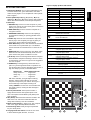
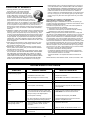
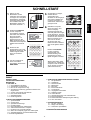
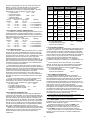
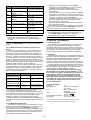
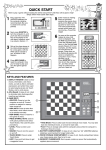
QUICK START To play a game of chess right away, without reading the entire manual first, simply follow these Quick Start steps! 1 2 3 4 Open the battery compartment at the back of the computer by sliding it in the direction of the arrow. Insert 3 “AA” (Type AM3/ R6) batteries into the computer, making sure that you observe the correct polarity. Then, reinstall the battery door. 3 x AA/AM3/R6 Enter moves by executing them on the board, pressing the chess pieces down gently on the from and to squares for each move. PRESS PRESS 6 Press GO/STOP to turn the game on. If the computer does not respond, press a paper clip or similar sharp object into the hole marked ACL in the base of the unit, as described in Section 4.1. Set up the chess pieces in the initial starting position for a new game, with the White pieces closest to you. 5 ዛዒዓዔዕዖዘዙዜ ዑ尷尽尻就尯尹尿尵ዑ ዐ屁屃屁屃屁屃屁屃ዐ ዏ巀居巀居巀居巀居ዏ ዎ居巀居巀居巀居巀ዎ ው巀居巀居巀居巀居ው ዌ居巀居巀居巀居巀ዌ ዋ屄层屄层屄层屄层ዋ ዊ尶局尺尴尮尼尾尸ዊ ዝዒዓዔዕዖዘዙዞ Press the NEW GAME key to reset the computer for a new game of chess. As soon as the computer makes a move, that move is shown in the display window. Press the computer’s piece lightly onto the indicated from and to squares to complete the computer’s move. That’s all there is to it! Make your next move as described above. Press GO/STOP at any time to turn the computer off. Enjoy your game! ዛዒዓዔዕዖዘዙዜ ዑ尷尽尻就尯尹尿尵ዑ ዐ屁屃屁屃屁屃屁屃ዐ ዏ巀居巀居巀居巀居ዏ ዎ居巀居巀居巀居巀ዎ ው巀居巀居屄居巀居ው ዌ居巀居巀居巀居巀ዌ ዋ屄层屄层巀层屄层ዋ ዊ尶局尺尴尮尼尾尸ዊ ዝዒዓዔዕዖዘዙዞ Note: The computer will automatically switch off to conserve power if no keys are pressed for about 20 minutes and the computer is not currently thinking. For details, see Section 2.9. ዛዒዓዔዕዖዘዙዜ ዑ尷尽尻就尯尹尿尵ዑ ዐ屁屃屁屃居屃屁屃ዐ ዏ巀居巀居巀居巀居ዏ ዎ居巀居巀屁巀居巀ዎ ው巀居巀居屄居巀居ው ዌ居巀居巀居巀居巀ዌ ዋ屄层屄层巀层屄层ዋ ዊ尶局尺尴尮尼尾尸ዊ ዝዒዓዔዕዖዘዙዞ TABLE OF CONTENTS QUICK START KEYS AND FEATURES INTRODUCTION 1. USING YOUR CHESS COMPUTER 1.1 Battery Installation 1.2 Making Moves 1.3 The Computer’s Move 1.4 Change Your Mind? Take Back! 1.5 Check, Mate, or Draw! 1.6 Start a New Game 1.7 Change Levels 1.8 Openings Coach 2. ADDITIONAL COMPUTER FEATURES 2.1 Language Selection 2.2 Chess Clocks 2.3 Capturing and Special Moves 2.4 Illegal Moves 2.5 Interrupting the Computer’s Search 2.6 Changing Sides with the Computer 2.7 Getting Hints from the Computer 2.8 The Computer Plays Against Itself 2.9 Game Memory and Automatic Power Down 2.10 Openings Library 3. LEVELS AND SPECIAL MODES 3.1 Levels of Play 3.2 Fun Levels 3.3 Casual Levels 3.4 Blitz Levels 3.5 Bronstein Levels 3.6 Bonus Timer Levels 3.7 Tournament Levels 3.8 Fixed Depth Levels 3.9 Tactical Level 3.10 Teach Modes 3.11 Selecting Levels and Teach Modes 3.12 Openings Coach Mode 3.13 Verify Mode. Check Piece Positions! 3.14 Non Auto Mode 4. TECHNICAL DETAILS 4.1 The ACL Function 4.2 Care and Maintenance 4.3 Technical Specifications TROUBLESHOOTING GUIDE