1
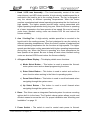
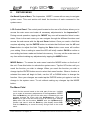
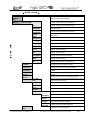
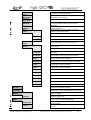
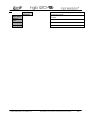
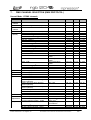
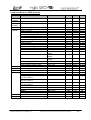
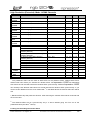
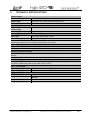
DOWN - UP Temperature Head PAN/TILT Motor Power PAN/TILT Silent Mode Indicates the head temperature Switches power for Pan/Tilt ON or OFF (disconnected from power) Reduces maximum speed for Pan/Tilt Defines whether the last DMX signal is stored or the lamp is switched OFF in case of signal interruption Automatically position feedback (correction) for Pan/Tilt movement Adjustments for a uniform white color (white balance); only in white-mode DMX Hold Position Feedback White Adjust Red Input for red adjustments Blue Input for blue adjustments Green Input for green adjustments Set DMX Image DMX input Monitor Stores the Scene currently sent to the unit Indicates the presently received DMX signal per DMX channel Pan Instantaneous value for Pan Speed Movements Pan/Tilt Movements Speed adjustment for Pan/Tilt movements see item below Special Instantaneous value for Special White Temperature Adjustment of the color temperature for WHITE Dimmer Instantaneous value for Dimmer Shutter Instantaneous value for Shutter Blue Instantaneous value for Blue Green Instantaneous value for Green Red Instantaneous value for Red Zoom Instantaneous value for Zoom Color Wheel Instantaneous value for Color Mixing unit Tilt Instantaneous value for Tilt movement Instantaneous value for Pan/Tilt movements Performs an automatic self-test Live time Indicates the overall operation time of the system Display Adjust the display DOWN - UP Self test Blackout Select DMX Mode ON/OFF: Display OFF Please select the desired DMX Mode Compressed Normal Elation Professional • Los Angeles, CA. Fixture works in "Compressed" mode see also section 0 below Fixture works in "Normal" mode see also section 0 below Error! Reference source not found. / Error! Reference source not found.) 21