1
Leak sensor (optional)
AP9325
na2760a
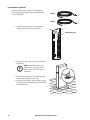
Install one leak sensor (AP9325). To extend the
leak sensor length, add up to three additional leak
sensors (AP9326).
na1584a
AP9325
1. Connect the leak sensor to the equipment
using the leak detector port as shown.
na2676a
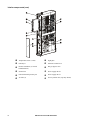
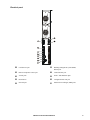
Leak detector port
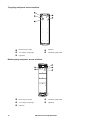
2. Position the leak sensor inside or outside the
equipment.
Note: Install leak sensors on a
clean surface, and do not allow
them to touch metal that is in an
air stream.
3. Route the leak sensor to the outside through
either the bottom plate or the door.
na2675a
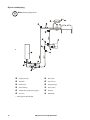
4. Secure the leak sensor wire to surfaces using
tie wraps and tie wrap holders (provided with
the leak detector).
22
InRow Fluid Cooled RD Installation